One screen for the day's orders: choose your columns, search by number, e-mail, phone in any format, name or SKU, open an order beside the list, change its status through the core order history, tag it, leave internal notes, and act on many orders at once with a preview. Timeline of every status change, customer panel, saved views, pick list, CSV export. Events only, no OCMOD.
Tested on 4.1.0.4 & 3.0.5.1Updated Nov 26, 2026Version 1.0.0Compatible with OpenCart 4.1.0.4, 3.0.5.1 No core file edits
Built forOpenCart
Orders Admin Pro for OpenCart1 of 9
What it does
One screen for the day's orders: choose your columns, search by number, e-mail, phone in any format, name or SKU, open an order beside the list, change its status through the core order history, tag it, leave internal notes, and act on many orders at once with a preview. Timeline of every status change, customer panel, saved views, pick list, CSV export. Events only, no OCMOD.
Process orders from one screen. The core order list has fixed columns and one status change at a time. Orders Admin Pro adds Sales > Order desk: choose your columns, find an order in a second, open it beside the list, change its status, tag it, leave a note for your team, and act on dozens of orders at once.
Features
Find and see
Columns you choose: order, date, colour-coded status, customer with order count, e-mail, phone, item thumbnails, quantity, total, shipping, payment, tags, notes, store, ship-to city, affiliate
One search box: order number, e-mail, phone in any format, name, company, SKU or product name
Status chips with counts; filters for date, total, payment, shipping, store, tags and notes
Saved views for yourself or the whole team
A quick view with items and images, totals, addresses, the customer's comment, notes, tags and a timeline; open the core order, invoice or shipping list from it
Work together
A timeline of every status change, whether it came from checkout, a payment callback, the core order page, the API or the desk, with who and when; tags, notes, prints and exports are recorded too
A customer panel with orders, paid total, average order, return rate, cancelled orders and the last five orders; guests are matched by e-mail or phone; notes per customer with a warning that shows on all their orders
Change many orders safely
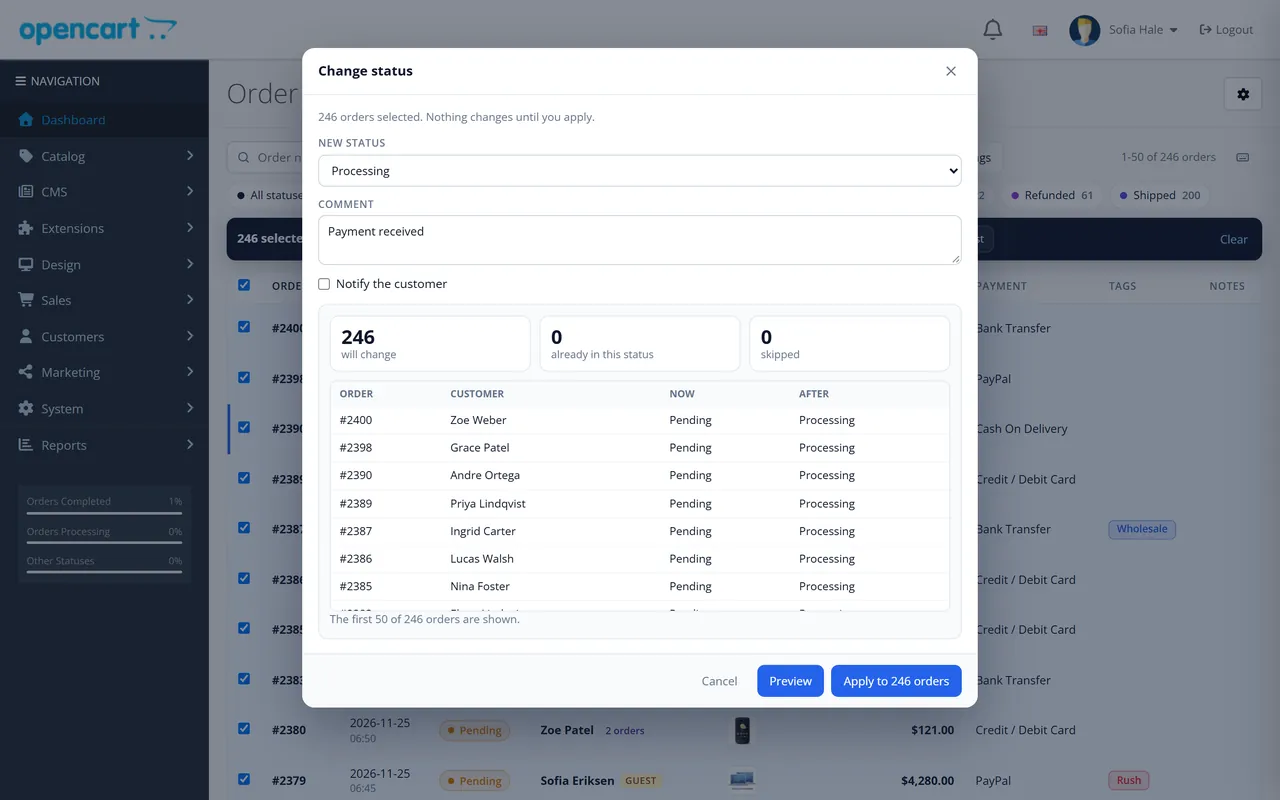
Bulk status change with the notify option: a preview shows how many orders change, are already set or are skipped, with before and after for the first 50; it runs in steps with a progress bar and a stop button
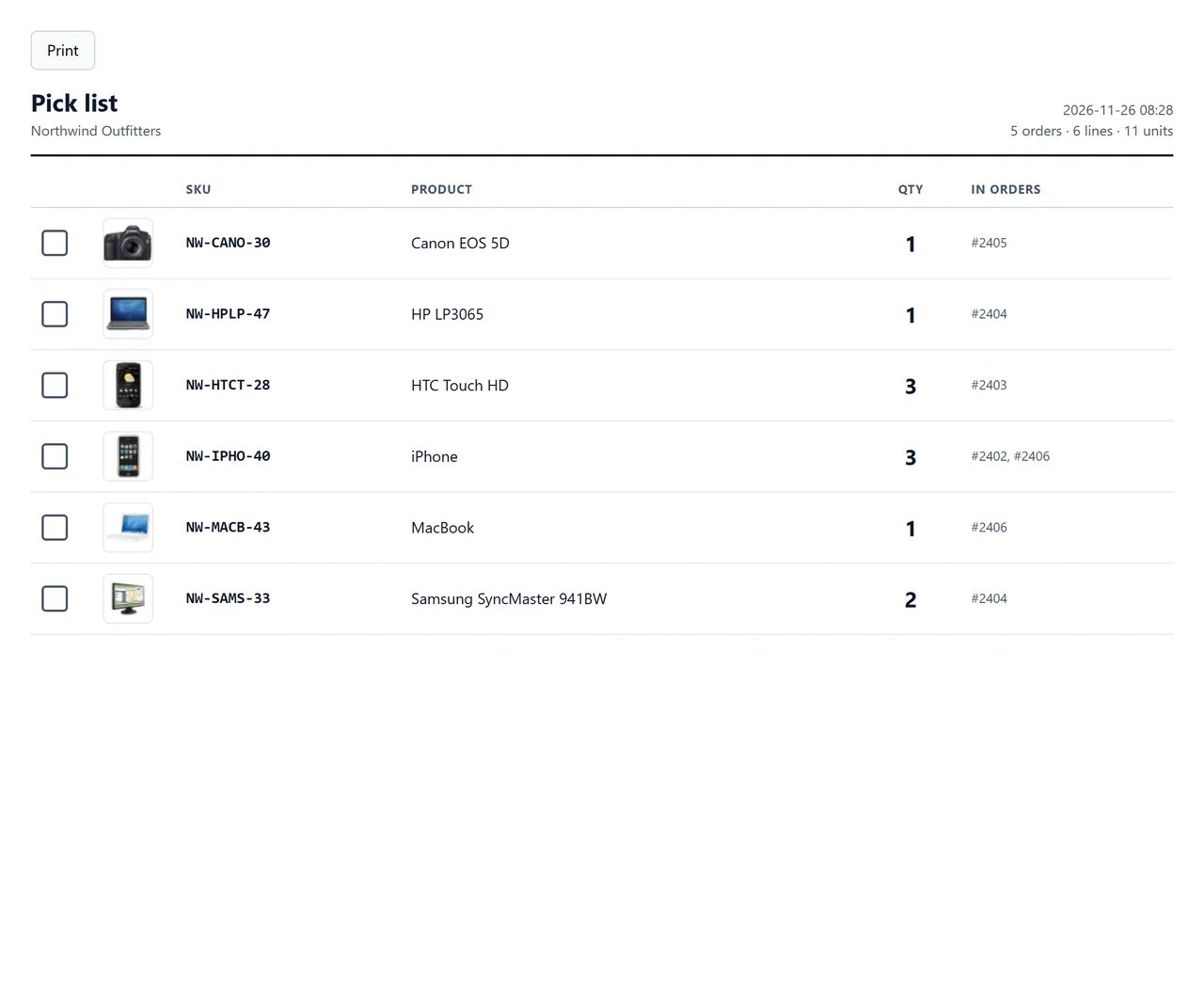
Bulk add or remove a tag; CSV export with the columns you choose; invoices and shipping lists in one print view; a pick list that adds up the SKUs to pack
Select the page or every order that matches the filters
Built for OpenCart
Status changes go through the core order history, so stock, customer e-mails, fraud checks, rewards and other extensions behave as usual; the desk never writes the status itself
Works with user groups: Access to look, search, export and print, Modify to change
OpenCart events only: no core file changes, no OCMOD patches
Fast with 10,000 orders: a page loads in well under a second
Uninstall keeps your tags, notes, views and timeline
Separate packages for OpenCart 4.1 and 3.0; one purchase covers both
What you get
Download & installTwo installer packages (.ocmod.zip): one for OpenCart 4.0.2 – 4.1.x and one for 3.0.3 – 3.0.5. One license key covers both. Download it from My licenses right after payment.
12 months of updates & supportNew versions and help for 12 months (24 or 36 months at checkout). After that the extension keeps working; renew anytime at 50%.
License for your storeOne production domain with all its subdomains; staging and local development hosts are free. How licensing works
30-day refundFull refund within 30 days of your first purchase, no reason needed. Refund policy
Tested buildsOpenCart 4.1.0.4, 3.0.5.1. Tested on OpenCart 4.1.0.4 and OpenCart 3.0.5.1.
Documentation & supportFull guide (Installation, Configuration, Usage, FAQ) on this page. Tickets from your account, same-day reply on weekdays (Mon-Fri 09:00-18:00 UTC+3).
Compatibility
Orders Admin Pro works with OpenCart 4.1.0.4, 3.0.5.1.
We list the builds we install and test on. “Tested” means the test plan ran on that build; “Supported” means the build is inside the supported range.
Compatibility
Version
Range
Runs on
Status
OpenCart 4.1.0.x
4.1.0.0 – 4.1.0.4
PHP 8.1 – 8.3
Tested on 4.1.0.4
OpenCart 4.0.2.x
4.0.2.0 – 4.0.2.3
PHP 8.0 – 8.2
Supported
OpenCart 3.0.x
3.0.3.8 – 3.0.5.x
PHP 7.4 – 8.1
Tested on 3.0.5.1
1.0.0
Nov 26, 2026
Latest
First release. Order desk under Sales with selectable columns (order, date, colour-coded status, customer with order count, e-mail, phone, item thumbnails, quantity, total, shipping, payment, tags, notes, store, ship-to city, affiliate), sorting, paging and status chips with counts.
One search box for order number, e-mail, phone in any format (own index table), name, company and product SKU / model / name; filters for date, total, payment, shipping, store, tags and notes; saved and shared views.
Customer panel: orders, paid total, average order, return rate, cancelled orders, last five orders, guests matched by e-mail or phone, customer notes with a warning option.
Bulk actions with preview: status change (notify or not, steps of 10 with progress and stop), add / remove a tag, CSV export with chosen columns (formula-safe), core invoices and shipping lists, pick list with summed SKUs. Select the page or all matching orders (up to 5,000).
Keyboard shortcuts, status colour settings, paid / cancelled status settings, user group permissions (Access to view, Modify to change).
Uninstall keeps all data; updates are uninstall + install on OpenCart 4.1.
How do I install the extension?
Upload. Extensions > Installer: upload the .ocmod.zip for your OpenCart version (4.x or 3.0.x). Both packages come with every license.
Install and enable. Extensions > Extensions > Modules: install, open the settings and switch it on. Events register themselves; nothing is patched.
Enter the license key. Paste the key from My licenses. Subdomains, staging and local hosts are included; you have 14 days to do it.
OpenCart 4.1.0.4, 3.0.5.1. Tested on OpenCart 4.1.0.4 and OpenCart 3.0.5.1. The Compatibility tab lists every version range.
Do the extensions change core files?
No. They work through OpenCart events and standard extension types (modules, order totals, themes). No core file edits, no OCMOD patches, no theme template edits, so OpenCart updates and other extensions keep working.
Do I get packages for OpenCart 4 and OpenCart 3?
Yes. Every download has a package for OpenCart 4.0.2 to 4.1.x and one for OpenCart 3.0.3 to 3.0.5, and the license key works with both. Moving from OpenCart 3 to 4 later costs nothing.
What does the license cover?
One production store domain with every subdomain (www, shop., staging.), plus local development hosts such as localhost, *.local and *.test. A store on another domain needs its own license; a second-store license is 40% off. You have 14 days after installing to enter the key. 12 months of updates and support are included; after that the extension keeps working and renewals are 50% off. How licensing works
Can I get a refund?
Yes. Ask for a full refund within 30 days of your first purchase, no reason needed: open a ticket or write to support@kaviolabs.com with your order number. The money goes back to the card or bank account you paid with within 5 business days of approval. Refund policy
How do I get help?
Open a ticket from your account, so your license details are attached. We answer with a same-day reply on weekdays (Mon-Fri 09:00-18:00 UTC+3). Support policy. Not a customer yet? Ask a pre-sales question.
Orders Admin Pro gives your team one screen for the day's orders. Open Sales > Order desk: pick the columns you need, search by order number, e-mail, phone in any format, name, company or SKU, click a row to see the whole order in a drawer on the right, change its status without leaving the list, tag it, add an internal note, and act on many orders at once with a preview before anything changes.
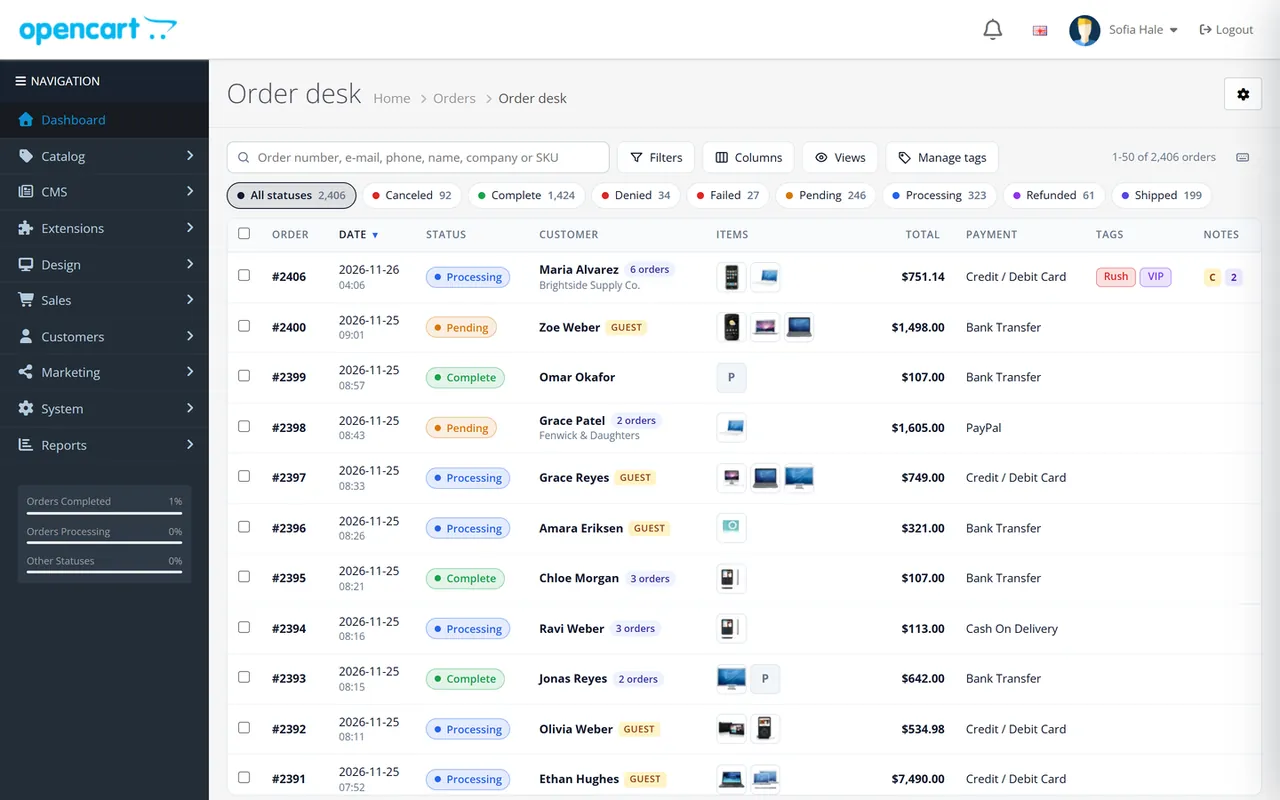
Order desk: order number, date, colour-coded status, customer with the number of their orders, e-mail, phone, item thumbnails, quantity, total, shipping and payment method, tags, notes flag, store, ship-to city and affiliate. Choose the columns, sort, page; the header stays in view. Fast with 10,000 orders and more (tested with 10,000).
Search and filters: one search box for order number, e-mail, phone in any format, name or company and the SKU or name of an ordered product; status chips with counts; date and total range, payment and shipping method, store, tags and notes.
Saved views: save filters, columns, sorting and page size under a name; share a view with the whole team.
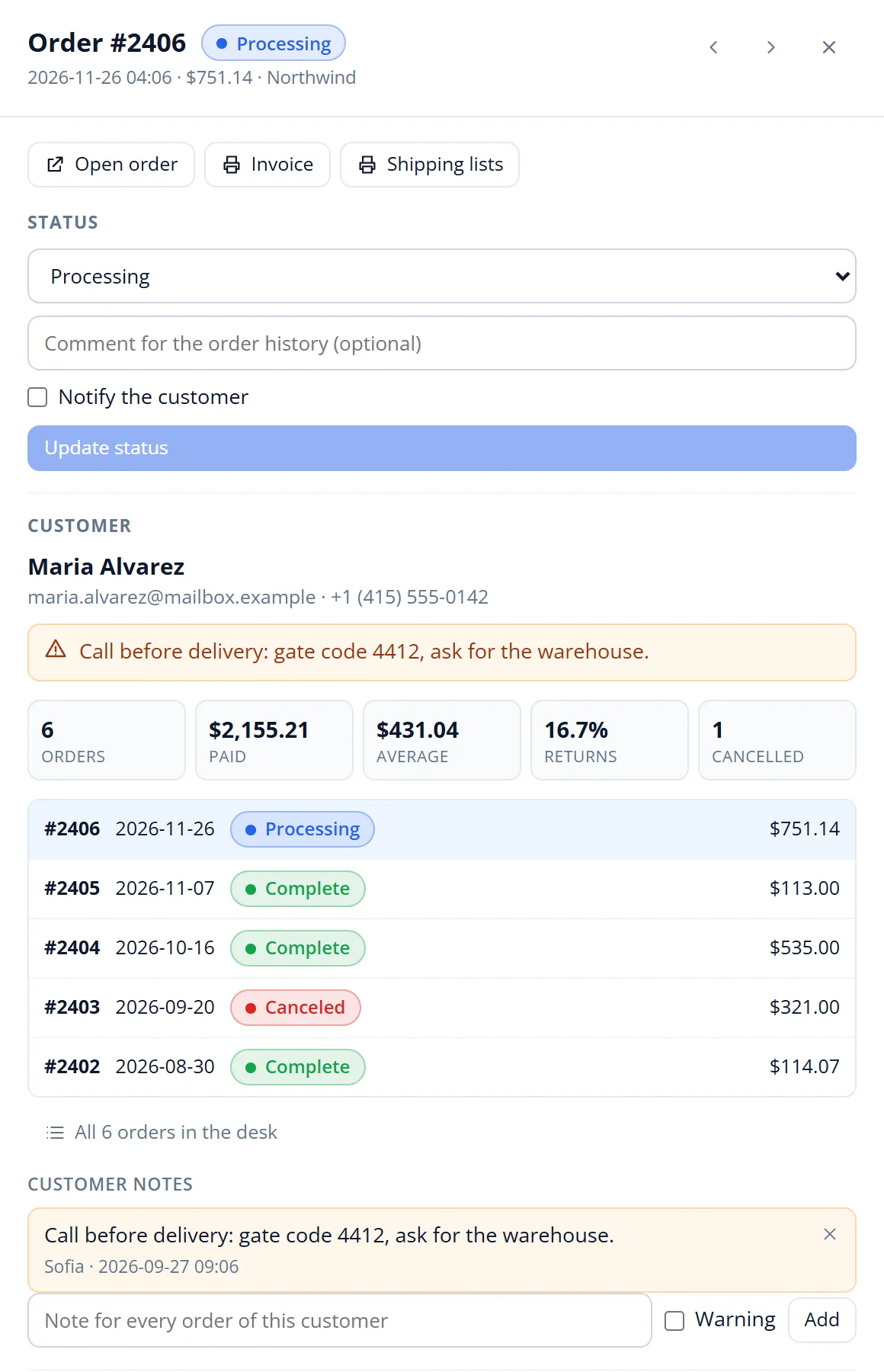
Quick view: items with images, totals, addresses, shipping and payment, the customer's comment, internal notes, tags and a timeline. Change the status with a comment and the notify option, print the core invoice or shipping list, or open the core order page.
Status changes go through OpenCart itself: the desk calls the same order history code as the core order page, so stock, e-mails, fraud checks, rewards and other extensions behave as they always do. Nothing writes the status directly.
Tags and internal notes: coloured tags and staff-only notes (customers never see them), plus a timeline per order.
Timeline of every status change: from checkout, a payment callback, the core order page, the API or the desk, with who and when. Tags, notes, prints and exports are recorded too.
Customer panel: number of orders, paid total, average order, return rate, cancelled orders and the last five orders. Guests are matched by e-mail or phone. Notes per customer, with a warning option that shows on all their orders.
Bulk actions with preview: change status (notify or not), add or remove a tag, export CSV with the columns you choose, print invoices and shipping lists, and a pick list that adds up the SKUs to pack. Select the page or every order that matches the filters.
Keyboard shortcuts:j / k, Enter, x, /, ?, Esc.
Permissions: works with user groups: view and export need Access, every change needs Modify for Sales > Orders and for this extension.
No OCMOD, no core file edits: events only. Uninstalling keeps your tags, notes, views and timeline. One licence covers OpenCart 4 and 3. Tested on OpenCart 4.1.0.4 and 3.0.5.1.
Extensions > Extensions > Modules > Install, then Edit.
Continue with step 3 above. OpenCart 3 changes statuses through a signed request to your own storefront (the same way the core order page uses its API), so your server must be able to reach its own store URL with cURL. The request is signed with a secret created at install and is accepted once. Limitation: OpenCart 3 answers every storefront request with the maintenance page while Settings > Server > Maintenance Mode is on, so status changes from the desk fail ("The storefront answered with HTTP 503") until you switch it off; the same happens behind HTTP basic auth or when the server cannot open its own store address. Everything else on the desk keeps working, and OpenCart 4 is not affected.
Permissions
User groups (System > Users > User Groups) need Access to the extension and to Sales > Orders to open the desk, and Modify for both to change anything. Groups with Access only can look, search, export and print.
Updating
Extensions > Uninstall, upload the new package, Install (OpenCart 3: upload the new package over the old one). Tags, notes, views, the timeline, settings and the licence state are kept: uninstalling never deletes them.
Uninstalling
Uninstall removes the events and the menu entry. Your data stays in the database, so a later install picks it up again. To remove everything, delete the kv_oap_* tables yourself.
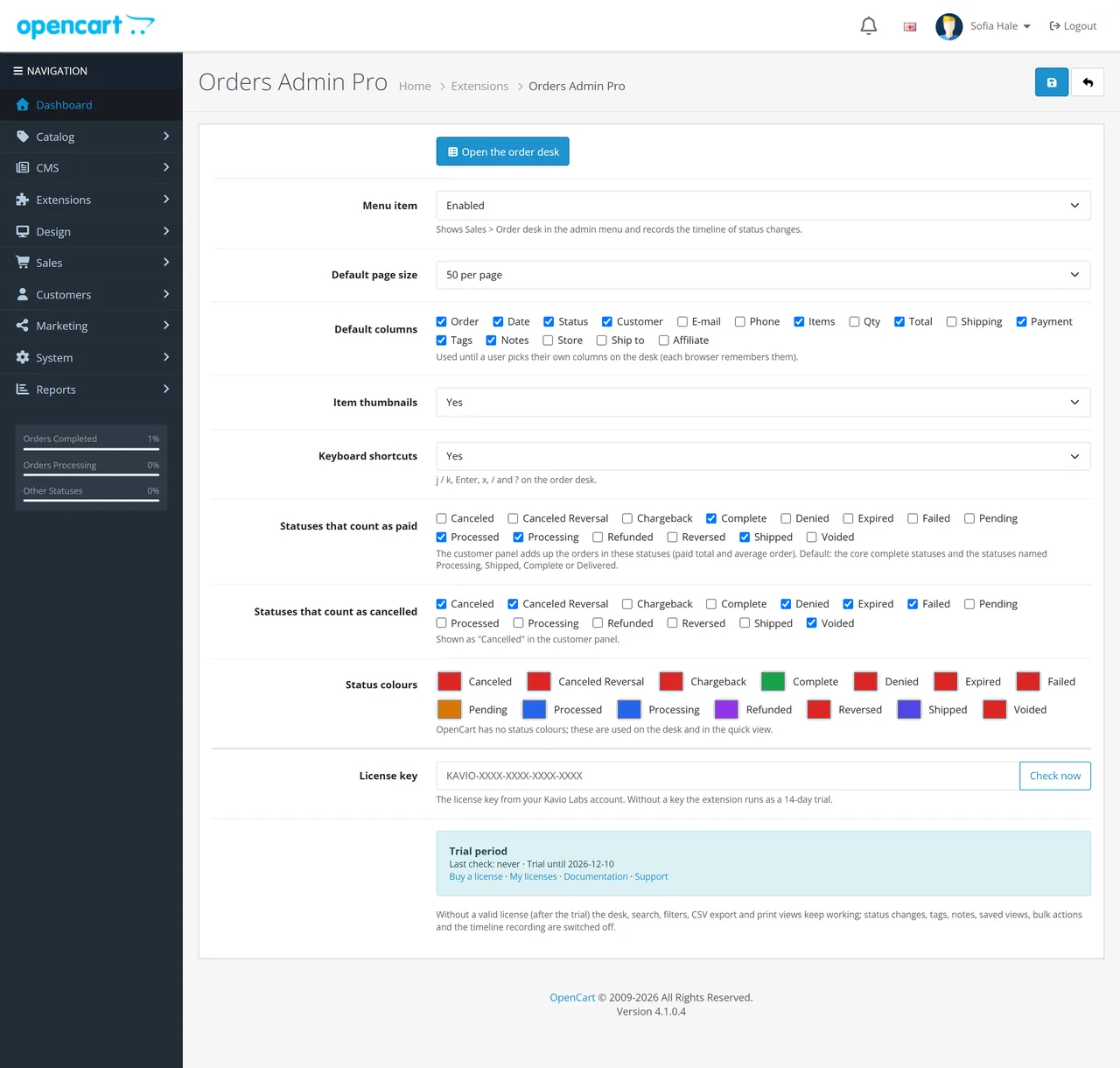
Shows Sales > Order desk in the admin menu and records the timeline of status changes.
Default page size
25, 50, 100 or 200 orders per page.
Default columns
The columns shown until a user picks their own on the desk (each browser remembers its columns).
Item thumbnails
Product images in the Items column.
Keyboard shortcuts
j / k, Enter, x, / and ? on the desk.
Statuses that count as paid
The customer panel adds up the orders in these statuses (paid total, average order). Default: the core complete statuses and the statuses named Processing, Shipped, Complete or Delivered.
Statuses that count as cancelled
Shown as Cancelled in the customer panel. Default: statuses named cancelled, denied, expired, failed or voided.
Status colours
OpenCart statuses have no colour; pick one for each, used on the desk and in the quick view.
License key
From your Kavio Labs account. Without a key the extension runs as a 14-day trial.
Customer panel
The panel counts the orders of the same account, the same e-mail and the same phone number (phone numbers match in any format, by their last ten digits). A guest order that shares a phone number with an account lists that account's orders; two registered accounts are never merged by a shared phone. The return rate is the share of those orders that have at least one return (Sales > Returns). Very active customers are counted over their newest 2,000 orders and the panel says so.
Without a valid licence
After the trial, the desk, search, filters, CSV export and print views keep working. Status changes, tags, notes, saved views, bulk actions and the timeline recording are switched off until a valid key is entered. The admin is never blocked.
Usage
Open Sales > Order desk.
The order list
Order desk
Status chips above the list filter by status; click several to combine them, All statuses clears them. Each chip shows how many orders match your other filters.
Columns: open Columns and tick what you need. The item column shows up to four product images (hover for quantity, name and SKU) and "+n" for more. The notes column shows C for a customer comment and a purple number for internal notes.
Sorting: click a column header (order, date, status, customer, e-mail, total, store); click again to reverse.
Paging: the list loads one page at a time from the server, so it stays fast with tens of thousands of orders. Incomplete (missing) orders are not listed, as in the core list.
Search and filters
You type
It finds
1024 or #1024
Order 1024 (and, from 5 digits, phone numbers containing the digits)
jane@example.com or part of it
Orders by e-mail
+1 415 555 0142, (415) 555-0142, 4155550142
Orders by phone, whatever the formatting
Jane Doe, Doe Jane, Brightside
Orders by customer name or company
NW-IPHO-40
Orders that contain a product with this model / SKU, or a product whose name contains the text
Filters opens date and total range, payment and shipping method, store, notes (any, internal, customer comment) and tags. Click Apply filters; Reset clears everything.
Saved views
Open Views, type a name and click Save current view: filters, columns, sorting and page size are saved. Tick Share with the team and everyone sees the view. Click a view to apply it; the x deletes your own views.
Quick view
Click a row (or press Enter) to open the order in a drawer:
Quick view
the status, date, total and store; buttons for the core order page, the core invoice and the shipping list;
Status: choose a status, add a comment, tick Notify the customer if you want the e-mail, click Update status. The change runs through the core order history;
the customer with order count, paid total, average order, return rate and cancelled orders, their last five orders (click one to open it) and All N orders in the desk;
customer notes: notes for every order of this customer; tick Warning to put the note on top of the panel;
addresses, shipping and payment, items with images and SKUs, totals and the customer's comment;
tags (click to add or remove) and internal notes (Ctrl+Enter adds the note; customers never see them);
the timeline and the core order history.
Bulk actions
Bulk status with preview
Tick orders (or the header box for the page). To act on all orders that match the filters, click Select all N matching orders (up to 5,000). The bar offers:
Action
What it does
Change status
Core status change for each order, with the comment and notify option you set. Preview first: how many orders will change, are already set or are skipped, and the first 50 with before and after. Apply runs in steps of 10 orders with a progress bar; Stop keeps what was done.
Add tag / Remove tag
Adds or removes one tag.
Export CSV
Downloads a UTF-8 file with the columns you choose: order data, items, SKUs, quantities, tags, addresses, notes, invoice number. Cells that start with = + - or @ are made safe for spreadsheets.
Invoices / Shipping lists
Opens the core print view with every selected order (up to 200).
Pick list
A printable list that adds up the items of the selected orders by SKU and options, with the orders that contain each line and a box to tick when picked.
Pick list
Keyboard shortcuts
Key
Action
j / down
Next order (also inside the quick view)
k / up
Previous order
Enter
Open the quick view
x
Select the order
/
Search
Esc
Close
?
Show the help
Shortcuts work when no input field has the focus and can be switched off in the settings.
FAQ
Does it replace the core order list?
No. Sales > Orders stays as it is. The order desk is an extra page for the people who work through many orders a day.
Does it change how statuses work?
No. A status change from the desk calls the core order history code, so stock, customer e-mails, fraud checks, rewards and events of other extensions run exactly as on the core order page. The desk never writes the status itself.
Does the timeline show changes made elsewhere?
Yes, from the moment the extension is installed: checkout, payment callbacks, the core order page, the API and the desk. Changes made before that are in the core order history, which the quick view also shows.
Can customers see tags, notes or the timeline?
No. They exist only in the admin.
Can I edit items or prices of an order?
No. Use the core order editor; the quick view has a button for it. Splitting and combining orders are not part of this extension.
Why does OpenCart 4 show no SKU column?
OpenCart 4.1 has no SKU field on products, only the model, and the order keeps the model. The desk searches and shows that model as the SKU. OpenCart 3 also uses the product SKU.
Why does a status change fail on OpenCart 3 with HTTP 503?
The shop is in maintenance mode (or behind basic auth, or cannot open its own address). OpenCart 3 changes statuses through the storefront, which refuses non-admin requests in maintenance mode. Switch maintenance mode off, or use the core order page meanwhile. OpenCart 4 is not affected.
Is it fast with many orders?
Yes. The list loads one page of 25 to 200 orders; counts, search and filters run in the database. Phone search uses an own index table (the core table has no index on the phone), built on first use. Tested with 10,000 orders: a page loads in well under a second, searches in under half a second.
What does it do when the licence is not valid?
After the 14-day trial, looking, searching, exporting and printing keep working; changes are switched off until a valid key is entered.
Does it send e-mails by itself?
No. Customer e-mails go out only when you tick Notify the customer, through the normal OpenCart mail settings.
Is data deleted when I uninstall it?
No. Tags, notes, views and the timeline stay in the kv_oap_* tables; a later install picks them up again.
Server-side tracking for OpenCart 4.x and 3.0.x: purchases, refunds, add to cart, checkout, product views and leads go from your server to the free official GA4 Measurement Protocol, Meta Conversions API and TikTok Events API, deduplicated with the browser pixels through shared event ids. Consent-aware, SHA-256 hashed customer data, order status mapping, queue with retries, test mode and an event log. No paid relay, events only, no OCMOD.
The department store theme for OpenCart 4.x and 3.0.x: colour-coded departments, a department list beside the hero slider with two side promos, a big search with a department selector, tabbed product blocks, a 2 + 1 + 2 offer grid, deals of the day with real countdowns, a department showcase, a promotions band and a three-column product page with a sticky buy box. Four styles (Meridian, Harbor, Citrus, Night) and your own colours on top. Events only, no core changes.
Stop AI crawlers, scrapers, vulnerability scanners and unwanted countries before OpenCart 4.x or 3.0.x builds a page. Googlebot and Bingbot are verified by DNS and always allowed; 50+ bots get one switch each; country rules use free GeoIP databases and can close only the checkout; IP and network lists, rate limits, honeypots and the cart flood fix; a one-second challenge instead of a captcha; learning mode, dashboard, log, IP tester and Cloudflare export. No core changes, no OCMOD.