Live USPS prices at checkout and USPS label printing from the order page on the new USPS APIs (OAuth 2.0), for OpenCart 4. Services filter, markup, free shipping threshold, fallback rate, package presets and dimensional weight, domestic and international labels with customs forms, tracking number in the order history, void and refund, address validation. You use your own USPS developer account and pay USPS postage only. A shipping extension with events and cron, no OCMOD.
Tested on 4.1.0.4Updated Nov 6, 2026Version 1.0.1Compatible with OpenCart 4.1.0.4 No core file edits
Built forOpenCart
Live USPS prices at checkout1 of 6
What it does
Live USPS prices at checkout and USPS label printing from the order page on the new USPS APIs (OAuth 2.0), for OpenCart 4. Services filter, markup, free shipping threshold, fallback rate, package presets and dimensional weight, domestic and international labels with customs forms, tracking number in the order history, void and refund, address validation. You use your own USPS developer account and pay USPS postage only. A shipping extension with events and cron, no OCMOD.
What it changes for your store
USPS shipping on the new USPS APIs. USPS retired its Web Tools API on 25 January 2026; extensions that still call it no longer get prices. This extension uses the new USPS APIs (OAuth 2.0) with your own USPS developer account. You pay USPS postage only: no aggregator, no per-label fee.
Know the limits. You need a free USPS developer account (Consumer Key and Secret). Labels also need your CRID, MID and an Enterprise Payment Account, with the Labels and Payments APIs added to your app by USPS. Prices are USPS prices in US dollars, converted to the store currency. One label per order. Tested against a stand-in built from the official USPS OpenAPI specifications, not against the live USPS service. USPS is a trademark of the United States Postal Service. This extension is not affiliated with, endorsed by or sponsored by USPS.
Features
Checkout
One USPS shipping method with a line per service you enable, each with its USPS delivery estimate: Ground Advantage, Priority Mail, Priority Mail Express, Media Mail, Library Mail, Bound Printed Matter, flat rate envelopes and boxes, and the international services
Retail, commercial or contract prices, percent markup and handling fee, rounding, free shipping threshold, fallback rate, tax class and geo zone
Package presets with packing weight, automatic preset choice, the product's own size for single items, heavy carts split into packages, dimensional weight reported
Labels and tracking
A USPS tab on the order page: service preselected from the customer's choice, rate before you buy, label in PDF, ZPL or PNG, signature confirmation and insurance
International labels with the customs declaration and remembered HS codes
The tracking number goes into the order history, tracking refreshes by cron and can move the order to your delivered status
Void unused labels or request a refund; USPS address check with one-click suggestion
Safe and simple
Credentials and tokens stored encrypted, secrets never in the log, labels served to administrators only; a shipping extension with events and cron, no OCMOD, no core edits; tested on OpenCart 4.1.0.4
What you get
Download & installOne installer package (.ocmod.zip) for OpenCart 4.0.2 – 4.1.x. There is no OpenCart 3 edition. Download it from My licenses right after payment.
12 months of updates & supportNew versions and help for 12 months (24 or 36 months at checkout). After that the extension keeps working; renew anytime at 50%.
License for your storeOne production domain with all its subdomains; staging and local development hosts are free. How licensing works
30-day refundFull refund within 30 days of your first purchase, no reason needed. Refund policy
Tested buildsOpenCart 4.1.0.4. Tested on OpenCart 4.1.0.4.
Documentation & supportFull guide (Installation, Configuration, Usage, Developer notes) on this page. Tickets from your account, first reply within 1 business day.
Compatibility
USPS Rates & Labels works with OpenCart 4.1.0.4.
We list the builds we install and test on. “Tested” means the test plan ran on that build; “Supported” means the build is inside the supported range.
Compatibility
Version
Range
Runs on
Status
OpenCart 4.1.0.x
4.1.0.0 – 4.1.0.4
PHP 8.1 – 8.3
Tested on 4.1.0.4
OpenCart 4.0.2.x
4.0.2.0 – 4.0.2.3
PHP 8.0 – 8.2
Supported
1.0.0
Nov 6, 2026
Latest
First release for OpenCart 4.1 on the new USPS APIs (OAuth 2.0): live prices and delivery estimates at checkout with services filter, markup, free shipping threshold, fallback rate, package presets and dimensional weight; labels (PDF, ZPL, PNG) from the order page including international customs forms; tracking number in the order history; tracking cron; void and refund; address validation; encrypted credentials.
How do I install the extension?
Upload. Extensions > Installer: upload the .ocmod.zip. It is for OpenCart 4 (4.0.2 to 4.1.x).
Install and enable. Extensions > Extensions > Modules: install, open the settings and switch it on. Events register themselves; nothing is patched.
Enter the license key. Paste the key from My licenses. Subdomains, staging and local hosts are included; you have 14 days to do it.
OpenCart 4.1.0.4. Tested on OpenCart 4.1.0.4. The Compatibility tab lists every version range.
Do the extensions change core files?
No. They work through OpenCart events and standard extension types (modules, order totals, themes). No core file edits, no OCMOD patches, no theme template edits, so OpenCart updates and other extensions keep working.
What does the license cover?
One production store domain with every subdomain (www, shop., staging.), plus local development hosts such as localhost, *.local and *.test. A store on another domain needs its own license; a second-store license is 40% off. You have 14 days after installing to enter the key. 12 months of updates and support are included; after that the extension keeps working and renewals are 50% off. How licensing works
Can I get a refund?
Yes. Ask for a full refund within 30 days of your first purchase, no reason needed: open a ticket or write to [email protected] with your order number. The money goes back to the card or bank account you paid with within 5 business days of approval. Refund policy
How do I get help?
Open a ticket from your account, so your license details are attached. We answer Monday to Friday: bug reports within 1 business day, how-to questions within 2. Support policy. Not a customer yet? Ask a pre-sales question.
USPS Rates & Labels brings USPS shipping back to your OpenCart 4 shop on the new USPS APIs. USPS retired its Web Tools API on 25 January 2026, and many OpenCart USPS extensions still call it. This extension talks to the new USPS APIs (OAuth 2.0) with your own USPS developer account: live prices and delivery estimates at checkout, labels bought and printed from the order page, tracking in the order history, void and refund. You pay USPS postage only; there is no aggregator account and no per-label fee.
Checkout prices
What it does
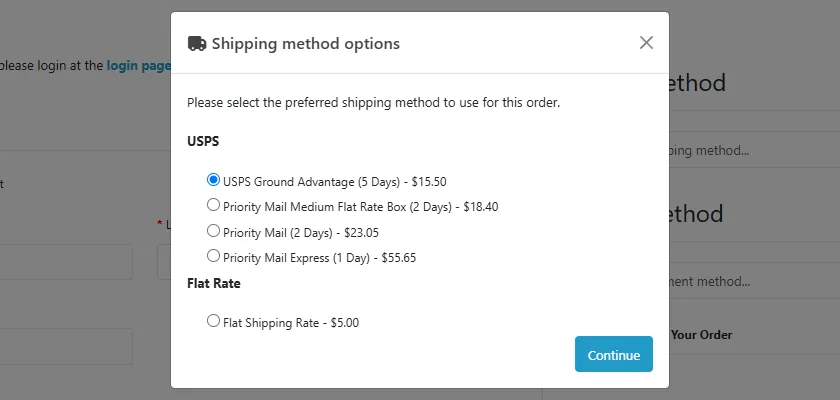
Live prices at checkout. One USPS shipping method with a line per service you enable: USPS Ground Advantage, Priority Mail, Priority Mail Express, Media Mail, Library Mail, Bound Printed Matter, the flat rate envelopes and boxes, and the international services. Each line shows the USPS delivery estimate. Services that do not serve the destination are skipped.
Price rules. Retail, commercial or contract prices; percent markup and a fixed handling fee; rounding up; a free shipping threshold; a fallback rate when USPS cannot be reached; signature confirmation priced in; tax class and geo zone like any OpenCart shipping method.
Packaging. Package presets with packing weight and maximum weight, the smallest preset that carries the cart, the product's own size for single-item carts, heavy carts split into several packages, USPS dimensional weight reported.
Labels from the order page. A USPS tab on the order: pick the service (preselected from what the customer chose), check weight and size, get the rate, buy. PDF, ZPL or PNG labels, domestic and international with the customs declaration and remembered HS codes, signature confirmation, insurance.
Tracking. The tracking number is written to the order history (the customer sees it in the account, with an optional e-mail), tracking refreshes by cron, and delivery can move the order to a status you choose.
Void and refund. Unused labels are cancelled; labels already scanned get a refund request.
Address check. USPS standardizes the shipping address on the order page; one click uses the suggestion on the label.
Safe. Credentials and tokens are stored encrypted, secrets never reach the log, label files are only served to logged-in administrators. Events, cron and a shipping extension only: no OCMOD, no core edits. OpenCart 4, tested on 4.1.0.4.
Limits to know
You need a free USPS developer account (developers.usps.com) and an app. Rates and address validation need only its Consumer Key and Secret. Labels also need the Customer Registration ID (CRID), Mailer ID (MID) and an Enterprise Payment Account (EPS or permit), and USPS must add the Labels and Payments APIs to your app. USPS decides who may use them.
Prices are in US dollars and converted to the store currency with the currencies of your shop (add USD to Localisation > Currencies when the store currency is another one).
One label per order covers all shippable items (one package). Global Express Guaranteed is priced but USPS offers no label API for it.
The extension was tested against a stand-in of the USPS APIs built from the official USPS OpenAPI specifications, not against the live USPS production service. Run the manual steps in the Developer notes with your own account once.
USPS does not allow every address type or service for every account; USPS error messages are shown as they are.
USPS is a trademark of the United States Postal Service. This extension is not affiliated with, endorsed by or sponsored by USPS.
Installation
Requirements: OpenCart 4.1.0.x, PHP 7.4 or newer with cURL and OpenSSL, a free USPS developer account.
In the admin open Extensions > Installer, upload kv_usps_v3.ocmod.zip and click Install.
Open Extensions > Extensions, choose Shipping, find USPS Rates & Labels and click the green Install button, then the blue pencil to open the settings.
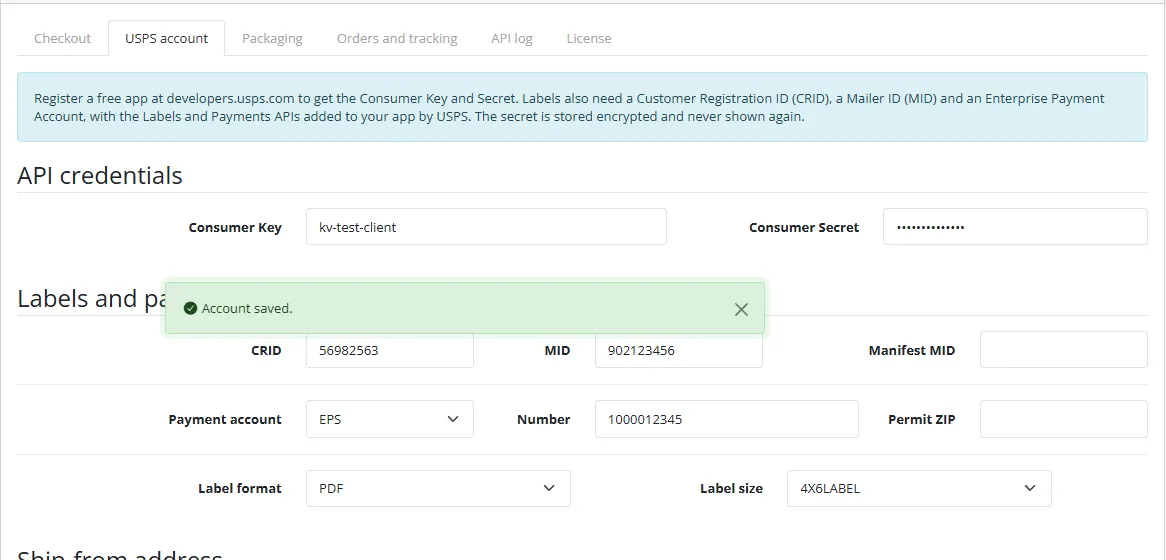
On the USPS account tab enter your Consumer Key and Consumer Secret and the ship-from address, click Save account, then Test connection. A green message with a Ground Advantage price means the connection works.
On the Checkout tab choose the services, set the status to on and save.
Make sure the OpenCart cron job runs (see Orders and tracking), so tracking refreshes by itself.
Uninstall: Extensions > Shipping > Uninstall removes the settings, the account, the labels and the log. Labels already bought stay valid at USPS and their tracking numbers stay in the order history. Then remove the extension in Extensions > Installer.
Update: upload the new zip in the Installer; the settings and the account stay.
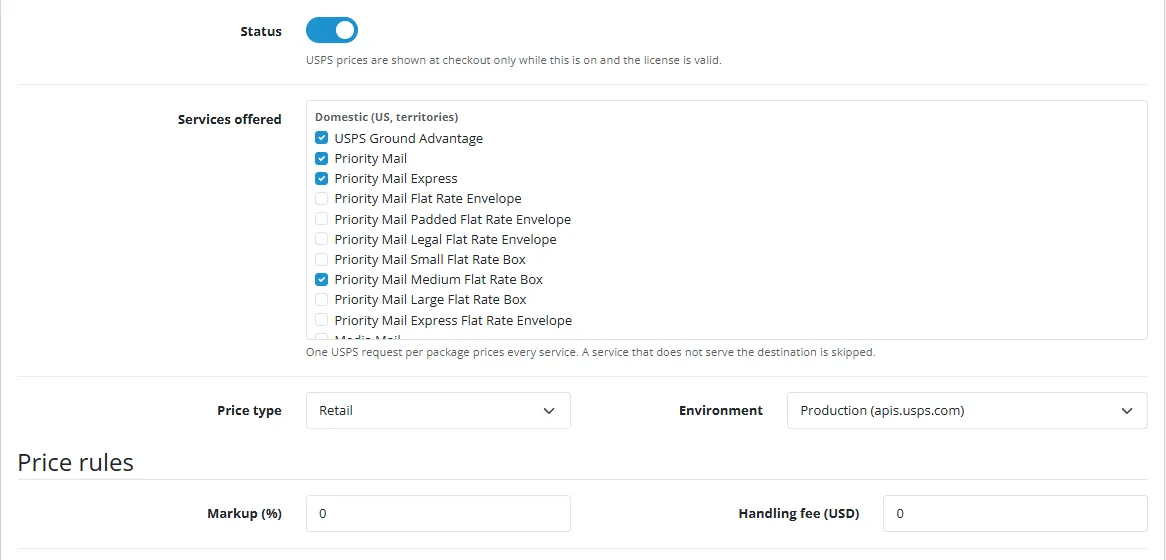
USPS prices appear only while this is on and the license is valid.
Services offered
One checkout line per ticked service. Domestic and international services are listed separately.
Price type
Retail, Commercial (needs a payment account) or Contract.
Environment
Production, or the USPS Testing Environment for Mailers if USPS granted you access.
Markup (%) and Handling fee
Added to the USPS price (handling fee in the store currency).
Free shipping from
Cart value from which the USPS lines cost nothing. Empty = off.
Fallback rate
Shown when USPS cannot be reached; empty hides USPS then.
Round up, delivery estimate, signature
Whole currency units; estimate in the name; price signature confirmation in.
Tax class, geo zone, sort order
As for any shipping method.
Rate cache
Minutes a USPS answer is reused (0 = off).
USPS account
Account
Consumer Key and Secret come from your app on developers.usps.com. For labels add CRID, MID, the payment account (EPS or permit) and the ship-from address. The secret is stored encrypted and never shown again; leave the field empty to keep it.
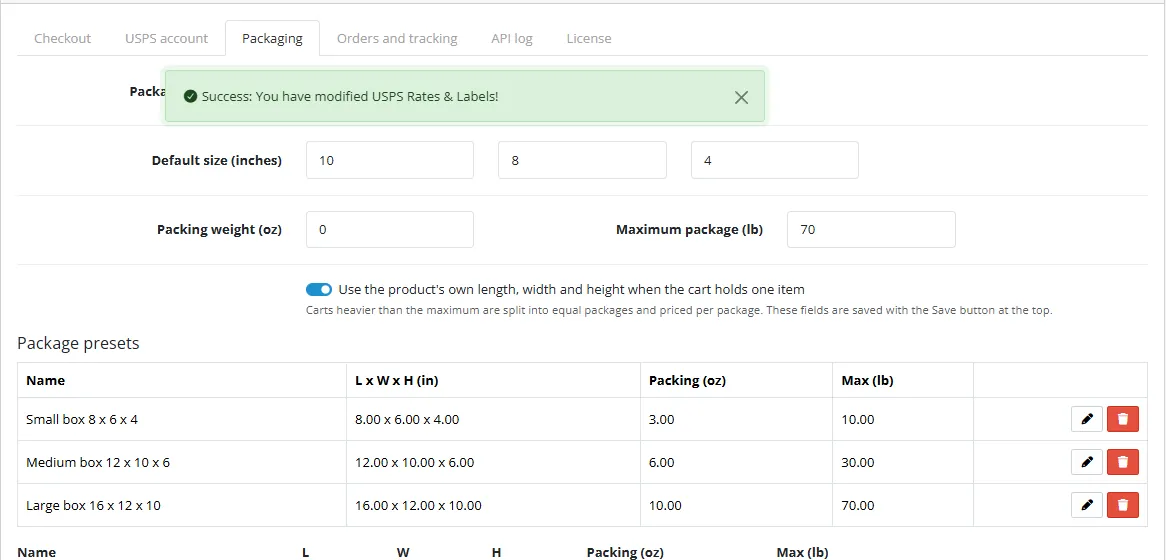
Packaging
Packaging
Package presets (name, size, packing weight, maximum weight), the preset used for prices (automatic = the smallest that carries the weight), a default size, packing weight, the maximum weight of one package (carts above it are split), and whether a single item uses its own length, width and height from the product. Weights and sizes are converted from your OpenCart units (kg, g, lb, oz, cm, mm, in).
Orders and tracking
Orders and tracking
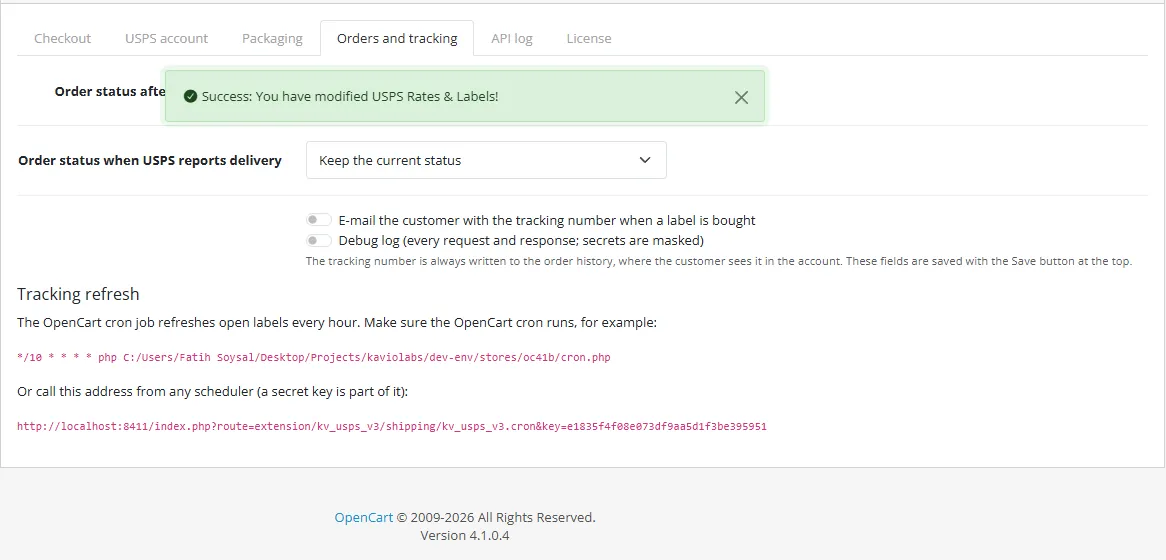
Order status after a label is bought, order status when USPS reports delivery, e-mail to the customer with the tracking number, debug log (every request; secrets are masked). The tab also shows the cron command and a secret web address for the tracking refresh.
Usage
At checkout
The customer chooses the shipping method USPS and one of its lines, for example "Priority Mail (2 Days) - $23.05".
Checkout prices
Buy a label
Open the order (Sales > Orders > view) and the USPS tab under the history.
Order form
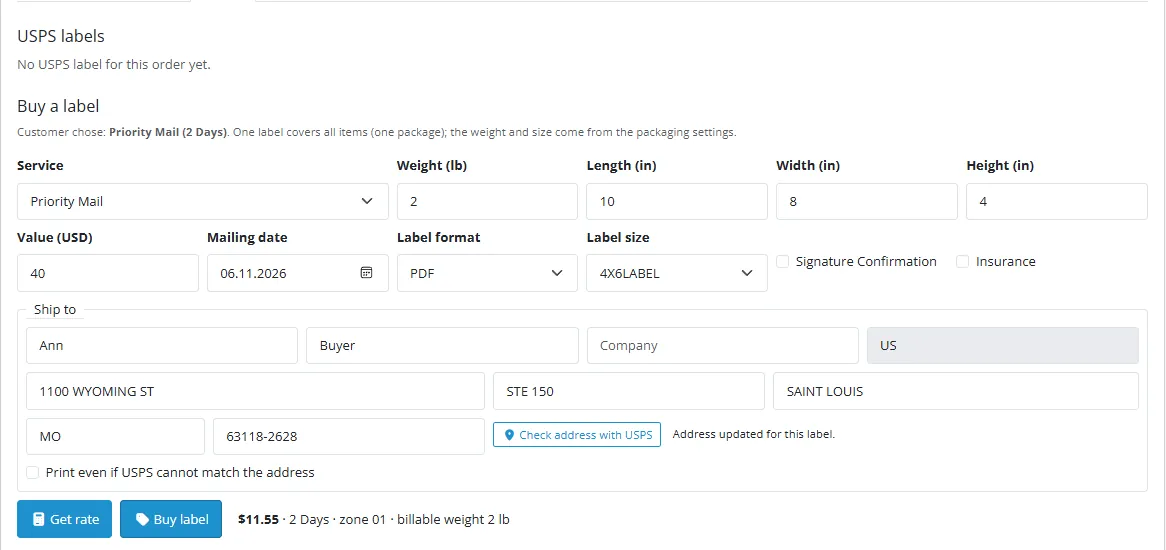
The service is preselected from the customer's choice; the weight and size come from the packaging settings. Change them to what is really in the box.
Optional: Check address with USPS, then Use this address.
Get rate shows the postage, delivery estimate, zone and billable weight. Buy label creates the label.
International orders also show the customs declaration: description, quantity, value, weight, HS code and origin per line.
Label
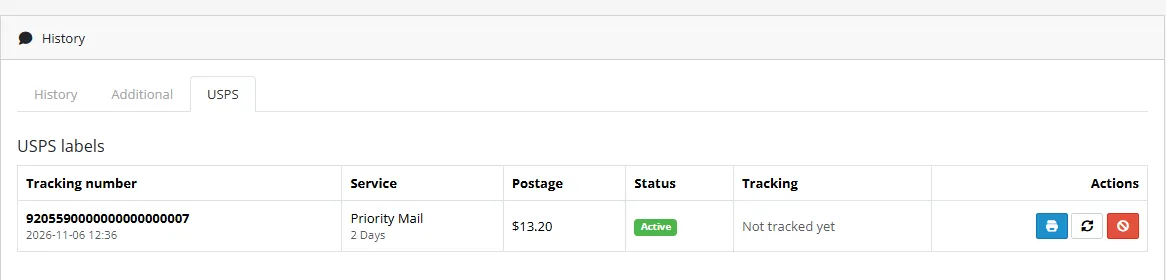
The tracking number is added to the order history (and the status you chose). Print opens the PDF; ZPL labels download. Refresh reads the tracking from USPS; the cron job does it every hour for open labels.
Void
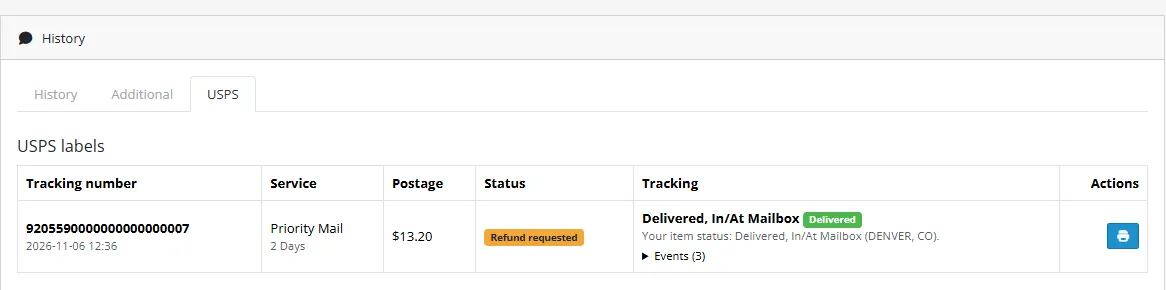
Void cancels an unused label. A label USPS has already scanned gets a refund request, shown as "Refund requested".
Voided
Developer notes
Identity
Item
Value
Extension code
kv_usps_v3 (type shipping)
Settings
shipping_kv_usps_v3_*
PHP namespace
KavioLabs\KvUspsV3 (shared core, copied to system/library/ of the extension)
token cached (encrypted), renewed once on 401 or 403
Label answers are multipart/form-data (metadata JSON + image)
parsed by Multipart, image stored as a blob
rateIndicator and processingCategory come from the rate
taken from the Shipping Options answer for the chosen service
DELETE returns CANCELED or DISPUTED
shown as cancelled or refund requested
International labels require a customs form
built from the order lines, HS codes remembered per product
Packages up to 70 lb
heavier carts are split
Deprecated mail class FIRST-CLASS_PACKAGE_SERVICE
mapped to USPS_GROUND_ADVANTAGE
Not covered: SCAN forms and manifests, pickup requests, Priority Mail Open and Distribute, USPS Connect, hold for pickup, and any service needing a contract.
Testing
tests/unit.php (php81 and php83) runs against tests/mock-server/mock.php, a stand-in built from the specifications, and a throw-away MariaDB database. tests/e2e.js drives an OpenCart 4.1.0.4 store in a headless browser: account form and connection test, checkout quotes (domestic, international, markup, free threshold, fallback, services, geo zone, product size, split), label purchase, print, tracking, cron, void, address check, uninstall.
Manual steps with your own account (not done by us): enter the Consumer Key and Secret and save; compare two checkout prices with the USPS Postage Price Calculator; with CRID, MID and payment account and the Labels and Payments APIs enabled, buy, print and void one domestic and one international label (use the Testing Environment for Mailers if USPS granted it).
USPS is a trademark of the United States Postal Service. This extension is not affiliated with, endorsed by or sponsored by USPS.
FAQ
Is this the old USPS Web Tools API?
No. Web Tools was retired by USPS on 25 January 2026. This extension uses the new USPS APIs with OAuth 2.0.
Do I need an aggregator account?
No. You use your own USPS developer account and pay USPS postage only.
Why do I need a CRID, MID and payment account?
Only for labels. USPS requires them to charge postage. Rates and address checks need only the Consumer Key and Secret.
Can I use it for non-US stores?
The prices are USPS prices in US dollars for parcels shipped from the United States; they are converted to the store currency.
Does it work with OpenCart 3?
No, OpenCart 4.1 only.
Does it use OCMOD?
No. A shipping extension, events and cron.
Where is the tracking number?
In the order history and on the USPS tab. The customer sees it in the account.
Is it affiliated with USPS?
No. USPS is a trademark of the United States Postal Service.
Server-side tracking for OpenCart 4.x and 3.0.x: purchases, refunds, add to cart, checkout, product views and leads go from your server to the free official GA4 Measurement Protocol, Meta Conversions API and TikTok Events API, deduplicated with the browser pixels through shared event ids. Consent-aware, SHA-256 hashed customer data, order status mapping, queue with retries, test mode and an event log. No paid relay, events only, no OCMOD.
The department store theme for OpenCart 4.x and 3.0.x: colour-coded departments, a department list beside the hero slider with two side promos, a big search with a department selector, tabbed product blocks, a 2 + 1 + 2 offer grid, deals of the day with real countdowns, a department showcase, a promotions band and a three-column product page with a sticky buy box. Four styles (Meridian, Harbor, Citrus, Night) and your own colours on top. Events only, no core changes.
Stop AI crawlers, scrapers, vulnerability scanners and unwanted countries before OpenCart 4.x or 3.0.x builds a page. Googlebot and Bingbot are verified by DNS and always allowed; 50+ bots get one switch each; country rules use free GeoIP databases and can close only the checkout; IP and network lists, rate limits, honeypots and the cart flood fix; a one-second challenge instead of a captcha; learning mode, dashboard, log, IP tester and Cloudflare export. No core changes, no OCMOD.