
Sell by Weight & Length
Extension · v1.0.1Sell products by weight, length, area or volume with decimal quantities, unit prices, step/min/max and a live price on the product page.
- 4.1.0.x
- 4.0.2.x
- 3.0.x
from$69Buy
by Kavio Labs · for OpenCart 4.x and 3.0.x
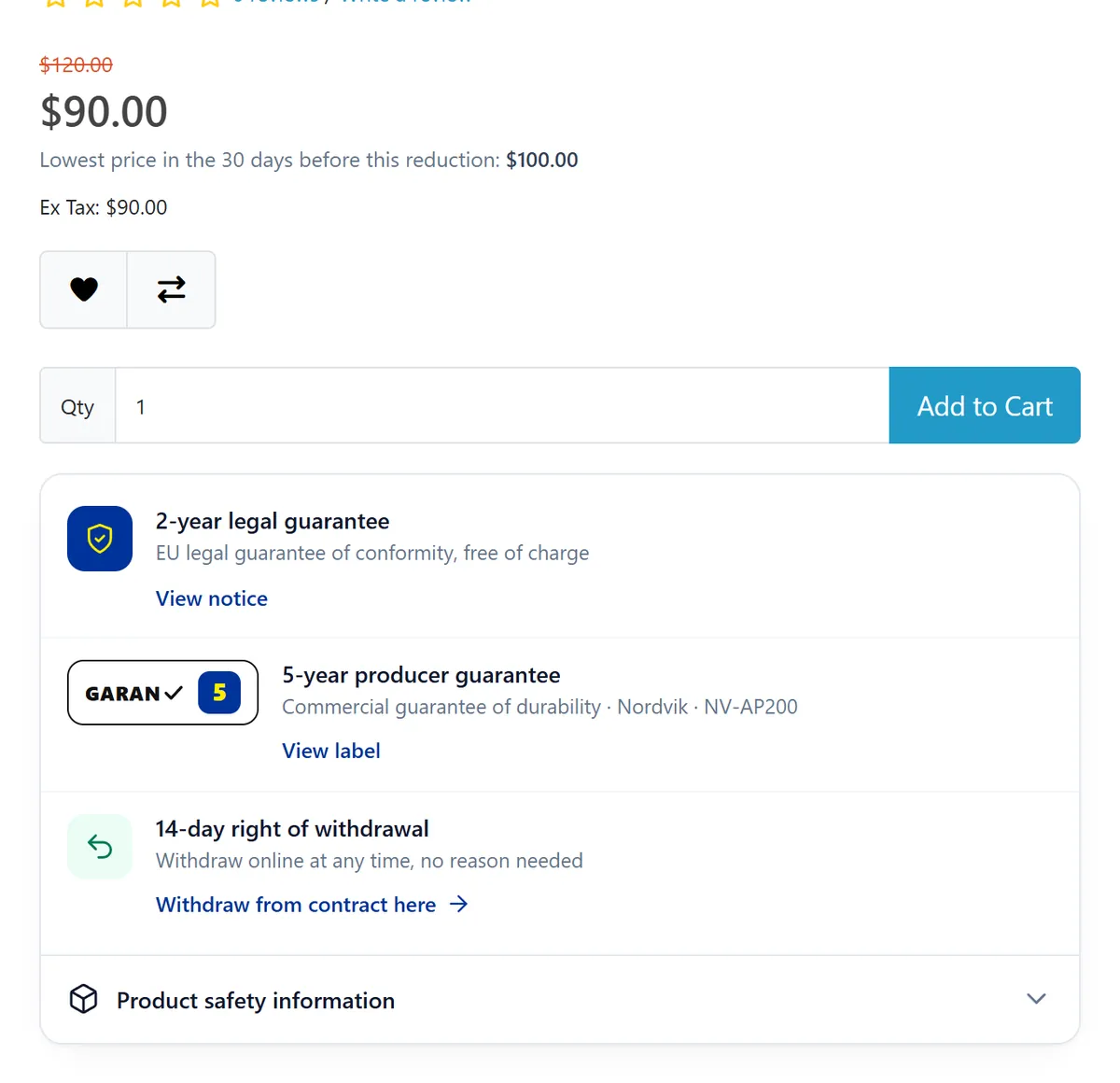
EU withdrawal button ("Withdraw from contract here" with Confirm withdrawal and an instant acknowledgement e-mail), the official EU legal guarantee notice per language, GARAN producer guarantee labels, the Omnibus lowest price of the last 30 days and GPSR product safety information, for OpenCart 4.x and 3.0.x. Every text editable per store language, events only, no OCMOD.
EU withdrawal button ("Withdraw from contract here" with Confirm withdrawal and an instant acknowledgement e-mail), the official EU legal guarantee notice per language, GARAN producer guarantee labels, the Omnibus lowest price of the last 30 days and GPSR product safety information, for OpenCart 4.x and 3.0.x. Every text editable per store language, events only, no OCMOD.
OpenCart 4.0.2.0 - 4.1.0.4, 3.0.x
One extension for the EU consumer-law information your online store has to show, built for OpenCart 4 and 3:
Not legal advice. The extension helps you display the information and provide the functions described in EU consumer law. All texts are templates you can change. Rules differ between countries (wording of the button, period lengths, longer national guarantees, exceptions); check them for the countries you sell to and ask a lawyer about your texts.
kv_eu_consumer_kit.ocmod.zip) or 3.0.3.x – 3.0.5.x (package kv_eu_consumer_kit-oc3.ocmod.zip)kv_eu_consumer_kit.ocmod.zip and click Install.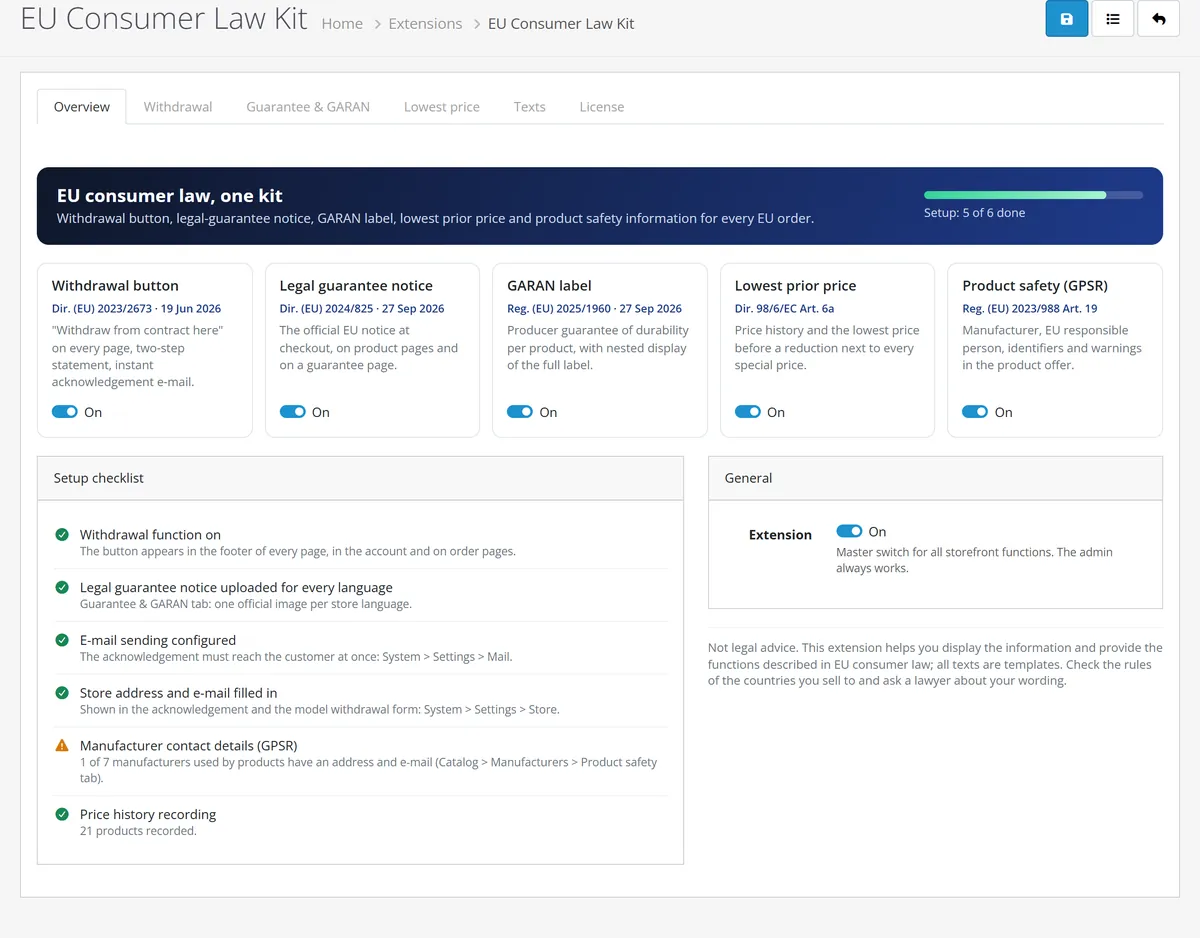
kv_eu_consumer_kit-oc3.ocmod.zip.Extensions > Extensions > Modules > Uninstall removes the events, the cron job and all data of the extension (withdrawal register, price history, product and manufacturer data). Export the register as CSV first.
Extensions > Extensions > Modules > EU Consumer Law Kit > Edit
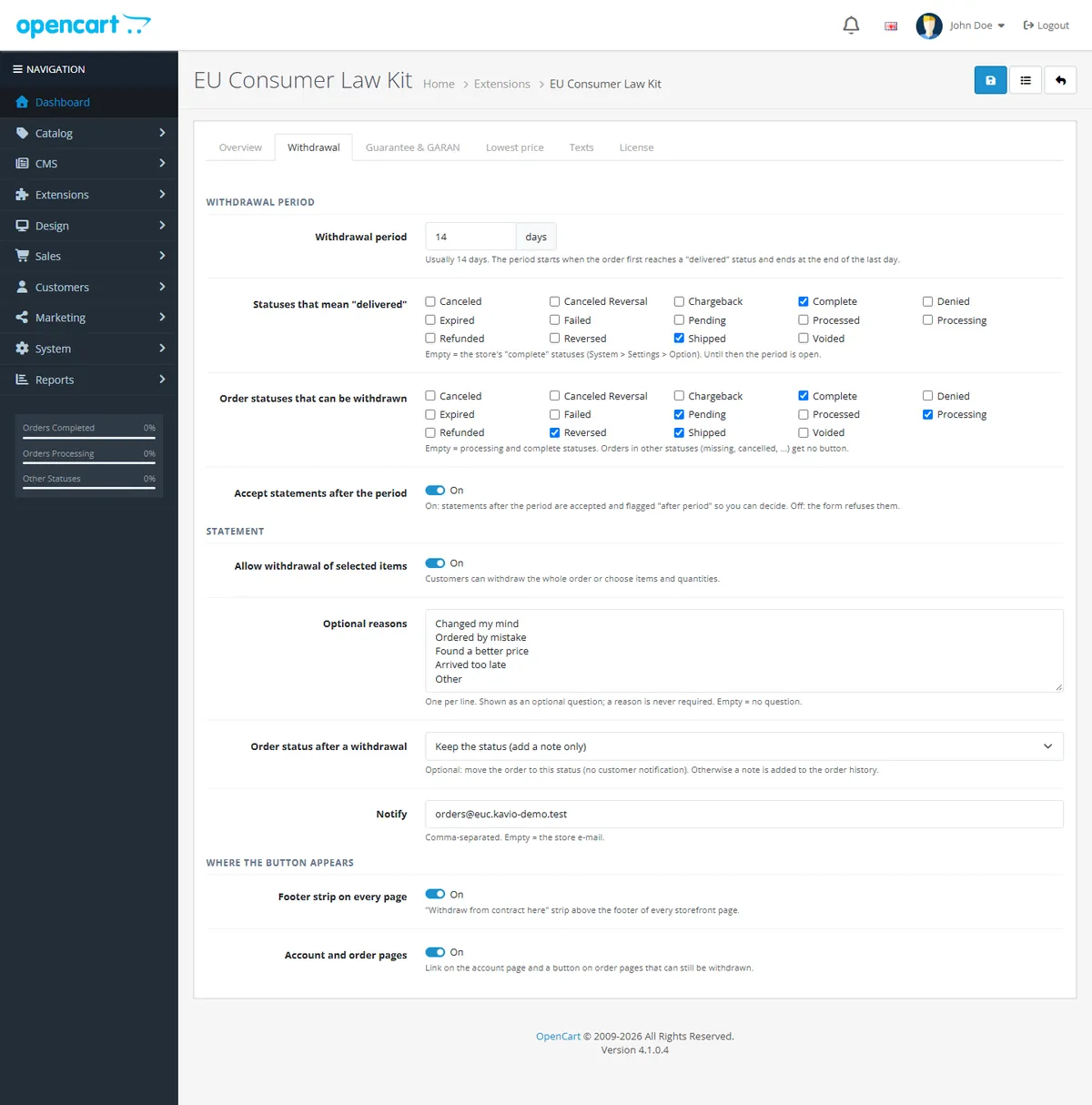
| Setting | Default | Notes |
|---|---|---|
| Withdrawal period | 14 days | Starts when the order first reaches a "delivered" status; ends at the end of the last day |
| Statuses that mean "delivered" | the store's "complete" statuses | Until then the period is open |
| Order statuses that can be withdrawn | processing + complete statuses | Missing or cancelled orders get no button |
| Accept statements after the period | On | Late statements are accepted and flagged "after period"; Off = the form refuses them |
| Allow withdrawal of selected items | On | Whole order, or items and quantities |
| Optional reasons | 5 reasons | Never required; empty = no question |
| Order status after a withdrawal | keep | Otherwise the order moves to this status (no customer notification); a history note is always added |
| Notify | store e-mail | Staff notice for each statement |
| Footer strip on every page | On | "Withdraw from contract here" + "Legal guarantee" at the top of the theme footer |
| Account and order pages | On | Account link and a button on order pages that can still be withdrawn |
| Setting | Default | Notes |
|---|---|---|
| Period | 30 days | At least 30 days under Art. 6a |
| Calculation | before the reduction | Or a rolling period including today |
| Consecutive reductions count as one | On | Progressive reductions keep the price before the first reduction |
| Not enough history | regular price | Or show nothing; the history starts on installation |
| Show on product lists | On | Category, search, specials, manufacturer and module lists |
The history is recorded for the store's default customer group; customers of other groups do not see the line.
One column per storefront language. Empty fields use the default English text (shown greyed out). Placeholders: {email}, {price}, {days}, {years}.
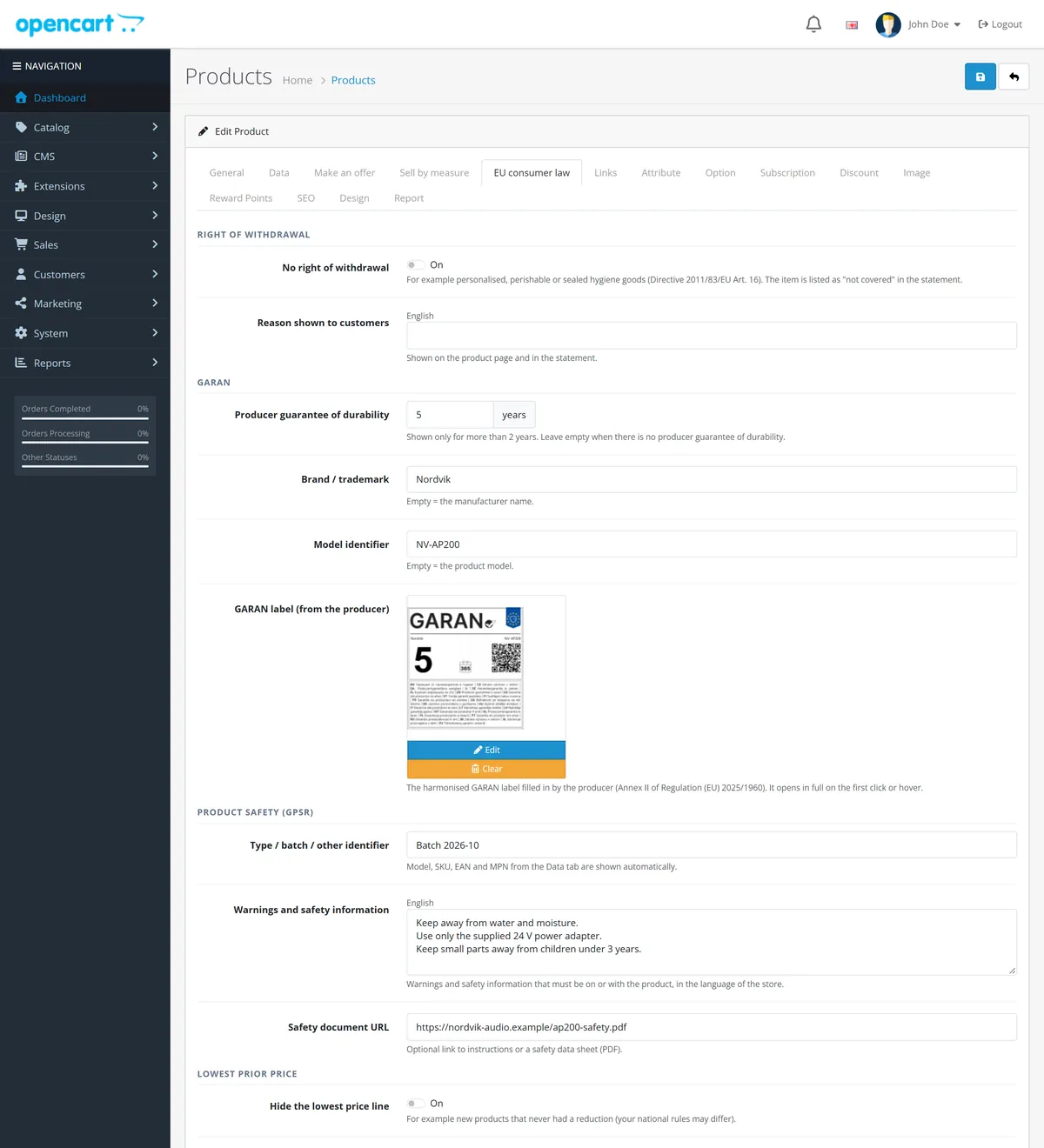
Legal name, postal address, e-mail, website, "manufacturer outside the EU" and the responsible person in the EU (name, address, e-mail).
Enter the key from your Kavio Labs account. Without a valid license (after the 14-day trial) the withdrawal button, statement, acknowledgement e-mail and register keep working; the guarantee notice, GARAN badge, lowest-price line and product-safety section are hidden on the storefront, and item-level withdrawal and CSV export are switched off.
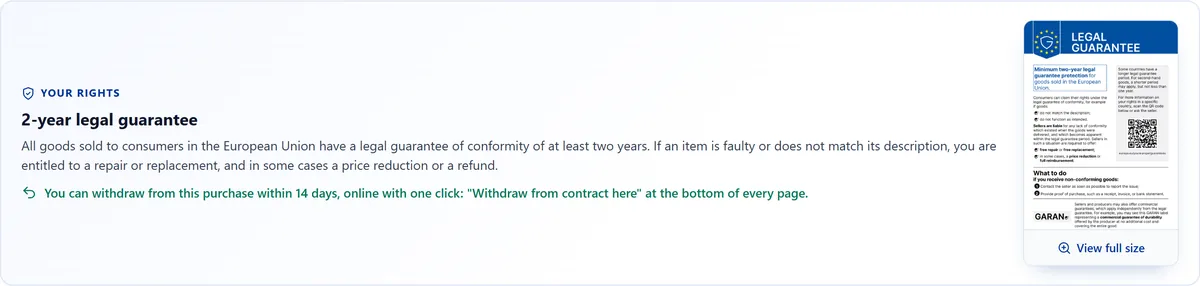
A card under the checkout heading with the legal guarantee notice (opens full size) and a reminder of the withdrawal button.
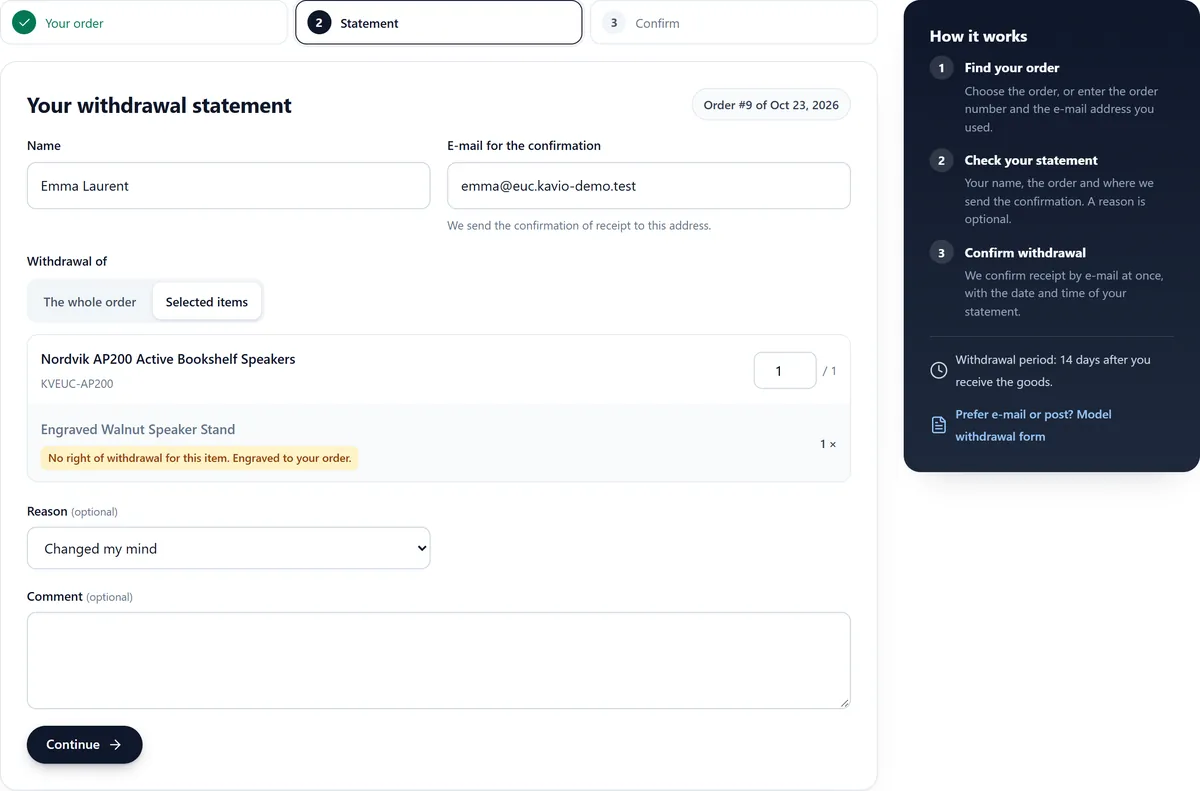
Linked from the withdrawal pages: the Annex I(B) model form with your store name, address and e-mail, for customers who prefer e-mail or post.
No software can promise that. The extension provides the functions and displays described in the EU rules and lets you adapt every text. Check the national rules of the countries you sell to and ask a lawyer about your wording. This is not legal advice.
From the European Commission ("Practical guidelines and high-resolution vector files for the EU notice and label"; the link is on the Guarantee & GARAN tab), in every EU language. Upload it unchanged and in colour, one image per storefront language.
The producer offering the commercial guarantee of durability fills in the years, brand and model identifier. Ask your supplier for the file; if you sell your own brand, you are the producer. Upload it on the product's EU consumer law tab.
Yes, per storefront language on the Texts tab. Keep it unambiguous; many countries publish an official wording for "Withdraw from contract here" and "Confirm withdrawal".
No. The withdrawal button, statement, acknowledgement e-mail and register always work, so customers are never left without the function. The other storefront displays need a valid license.
By default the statement is accepted and flagged "after period" so you can decide. You can switch this off; the form then says that the period has ended.
From the order history: the first time the order reached one of the "delivered" statuses. Until then the period is open.
The history starts on installation. Until 30 days of history exist, the extension shows the regular price before the reduction (or nothing, if you choose). Special prices that start or end on a date are back-dated to that date.
The store's default customer group. Visitors of other groups do not see the line.
The extension adds its own self-contained HTML and styles through OpenCart events and does not edit theme files. It is tested with the default themes of OpenCart 4.1 and 3.0.
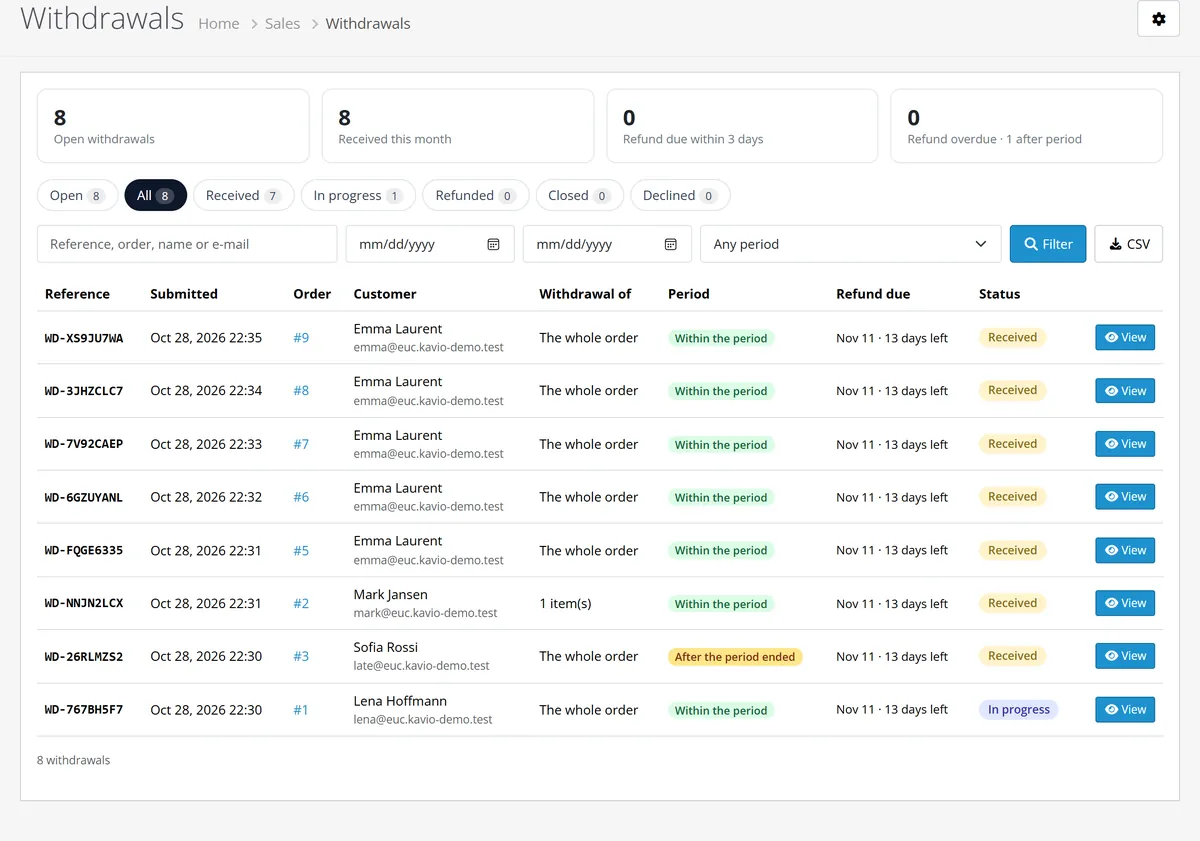
Yes. Configure System > Settings > Mail. A failed send is shown in the register with a Resend acknowledgement button; the statement is stored either way.
Buy with confidence
Every release is installed and run on these versions before it ships.
Updates and support are included in the price. The product keeps working afterwards; renewing is optional.
How licensing worksIf it is not what you expected, tell us within 30 days and we refund the order.
Refund policyCard payments are processed by Stripe. Your card number never reaches our server.
Ask a pre-sales questionSold by Kavio Labs Software Limited, registered in England and Wales No. 17532441. About us
More for OpenCart
Sell products by weight, length, area or volume with decimal quantities, unit prices, step/min/max and a live price on the product page.
Shoppers propose a price; the store accepts, declines or counters, and the agreed price is enforced in the cart once.
Buy X get Y, tiered cart discounts, free gifts and scheduled rules on top of OpenCart specials and coupons.

