
Sell by Weight & Length
Extension · v1.0.1Sell products by weight, length, area or volume with decimal quantities, unit prices, step/min/max and a live price on the product page.
- 4.1.0.x
- 4.0.2.x
- 3.0.x
from$69Buy
by Kavio Labs · for OpenCart 4.x and 3.0.x
Shoppers propose a price; the store accepts, declines or counters, and the agreed price is enforced in the cart once (OpenCart 4.x and 3.0.x).
Shoppers propose a price; the store accepts, declines or counters, and the agreed price is enforced in the cart once (OpenCart 4.x and 3.0.x).
OpenCart 4.0.2.0 - 4.1.0.4, 3.0.x
Let shoppers propose their own price. A Make an offer button below Add to Cart opens a short dialog for the selected options and quantity. You accept the offer, decline it or answer with a counter-offer. Once an offer is accepted, the shopper adds the item to the cart with one click and checks out as usual: the agreed price is applied as an Accepted offer line in the order totals, for that shopper, that product, those options and that quantity, once and until a deadline.

| OpenCart 4 | OpenCart 3 | |
|---|---|---|
| Versions | 4.0.2.0 – 4.1.x | 3.0.3.x – 3.0.5.x |
| Package | kv_make_an_offer.ocmod.zip | kv_make_an_offer-oc3.ocmod.zip |
| PHP | as required by OpenCart (8.1+ for 4.1.x) | as required by OpenCart (8.1+ for 3.0.5.x); the extension itself runs on PHP 7.4+ |
| OpenCart mail settings (System > Settings > Mail) | same |
kv_make_an_offer.ocmod.zip, then click Install next to it.Installing the module also installs the order total Accepted offers (Make an Offer) (sort order 3, before taxes) and an hourly job in System > Maintenance > Cron Jobs that closes expired offers. Make sure OpenCart's cron runs (php cron.php from your server's crontab); without it, offers still expire when you or the customer open them.
kv_make_an_offer-oc3.ocmod.zip.OpenCart 3 has no cron table: expired offers are closed whenever an administrator opens the admin panel, and whenever an offer page is opened.
OpenCart 4: Extensions > Installer, uninstall and delete the old package, upload and install the new one. OpenCart 3: upload the new package over the old one and refresh the modifications. Your settings, rules and offers stay as long as you do not uninstall the module.
Extensions > Extensions > Modules > Make an Offer > Uninstall removes the events, settings, the order total, the cron job and the offer tables (offers, history, rules). Export the offers first (Sales > Offers > Export CSV) if you want to keep them. Orders already placed keep their Accepted offer total line.
Extensions > Extensions > Modules > Make an Offer > Edit. Amounts in rules are unit prices excluding tax in the default currency, like the product price field.
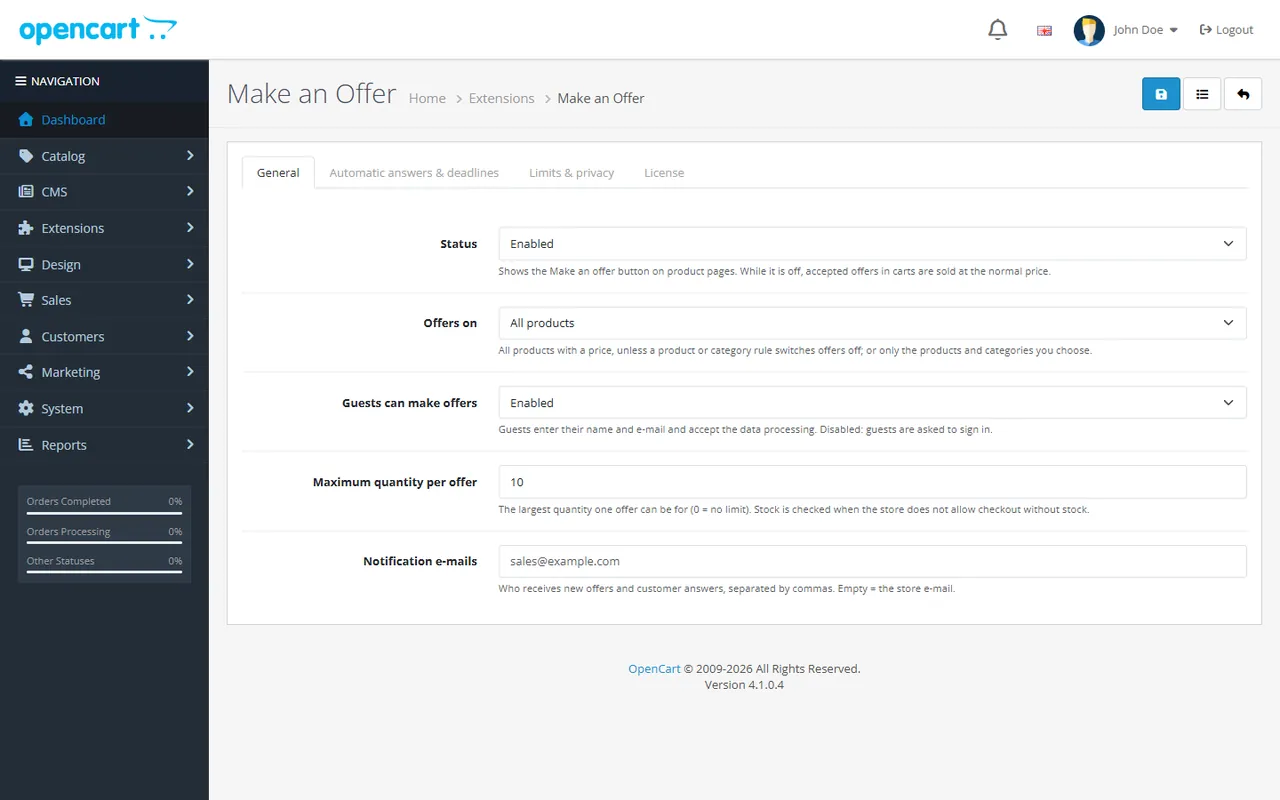
| Setting | Default | What it does |
|---|---|---|
| Status | Disabled after installing | Shows the Make an offer button. While it is disabled, no new offers can be made and accepted offers in carts are sold at the normal price. |
| Offers on | All products | All products with a price unless a product or category rule switches offers off, or only products and categories with the rule "Offers on". |
| Guests can make offers | Enabled | Guests enter their name and e-mail and tick the consent box. Disabled: guests are asked to sign in. |
| Maximum quantity per offer | 10 | The largest quantity one offer can be for (0 = no limit). The product minimum and, when checkout without stock is not allowed, the stock are checked too. |
| Notification e-mails | empty | Who receives new offers and customer answers, separated by commas. Empty = the store e-mail. |
| Setting | Default | What it does |
|---|---|---|
| Auto-accept at | empty | Offers at or above this share of the current price are accepted at once, e.g. 90 %. Empty = you answer every offer. |
| Auto-decline below | 50 % | Offers below this share are declined at once with a polite e-mail. Empty or 0 = off. |
| Counter-offers per offer | 3 | How many counter-offers you can send for one offer (0 = accept or decline only). |
| Days to answer an offer | 7 | Offers waiting for your answer expire after this many days (0 = never). |
| Days for the customer to answer a counter-offer | 3 | Counter-offers expire after this many days (0 = never). |
| Hours to buy at the accepted price | 48 | An accepted offer can be bought once within this time; then it expires. |
The current price is the unit price the shopper would pay for the selected options and quantity: special price, quantity discount and option prices included. Shoppers never see your automatic thresholds.
| Setting | Default | What it does |
|---|---|---|
| Open offers per customer | 5 | Offers one customer (account, or e-mail for guests) can have waiting at the same time (0 = no limit). One open offer per product and options always applies. |
| Offers per product in 30 days | 3 | Offers one customer can make for the same product within 30 days (0 = no limit). |
| Guest offers per connection per hour | 10 | Anti-abuse limit for guests (0 = no limit). |
| Erase personal data of closed offers after | 365 days | Name, e-mail and messages of ordered, declined, withdrawn and expired offers are erased after this many days (0 = keep). Prices stay for the statistics. |
Catalog > Products > Edit > Make an offer and Catalog > Categories > Edit > Make an offer:
| Field | Product | Category | Values |
|---|---|---|---|
| Offers | yes | yes | Inherit, Offers on, Offers off |
| Hidden minimum price | yes | - | Unit price excl. tax; offers at or above it are accepted at once. It wins over the auto-accept percentage. |
| Auto-accept at | yes | yes | Empty = inherit |
| Auto-decline below | yes | yes | Empty = inherit, 0 = never |
Each field is resolved on its own: product → the nearest category of the product (its own categories first, then their parents) → settings. The product tab tells you whether customers can make offers for the product.

Extensions > Extensions > Order Totals > Accepted offers (Make an Offer) is installed with the module (sort order 3, before taxes). It turns the agreed price into a negative total line Accepted offer #12 (Product) and lowers percentage taxes on it, like a coupon. Keep its sort order below the tax totals.
Mails use your store's mail settings and your store name. Customer mails: offer received, accepted (with Add to cart at offer price), counter-offer, declined, expired, messages from you. Staff mails: new offer (with the automatic decision), customer accepted or declined your counter-offer, new offer after a counter-offer, offer withdrawn. Every text is in the language files and can be changed in Design > Language Editor (keys kv_mao_mail_*). The offer history shows e-mail sent for every mail that went out.
Enter the license key from your purchase e-mail on the License tab and click Save; Check now verifies it at once. Without a key the extension runs for a 14-day trial.
What happens without a valid license: the Make an offer button is hidden and no new offers or counter-offers can be made; accepted offers can still be bought at the agreed price until they expire, you can still decline offers and send messages, and all offers stay viewable and exportable. The admin is never blocked.

The offer page (link in every e-mail, and My offers on the account page for signed-in customers) shows the prices, the deadline, the history and the next step:

E-mail links are signed: they open the offer without an account. Please ask customers not to forward them.
Add to cart at offer price puts the product with the offered options and quantity into the cart. The line shows Accepted offer: $194.00 each for 1 item(s) and the totals show Accepted offer #12 (Product) with the difference to the current price:

Sales > Offers lists the offers with the tabs Open, every status and All, statistics for the filtered period (offers, waiting, acceptance rate, average discount, ordered offers, revenue at offer prices), a search (product, model, customer, e-mail or offer number) and dates. Export CSV downloads the filtered list.

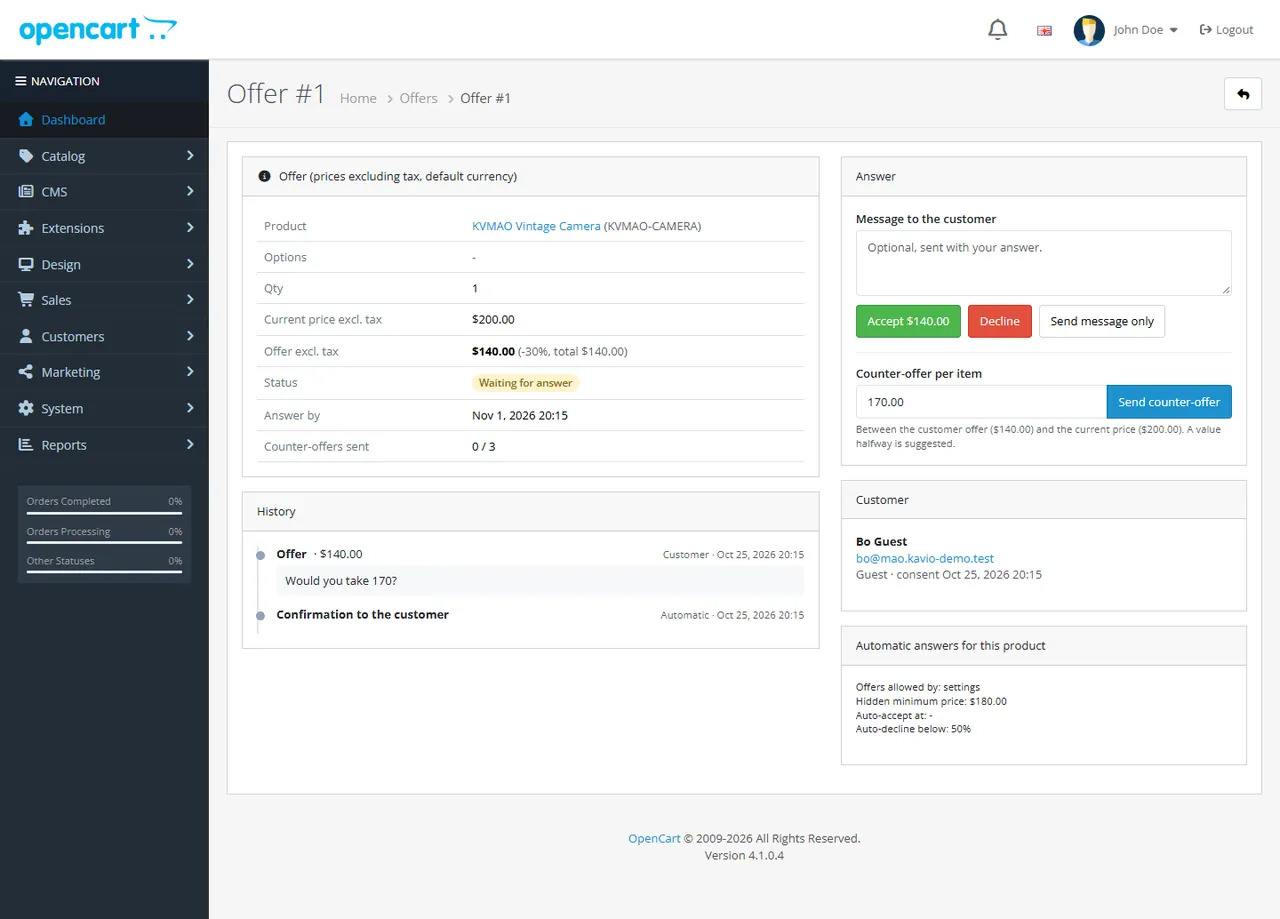
Open an offer to answer it. The page shows the product and options, quantity, current price, the offer with the discount, the history (with e-mail sent marks), other offers of the customer and the automatic rules that apply to the product.
No. It uses OpenCart events and a standard order total. Your theme does not need changes: a small script places the button below the core Add to Cart button (#button-cart).
OpenCart has no event inside the cart library. A total line works on every OpenCart 4 and 3 store, together with coupons, vouchers and other extensions (also extensions that replace the cart, such as our Sell by Weight & Length), and payment gateways receive the correct order total. Taxes are calculated on the agreed price.
No. The agreed price applies once, to the shopper who made the offer (or the browser that opened the signed e-mail link), for the offered product, options and quantity, until the deadline. A second order with the same offer is set to your fraud status, like a used coupon.
The customer pays the agreed price. If the product becomes cheaper than the agreed price, the customer pays the lower normal price.
The offer discount is calculated against the current cart price, which already includes specials and quantity discounts. Coupons apply on top like on any other order; restrict your coupons to other products if you do not want that.
Shoppers type the price they see (with tax when your store shows prices with tax, in their currency). In the admin all amounts are excluding tax in the default currency, like the product price field.
Products with a price where offers are on (settings, category or product rule). It is hidden when the store hides prices from guests and the visitor is not signed in.
Yes. The offer stores the selected options; the agreed price only applies to that option combination. File upload options are not part of an offer.
Events, settings, the order total, the cron job and the offer tables are removed. Placed orders keep their total lines. Export the offers first if you need them.
OpenCart's mail settings (System > Settings > Mail). If no mail engine is configured, offers still work; the history then shows no e-mail sent marks.
One license covers OpenCart 4 and 3 for one store, with 12 months of updates and support. The admin is never blocked; without a valid license the storefront button is hidden.
More for OpenCart
Sell products by weight, length, area or volume with decimal quantities, unit prices, step/min/max and a live price on the product page.
Buy X get Y, tiered cart discounts, free gifts and scheduled rules on top of OpenCart specials and coupons.
Grocery and food delivery theme for OpenCart 4.x and 3.0.x: aisle bubbles, stepper product cards with unit prices, recipe add-all block and a phone basket bar. Four presets, no core changes.

