
Sell by Weight & Length
Extension · v1.0.1Sell products by weight, length, area or volume with decimal quantities, unit prices, step/min/max and a live price on the product page.
- 4.1.0.x
- 4.0.2.x
- 3.0.x
from$69Buy
by Kavio Labs · for OpenCart 4.x and 3.0.x
Engraving, names and monograms with a live preview on the product photo, 12 fonts, fixed or per-character fees, character rules and a printable production sheet (OpenCart 4.x and 3.0.x).
Engraving, names and monograms with a live preview on the product photo, 12 fonts, fixed or per-character fees, character rules and a printable production sheet (OpenCart 4.x and 3.0.x).
OpenCart 4.0.2.0 - 4.1.0.4, 3.0.3.x - 3.0.5.x
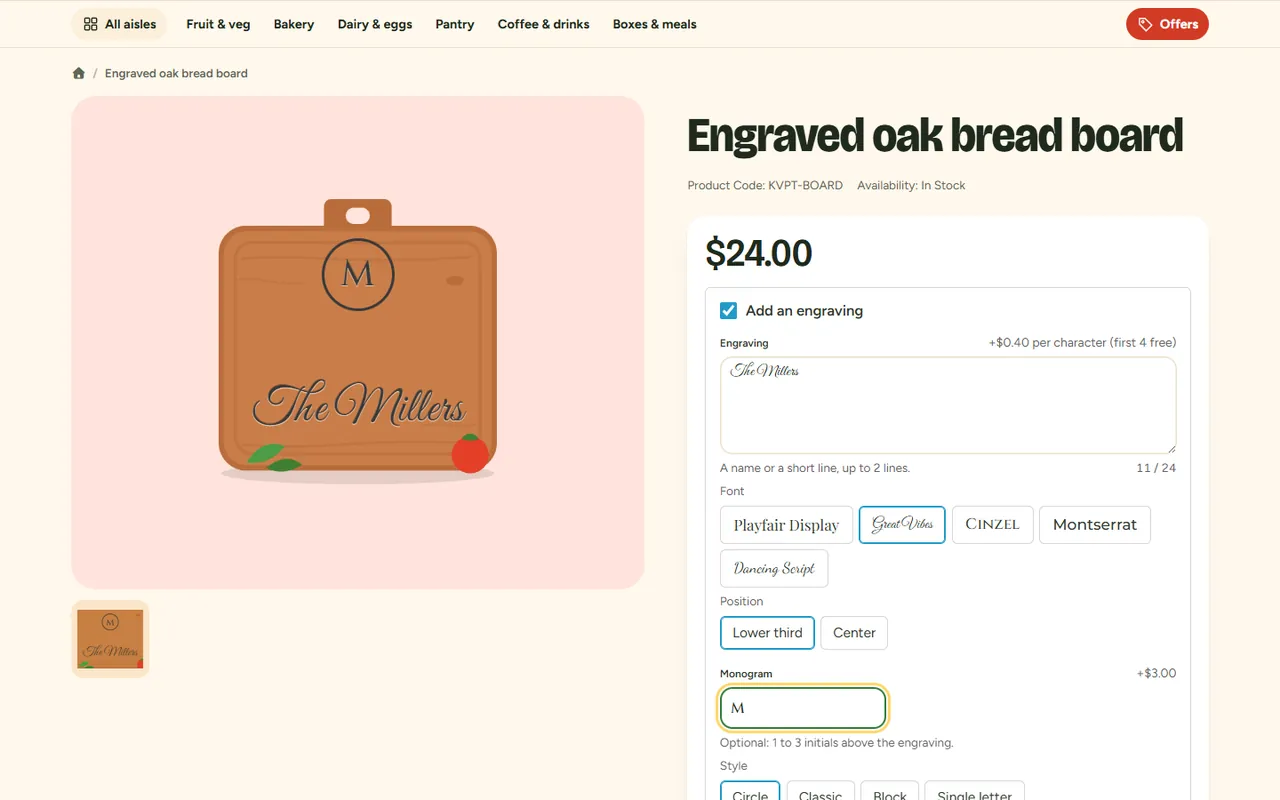
Sell engraved, embroidered or printed products without a designer tool. Customers type a name, a date or their initials on the product page, pick a font and a position and see the text on the product photo while they type. The fee is shown before they add the item to the cart, every value is checked again on the server, and the personalization travels with the line through the cart, the checkout, the order, the invoice and a printable production sheet for your workshop.
| OpenCart 4 | OpenCart 3 | |
|---|---|---|
| Versions | 4.0.2.0 – 4.1.x | 3.0.3.8 – 3.0.5.x |
| Package | kv_product_personalizer.ocmod.zip | kv_product_personalizer-oc3.ocmod.zip |
| PHP | as required by OpenCart (8.1+ for 4.1.x) | as required by OpenCart (8.1+ for 3.0.5.x); the extension itself runs on PHP 7.4+ |
| Database | MySQL 5.7+ / MariaDB 10.2+ | same |
kv_product_personalizer.ocmod.zip, then click Install next to it.Installing the module also installs the order total Personalization (Product Personalizer) (sort order 2, after the sub-total and before taxes). Keep it enabled: it charges the personalization fees.
kv_product_personalizer-oc3.ocmod.zip.Sales > Personalization sheet appears in the admin menu, with the number of open personalized lines.
OpenCart 4: Extensions > Installer, uninstall and delete the old package, upload and install the new one. OpenCart 3: upload the new package over the old one and refresh the modifications. Templates, assignments and production marks stay as long as you do not uninstall the module.
Extensions > Extensions > Modules > Product Personalizer > Uninstall removes the events, settings, the order total and the extension's tables (templates, assignments, saved personalizations, production marks). Orders already placed keep their personalization text (it is stored with the order options) and their Personalization total line.
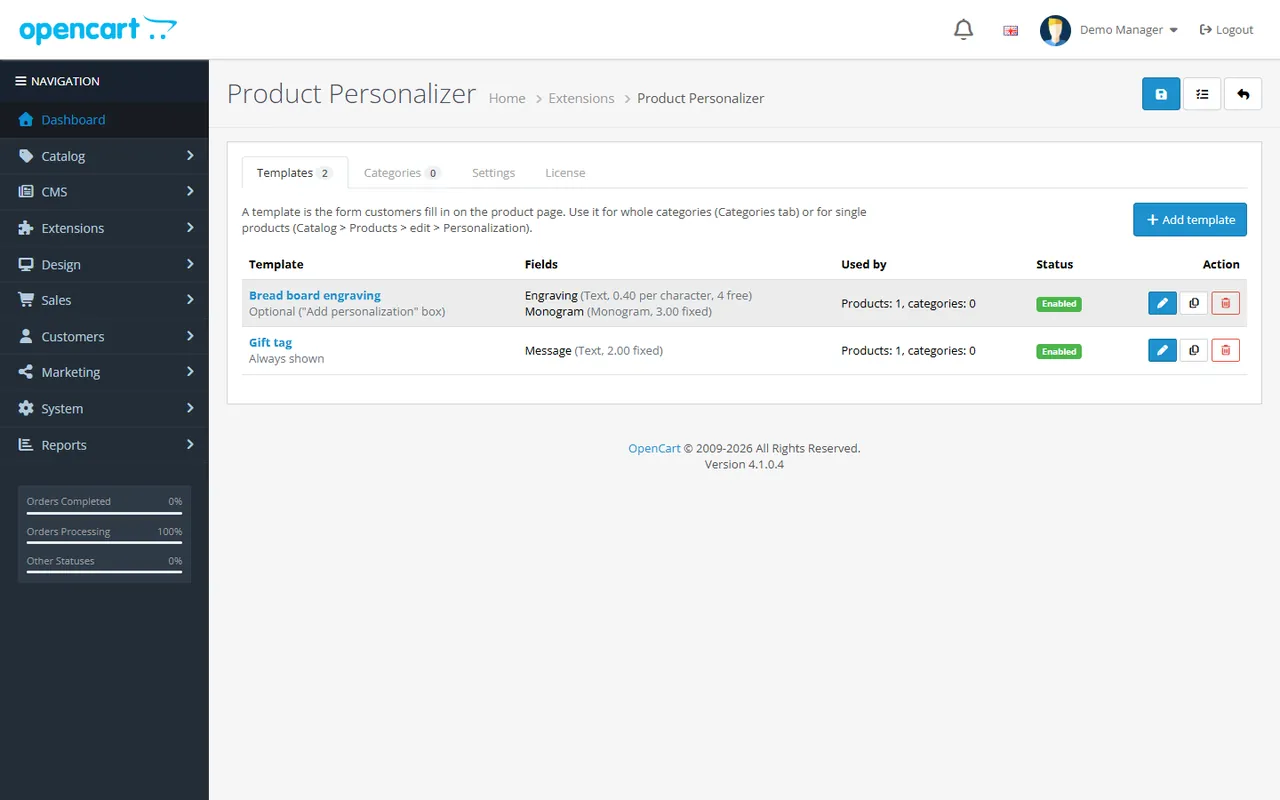
Extensions > Extensions > Modules > Product Personalizer > Edit. Amounts are per item, excluding tax, in your default currency, like the product price field.
| Setting | Default | What it does |
|---|---|---|
| Status | Disabled after installing | Shows the personalization form on product pages. While it is disabled no new personalizations are accepted; lines already in carts keep their text and fee, orders are never affected. |
| Charge personalization fees | Enabled | Disabled: every field is free. |
| Built-in offensive word list | Enabled | An English list of offensive words, used by templates with Block offensive words. |
| Your own blocked words | empty | One word or phrase per line. Matched as whole words, also with look-alike characters (0/o, 1/i, 3/e, 4/a, 5/s, $, @), repeated letters, plurals and spaced-out letters. |
A template is the form customers fill in. Use example creates a ready-made template, Copy duplicates one (inactive until you switch it on), Delete removes it (products that used it become not personalized; orders keep their personalization).
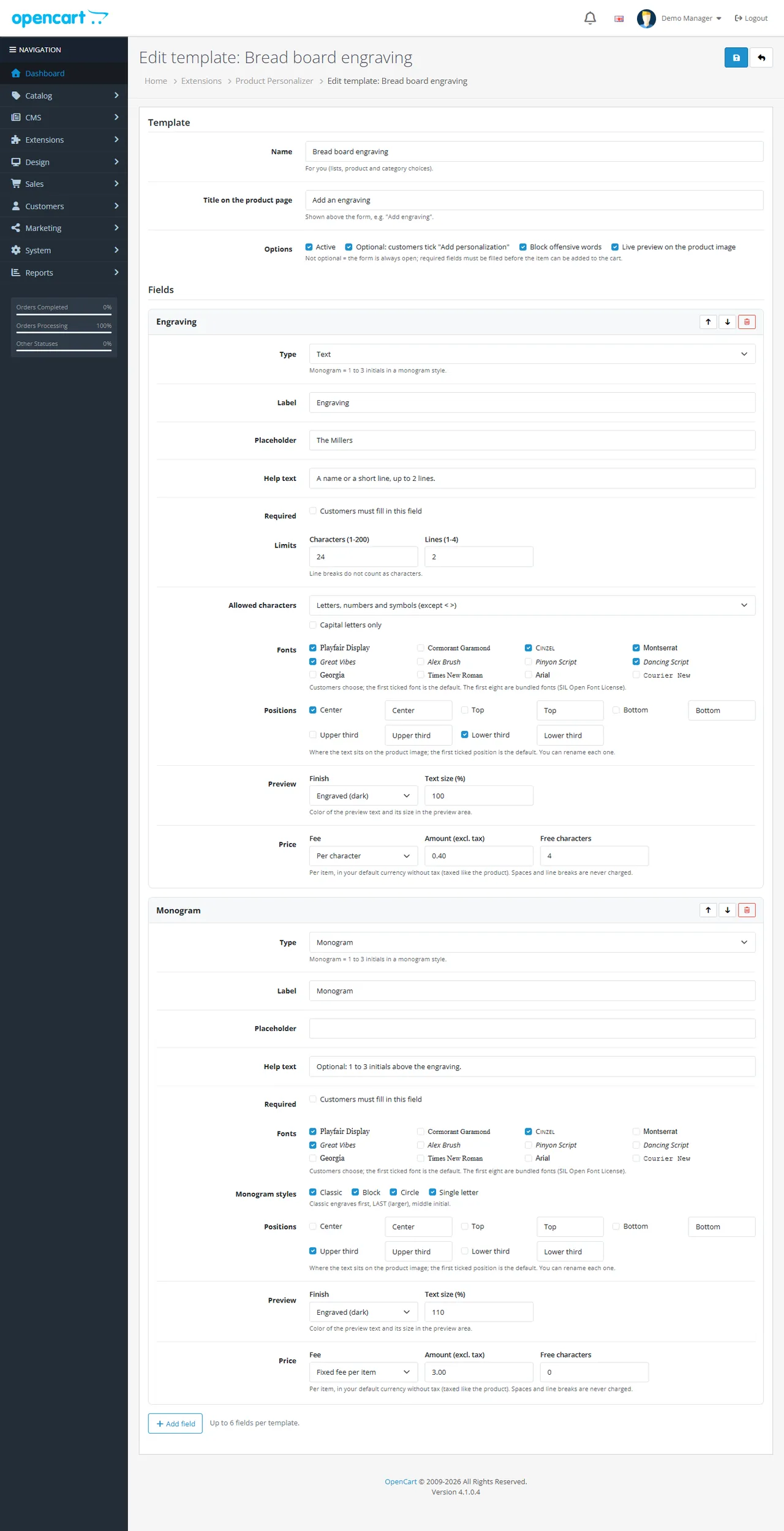
Template options:
| Option | What it does |
|---|---|
| Name | For you: lists, product and category choices. |
| Title on the product page | Shown above the form, e.g. "Add an engraving". |
| Active | Inactive templates are ignored on the storefront. |
| Optional | Customers tick the title to open the form. Not optional: the form is always open and required fields must be filled before the item can be added to the cart. |
| Block offensive words | Checks every field against the built-in list and your own words. |
| Live preview | Draws the text on the main product image. |
Field options (up to 6 fields; move them up and down, the order is the order on the product page):
| Option | Text field | Monogram |
|---|---|---|
| Label, placeholder, help text | yes | yes |
| Required | yes | yes |
| Characters (1 – 200), lines (1 – 4) | yes | 1 – 3 letters, by style |
Allowed characters: letters, numbers and symbols (never < or >), basic punctuation, letters only, numbers only | yes | letters |
| Capital letters only | optional | always |
| Fonts: Playfair Display, Cormorant Garamond, Cinzel, Montserrat, Great Vibes, Alex Brush, Pinyon Script, Dancing Script (bundled), Georgia, Times New Roman, Arial, Courier New. The first ticked font is the default | yes | yes |
| Monogram styles: Classic (first, LAST, middle), Block, Circle, Single letter | – | yes |
| Positions: center, top, bottom, upper third, lower third, each with your own name. The first ticked position is the default | yes | yes |
| Preview finish (engraved dark, engraved light, gold, silver, black ink) and text size 50 – 150 % | yes | yes |
| Fee: free, fixed per item, per character with free characters | yes | yes |
Fonts, styles and positions are offered as choices only when you tick more than one.
The fee of one item is the sum of its fields. Per character: spaces and line breaks are never charged, and the first characters can be free. Example: $0.40 per character with 4 free characters, "The Millers" = 10 characters − 4 = 6 × $0.40 = $2.40.
The fees of all lines appear as one Personalization line in the order totals (fee × quantity), taxed with each product's percent tax rates, converted to the customer's currency and shown with tax when your store shows prices with tax. Coupons and specials do not reduce the fee.
Add category, pick the category and the template, then Save. A product uses the template of its deepest category that has one, looking up the category tree (parents count too).
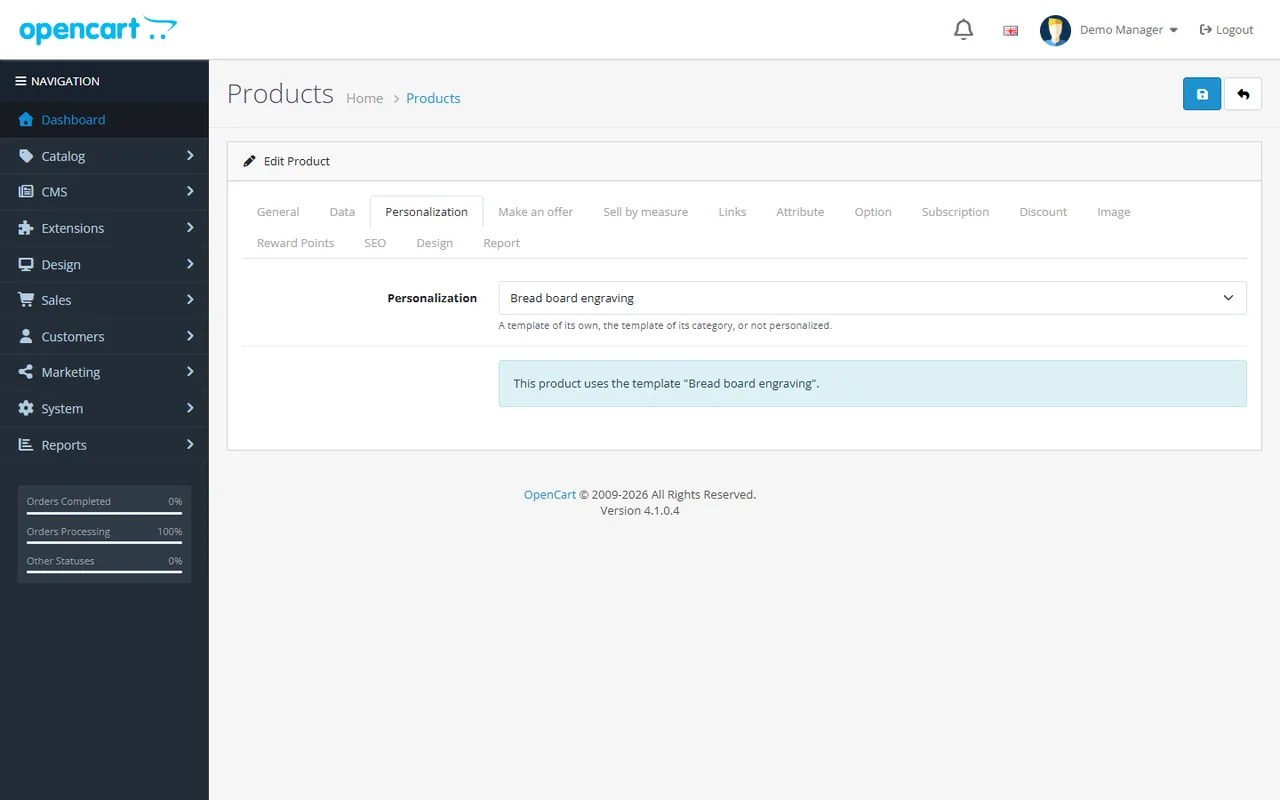
Catalog > Products > edit > Personalization: Use the category template, a template of its own, or Not personalized. The hint below shows which template the product uses now. OpenCart 4 variant products follow their master product unless they have a choice of their own.
Enter the key from your Kavio Labs account on the License tab and click Check now. The extension works without a key for 14 days after installing. Without a valid license the product page form is hidden and no new personalizations are accepted; lines already in carts keep their text and fee, orders keep their personalization, and the admin keeps working.
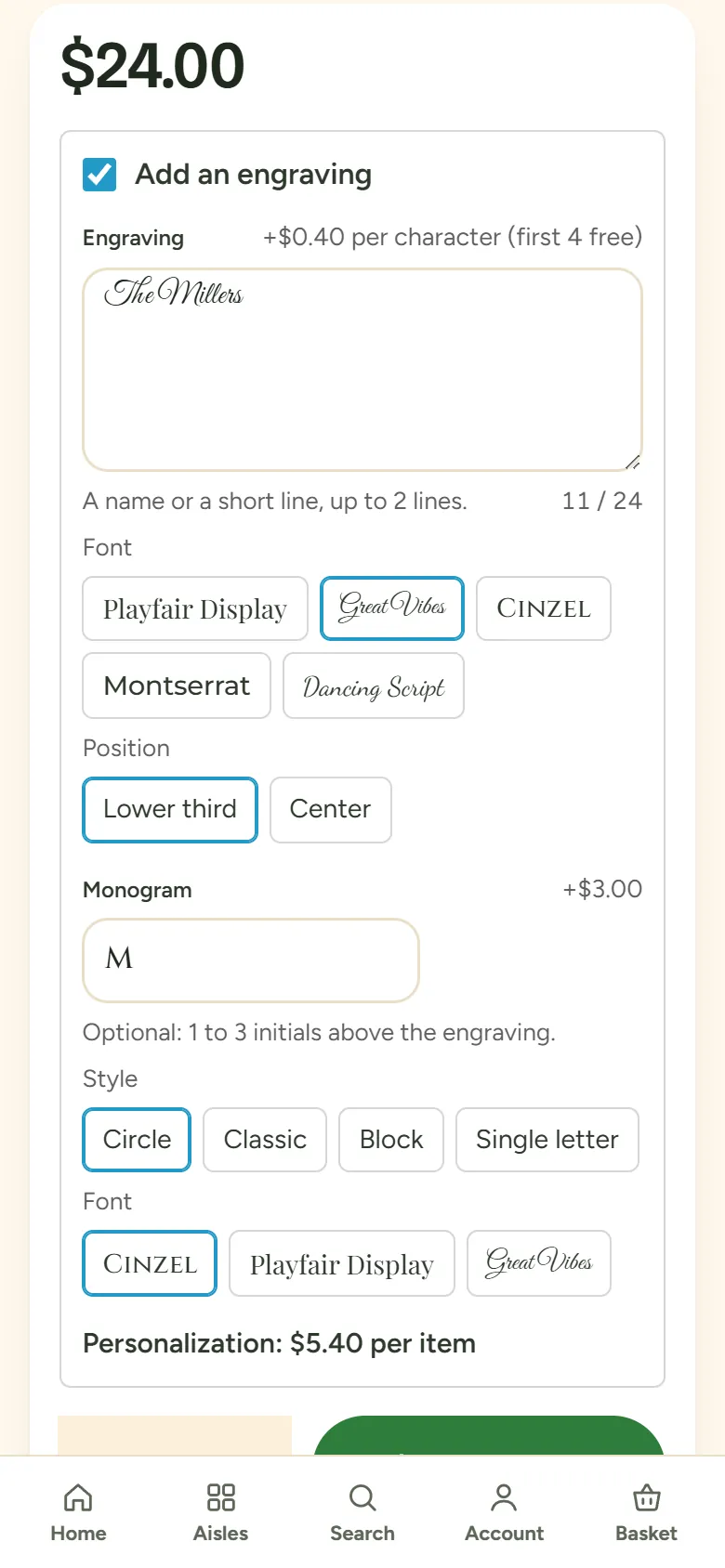
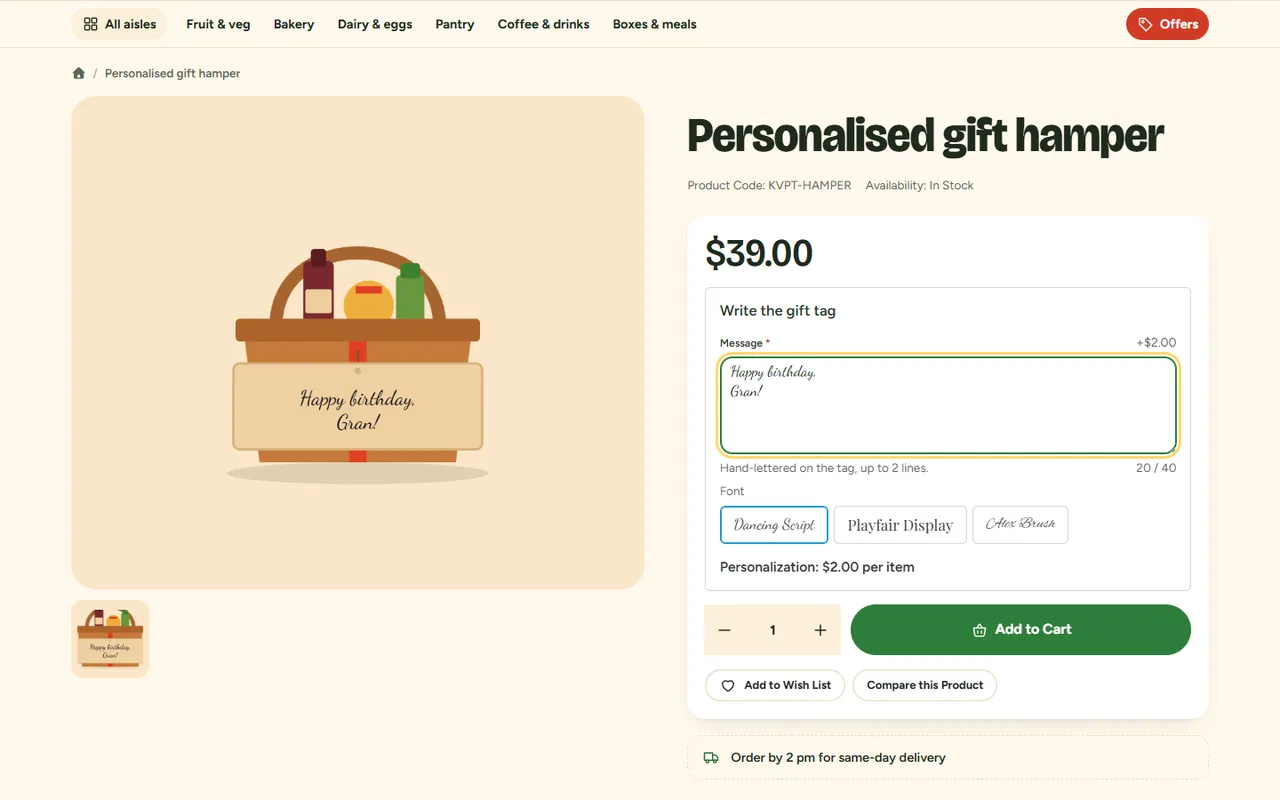
Products whose template is required cannot be added from category pages, search results or modules: the add-to-cart button there opens the product page instead.
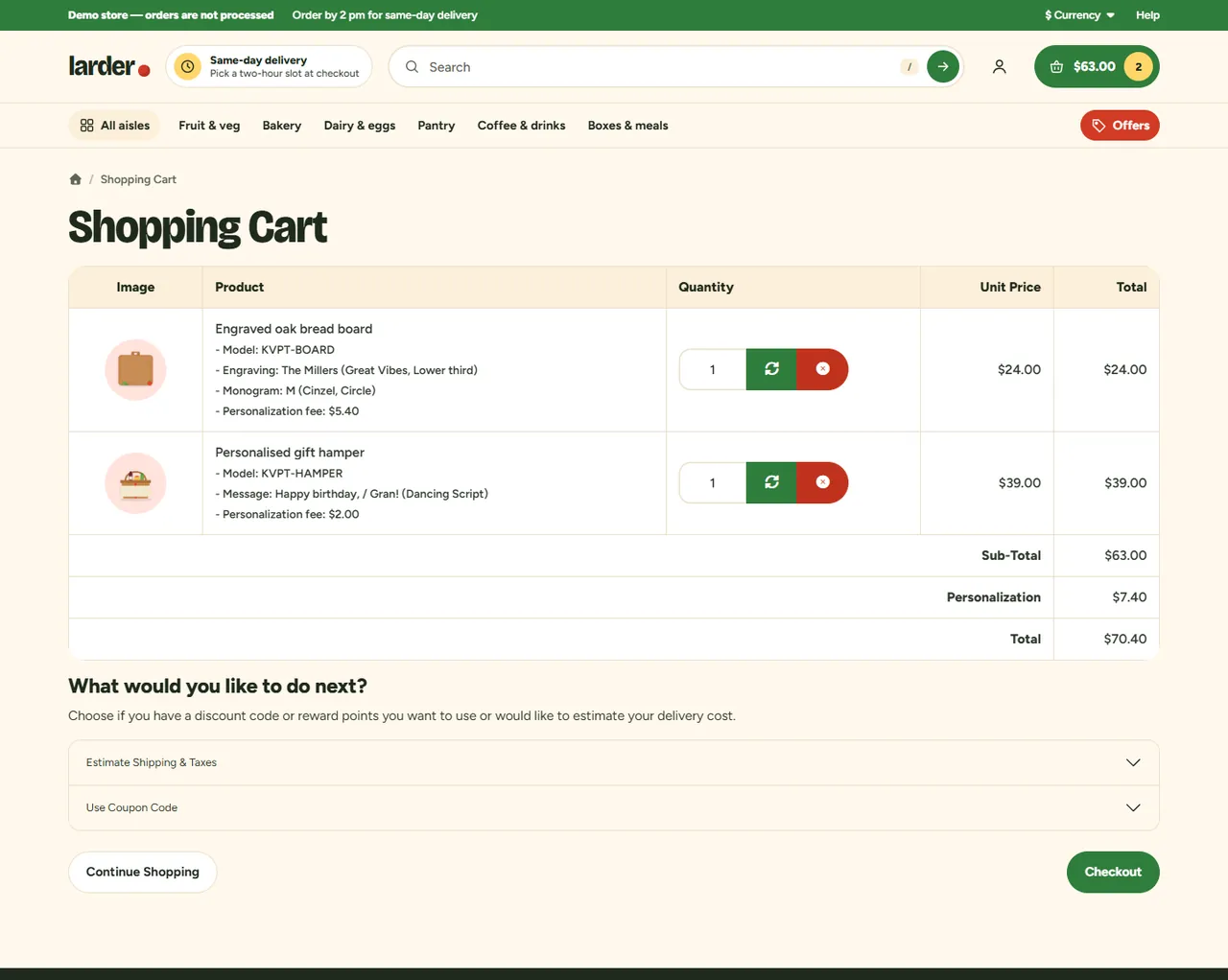
The cart, the mini cart and the checkout show each field ("Engraving: The Millers (Great Vibes, Lower third)") and the fee per item; the totals show one Personalization line.
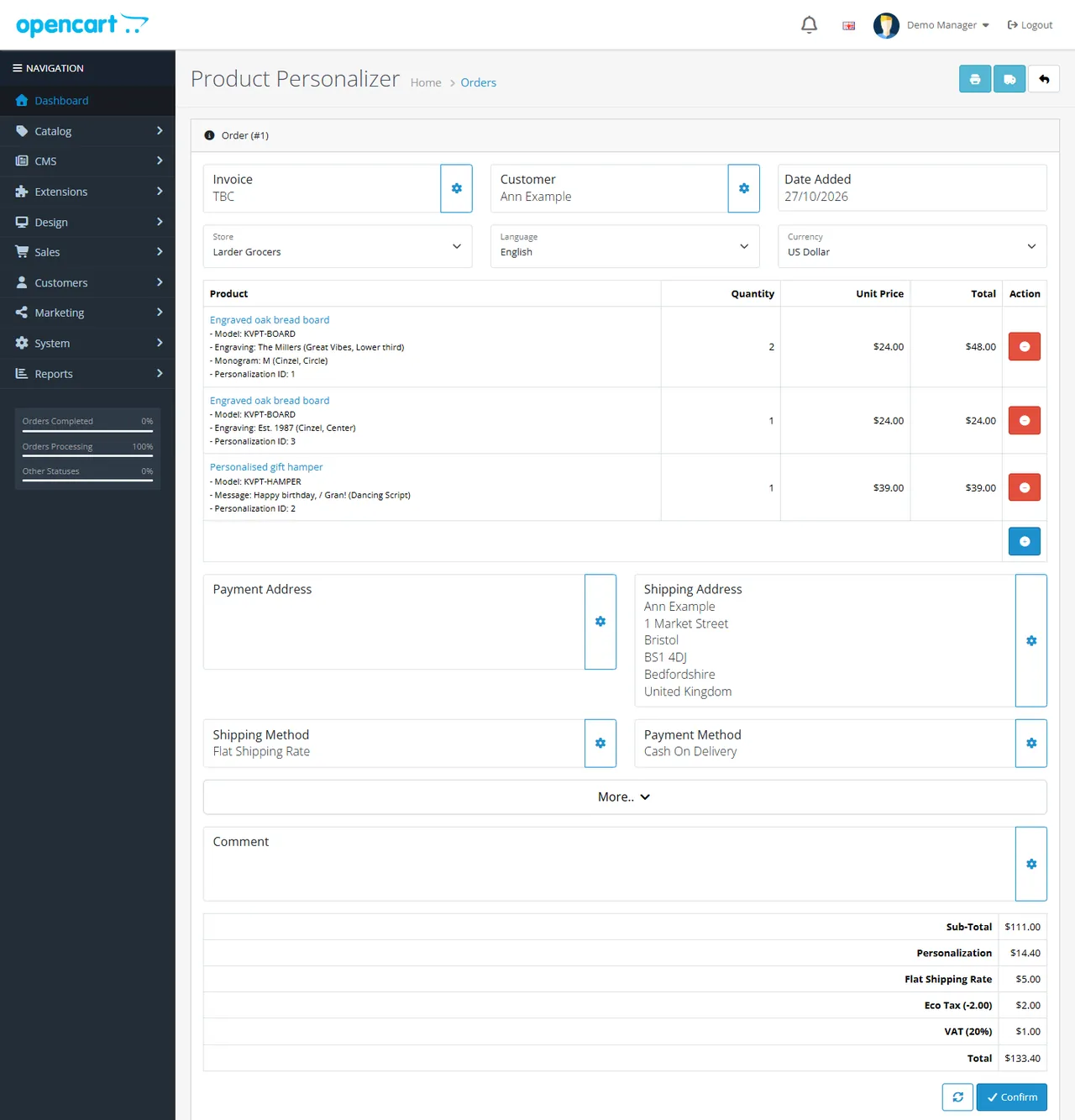
The order stores the personalization as order options, so the order confirmation, the customer's order history, the order e-mails, the admin order page, the invoice and the shipping list show it like any other product option. The admin order page also gets a Personalization card with every detail and a link to the production sheet of that order.
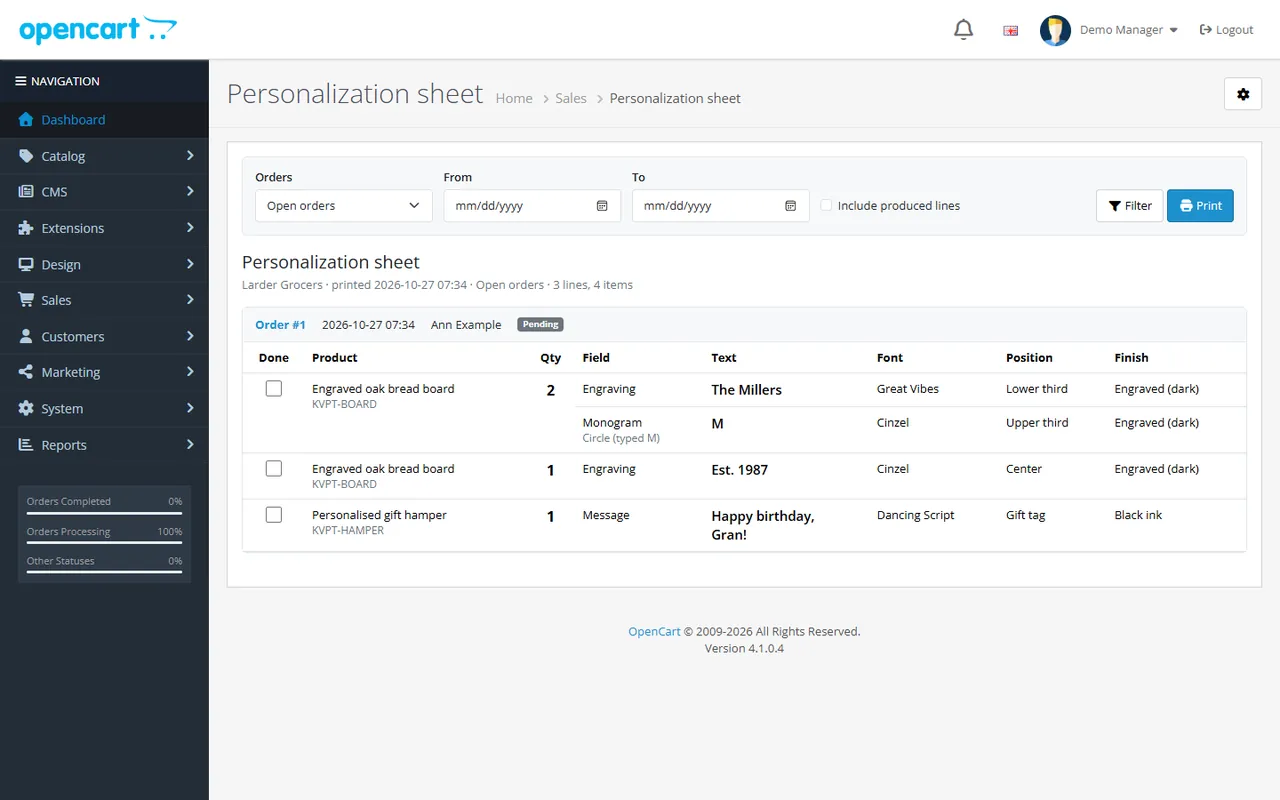
Sales > Personalization sheet lists the personalized lines of open orders (your processing statuses that are not complete statuses) with the full specification: text, monogram as engraved and as typed, font, style, position and finish.
The admin order editor shows a Personalization ID under each personalized product. It keeps every personalization with its product while you change the order: two boards with two different names stay two lines, and the fee stays in the totals. A product you add to an order in the admin is added without personalization.
No. It uses OpenCart events and a standard order total. Your theme does not need changes: a small script places the form above the quantity field and draws the preview over the main product image.
It is tested with the default OpenCart 4 and 3 themes and with our Pantry theme. Themes that keep the standard product form (#form-product / #product, #input-quantity, #button-cart) work. The preview needs the main product image of the product page; without it the form still works.
OpenCart has no event inside the cart library. A total line works on every OpenCart 4 and 3 store, together with coupons, vouchers, payment gateways and extensions that replace the cart, such as our Sell by Weight & Length. The cart shows the fee of each line next to the personalization.
No. The fee is calculated on the server from the checked values and the template saved with the cart line. Every add to cart is checked again (template, limits, characters, offensive words); anything else sent by the browser is ignored.
Carts and orders keep the template as it was when the item was added (fields, labels and fee).
They work side by side: required options are still required, option prices are added to the product price, and the personalization is added to the same cart line.
Playfair Display, Cormorant Garamond, Cinzel, Montserrat, Great Vibes, Alex Brush, Pinyon Script and Dancing Script, under the SIL Open Font License 1.1 (the license texts are in the package next to the font files). The license allows using them on your site. Georgia, Times New Roman, Arial and Courier New are the visitor's system fonts. Fonts are downloaded only when a template uses them.
They are never accepted, so no markup can reach e-mails, invoices or the admin.
The script and styles (about 20 KB) are added only to product pages that have a template. The fonts load only when they are offered.
Disabled or unlicensed: the form disappears and no new personalizations are accepted; lines already in carts keep their text and fee. After an uninstall, orders keep the personalization text and the Personalization total line.
The extension ships English texts in standard OpenCart language files, which you can change in Design > Language Editor.
More for OpenCart
Sell products by weight, length, area or volume with decimal quantities, unit prices, step/min/max and a live price on the product page.
Shoppers propose a price; the store accepts, declines or counters, and the agreed price is enforced in the cart once.
Buy X get Y, tiered cart discounts, free gifts and scheduled rules on top of OpenCart specials and coupons.

