
Make an Offer
Extension · v1.0.2Shoppers propose a price; the store accepts, declines or counters, and the agreed price is enforced in the cart once.
- 4.1.0.x
- 4.0.2.x
- 3.0.x
from$39Buy
by Kavio Labs · for OpenCart 4.x and 3.0.x
Sell products by weight, length, area or volume with decimal quantities, unit prices, step/min/max and a live price on the product page (OpenCart 4.x and 3.0.x).
Sell products by weight, length, area or volume with decimal quantities, unit prices, step/min/max and a live price on the product page (OpenCart 4.x and 3.0.x).
OpenCart 4.0.2.0 - 4.1.0.4, 3.0.x
Sell cheese by the kilogram, fabric by the meter, flooring by the square meter and paint by the liter. Shoppers enter decimal quantities (1.25 kg, 2.5 m), pick preset amounts and see the line total while they type. The cart, the checkout, the order, the invoice and the stock all use the exact quantity.
| OpenCart 4 | OpenCart 3 | |
|---|---|---|
| Versions | 4.0.2.0 – 4.1.x | 3.0.3.x – 3.0.5.x |
| Package | kv_fractional_quantities.ocmod.zip | kv_fractional_quantities-oc3.ocmod.zip |
| PHP | as required by OpenCart (8.1+ for 4.1.x) | as required by OpenCart (8.1+ for 3.0.5.x); the extension itself runs on PHP 7.4+ |
kv_fractional_quantities.ocmod.zip, then click Install next to it in the list of uploaded packages.kv_fractional_quantities-oc3.ocmod.zip.Open a product (Catalog > Products > Edit) and choose its sale unit in the new Sell by measure tab. See Configuration.
Upload the new package the same way. Your settings and product units are kept. On OpenCart 3, click Refresh in Extensions > Modifications afterwards.
Extensions > Extensions > Modules > Sell by Weight & Length > Uninstall removes the events, the settings and the extension tables (product units, exact stock, measured order lines). Products keep the rounded-up stock in their Quantity field and are sold in whole units again. Existing orders keep their lines and the "Quantity: 1.250 kg" detail.
Extensions > Extensions > Modules > Sell by Weight & Length > Edit
| Setting | Default | What it does |
|---|---|---|
| Status | Off after install | Decimal quantities on the storefront. While off, products are sold in whole units; carts and orders that already hold a decimal quantity keep it. |
| Show the unit after prices | On | "/ kg" after the price on product pages, product lists and quantity discounts. |
| Show preset quantities | On | Preset buttons under the quantity field. |
| License key | empty | Your Kavio Labs license key (see License). |
Open a product (Catalog > Products > Edit), tab Sell by measure, and click Save.

| Field | Example | What it does |
|---|---|---|
| Sale unit | Kilogram (kg) | Whole items (standard) keeps the product as it is. Any unit turns on decimal quantities. The product price is the price of 1 unit. |
| Quantity step | 0.005 | Smallest change of the quantity, up to 4 decimals. Quantities are snapped to the step (1.2345 kg becomes 1.235 kg). The decimals of the step are the decimals shown (0.005 → 1.250 kg, 0.5 → 2.5 m). |
| Minimum quantity | 0.1 | Smallest quantity per cart line. Empty = one step. |
| Maximum quantity | 5 | Largest quantity per cart line. Empty = no limit. |
| Default quantity | 0.5 | Quantity in the field when the page opens, and the quantity added from product lists. Empty = the minimum. |
| Preset quantities | 0.25, 0.5, 1 | Up to 8 buttons. Below 1 kg, 1 L or 1 m they read 250 g, 250 ml or 50 cm. With decimal commas use semicolons: 0,25; 0,5; 1. |
| Exact stock | 8.750 | Stock in the sale unit with decimals (see below). Empty = the Quantity field. |
The core Minimum Quantity field (Data tab) is not used for products sold by a measure; use the fields of this tab.
OpenCart stores whole quantities only, so the extension keeps the exact stock next to the core field:
Quantity discounts (Discount tab) work in the sale unit: a discount from 5 applies from 5 kg. The price is chosen by the whole units of the quantity (5.5 kg uses the "5 or more" price). Specials apply as usual.
Set the product Weight to the weight of one sale unit (1 kg for a product sold per kg). The shipping weight of a line is weight × quantity.
The License section of the module settings shows the status, the licensed domain and Check now.
What switched off means: without a valid license (no key after the 14-day start period, an invalid or revoked key, or a domain the license does not cover), products are sold in whole units again: the decimal quantity field and the preset buttons are hidden and no new decimal quantities are accepted. Carts and orders that already hold a decimal quantity keep their exact quantity, price and stock handling. The admin panel and your settings always stay available.
The quantity field takes decimals with a dot or a comma (1.25 or 1,25). The unit is shown next to the field, the preset buttons fill in a quantity, the arrow keys move by the step, and the line total is shown while the shopper types. Quantities off the step, below the minimum or above the maximum are corrected.
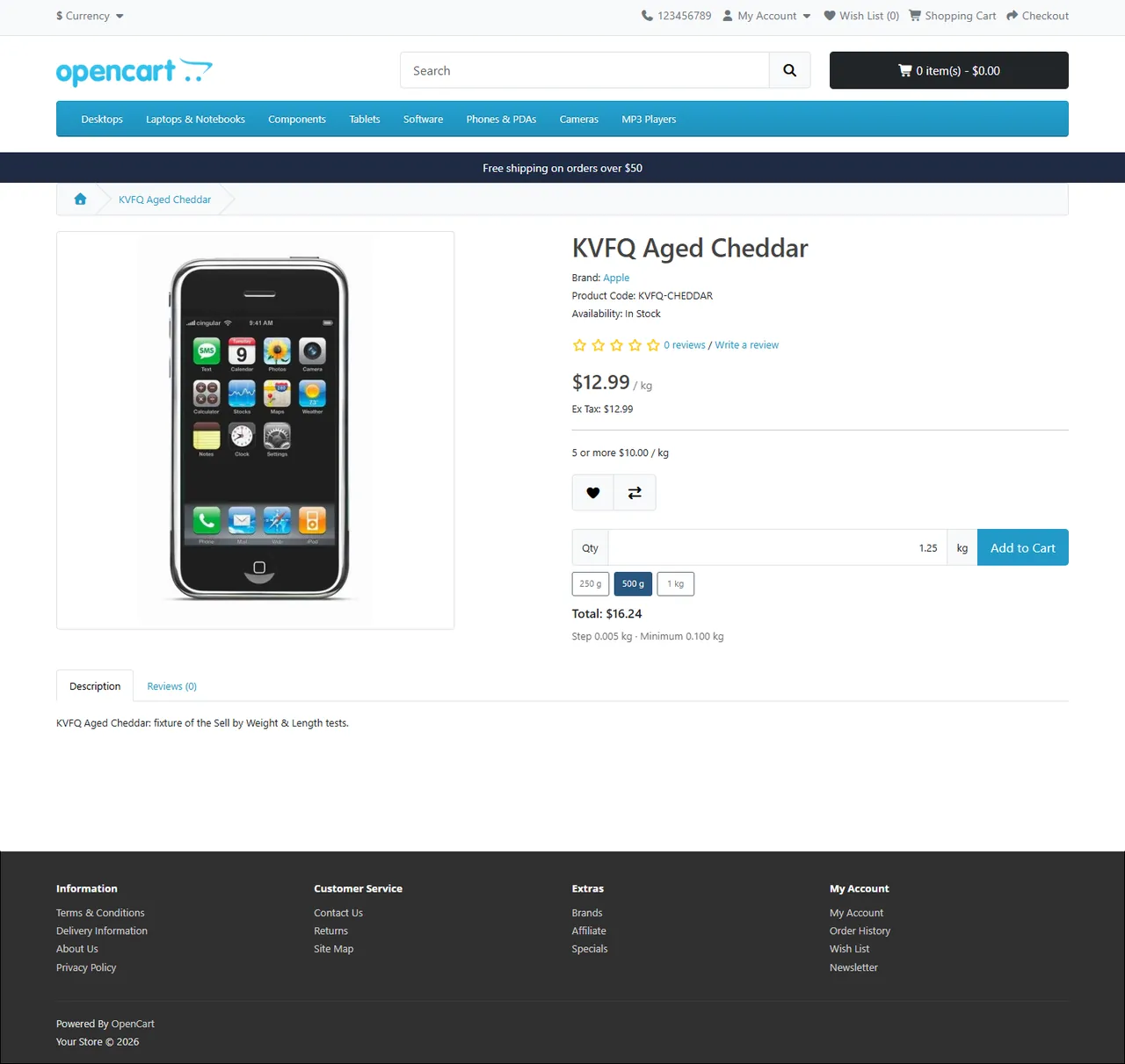
On product lists, Add to Cart adds the default quantity of the product (the minimum when no default is set).
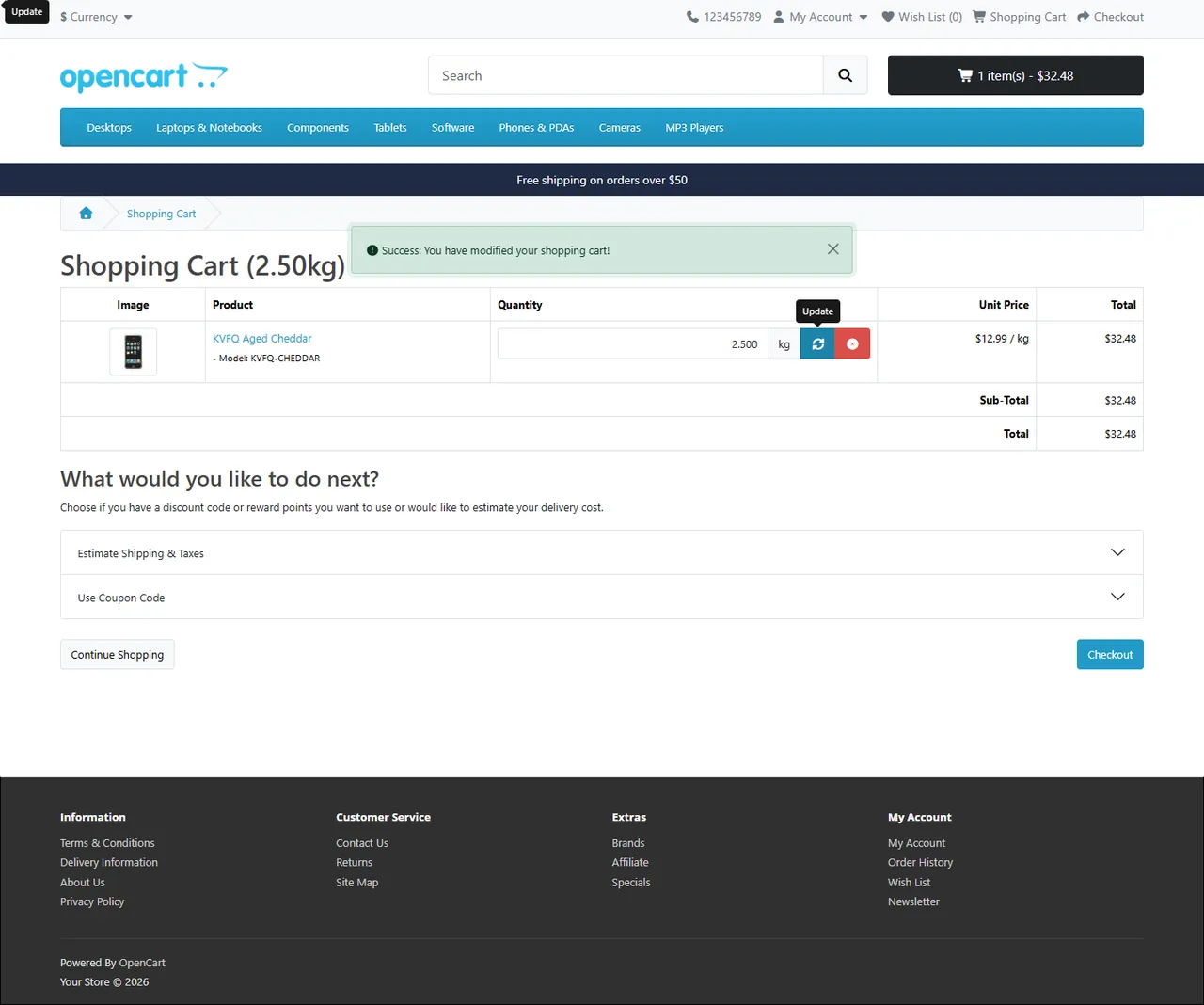
The line price is the unit price (after option prices, quantity discounts and specials) × the quantity, rounded to the cent once: 12.99 × 1.25 = 16.2375 → $16.24. Everything after that uses the line price, exactly as for any other product: taxes, coupons, reward points, totals, shipping by weight.
An order line of a measured product has quantity 1 and the exact line price. Two details under the product name keep the measure wherever OpenCart shows product options: the checkout, order e-mails, the customer's order page, the admin order page, invoices and shipping lists.

When an order enters a processing or complete status, the exact quantity is taken from the stock (10 → 8.750 kg); when it is canceled or moves back to another status, it is given back. This follows your Processing Order Status and Complete Order Status settings, like the core stock handling.
Payment gateways receive each measured line as "1 × line total" (Aged Cheddar, 1 × $16.24). Gateways that only accept whole quantities therefore work unchanged.
OpenCart stores whole quantities only. A product sold by a measure is one order line ("1") with the exact line total; "Quantity: 1.250 kg" and "Price per kg: $12.99" under the product name keep the measure.
Yes. The line price is the unit price × the quantity, rounded once: 1.250 kg × $12.99 = $16.24. Taxes, discounts and the order total are computed from that line.
Yes. They receive quantity 1 with the line total as its price, so the sum of the lines always equals the order total.
No. The extension uses OpenCart events and the standard quantity field of the product page (name="quantity"). It works with the default themes of OpenCart 4 and 3 and with themes that keep that field.
No. It changes no core file and ships no OCMOD patch.
Yes. Option prices are added to the unit price and option weights to the unit weight. Option stock (Subtract Stock on an option value) counts order lines, not kilograms.
Reports that count products count order lines: 1.250 kg is one product. Amounts (revenue, taxes) are exact.
The number you enter becomes the exact stock (12 → 12.000 kg). To set a fraction, use Exact stock in the Sell by measure tab.
Not in this version: a measured product added in the admin order editor is added in whole units of its sale unit. Status changes, cancellations and invoices work as usual.
No. A product bought with a subscription plan (recurring profile on OpenCart 3) is sold in whole units.
Products are sold in whole units again; existing carts and orders keep their exact quantities, prices and stock handling. See License.
No. The check runs in the admin panel, once a day. The storefront never contacts the license server.
More for OpenCart
Shoppers propose a price; the store accepts, declines or counters, and the agreed price is enforced in the cart once.
Buy X get Y, tiered cart discounts, free gifts and scheduled rules on top of OpenCart specials and coupons.
Grocery and food delivery theme for OpenCart 4.x and 3.0.x: aisle bubbles, stepper product cards with unit prices, recipe add-all block and a phone basket bar. Four presets, no core changes.

