
Sell by Weight & Length
Extension · v1.0.1Sell products by weight, length, area or volume with decimal quantities, unit prices, step/min/max and a live price on the product page.
- 4.1.0.x
- 4.0.2.x
- 3.0.x
from$69Buy
by Kavio Labs · for OpenCart 4.x and 3.0.x
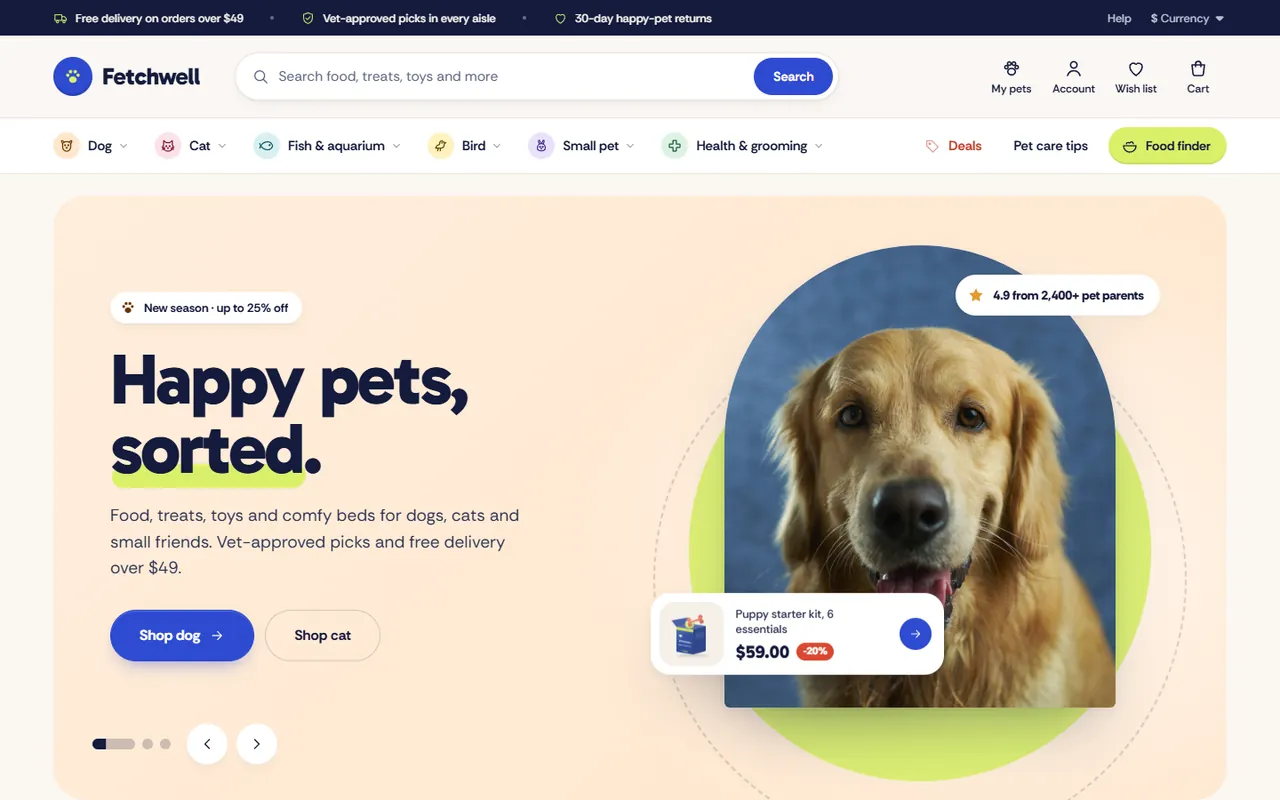
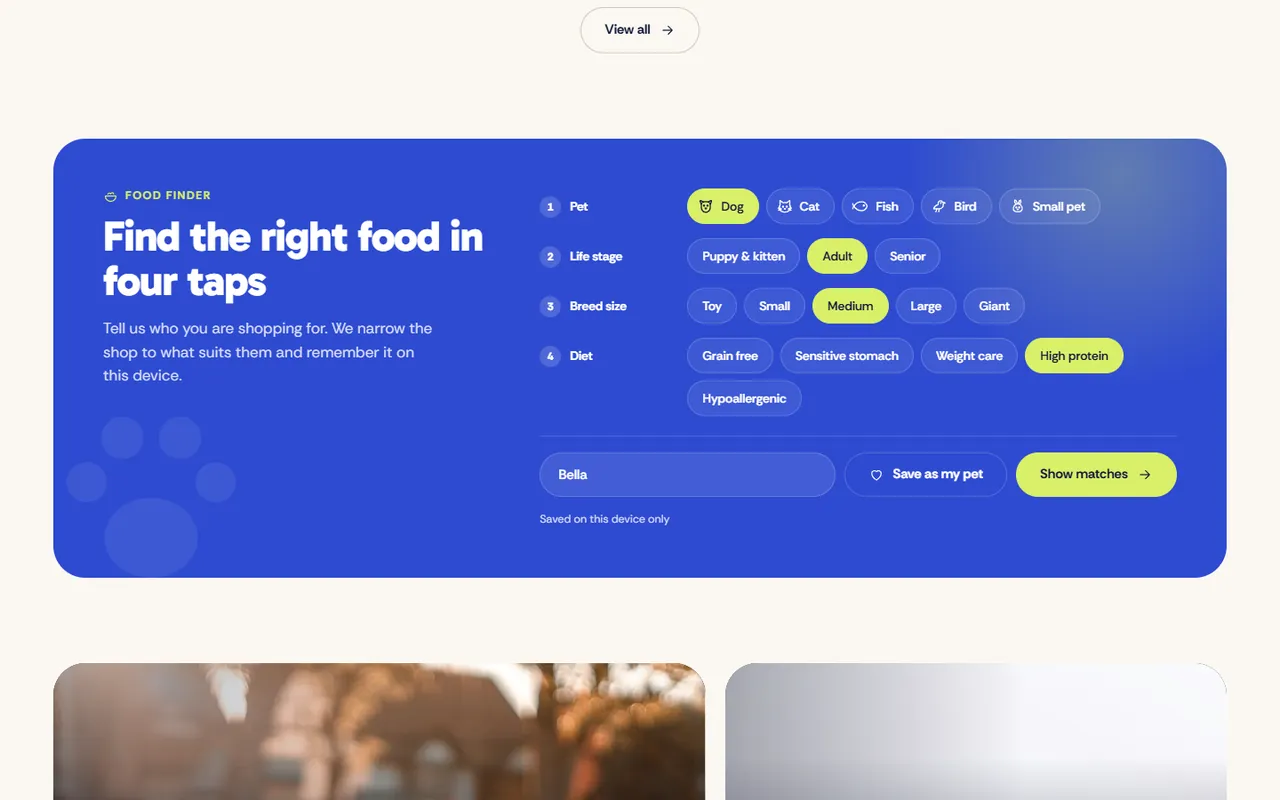
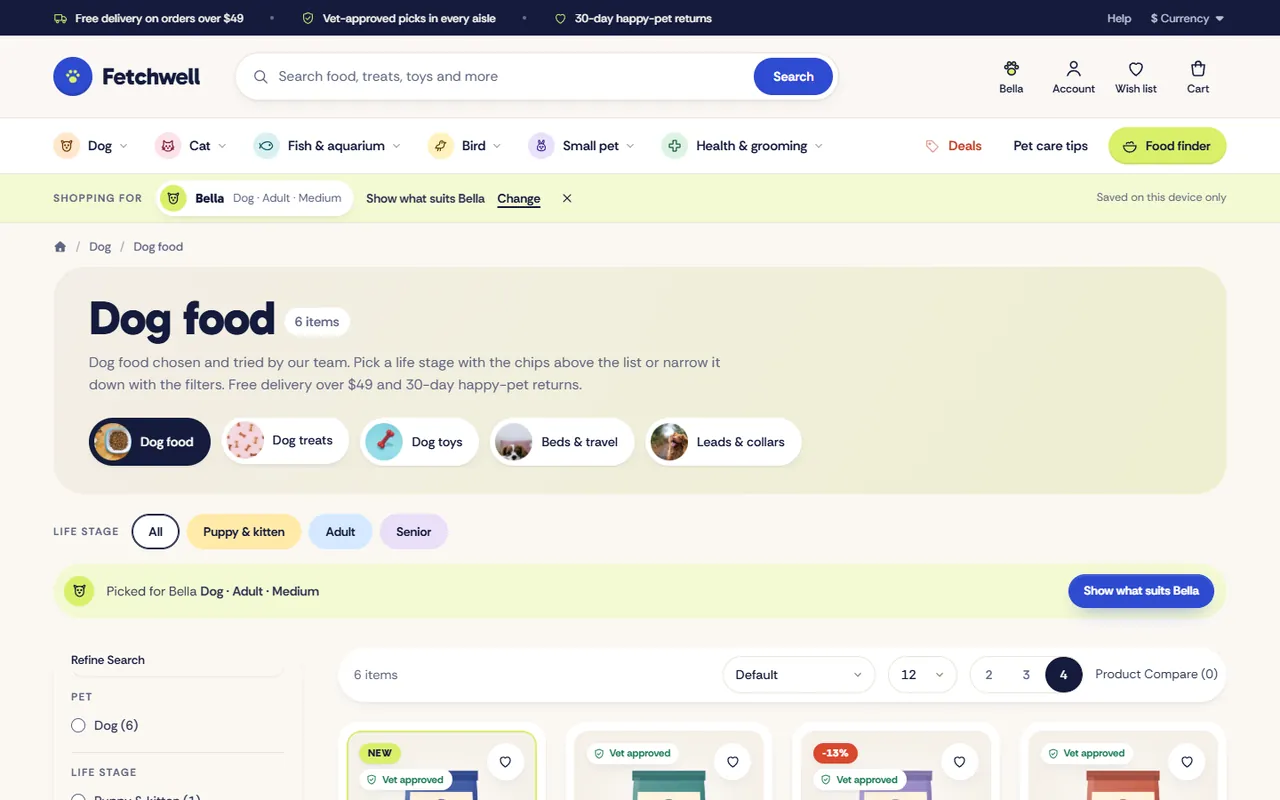
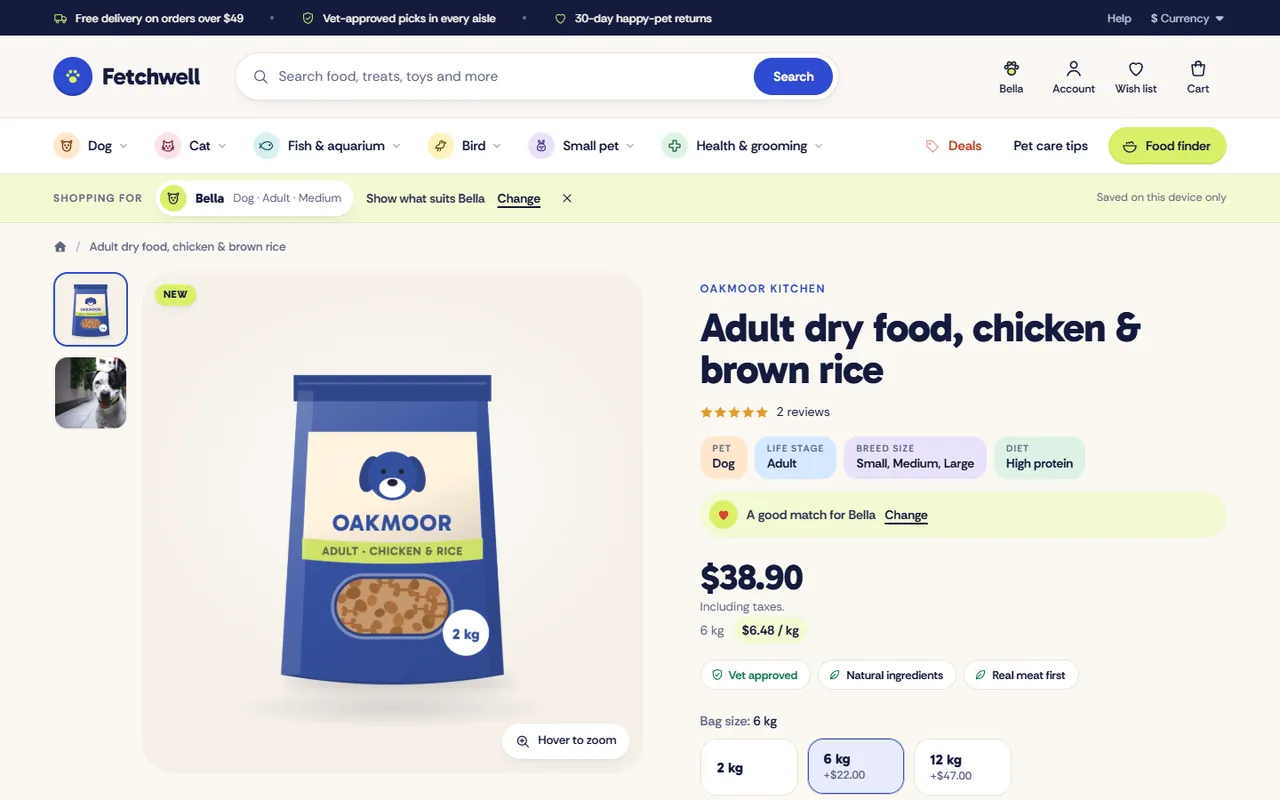
Premium pet supplies store theme for OpenCart 4.x and 3.0.x: a photo hero in pet-door arches, shop by pet, a food finder with My pets and Good for lines on every card, rich cards with hover image, quick view and one-tap add, bag sizes with a live price per kg, a mega menu with photos and a starter kit builder. Four presets, no core changes.
Premium pet supplies store theme for OpenCart 4.x and 3.0.x: a photo hero in pet-door arches, shop by pet, a food finder with My pets and Good for lines on every card, rich cards with hover image, quick view and one-tap add, bag sizes with a live price per kg, a mega menu with photos and a starter kit builder. Four presets, no core changes.
OpenCart 4.0.2.0 - 4.1.0.4, 3.0.x
Fetch is a premium, conversion-first storefront theme for pet shops and pet supply stores on OpenCart 4.x and 3.0.x by Kavio Labs. It is built for shoppers who buy for someone at home: they shop by pet first, then by life stage, size and diet, and they want to see in a second whether a food or a bed suits their dog or cat.
On a phone the menu becomes a slide-in drawer, a bottom bar gives Home, Shop, Search, Saved and Cart, cards get a round add button and the product gallery swipes.
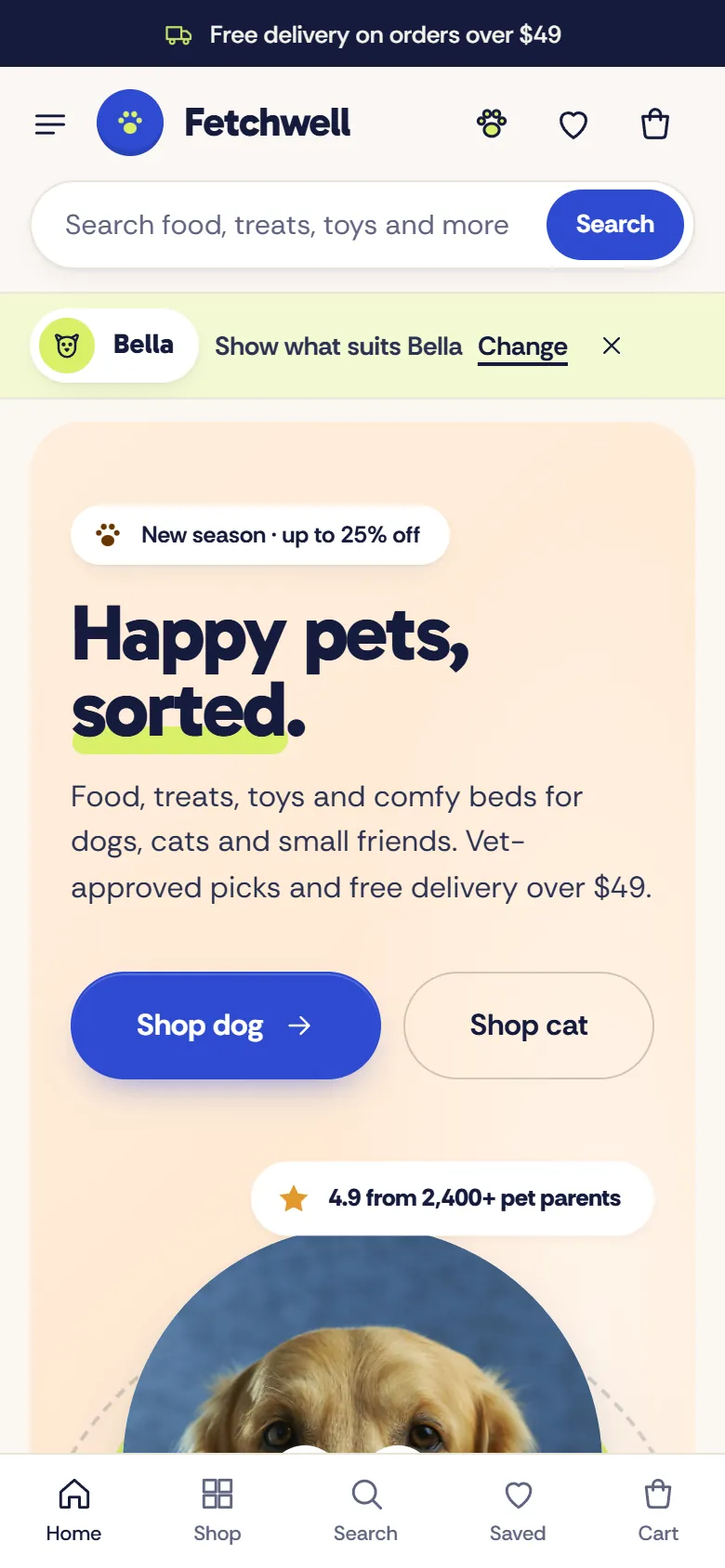
Other extensions keep working: Fetch keeps the core ids of the product form and the mini cart. Extensions that add buttons to the product page appear under Add to cart. Fetch reads standard OpenCart data only (categories, filters, attributes, options, specials, related products) and never writes to your database.
| OpenCart 4.0.2.0 to 4.1.x | OpenCart 3.0.3.x to 3.0.5.x | |
|---|---|---|
| Package | kv_theme_fetch.ocmod.zip | kv_theme_fetch-oc3.ocmod.zip |
| Framework | Bootstrap 5 | Bootstrap 3 |
| Fetch templates | header, footer, home, mini cart, product card, category, product page | header, footer, home, mini cart, product card, category, product page, search, specials, brand page |
One licence covers both packages. The first 14 days are a trial. Without a valid licence the store keeps working and the theme settings page shows a reminder.
kv_theme_fetch.ocmod.zip. Click Install (the green + button) next to it.OpenCart 4 has no theme folders. Fetch is a theme extension: it swaps in its own templates while it is the store theme and switched on. Switch the store back to Default to return to the stock look at any time. The settings page tells you whether Fetch is the active theme.
Recommended image sizes (System > Settings > Image): product card 600 x 600, product page 900 x 900, popup 1200 x 1200, cart 120 x 120. Square product images on a plain or transparent background look best on the soft image wells.
kv_theme_fetch-oc3.ocmod.zip.On OpenCart 3 the image sizes and the number of products per page for the theme are on the Listing & images tab of the theme settings.
Fetch reads your normal catalogue data. Before you start:
2 kg or 400 g gives the price per kg (or per 100 g) on cards and the product page.2 kg, 6 kg, 12 kg and their price changes shows as chips on the product page; choosing one updates the price and the price per kg. Cards list the first three sizes.Vet approved, Grain free, Real meat first. Cards show the first badge, the product page all of them.Upload the new package the same way and refresh modifications on OpenCart 3. Your settings are kept in the store settings.
Switch the store theme back to Default, then uninstall Fetch from Extensions > Extensions > Themes.
Open Extensions > Extensions > Themes > Fetch > Edit. Every storefront text you can change is on one of these tabs. A section that is switched off or has an empty title is not shown.
*stars* to set it in the accent colour (Fetchwell *Pet*).| (default Pet|Life stage|Breed size|Diet). The finder, My pets, the life stage bar on category pages and the made-for chips on product pages read these groups. Empty turns them off.How the finder works: the filter list is embedded in the page, so choosing is instant. Show matches opens the category whose name matches the chosen pet (for example Dog) filtered by the chosen life stage. Cards whose filters match every choice say Good for <name>; groups a product has no filters in (a fish food has no breed size) do not count against it.
Three announcement messages (they rotate on phones and tablets), the number of categories in the menu, an optional Brands panel, the Deals link, an optional second link (for example Pet care tips), the search placeholder, the account band, the footer text and help card, and the payment chips (plain text, no logos).
*stars* mark the highlighted word), label, text, a portrait photo (about 1100 x 1300), two buttons with links, a sticker product id and a background tint (apricot, rose, aqua, butter, lilac, mint). An empty title and photo hide the slide.Shop by pet, the promise row, product tabs, two promo banners (photo, label, title, text, button, link), shop by need tiles, three life stage cards (title, text, link, square photo), the deals band, little treats, the starter kit builder (2 to 6 product ids and a photo), brands, pet care tips (three cards with photos) and reviews.
42, 57. Empty fields use an automatic source: orders then views for best sellers, the newest products, products on special for the deals band, the newest products under the maximum price for little treats.20 or 20_27), an information page as i:<id>, or a URL. Tip: link a life stage card to its category with the filter, for example index.php?route=product/category&path=20&filter=12.;. Grain free is a search for the words; Grain free|20_27 or Grain free|i:5 or Grain free|https://... link to a category, page or URL. The icon follows the words (grain, stomach, dental, joint, puppy, senior, grooming, training, vet).Bag size, Size, Pack size, Dog weight) and Colour option names.Products per page and the image sizes. On OpenCart 4 these are in System > Settings > Image. Fetch shows products on square wells: 600 x 600 on cards and 900 x 900 on the product page work well.
From four filter groups (default names Pet, Life stage, Breed size and Diet) that you assign to products under Links > Filters. Fetch stores nothing of its own and never writes to your database.
None of the filter groups named on the Pets & food finder tab exists, or they have no filters. Check the names (they are not case sensitive).
No. It is stored in the visitor's browser (local storage) and only used to mark matching cards and to build links. Your server never sees it, so cached pages stay the same for every visitor.
OpenCart's category filter returns products that have any of the chosen filters (OpenCart 4.1 can be switched to "all" in the store settings, OpenCart 3 always uses "any"). Fetch filters by the life stage only and marks the cards that match every choice with Good for <name>.
Add an attribute "Net weight" (for example 2 kg) to the product. For bag sizes, name the option values with the weight (6 kg) so the product page can show the price per kg of each size.
It uses the first additional image of the product. Products without one keep the first image. Touch screens never show the hover image.
Yes. Slides take any image path below image/; shop by pet uses the category image. Portrait photos about 4:5 fit the arches best; landscape photos are cropped to the centre.
It is switched off on the General tab, or the browser blocks the request (then the button opens the product page).
Yes. It keeps the core product form and mini cart ids, and buttons that other extensions add to the product page appear under Add to cart.
None. The demo store in the screenshots (Fetchwell Pet Supply, fictional) uses generated packshots of invented brands and licensed stock photos that are not part of the package.
Buy with confidence
Every release is installed and run on these versions before it ships.
Updates and support are included in the price. The product keeps working afterwards; renewing is optional.
How licensing worksIf it is not what you expected, tell us within 30 days and we refund the order.
Refund policyCard payments are processed by Stripe. Your card number never reaches our server.
Ask a pre-sales questionSold by Kavio Labs Software Limited, registered in England and Wales No. 17532441. About us
More for OpenCart
Sell products by weight, length, area or volume with decimal quantities, unit prices, step/min/max and a live price on the product page.
Shoppers propose a price; the store accepts, declines or counters, and the agreed price is enforced in the cart once.
Buy X get Y, tiered cart discounts, free gifts and scheduled rules on top of OpenCart specials and coupons.

