Builds structured FA(3) invoices from OpenCart orders, checks them against the official schema of the Ministry of Finance and sends them to KSeF through the KSeF API 2.0 with your own NIP and KSeF token or certificate, then stores the KSeF number, the UPO receipt and the verification QR code. Correction invoices (KOR), a send queue with offline mode run by the OpenCart cron, incoming purchase invoices, split payment mark and GTU codes, a KSeF panel on the order page and an invoice card with printable view and XML on the customer order page. One seller NIP, one store, invoices built on net prices. OpenCart 4, events only, no OCMOD.
Tested on 4.1.0.4Updated Nov 6, 2026Version 1.0.0Compatible with OpenCart 4.1.0.4 No core file edits
Built forOpenCart
Every KSeF invoice, one clear list1 of 6
What it does
Builds structured FA(3) invoices from OpenCart orders, checks them against the official schema of the Ministry of Finance and sends them to KSeF through the KSeF API 2.0 with your own NIP and KSeF token or certificate, then stores the KSeF number, the UPO receipt and the verification QR code. Correction invoices (KOR), a send queue with offline mode run by the OpenCart cron, incoming purchase invoices, split payment mark and GTU codes, a KSeF panel on the order page and an invoice card with printable view and XML on the customer order page. One seller NIP, one store, invoices built on net prices. OpenCart 4, events only, no OCMOD.
What it changes for your store
KSeF invoicing from your OpenCart orders. KSeF, the National e-Invoicing System, is mandatory for Polish VAT payers: for large taxpayers since February 2026, for most others since April 2026 and for the smallest businesses from January 2027. Invoices must reach KSeF as structured FA(3) files. This extension is for OpenCart stores registered for VAT in Poland. You connect with your own NIP and KSeF token or certificate; there is no intermediary service and no per-invoice fee.
Know the limits. One seller NIP and one store. OpenCart prices are without tax, so invoices are built on net values; shipping and fees get the VAT rate of the dominant product line. The extension prepares and sends invoices with the data and settings you provide; it is not tax or legal advice.
Features
No retyping, no separate invoicing tool
The invoice is created when the order reaches the statuses you choose, or with one click on the order page
Every file is validated against the official FA(3) XSD before it leaves the store
The KSeF number, the UPO receipt and the QR code are kept for you and your customer
When KSeF is down, invoices wait in a queue with their deadline and go out automatically
FA(3) invoices
Buyer NIP, EU VAT ID or other tax ID from a checkout field the extension adds
VAT rates 23, 8, 5 and 0 %, exempt, reverse charge, intra-EU supply, export and OSS
Shipping and fee lines, paid or due date, bank account, KRS / REGON / BDO footer
Split payment mark for Annex 15 goods and GTU codes per product
Test, Demo and Production environments
KSeF API 2.0
Login with a KSeF token or a certificate (XAdES signature), tokens stored encrypted
Send, status polling, UPO download and verification QR code (KOD I)
Correction invoices (KOR) with lines before and after, full or partial, or automatic at a status
Incoming purchase invoices for your NIP with XML download
Admin and customers
KSeF panel on the order page and an invoices list with status tiles
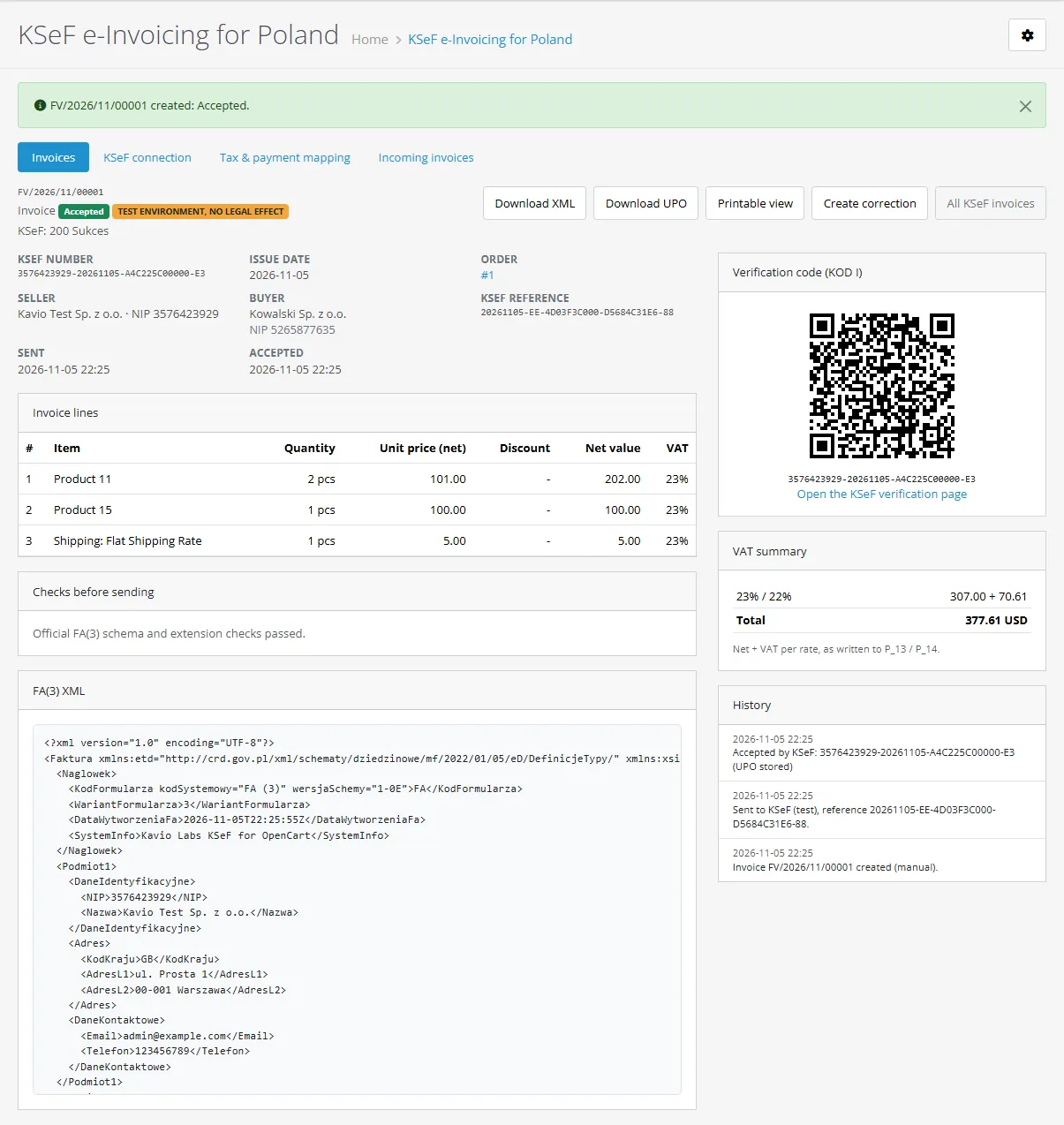
Document page with QR code, checks, history and XML; printable view
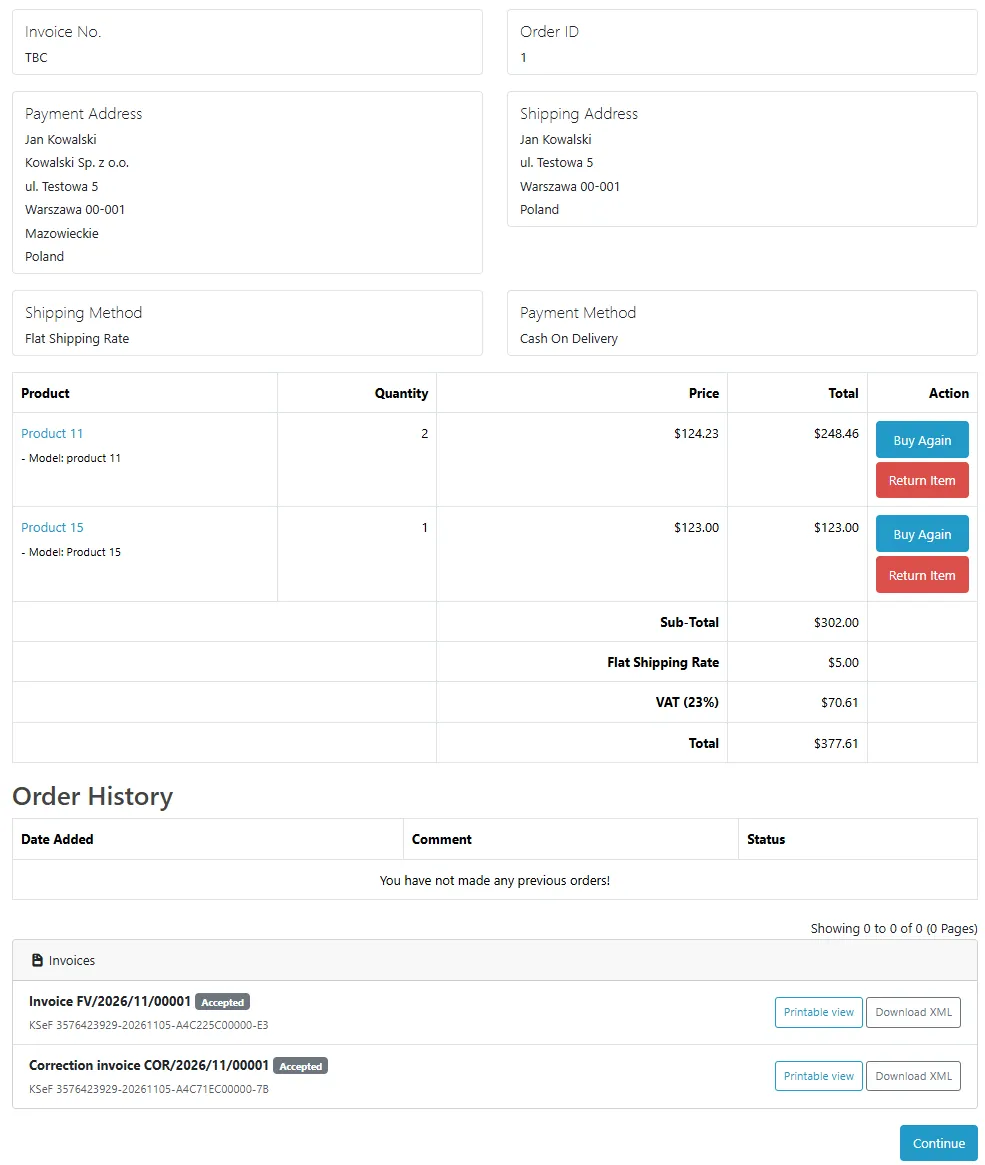
Customer order page with the KSeF number, QR code, printable view and XML
Events only, no OCMOD, no core edits; OpenCart 4, tested on 4.1.0.4
What you get
Download & installOne installer package (.ocmod.zip) for OpenCart 4.0.2 – 4.1.x. There is no OpenCart 3 edition. Download it from My licenses right after payment.
12 months of updates & supportNew versions and help for 12 months (24 or 36 months at checkout). After that the extension keeps working; renew anytime at 50%.
License for your storeOne production domain with all its subdomains; staging and local development hosts are free. How licensing works
30-day refundFull refund within 30 days of your first purchase, no reason needed. Refund policy
Tested buildsOpenCart 4.1.0.4. Tested on OpenCart 4.1.0.4.
Documentation & supportFull guide (Installation, Configuration, Usage, FAQ) on this page. Tickets from your account, first reply within 1 business day.
Compatibility
KSeF e-Invoicing for Poland works with OpenCart 4.1.0.4.
We list the builds we install and test on. “Tested” means the test plan ran on that build; “Supported” means the build is inside the supported range.
Compatibility
Version
Range
Runs on
Status
OpenCart 4.1.0.x
4.1.0.0 – 4.1.0.4
PHP 8.1 – 8.3
Tested on 4.1.0.4
OpenCart 4.0.2.x
4.0.2.0 – 4.0.2.3
PHP 8.0 – 8.2
Supported
1.0.0
Nov 6, 2026
Latest
First release: FA(3) invoices built from OpenCart orders (buyer NIP, EU VAT ID or other tax ID; VAT rates 23, 8, 5 and 0 %, exempt, reverse charge, intra-EU supply, export and OSS; shipping and fee lines), validated against the official FA(3) schema before sending; KSeF API 2.0 login with a KSeF token or a certificate; KSeF numbers, UPO receipts and verification QR codes; correction invoices (KOR), full or partial, with an automatic option; send queue with offline mode run by OpenCart's cron; incoming purchase invoices; split payment mark and GTU codes per product; tax and payment mapping; KSeF panel on the order page; customer order page card with printable view and XML; buyer tax ID field created at install. OpenCart 4.1.x (tested on 4.1.0.4).
How do I install the extension?
Upload. Extensions > Installer: upload the .ocmod.zip. It is for OpenCart 4 (4.0.2 to 4.1.x).
Install and enable. Extensions > Extensions > Modules: install, open the settings and switch it on. Events register themselves; nothing is patched.
Enter the license key. Paste the key from My licenses. Subdomains, staging and local hosts are included; you have 14 days to do it.
OpenCart 4.1.0.4. Tested on OpenCart 4.1.0.4. The Compatibility tab lists every version range.
Do the extensions change core files?
No. They work through OpenCart events and standard extension types (modules, order totals, themes). No core file edits, no OCMOD patches, no theme template edits, so OpenCart updates and other extensions keep working.
What does the license cover?
One production store domain with every subdomain (www, shop., staging.), plus local development hosts such as localhost, *.local and *.test. A store on another domain needs its own license; a second-store license is 40% off. You have 14 days after installing to enter the key. 12 months of updates and support are included; after that the extension keeps working and renewals are 50% off. How licensing works
Can I get a refund?
Yes. Ask for a full refund within 30 days of your first purchase, no reason needed: open a ticket or write to [email protected] with your order number. The money goes back to the card or bank account you paid with within 5 business days of approval. Refund policy
How do I get help?
Open a ticket from your account, so your license details are attached. We answer Monday to Friday: bug reports within 1 business day, how-to questions within 2. Support policy. Not a customer yet? Ask a pre-sales question.
KSeF e-Invoicing for Poland creates structured invoices in the official FA(3) format from your OpenCart orders and sends them to KSeF, the National e-Invoicing System of the Polish Ministry of Finance, through the KSeF API 2.0. You connect with your own NIP and your own KSeF token or certificate; there is no intermediary service and no extra fee.
The extension stores the KSeF number of every invoice, downloads the official receipt (UPO), shows the verification QR code (KOD I) to you and your customers, keeps invoices that cannot be sent right away in a queue, and creates correction invoices when goods come back.
What it does
FA(3) invoices from orders. Built from the order: buyer NIP, EU VAT ID or other tax ID, lines with VAT rates 23, 8, 5 and 0 %, exempt (zw), reverse charge (oo, np II), intra-Community supply (0 WDT), export (0 EX) and OSS rates of other EU countries, shipping and fee lines, paid or due date, bank account, order number, KRS / REGON / BDO footer.
Checked before sending. Every file is validated against the official FA(3) XSD of the Ministry of Finance, which ships with the extension, plus checks of your NIP, the buyer NIP checksum, the exemption basis and the totals.
Sent through the KSeF API 2.0. Login with a KSeF token or with a certificate (KSeF certificate or qualified electronic seal), encrypted interactive session, status polling, UPO download. Test, Demo and Production environments.
Corrections. Correction invoices (KOR) with the lines before and after the change, the reference to the original KSeF number and your reason. Full corrections automatically at order statuses you choose, partial ones from a form.
Queue. Invoices created when an order reaches a status wait in a queue that the OpenCart cron sends, so checkout is never slowed down. Invoices created on the order page are sent at once. When KSeF cannot be reached the invoice keeps its number, gets the offline mark and its send deadline.
Customers. The order page in the customer account shows the KSeF number, a printable view with the verification QR code and the XML.
Incoming invoices. A list of purchase invoices your suppliers sent to KSeF for your NIP, with XML download.
Buyer tax ID field. A custom field "Company tax ID (NIP / VAT ID)" is added to the address form and checkout.
Events only, no OCMOD, no core edits.
KSeF invoices
Limits to know
One seller NIP. One KSeF connection per store. There is no per-vendor or multi-company mode.
Net-price invoices. OpenCart stores product prices without tax and adds tax at the end, so the invoice is built on net values with the VAT rate of each line. Shipping and fees get the VAT rate of the dominant product line.
Single store. One OpenCart store (the default store); multi-store setups share one connection and one numbering.
Currency. The invoice is in your default store currency. When that is not PLN, VAT amounts in PLN use the PLN rate from your OpenCart currencies.
OpenCart 4.1.x only (tested on 4.1.0.4). There is no OpenCart 3 edition.
7.4 or newer (tested on 8.1 and 8.3) with OpenSSL, cURL and DOM
KSeF
KSeF API 2.0, schema FA(3) version 1-0E; environments Test, Demo, Production
The extension prepares and sends invoices in the published FA(3) format with the credentials and data you provide. It is not tax or legal advice: which invoices you must issue in KSeF, the VAT rates and the exemption basis depend on your business. Ask your tax advisor when in doubt.
Installation
Requirements
OpenCart 4.1.x (tested on 4.1.0.4).
PHP 7.4 or newer with the OpenSSL, cURL and DOM extensions (standard on OpenCart hosting). The server must reach api.ksef.mf.gov.pl (and api-test.ksef.mf.gov.pl / api-demo.ksef.mf.gov.pl for testing) over HTTPS.
A KSeF token or a KSeF certificate / qualified electronic seal for your NIP. You create the token yourself in the KSeF taxpayer application of the Ministry of Finance. Using KSeF is free of charge.
OpenCart's cron running (see below) so that queued invoices are sent.
Install
Go to Extensions > Installer and upload kv_ksef.ocmod.zip.
Press the install button next to KSeF e-Invoicing for Poland.
Go to Extensions > Extensions, choose Modules and install KSeF e-Invoicing for Poland (the plus button). Installation creates the tables, the events, the cron entry, the access rights for your admin group and the buyer tax ID field.
Open Sales > KSeF invoices > KSeF connection, enter your NIP, choose the environment (start with Test) and paste your KSeF token. Press Save and test connection.
Open Tax & payment mapping and check the rate code of each tax. Polish VAT rates (23, 8, 5 %) are recognised automatically.
Open the module settings (Extensions > Modules > KSeF e-Invoicing for Poland, the edit button) to choose the order statuses that create invoices and to enter your license key.
Other user groups need access and modify rights for extension/kv_ksef/invoice/ksef under System > Users > User Groups.
On install the extension adds an optional custom field Company tax ID (NIP / VAT ID) to the address form and the checkout. Edit its name, customer groups and order in Customers > Custom Fields.
Cron
Invoices created on the order page are sent at once. Invoices created when an order reaches a status wait in the queue so that checkout is never slowed down. The queue is sent by OpenCart's own cron (the extension registers an hourly job in Extensions > Cron Jobs), which needs the standard OpenCart cron line on your server, for example every 10 minutes:
*/10 * * * * php /path/to/store/cron.php
(The settings page shows the exact line for your store.) As an alternative, call the cron URL shown on the settings page, with its secret key, from any scheduler: index.php?route=extension/kv_ksef/invoice/ksef.cron&key=KEY. You can also press Send queue now on the KSeF invoices page.
Updating
Upload the new package the same way. Settings, connection data and documents stay; tables and settings are brought up to date.
Disabling and uninstalling
Set the module Status to off to stop creating new invoices. Queued invoices are not lost.
Uninstall removes the events, the cron entry, the settings, the access rights and the buyer tax ID field. The invoice tables (documents, UPO receipts, numbering, log) are kept on purpose: they are tax records. KSeF also keeps your invoices, and you can download them from the taxpayer application.
Configuration
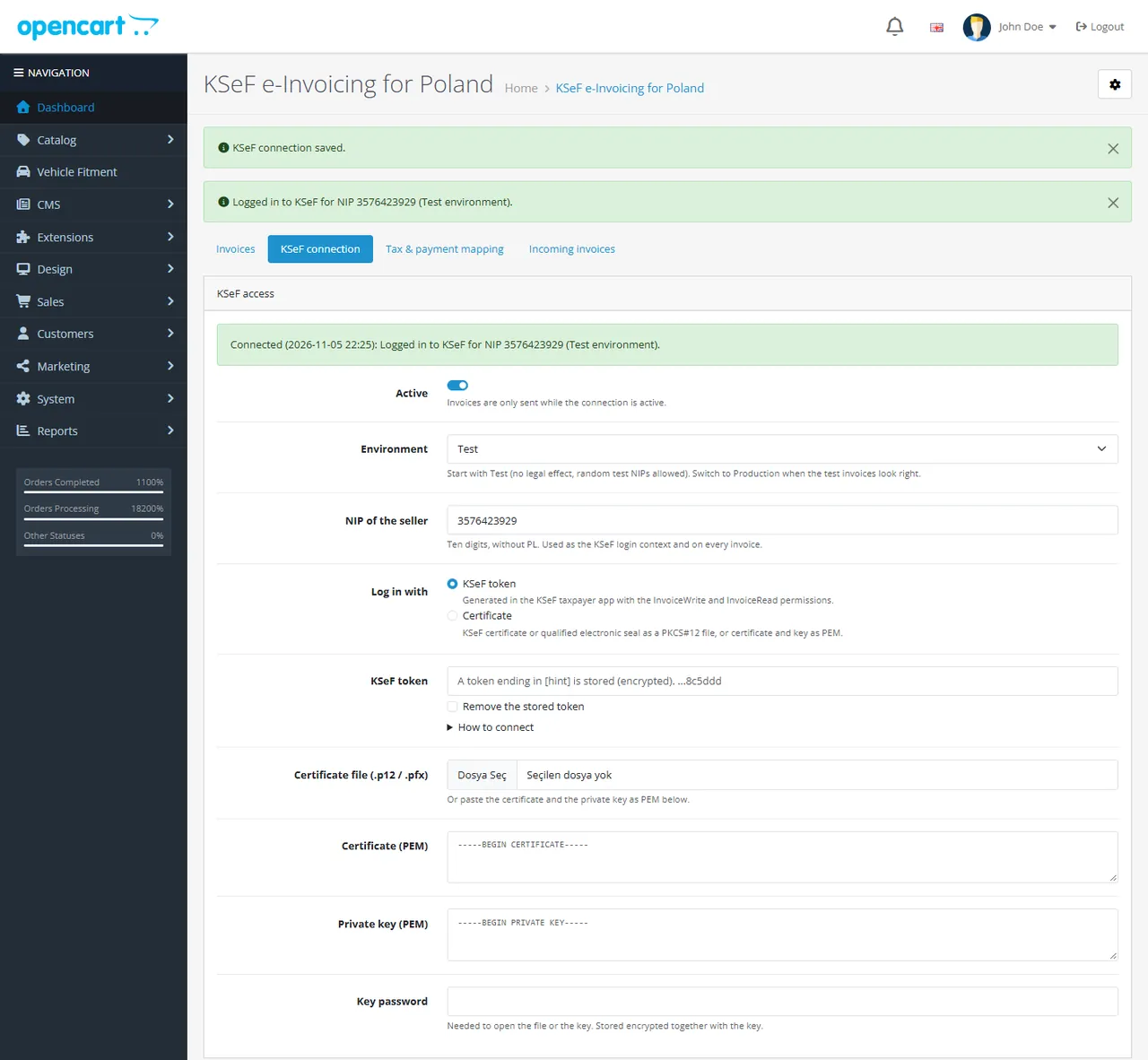
KSeF connection
Sales > KSeF invoices > KSeF connection
KSeF connection
Field
Meaning
Active
Invoices are only sent while the connection is active.
Environment
Test (no legal effect; any test NIP), Demo (pre-production, same rules as production) or Production. Start with Test, check a few invoices, then switch.
NIP of the seller
Ten digits without PL. It is the KSeF login context and the seller NIP (Podmiot1) on every invoice.
Log in with
KSeF token (recommended) or Certificate.
KSeF token
Created in the KSeF taxpayer application with the permissions to issue (InvoiceWrite) and view (InvoiceRead) invoices. Stored encrypted; the page only shows its last characters.
Certificate
A KSeF certificate or a qualified electronic seal for your NIP as a .p12 / .pfx file with its password, or the certificate and the private key as PEM. Stored encrypted. The extension signs the KSeF login request with it (XAdES).
Seller data
Full name, address, place of issue, e-mail, phone, bank account, bank name, SWIFT, KRS, REGON, BDO and a footer text, printed on every invoice. Empty fields are filled from your store settings when the connection is first opened.
Save and test connection logs in to KSeF and shows the result. The last result is also shown on the KSeF invoices list.
How to get a KSeF token
Log in to the KSeF taxpayer application of the Ministry of Finance (test or production, matching the environment).
Generate a token for your NIP with the permissions InvoiceWrite and InvoiceRead.
Paste it in the extension with your NIP and test the connection.
The token is a secret: anyone with it can issue invoices in your name. Revoke it in the taxpayer application if it leaks.
Off: no new invoices; queued invoices are still sent.
Create an invoice when the order reaches
Processing, Complete
The invoice is created once per order at the first of these statuses.
Create a full correction when the order reaches
none
For example Canceled or Refunded.
The invoice shows "paid" for orders in
Processing, Shipped, Complete
Such invoices show the payment date; other orders get a due date and your bank account.
Invoice orders without a buyer tax ID (B2C)
off
Off: only orders with a NIP or VAT ID get a KSeF invoice. On: consumer orders too (buyer without tax ID).
Sending
Instant
Instant: invoices created on the order page are sent at once. Orders that reach a status always go through the queue. Queue: everything through the queue.
Customers can download their invoice
on
KSeF number, printable view and XML on the customer's order page.
Numbering
Setting
Default
Meaning
Invoice number format
INV/{YYYY}/{MM}/{N}
Tokens {YYYY} {YY} {MM} {DD} {N}. KSeF rejects a second invoice with the same number for your NIP.
Correction format
COR/{YYYY}/{MM}/{N}
Digits / restart
5, every year
Restart the counter every year, every month or never. Counters are gapless.
Invoice content
Setting
Default
Meaning
Default unit / shipping line / fee line
pcs / Shipping / Payment surcharge
Unit text (P_8A), for example szt., and the names of the shipping and fee lines.
Required when you sell exempt (zw) items: the provision of the VAT Act, of the directive, or another legal basis, with its text.
Correction type
2
Effect of correction invoices (TypKorekty).
Queue (cron)
The settings page shows the cron line and the secret cron URL; see Installation.
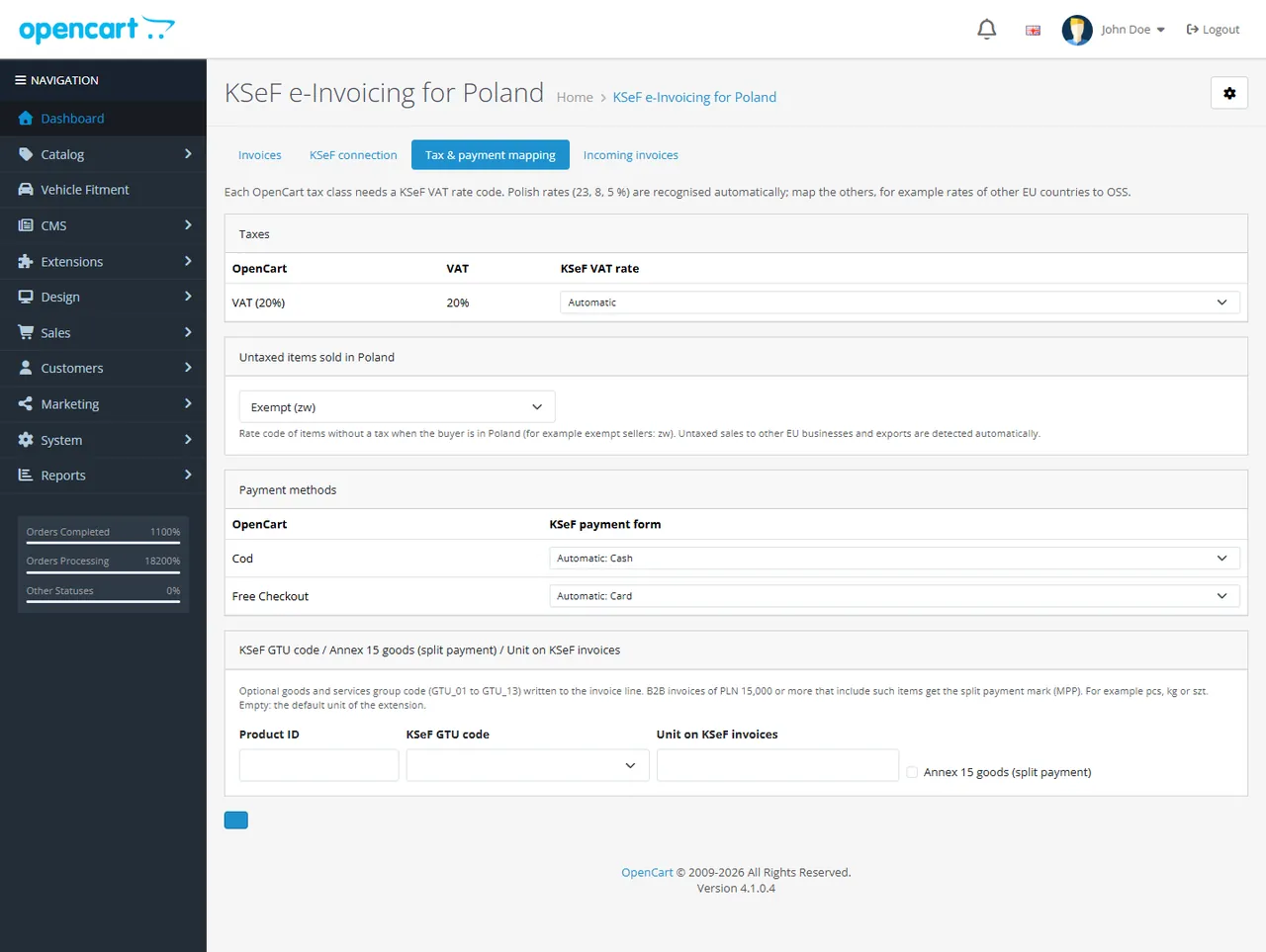
Tax and payment mapping
Sales > KSeF invoices > Tax & payment mapping
Tax and payment mapping
Taxes: each tax rate of your OpenCart tax rules gets a KSeF VAT rate code. Rates of 23, 22, 8, 7, 5, 4 and 3 % are recognised automatically; map other rates, for example 19 % of another EU country to OSS (B2C distance sales under the One-Stop-Shop procedure: the extension writes the rate of the buyer country and the procedure mark WSTO_EE).
Untaxed items sold in Poland: the rate code of items without tax when the buyer is in Poland (default: exempt, zw). Untaxed sales to EU businesses with a VAT ID and exports outside the EU are detected from the buyer's country.
Payment methods: each payment method gets a KSeF payment form (cash, card, voucher, cheque, credit, bank transfer, mobile). Common methods are recognised automatically.
Product codes: pick a product to give it a GTU code (GTU_01 to GTU_13, written to the invoice line), the Annex 15 goods (split payment) mark and its own unit. B2B invoices of PLN 15,000 or more with Annex 15 goods get the split payment mark (MPP).
Net-price invoices and VAT
OpenCart stores product prices without tax and adds tax from your tax rules at the end of the order. The KSeF invoice is therefore built on net values: each line carries its net unit price and a VAT rate. Shipping and fee lines get the VAT rate of the dominant product line (the rate with the largest net value). If your orders mix several rates, check the first invoices against the order totals.
Currency
Invoices are issued in your default store currency. When that is not PLN, the extension adds the VAT amounts in PLN using the PLN rate of your OpenCart currencies. Polish law requires a specific exchange rate (generally the NBP rate of the last business day before the tax point): keep your PLN rate up to date or ask your tax advisor.
License
The extension checks its license against your domain. A 14-day trial runs without a key. Without a valid license (after the trial):
No new KSeF invoices or corrections are created. Invoices already created keep being sent to KSeF, and their KSeF numbers, UPO receipts and verification codes stay available. The admin pages are never blocked.
The license card on the module settings page shows the status, the licensed domain and when updates end; Check now repeats the check. Development hosts (localhost, .test, .local) work with a valid key. The check runs from the admin panel at most once a day and has no effect on the storefront speed.
Usage
How a KSeF invoice is made
An order reaches one of the issue statuses (default Processing or Complete), or you press Create KSeF invoice on the KSeF panel of the order page.
The extension builds the FA(3) invoice from the order, gives it the next number and checks it against the official FA(3) schema and its own rules.
The invoice is sent to KSeF: at once when you created it on the order page, otherwise by the queue (cron or Send queue now).
KSeF assigns the KSeF number. The extension stores it with the official receipt (UPO) and builds the verification link and QR code (KOD I).
Orders without a buyer tax ID are skipped unless B2C invoicing is on. The buyer tax ID comes from the Company tax ID (NIP / VAT ID) field of the payment address. On the order page you can also create an invoice by hand for any order.
Statuses
Status
Meaning
Queued
Waiting to be sent. With the offline mark: KSeF could not be reached, the invoice is sent in offline mode by the next run; Send by shows the deadline (the next business day).
Waiting
The seller has no active KSeF connection yet, the KSeF login failed, or a correction waits for the KSeF number of its invoice. Sent automatically once the reason is gone.
Processing
Sent; KSeF has not assigned the number yet. The queue asks again.
Accepted
KSeF number and UPO stored.
Rejected
KSeF refused the invoice (the reason and code are shown, for example a duplicate number). Fix the data and press Rebuild from order.
Check failed
The invoice did not pass the checks and was not sent (for example an invalid buyer NIP). Fix the data and rebuild.
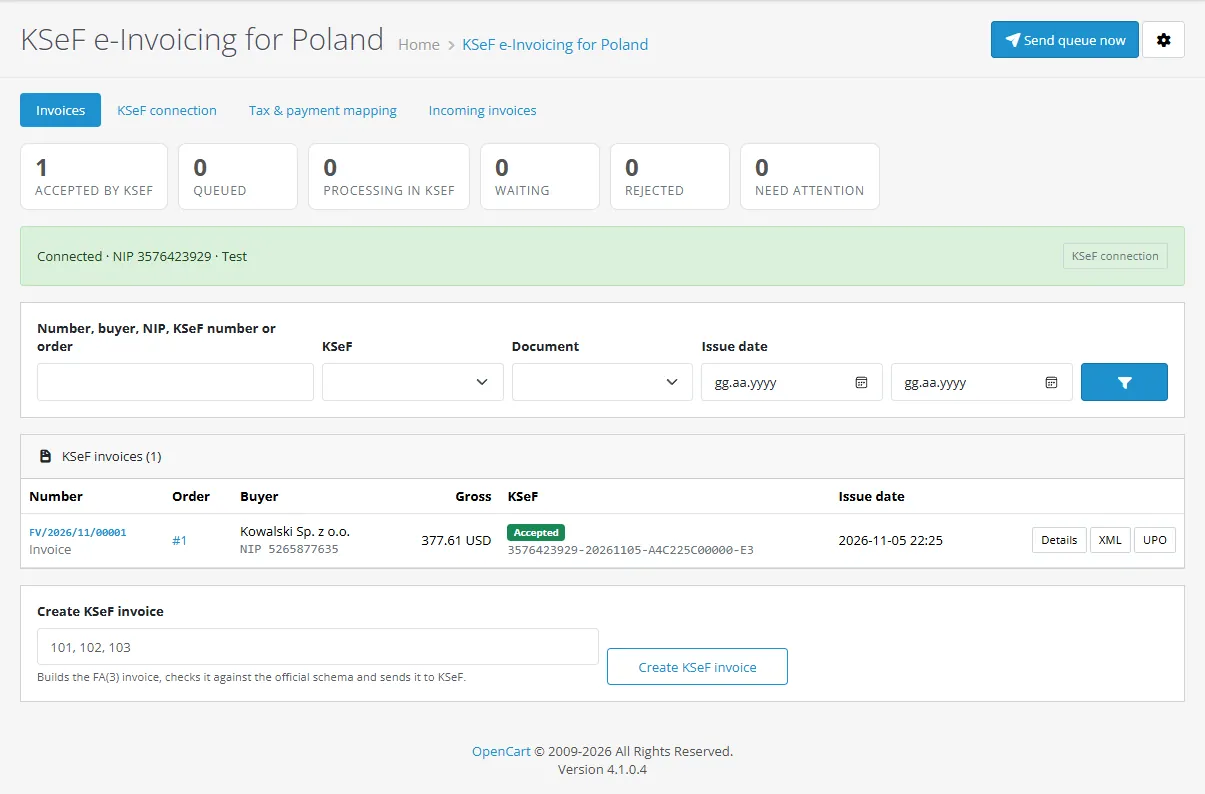
Sales > KSeF invoices
KSeF invoices
Tiles count the documents per status and filter the list. The connection card shows the seller NIP, the environment and the last connection result. Press Send queue now to send everything due. Search by number, buyer, NIP, KSeF number or order. A form at the bottom creates invoices for order numbers you type in.
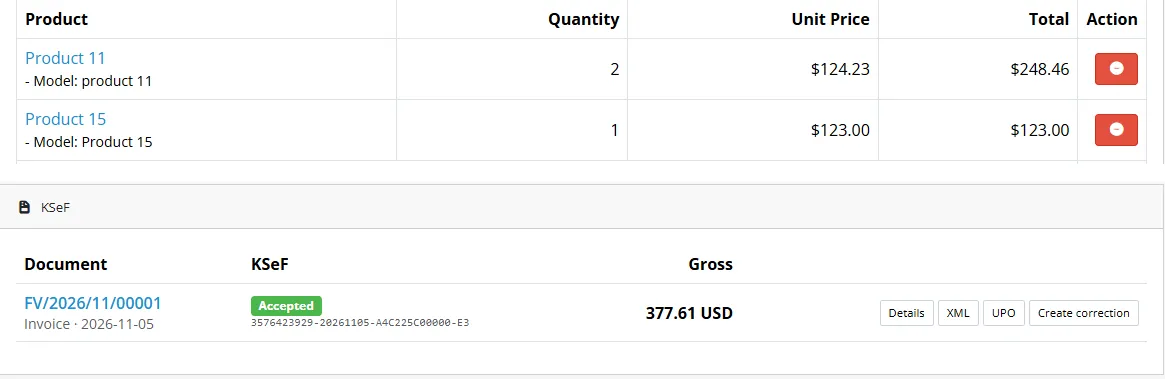
The order page
KSeF panel on the order page
Every order page has a KSeF panel: Create KSeF invoice when the order has none, otherwise its documents with status, KSeF number and gross total, and the buttons Details, XML, UPO and Create correction.
The document page
Document page
KSeF number, KSeF reference, sent and accepted times, the order and the buyer.
The verification QR code (KOD I) with the link to the KSeF verification page.
The invoice lines (net unit prices, discounts, VAT rates, GTU and Annex 15 marks), the VAT summary per rate, the checks, the history and the FA(3) XML.
Download XML, Download UPO, Printable view, Create correction, Send to KSeF now / Check KSeF status, Rebuild from order and Discard (only for documents KSeF never accepted).
Corrections
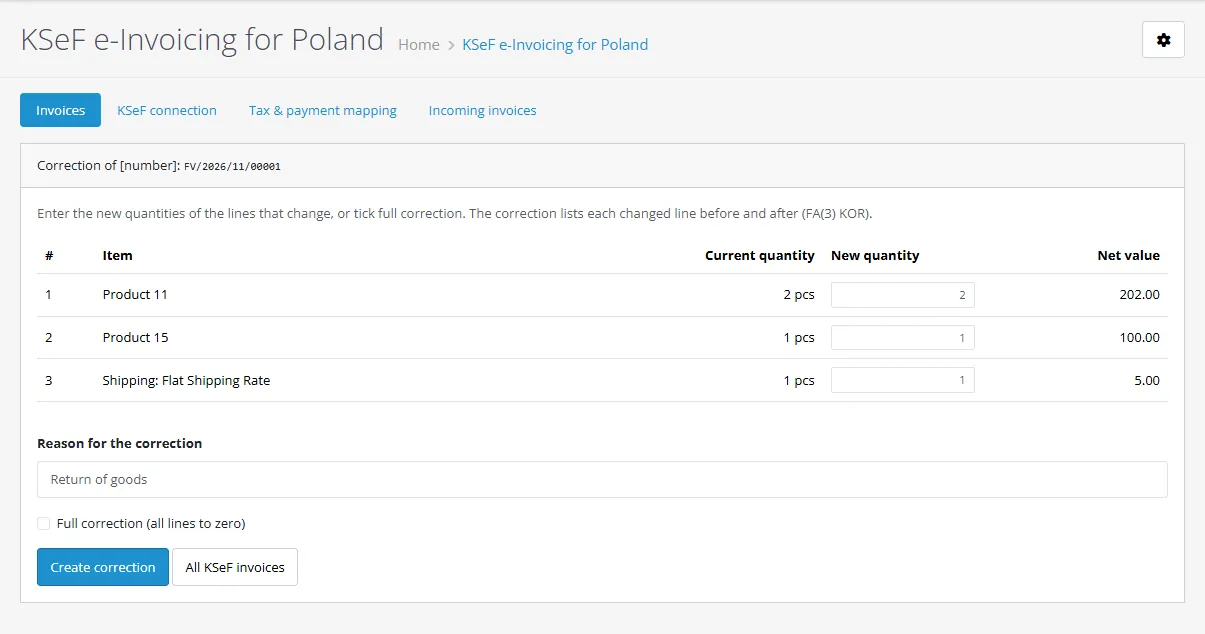
Correction
Create correction opens a form with the current lines of the invoice (after earlier corrections). Enter the new quantities of the lines that change, or tick Full correction, and give a reason. The correction invoice (FA(3) type KOR) lists each changed line before and after the change, refers to the KSeF number of the invoice and carries the difference as its total.
Full corrections are also created automatically when an order reaches a correction status (for example Canceled). A correction of an invoice that has no KSeF number yet waits and is sent right after it. The extension does not change the order or refund the payment.
Offline mode
When KSeF cannot be reached (network problem or an announced KSeF outage), the invoice keeps its number and issue date, gets the offline mark and its send deadline, and the queue retries with growing intervals. Invoices sent after their issue date are sent with the offline flag, as KSeF requires. The verification QR code shows OFFLINE until the KSeF number is assigned.
The extension cannot know about outages that the Ministry of Finance announces; check the KSeF communications for the deadlines that apply during a failure.
Incoming invoices
Sales > KSeF invoices > Incoming invoices lists the purchase invoices your suppliers sent to KSeF for your NIP (last 7 to 90 days) with their KSeF numbers and amounts, loaded from KSeF when you ask. Download XML gets the structured invoice. Nothing is stored in the store.
Customers
Customer order page
On the order page of the customer account (signed-in customers) the extension shows the KSeF invoices of the order with the KSeF number, a printable view with the verification QR code and the XML download. Customers never see documents of other orders, nor documents that KSeF did not accept.
FAQ
Do I need an account with a service provider?
No. The extension talks to the KSeF API of the Ministry of Finance directly, with your own NIP and your own KSeF token or certificate. Using KSeF is free.
Since when is KSeF mandatory?
According to the Ministry of Finance (ksef.podatki.gov.pl, "Etapy wdrozenia KSeF"): from 1 February 2026 for large taxpayers, from 1 April 2026 for the other VAT payers, and from 1 January 2027 also for the smallest businesses whose invoiced sales are up to PLN 10,000 a month. Rules on penalties and their start date may change; follow the Ministry's announcements and ask your tax advisor.
Which OpenCart versions are supported?
OpenCart 4.1.x, tested on 4.1.0.4. There is no OpenCart 3 edition.
Which orders get a KSeF invoice?
Orders with a buyer tax ID (Polish NIP, EU VAT ID or another tax ID) when they reach an issue status. Consumer orders (B2C) only when you switch on B2C invoicing. You can always create an invoice by hand on the order page.
Can I test before going live?
Yes. Choose the Test environment of KSeF: invoices there have no legal effect and you can use test NIPs. The Demo environment works like production for a final check. Switch to Production when your invoices look right. Documents show which environment they were sent to.
Which login should I use, token or certificate?
A KSeF token is the simplest: create it once in the KSeF taxpayer application and paste it in. A KSeF certificate or a qualified electronic seal works as well; the extension signs the login with it. Both are stored encrypted.
What does the extension check before sending?
Every invoice is validated against the official FA(3) XSD of the Ministry of Finance (included in the extension). It also checks your NIP, the buyer NIP checksum, the seller address, the exemption basis for exempt items, unknown tax rates and whether the invoice total matches the order. KSeF itself runs further checks and the extension shows its answer.
OpenCart prices are without tax. Are the invoice amounts right?
OpenCart stores prices without tax and adds the tax at the end, so the invoice is built on net values with the VAT rate of each line; the total should equal the order total. Shipping and fees get the VAT rate of the dominant product line. If your catalog mixes several VAT rates, compare the first invoices with the order totals and tell us if a case differs.
Can I issue invoices for more than one seller NIP?
No. The extension has one KSeF connection and one numbering per store. It is not a marketplace or multi-company solution.
Does it work with several stores in one OpenCart?
The extension is built for a single store. In a multi-store setup all orders use the same connection and numbering.
How are EU and export sales handled?
Untaxed sales to EU businesses with a VAT ID get 0 % intra-Community supply (or np II for services, as you set), exports outside the EU get 0 % export, OSS sales to EU consumers carry the rate of the buyer country with the WSTO_EE mark (map those taxes to OSS). Reverse charge sets the P_18 annotation.
What about split payment (MPP)?
Mark Annex 15 products on the mapping page (product codes). B2B invoices for Polish VAT payers of PLN 15,000 or more that include such products get the split payment mark. Your payment instructions remain your responsibility.
Can I change an invoice after KSeF accepted it?
No, KSeF invoices are final. Create a correction invoice instead. Invoices that KSeF rejected or that failed the checks can be rebuilt from the order with the same number.
What happens when KSeF is down?
The invoice keeps its number and date and waits in the queue with its send deadline; the queue sends it in offline mode as soon as KSeF answers. Keep OpenCart's cron running.
Can I get the invoices my suppliers sent me?
Yes, Incoming invoices lists them for your NIP and downloads their XML.
Is my KSeF token safe?
It is stored encrypted with a key derived from your store's own secret, never shown again (only its last characters) and never written to logs. Anyone with access to your server files and database could still use it, as with any stored credential: revoke the token in the taxpayer application if you suspect a leak.
Does it slow down checkout?
No. Orders that reach a status only queue their invoice; sending happens by cron or from the order page.
What happens if I uninstall it?
Events, settings, the cron entry and the buyer tax ID field are removed. The invoice tables stay in your database because they are tax records. KSeF keeps your invoices in any case.
What happens if the license lapses?
No new KSeF invoices or corrections are created. Invoices already created keep being sent to KSeF, and their KSeF numbers, UPO receipts and verification codes stay available. The admin pages are never blocked.
Does the extension work on my staging copy?
Yes. Development hosts (localhost, .test, .local) work with a valid key. Use the KSeF Test environment there so that no real invoices are sent from staging.
Is this legal or tax advice?
No. The extension creates and sends invoices in the published format with the data and settings you provide. You remain responsible for the content of your invoices.
Server-side tracking for OpenCart 4.x and 3.0.x: purchases, refunds, add to cart, checkout, product views and leads go from your server to the free official GA4 Measurement Protocol, Meta Conversions API and TikTok Events API, deduplicated with the browser pixels through shared event ids. Consent-aware, SHA-256 hashed customer data, order status mapping, queue with retries, test mode and an event log. No paid relay, events only, no OCMOD.
The department store theme for OpenCart 4.x and 3.0.x: colour-coded departments, a department list beside the hero slider with two side promos, a big search with a department selector, tabbed product blocks, a 2 + 1 + 2 offer grid, deals of the day with real countdowns, a department showcase, a promotions band and a three-column product page with a sticky buy box. Four styles (Meridian, Harbor, Citrus, Night) and your own colours on top. Events only, no core changes.
Stop AI crawlers, scrapers, vulnerability scanners and unwanted countries before OpenCart 4.x or 3.0.x builds a page. Googlebot and Bingbot are verified by DNS and always allowed; 50+ bots get one switch each; country rules use free GeoIP databases and can close only the checkout; IP and network lists, rate limits, honeypots and the cart flood fix; a one-second challenge instead of a captcha; learning mode, dashboard, log, IP tester and Cloudflare export. No core changes, no OCMOD.