1.0.0
Nov 6, 2026
Latest- First release: Skroutz XML feed for OpenCart 4.1.x with category mapping, availability from stock status, variants, per-product exclude, cached file behind a secret URL rebuilt by cron, and a self-check page.
by Kavio Labs · for OpenCart 4.1.x
Generates the Skroutz XML feed from your OpenCart catalogue: your own category mapping, availability from stock status, sizes as variations, colours as separate products, per-product exclude, a cached feed file rebuilt by the OpenCart cron behind a secret URL, and a self-check page that lists products with missing required fields (manufacturer, MPN or EAN, description, https links, images). Prices with VAT in euros, weight, specifications from attributes. One feed for the default store. OpenCart 4, events only, no OCMOD.
Generates the Skroutz XML feed from your OpenCart catalogue: your own category mapping, availability from stock status, sizes as variations, colours as separate products, per-product exclude, a cached feed file rebuilt by the OpenCart cron behind a secret URL, and a self-check page that lists products with missing required fields (manufacturer, MPN or EAN, description, https links, images). Prices with VAT in euros, weight, specifications from attributes. One feed for the default store. OpenCart 4, events only, no OCMOD.
Skroutz XML Feed works with OpenCart 4.1.0.4.
We list the builds we install and test on. “Tested” means the test plan ran on that build; “Supported” means the build is inside the supported range.
| Version | Range | Runs on | Status |
|---|---|---|---|
| OpenCart 4.1.0.x | 4.1.0.0 – 4.1.0.4 | PHP 8.1 – 8.3 | Tested on 4.1.0.4 |
| OpenCart 4.0.2.x | 4.0.2.0 – 4.0.2.3 | PHP 8.0 – 8.2 | Supported |
The Documentation tab covers the settings and every screen.
OpenCart 4.1.0.4. Tested on OpenCart 4.1.0.4. The Compatibility tab lists every version range.
No. They work through OpenCart events and standard extension types (modules, order totals, themes). No core file edits, no OCMOD patches, no theme template edits, so OpenCart updates and other extensions keep working.
One production store domain with every subdomain (www, shop., staging.), plus local development hosts such as localhost, *.local and *.test. A store on another domain needs its own license; a second-store license is 40% off. You have 14 days after installing to enter the key. 12 months of updates and support are included; after that the extension keeps working and renewals are 50% off. How licensing works
Yes. Ask for a full refund within 30 days of your first purchase, no reason needed: open a ticket or write to [email protected] with your order number. The money goes back to the card or bank account you paid with within 5 business days of approval. Refund policy
Open a ticket from your account, so your license details are attached. We answer Monday to Friday: bug reports within 1 business day, how-to questions within 2. Support policy. Not a customer yet? Ask a pre-sales question.
7 more answers about setup and daily use in the Documentation tab.
Skroutz XML Feed turns your OpenCart catalogue into the XML product feed that Skroutz (Greece and Cyprus) reads. You map your categories to the Skroutz category tree, say what each stock status means for availability, and give Skroutz one secret feed URL. The feed is a cached file that the OpenCart cron rebuilds, so Skroutz never slows your shop down.
What it does
<mywebstore> document with id, name, link, image, additionalimage, category, price_with_vat, vat, manufacturer, mpn, ean, availability, size, weight, color, description, quantity and specifications, as published in the Skroutz XML feed specification.<variation> entries with their own stock and price; colours become separate products, as the specification asks.kv_skroutz_feed.ocmod.zip, then press the install button.Other user groups need access and modify rights for extension/kv_skroutz_feed/module/kv_skroutz_feed under System > Users > User Groups.
The extension registers the job "Skroutz XML Feed" in System > Maintenance > Cron Jobs. It needs the standard OpenCart cron call on your server, for example every 15 minutes:
*/15 * * * * curl -s "https://your-shop.example/index.php?route=cron/cron" > /dev/null
The job rebuilds the file when it is older than the interval you set (default 6 hours). A server cron can also call the cron URL shown on the settings page. If nobody calls the cron, the feed URL rebuilds an outdated file when Skroutz asks for it.
Uninstalling removes the tables, the cron job, the events and the generated files. Your products and categories are not touched.
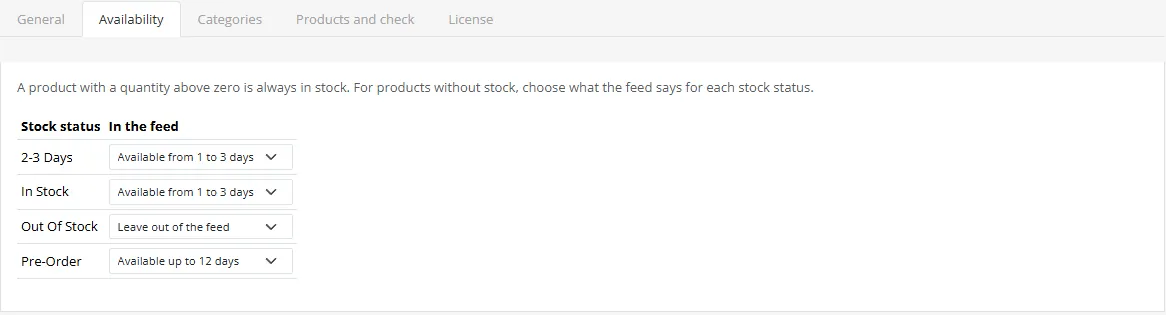
A product with a quantity above zero is "In Stock". For the others the feed says what you choose for the product's stock status: 1 to 3 days, 4 to 6 days, up to 12 days, or leave the product out. Variations use the Skroutz variation labels (4 to 10 days, up to 30 days).
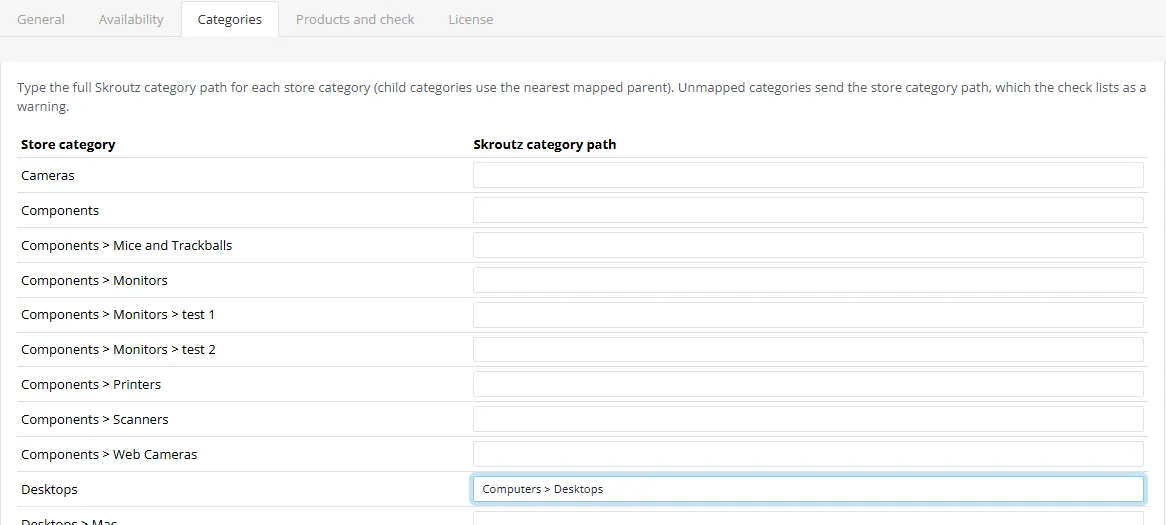
Type the full Skroutz category path, for example Computers > Desktops. A sub-category without its own entry uses the nearest mapped parent. A category with no mapping sends the store path and the check lists it as a warning. A single product can have its own category on the Products and check tab.
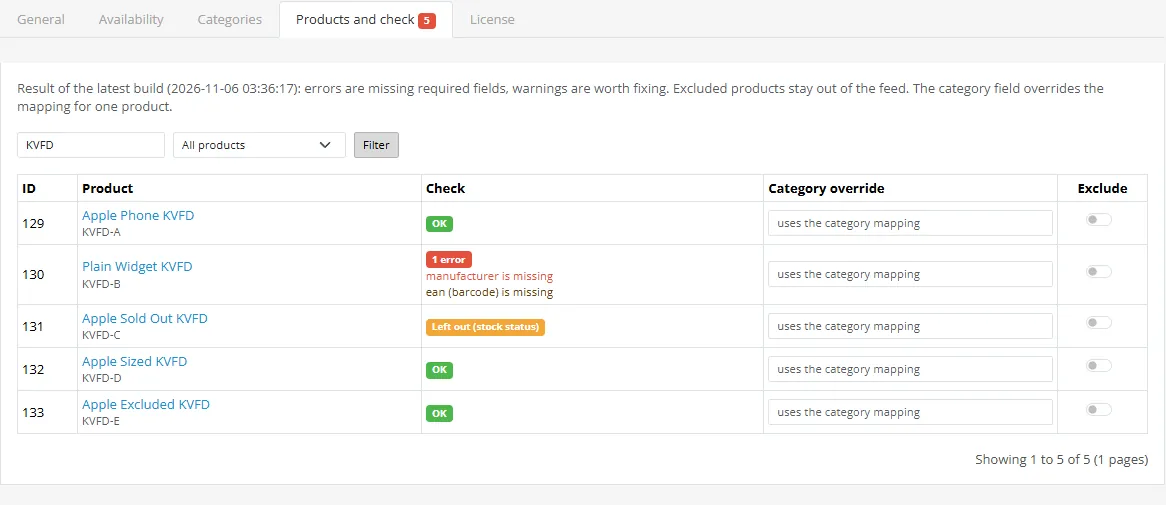
Press Build feed and run check. The list shows every product with OK, errors (required fields that are missing: name, https link, image, category, price, manufacturer, MPN or EAN, description) and warnings (EAN, weight, image smaller than 1000 px, unmapped category). Exclude keeps a product out of the feed.
Copy the Feed URL from the top of the settings page into your Skroutz merchant account. The URL contains a secret key; create a new key on the General tab if it ever leaks.
It is disabled, excluded, not in the default store, or it has no stock and its stock status is set to "Leave out of the feed". The Products and check tab shows "Excluded" and "Left out".
Skroutz asks for https product and image links. Move the shop to https or set a public https address under Store address.
Yes. The price is the one your storefront shows with taxes, converted to the feed currency. The vat element carries the percentage rate of the product's tax class.
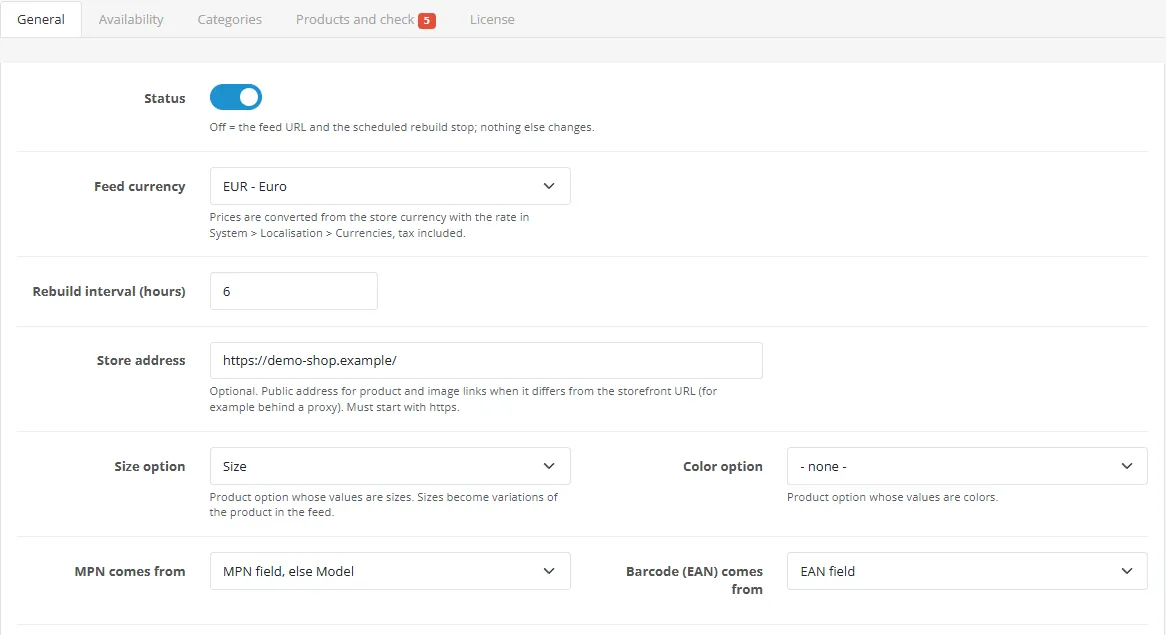
Choose the options on the General tab. Each colour becomes its own product (<id> is the product id plus the colour), each size a variation of it with its own stock and price.
No. It uses OpenCart events and its own files only.
No. Building and serving the feed uses only your own shop.
Buy with confidence
This product was tested on this build. Builds we did not test are not listed.
Updates and support are included in the price. The product keeps working afterwards; renewing is optional.
How licensing worksIf it is not what you expected, tell us within 30 days and we refund the order.
Refund policyPay by card, Apple Pay or Google Pay on Stripe's secure page. Your card number never reaches our server.
Ask a pre-sales questionSold by Kavio Labs Software Limited, registered in England and Wales No. 17532441. About us
More for OpenCart
Server-side tracking for OpenCart 4.x and 3.0.x: purchases, refunds, add to cart, checkout, product views and leads go from your server to the free official GA4 Measurement Protocol, Meta Conversions API and TikTok Events API, deduplicated with the browser pixels through shared event ids. Consent-aware, SHA-256 hashed customer data, order status mapping, queue with retries, test mode and an event log. No paid relay, events only, no OCMOD.

The department store theme for OpenCart 4.x and 3.0.x: colour-coded departments, a department list beside the hero slider with two side promos, a big search with a department selector, tabbed product blocks, a 2 + 1 + 2 offer grid, deals of the day with real countdowns, a department showcase, a promotions band and a three-column product page with a sticky buy box. Four styles (Meridian, Harbor, Citrus, Night) and your own colours on top. Events only, no core changes.

Stop AI crawlers, scrapers, vulnerability scanners and unwanted countries before OpenCart 4.x or 3.0.x builds a page. Googlebot and Bingbot are verified by DNS and always allowed; 50+ bots get one switch each; country rules use free GeoIP databases and can close only the checkout; IP and network lists, rate limits, honeypots and the cart flood fix; a one-second challenge instead of a captcha; learning mode, dashboard, log, IP tester and Cloudflare export. No core changes, no OCMOD.


