The campaign theme for OpenCart 4.x and 3.0.x that makes a store feel like a sale is always on: a flash bar with the sale that ends first, a bento hero with a live deal tile, a dark flash deals zone, tilted discount stickers, promo cells inside product grids, a 9:16 story player, a Discover feed, a campaign strip on the product page and a sticky buy bar on phones. Every countdown runs on a real special price end date. 16 colour schemes, a one-click Brightloop demo store, events only, no core changes.
Tested on 4.1.0.4 & 3.0.5.1Version 1.0.0Compatible with OpenCart 4.0.2.0 – 4.1.0.4, 3.0.x No core file edits
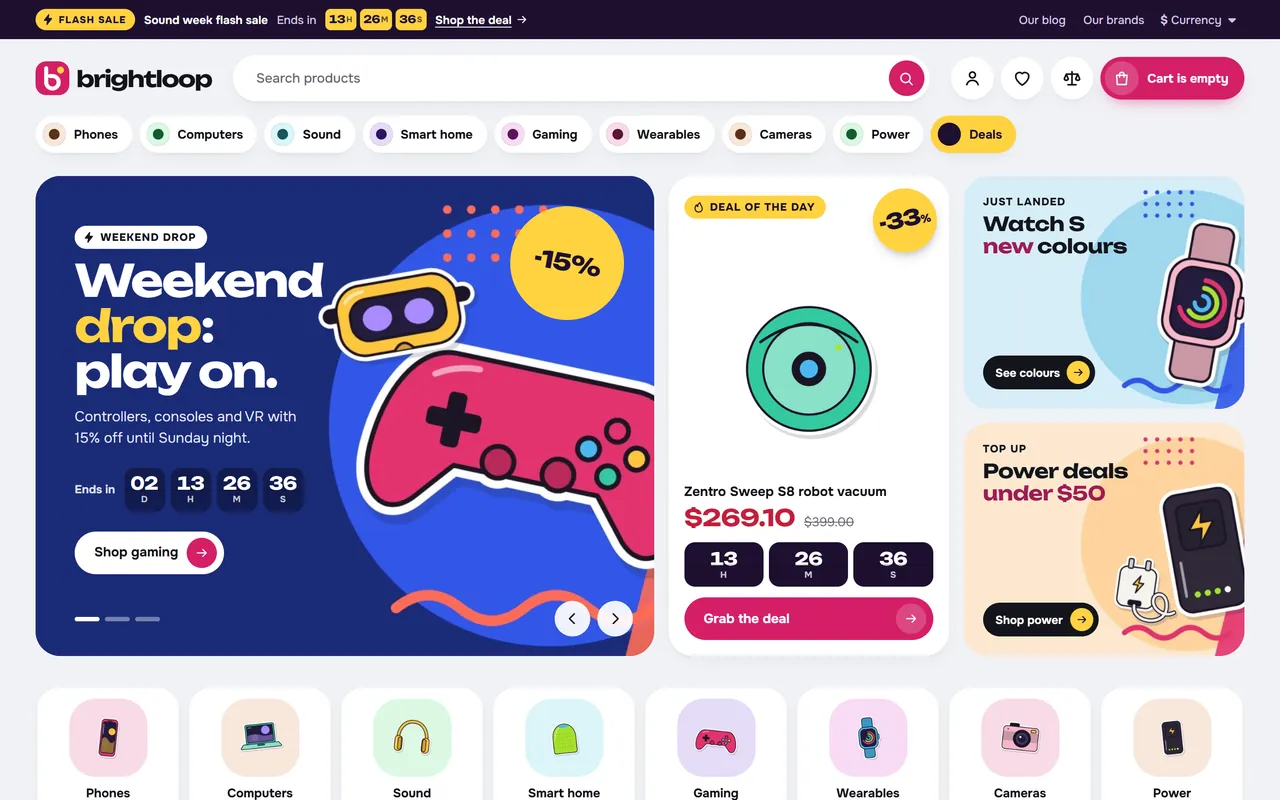
A sale that is always on: flash bar, category pills and a bento hero with a live deal1 of 15
What it does
The campaign theme for OpenCart 4.x and 3.0.x that makes a store feel like a sale is always on: a flash bar with the sale that ends first, a bento hero with a live deal tile, a dark flash deals zone, tilted discount stickers, promo cells inside product grids, a 9:16 story player, a Discover feed, a campaign strip on the product page and a sticky buy bar on phones. Every countdown runs on a real special price end date. 16 colour schemes, a one-click Brightloop demo store, events only, no core changes.
Pulse puts your running offers in front of every visitor, with a flash bar, a bento hero, a dark flash deals zone and a campaign strip on the product page. Every timer reads the end date of a real OpenCart special price, so a timer never restarts by itself.
Features
Flash bar: the special that ends first with a live countdown, on every page.
Bento hero: slider, a live deal tile and two promo tiles in one rounded block.
Product cards: tilted discount stickers, colour dots, stock meters, an add button and a countdown pill on every deal.
Promo cells in grids: promo, countdown, video and article cells inside the Discover feed and category grids.
Stories: round stories that open a 9:16 player with a Shop now button.
Category pill bar, category squircles, pill-tab shelves, promo cards, counters, video articles, chat-bubble reviews, brand and trust strips.
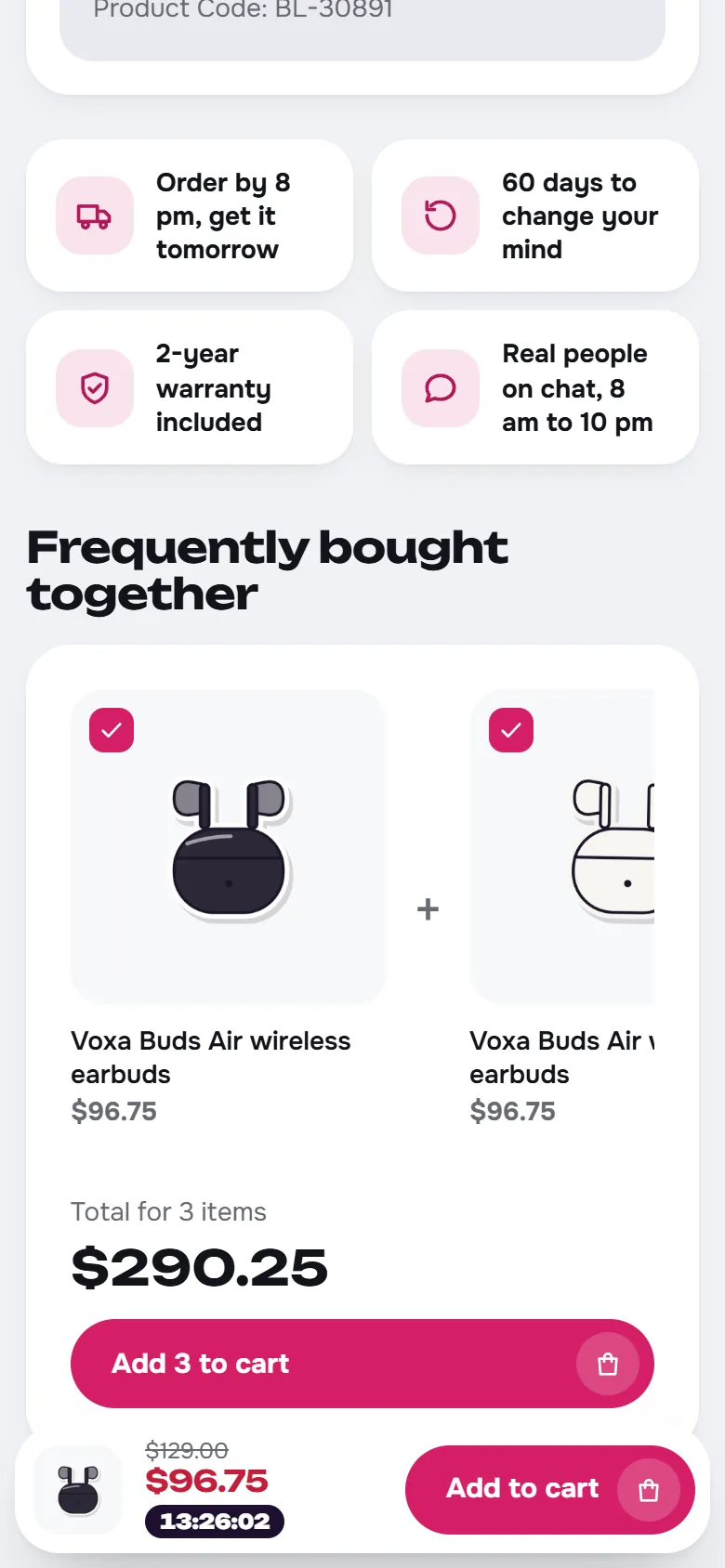
Product page: campaign strip with the price after the deal, option chips, delivery dates, perks, Buy together.
Phones: floating tab bar, swipe rows, sticky buy bar with the deal timer.
16 colour schemes, two of them dark, and six colours of your own.
One-click demo store: Brightloop, with 39 illustrated products, arrives on a fresh store and leaves with one click.
OpenCart 4.0.2.0 to 4.1.x and 3.0.3.x to 3.0.5.x. Events only: no core changes, no OCMOD.
What you get
Download & installTwo theme packages (.ocmod.zip): one for OpenCart 4.0.2 – 4.1.x and one for 3.0.3 – 3.0.5. One license key covers both. Download it from My licenses right after payment.
12 months of updates & supportNew versions and help for 12 months (24 or 36 months at checkout). After that the theme keeps working; renew anytime at 50%.
License for your storeOne production domain with all its subdomains; staging and local development hosts are free. How licensing works
30-day refundFull refund within 30 days of your first purchase, no reason needed. Refund policy
Tested buildsOpenCart 4.0.2.0 – 4.1.0.4, 3.0.x. Tested on OpenCart 4.1.0.4 and OpenCart 3.0.5.1, before every release.
Documentation & supportFull guide (Installation, Configuration, FAQ) on this page. Tickets from your account, first reply within 1 business day.
Compatibility
Pulse: Campaign Theme works with OpenCart 4.0.2.0 – 4.1.0.4, 3.0.x.
We list the builds we install and test on. “Tested” means the full test plan runs on that build before every release; “Supported” means the build is inside the supported range.
Compatibility
Version
Range
Runs on
Status
OpenCart 4.1.0.x
4.1.0.0 – 4.1.0.4
PHP 8.1 – 8.3
Tested on 4.1.0.4 before every release
OpenCart 4.0.2.x
4.0.2.0 – 4.0.2.3
PHP 8.0 – 8.2
Supported
OpenCart 3.0.x
3.0.3.8 – 3.0.5.x
PHP 7.4 – 8.1
Tested on 3.0.5.1 before every release
1.0.0
Latest
Pulse for OpenCart 4.0.2.0 – 4.1.x and 3.0.3.x – 3.0.5.x: the OpenCart edition of the Pulse campaign theme, with the same design and Brightloop demo as Pulse on CS-Cart.
Flash bar with the special that ends first, a date of your own or one product, on every page.
Header with live search and a cart side panel; category pill bar with tone dots, floating panels and a Deals pill.
Home page: bento hero (slider, live deal tile, two promo tiles), category squircles, dark flash deals zone with a flip-tile countdown, story circles with a 9:16 story player, Discover feed with promo cells, pill-tab shelves, promo cards, counters, video articles, chat-bubble reviews, brand strip and trust strip, each per device and in any order.
Countdowns on the real end dates of OpenCart special prices, on OpenCart 4.1 and on 4.0 / 3.0. No end date, no timer.
Product cards with tilted discount stickers, colour dots, stock meters, Top rated and New flags and countdown pills.
Promo, countdown, video and article cells in the Discover feed and in category grids, one or two cells wide.
Category pages with a dark category hero, subcategory pills, filters without page reloads, active filter chips and Show more; a Filter and Sort bar on phones.
Product page with a campaign strip (countdown and price after the deal), option chips, delivery dates, perks and Buy together; sticky buy bar on phones.
Sixteen colour schemes, two of them dark, plus six colours of your own. Unbounded and Onest, self-hosted (SIL Open Font License).
One-click Brightloop demo store: added on a fresh store at install, removed exactly with one click or at uninstall.
Events only: no core files changed, no OCMOD.
How do I install the theme?
Download the package from My licenses and install it in Extensions > Installer, then Extensions > Themes, like any other OpenCart theme. The Documentation tab has every step, from the first activation to the theme settings.
Which OpenCart versions does it work with?
OpenCart 4.0.2.0 – 4.1.0.4, 3.0.x. Every release is installed and tested on OpenCart 4.1.0.4 and OpenCart 3.0.5.1 before it is published. The Compatibility tab lists every version range.
Do I get packages for OpenCart 4 and OpenCart 3?
Yes. Every download has a package for OpenCart 4.0.2 to 4.1.x and one for OpenCart 3.0.3 to 3.0.5, and the license key works with both. Moving from OpenCart 3 to 4 later costs nothing.
What does the license cover?
One production store domain with every subdomain (www, shop., staging.), plus local development hosts such as localhost, *.local and *.test. A store on another domain needs its own license; a second-store license is 40% off. You have 14 days after installing to enter the key. 12 months of updates and support are included; after that the theme keeps working and renewals are 50% off. How licensing works
Can I get a refund?
Yes. Ask for a full refund within 30 days of your first purchase, no reason needed: open a ticket or write to [email protected] with your order number. The money goes back to the card or bank account you paid with within 5 business days of approval. Refund policy
How do I get help?
Open a ticket from your account, so your license details are attached. We answer Monday to Friday: bug reports within 1 business day, how-to questions within 2. Support policy. Not a customer yet? Ask a pre-sales question.
Pulse is the campaign theme of Kavio Labs for OpenCart 4.x and 3.0.x, the OpenCart edition of the Pulse theme for CS-Cart. It makes a store feel like a sale is always on: a flash bar with the sale that ends first, a bento hero with a live deal tile, a dark flash deals zone, discount stickers, promo cells inside product grids, a story player, a Discover feed, a campaign strip on the product page and a sticky buy bar on phones. It fits stores that sell through flash sales, deals of the day, weekend drops and seasonal offers, in electronics, fashion, home, toys or beauty alike.
Every countdown runs to the real end date of an OpenCart special price. Without a running sale the timers are simply not shown.
Pulse home page, Berry scheme
What you get
Flash bar. A dark bar on every page with a tag, the sale name, a live countdown and a link. It runs to the special that ends first in your store, to a date of your own or to one product; with no sale it shows a message of your choice or nothing.
Category pill bar. Your top categories as pills with a tone dot and a pop-colour Deals pill. Subcategories open in a floating panel with products and a banner of your own. Pills that do not fit go into a More panel.
Bento hero. A slider island, a deal tile (your product or the special with the biggest saving, with price and countdown) and two promo tiles, all in one rounded block.
Flash deals zone. A dark band with a big flip-tile countdown, stock meters, "Only N left" and a swipe rail of product cards.
Home sections, each for all devices, wide screens only or phones only, in any order:
category squircles with an image and a product count;
story circles that open a 9:16 story player with progress bars and a button to any page;
a Discover feed: a dense grid with promo, countdown and video cells between the products;
pill-tab shelves (best sellers, new in, on sale);
promo cards, counters, video articles, chat-bubble reviews, a brand strip and a trust strip.
Product cards. A round tilted discount sticker, brand and rating, colour dots, Top rated and New flags, a low-stock meter, an add button on every card and a countdown pill on every deal.
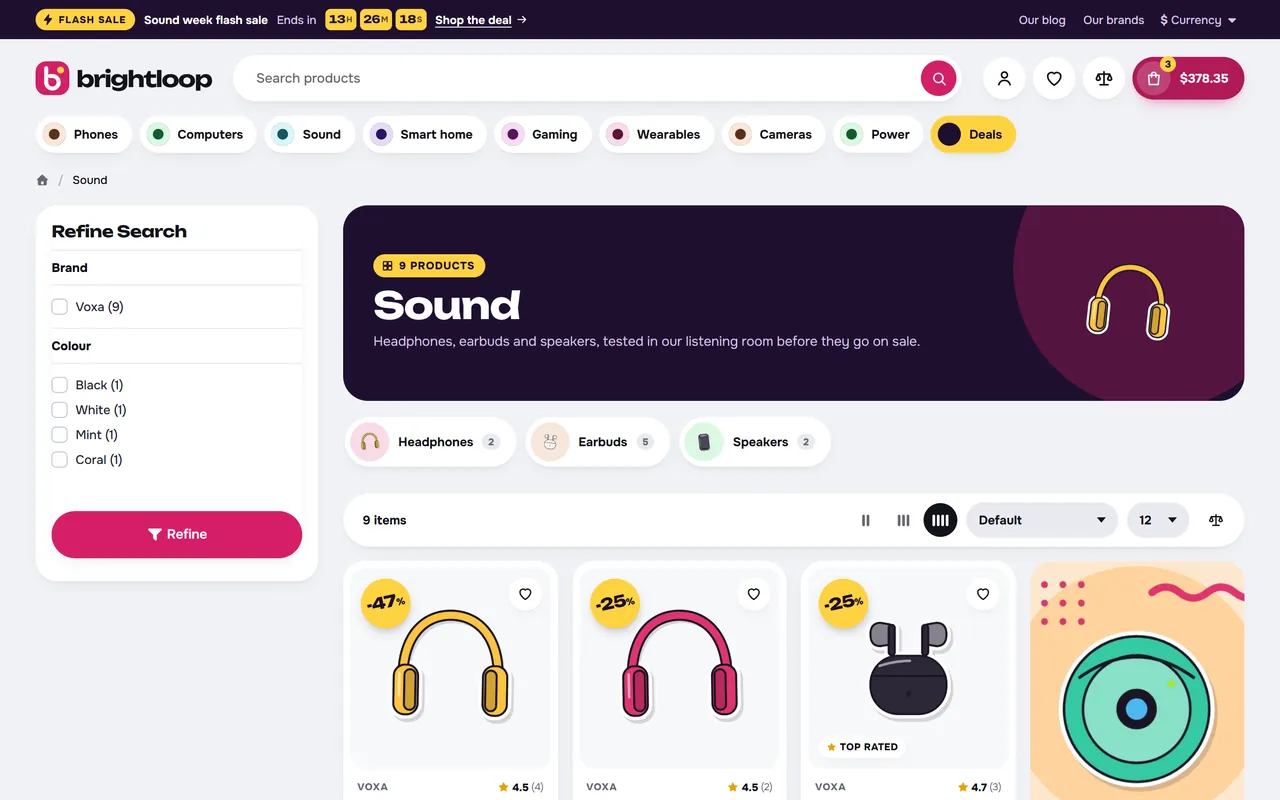
Promo cells in grids. Promo, countdown, video and article cells take a place in the Discover feed or in the product grid of the categories you choose, one or two cells wide.
Category pages. A dark category hero, subcategory pills with images, filters and sorting without page reloads, active filter chips and Show more. Phones get a Filter and Sort bar.
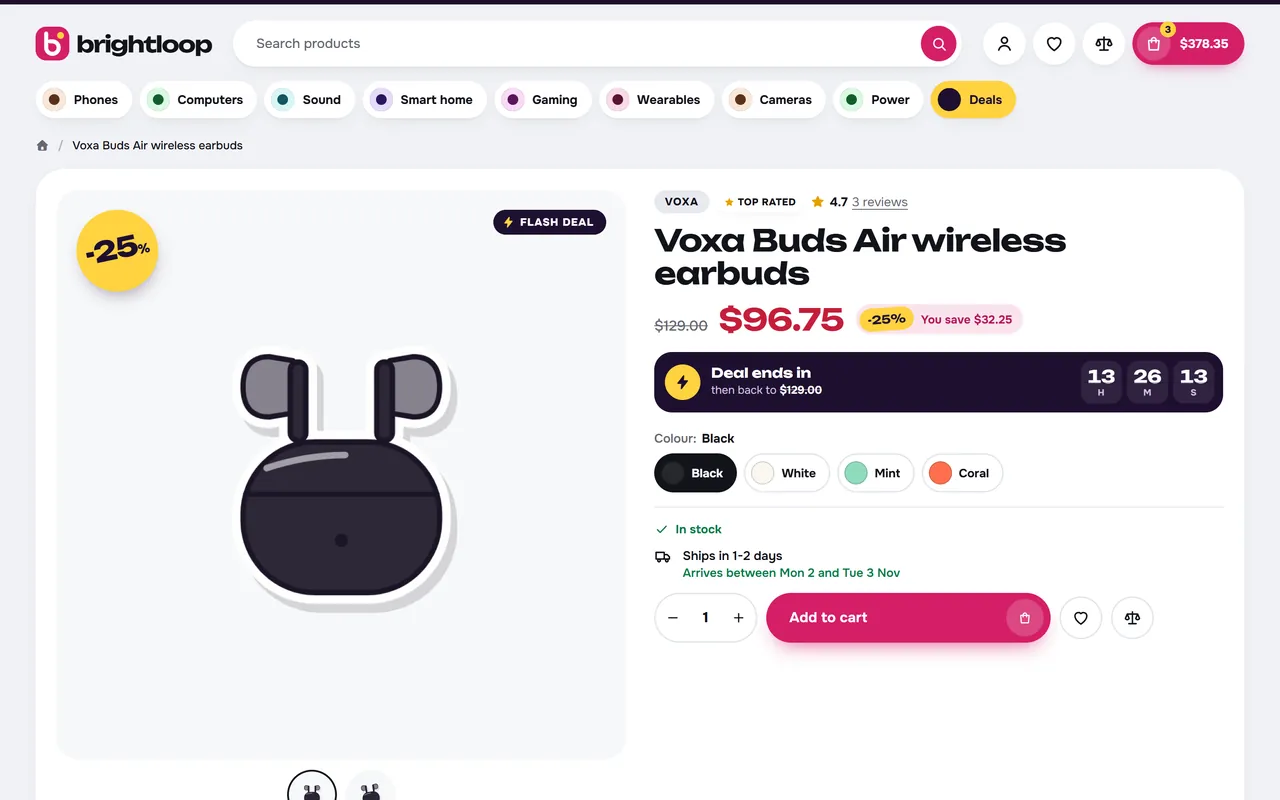
Product page. Gallery with hover zoom and optional video, saving next to the price, a campaign strip with the countdown and the price after the deal, colour and option chips, delivery dates, perks and Buy together.
Phones. Swipe rows, a floating bottom bar, a menu drawer and a sticky buy bar with the deal countdown.
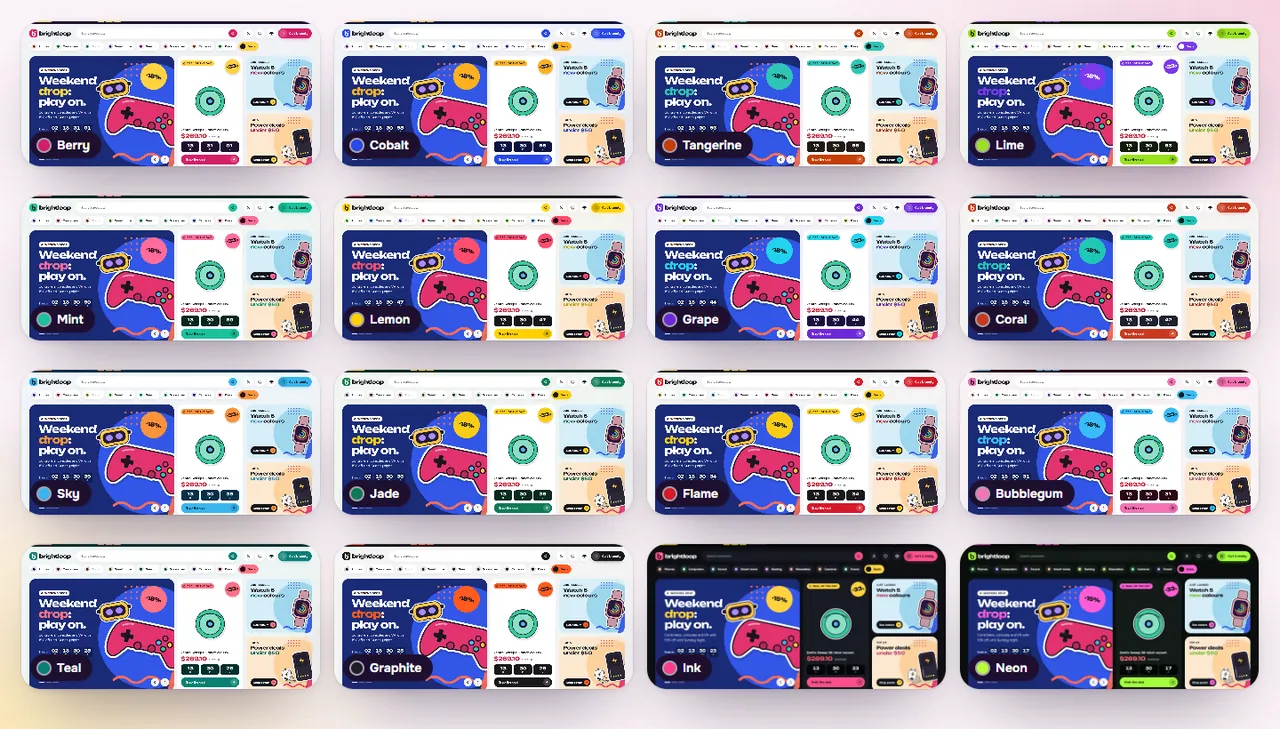
Sixteen colour schemes, two of them dark, plus six colours of your own. Text on coloured surfaces turns white or dark by contrast.
One-click demo store. The Brightloop demo (eight departments, 39 illustrated products, running specials, banners, stories, articles) arrives with the theme on a fresh store and can be added or removed from the settings page.
Structured data (JSON-LD): product, offer, rating and breadcrumbs, plus the store and its search box on the home page.
Safe and fast. Events only: no core file changes, no OCMOD. Two self-hosted fonts (Unbounded and Onest, SIL Open Font License 1.1), one stylesheet and one script, no font or icon CDNs.
The sixteen colour schemesCategory page with a deal cell in the gridProduct page with the campaign stripPulse on a phone
Works with
Other extensions keep working: Pulse keeps the core ids of the product form and the mini cart, and modules of the Home layout appear under the Pulse sections.
Versions
OpenCart 4.0.2.0 to 4.1.x
OpenCart 3.0.3.x to 3.0.5.x
Package
kv_theme_pulse.ocmod.zip
kv_theme_pulse-oc3.ocmod.zip
Framework
Bootstrap 5
Bootstrap 3
Licence
One licence covers both packages and every colour scheme. The first 14 days are a trial. Without a valid licence the store keeps working and the theme settings page shows a reminder.
Installation
OpenCart 4.x
Go to Extensions > Installer and upload kv_theme_pulse.ocmod.zip. Click Install (the green + button) next to it.
Go to Extensions > Extensions, choose the type Themes, and click Install next to Pulse Theme by Kavio Labs.
Click Edit, check that Status is on, pick a Colour scheme and save.
Go to System > Settings, edit your store, and on the General tab set Theme to Pulse Theme by Kavio Labs. Save.
OpenCart 4 has no theme folders. Pulse is a theme extension: it swaps in its own templates while it is the store theme and switched on. Switch the store back to Default to return to the stock look at any time.
Recommended image sizes (System > Settings > Image): product card 600 x 600, product page 1000 x 1000, popup 1400 x 1400, additional 160 x 160, cart 140 x 140, category 600 x 600. Square product images on a white or transparent background look best.
OpenCart 3.0.x
Go to Extensions > Installer and upload kv_theme_pulse-oc3.ocmod.zip.
Go to Extensions > Modifications and click Refresh (the blue button).
Go to Extensions > Extensions, choose Themes, click Install next to Pulse Theme by Kavio Labs, then Edit, check Status, pick a colour scheme and save.
Go to System > Settings, edit your store, open the General tab and set Theme to Pulse Theme by Kavio Labs. Save.
On OpenCart 3 the image sizes and the number of products per page for the theme are on the Listing & images tab of the theme settings.
The demo store
On a fresh store (no products, or only the OpenCart sample products and no orders) the install adds the Brightloop demo: eight departments, 39 illustrated products, specials with end dates, banners, stories and articles, so every section is filled at once. A store with its own catalogue stays exactly as it is.
The Design tab of the theme settings has the buttons:
Install the demo adds it on any store, next to your own products.
Remove the demo deletes exactly what the demo added and restores the theme settings it changed. Your own products stay.
The demo specials run for a few days after the import, so timers on a demo store end. To see them again, remove and add the demo, or give the products new end dates.
Set up your store in six steps
Look. On the Design tab pick a colour scheme, then (optional) your own colours. Without a logo image the header shows a mark with your store name.
Categories. Categories with Show in top menu form the pill bar (OpenCart 3: Top). On Flash bar & menu you can give a pill a shorter name, an icon and a banner.
Sales. Add special prices with an end date (Catalog > Products > Special). The flash bar, deal tile, flash deals zone, card pills and the campaign strip pick them up on their own. Specials without an end date stay on sale but never show a timer.
Hero. On the Home page tab add slides (a scene image, label, title, text, buttons, sticker and an optional countdown), choose the deal product or leave it automatic, and fill the two promo tiles.
Grids. On the Category pages tab add promo cells: where they show (Discover feed or category ids), the place in the grid, one or two cells wide, and the type (promo, video, article), with an optional countdown.
Product data. Pulse reads your normal catalogue data:
Options: radio, select or image options named Colour or Color show as colour dots on cards and as colour chips on the product page. Options listed under Chip option names show as chips with the price change.
Description: the first bullet points (an HTML list) become the highlights.
Special prices with an end date within 60 days give countdowns on cards and on the product page.
Second image: the first additional image of a product appears when the pointer is over the card.
Manufacturers fill the brand line on cards, the brand strip and the brand pages.
Related Products fill Buy together.
Attributes (names are settings): delivery time (Ships in 1-2 days becomes dates on the page), your own label, and a video link.
Filters: add filter groups (Catalog > Filters), assign them to products and categories, and put the core Filter module in the left column of the Category layout (Design > Layouts).
Update
Upload the new package the same way (and refresh modifications on OpenCart 3). Your settings are kept in the store settings.
Uninstall
Switch the store theme back to Default, then uninstall Pulse from Extensions > Extensions > Themes. The theme settings and the demo store are removed; your own catalogue is untouched.
Configuration
Open Extensions > Extensions > Themes > Pulse > Edit. Every storefront text you can change is on one of these tabs. A section that is switched off or has no content is not shown. Settings are per store.
Pulse theme settings
Design
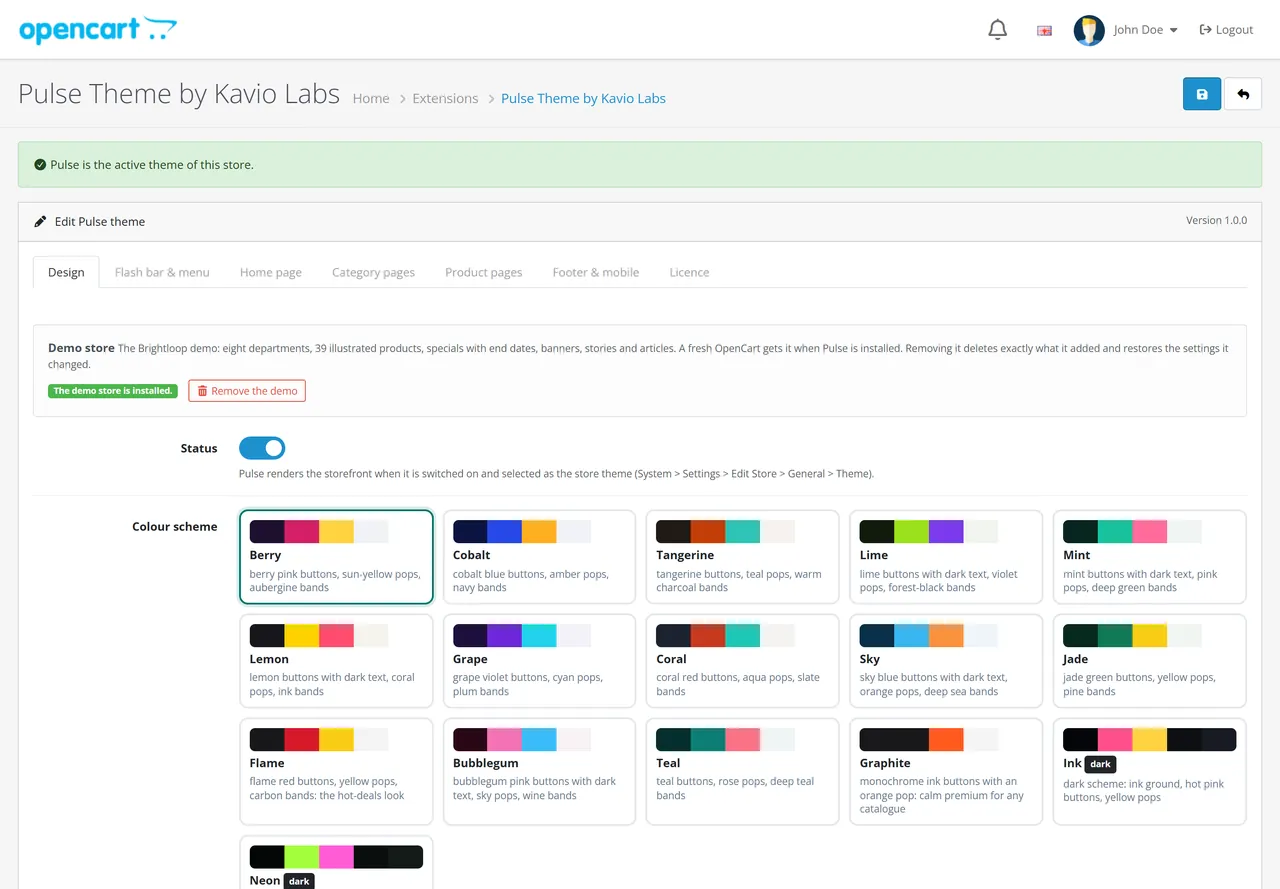
Demo store: add or remove the Brightloop demo with one click.
Status and Colour scheme: Berry (default), Cobalt, Tangerine, Lime, Mint, Lemon, Grape, Coral, Sky, Jade, Flame, Bubblegum, Teal, Graphite, and the dark schemes Ink and Neon. A scheme sets the buttons, links, the dark band, the pop colour and the page ground.
Subtle animations (visitors who prefer reduced motion never see them).
Your colours (optional): buttons and accents, links, dark band, pop colour, page background and sale prices. Empty = the colour of the scheme. Text on these colours turns white or dark by contrast. A dark page background switches the store to dark surfaces.
Logo: the text logo (empty = store name), shown when the store has no logo image.
Flash bar & menu
Flash bar: tag, sale name, Own end date (empty = the special that ends first; or a date such as 2026-12-24 18:00, or p:<id> for the end of the special of a product), link text and target, and the message without a sale.
Service links, Opening hours, Phone number, Sticky header, Search placeholder.
Category pill bar: number of pills (the rest goes into More), the Deals pill, an Extra pill, and one row per top category with a shorter name, an icon for the phone menu and a banner in the floating panel.
Home page
Pulse home sections on or off (off = only the modules of the Home layout) and Section order: hero, bubbles, flash, stories, feed, tabs, promos, counters, videos, reviews, brands, trust.
Every section has Show and Show on (all devices, wide screens only, phones only).
Bento hero: seconds per slide (autoplay pauses on hover, focus and touch, and for visitors who prefer reduced motion), Slides (scene image for desktop and phone, label, title, text, two buttons, sticker, optional countdown), Deal tile (label, button, product id; empty = the special with the biggest saving) and two Promo tiles.
Category squircles: category ids (empty = your top categories) and number.
Flash deals zone: label, title (*word* is highlighted), product ids (empty = products on special, ending soonest first), number, button and link.
Story circles: title and stories (name, label, 9:16 image, button, link).
Discover feed: label, title, product ids (empty = the newest products), number, button and link. Its cells are on the Category pages tab.
Pill-tab shelves: three tabs (best sellers, newest, on special by default) with optional product ids, and the number of products.
Promo cards: up to three wide cards.
Counters: title and four big numbers. Write only real figures.
Video articles: the latest OpenCart 4.1 blog articles or your own list, as cover cards with a play badge.
Chat-bubble reviews: your own quotes, or else your latest four and five star product reviews.
Brand strip and Trust strip.
Category pages
Subcategories (pills with images or hidden), Pagination (Show more, load while scrolling, page numbers), AJAX filters and sorting, Active filter chips, Products per row (3, 4 or 5 on wide screens).
Promo cells: where (Discover feed or category ids; a category also covers its subcategories), place in the grid, size (1 or 2 cells), type (promo, video, article), label, title, text, image, button, link, countdown and video link.
Stickers: discount sticker, New flag and its days, Top rated flag (4.6 or more with at least three reviews), your own label attribute, low stock quantity.
Product pages
Hover zoom, Sticky buy bar, Structured data, Perks strip, Highlights, Payment chips, Buy together and its title, Video attribute.
Product data: colour and chip option names, size guide link, delivery time attribute and the line without one, extra tab attributes, notice attribute, unit price attribute, range and colour attributes (sell each colour as its own product), in-stock line.
Footer & mobile
Promo card above the footer (label, title, text, side title and text, button: it opens the newsletter page for signed-in customers, else the registration).
Footer about text and help box, Payment chips (plain text, no logos), Social links (Name|URL per line, shown as round buttons) and the Mobile bottom bar.
Licence
The Licence tab takes the key from your Kavio Labs account and shows the licence status. The theme keeps working without a key.
FAQ
Who is Pulse for?
Stores that sell through campaigns: flash sales, deals of the day, weekend drops and seasonal offers. The demo is an electronics store, but the design fits fashion, home, toys, beauty and mixed catalogues alike.
Is it the same Pulse as on CS-Cart?
Yes. Pulse for OpenCart has the same design, colour schemes and Brightloop demo as the Pulse theme for CS-Cart and Multi-Vendor, built natively for OpenCart (Twig templates, OpenCart events, Bootstrap 5 on OpenCart 4 and Bootstrap 3 on OpenCart 3).
How is Pulse different from Atlas?
Atlas is built around finding things in a large catalogue: a department list, a big search and department colours. Pulse is built around running offers: a flash bar, a deal tile, a flash deals zone and countdowns on every page.
How do countdowns work?
Every timer reads the end date of a real special price. The flash bar runs to the special that ends first, the deal tile and the campaign strip to the special of their product, and the flash deals zone to the soonest end among its products. A special without an end date never shows a timer, and no timer restarts on its own. Turn Deal countdowns off to hide them on cards and product pages.
What happens when no sale is running?
Without specials the flash bar shows your message or disappears, the deal tile and the flash deals zone leave the page, and the bento hero closes the gap.
Does Pulse import a demo store?
On a fresh store, yes: the Brightloop demo arrives with the theme. A store with its own catalogue stays as it is and gets a button on the Design tab. The demo is fictional and uses our own illustrations of invented brands.
Can I remove the demo?
Yes, with one click on the Design tab. It deletes exactly what the demo added. Your own products stay. Uninstalling Pulse removes the demo too.
Can I change the colour scheme later?
Yes, any time. A scheme changes the look only. Your products, categories, texts and images stay as they are.
Will my own colours stay readable?
Yes. Pulse picks white or dark text for every coloured surface by contrast and darkens link colours until they reach a contrast of 4.5:1 on their ground.
How do promo cells in the grid work?
You add them on the Category pages tab. Each cell takes a place in the Discover feed or in the product grid of the categories you choose, one or two cells wide. Countdown cells need an end date and disappear after it.
Where do the stories go?
Story circles open a 9:16 player with progress bars and a button to the page you choose. On phones a tap on the left or right side moves between stories.
Can I hide a home section on phones?
Yes. Every section has a Show on setting: all devices, wide screens only, or phones only.
Does Show more work with search engines?
Yes. The page numbers stay under the button as normal links; the button and scroll loading only add the next page to the grid.
Does it slow my store down?
Pulse adds one stylesheet, one script and two self-hosted fonts. Images below the first screen load lazily.
Does Pulse change core files?
No. It uses OpenCart events only (no core changes, no OCMOD). Uninstalling it leaves your store and catalogue as they were.
Server-side tracking for OpenCart 4.x and 3.0.x: purchases, refunds, add to cart, checkout, product views and leads go from your server to the free official GA4 Measurement Protocol, Meta Conversions API and TikTok Events API, deduplicated with the browser pixels through shared event ids. Consent-aware, SHA-256 hashed customer data, order status mapping, queue with retries, test mode and an event log. No paid relay, events only, no OCMOD.
The department store theme for OpenCart 4.x and 3.0.x: colour-coded departments, a department list beside the hero slider with two side promos, a big search with a department selector, tabbed product blocks, a 2 + 1 + 2 offer grid, deals of the day with real countdowns, a department showcase, a promotions band and a three-column product page with a sticky buy box. Four styles (Meridian, Harbor, Citrus, Night) and your own colours on top. Events only, no core changes.
Stop AI crawlers, scrapers, vulnerability scanners and unwanted countries before OpenCart 4.x or 3.0.x builds a page. Googlebot and Bingbot are verified by DNS and always allowed; 50+ bots get one switch each; country rules use free GeoIP databases and can close only the checkout; IP and network lists, rate limits, honeypots and the cart flood fix; a one-second challenge instead of a captcha; learning mode, dashboard, log, IP tester and Cloudflare export. No core changes, no OCMOD.