Stop AI crawlers, scrapers, vulnerability scanners and unwanted countries before OpenCart 4.x or 3.0.x builds a page. Googlebot and Bingbot are verified by DNS and always allowed; 50+ bots get one switch each; country rules use free GeoIP databases and can close only the checkout; IP and network lists, rate limits, honeypots and the cart flood fix; a one-second challenge instead of a captcha; learning mode, dashboard, log, IP tester and Cloudflare export. No core changes, no OCMOD.
On saleVersion 1.0.0Compatible with OpenCart 4.0.2.0 – 4.1.0.4, 3.0.3.8 – 3.0.5.1 No core file edits
Built forOpenCart
AI crawlers, scrapers, scanners and blocked countries stopped before the page; Googlebot always passes1 of 9
Stop AI crawlers, scrapers, vulnerability scanners and unwanted countries before OpenCart 4.x or 3.0.x builds a page. Googlebot and Bingbot are verified by DNS and always allowed; 50+ bots get one switch each; country rules use free GeoIP databases and can close only the checkout; IP and network lists, rate limits, honeypots and the cart flood fix; a one-second challenge instead of a captcha; learning mode, dashboard, log, IP tester and Cloudflare export. No core changes, no OCMOD.
OpenCart 4.0.2.0 - 4.1.0.4, 3.0.3.8 - 3.0.5.1
Overview
Stop AI crawlers, scrapers, vulnerability scanners and unwanted countries before OpenCart builds a page. Every storefront request is checked right after OpenCart reads the URL and the session, from a compiled rule file, so a normal visitor costs no extra database query and a blocked bot never reaches the page code. Googlebot and Bingbot are verified by DNS and always allowed, so your search rankings are safe.
It starts in learning mode: rules only write "would block" entries to the log, so you see what would happen before anything is blocked.
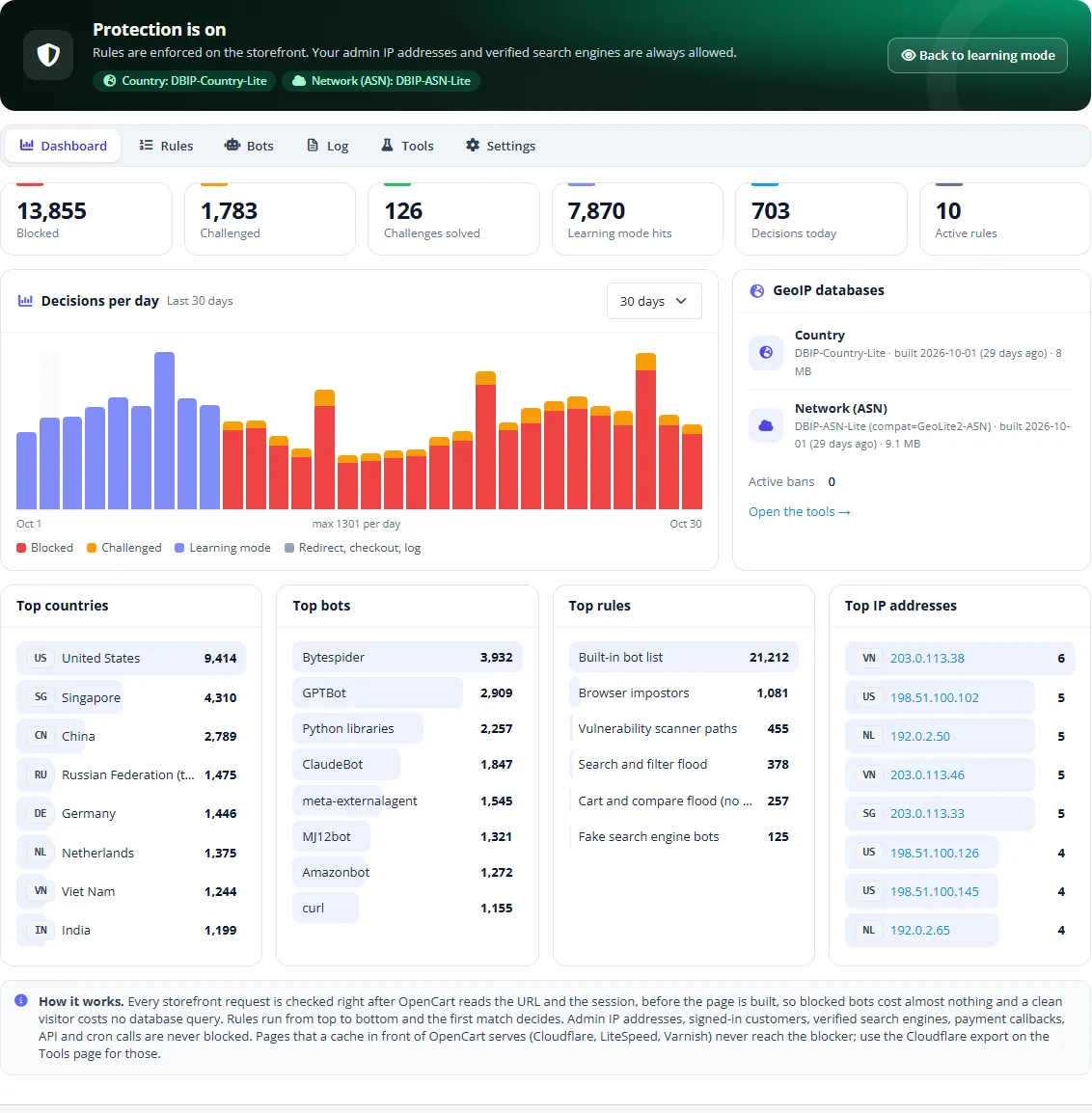
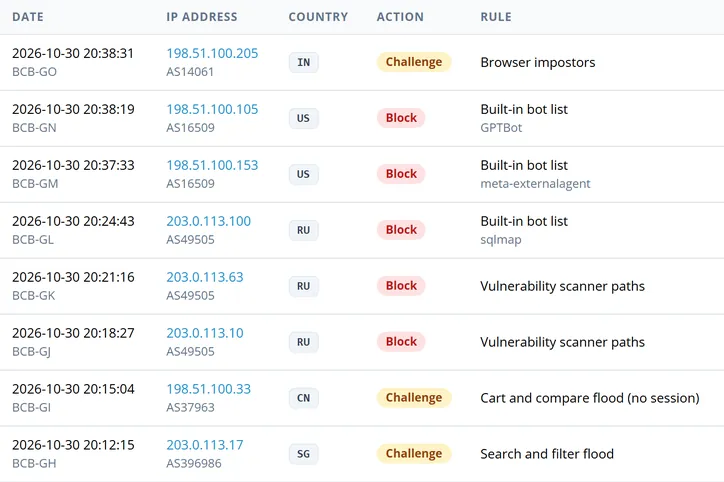
Dashboard with blocked and challenged requests, top countries and bots
Key features
Countries: block, challenge, redirect or close only the checkout for selected countries, or for every country except the selected ones. Free DB-IP Lite country and network databases in one click (no account), MaxMind GeoLite2 with a free key, or upload your own .mmdb; Cloudflare's CF-IPCountry header is used when the request comes through Cloudflare. IPv4 and IPv6.
IP addresses and networks: single IPs, CIDR ranges, ranges, IPv6, public list URLs refreshed daily, AS numbers and a preset of 50+ hosting, cloud and server providers.
Built-in bot list with one switch per bot: 50+ AI training crawlers (GPTBot, ClaudeBot, CCBot, Bytespider, meta-externalagent, Amazonbot and more), AI assistants and AI search, SEO crawlers, scripts and HTTP libraries, headless browsers and vulnerability scanners.
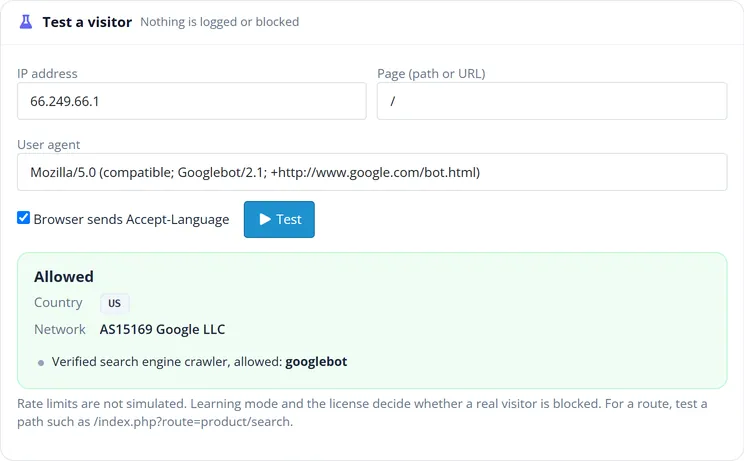
Search engines stay safe: Googlebot, Bingbot, Applebot, YandexBot and Baiduspider are verified by reverse and forward DNS and allowed before any rule runs; impostors are blocked.
Rate limits per IP address for the whole store or for expensive pages such as search and filters, with an optional temporary ban.
Honeypot paths (/wp-login.php, /.env, /xmlrpc.php and more) that ban scanners, and the cart and compare flood fix: "add to cart / wish list / compare" calls without the session cookie every browser has.
Empty user agents and browser impostors (a browser user agent without the Accept-Language header every browser sends).
Actions per rule: block (styled, editable 403 page), challenge (a one-second JavaScript proof of work: no captcha, no third-party service), redirect, checkout only, allow, log only.
Dashboard, log and CSV export: decisions per day, top countries, bots, rules and IP addresses, filters, a reference on the block page your customers can quote, retention.
Tools: IP tester with a decision trace, Cloudflare WAF expressions for the same rules at the edge, AI crawler group for robots.txt, bans and administrator IP addresses.
You cannot lock yourself out: administrator IP addresses are allowed automatically, signed-in customers are never blocked (option), API, cron and payment callbacks are never checked, the admin panel is never checked, and an emergency file switches everything off.
Cache safe: block and challenge answers are sent with Cache-Control: no-store and X-LiteSpeed-Cache-Control: no-cache; clean pages are left untouched (no cookie, no header), so a page cache never stores a block page.
Clean install: OpenCart extension startup (4.x) and events (3.0.x); no core file changes and no OCMOD.
Compatibility
OpenCart 4.0.2.0 – 4.1.x (kv_bot_country_blocker.ocmod.zip) and 3.0.3.8 – 3.0.5.x (kv_bot_country_blocker-oc3.ocmod.zip), one license for both. Tested on 4.1.0.4 and 3.0.5.1.
PHP 7.4 or newer (OpenCart 4.1 and 3.0.5 need PHP 8.1+). APCu is used for rate limits when the server has it.
Works with any theme: the extension adds no storefront markup; its block, challenge and checkout pages are self-contained.
Installation
Requirements
OpenCart 4.0.2.0 – 4.1.x or 3.0.3.8 – 3.0.5.x
PHP 7.4 or newer (OpenCart 4.1 and 3.0.5 need PHP 8.1+), cURL for the database and list downloads
About 20 MB free in the OpenCart storage folder for the GeoIP databases
OpenCart 4
Extensions > Installer: upload kv_bot_country_blocker.ocmod.zip and click Install.
Extensions > Extensions, type Modules: find Bot & Country Blocker, click Install (green +), then Edit.
On the dashboard click Download now to install the free DB-IP Lite country and network databases. Skip it if you only use bot rules, or if your store is behind Cloudflare.
The extension registers a storefront startup (System > Maintenance > Startup), two checkout events and a daily cron job (System > Maintenance > Cron Jobs). Nothing else is changed.
Extensions > Modifications: click Refresh (the package changes no files, but OpenCart lists it there).
Extensions > Extensions, type Modules: install Bot & Country Blocker, then Edit.
Click Download now on the dashboard for the GeoIP databases.
Recommended: add the cron URL from Tools > Maintenance to your hosting's cron jobs once a day, for example wget -q -O /dev/null "<cron URL>". Without it, light maintenance runs when an administrator opens the admin panel.
After installing
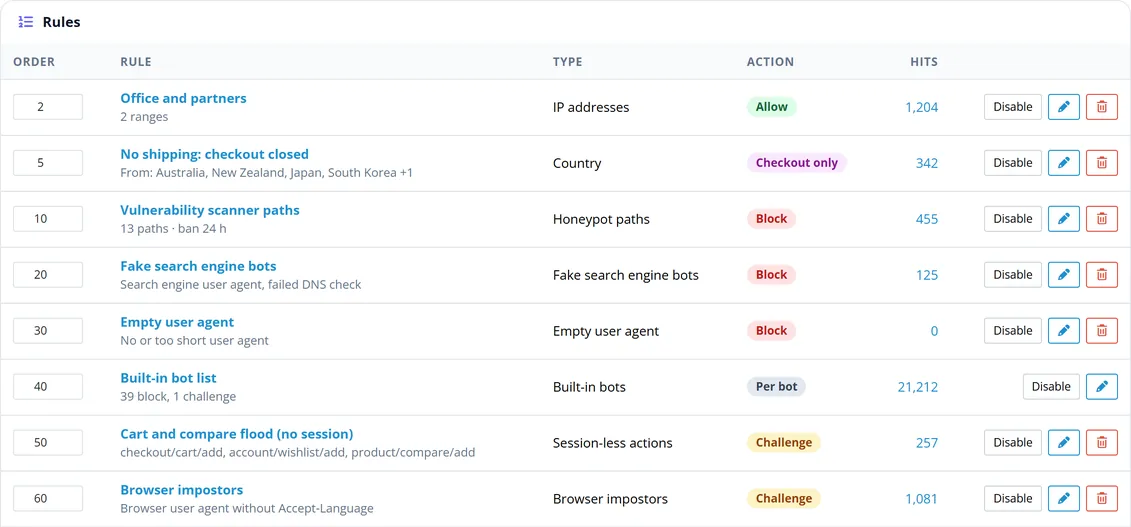
The extension starts in learning mode with nine ready-made rules: scanner paths, fake search engine bots, empty user agents, the built-in bot list, the cart and compare flood fix, browser impostors, two rate limits and a disabled hosting-network rule. Look at the Log for a few days, adjust the rules, then click Switch protection on in the header.
The menu entry Bot & Country Blocker (shield icon) is added below Reports.
Updating
Upload the new package the same way. On OpenCart 4, uninstall and delete the old entry under Extensions > Installer first; keep the module itself installed under Extensions > Modules so your rules, settings and log stay.
Uninstalling
Extensions > Extensions > Modules > Bot & Country Blocker > Uninstall removes the startup entry, the events, the cron job, the settings, the seven tables (kv_bcb_*), the compiled rule file and the downloaded databases, and removes its group from robots.txt if you added it.
Configuration
Open Bot & Country Blocker in the admin menu (or Extensions > Modules > Edit). The header shows the mode (learning or protection), the GeoIP databases and the license; the tabs are Dashboard, Rules, Bots, Log, Tools and Settings.
Rules in the order they run
Rules
Rules run from top to bottom; the first rule that matches decides. "Log only" rules record and continue. Change the order numbers and click Save order. Add a rule with the buttons at the top:
Type
Matches
Notes
Country
the visitor's country, in or not in the list
needs the country database or Cloudflare; unknown countries never match
IP addresses
IPs, CIDR, ranges, IPv6, plus an optional public list URL
the list is downloaded daily; plain text, CSV and JSON work
Networks (ASN)
AS numbers, optional hosting preset (50+ cloud and server providers)
needs the ASN database
User agent
text (case-insensitive) or /regular expressions/
Rate limit
more than N requests per S seconds per IP, on all pages or listed routes
optional ban in minutes
Honeypot paths
URLs only scanners ask for
bans the IP for the given hours; needs SEO URLs on
Session-less actions
add to cart / wish list / compare without the session cookie
The built-in rules Fake search engine bots, Empty user agent, Browser impostors and Built-in bot list exist once: switch them on or off and choose their action.
Routes are written in the OpenCart 3 form (product/search, checkout/cart/add); OpenCart 4 routes such as checkout/cart.add work too. account/* matches every route below account/; product/category?filter matches only when the filter parameter is set.
Actions
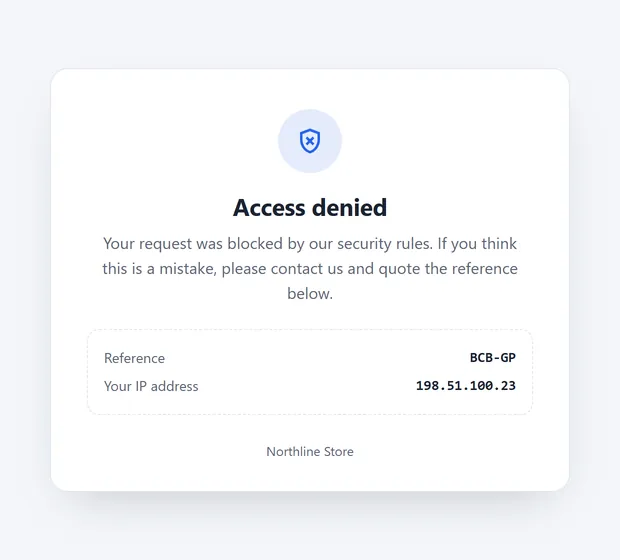
Block: the block page (HTTP 403) with a reference such as BCB-4F2K.
Challenge: a browser check that takes about a second (proof of work, no captcha, no third-party service). People pass once and are not asked again for the configured hours; scripts cannot pass.
Redirect: to a URL or a path.
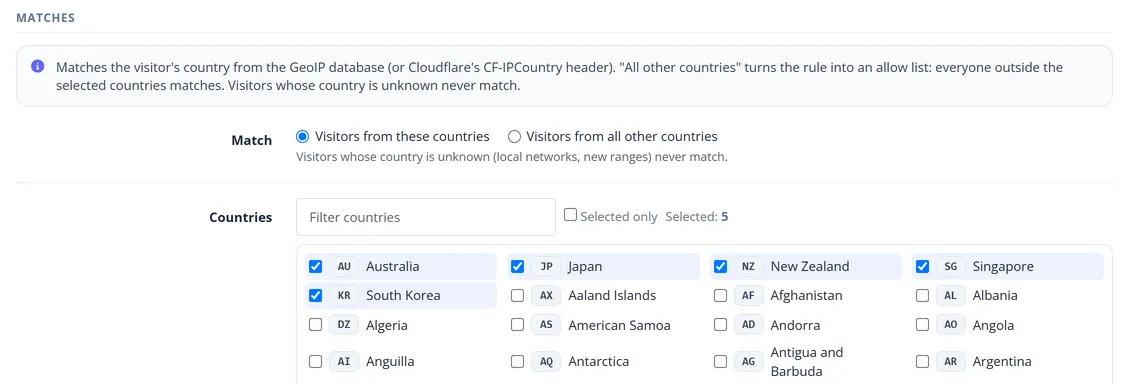
Checkout only: the visitor can browse and use the cart; opening the checkout or confirming an order shows the checkout restriction page. Use it for countries you cannot ship to.
Allow: skips all later rules (put it on top for your office or partners).
Log only: records and continues.
Country rule with the checkout-only action
Bots
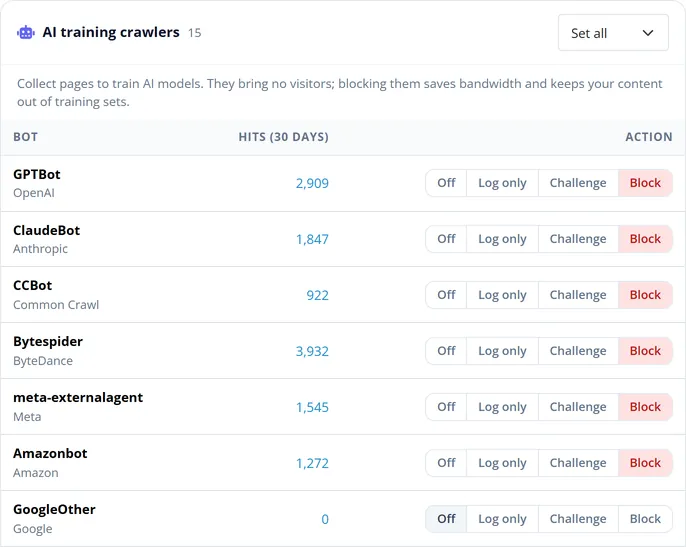
One switch per bot: Off, Log only, Challenge or Block, and Set all per group. AI assistants (ChatGPT-User, OAI-SearchBot, PerplexityBot and others) are off by default because they fetch pages when a person asks about your products; AI training crawlers are blocked by default. Googlebot, Bingbot, Applebot, YandexBot and Baiduspider are not in the list: they are verified by DNS and always allowed when real.
One switch per bot
Settings
Status and Learning mode.
Never blocked: signed-in customers, verified search engines, administrator IP addresses (remembered for N days), and your own paths or routes (for example a product feed).
Block and challenge pages: accent colour, titles and messages (placeholders [store], [ip], [country], [ref]), challenge difficulty, how long a solved challenge is valid.
IP address and GeoIP: Automatic trusts Cloudflare's CF-Connecting-IP only from Cloudflare edge addresses and your proxy header only from the trusted proxies you list; otherwise the connection address is used, which cannot be forged. Monthly GeoIP update (DB-IP Lite or MaxMind GeoLite2) and the MaxMind account ID and licence key.
Log: retention in days and maximum rows.
License: your license key and its status.
Usage
First week: learning mode
After installing, every rule only logs. Open the Log and filter by rule or action; look for real customers among the "would block" entries. Typical adjustments: switch off a rate limit for a busy business customer, allow an integration's user agent, or set an SEO tool you use to Off on the Bots page. Then click Switch protection on.
The log with filters and CSV export
Dashboard
Blocked and challenged requests, solved challenges, learning-mode hits and today's decisions; a 7, 30 or 90 day chart; top countries, bots, rules and IP addresses. Click an IP address to see its log entries.
When a customer says "I am blocked"
Ask for the reference on the block page (for example BCB-4F2K) and type it in the log filter: you see the rule, the IP address, the country and the user agent. Add an Allow rule for the address on top, or change the rule.
Tools
Test a visitor: enter an IP address, a user agent and a page; the result shows the country, the network and every step of the decision. Nothing is logged or blocked.
GeoIP databases: download DB-IP Lite or MaxMind GeoLite2, upload a file, remove a database.
Cloudflare WAF rules: expressions for "Block" and "Managed Challenge" built from your rules, to stop the same bots at the edge, in front of cached pages.
AI crawlers in robots.txt: add or remove a Disallow: / group for the AI crawlers you block (a backup of robots.txt is kept).
Maintenance: last run, run now, the cron URL. Active bans and administrator IP addresses can be removed here.
Tester, GeoIP databases and Cloudflare export
The pages visitors see
Self-contained pages in your accent colour, light and dark, readable on phones, never cached and marked noindex.
Block page
Block page: title, message, reference and IP address (optional).
Challenge page: a progress bar; passes on its own in about a second and returns to the page the visitor asked for.
Checkout restriction page: message, detected country and a "Back to the store" button.
AJAX calls (add to cart and similar) get a JSON answer with status 403 instead of a page.
Emergency switch
If you ever lock yourself out of the storefront, create an empty file kv_bot_country_blocker.off in the OpenCart storage folder (the exact path is shown on the Tools page). The blocker stops at once; delete the file to turn it back on. The admin panel is never blocked.
FAQ
Will it hurt my Google rankings?
No. Googlebot, Bingbot, Applebot, YandexBot and Baiduspider are verified by reverse and forward DNS (cached for 7 days) and allowed before any rule runs, even before country or rate-limit rules. Fake crawlers that only copy Googlebot's user agent are blocked.
Do I need Cloudflare or a paid GeoIP service?
No. Country and network data come from the free DB-IP Lite databases (no account, CC BY 4.0) or MaxMind GeoLite2 (free account). Both are files on your server, read by the extension itself. If your store is behind Cloudflare, its country header is used as well.
How fast is it?
The rules are compiled into a PHP file that OPcache keeps in memory; a clean visitor costs no database query. Country lookups read a few bytes of the database file. Only blocked, challenged or logged requests write a log row.
Does it work with page caches?
Block, challenge and checkout answers are sent with Cache-Control: no-store and X-LiteSpeed-Cache-Control: no-cache, so a cache never stores them, and clean pages get no cookie and no header from the extension. Pages that a cache in front of OpenCart serves (Cloudflare, LiteSpeed, Varnish) never reach PHP: use the Cloudflare export for the edge.
Does it stop registration and contact form spam?
Most spam comes from scripts, hosting networks and a few countries. The bot list, the hosting preset, browser impostors, rate limits and country rules stop them before the form is shown. Keep OpenCart's captcha if you want a second layer.
Can I close only the checkout for some countries?
Yes: a Country rule with the action Checkout only. Visitors can browse and use the cart; the checkout and the payment confirmation show the restriction page.
What about my payment provider, the API and cron?
OpenCart API calls, cron and payment callbacks are never checked. Add your own integrations to the exempt paths in the settings.
What happens when the license is not active?
After the 14-day trial without a key, rules only log, as in learning mode. The dashboard, rules, log and tools keep working.
Which data is stored?
For blocked, challenged or logged requests: time, IP address, country, network, user agent, method, path and the rule. Entries are deleted after the retention period (30 days by default). Clean visitors are not logged.
Server-side tracking for OpenCart 4.x and 3.0.x: purchases, refunds, add to cart, checkout, product views and leads go from your server to the free official GA4 Measurement Protocol, Meta Conversions API and TikTok Events API, deduplicated with the browser pixels through shared event ids. Consent-aware, SHA-256 hashed customer data, order status mapping, queue with retries, test mode and an event log. No paid relay, events only, no OCMOD.
The department store theme for OpenCart 4.x and 3.0.x: colour-coded departments, a department list beside the hero slider with two side promos, a big search with a department selector, tabbed product blocks, a 2 + 1 + 2 offer grid, deals of the day with real countdowns, a department showcase, a promotions band and a three-column product page with a sticky buy box. Four styles (Meridian, Harbor, Citrus, Night) and your own colours on top. Events only, no core changes.
The multipurpose flagship theme for OpenCart 4.x and 3.0.x: five ready store styles (Fashion, Electronics, Home, Beauty, Grocery) switchable from the admin in one click, three header and two footer layouts, four hero layouts, a mega menu, live search, AJAX filters, quick view, wish list and compare, a sticky add-to-cart bar and a mobile tab bar. No core changes.