Layered navigation for OpenCart 4.x and 3.0.x that works right after install: price slider, brands, attributes, options, stock and rating with live counts, instant results with URL state, a phone bottom sheet, SEO-safe filter URLs and a bitmap index that stays fast at 10,000+ products. No OCMOD.
On saleVersion 1.0.0Compatible with OpenCart 4.0.2.0 – 4.1.0.4, 3.0.3.8 – 3.0.5.1 No core file edits
Built forOpenCart
Price, brand, size, colour and specs on every list, on desktop and phone1 of 9
Layered navigation for OpenCart 4.x and 3.0.x that works right after install: price slider, brands, attributes, options, stock and rating with live counts, instant results with URL state, a phone bottom sheet, SEO-safe filter URLs and a bitmap index that stays fast at 10,000+ products. No OCMOD.
OpenCart 4.0.2.0 - 4.1.0.4, 3.0.3.8 - 3.0.5.1
Overview
Layered navigation for category, brand, search and specials pages. Shoppers narrow a list by price, brand, attributes, options, stock, sale and rating, see how many products are left, and get the result at once without a page reload.
The panel appears by itself after installation. There is nothing to add to your layouts, and no filter groups to build by hand: it reads the attributes, options, brands and prices your store already has.
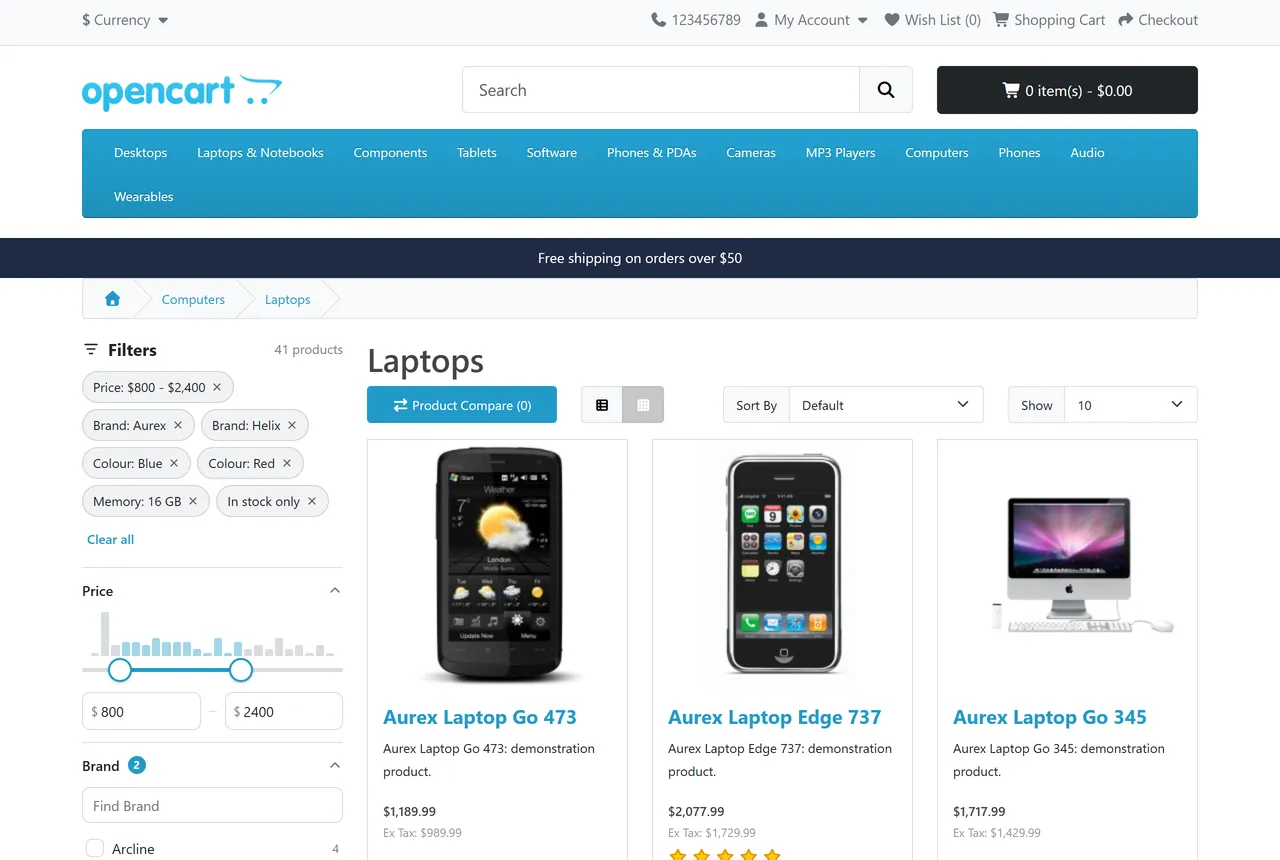
Filtered category page on the stock theme
Key features
All the filters: price slider with a histogram, brand, every attribute, every option with values, core filter groups, subcategories, in stock, on sale and customer rating.
Live counts: each number takes the other selected filters into account. Values with no products grey out or hide.
Display picked for you: colour swatches for colour options, image swatches for options with images, pills for short values such as sizes, checkboxes for the rest. You can override it per filter.
Instant, with a real URL: results change without a reload, the URL follows, and Back and Forward work. Filtered links can be shared. Sort, page size and pagination keep the filter.
Phones: a bottom sheet with a large touch slider and a Show N products button that updates as the shopper picks. Core hides filters on phones.
SEO-safe: filtered pages send noindex,follow, the canonical stays the clean page, and the panel has no links for crawlers to follow.
Prices as shown: the slider follows specials, quantity 1 discounts, customer group, tax display and the shopper's currency.
Speed: a bitmap index answers filters without one SQL query per value. See the measurements below.
Keeps itself current: product changes, reviews and orders refresh the index in the background; direct database imports are noticed within minutes. Cron is optional.
Multi-store and multi-language: every store sees its own products, attribute texts per language.
Your theme stays yours: colours and text follow the theme. Works on stock OpenCart and inside the filter drawers of Kavio Labs themes.
Clean install: no OCMOD, no core file changes. Uninstalling removes everything it added.
Measured speed
Median of real requests on our test stores with a generated catalogue, all products in one category, five filter groups selected. PHP without opcache on a desktop PC, so your server will differ.
10,000 products, OpenCart 4.1.0.4
10,000 products, OpenCart 3.0.5.1
50,000 products, OpenCart 4.1.0.4
Filter code (all counts + one page)
5.5 ms
4.8 ms
18.6 ms
Live count request (phone sheet)
66 ms
55 ms
88 ms
Complete filtered page
397 ms
395 ms
667 ms
Same page without filter, core query
411 ms
728 ms
1,076 ms
Full index rebuild
0.5 s
0.65 s
4.2 s
The complete page time is mostly OpenCart rendering the page, not the filter. The index of the 10,000 product store is about 770 KB in the database.
Use Test speed on the settings page to measure your own store.
Documentation
Installation
Requirements
OpenCart 4.0.2.0 – 4.1.x or 3.0.3.8 – 3.0.5.x. Tested on 4.1.0.4 and 3.0.5.1.
PHP 7.4 or newer, with what OpenCart itself needs.
MySQL or MariaDB with InnoDB.
Use the package for your OpenCart version: kv_product_filter.ocmod.zip for OpenCart 4, kv_product_filter-oc3.ocmod.zip for OpenCart 3.
OpenCart 4
Go to Extensions > Installer and upload kv_product_filter.ocmod.zip.
Click the green Install button next to it.
Go to Extensions > Extensions, choose Modules, and click Install next to AJAX Product Filter.
OpenCart 3
Go to Extensions > Installer and upload kv_product_filter-oc3.ocmod.zip.
Go to Extensions > Extensions, choose Modules, and click Install next to AJAX Product Filter.
There is no OCMOD modification to refresh.
After installing
The first index is built during installation, and the panel shows on category, brand, search and specials pages straight away. Open a category of your store to see it.
If your theme does not show the left column on a page, choose the right column in the settings or see the FAQ.
License
Open the extension from Extensions > Modules and enter your license key under License. It works for 14 days without a key. Without a valid license the storefront filter switches off and your pages work as before; the settings page always works.
Updating
Upload the new package in Extensions > Installer the same way. Your settings stay.
Uninstalling
Click Uninstall next to the extension under Extensions > Modules. Its events, cron job, settings and tables are removed. Products are not touched.
Configuration
Open Extensions > Modules > AJAX Product Filter > Edit.
Index status and speed test
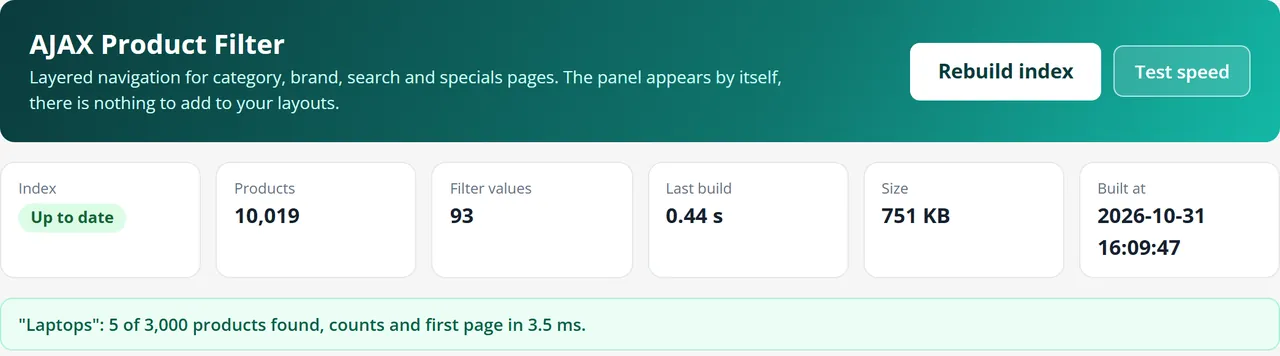
The top of the page shows the state of the index. Rebuild index builds it now. Test speed runs a real filter on your largest category and shows the time.
Where it shows
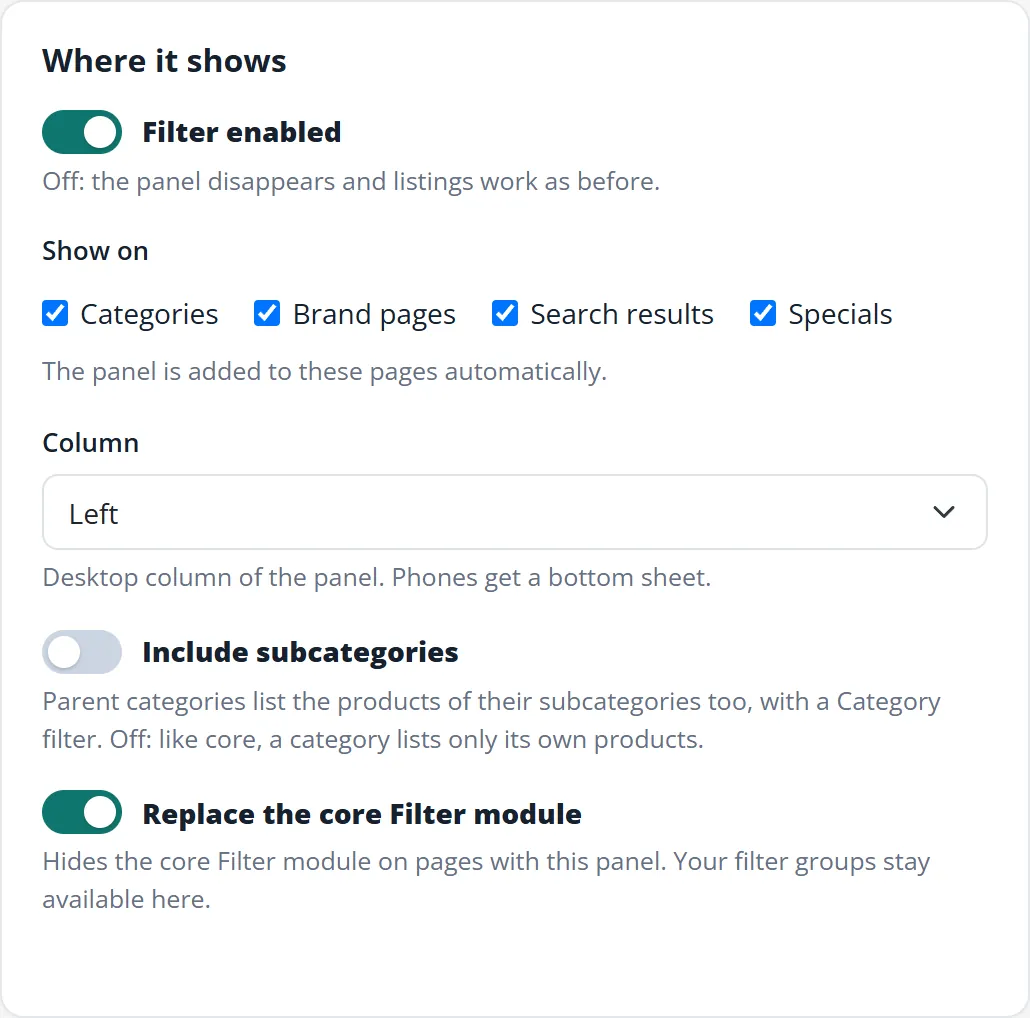
Where it shows
Filter enabled: off removes the panel and listings work as before.
Show on: categories, brand pages, search results, specials.
Column: left or right on desktop. Phones get a bottom sheet.
Include subcategories: parent categories list the products of their subcategories too, with a Category filter. Off, a category lists only its own products, as core does.
Replace the core Filter module: hides the core Filter module on pages with this panel. Your filter groups stay available as filters here.
Behaviour and look
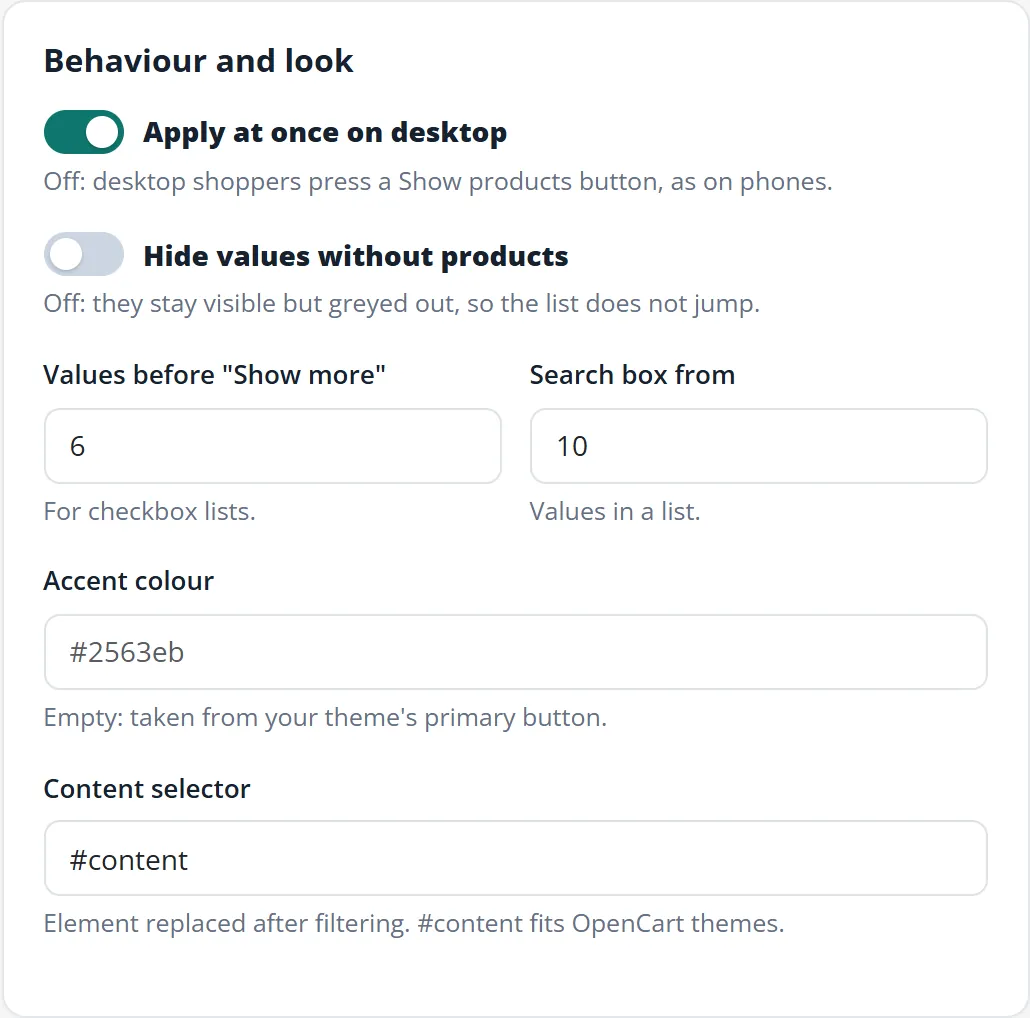
Behaviour and look
Apply at once on desktop: off, desktop shoppers press a Show products button, as on phones.
Hide values without products: off keeps them visible but greyed out, so the list does not jump.
Values before "Show more": for checkbox lists.
Search box from: a list with this many values gets a search box.
Accent colour: empty takes the colour of your theme's primary button.
Content selector: the part of the page replaced after filtering. #content fits OpenCart themes. Change it only for a theme that uses another element.
Filters
Filter list
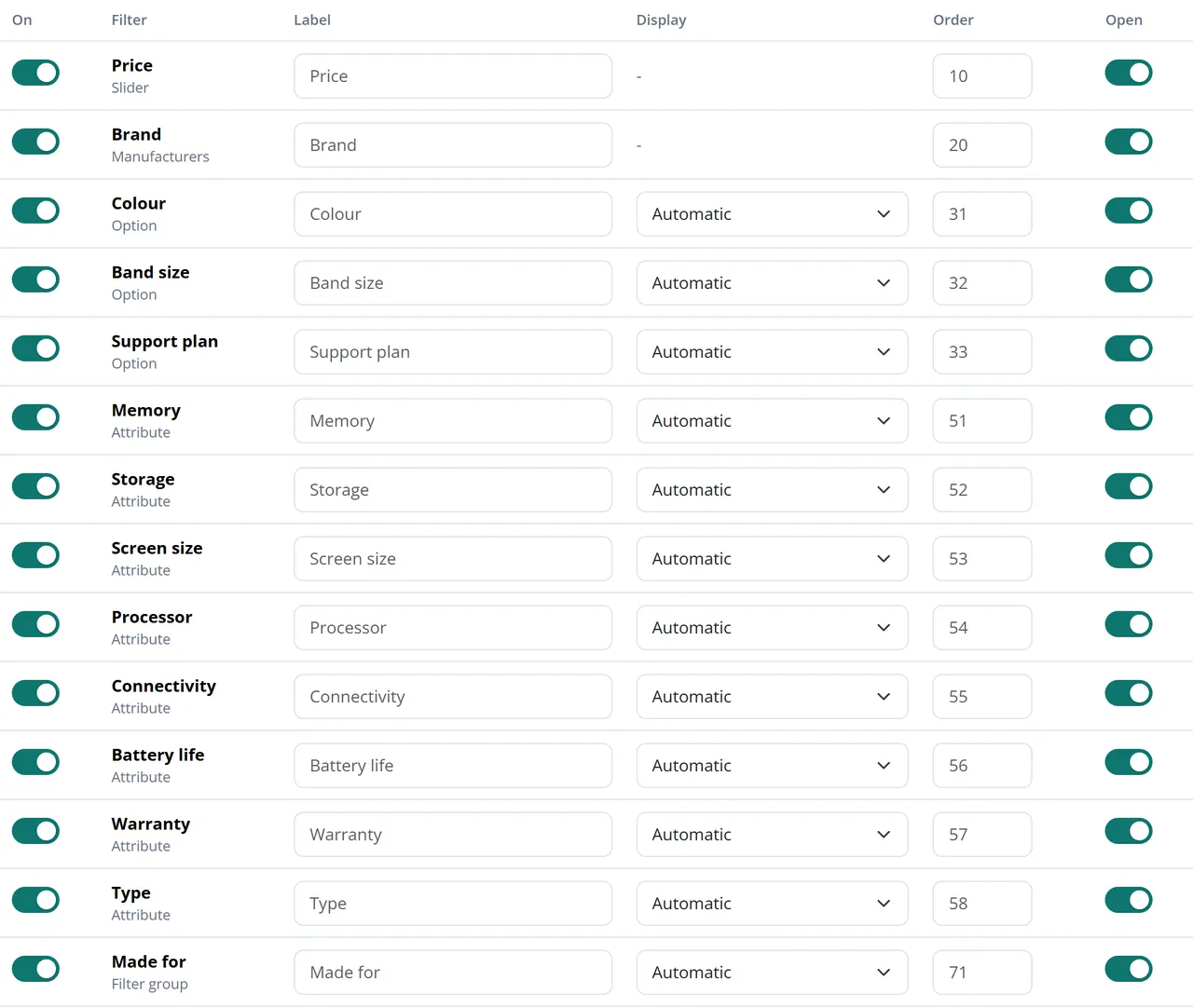
Every attribute, option and filter group of your catalogue is listed, with price, brand, category, rating, stock and sale. For each one:
On: switch it off if shoppers do not need it.
Label: another name for the panel. Empty uses the name from your catalogue.
Display: automatic, checkboxes, pills, colour swatches or image swatches.
Order: position in the panel, low numbers first.
Open: whether the group starts open.
Filters without products on a page never show on that page, so you can leave them on.
Colour swatches use the value name (Red, Navy Blue, Silver and so on) or the image of the option value. Values without a known colour get a neutral circle; add images to the option values in that case.
Index and SEO
Index and SEO
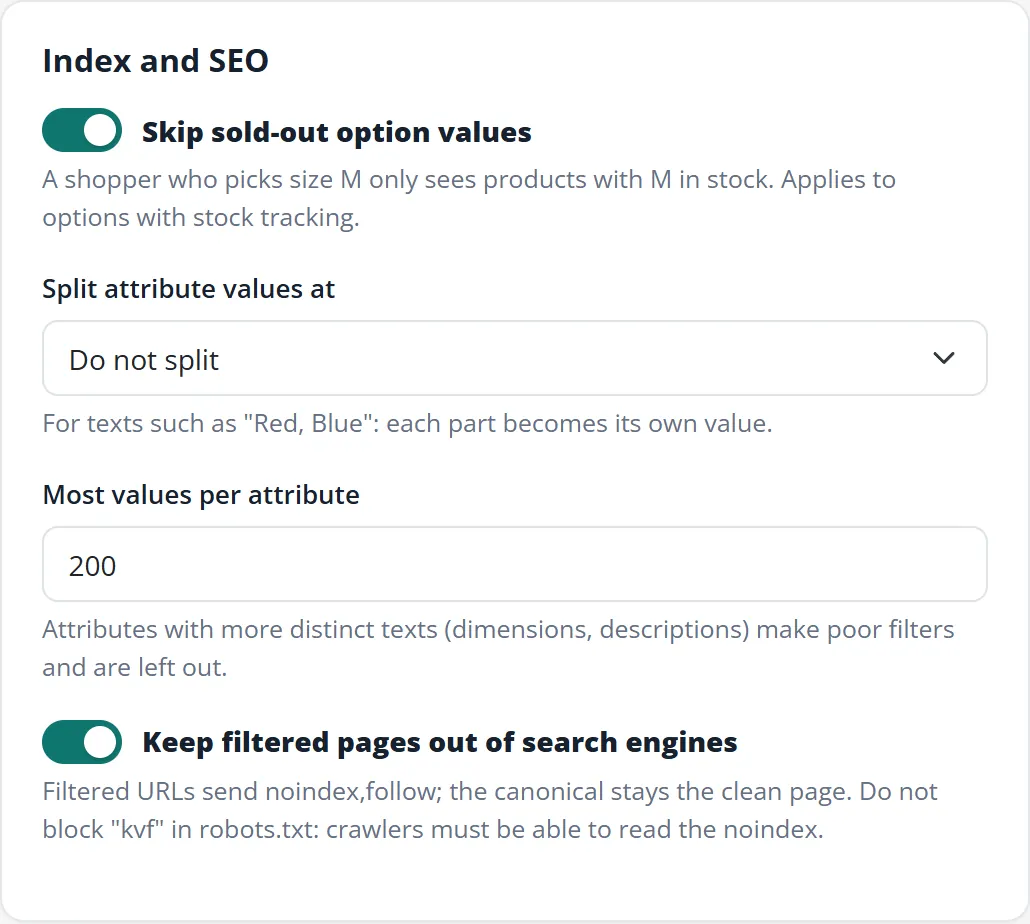
Skip sold-out option values: a shopper who picks size M only sees products that have M in stock. Applies to options with stock tracking.
Split attribute values at: for attribute texts such as "Red, Blue". Each part becomes its own value.
Most values per attribute: attributes with more distinct texts than this are left out, and the filter list says so. Long texts such as dimensions make poor filters.
Keep filtered pages out of search engines: leave this on. Do not block kvf in robots.txt: crawlers must be able to read the noindex.
Automatic updates
The index updates by itself. Saving a product, category, attribute, option, brand, filter or review and an order status change mark it as out of date. The next storefront visit starts the rebuild in the background from the visitor's browser, so nobody waits for it, at most once a minute (longer on large catalogues).
Imports that write directly to the database fire no OpenCart events. They are noticed by a check of the product table every five minutes. Prices with start and end dates switch on the right day, and the index is rebuilt at least once a day.
A cron job is optional. It is recommended above 20,000 products. The settings page shows the cron URL with its secret key; hourly is enough. OpenCart 4 also lists it under System > Maintenance > Cron Jobs.
How it works for shoppers
Desktop
Each tick updates the list, the counts, the page URL and the filter chips at once.
Inside one group, values add up: Aurex or Helix. Between groups, they narrow down: Aurex or Helix, and 16 GB.
The number next to a value is what the shopper gets by ticking it, given the other selected filters.
The price slider has two thumbs. The boxes under it accept typed numbers, and both work with the keyboard.
Chips at the top of the panel remove one filter; Clear all removes them all.
A second click on a selected rating clears it.
Back and Forward step through the selections. A copied link opens the same selection.
Keyboard users reach every control with Tab; Space ticks a value, the arrow keys move the slider.
Phones
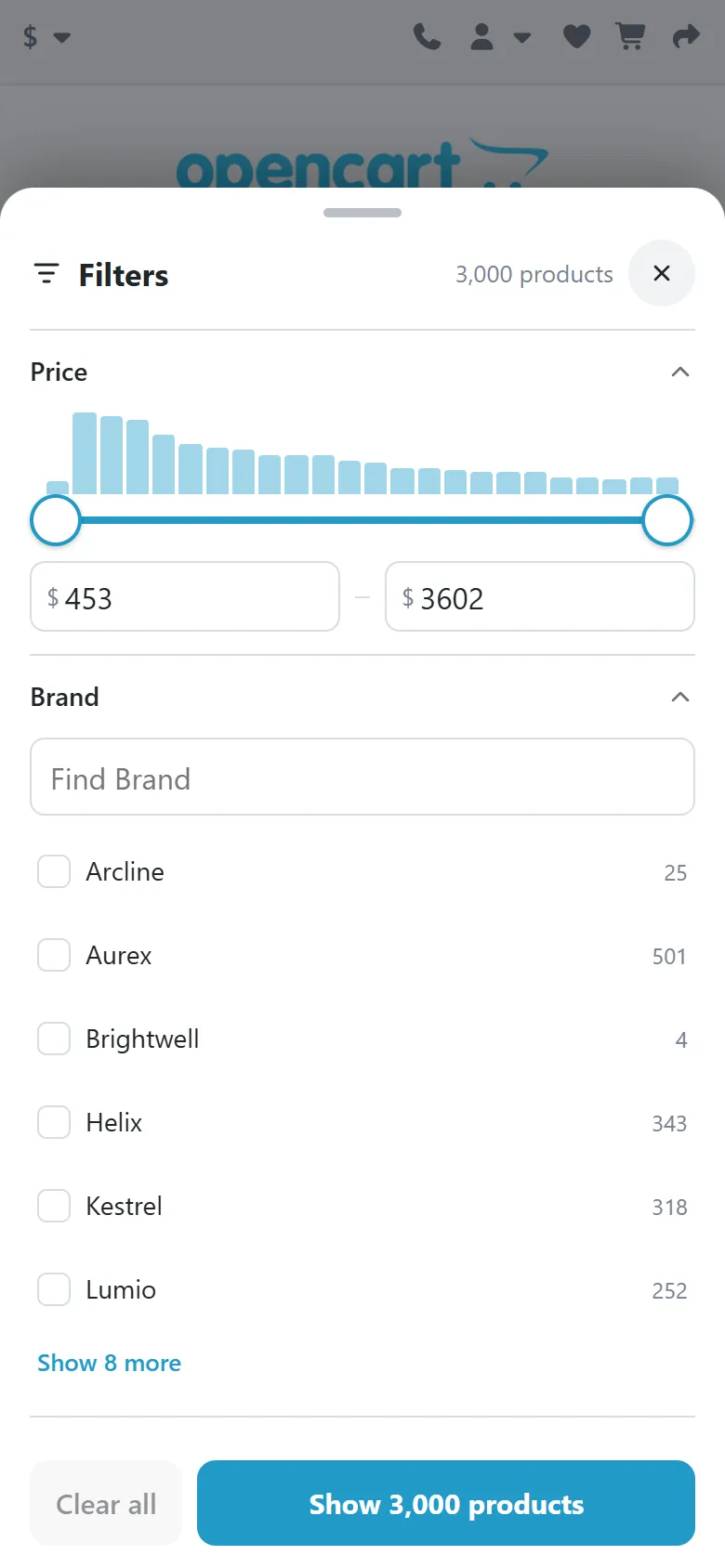
Bottom sheet on a phone
A Filters button floats over the list and shows the number of active filters. It opens a sheet from the bottom:
The page behind stays still.
Each tap updates the counts and the Show N products button, without changing the list yet.
Show N products closes the sheet and updates the list.
Drag the handle down, tap outside, or tap the X to close without applying.
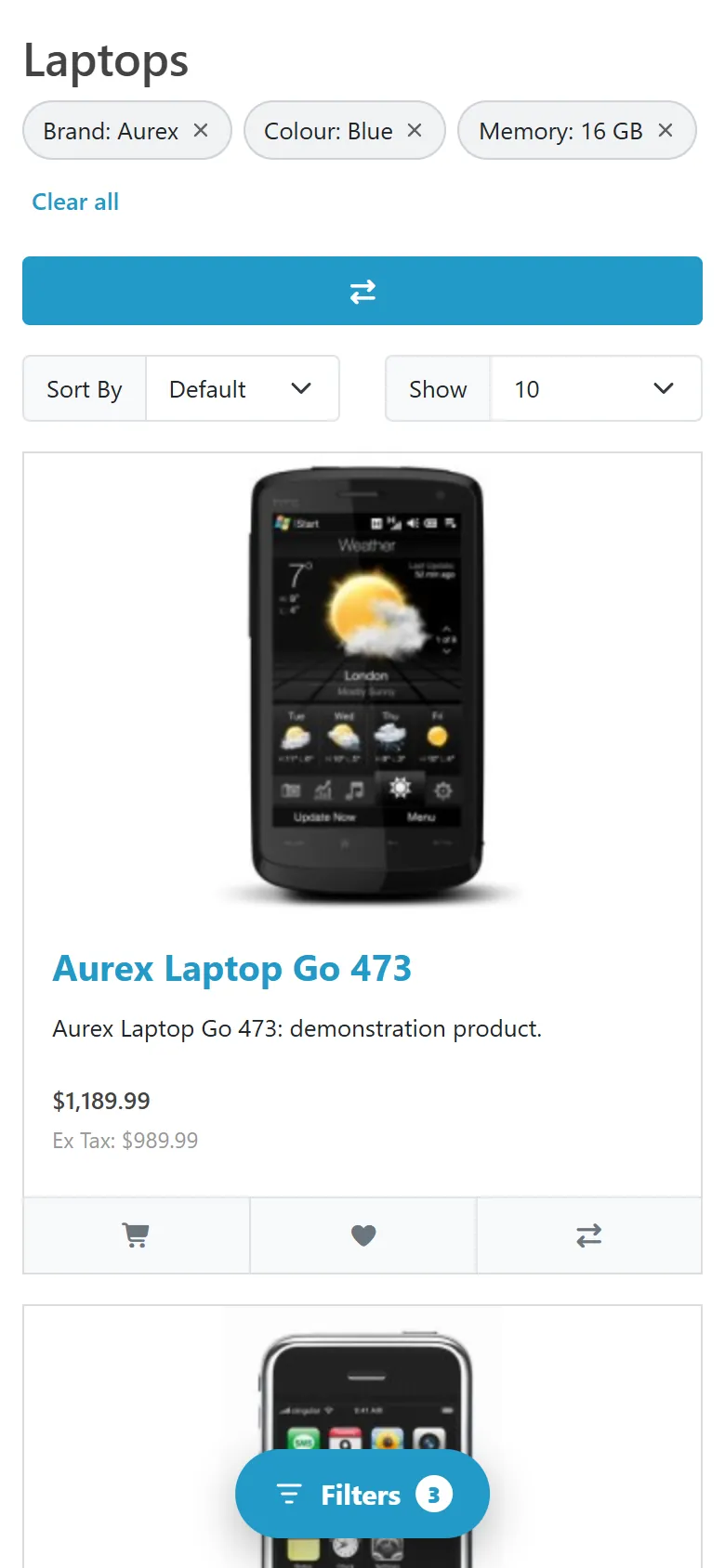
Filtered list with chips on a phone
Active filters show as chips above the list, and a tap removes one.
On Kavio Labs themes the same panel opens in the theme's own filter drawer, from the theme's Filters button.
Pages
The panel works on category, brand, search result and specials pages. A brand page has no brand filter and the specials page has no sale switch, since they would not narrow anything.
If a selection leaves no products, the chips stay so the shopper can step back.
FAQ
Do I need to add a module to my layouts?
No. The panel adds itself to the left or right column of the listing pages.
Does it use OCMOD or change core files?
No. Everything runs on OpenCart events.
Which themes does it work with?
It was tested on the stock themes of OpenCart 4.1.0.4 and 3.0.5.1 and on these Kavio Labs themes: Atlas, Prism, Pulse and Fetch on both versions; Axle, Volt, Gloss, Hearth, Kite, Atelier and Pantry on OpenCart 4.1.0.4. Other themes work when they print the left or right column and use #content for the page content. If yours uses another element, set it under Content selector.
I do not see the panel. Check that the extension is enabled and the page type is ticked under Show on. A category without products of its own shows no panel unless Include subcategories is on. A theme that does not print the columns on that page needs the other column or a template change. After adding products through a direct database import, the index catches up within minutes; Rebuild index does it now.
A new product does not show up in a filter. The index refreshes after the next storefront visit, at most once a minute. On large catalogues the gap is longer. Rebuild index does it at once.
Can search engines index filtered pages?
No, on purpose: they send noindex,follow and the canonical points to the clean page. Filter choices are form controls, not links, so crawlers do not walk through combinations.
What about my core Filter module?
It is hidden on pages with the panel, and its filter groups appear as filters in the panel. Switch off Replace the core Filter module to keep both.
Do prices in the slider include tax?
They follow your store: with tax if prices are shown with tax, in the shopper's currency, with specials and customer group prices. If prices are hidden for guests, the price filter is hidden too.
How much space does the index take?
About 770 KB for 10,000 products with 90 filter values, and it grows with products times filter values.
Do I need a cron job?
No, but it is recommended above 20,000 products. See Configuration.
Does it work on a multi-store installation?
Yes. Every store sees its own products. The settings are shared by all stores.
Is Journal supported?
Journal has its own filter and was not tested.
What happens when the license ends?
Without a valid license the panel disappears and your pages work as before. No data is lost.
Server-side tracking for OpenCart 4.x and 3.0.x: purchases, refunds, add to cart, checkout, product views and leads go from your server to the free official GA4 Measurement Protocol, Meta Conversions API and TikTok Events API, deduplicated with the browser pixels through shared event ids. Consent-aware, SHA-256 hashed customer data, order status mapping, queue with retries, test mode and an event log. No paid relay, events only, no OCMOD.
The department store theme for OpenCart 4.x and 3.0.x: colour-coded departments, a department list beside the hero slider with two side promos, a big search with a department selector, tabbed product blocks, a 2 + 1 + 2 offer grid, deals of the day with real countdowns, a department showcase, a promotions band and a three-column product page with a sticky buy box. Four styles (Meridian, Harbor, Citrus, Night) and your own colours on top. Events only, no core changes.
Stop AI crawlers, scrapers, vulnerability scanners and unwanted countries before OpenCart 4.x or 3.0.x builds a page. Googlebot and Bingbot are verified by DNS and always allowed; 50+ bots get one switch each; country rules use free GeoIP databases and can close only the checkout; IP and network lists, rate limits, honeypots and the cart flood fix; a one-second challenge instead of a captcha; learning mode, dashboard, log, IP tester and Cloudflare export. No core changes, no OCMOD.