SEO for OpenCart 4.x and 3.0.x in one panel: meta templates and SEO URLs with preview and undo, automatic 301s tied to the item, a 404 log, canonical fixes, Product and Breadcrumb JSON-LD that never doubles your theme, Open Graph, an image sitemap, robots.txt and a score that says what to fix first. No OCMOD, no AI keys.
On saleVersion 1.0.0Compatible with OpenCart 4.1.0.4, 3.0.5.1 No core file edits
Built forOpenCart
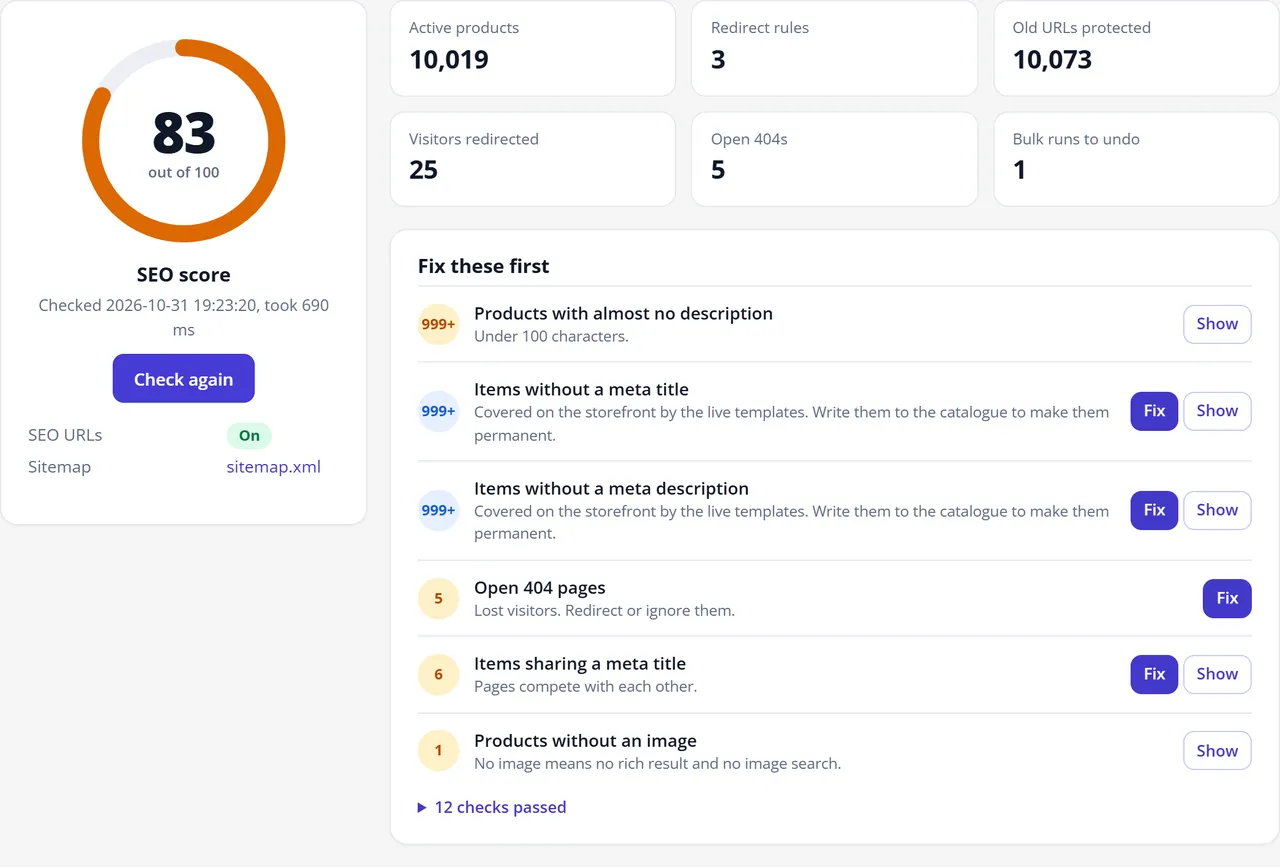
One score, and what to fix first1 of 9
SEO for OpenCart 4.x and 3.0.x in one panel: meta templates and SEO URLs with preview and undo, automatic 301s tied to the item, a 404 log, canonical fixes, Product and Breadcrumb JSON-LD that never doubles your theme, Open Graph, an image sitemap, robots.txt and a score that says what to fix first. No OCMOD, no AI keys.
OpenCart 4.1.0.4, 3.0.5.1
Overview
One extension for the SEO work of a store: meta texts, clean URLs, redirects, structured data, social tags, sitemap and robots.txt, with a score that tells you what to fix first.
Two promises run through it. Nothing changes in your catalogue without a before and after preview. Every bulk change can be undone.
Overview with score and open issues
Key features
SEO score: one number for the store and a list of problems in the order that matters, each with the items behind it and a way to fix it.
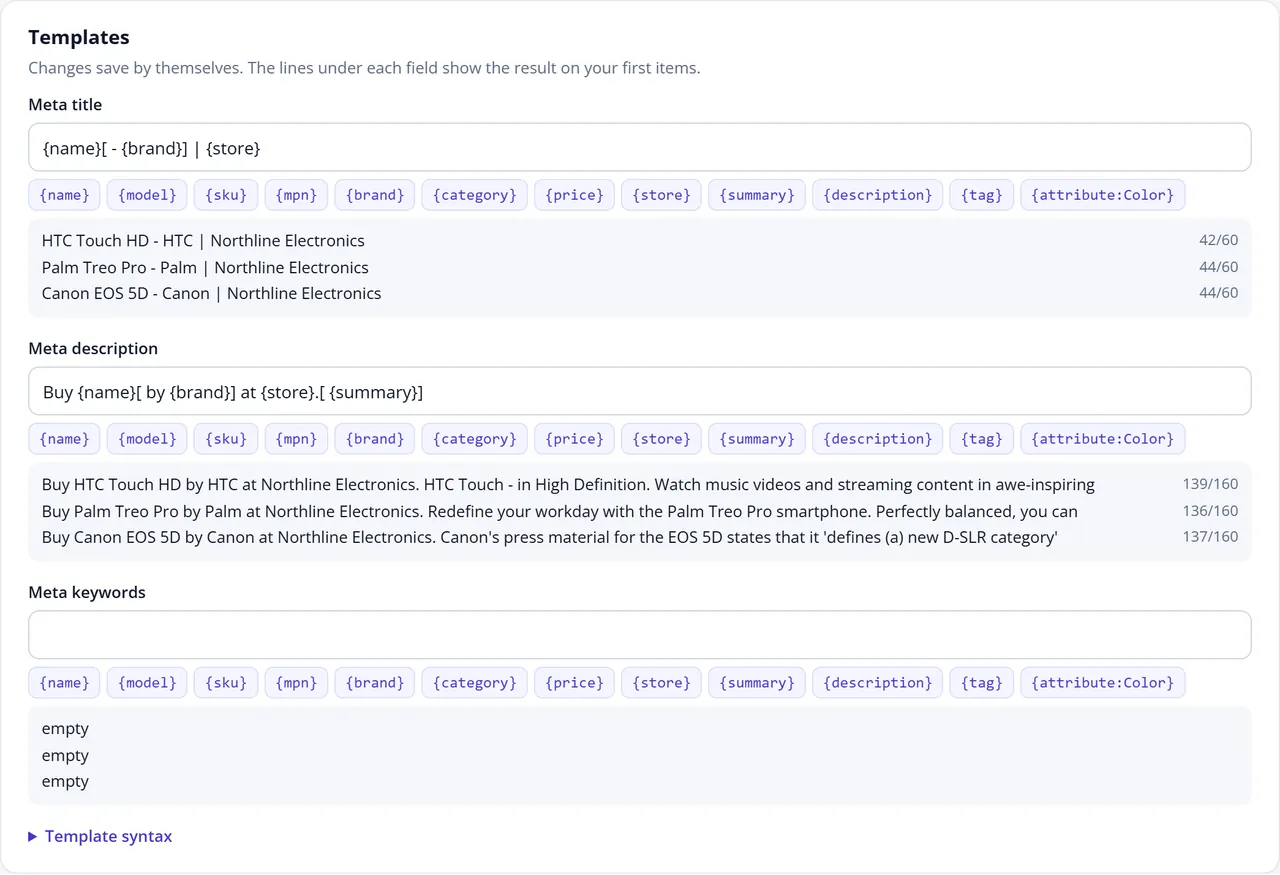
Meta templates: titles, descriptions and keywords for products, categories, brands and information pages. Rules per category and brand. Optional text that disappears when a value is empty or the text gets too long.
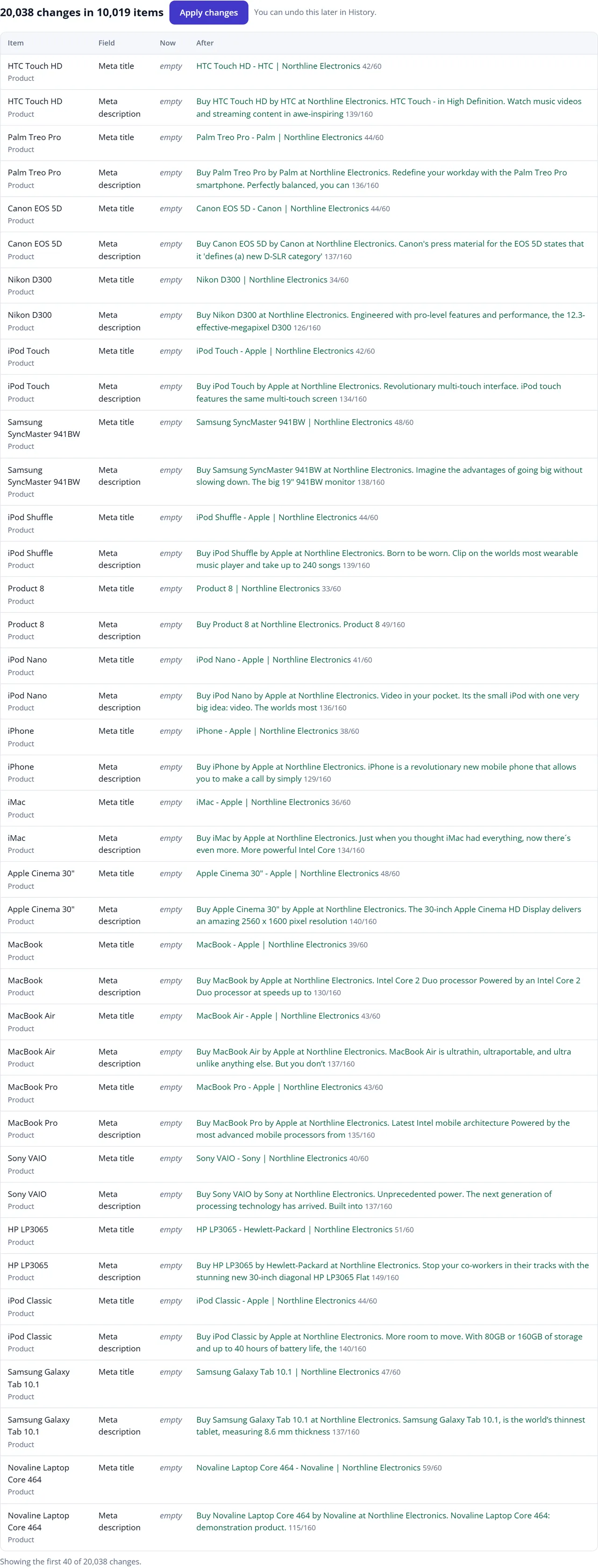
Preview and Undo: every run shows the exact before and after first. Undo restores the old values, and leaves alone anything someone edited since.
Live fallback: pages with empty meta use the templates on the page itself, without writing to your catalogue.
SEO URLs: generate missing keywords or all of them, with transliteration, unique per store. Finds items without a URL, keywords used twice and invalid characters.
Old URLs keep working: when a keyword changes, the old URL gets a 301 tied to the item, so it always leads to today's URL and redirect chains do not form. Disabled and deleted products lead to their category.
Redirect manager: exact URLs, wildcards and regular expressions, 301, 302 and 410, per store, CSV import and export, a URL tester, hit counts. Chains are flattened when you save.
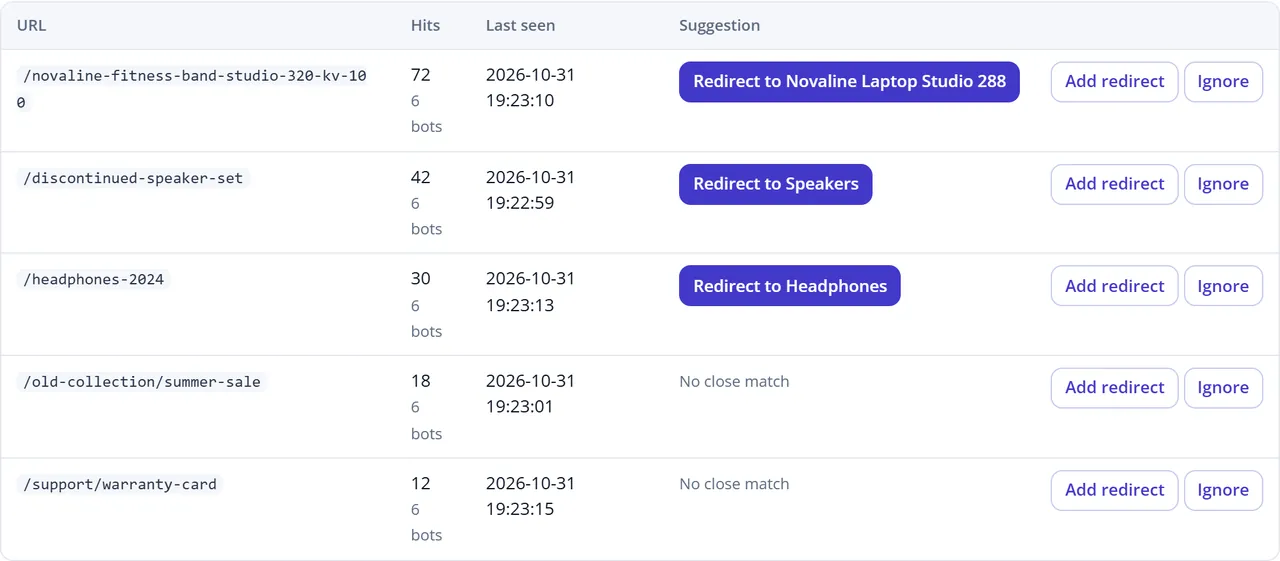
404 log: the URLs visitors and bots asked for, with hit counts, referrer and a suggestion for the closest live page. One click turns it into a redirect. No IP addresses are stored.
One canonical on every page: different paths and sort options point to one clean URL. Raw index.php links go to the SEO URL with a 301.
Search results stay clean:noindex,follow on internal search, sorted and filtered lists, cart, checkout and account pages.
Structured data from real data: Product, Offer, BreadcrumbList, Organization and WebSite. A rating appears only with approved reviews, a GTIN only with a valid check digit, returns and shipping only when you fill them in.
No duplicates: we read the finished page, so each type appears once, whatever your theme prints.
Open Graph and X cards.
XML sitemap: index plus split files, with product images, per store, per language on OpenCart 4. Works on the stock rewrite rules.
robots.txt editor: with undo, warnings for dangerous rules, and a tester that tells you whether a URL is blocked.
Page inspector: shows what a search engine reads from any page of your store.
No OCMOD, no core file changes, no AI keys, no paid services.
Measured speed
Generated catalogue of 10,000 products on our own test stores. PHP without opcache on a desktop PC, so your server will differ.
OpenCart 4.1.0.4
OpenCart 3.0.5.1
Store check with score
0.2 s
0.3 s
Preview of 20,038 meta changes
2.3 s
2.0 s
Writing 20,038 meta values
4.5 s
4.7 s
Undo of those values
5.3 s
5.4 s
Generating 10,001 SEO URLs
4.8 s
5.4 s
Renaming 10,019 URLs, each old URL becoming a 301
5.6 s
6.3 s
Sitemap, first build: 10,099 URLs, 10,088 images
4.3 s
2.2 s
Sitemap file from the cache
95 ms
79 ms
Old URL answering with its 301, 10,020 rules
89 ms
57 ms
A normal product page, median of 25 requests with SEO Suite off and on: 409 and 422 ms on 4.1.0.4, 310 and 315 ms on 3.0.5.1. Bulk work runs in steps of 500 items, so a slow host does not hit a time limit.
Tested on
OpenCart 4.1.0.4 with PHP 8.3 and OpenCart 3.0.5.1 with PHP 8.1, on the stock themes and on the Kavio Labs themes Atlas, Prism, Pulse and Fetch, next to AJAX Product Filter and Server-Side Tracking.
Not tested: other OpenCart versions, PHP 8.2 and 8.4, other themes, Journal, stores in a subfolder, nginx and Apache (our test server is Caddy with rewrite rules translated from OpenCart's .htaccess.txt). The code handles the database differences of OpenCart 4.0 and older 3.0 releases, but we have not run it there.
Documentation
Installation
Requirements
OpenCart 4.1.0.4 or 3.0.5.1 (tested versions, see Tested on)
PHP 8.1 or newer, MySQL or MariaDB
SEO URLs switched on for clean URLs: System > Settings > Server > Use SEO URLs
OpenCart 4
Go to Extensions > Installer and upload kv_seo_suite.ocmod.zip.
Press the green install button in the installer list.
Go to Extensions > Extensions, choose Modules and install SEO Suite.
Press the edit button to open the panel.
OpenCart 3
Go to Extensions > Installer and upload kv_seo_suite-oc3.ocmod.zip.
Go to Extensions > Extensions, choose Modules and install SEO Suite.
Press the edit button to open the panel.
There is nothing to refresh under Modifications: the extension uses events only.
First steps
Open Overview and read the score.
Under Settings, check that SEO URLs are on. The panel warns you when they are not.
Under Rich results, fill in your store details, and returns and shipping if you want them in merchant listings.
Open Meta templates and SEO URLs, look at the examples and press Preview changes.
Submit https://your-store/sitemap.xml in Google Search Console and Bing Webmaster Tools.
Sitemap and robots.txt on your server
The stock OpenCart rewrite rules send unknown paths to OpenCart, so /sitemap.xml works without any server change. If you use nginx with your own rules, requests for /sitemap.xml must reach index.php like any SEO URL. The stock .htaccess of OpenCart 3 sends /sitemap.xml to the core feed; SEO Suite answers that request too, so you do not need to edit it.
robots.txt is a normal file in the store root. A store without the file gets a generated one.
Updating
Upload the new package the same way. Your templates, redirects, log and history are kept when the update does not remove the module. If you uninstall the module first, export your redirects to CSV: see below.
Uninstalling
Extensions > Extensions > Modules > SEO Suite > Uninstall removes the extension's events, cron job, settings, tables and built sitemaps. Export your redirects first (Redirects > Export CSV): they are removed with the tables.
Meta texts and SEO URLs you wrote to the catalogue stay, because they are your data. Brand meta texts live in the extension's own table, as OpenCart has no field for them, so they go. Your robots.txt stays as it is.
Configuration
Everything lives in one panel. Save settings at the top saves the switches and fields of all tabs. Templates save by themselves.
Template syntax
Write
Meaning
{name}
A value of the item
`{brand\
category\
"Shop"}`
The first value that is not empty; text in quotes is literal
[ by {brand}]
Optional: disappears when a value inside is empty, and is the first thing dropped when the text gets too long
Titles are cut at 60 and descriptions at 160 characters, on a word boundary.
Avoid {price} in texts you write to the catalogue: it does not follow later price changes. It is fine in the live fallback.
Meta templates
Rules
A rule replaces the template for a category with its subcategories, a brand, or both. The most specific rule wins: a rule for a deeper category beats a higher one, and category plus brand beats either.
Structured data
Markup already on the page decides what happens with what your theme prints:
Replace (recommended): our Product, BreadcrumbList, Organization and WebSite replace the theme's.
Keep the theme's: ours are added only where the page has none.
Off: nothing from us. The theme's markup stays.
Either way each type appears once on the final page. Other types, such as FAQ blocks, are left alone. If a theme uses microdata for Product instead of JSON-LD, we do not add a second Product.
Prices are what a guest sees, with tax if your store shows tax, in the shopper's currency. When prices are hidden from guests, the offer is left out.
Merchant details
Returns and shipping appear in the Offer only when you fill them in. Use two-letter country codes such as US. Handling and delivery days take one number or a range: 0-1, 2-5.
Settings tab
Setting
Default
What it does
Storefront features
On
Off: pages are left as OpenCart makes them
Add the page number to titles
On
Page 2 of a list gets its own title
Fill empty alt texts on product pages
On
Uses the product name, only where alt is missing
One canonical on every page
On
Replaces whatever is there with one clean URL
Redirect index.php links to SEO URLs
On
Only when SEO URLs are on and the item has a keyword
Redirect ?page=1
On
To the page itself
Language alternates
On
OpenCart 4 with more than one language
Search results
On
noindex,follow
Sorted, filtered and limited lists
On
noindex,follow
Cart, checkout, account, compare
On
noindex,follow
Page 2 and later of lists
Off
noindex,follow
Redirect settings
Setting
Default
What it does
Keep old URLs alive
On
An old keyword gets a 301 to its item
Disabled products lead to their category
On
Also deleted products, instead of a 404
Fix mistyped URLs
Off
A 404 very close to a live keyword goes there
Keep the query string
On
Campaign tags survive the redirect
Sitemap
Choose what to include, how many URLs go in a file (up to 50,000) and after how many hours a file is rebuilt. Files are built when first requested and kept in OpenCart's cache folder. Changes to items clear them.
Multi-store: each store has its own /sitemap.xml with its own items and host. OpenCart 4: one set of files per language. OpenCart 3 has one URL per page, so the sitemap holds the default language.
Cron (optional)
Nothing needs cron to work. Old URLs are picked up when an item is saved, when the panel opens and when a run finishes. OpenCart 4 gets an hourly cron job on install. On OpenCart 3 you can call the URL on the Settings tab, which also notices keywords changed by direct database imports.
License
Enter your key under Settings and press Check. Without a valid license the storefront features switch off after the 14-day trial; the panel and everything already written to your catalogue keep working.
Daily use
Fill in missing meta texts
Open Meta templates and pick a page type. The lines under each field show the result on your first items.
Under Write to the catalogue, choose pages, fields and Empty fields only.
Press Preview changes. Nothing is written yet. You see how many values would change and the first ones, before and after.
Press Apply changes.
Preview before writing
Prefer not to write anything? Leave Fill empty meta on the page on: visitors and search engines get the template text, and your catalogue stays as it is.
Undo a run
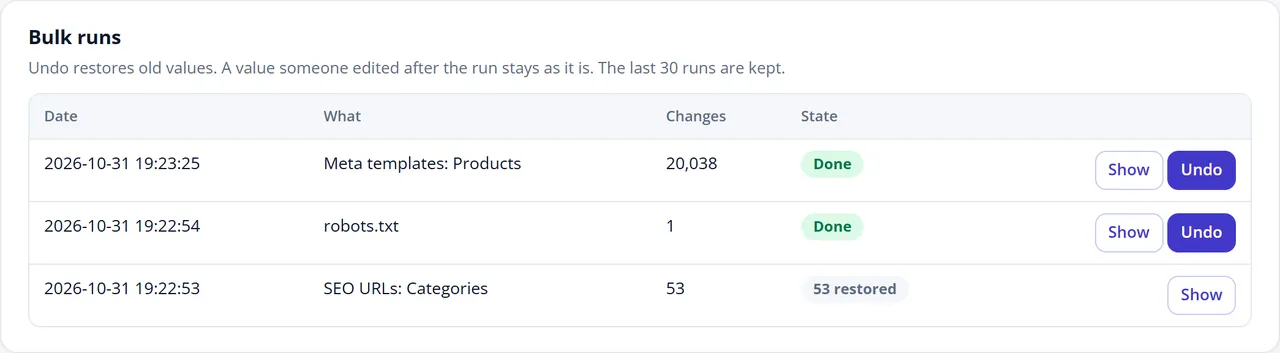
Open History and press Undo next to the run. Old values come back. A value someone edited after the run stays as it is, and the result tells you how many.
The last 30 runs are kept. A robots.txt save appears here too.
History with Undo
Generate SEO URLs
Open SEO URLs and check the templates.
Choose Empty fields only to fill gaps, or All items to rebuild keywords.
Preview, then apply.
Keywords are unique per store. Two items with the same name get name and name-2. A keyword another item already uses is left to that item. Changing URLs is safe: each old URL gets a 301.
The URL check at the bottom lists items without a keyword, keywords used twice and invalid characters.
Rename a product
Change the keyword in the normal product form and save. The old URL redirects from that moment, to the item rather than to a fixed address. Rename it again and both old URLs lead straight to the newest one.
Keywords changed by an import or directly in the database are noticed the next time the panel opens or the cron job runs. The old keyword must have been seen once, so install the extension before a big rename.
Add a redirect
Redirects > Add a redirect. Paths are relative to the store.
Kind
From
To
Exact URL
/old-page
/new-page
With a query
/page?id=5
/new-page
Wildcard
/blog/*
/news/$1
Regular expression
^/item-(\d+)$
/product/$1
Gone
/removed
Choose 410, leave To empty
Test a URL tells you what a URL does now. Import CSV takes source,target,code,type, one rule per line.
Redirect list
A rule on an address that also exists as a page wins over the page. Pattern rules run on every page, so keep them short: up to 300 are used.
Work through the 404 log
The log shows what is missing, most requested first. Where a live page looks close, a button offers it: one click makes the redirect, tied to that item. Add redirect lets you pick the target. Ignore hides a row. Bot requests are counted separately, and scanner noise such as /wp-login.php is left out.
404 log with suggestions
Check a page
Rich results > Page inspector loads a page as a guest and shows the search snippet, lengths, canonical, robots tag, structured data and Open Graph. A red badge means a type appears twice. For a final check, Google's Rich Results Test works on live pages.
Search preview
robots.txt
Sitemap & robots has the editor. The panel warns when a rule blocks the whole store, images, CSS or JavaScript, or when the Sitemap line is missing. Is this URL blocked? tests the text in the editor before you save.
FAQ
Will it change my products by itself?
No. Bulk changes run only when you press Apply after a preview. The one automatic write: an item saved without a keyword gets one from the template, on OpenCart 3 where the form allows that. You can switch it off in SEO URLs.
Does it need OCMOD?
No. It uses OpenCart events only. There is nothing to refresh under Modifications and no core file is changed.
Do I need an API key or a paid service?
No. There is no AI text generation and no external service. The only outbound call is the license check on the version from our own store.
My theme already prints Product markup. Will I get two?
No. SEO Suite reads the finished page and keeps each type once. We tested this on Atlas, Pulse, Prism, Fetch and stock OpenCart. Other themes were not tested: use the Page inspector to check yours.
Do you add star ratings to products without reviews?
No. A rating appears only when the product has approved reviews, with their real average and count. Google's rich result is still Google's decision.
Will this get me to the top of Google?
No tool can promise that. It fixes the technical side and saves the hours; ranking also depends on your content, links and competition.
Does it work with AJAX Product Filter?
Yes. Filtered pages keep their noindex,follow, with one robots tag and a clean canonical. Tested together.
I already use another SEO extension. Switch the overlapping parts off in one of them. Running two extensions that both generate sitemaps or redirects makes it hard to tell which one answered.
Can I use my existing redirects?
Yes, import them as CSV: source,target,code,type.
How many redirects can it hold?
We tested 10,020 keyword redirects. An old URL answered in 57 to 89 ms on our test stores. Exact rules and old keywords use an indexed lookup. Pattern rules run on every request, so up to 300 are used.
Why did a keyword get -2 at the end?
Another item uses that keyword in the same store. OpenCart looks keywords up per store, so they must be unique there, also across languages unless it is the same item.
Why does a renamed item not redirect after a direct database import?
Old keywords are learned when seen. Open the panel or let cron run once before the import, and once after it.
Does Undo bring back URLs too?
Yes, and the old URLs answer again. The keywords of the undone run then redirect to the item.
Is uninstalling clean?
Yes: events, cron job, settings, tables and built sitemaps go. Meta texts and URLs written to the catalogue stay. Export your redirects first.
Does it work on several stores and languages?
Yes. Redirects can be set per store, sitemaps and the 404 log are per store, and runs can target one language. Language alternates are on OpenCart 4, where each language has its own URL. Tested with two stores and two languages.
Server-side tracking for OpenCart 4.x and 3.0.x: purchases, refunds, add to cart, checkout, product views and leads go from your server to the free official GA4 Measurement Protocol, Meta Conversions API and TikTok Events API, deduplicated with the browser pixels through shared event ids. Consent-aware, SHA-256 hashed customer data, order status mapping, queue with retries, test mode and an event log. No paid relay, events only, no OCMOD.
The department store theme for OpenCart 4.x and 3.0.x: colour-coded departments, a department list beside the hero slider with two side promos, a big search with a department selector, tabbed product blocks, a 2 + 1 + 2 offer grid, deals of the day with real countdowns, a department showcase, a promotions band and a three-column product page with a sticky buy box. Four styles (Meridian, Harbor, Citrus, Night) and your own colours on top. Events only, no core changes.
Stop AI crawlers, scrapers, vulnerability scanners and unwanted countries before OpenCart 4.x or 3.0.x builds a page. Googlebot and Bingbot are verified by DNS and always allowed; 50+ bots get one switch each; country rules use free GeoIP databases and can close only the checkout; IP and network lists, rate limits, honeypots and the cart flood fix; a one-second challenge instead of a captcha; learning mode, dashboard, log, IP tester and Cloudflare export. No core changes, no OCMOD.