Gift wrap for OpenCart 4: wraps with pictures and prices for the whole order or single items, a gift message with From and To names and a wanted delivery date, a gift receipt and invoice without prices, and a separate correctly taxed Gift wrap order total line that follows coupons, shipping and currencies. Works in the checkout, the cart, the order e-mails and the admin order editor, with several stores and languages. Events only, no OCMOD.
Tested on 4.1.0.4Updated Nov 7, 2026Version 1.0.0Compatible with OpenCart 4.1.0.4 No core file edits
Built forOpenCart
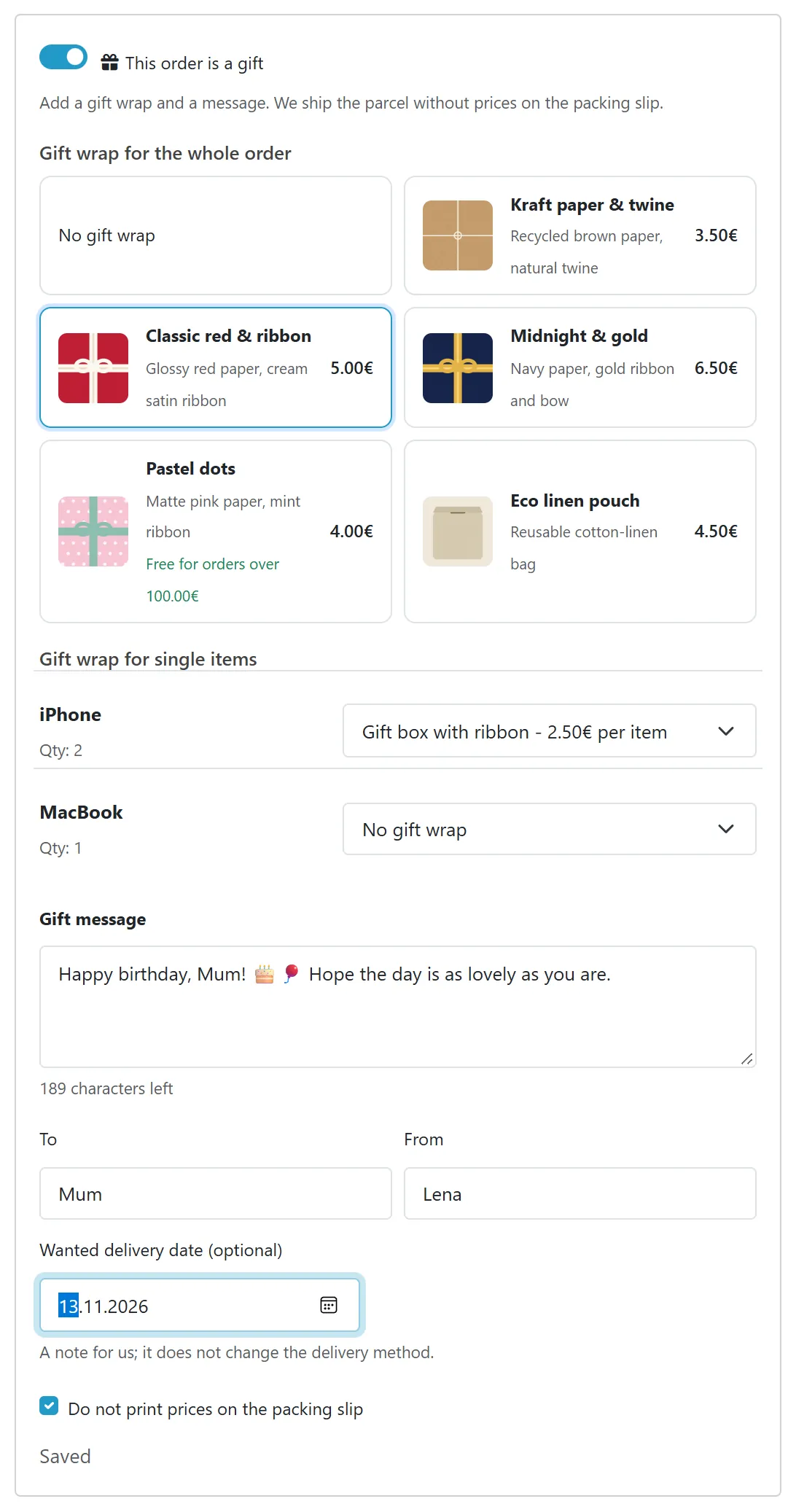
Gift wrap chosen at checkout1 of 6
What it does
Gift wrap for OpenCart 4: wraps with pictures and prices for the whole order or single items, a gift message with From and To names and a wanted delivery date, a gift receipt and invoice without prices, and a separate correctly taxed Gift wrap order total line that follows coupons, shipping and currencies. Works in the checkout, the cart, the order e-mails and the admin order editor, with several stores and languages. Events only, no OCMOD.
What it changes for your store
Gift wrap that is charged correctly and arrives as a gift. A This order is a gift box in the cart and the checkout lets shoppers choose one of your wraps for the parcel or for single products, write a message with the names of the sender and the recipient and name a wanted delivery date. The wrap becomes its own line of the order total with the taxes of the tax class you choose, so the tax lines and the total stay right with coupons, shipping and several currencies.
Know the limits. Tested on OpenCart 4.1.0.4 with the default theme. The wanted delivery date is a note for you; it does not change the shipping method. Coupons discount products, not the wrap. Re-ordering a product from the account page does not copy gift options. Wraps are charged in the default currency of the store and converted for display; a tax-exempt customer pays no tax on the wrap.
Features
For shoppers
Wrap cards with picture, name, description and the price in the shopper's currency, with tax when your store shows prices with tax
One wrap for the whole order, a wrap per product line, or both
Gift message with a counter, emoji and every language, From and To names, a wanted delivery date
A tick box Do not print prices on the packing slip
Gift facts on the order page and in the order e-mail, and a printable gift receipt
For the store owner
Wraps with name and description per language, image, price, tax class, an optional free-above amount, sort order and status
Offered for all products, selected categories (subcategories included) or selected products, per store
Charged once per order, per item or once per product line
A Gift order card on the admin order page with the facts, a printable gift receipt without prices and a form to correct the message, names and date without touching the totals
The order editor has the gift options in its More section; a wrap that is already on the order keeps its price even if you changed the wrap price since
Invoices of orders with the no-prices tick print without prices; the packing list shows the gift facts
The order total line has its own name and sort order in Extensions > Order Totals
Safe and light
Events and an order total extension, no OCMOD, no core edits, no external service
Every value escaped on output, SQL values escaped or integer-cast, utf8mb4 tables, character-based limits
What you get
Download & installOne installer package (.ocmod.zip) for OpenCart 4.0.2 – 4.1.x. There is no OpenCart 3 edition. Download it from My licenses right after payment.
12 months of updates & supportNew versions and help for 12 months (24 or 36 months at checkout). After that the extension keeps working; renew anytime at 50%.
License for your storeOne production domain with all its subdomains; staging and local development hosts are free. How licensing works
30-day refundFull refund within 30 days of your first purchase, no reason needed. Refund policy
Tested buildsOpenCart 4.1.0.4. Tested on OpenCart 4.1.0.4.
Documentation & supportFull guide (Installation, Configuration, Usage, Developer notes) on this page. Tickets from your account, first reply within 1 business day.
Compatibility
Gift Wrap & Gift Messages works with OpenCart 4.1.0.4.
We list the builds we install and test on. “Tested” means the test plan ran on that build; “Supported” means the build is inside the supported range.
Compatibility
Version
Range
Runs on
Status
OpenCart 4.1.0.x
4.1.0.0 – 4.1.0.4
PHP 8.1 – 8.3
Tested on 4.1.0.4
OpenCart 4.0.2.x
4.0.2.0 – 4.0.2.3
PHP 8.0 – 8.2
Supported
1.0.0
Nov 7, 2026
Latest
Updates keep your data: uninstalling keeps the tables, the settings (restored on install) and the licence state, because an OpenCart 4 update is uninstall + install. The documentation has the update steps and how to remove all data.
First release for OpenCart 4.1: gift wraps with picture, name and description per language, price, tax class, optional free-above amount, limits by product, category (subcategories included) and store; used for the whole order or for single items (per item or once per product line).
"This order is a gift" box in the checkout and the cart with wrap cards, a gift message (20 to 1000 characters, counted in characters, emoji safe), From and To names, a wanted delivery date note and a "no prices on the packing slip" tick; saved as the shopper types.
Separate Gift wrap order total line with the taxes of the wrap's tax class (Extensions > Order Totals), consistent with coupons, shipping, other fees, several currencies and several stores.
Admin: wraps list and form, settings, license card, a Gift order card on the order page with a printable gift receipt without prices and a quick text form, gift options inside the order editor (the price of a wrap already on the order is kept), invoice without prices for orders with the tick, gift facts on the packing list.
Gift facts on the customer's order page and in the order e-mail and the admin alert (template variables kv_gift_wrap.*).
Events and an order total extension only: no OCMOD, no core edits. Self-healing upgrade of tables and settings.
Privacy and price safety: the order editor bridge answers only inside OpenCart's order API (admin order editor or a signed API call); the storefront never loads the gift data of another order and always prices wraps from the current wrap list.
How do I install the extension?
Upload. Extensions > Installer: upload the .ocmod.zip. It is for OpenCart 4 (4.0.2 to 4.1.x).
Install and enable. Extensions > Extensions > Modules: install, open the settings and switch it on. Events register themselves; nothing is patched.
Enter the license key. Paste the key from My licenses. Subdomains, staging and local hosts are included; you have 14 days to do it.
OpenCart 4.1.0.4. Tested on OpenCart 4.1.0.4. The Compatibility tab lists every version range.
Do the extensions change core files?
No. They work through OpenCart events and standard extension types (modules, order totals, themes). No core file edits, no OCMOD patches, no theme template edits, so OpenCart updates and other extensions keep working.
What does the license cover?
One production store domain with every subdomain (www, shop., staging.), plus local development hosts such as localhost, *.local and *.test. A store on another domain needs its own license; a second-store license is 40% off. You have 14 days after installing to enter the key. 12 months of updates and support are included; after that the extension keeps working and renewals are 50% off. How licensing works
Can I get a refund?
Yes. Ask for a full refund within 30 days of your first purchase, no reason needed: open a ticket or write to [email protected] with your order number. The money goes back to the card or bank account you paid with within 5 business days of approval. Refund policy
How do I get help?
Open a ticket from your account, so your license details are attached. We answer Monday to Friday: bug reports within 1 business day, how-to questions within 2. Support policy. Not a customer yet? Ask a pre-sales question.
Gift wrap, a gift message and a price-free packing note for OpenCart 4. Shoppers switch on This order is a gift in the cart or the checkout, pick a wrap for the whole parcel or for single products, write a message with the names of the sender and the recipient, and may name a wanted delivery date. The wrap is charged as its own, correctly taxed line of the order total.
The gift box at the checkout
Wrap options with pictures and prices: name, description and image per language, a price in your default currency, a tax class, an optional free-above amount, and a sort order
For the whole order or for single products: one wrap for the parcel, a wrap per product line (charged per item or once per line), or both
Offered where it makes sense: all products, selected categories (subcategories included) or selected products, per store
Gift message with a character counter and limit (20 to 1000), emoji safe, plus From and To names and a wanted delivery date note
Prices hidden on the packing documents: the customer can tick Do not print prices on the packing slip; the admin prints a gift receipt without any price, and the invoice of such an order prints without prices
A separate order total line (Extensions > Order Totals) with the taxes of the wrap's tax class, kept in step with coupons, shipping, other fees and the tax line
Everywhere the order shows: cart, checkout, the customer's order page, the order e-mail and the admin alert, the admin order page and order editor, the invoice and the packing list
Several stores, languages and currencies: wrap names per language, prices converted by the shopper's currency, wraps limited to stores
Safe: every output escaped, SQL values escaped or integer-cast, no external service, events only, no OCMOD and no core file changes
OpenCart 4.1.0.x
Installation
Requirements: OpenCart 4.1.0.x, PHP 7.4 or newer with the mbstring extension, the default storefront theme or a theme that keeps the standard checkout and cart markup.
In the OpenCart admin open Extensions > Installer, upload kv_gift_wrap.ocmod.zip and click Install.
Open Extensions > Extensions, choose Modules, find Gift Wrap & Gift Messages, click the green Install button, then the blue pencil.
Installing also adds the order total Gift wrap (Extensions > Extensions > Order Totals), switched on and placed right after shipping. Nothing else to do.
Add your wraps on the Gift wraps tab (the + button). The gift box appears at the checkout and on the cart page as soon as one wrap exists, or when the message, names or date field is on.
Order total position: Settings tab, Order total sort order. The gift wrap line must stay before the Taxes line of your store (default 4 against 5) so its taxes are included.
License: the extension works for 14 days without a key. Enter the key on the License tab. When the license is not valid the storefront gift box and the fee are switched off; the admin pages, existing gift data, receipts and orders always work.
Updating
Your data and settings stay when you update.
OpenCart 4.x. OpenCart 4 cannot replace an installed extension, so an update is a re-install:
Extensions > Extensions > Modules > Gift Wrap & Gift Messages: Uninstall. The tables and the licence stay; the settings are kept by the extension and come back in step 4.
Extensions > Installer: Uninstallkv_gift_wrap, then Delete it.
Upload the new kv_gift_wrap.ocmod.zip and click Install.
Extensions > Extensions > Modules > Gift Wrap & Gift Messages: Install, then open Edit and check the settings once.
Uninstalling and removing all data
Extensions > Extensions > Modules > Gift Wrap & Gift Messages > Uninstall removes the events, scheduled tasks and menu entries; your data stays in the database so that a re-install or an update finds it.
To remove everything for good, uninstall the extension (both steps above), then delete its tables in phpMyAdmin or your host's database tool: oc_kv_gw_wrap, oc_kv_gw_wrap_desc, oc_kv_gw_order (with your own table prefix if it is not oc_), and the row kv_gift_wrap of oc_kv_keep (the kept settings; drop oc_kv_keep itself when it is empty). Back up first: this cannot be undone.
Configuration
Extensions > Extensions > Modules > Gift Wrap & Gift Messages > Edit. Three tabs: Gift wraps, Settings, License.
Gift wraps
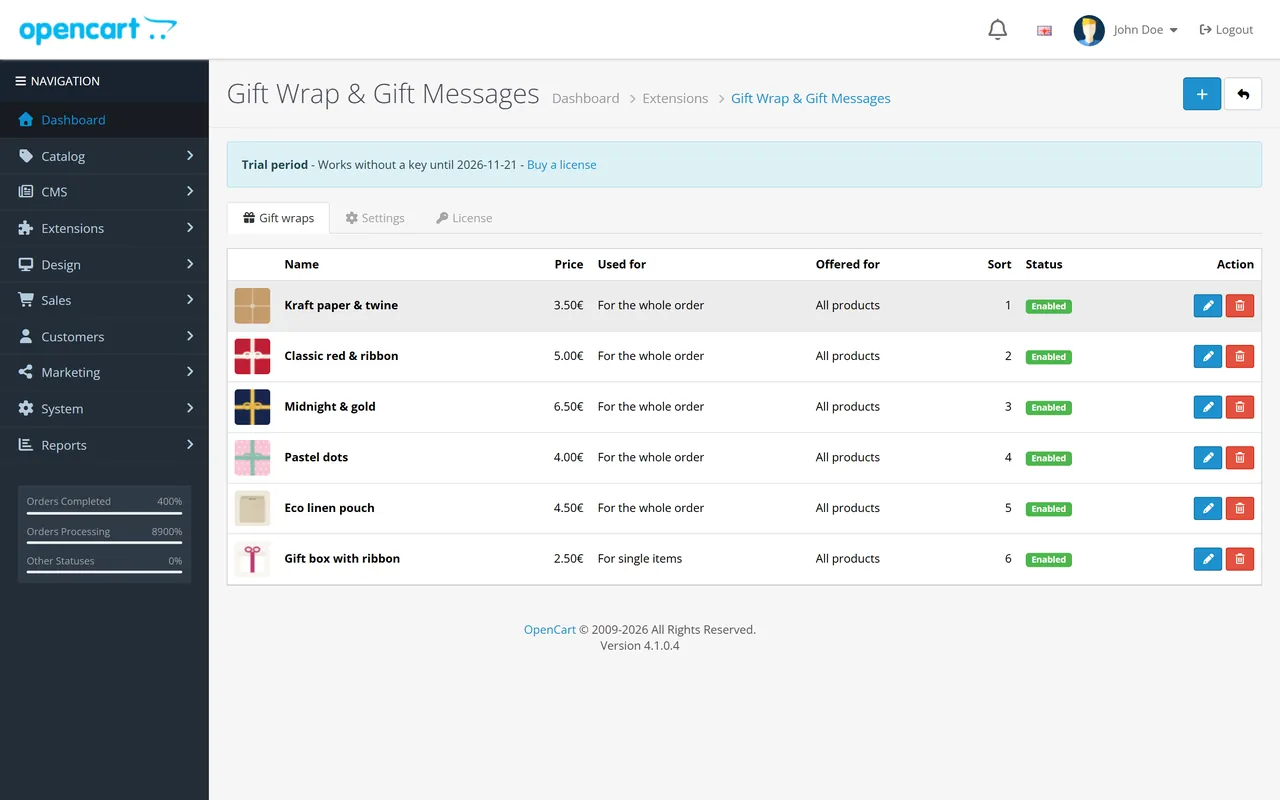
The list shows picture, name, price, where it is used, what it is offered for, sort order and status. Use the + button to add a wrap.
Gift wraps list
Field
Notes
Name, Description
One set per language; shown at the checkout, on the order, in e-mails and on the gift receipt.
Image
Shown as a thumbnail at the checkout. Square, at least 96 x 96 px.
Price
In the default currency of the store, without tax. Other currencies are converted at the checkout. 0 is a free wrap.
Tax class
Taxes of the wrap, like the tax class of a shipping method. Rates follow the shopper's address and customer group, so a tax-exempt customer pays no tax.
Used for
For the whole order: one wrap for the parcel, charged once. For single items: chosen per product line.
Charged
Single-item wraps only: per item (price x quantity) or once per product line.
Free above subtotal
The wrap costs nothing when the cart subtotal (products before tax) reaches this amount (0 = never). The shopper sees "Free for orders over X (subtotal before tax)".
Offered for
All products, products in selected categories (subcategories included) or selected products. An order wrap is offered when at least one product of the cart qualifies; a single-item wrap only for qualifying products.
Stores
Leave all unticked for every store.
Sort order, Status
Order at the checkout; a disabled wrap is hidden but stays on placed orders.
Deleting a wrap never changes placed orders: each order stores its own copy of the wrap name, price and tax class.
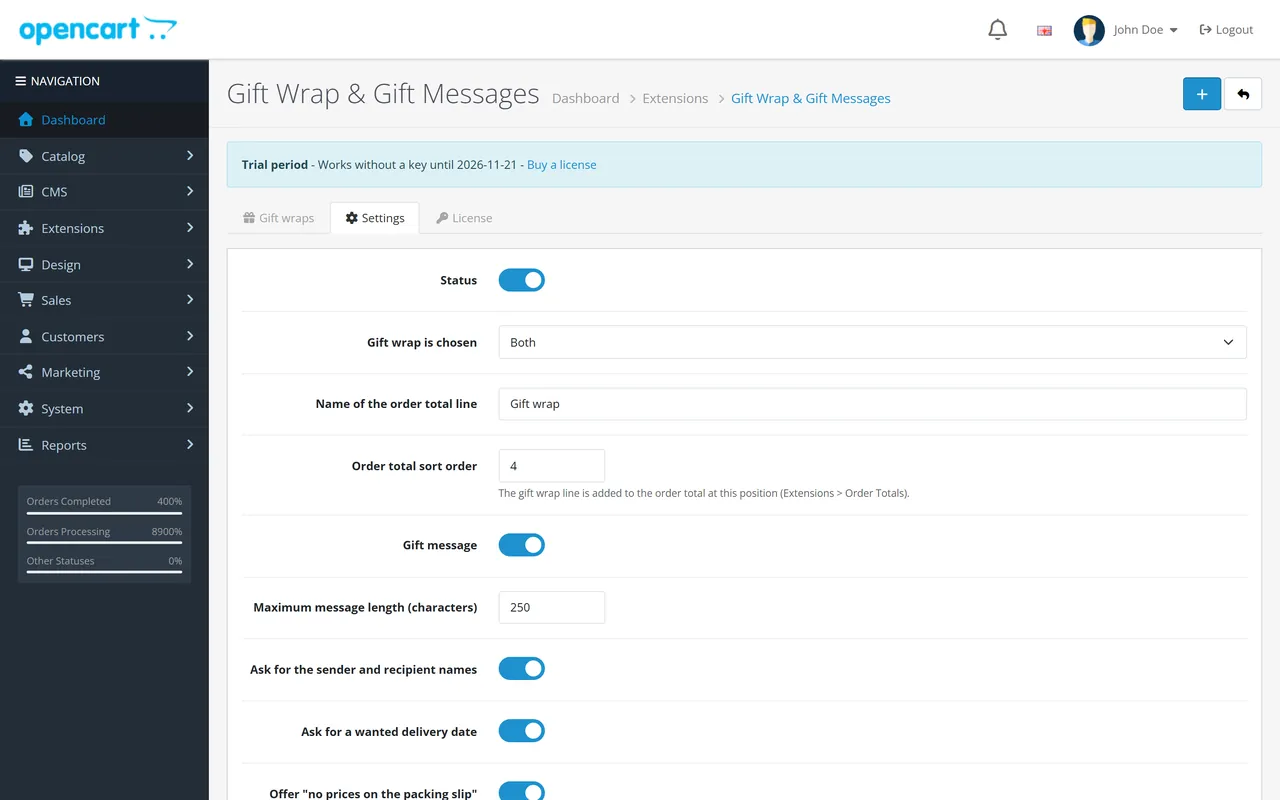
Settings
Setting
Default
What it does
Status
On
Off: no gift box, no fee for new orders. Placed orders keep their gift data.
Gift wrap is chosen
Both
One wrap for the whole order, a wrap for single items or both.
Name of the order total line
Gift wrap
The title of the line in the totals, invoices and e-mails.
Order total sort order
4
Position of the line among the order totals. Keep it before Taxes (5) and after Coupon (core Coupon also uses 4; give the coupon 3 or the wrap 4 with Taxes moved to 6 if you sell fixed-amount coupons larger than the products, so the coupon never reaches the wrap).
Gift message
On
The message field with a counter.
Maximum message length
250
20 to 1000 characters (not bytes; an emoji counts as one).
Ask for the sender and recipient names
On
The From and To fields.
Ask for a wanted delivery date
On
A date field (a note only: it does not change shipping).
Offer "no prices on the packing slip"
On
A tick box for the shopper.
Ticked by default
On
The default of that box.
Print gift orders without prices when the customer asked for it
On
The invoice print of an order with the tick shows no prices or totals.
Show the gift box on the cart page too
On
The same box below the cart.
Show "Gift wrapping available" on product pages
On
A small note above the buy form when a wrap is offered for the product.
Settings
License
Enter the key and press Save, Check now verifies it at once. Status, licensed domain and the end of the updates period are shown. Development hosts such as localhost work with every valid key.
Usage
At the cart and checkout
The box This order is a gift sits above the order summary of the checkout and below the cart. Switching it on opens:
Gift wrap for the whole order: a card per wrap with picture, name, description and the price as the shopper sees it (with tax when your store shows prices with tax, in the shopper's currency), plus No gift wrap.
Gift wrap for single items: every cart line that qualifies gets a menu with the wraps for it.
Gift message with a counter of the characters left, To and From, Wanted delivery date and Do not print prices on the packing slip.
Every change is saved at once, the order summary and the mini cart reload, and the Gift wrap line appears in the totals. Switching the box off removes the wrap and the message.
Gift options and the Gift wrap line in the totals
Totals and taxes
The wrap is a line of the order total, not a part of the product price:
coupons and discounts apply to products, not to the wrap; shipping rules are unchanged;
the taxes of the wrap's tax class are added to the tax lines of the order, so Taxes and Total add up;
the amount is stored in the default currency like every total and shown in the shopper's currency;
a wrap with free above shows Free once the cart subtotal is high enough.
Orders
Gift card on the admin order page
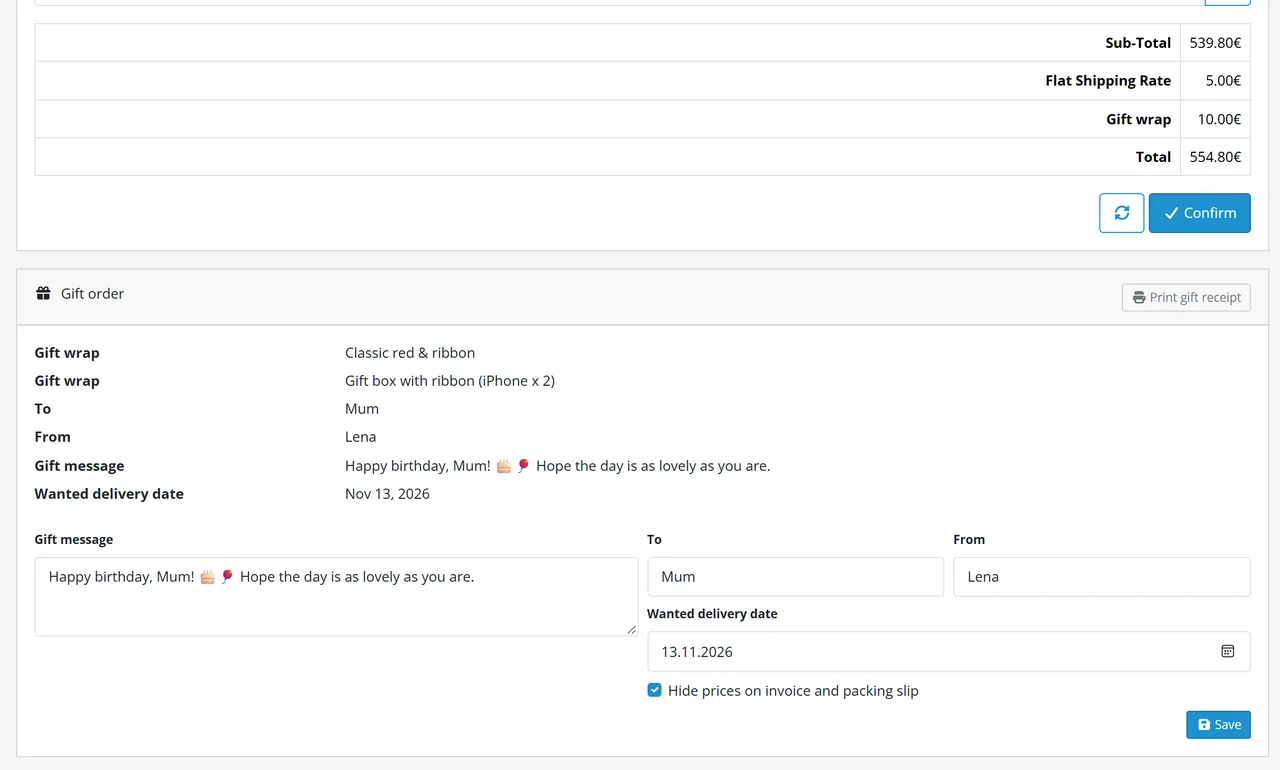
The admin order page shows a Gift order card: wraps, names, message, wanted date, Print gift receipt and a quick form to correct the message, names, date and the no-prices tick without touching the totals. The customer's order page shows the same facts and a Print gift receipt button. The order e-mail and the admin alert get a Gift table.
In the order editor (Sales > Orders > Edit) the More section holds the gift options of the order. Press the refresh button to see the new totals and Confirm to save. The price of a wrap that is already on the order stays as it was, even when you changed, disabled or deleted the wrap since. The per-item selects list the products that were on the order when the page opened: after adding a product in the editor, save and reload the page to wrap it.
Gift receipt and packing documents
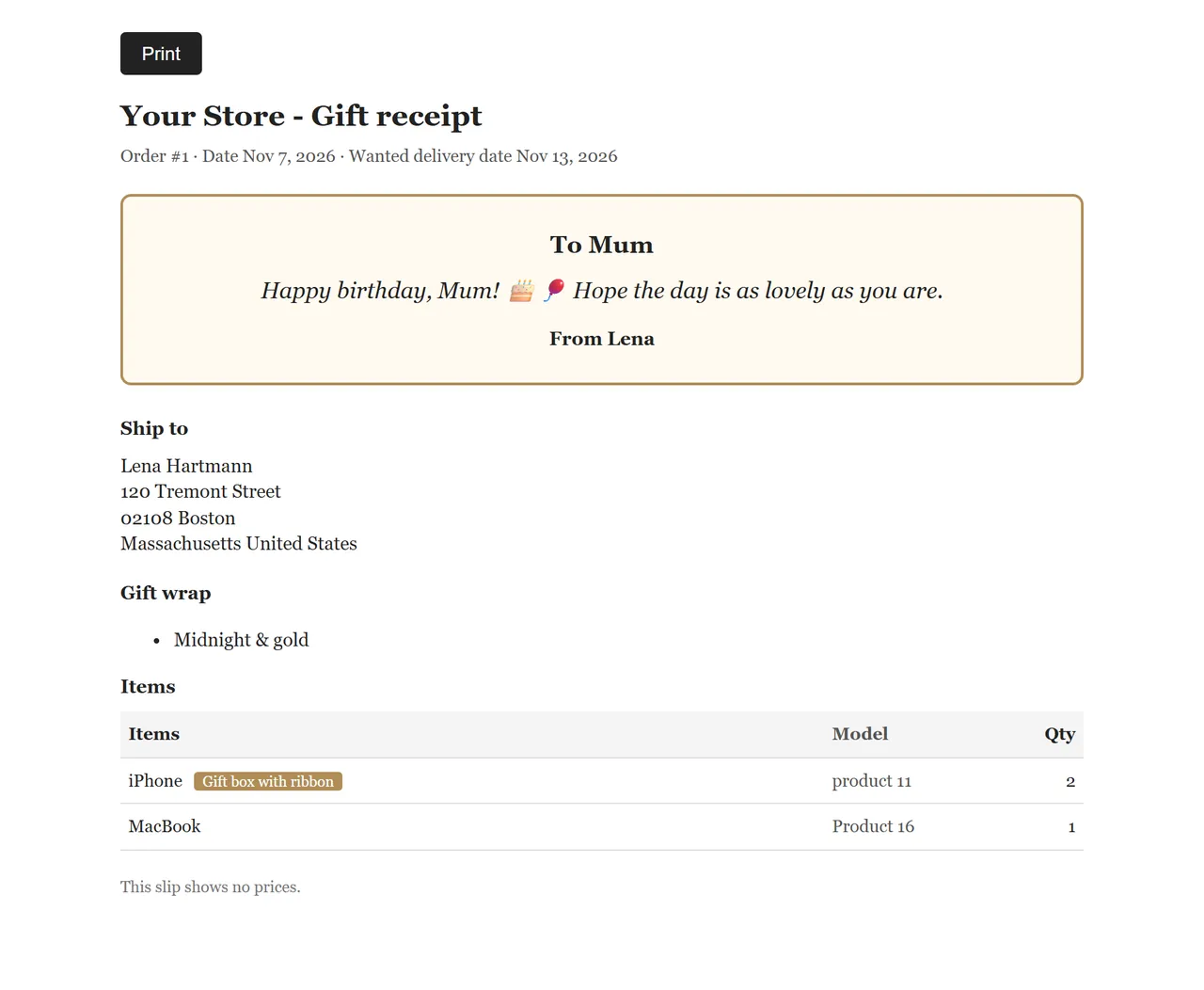
The gift receipt is a one-page packing slip without any price: store name, order number and date, the message card, the ship-to address, the wraps, items with options and quantities. The print button is not printed.
The OpenCart packing list (Print shipping list) and the invoice get the gift facts in their comment block; when the customer ticked no prices (and the setting is on) the invoice prints without prices and totals.
Gift receipt
E-mail templates
Custom mail templates can use kv_gift_wrap.is_gift, .message, .sender, .recipient, .deliver_on and .wraps in mail/order_add and mail/order_alert; the values are already escaped.
Developer notes
Item
Value
Extension code
kv_gift_wrap (module plus the order total kv_gift_wrap)
Tests: php81 tests/unit.php and php83 tests/unit.php (throw-away MariaDB database), node tests/e2e-http.js oc41 (real checkouts with tax, coupon and a second currency) and node tests/e2e-browser.js oc41 (admin editor, screenshots).
FAQ
Does it need OCMOD or core changes?
No. It uses OpenCart events, an order total extension and the order editor's own API hook.
Which versions?
OpenCart 4.1.0.x, tested on 4.1.0.4 with the default theme. There is no OpenCart 3 edition.
Why is the wrap not discounted by a coupon?
The wrap is its own total line; core coupons discount products. A free wrap above an amount is available per wrap.
Is the gift wrap taxed?
Yes, with the tax class you choose on the wrap and the shopper's address. Choose None for an untaxed wrap.
What happens to old orders when I change a price, disable or delete a wrap?
Nothing. Orders keep a copy of each wrap line; when you edit such an order in Sales > Orders, the wrap stays on it at the price it was ordered with (shown as "no longer offered" in the editor).
Can customers wrap only one product?
Yes, with a wrap used for single items and the setting both or a wrap for single items.
Does the message support emoji and other languages?
Yes. The tables are utf8mb4 and the limit counts characters.
Can the packing slip hide prices?
The gift receipt never shows prices. OpenCart's packing list has no prices; the invoice of an order with the tick prints without prices. Your own invoice extension is not affected.
What if the license is not valid?
The gift box and the fee disappear from the storefront; everything in the admin and all stored orders keep working.
Does it work in the order editor?
Yes: the gift options are in the More section, and the totals follow the refresh button.
Does re-ordering a product copy the gift options?
No. OpenCart re-orders one product at a time into the cart; the new order starts without gift options.
What about returns and refunds?
OpenCart returns do not change order totals, so the gift wrap line stays as it was ordered. Refund the wrap together with the products through your payment provider if you want to.
Does an update keep my wraps and gift messages?
Yes. Uninstalling keeps the tables and the settings; see Installation > Updating for the exact steps.
Is the "Gift wrap" total title translated?
The title setting is one text for all languages (empty = the language file text "Gift wrap"); wrap names and descriptions are per language.
Server-side tracking for OpenCart 4.x and 3.0.x: purchases, refunds, add to cart, checkout, product views and leads go from your server to the free official GA4 Measurement Protocol, Meta Conversions API and TikTok Events API, deduplicated with the browser pixels through shared event ids. Consent-aware, SHA-256 hashed customer data, order status mapping, queue with retries, test mode and an event log. No paid relay, events only, no OCMOD.
The department store theme for OpenCart 4.x and 3.0.x: colour-coded departments, a department list beside the hero slider with two side promos, a big search with a department selector, tabbed product blocks, a 2 + 1 + 2 offer grid, deals of the day with real countdowns, a department showcase, a promotions band and a three-column product page with a sticky buy box. Four styles (Meridian, Harbor, Citrus, Night) and your own colours on top. Events only, no core changes.
Stop AI crawlers, scrapers, vulnerability scanners and unwanted countries before OpenCart 4.x or 3.0.x builds a page. Googlebot and Bingbot are verified by DNS and always allowed; 50+ bots get one switch each; country rules use free GeoIP databases and can close only the checkout; IP and network lists, rate limits, honeypots and the cart flood fix; a one-second challenge instead of a captcha; learning mode, dashboard, log, IP tester and Cloudflare export. No core changes, no OCMOD.