Brazil shipping for OpenCart 4 on the Melhor Envio API v2: live Correios, Jadlog and other carrier prices at checkout from the destination CEP, in reais; you create the label from the order page, add it to the Melhor Envio cart or pay it from your wallet and generate it, open the print link, and the tracking code, posted and delivered steps are written to the order history by cron and the signed Melhor Envio webhook; cancel with the cancellable check. You connect with your own Melhor Envio app (OAuth2, sandbox supported); CPF/CNPJ are checked, a content declaration or the NF-e key is sent as the API requires, and phone and e-mail only when you switch it on. A shipping extension with events and cron, no OCMOD.
Tested on 4.1.0.4Updated Nov 7, 2026Version 1.0.0Compatible with OpenCart 4.1.0.4 No core file edits
Built forOpenCart
Live carrier prices at checkout1 of 6
What it does
Brazil shipping for OpenCart 4 on the Melhor Envio API v2: live Correios, Jadlog and other carrier prices at checkout from the destination CEP, in reais; you create the label from the order page, add it to the Melhor Envio cart or pay it from your wallet and generate it, open the print link, and the tracking code, posted and delivered steps are written to the order history by cron and the signed Melhor Envio webhook; cancel with the cancellable check. You connect with your own Melhor Envio app (OAuth2, sandbox supported); CPF/CNPJ are checked, a content declaration or the NF-e key is sent as the API requires, and phone and e-mail only when you switch it on. A shipping extension with events and cron, no OCMOD.
What it changes for your store
Melhor Envio shipping for your Brazilian OpenCart store. Quote Correios, Jadlog and the other Melhor Envio carriers at checkout, then create, pay, generate and print the label from the order page. It connects with your own Melhor Envio app through OAuth2: no aggregator in between and no per-label fee from us.
Know the limits. You need a Melhor Envio account and your own app (Client ID and Secret). Paying uses your Melhor Envio wallet balance. OpenCart has no CPF/CNPJ or street number fields by default: map custom fields in the settings or type the values on the order page. One label per click, one package (you set its size; the billed price can differ slightly from the quoted one). The contact e-mail for Melhor Envio's required User-Agent header is yours to enter. Commercial shipments need the NF-e key; Azul Cargo labels cannot be bought through the Melhor Envio API. Tested against a stand-in built from the official documentation, not against the live Melhor Envio service (webhook signature encoding: both hex and base64 are accepted). Melhor Envio is a trademark of its owner. This extension is not affiliated with, endorsed by or sponsored by Melhor Envio, Correios or any carrier.
Features
Checkout
One Melhor Envio shipping method with a line per service, each with its delivery estimate, in reais converted to your store currency
Only the destination CEP, the product sizes, weights and values are sent for a quote: no name, e-mail or phone
Markup, handling fee, rounding, free shipping threshold, fallback rate, services filter, tax class and geo zone; optional receipt notice (AR) and own hand (MP)
Labels and tracking
A Melhor Envio tab on the order: service preselected from the customer's choice, recipient CPF or CNPJ, street, number and district filled from the order (or from custom fields you choose), content declaration or NF-e key
Add to the Melhor Envio cart, or pay from your wallet, generate and get the print link in one click; continue a label that was left in the cart after you add funds; an order with an open label gets no second purchase by mistake (explicit "additional package" for a real second parcel), and a request that Melhor Envio never answered is checked against the real label state before anything is paid again
The tracking code, posted and delivered steps go into the order history, by cron and by the signed Melhor Envio webhook, and can move the order to your statuses
Cancel a label: the extension asks Melhor Envio first and shows its answer
Safe and simple
Client secret and tokens stored encrypted and renewed automatically, secrets and personal data masked in the log, phone and e-mail sent only when you switch it on; a shipping extension with events and cron, no OCMOD, no core edits; tested on OpenCart 4.1.0.4
What you get
Download & installOne installer package (.ocmod.zip) for OpenCart 4.0.2 – 4.1.x. There is no OpenCart 3 edition. Download it from My licenses right after payment.
12 months of updates & supportNew versions and help for 12 months (24 or 36 months at checkout). After that the extension keeps working; renew anytime at 50%.
License for your storeOne production domain with all its subdomains; staging and local development hosts are free. How licensing works
30-day refundFull refund within 30 days of your first purchase, no reason needed. Refund policy
Tested buildsOpenCart 4.1.0.4. Tested on OpenCart 4.1.0.4.
Documentation & supportFull guide (Installation, Configuration, Usage, Developer notes) on this page. Tickets from your account, first reply within 1 business day.
Compatibility
Melhor Envio Shipping & Labels works with OpenCart 4.1.0.4.
We list the builds we install and test on. “Tested” means the test plan ran on that build; “Supported” means the build is inside the supported range.
Compatibility
Version
Range
Runs on
Status
OpenCart 4.1.0.x
4.1.0.0 – 4.1.0.4
PHP 8.1 – 8.3
Tested on 4.1.0.4
OpenCart 4.0.2.x
4.0.2.0 – 4.0.2.3
PHP 8.0 – 8.2
Supported
1.0.0
Nov 7, 2026
Latest
First release (the review fixes of 2026-11-07 are part of it, nothing was published before):
One label per order: a server-side guard under a per-order lock refuses a second purchase while a label is open ("additional package" needs a checkbox and a confirmation), the order panel hides the form, a double submit cannot pay twice.
A cart, checkout or generate request that gets no answer is reconciled from the real state at Melhor Envio (GET /me/orders/{id}, list of the cart) before anything is sent again; a paid label that timed out continues instead of getting stuck.
The contact e-mail for the User-Agent header is a required setting entered by the shop owner (nothing is pre-filled); no request leaves without it.
Content declarations no longer send the sender state registration; alphanumeric CNPJ (and NF-e keys with letters) accepted.
Tracking updates are claimed atomically (no duplicate history or customer e-mail), token renewal fails closed under its lock, an hourly keep-alive renews the connection, a missing refresh token keeps the stored one, log cuts never split a character, unused scope cart-read dropped.
Known limits: the label uses the package you set, not the packages of the quote; tested against a stand-in built from the documentation, never against the Melhor Envio sandbox; the webhook signature encoding (hex or base64) is assumed.
Features: Melhor Envio API v2 shipping for OpenCart 4.1: live quotes at checkout from the CEP, OAuth2 connection with automatic token renewal, labels from the order page (cart, pay from the wallet, generate, print link), tracking and status in the order history by cron and signed webhook, cancel, CPF/CNPJ and NF-e or content declaration, sandbox support.
How do I install the extension?
Upload. Extensions > Installer: upload the .ocmod.zip. It is for OpenCart 4 (4.0.2 to 4.1.x).
Install and enable. Extensions > Extensions > Modules: install, open the settings and switch it on. Events register themselves; nothing is patched.
Enter the license key. Paste the key from My licenses. Subdomains, staging and local hosts are included; you have 14 days to do it.
OpenCart 4.1.0.4. Tested on OpenCart 4.1.0.4. The Compatibility tab lists every version range.
Do the extensions change core files?
No. They work through OpenCart events and standard extension types (modules, order totals, themes). No core file edits, no OCMOD patches, no theme template edits, so OpenCart updates and other extensions keep working.
What does the license cover?
One production store domain with every subdomain (www, shop., staging.), plus local development hosts such as localhost, *.local and *.test. A store on another domain needs its own license; a second-store license is 40% off. You have 14 days after installing to enter the key. 12 months of updates and support are included; after that the extension keeps working and renewals are 50% off. How licensing works
Can I get a refund?
Yes. Ask for a full refund within 30 days of your first purchase, no reason needed: open a ticket or write to [email protected] with your order number. The money goes back to the card or bank account you paid with within 5 business days of approval. Refund policy
How do I get help?
Open a ticket from your account, so your license details are attached. We answer Monday to Friday: bug reports within 1 business day, how-to questions within 2. Support policy. Not a customer yet? Ask a pre-sales question.
Melhor Envio Shipping & Labels brings the Melhor Envio carriers to your OpenCart 4 shop in Brazil: live prices at checkout from the destination CEP, shipments created from the order page, paid from your Melhor Envio wallet, generated and printed as labels, and the tracking code and status written to the order history. It connects with your own Melhor Envio app (OAuth2); there is no third-party service in between and no per-label fee from us.
Checkout prices
What it does
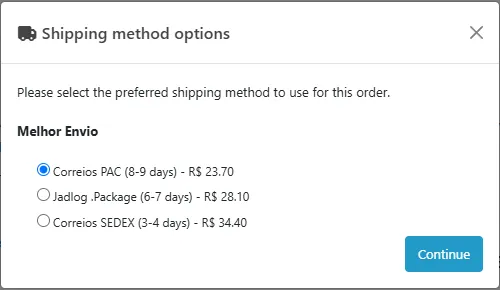
Live prices at checkout. One "Melhor Envio" shipping method with a line per service (for example Correios PAC, Correios SEDEX, Jadlog .Package), each with its delivery estimate, in reais and converted to your store currency. Only the destination CEP, the product sizes, weights and values are sent for a quote; no name, e-mail or phone.
Price rules. Percent markup, handling fee, rounding, free shipping above a subtotal, a fallback rate when Melhor Envio cannot be reached, a services filter, tax class and geo zone like any OpenCart shipping method.
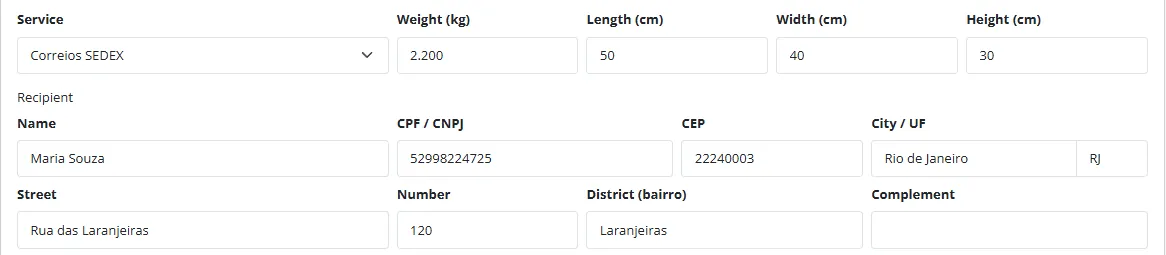
Labels from the order page. A "Melhor Envio" tab on the order: service preselected from the customer's choice, recipient CPF or CNPJ, street, number and district filled from the order, content declaration or NF-e key, then Add to Melhor Envio cart or Pay and generate label. The print link opens the label.
Tracking. The tracking code and the posted and delivered steps are written to the order history (the customer sees them in the account, with an optional e-mail). They arrive by an hourly cron and, when you register it, by the signed Melhor Envio webhook. Posted and delivered can move the order to the statuses you choose.
Cancel. The extension asks Melhor Envio whether the label can still be cancelled and cancels it; Melhor Envio processes the refund of a generated label.
Safe. Client secret and tokens are encrypted at rest and renewed automatically, the API log masks secrets and personal data, phone and e-mail go to Melhor Envio only when you switch that on. Events, cron and a shipping extension only: no OCMOD, no core edits. OpenCart 4.1, tested on 4.1.0.4.
Limits to know
You need a Melhor Envio account and your own app (Integracoes, Area Dev.) to get the Client ID and Secret. The sandbox (sandbox.melhorenvio.com.br) is a separate environment with its own account and app; it quotes Correios and Jadlog services only.
Paying a label uses the balance of your Melhor Envio wallet. Without balance the label stays in the Melhor Envio cart and you can continue it from the order page after adding funds.
OpenCart has no CPF/CNPJ, street number or district fields by default. Create custom fields and pick them in the settings, or type the values on the order page before you create the label.
One label covers all shippable items of the order in one package (the size comes from the package presets and can be changed). An order that already has an open label gets no create form, so a label is never bought twice by mistake; for a real second parcel use "additional package" (checkbox plus confirmation). The label uses the package you set, not the packages of the checkout quote, so the billed price can differ slightly from the quoted one.
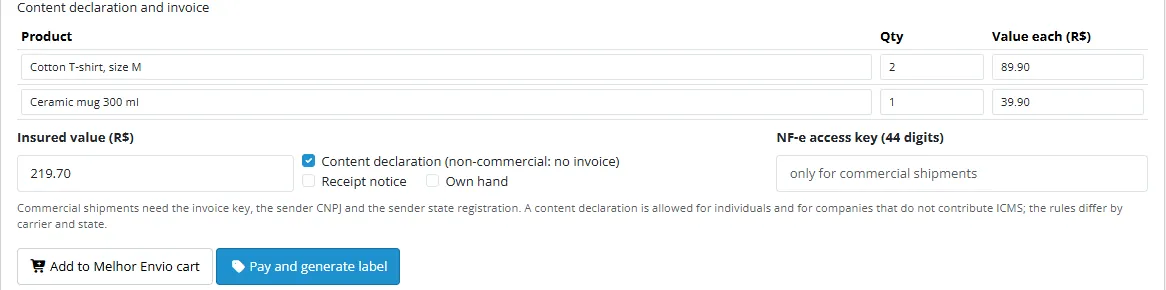
Commercial shipments need the 44-digit NF-e access key, the sender CNPJ and the sender state registration. A content declaration is allowed for individuals and for companies that do not contribute ICMS; the rules differ by carrier and state, and Melhor Envio decides.
Azul Cargo can be quoted but its labels cannot be bought through the Melhor Envio API (see the Melhor Envio documentation); offer it only if you handle it elsewhere.
Tested against a stand-in built from the official Melhor Envio documentation, not against the live Melhor Envio service. Run the manual steps in the Developer notes with your own sandbox account once (the exact encoding of the webhook signature is also assumed: both hex and base64 are accepted).
Melhor Envio is a trademark of its owner. This extension is not affiliated with, endorsed by or sponsored by Melhor Envio, Correios or any carrier.
Installation
Requirements: OpenCart 4.1.0.x, PHP 7.4 or newer with cURL and OpenSSL, a Melhor Envio account with a registered app.
In the Melhor Envio panel open Integracoes > Area Dev., create an app and note the Client ID and Client Secret. Enter the redirect address shown on the Connection tab of the extension as the app's callback URL (it must match exactly). Use the sandbox account and app first if you want to test.
In the OpenCart admin open Extensions > Installer, upload kv_melhor_envio.ocmod.zip and click Install.
Open Extensions > Extensions, choose Shipping, find Melhor Envio Shipping & Labels and click the green Install button, then the blue pencil to open the settings.
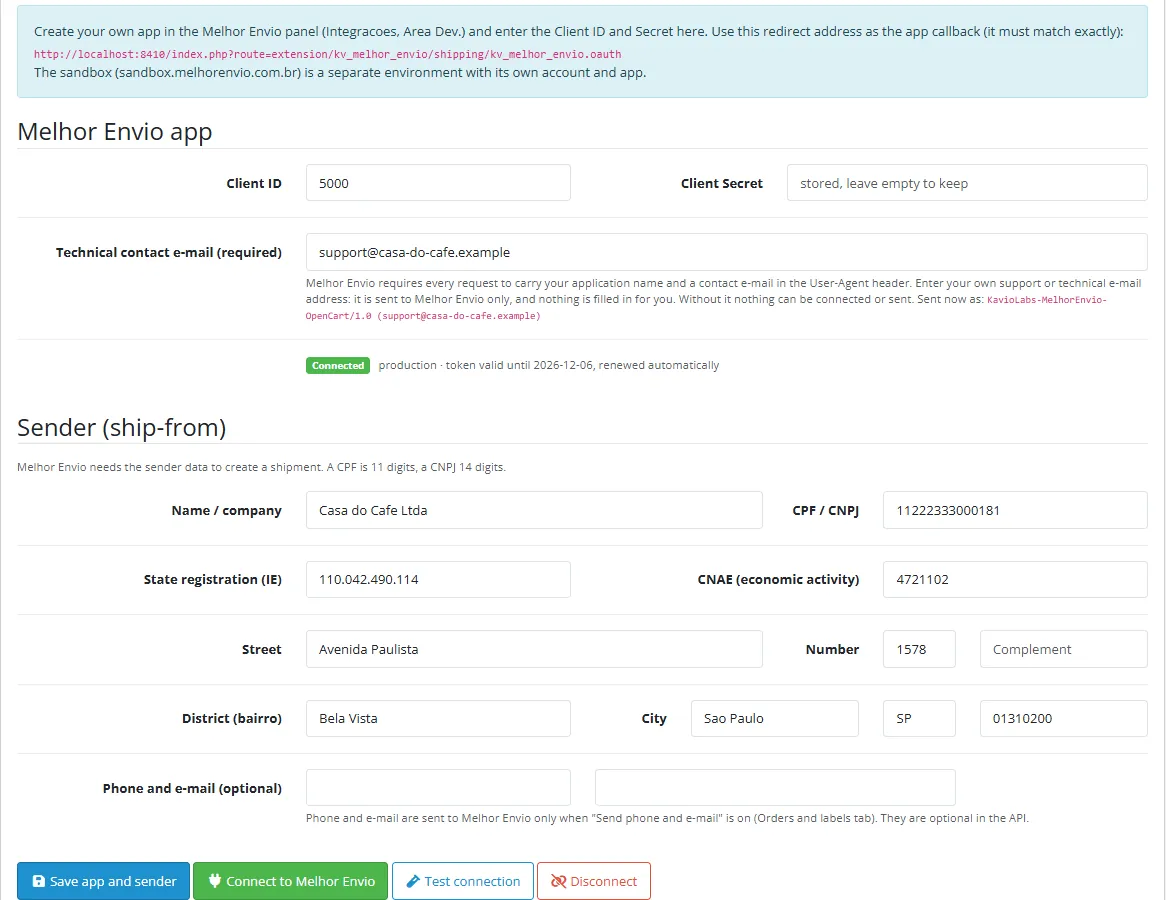
On the Connection tab enter your own technical contact e-mail (required: Melhor Envio asks for it in every request; nothing is filled in for you), the Client ID, the Client Secret and the sender data (name, CPF or CNPJ, address with number and district, CEP), click Save app and sender, then Connect to Melhor Envio. Melhor Envio asks you to authorize the app and sends you back; the tab shows Connected. Test connection requests one quote.
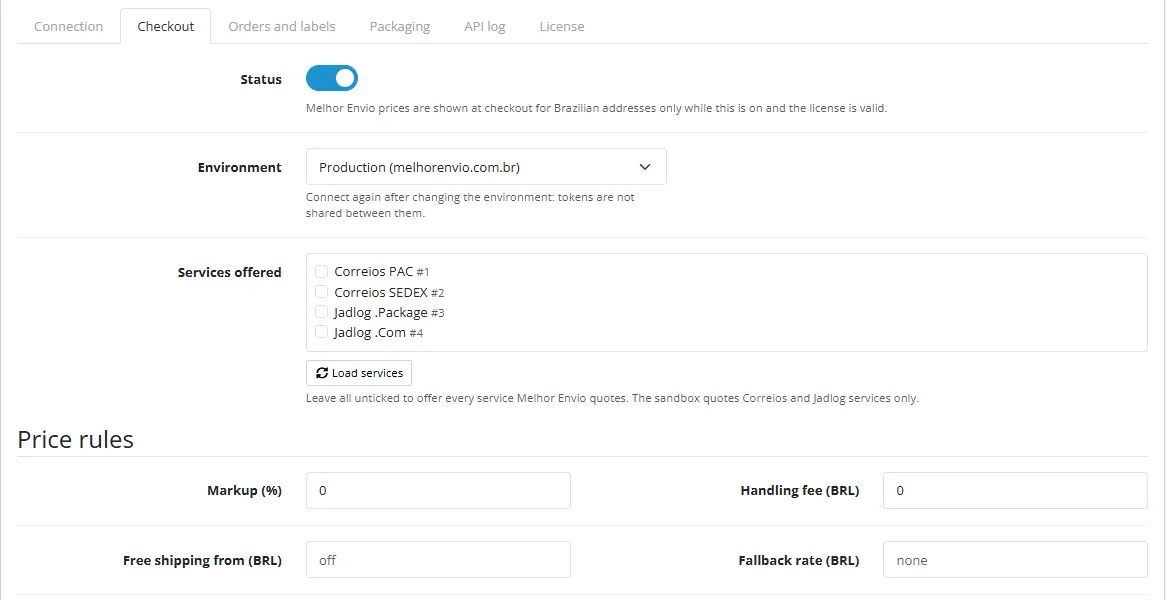
On the Checkout tab choose the environment (production or sandbox), click Load services and tick the services you offer (or none for all), set the status to on and save.
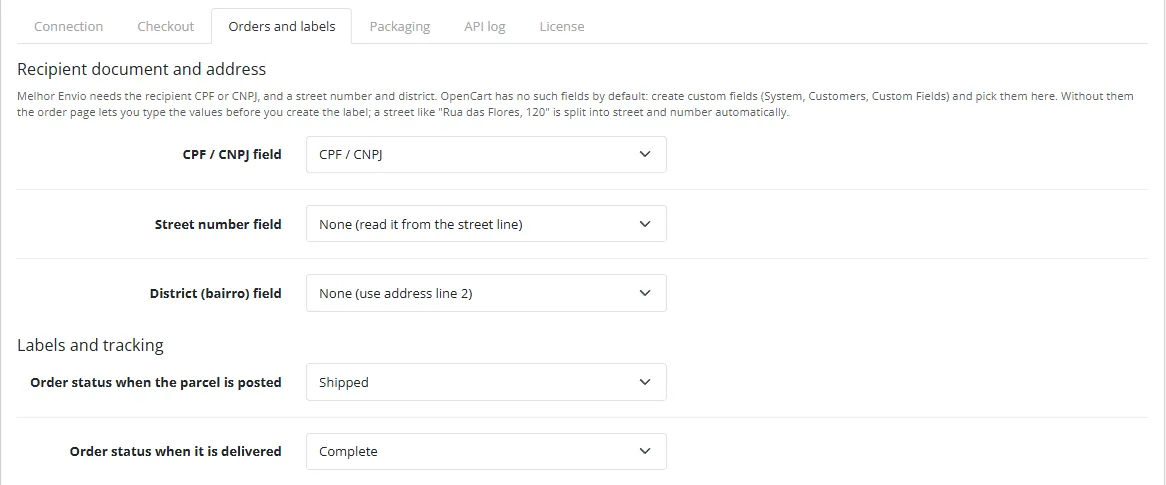
On the Orders and labels tab pick the custom fields for CPF/CNPJ, street number and district, the order statuses for posted and delivered, then save.
Make sure the OpenCart cron job runs (see Orders and labels), so tracking refreshes by itself.
Uninstall: Extensions > Shipping > Uninstall removes the settings, the app credentials and tokens, the label records and the log. Labels already bought stay valid at Melhor Envio and their tracking codes stay in the order history. The authorization stays listed in your Melhor Envio panel until you revoke it there. Then remove the extension in Extensions > Installer.
Update: upload the new zip in the Installer; the settings, the connection and the labels stay.
Technical contact e-mail (required): Melhor Envio requires every request to carry your application name and a contact e-mail in the User-Agent header. Enter your own support or technical e-mail address on the Connection tab. Nothing is filled in for you (not our address and not the shop e-mail) and nothing is connected, quoted or sent to Melhor Envio until it is set. It is sent to Melhor Envio only, as KavioLabs-MelhorEnvio-OpenCart/1.0 (your-address).
Client ID / Client Secret: from your Melhor Envio app. The secret is stored encrypted and never shown again. Changing the Client ID or the secret drops the stored tokens: connect again.
Connect to Melhor Envio: sends you to the Melhor Envio authorization page and back. The access token is valid for 30 days and the refresh token for 45 days; the extension renews them before they expire, again when a request answers "Unauthenticated", and the hourly cron renews the connection when the last renewal is older than 15 days, so a shop without quotes or labels does not lose it after 45 days (it needs the OpenCart cron to run). If the refresh token has expired or the authorization was revoked, connect again.
Sender: name or company, CPF (11 digits) or CNPJ (14 characters: the numeric one, or the alphanumeric CNPJ issued from July 2026, digits and letters A-Z with two check digits), state registration (IE) and CNAE (needed for some carriers and for commercial shipments), address with number and district, city, UF and CEP. The CEP is also the origin of every quote. Phone and e-mail are optional and sent only when you switch that on.
Checkout
Checkout settings
Environment: production or sandbox. Tokens are separate: connect again after switching.
Services offered: Load services reads the service list from Melhor Envio. Tick the services you want; none ticked offers everything a quote returns.
Price rules: markup (%), handling fee, free shipping from a subtotal, fallback rate (shown when Melhor Envio cannot be reached; empty hides the method then), rounding. Prices come in reais and are converted to the store currency with the currencies of your shop (add BRL in Localisation > Currencies when the store currency is another one).
Show the delivery estimate and the carrier name in the method name, quote with insured value, receipt notice (Aviso de Recebimento) or own hand delivery (Mao Propria); tax class, geo zone, quote cache (minutes), sort order.
Orders and labels
Orders and labels
CPF / CNPJ, street number and district fields: pick the custom fields (System > Customers > Custom Fields, location address) that hold these values. A street line like "Rua das Flores, 120" is split into street and number automatically; address line 2 is used as district when no field is chosen. You can always edit the values on the order page before creating the label.
Order status when posted / delivered: moved through the OpenCart order model, so your own order status events run.
E-mail the customer when the tracking code becomes available (it is always in the order history).
Send the recipient phone and e-mail: off by default. Both are optional in the Melhor Envio API.
Create public print links: off by default; a private link needs a Melhor Envio login.
Cron and webhook: the OpenCart cron (php cron.php) runs the hourly tracking refresh; the secret cron address works from any scheduler. To get instant updates register the webhook address in your Melhor Envio app (Novo Webhook); requests are checked with the X-ME-Signature header.
Packaging
Packaging
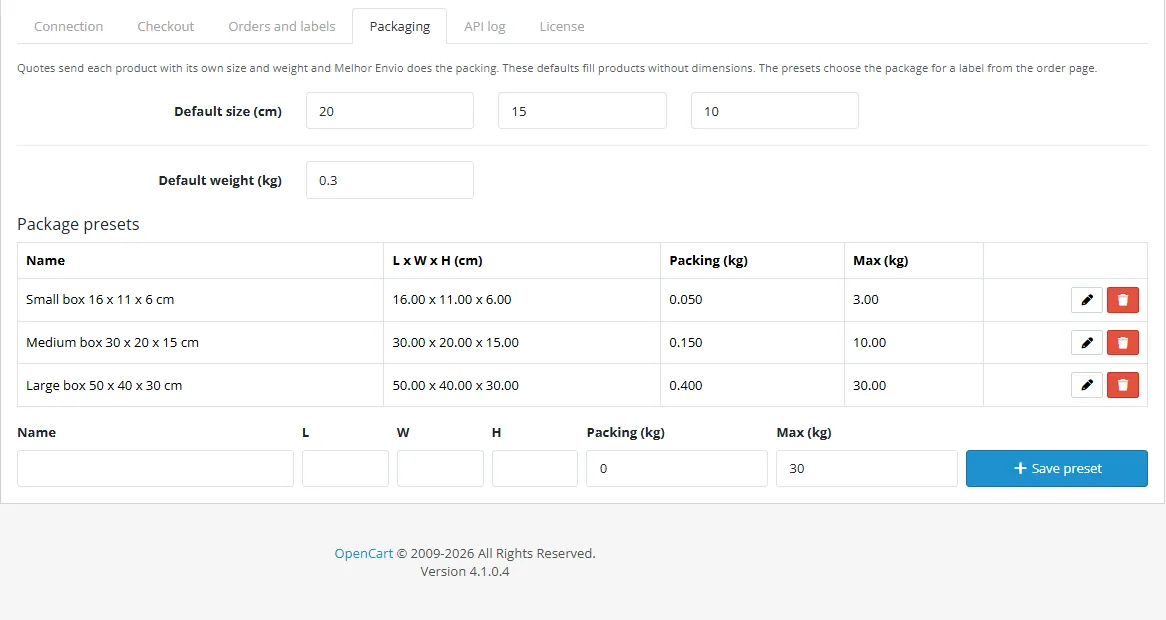
Quotes send each product with its own size and weight and Melhor Envio does the packing; the default size and weight fill products without dimensions. Package presets (name, size, packing weight, maximum weight) pick the package for a label: the smallest preset that holds the order. You can change size and weight on the order page.
API log
The API log tab lists errors (and every request with the debug log on). Secrets, tokens, CPF/CNPJ, names, street addresses, phone and e-mail are masked before saving; entries older than 60 days are removed.
Usage
At checkout
The customer enters a Brazilian address and chooses the shipping method Melhor Envio and one of its lines, for example "Correios SEDEX (3-4 days) - R$ 34,40". Addresses outside Brazil get no Melhor Envio quote.
Checkout prices
Create a label
Open the order (Sales > Orders > view) and the Melhor Envio tab under the history.
Order form
The service is preselected from the customer's choice. The weight and size come from the package presets; change them to what is really in the box.
The recipient is filled from the order. Check the CPF or CNPJ, the street number and the district; the label cannot be created without them.
Content declaration (the default) or commercial shipment with the 44-digit NF-e access key. Optionally tick receipt notice or own hand.
Declaration and buttons
Add to Melhor Envio cart only inserts the shipment in the cart (you can pay it later in the Melhor Envio panel or continue it here). Pay and generate label pays with your wallet balance, generates the label and gets the print link.
Label
The label row shows the protocol, the status and, after posting, the tracking code. Print opens the print link, Refresh reads the status from Melhor Envio (the cron job does it for open labels), Cancel cancels the label.
One label per order, and timeouts
While an order has an open label (in the cart, paid, generated, posted) the Create a label form is hidden and the server refuses a second purchase. If you really have to send a second parcel, click add an additional package, tick the box and confirm. If Melhor Envio does not answer while a label is added, paid or generated, the extension reads the real state from Melhor Envio before it does anything again: press Continue after a minute. If the message says the outcome is unknown and could not be checked, do not pay in the Melhor Envio panel either: wait and press Continue, it never pays a label Melhor Envio already shows as paid.
Pending and cancelled labels
A label that was added to the cart but not paid stays "In cart, not paid": the green Continue button pays and generates it, for example after you add funds to the wallet.
Pending label
Cancel first asks Melhor Envio whether the label can be cancelled. A label the carrier has already been notified about cannot be cancelled; the refund of a cancelled generated label is processed by Melhor Envio.
Developer notes
Identity
Item
Value
Extension code
kv_melhor_envio (type shipping)
Settings
shipping_kv_melhor_envio_*
PHP namespace
KavioLabs\KvMelhorEnvio (shared core, copied to system/library/ of the extension)
Source: the official documentation at docs.melhorenvio.com.br, read on 2026-11-07. Hosts: production https://melhorenvio.com.br, sandbox https://sandbox.melhorenvio.com.br (reference "Introducao API Melhor Envio" and "Sandbox"). Every API request sends Accept: application/json, Content-Type: application/json, Authorization: Bearer <token> and the User-Agent header (see "User-Agent" below); non-GET payloads are JSON bodies.
id, name, company{id,name}; the page warns not to identify services by name, so the extension stores ids
Webhook
POST to your address
/docs/webhooks
event (order.*), data{id, protocol, status, tracking, posted_at, delivered_at, ...}, header X-ME-Signature = HMAC-SHA256 of the body with the app secret
Scopes requested (names from /reference/fluxo-de-autorização): shipping-calculate cart-write shipping-checkout shipping-generate shipping-print shipping-cancel shipping-tracking shipping-companies orders-read. Only the scopes a call of the extension needs are requested, as the page demands (cart-read is not used: the extension never reads the cart; orders-read covers GET /me/orders/{id} and the label list used to reconcile). Shops connected with the earlier list keep working; connect again only if you want the narrower authorization.
Rules from the documentation and how they are handled
Rule
Handling
Sizes in whole centimetres, weight in kg, values in reais
sizes rounded up to integers, weights from the OpenCart weight class, values converted to BRL
chosen by the number of characters (11 or 14), check digits verified before the call; the CNPJ may be alphanumeric ([0-9A-Z]{12}\d{2}, check digits by the Receita Federal rule: ASCII value minus 48, weights 2-9, modulo 11, IN RFB 2.229/2024); the NF-e key is checked the same way (issuer CNPJ part may hold letters, NT 2025.001, last digit = modulo 11 check digit)
Commercial shipment: sender CNPJ, state registration and invoice key; non-commercial: no invoice, from.state_register empty or ISENTO
commercial needs a 44-character key, a 14-character sender document and a sender IE, else nothing is sent; content declaration is the default, sends the declared products and leaves from.state_register out (empty) even when the shop has an IE
products must be complete (DC-e from 06/04/2026)
the declaration lines come from the order lines and can be edited
agency only for Latam Cargo, Azul Cargo and Buslog with panel tokens
never sent
Correios (services 1, 2, 17), J&T, Loggi and .package (27) do not support several volumes
one volume per label; several packages = several labels. The volume (weight and size) comes from the package presets and what you type in the form, not from the packages array of the quote answer (the quote is requested per cart at checkout and cannot be matched to a later order edit), so Melhor Envio may bill a slightly different price than the quoted one; the cart answer shows the billed price
Azul Cargo: quotes yes, label purchase through the API no
not handled, stated in the docs and the listing
Cart label expires after 7 days; generated label printable for 20 days
print links are requested again on demand
Cancel only before the carrier is notified
cancellable is asked first; the error is shown as is
Quote: each request is one shipment (one origin and destination)
one request per cart (cached for the configured minutes)
Webhook retries after 15 minutes, 5 attempts, 6 s timeout
the handler updates one row and answers at once
Sandbox: Correios and Jadlog only, fictitious balance, status changes every 15 minutes
environment switch; service list loaded from the API
User-Agent
Every page of the reference states that the User-Agent header is mandatory and must carry the application name and an e-mail for technical contact (the cancellable page shows MinhaApp ([email protected])). The extension sends KavioLabs-MelhorEnvio-OpenCart/1.0 (<contact e-mail>). The contact e-mail is a required setting that the shop owner enters (Connection tab) and is validated as an e-mail address. Nothing is pre-filled (not a Kavio Labs address and not the shop e-mail): without it no request (quote, token, label) is sent and the Connect button reports what is missing.
Double purchase protection, timeouts and reconcile
One label per order: Labels::create runs under the database lock kv_me_label_<hash>_<order> and refuses when the order already has a label that is not cancelled or delivered (pending, released, generated, posted, ...), unless the form carries the explicit "additional package" flag together with its confirmation. The order panel hides the form while a label is open.
Labels::advance (Continue, Pay and generate) runs under the same lock, re-reads the label row and first reads the real state with GET /api/v2/me/orders/{id} (reference "Listar informacoes de uma etiqueta"). A payment is sent only when Melhor Envio still says pending. After a checkout or generate request that ended without an answer (timeout, transport error) or with a 5xx / 408 / 429, the state is read again and the flow continues from what Melhor Envio says; if it cannot be read nothing is paid.
A cart request without an answer leaves a marker for the order. Before another cart request the extension lists the labels in the cart (GET /api/v2/me/orders?status=pending) and adopts the one that carries the order id in options.tags, the same service and the same destination CEP instead of inserting a second one. (The search route GET /api/v2/me/orders/search?q= only looks at id, protocol, document, tracking and authorization code, so it cannot find a tag.) If the lookup fails, no new cart item is created.
Tracking updates (webhook and cron) claim every history entry with a conditional UPDATE, so the tracking code, "posted" and "delivered" entries (and the customer e-mail) are written once.
Token renewal fails closed when its lock cannot be taken (two renewals at once would burn the rotating refresh token); a response without a refresh_token keeps the stored one.
Flagged: not verifiable from the documentation
Item
Situation
Wallet balance endpoint
not documented in the pages read (the payment page only says a balance is needed); the extension shows no balance and reports the checkout error text
Webhook signature encoding
the page says HMAC-SHA256 of the body keyed with the app secret and does not state hex or base64; both are accepted
volumes spelling in the quote
the schema writes heigth and lenght; the extension quotes with products only and uses height, width, length in the cart, where the schema spells them correctly
Scope to endpoint mapping
the scope list has no per-endpoint table; names are matched to the calls by meaning (for example shipping-companies for the services list)
Required document and company_document for both parties in the cart schema
the rules text says one of them; only the relevant one is sent
Delivery estimate unit
the quote page does not say business days; the name shows "days"
Label file as PDF through `GET /api/v2/me/imprimir/{pdf
zpl
jpeg}/{id}`
the page contradicts itself (two paths); only the print link (/shipment/print) is used
Status values
the pages show example values (pending, released, generated, posted, delivered, canceled / cancelled) and the webhook event names; unknown values are stored as they come
Merchant brand rules
no rule for third-party use of the Melhor Envio logo is published in the pages read; no logo is used
Testing
tests/unit.php (php81 and php83) runs against tests/mock-server/mock.php, a stand-in built from the documentation pages above (samples and error shapes copied where the pages show them), and a throw-away MariaDB database: OAuth code exchange and refresh rotation, renewal on 401, quote body and parsing, price rules, order mapping (CPF, street number, district), cart body rules, the whole flow (cart, pay, generate, print, tracking), no-balance and cancel, webhook signature, log masking, and the regression tests of the 2026-11-07 review: one label per order, order lock, double submit, lost cart / checkout / generate answers reconciled from the real state, alphanumeric CNPJ and NF-e key, content declaration without state registration, contact e-mail in the User-Agent, concurrent tracking updates, token lock, keep-alive and a missing refresh token. tests/e2e.js drives an OpenCart 4.1.0.4 store in a headless browser: app and sender form, OAuth through the authorization redirect, checkout quotes for a Brazilian address, price rules, fallback, the order page flow, cron, signed webhook, expired token renewal, uninstall.
Manual steps with your own account (not done by us): create a sandbox account and app, enter the Client ID and Secret, connect, compare a quote with the Melhor Envio calculator, create one label (content declaration) and cancel it; check the exact response of the services list and the webhook signature encoding against your account, and report differences.
Melhor Envio is a trademark of its owner. This extension is not affiliated with, endorsed by or sponsored by Melhor Envio, Correios or any carrier.
FAQ
Do I need a Melhor Envio account?
Yes, and your own app (Integracoes, Area Dev.) for the Client ID and Secret. There is no aggregator account and no per-label fee from us.
Can I test without spending money?
Yes. Create a sandbox account and app at sandbox.melhorenvio.com.br, choose the sandbox environment and connect. The sandbox quotes Correios and Jadlog services, starts with a fictitious balance and moves shipments to posted and delivered by itself.
Where do the CPF/CNPJ, street number and district come from?
From custom fields you choose in the settings, from the street line (number) and address line 2 (district), or typed on the order page. OpenCart has no such fields by default.
Which customer data is sent to Melhor Envio?
For a quote only the destination CEP and the product sizes, weights and values. For a label the recipient data the API requires (name, document, address). Phone and e-mail only when you switch it on.
What if the wallet has no balance?
The label stays in the Melhor Envio cart; after adding funds use Continue on the order page.
Can I cancel a label?
Yes, from the order page, as long as Melhor Envio says it can still be cancelled.
Server-side tracking for OpenCart 4.x and 3.0.x: purchases, refunds, add to cart, checkout, product views and leads go from your server to the free official GA4 Measurement Protocol, Meta Conversions API and TikTok Events API, deduplicated with the browser pixels through shared event ids. Consent-aware, SHA-256 hashed customer data, order status mapping, queue with retries, test mode and an event log. No paid relay, events only, no OCMOD.
The department store theme for OpenCart 4.x and 3.0.x: colour-coded departments, a department list beside the hero slider with two side promos, a big search with a department selector, tabbed product blocks, a 2 + 1 + 2 offer grid, deals of the day with real countdowns, a department showcase, a promotions band and a three-column product page with a sticky buy box. Four styles (Meridian, Harbor, Citrus, Night) and your own colours on top. Events only, no core changes.
Stop AI crawlers, scrapers, vulnerability scanners and unwanted countries before OpenCart 4.x or 3.0.x builds a page. Googlebot and Bingbot are verified by DNS and always allowed; 50+ bots get one switch each; country rules use free GeoIP databases and can close only the checkout; IP and network lists, rate limits, honeypots and the cart flood fix; a one-second challenge instead of a captcha; learning mode, dashboard, log, IP tester and Cloudflare export. No core changes, no OCMOD.