A floating chat button for OpenCart 4 that opens WhatsApp with the message already typed: the product name, model, price and link on product pages, the items and total in the cart. Agents and departments with a role, photo and number, working hours per weekday in each agent's own time zone with a Back time in the shopper's clock (right across daylight-saving changes), agents for all stores, the default store or one extra store, page rules with exclude patterns, desktop and phone switches, an Ask on WhatsApp button under Add to Cart, texts per language and click statistics without personal data. No third-party script, no cookie, no OCMOD. It builds Meta's click-to-chat links only: no Business API and no automatic replies.
Tested on 4.1.0.4Updated Nov 7, 2026Version 1.0.0Compatible with OpenCart 4.1.0.4 No core file edits
Built forOpenCart
One button for your whole team1 of 6
What it does
A floating chat button for OpenCart 4 that opens WhatsApp with the message already typed: the product name, model, price and link on product pages, the items and total in the cart. Agents and departments with a role, photo and number, working hours per weekday in each agent's own time zone with a Back time in the shopper's clock (right across daylight-saving changes), agents for all stores, the default store or one extra store, page rules with exclude patterns, desktop and phone switches, an Ask on WhatsApp button under Add to Cart, texts per language and click statistics without personal data. No third-party script, no cookie, no OCMOD. It builds Meta's click-to-chat links only: no Business API and no automatic replies.
What it changes for your store
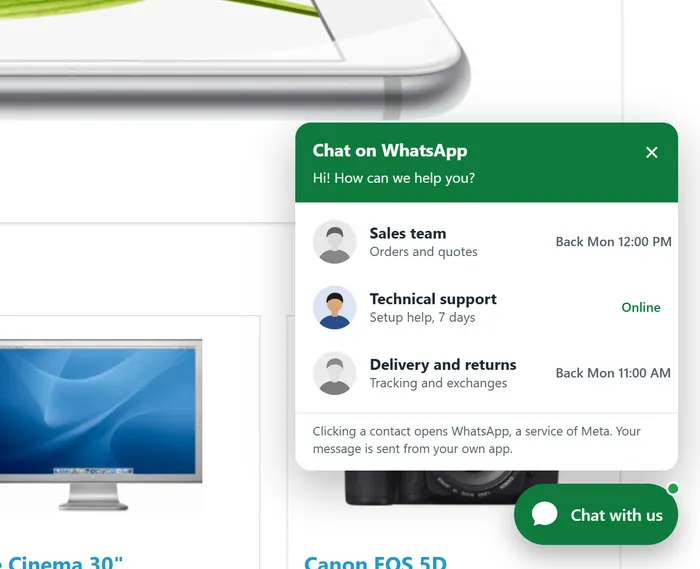
WhatsApp chat for OpenCart 4 that knows what the shopper is looking at. A round or pill button sits in the corner. One contact opens WhatsApp at once; a team opens a panel with every agent, their role and whether they are online or when they are back. The message is already typed: on a product page it names the product with model, price and link, in the cart it lists the items and the total. The shopper presses send in their own WhatsApp.
Know the limits. This is a click-to-chat button: it opens WhatsApp with a typed message. It does not use the WhatsApp Business API, does not answer automatically and does not receive or log messages. The product page button needs the standard Add to Cart button of the theme; without it the floating button carries the product message. It uses a generic chat icon, not the WhatsApp logo.
Features
For shoppers
One tap to a conversation with the right person: sales, support, delivery and returns
A clear state per agent: Online, or Back Mon 09:00 in the shopper's own clock, also across daylight-saving changes
A message that already says which product or order the question is about
A small panel that fits phones, keyboard and screen reader friendly
For the store owner
Agents and departments with photo, role, number, store and an own message; per agent: all stores, the default store only or one extra store (number, colour, texts and page rules are shared by all stores)
Working hours per weekday in each agent's time zone: split shifts, overnight hours, daylight saving handled; keep offline agents in the list, hide them, or hide the button when nobody is in
Ask on WhatsApp button under Add to Cart; texts and messages editable per language, with placeholders for store, page, product, model, price, items and total
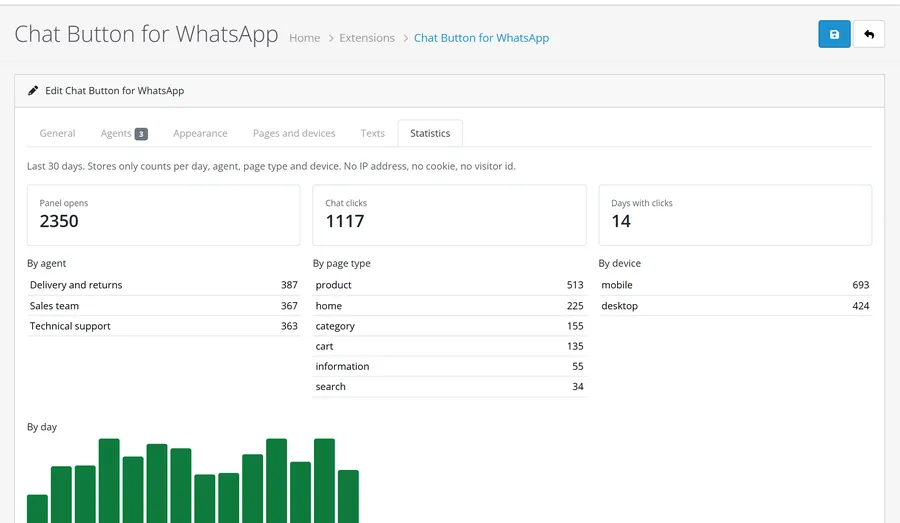
Click statistics per agent, page type and device for the last 30 days
Privacy and safety
No third-party script, tracking pixel or cookie: your shop serves one small CSS and one JS file, WhatsApp is contacted only when the shopper clicks
Statistics are counts per day only: no IP address, no cookie, no visitor id. The counting call is signed, limited per address (a keyed hash kept ten minutes, never stored with a count) and capped per day
Official click-to-chat links (wa.me), numbers cleaned to international format, message text encoded and cut safely, every shown value escaped
Events only, no OCMOD, no core edits; tested on OpenCart 4.1.0.4 with the default theme
What you get
Download & installOne installer package (.ocmod.zip) for OpenCart 4.0.2 – 4.1.x. There is no OpenCart 3 edition. Download it from My licenses right after payment.
12 months of updates & supportNew versions and help for 12 months (24 or 36 months at checkout). After that the extension keeps working; renew anytime at 50%.
License for your storeOne production domain with all its subdomains; staging and local development hosts are free. How licensing works
30-day refundFull refund within 30 days of your first purchase, no reason needed. Refund policy
Tested buildsOpenCart 4.1.0.4. Tested on OpenCart 4.1.0.4.
Documentation & supportFull guide (Installation, Configuration, Usage, FAQ) on this page. Tickets from your account, first reply within 1 business day.
Compatibility
Chat Button for WhatsApp on OpenCart works with OpenCart 4.1.0.4.
We list the builds we install and test on. “Tested” means the test plan ran on that build; “Supported” means the build is inside the supported range.
Compatibility
Version
Range
Runs on
Status
OpenCart 4.1.0.x
4.1.0.0 – 4.1.0.4
PHP 8.1 – 8.3
Tested on 4.1.0.4
OpenCart 4.0.2.x
4.0.2.0 – 4.0.2.3
PHP 8.0 – 8.2
Supported
1.0.0
Nov 7, 2026
Latest
First release for OpenCart 4.1: floating click-to-chat button (round or pill, left or right, colour, offsets, delay), panel with agents and departments (photo, role, number, all stores / default store / one extra store, own message), working hours per weekday in each agent's time zone (split shifts, overnight, daylight saving: the next opening is built as a wall-clock time of the agent's zone), Back times shown in the shopper's own clock, offline agents kept or hidden, button hidden when nobody is online (option).
Messages that know the page: product name, model, price and link on product pages; item count and total in the cart and checkout; the shop and page elsewhere. Texts per language. Ask on WhatsApp button under Add to Cart.
Click statistics per agent, page type and device without personal data (no address, cookie or visitor id), protected counting call (signed page token, per-address limit, daily ceilings per agent, in total and in rows).
Links use Meta's documented formats only (wa.me or api.whatsapp.com/send), numbers are cleaned to international format (8-15 digits, no leading zero), message text is URL-encoded and cut at 900 characters (UTF-8 safe), all shown values are escaped. No third-party script, no OCMOD.
How do I install the extension?
Upload. Extensions > Installer: upload the .ocmod.zip. It is for OpenCart 4 (4.0.2 to 4.1.x).
Install and enable. Extensions > Extensions > Modules: install, open the settings and switch it on. Events register themselves; nothing is patched.
Enter the license key. Paste the key from My licenses. Subdomains, staging and local hosts are included; you have 14 days to do it.
OpenCart 4.1.0.4. Tested on OpenCart 4.1.0.4. The Compatibility tab lists every version range.
Do the extensions change core files?
No. They work through OpenCart events and standard extension types (modules, order totals, themes). No core file edits, no OCMOD patches, no theme template edits, so OpenCart updates and other extensions keep working.
What does the license cover?
One production store domain with every subdomain (www, shop., staging.), plus local development hosts such as localhost, *.local and *.test. A store on another domain needs its own license; a second-store license is 40% off. You have 14 days after installing to enter the key. 12 months of updates and support are included; after that the extension keeps working and renewals are 50% off. How licensing works
Can I get a refund?
Yes. Ask for a full refund within 30 days of your first purchase, no reason needed: open a ticket or write to [email protected] with your order number. The money goes back to the card or bank account you paid with within 5 business days of approval. Refund policy
How do I get help?
Open a ticket from your account, so your license details are attached. We answer Monday to Friday: bug reports within 1 business day, how-to questions within 2. Support policy. Not a customer yet? Ask a pre-sales question.
A floating chat button for OpenCart 4 that opens a WhatsApp conversation with the message already typed. Add one number, or a team of agents and departments with working hours in their own time zone. On product pages the message names the product, in the cart it lists the items and the total.
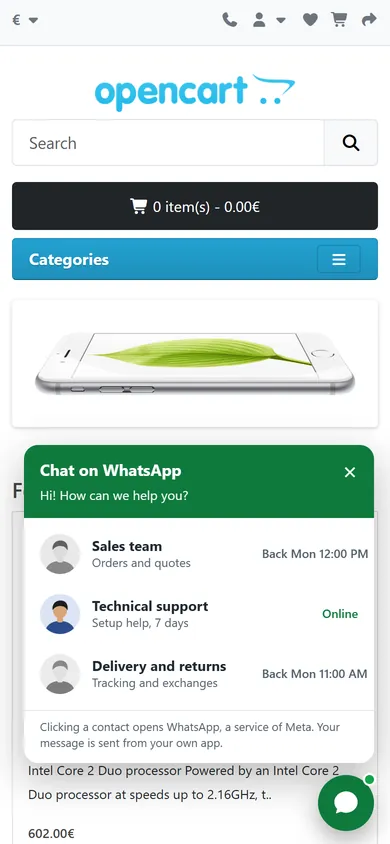
The panel with three agents
Floating button on the side you choose, round or with a label, in your colour. One contact opens WhatsApp at once, several open a panel with the agents, their role and their state (Online or Back Mon 09:00)
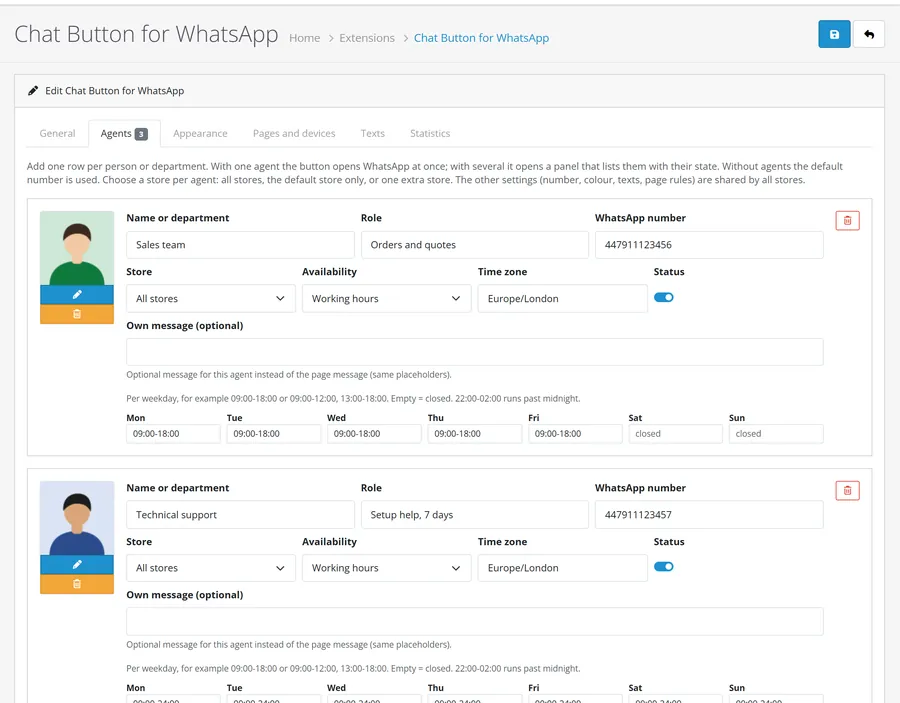
Agents and departments with name, role, photo, number, store and a message of their own
Working hours and time zones: a weekly schedule per agent in the agent's time zone, split shifts and overnight hours. The Back time is shown in the shopper's own clock. Offline agents stay in the list or are hidden; the whole button can hide when nobody is in
Messages that know the page: product pages carry the name, model, price and link; the cart and checkout carry the item count and total; every other page names the shop. All texts are editable per language
Ask on WhatsApp button under Add to Cart on product pages
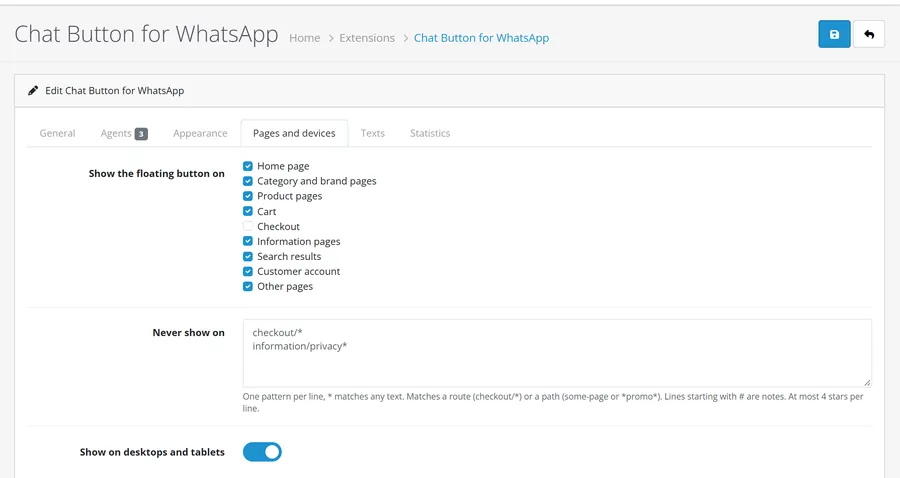
Page rules: switch the button on or off for home, category, product, cart, checkout, information, search, account and other pages, exclude URLs or routes, show it on desktops, phones or both, delay it
Click statistics per agent, page type and device for the last 30 days. Counts only: no IP address, no cookie, no visitor id
Privacy friendly: no third-party script, no tracking pixel and no cookie. The shop loads its own small CSS and JS; WhatsApp is contacted only when a shopper clicks a contact
Multi-store and multi-language: every agent belongs to all stores, to the default store only, or to one extra store; the other settings (number, colour, texts, page rules) are shared by all stores; texts per language
Official click-to-chat links (https://wa.me/<number>?text=...; the older https://api.whatsapp.com/send format is available as an option)
No OCMOD and no core file changes: OpenCart events only. OpenCart 4.1.0.x
WhatsApp is a trademark of Meta Platforms, Inc. This extension is made by Kavio Labs and is not affiliated with, endorsed by or sponsored by WhatsApp or Meta. It uses a generic chat icon and only builds the click-to-chat links that Meta documents.
Installation
Requirements: OpenCart 4.1.0.x, PHP 7.4 or newer with the mbstring extension. The shop visitors need WhatsApp (the app or WhatsApp Web) to chat; the extension itself needs no account and no API.
In the OpenCart admin open Extensions > Installer, upload kv_whatsapp_chat.ocmod.zip and click Install.
Open Extensions > Extensions, choose Modules, find Chat Button for WhatsApp, click the green Install button, then the blue pencil.
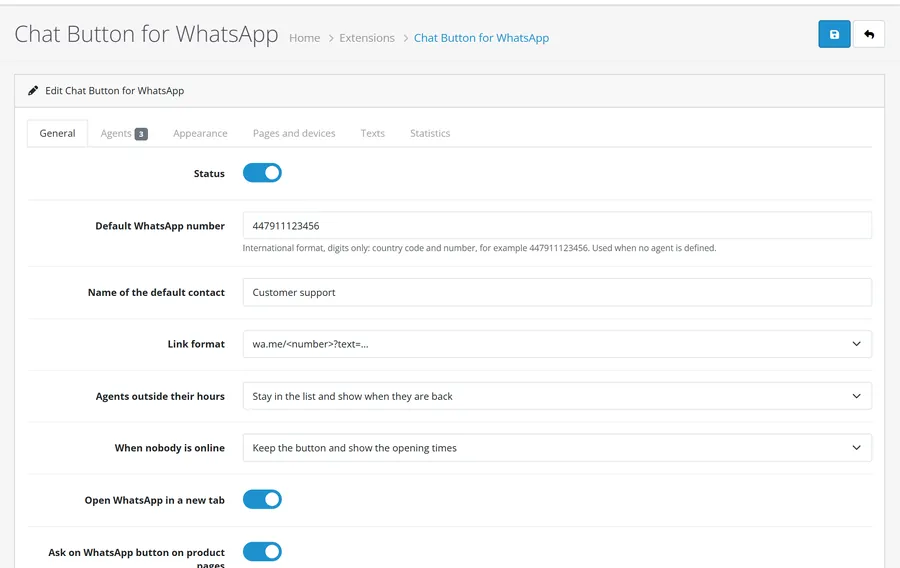
On the General tab enter your WhatsApp number in international format, digits only (country code first, for example 447911123456). Save.
Open the store: the round button is in the bottom corner. For a team add agents on the Agents tab.
The extension is switched on after installing. Pages cached by a page cache extension show the button after the cache is rebuilt.
Uninstall: Extensions > Modules > Uninstall removes the settings, the agents, the statistics and the events.
Update: upload the new zip in Extensions > Installer and install it again; settings and agents stay (the tables are created only when missing).
Configuration
Open Extensions > Extensions > Modules > Chat Button for WhatsApp. The page has six tabs.
General tab
General
Setting
Default
Description
Status
On
Switches the button and the product page button on or off.
Default WhatsApp number
empty
International format, digits only. Used when no agent is defined. A number with +, spaces, dashes or a leading 00 is cleaned up; it must have 8 to 15 digits and must not start with 0 (07911 123456 is a national number: write 447911123456). A trunk zero in brackets, +44 (0) 7911 123456, is removed.
Name of the default contact
Customer support
Name shown for the default number.
Link format
wa.me
https://wa.me/<number>?text=... or https://api.whatsapp.com/send?phone=<number>&text=.... Meta documents wa.me; the api.whatsapp.com form is the older format, still working, kept as an option.
Agents outside their hours
Stay in the list
Stay in the list with Back Mon 09:00, or hide while someone else is online.
When nobody is online
Keep the button
Keep the button with the opening times, or hide it.
Open WhatsApp in a new tab
On
Links open with rel="noopener noreferrer".
Ask on WhatsApp button on product pages
On
Adds a button under Add to Cart. Themes without the standard Add to Cart button keep the floating button only.
Count opens and clicks
On
Counts per day, agent, page type and device. See Statistics.
Agents
Agents with working hours
Click Add agent for each person or department.
Field
Description
Photo
Optional. Without a photo the first letter of the name is shown.
Name or department, Role
Shown in the panel.
WhatsApp number
International format. A wrong number blocks saving and names the agent.
Store
All stores, the default store only, or one extra store. The other settings (number, colour, texts, page rules) are shared by all stores.
Availability
Always available or Working hours.
Time zone
The agent's time zone (for example Europe/Berlin). Daylight saving changes are handled.
Status
Disabled agents are not shown.
Own message
Optional message for this agent instead of the page message.
Weekday hours
09:00-18:00, or 09:00-12:00, 13:00-18:00. Empty means closed. 22:00-02:00 runs past midnight, 00:00-24:00 is all day.
With one agent the button is a direct link; with several it opens the panel. The order of the rows is the order in the panel.
Appearance
Side (left or right), shape (round, or pill with the label text; phones always show the round button), colour, distance from the edge, a soft pulse while somebody is online, and a delay in seconds. White text and icon sit on the colour: choose a dark enough shade (the default has a contrast of 5.6:1).
Pages and devices
Pages and devices
Tick the page types that show the floating button (checkout is off by default). Never show on takes one pattern per line, * matches any text: a route such as information/privacy*, or a path such as *promo*. Lines starting with # are notes. Show on desktops and tablets, on phones, or both (breakpoint 768 px). The Ask on WhatsApp button on product pages works independently of the page list.
Texts
Per language, leave a field empty to use the English default. Message templates replace [store], [page], [url], [product], [model], [price], [count] and [total]; a line whose placeholders are all empty is left out. [time] in the Back text is the opening time. Prices follow the shopper's currency and your tax display setting and are left out when your shop hides prices from guests.
Statistics
Statistics
Panel opens and chat clicks of the last 30 days by agent, page type and device, and a bar per day. Delete statistics empties the table. The table has no column for an address, a cookie or a visitor. The counting call carries a signed token issued with the page (so an invented store or a call from outside a shop page is refused), one address may count at most 40 times a minute, one agent collects at most 20,000 counts a day, all agents together 50,000 and the table at most 5,000 rows a day, so a script cannot grow it or inflate the numbers without limit. Flood protection keeps only a keyed one-way hash of the address for ten minutes; it is never stored with a count.
Usage
What the shopper sees
Several agents: a tap on the button opens the panel. Each row shows the name, the role and Online, or Back Mon 09:00 converted to the shopper's own time zone. A tap on a row opens WhatsApp with the message typed in; the shopper presses send in their own app.
Panel on a phone
One agent or only the default number: the button is the link.
Product pages
Product page
The button's message is built from the template for products, for example:
Hello! I have a question about this product:
iPhone
product 11
25.88€
https://shop.example/index.php?route=product/product&product_id=40
The Ask on WhatsApp button under Add to Cart opens the same message; with several agents it opens the panel first, also on a device where the floating button is switched off. The link in the message has no session, token or tracking parameters.
Cart and checkout
With items in the cart the message lists the item count and the total. Checkout is hidden by default (tick it on the Pages tab to show it).
Working hours in practice
Sales team, Mon-Fri 09:00-18:00, Europe/London: on Saturday the panel shows Back Mon 12:00 to a shopper in Istanbul.
Night desk, 22:00-02:00, every day: online from 22:00 to 02:00 in its own zone.
Agents with Always available are online around the clock.
The state is calculated in the page and refreshed in the browser every minute, so a page kept open (or served from a page cache) stays correct. The Back time is the real next opening: it is built as a wall-clock time in the agent's zone, so it is right across daylight-saving changes (Europe, USA, southern hemisphere), and then shown in the shopper's zone.
Page cache
The button is added to the page by the shop, so a page cache stores it with the page. The state refresh and the click counting run in the browser and need no uncached request except the counting call.
Statistics
Use the Statistics tab to see which agents and pages start conversations. Counting never stores personal data.
Tables: kv_wa_agent (store_id: -1 all stores, 0 default store, N store N), kv_wa_click, kv_wa_rate (prefix as configured).
Settings: module_kv_whatsapp_chat_*.
The counting endpoint is index.php?route=extension/kv_whatsapp_chat/module/kv_whatsapp_chat.track (POST a, p, d, k, t = the token issued with the page). It ignores calls without a valid token, unknown stores, unknown agents, unknown page types and GET requests.
FAQ
Does it need the WhatsApp Business API or an account with a provider?
No. It builds the click-to-chat links that Meta documents. The shopper's own WhatsApp opens with the message typed in. There are no automatic replies and no incoming message log: the conversation happens in your WhatsApp or WhatsApp Business app.
Does it load anything from WhatsApp or other hosts?
No. The page loads one CSS and one JS file from your own shop. WhatsApp is contacted only when a shopper clicks a contact.
Is it GDPR friendly?
The button sets no cookie, loads no third-party script and stores no personal data with the statistics, which are counts per day. To limit floods the counting call keeps a keyed one-way hash of the visitor address for ten minutes; it is never linked to a count. Clicking a contact opens WhatsApp, a service of Meta, and the panel says so (the text is editable). Mention WhatsApp in your privacy policy as you would for any chat link.
Does it use the WhatsApp logo?
No. It uses a generic chat icon and the words WhatsApp only to name the service. WhatsApp is a trademark of Meta Platforms, Inc.; this extension is not affiliated with or endorsed by WhatsApp or Meta.
Can I show different people in different stores?
Yes, choose per agent: all stores, the default store only, or one extra store. The other settings (number, colour, texts, page rules) are the same in every store; texts are per language.
Can I use WhatsApp Business numbers?
Yes, any number that has WhatsApp. Enter it in international format without zeros in front: 447911123456, not 07911 123456 (a number that starts with 0 is refused; a trunk zero in brackets, as in +44 (0) 7911 123456, is removed for you).
The button does not show. Check the status, that a valid number or an enabled agent exists, the page type on the Pages tab, the exclude list, the device switches and, for a pill button on a phone, that phones are switched on. When every agent has hours and nobody is online, When nobody is online may hide the button.
The Ask button is missing on a product page. Some themes change the Add to Cart markup. The floating button then carries the product message.
Server-side tracking for OpenCart 4.x and 3.0.x: purchases, refunds, add to cart, checkout, product views and leads go from your server to the free official GA4 Measurement Protocol, Meta Conversions API and TikTok Events API, deduplicated with the browser pixels through shared event ids. Consent-aware, SHA-256 hashed customer data, order status mapping, queue with retries, test mode and an event log. No paid relay, events only, no OCMOD.
The department store theme for OpenCart 4.x and 3.0.x: colour-coded departments, a department list beside the hero slider with two side promos, a big search with a department selector, tabbed product blocks, a 2 + 1 + 2 offer grid, deals of the day with real countdowns, a department showcase, a promotions band and a three-column product page with a sticky buy box. Four styles (Meridian, Harbor, Citrus, Night) and your own colours on top. Events only, no core changes.
Stop AI crawlers, scrapers, vulnerability scanners and unwanted countries before OpenCart 4.x or 3.0.x builds a page. Googlebot and Bingbot are verified by DNS and always allowed; 50+ bots get one switch each; country rules use free GeoIP databases and can close only the checkout; IP and network lists, rate limits, honeypots and the cart flood fix; a one-second challenge instead of a captcha; learning mode, dashboard, log, IP tester and Cloudflare export. No core changes, no OCMOD.