Exports your OpenCart orders and credit notes as DATEV files for your tax adviser: the booking batch (EXTF, Windows-1252) and the debtor master data file, with SKR03 and SKR04 presets, revenue accounts for 19 %, 7 % and 0 % VAT, intra-community supplies, exports and OSS accounts per country, a debtor number per customer or one collective debtor, clearing accounts per payment method, a validation report and a scheduled export. An export file, not a DATEV-certified connector. OpenCart 4, events and cron only, no OCMOD.
Tested on 4.1.0.4Updated Nov 7, 2026Version 1.0.0Compatible with OpenCart 4.1.0.4 No core file edits
Built forOpenCart
Your orders as a DATEV booking batch1 of 6
What it does
Exports your OpenCart orders and credit notes as DATEV files for your tax adviser: the booking batch (EXTF, Windows-1252) and the debtor master data file, with SKR03 and SKR04 presets, revenue accounts for 19 %, 7 % and 0 % VAT, intra-community supplies, exports and OSS accounts per country, a debtor number per customer or one collective debtor, clearing accounts per payment method, a validation report and a scheduled export. An export file, not a DATEV-certified connector. OpenCart 4, events and cron only, no OCMOD.
What it changes for your store
Your month end, without spreadsheets. German merchants hand their bookkeeping to a tax adviser who works with DATEV. This extension turns your OpenCart orders into the file the adviser imports: a booking batch in the DATEV format and a debtor master data file.
Know the limits. An export file, not a DATEV-certified connector and no DATEV online service. The shop currency must be EUR. Not covered: BU keys, cost centres, document images, fixed-amount taxes, margin schemes. Account numbers of the presets are the standard accounts; confirm them with your tax adviser, and send the first file as a test. DATEV is a trademark of DATEV eG. This extension is not made, endorsed or certified by DATEV eG.
Features
The export
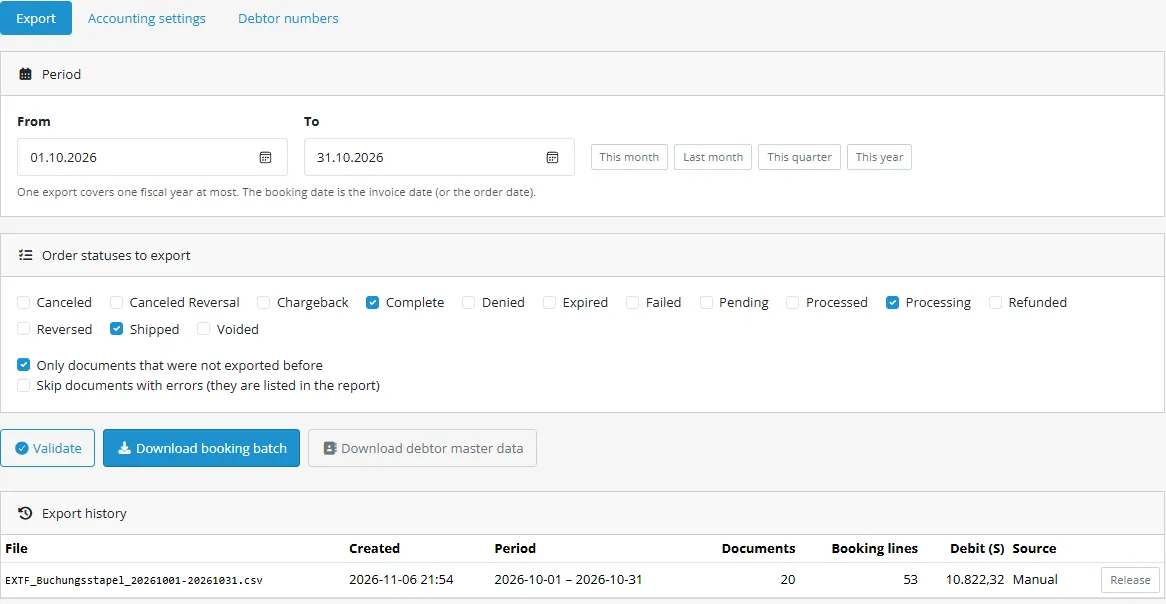
Pick the period and the order statuses, press Validate, download the booking batch (EXTF version 700, one line per booking, Windows-1252, decimal comma, CR/LF)
Every export is kept in a history; release one to export the same period again; only documents not exported before by default
Debtor master data file for the customers that were booked, EU VAT ID split into country and number
Accounts and VAT
SKR03 and SKR04 presets: revenue accounts for 19 %, 7 % and 0 % VAT, intra-community supplies, tax-free exports, optional accounts for shipping and payment fees
OSS: one revenue account per EU country, mapped by the delivery country; no preset because the numbers are company specific
Coupons and reward points lower the taxable amount as OpenCart does; the booked lines always add up to the order total
Customers, credit notes, payments
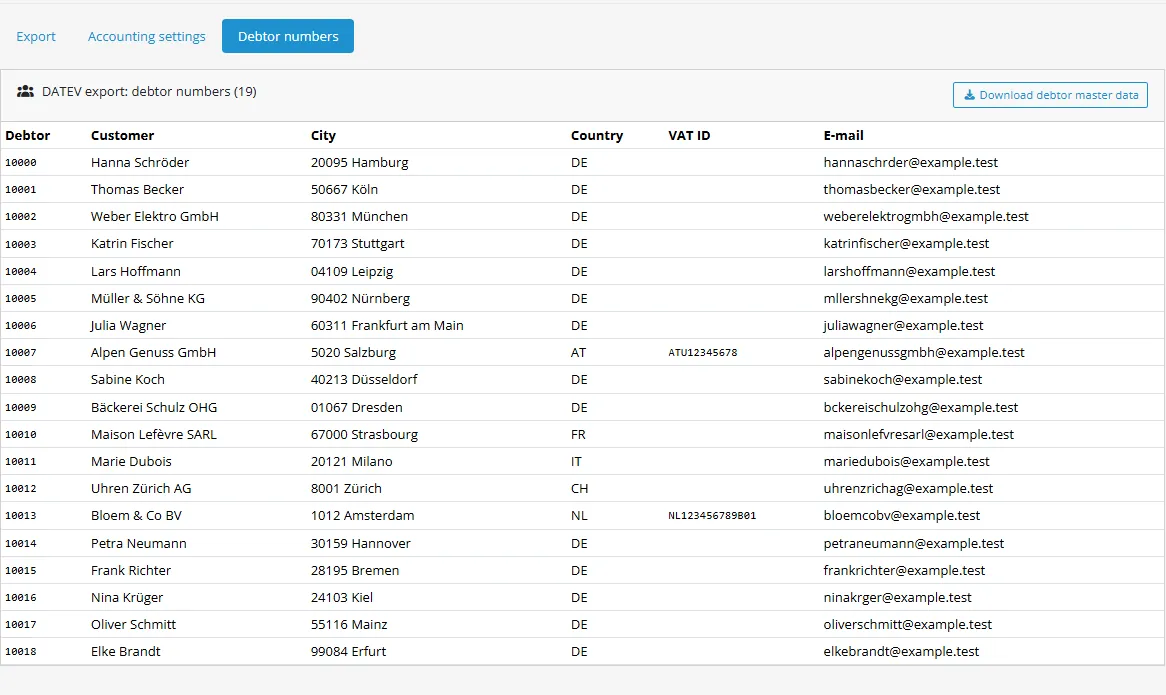
One collective debtor or one debtor number per customer from a start number; the number stays with the customer
Refunded orders and the credit notes of PDF Invoices & Credit Notes are booked Haben; optional payment lines against a clearing account per payment method
Belegfeld 1 from the invoice number when there is one, otherwise the order number with your prefix
Safe
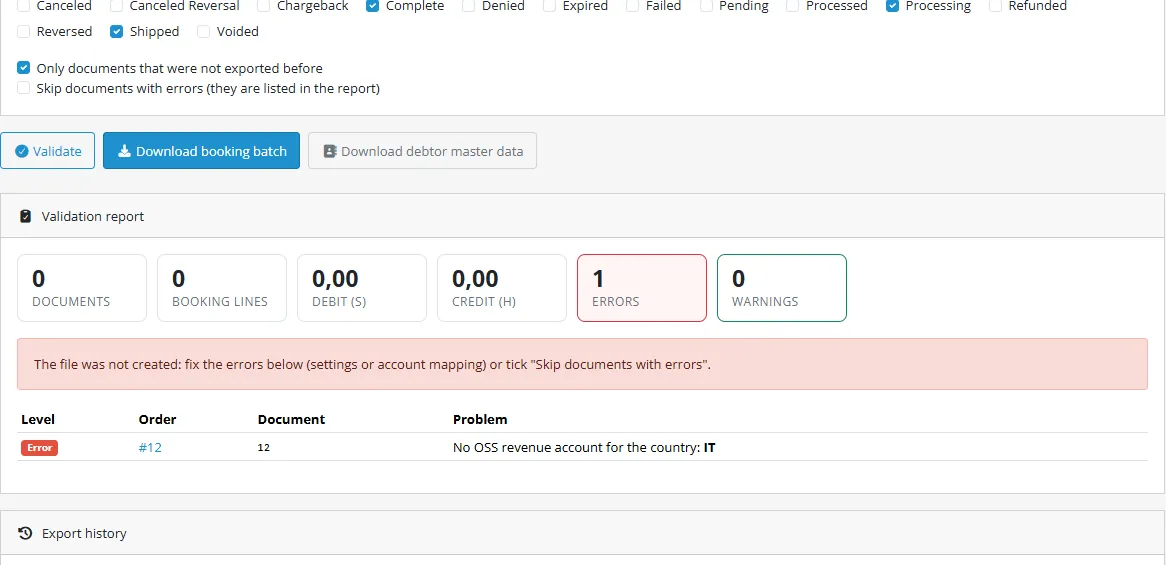
The validation report names every problem before your adviser sees the file: missing OSS account, unknown tax rate, wrong period, number range
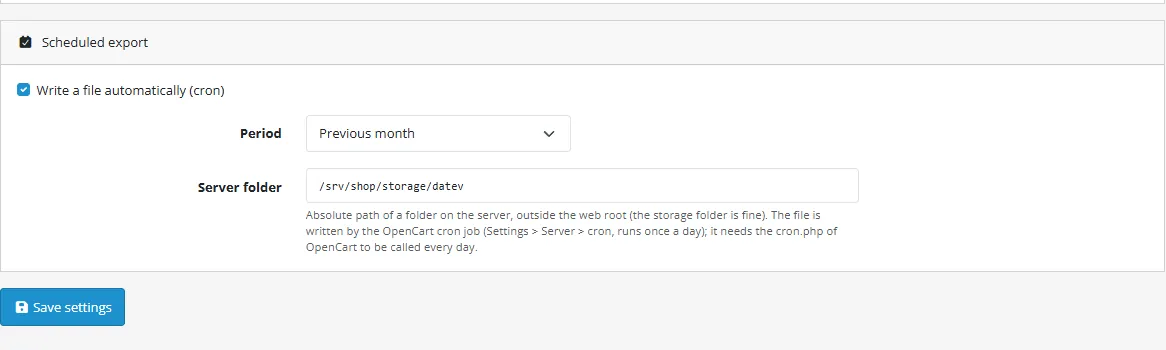
Scheduled export: the OpenCart cron writes last month into a server folder; events and cron only, no OCMOD, no core edits, the extension only reads orders; tested on OpenCart 4.1.0.4
What you get
Download & installOne installer package (.ocmod.zip) for OpenCart 4.0.2 – 4.1.x. There is no OpenCart 3 edition. Download it from My licenses right after payment.
12 months of updates & supportNew versions and help for 12 months (24 or 36 months at checkout). After that the extension keeps working; renew anytime at 50%.
License for your storeOne production domain with all its subdomains; staging and local development hosts are free. How licensing works
30-day refundFull refund within 30 days of your first purchase, no reason needed. Refund policy
Tested buildsOpenCart 4.1.0.4. Tested on OpenCart 4.1.0.4.
Documentation & supportFull guide (Installation, Configuration, Usage, Developer notes) on this page. Tickets from your account, first reply within 1 business day.
Compatibility
DATEV Export for Accounting works with OpenCart 4.1.0.4.
We list the builds we install and test on. “Tested” means the test plan ran on that build; “Supported” means the build is inside the supported range.
Compatibility
Version
Range
Runs on
Status
OpenCart 4.1.0.x
4.1.0.0 – 4.1.0.4
PHP 8.1 – 8.3
Tested on 4.1.0.4
OpenCart 4.0.2.x
4.0.2.0 – 4.0.2.3
PHP 8.0 – 8.2
Supported
1.0.0
Nov 7, 2026
Latest
Initial release for OpenCart 4.1.
DATEV booking batch (EXTF, format version 700, category 21) and debtor master data file (category 16), Windows-1252, semicolon separated, decimal comma; header, column line and field layout checked against the official DATEV sample data.
Export by date range and order status, with a validation report (missing VAT / OSS accounts, client numbers, fiscal-year rule, unreadable tax rates, skippable documents).
SKR03 and SKR04 presets, OSS accounts per country, shipping and payment fee accounts.
Debtor numbers: collective debtor or one number per customer.
Credit notes (refund statuses and credit notes of PDF Invoices & Credit Notes), optional payment bookings with clearing accounts per payment method.
Belegfeld 1 from the invoice number (OpenCart or PDF Invoices & Credit Notes) when present, otherwise the order number.
Export history, release of an export, "only documents not exported before".
Scheduled export into a server folder by the OpenCart cron.
How do I install the extension?
Upload. Extensions > Installer: upload the .ocmod.zip. It is for OpenCart 4 (4.0.2 to 4.1.x).
Install and enable. Extensions > Extensions > Modules: install, open the settings and switch it on. Events register themselves; nothing is patched.
Enter the license key. Paste the key from My licenses. Subdomains, staging and local hosts are included; you have 14 days to do it.
OpenCart 4.1.0.4. Tested on OpenCart 4.1.0.4. The Compatibility tab lists every version range.
Do the extensions change core files?
No. They work through OpenCart events and standard extension types (modules, order totals, themes). No core file edits, no OCMOD patches, no theme template edits, so OpenCart updates and other extensions keep working.
What does the license cover?
One production store domain with every subdomain (www, shop., staging.), plus local development hosts such as localhost, *.local and *.test. A store on another domain needs its own license; a second-store license is 40% off. You have 14 days after installing to enter the key. 12 months of updates and support are included; after that the extension keeps working and renewals are 50% off. How licensing works
Can I get a refund?
Yes. Ask for a full refund within 30 days of your first purchase, no reason needed: open a ticket or write to [email protected] with your order number. The money goes back to the card or bank account you paid with within 5 business days of approval. Refund policy
How do I get help?
Open a ticket from your account, so your license details are attached. We answer Monday to Friday: bug reports within 1 business day, how-to questions within 2. Support policy. Not a customer yet? Ask a pre-sales question.
Hand your tax adviser a file they can import: your OpenCart orders and credit notes as a DATEV booking batch (EXTF) and the debtor master data, with SKR03 and SKR04 account presets, VAT, intra-community and OSS handling, a validation report and an optional scheduled export.
Export page
Honest scope: this extension creates an export file for your tax adviser. It is not DATEV-certified and it does not talk to DATEV online services.
Key features
Booking batch in the DATEV format (EXTF, version 700, category 21 "Buchungsstapel"): amount with decimal comma, Soll/Haben (S/H), account, counter account, booking date (DDMM), Belegfeld 1 (document number), booking text; Windows-1252, semicolon separated, CR/LF.
Debtor master data file (category 16 "Debitoren/Kreditoren") for the customers that were booked.
SKR03 and SKR04 presets: revenue accounts for 19 %, 7 % and 0 % VAT, intra-community supplies, tax-free exports, optional separate accounts for shipping and payment fees.
OSS (one-stop shop): one revenue account per EU country, mapped by the delivery country.
Debtor numbers: one collective debtor, or one number per customer from a start number (the number stays with the customer).
Credit notes: orders in "refund" statuses and, when installed, the credit notes of our PDF Invoices & Credit Notes extension are booked Haben.
Payments: optional clearing-account bookings, one account per payment method.
Belegfeld 1 is the OpenCart invoice number, or the number of PDF Invoices & Credit Notes, otherwise the order number.
Validation report before you download: missing VAT or OSS accounts, missing client numbers, periods over two fiscal years, orders you can skip.
Download by date range and order status, or write files automatically into a server folder from the OpenCart cron.
Events and cron only, no OCMOD, no core edits; the extension only reads orders.
Compatibility
OpenCart 4.1.0.4 (the version we test); no OpenCart 3 edition.
PHP 7.4 to 8.3 as your OpenCart version allows.
The default currency of the shop must be EUR.
Next steps
DATEV is a trademark of DATEV eG. This extension is independent software; it is not made, endorsed or certified by DATEV eG.
Installation
Requirements
OpenCart 4.1 (tested on 4.1.0.4), PHP 7.4 to 8.3 as your OpenCart version allows.
The default currency of the shop must be EUR (System > Localisation > Currencies, and the shop setting).
Administrator access to the admin panel.
The consultant number (Beraternummer) and client number (Mandantennummer) your tax adviser uses for your company.
Install the extension
Download kv_datev_export.ocmod.zip from your Kavio Labs or opencart.com account.
In the admin panel open Extensions > Installer, upload the file and click the green install button.
Open Extensions > Extensions, choose the type Modules, find DATEV Export for Accounting and click the green Install button, then the blue edit button.
Enter the license key in the License box and save. Without a key the extension works for 14 days; the admin pages are never blocked.
Open Sales > DATEV Export > Accounting settings and follow Configuration.
For the scheduled export make sure the standard OpenCart cron job runs on your server (cron.php or the web address of the OpenCart cron, see System > Maintenance > Cron); the install registers a daily entry.
Update
Upload the new package in Extensions > Installer and install it. Your settings, debtor numbers and export history are kept. See the CHANGELOG.
Uninstall
Uninstall the module in Extensions > Extensions > Modules, then remove the package in Extensions > Installer. Uninstalling removes the settings, the debtor numbers, the export history and the exported flags (four database tables), the events, the cron entry and the permission. Export files you downloaded or that were written to a server folder are not touched.
Configuration
All accounting settings are on one page: Sales > DATEV Export > Accounting settings. The module page in Extensions only holds the on/off switch and the license.
Ask your tax adviser for the values marked (adviser). The account numbers in the presets are the standard accounts of SKR03 and SKR04; many companies customise their chart, so let your adviser confirm them once.
Client data (adviser)
Setting
Description
Consultant number (Beraternummer)
1 to 7 digits. Written into the file header.
Client number (Mandantennummer)
1 to 5 digits. Written into the file header.
First month of the fiscal year
1 for a calendar year. The header carries the start of the fiscal year; a file never spans two fiscal years (the report tells you).
Account length (Sachkontenlänge)
4 to 8 digits, as set up for your client. Account numbers are padded with zeros to this length; debtor numbers have one digit more.
Dictation code
Two letters, optional.
Your country
Two-letter code of the country whose VAT rates are the domestic ones (DE).
Chart of accounts and revenue accounts
Chart of accounts: SKR03 or SKR04. The buttons "Reset to SKR03/SKR04 preset" restore the standard accounts.
Standard / reduced VAT rate: 19 and 7 by default. A tax line of the order with another rate in your own country is reported as an error until you map it.
Revenue accounts: 19 %, 7 %, without VAT (domestic), intra-community supplies (EU, VAT ID), tax-free exports (non-EU). SKR03 presets: 8400, 8300, 8200, 8125, 8120. SKR04 presets: 4400, 4300, 4200, 4125, 4120. Revenue accounts of the standard charts carry the VAT automatically, so no BU key is written.
Shipping and payment fee accounts (optional): empty means the same account as the goods of that VAT rate. With an account set, the shipping part (or the payment fee) is booked on its own line.
OSS revenue accounts per country: one line per country, for example FR=8338. OSS account numbers are company specific, so there is no preset: your adviser gives you the numbers. Orders to an EU country without an account are reported as errors. An optional default account covers all other EU countries.
EU orders without VAT: with the option on, such an order is booked as an intra-community supply (a warning is shown when no VAT ID is stored; the VAT ID comes from our EU VAT Number Validation extension when it is installed; OpenCart itself has no VAT ID field).
Orders and documents
Order statuses: orders in these statuses are booked as invoices (Processing, Shipped and Complete by default).
Refund statuses: orders in these statuses are booked as full credit notes. The credit notes of PDF Invoices & Credit Notes are always included.
Document number prefix: put in front of the order number when the order has no invoice number (Belegfeld 1). An invoice number generated in OpenCart (prefix and number) is used as it is.
Use invoice numbers, dates and credit notes of PDF Invoices & Credit Notes: shown when that extension is active. The invoice number becomes Belegfeld 1, the invoice date the booking date.
Payments and clearing accounts
Also book the payment: adds a second line per document, clearing account against the debtor (Haben for credit notes).
Statuses that count as paid and one clearing account per payment method (empty = the default clearing account). Presets: 1360 (SKR03) and 1460 (SKR04), the standard "Geldtransit" accounts. The payment date is the document date.
Debtor numbers
One collective debtor (10000 by default) or one number per customer from a start number. Numbers run up to 7 times the account base minus 1 (69999 at account length 4) and stay with the customer (registered customers by user id, guests by e-mail address).
Tax rates
OpenCart stores the name of every tax rate on the order, not its percentage. The extension looks the rate up by that name in System > Localisation > Taxes > Tax Rates: keep the name of a rate unchanged once orders exist, or the old orders report "tax rate cannot be read". Fixed-amount rates cannot be mapped to a revenue account and are reported.
Scheduled export
Tick Write a file automatically, choose the period (previous day, week or month) and an absolute server folder outside the web root (the OpenCart storage folder is fine, for example .../storage/datev).
The extension registers one daily entry in the OpenCart cron; the standard OpenCart cron job runs it. Only documents that were not exported yet are written; the history shows these runs as "Scheduled".
Scheduled export
Usage
How it works
Open Sales > DATEV Export. Pick a period and the order statuses, press Validate to see what would be exported, then Download booking batch. The file EXTF_Buchungsstapel_<from>-<to>.csv is what your tax adviser imports into DATEV Rechnungswesen (they know the import under the DATEV format / "Buchungsstapel").
For every order the extension books the receivable (debtor, Soll) against the revenue account of its VAT scenario (Haben). Credit notes are booked the other way round. With "Also book the payment" there is a second line per document that moves the amount from the debtor to the clearing account of the payment method.
Scenario
Revenue account
Domestic, 19 % or 7 %
the 19 % / 7 % account
Domestic without VAT
the "without VAT" account
EU country, VAT ID, no VAT (reverse charge)
intra-community supplies account
EU country, consumer, VAT of that country
the OSS account of the country
Non-EU country, no VAT
tax-free export account
The amounts are taken from the order itself (total, tax lines, shipping, fees). Coupons and reward points lower the taxable amount as OpenCart does; gift vouchers and store credit count as payments, not as discounts. The booked lines always add up to the order total to the cent.
Validation report
Common tasks
First export
Open Sales > DATEV Export > Accounting settings, enter the consultant number and client number of your tax adviser, choose SKR03 or SKR04 and save.
If you sell to other EU countries with OSS, add the OSS accounts (FR=8338).
Open the Export tab, choose last month, press Validate, fix what the report lists, press Download booking batch.
Press Download debtor master data if you use one debtor number per customer; your adviser imports it first so the numbers exist.
Fix a validation error
The report lists the order, the document number and the problem. Typical ones: no OSS account for a country, a domestic VAT rate that is neither the standard nor the reduced rate, a missing consultant number, a period over two fiscal years. Fix the setting and validate again, or tick Skip documents with errors to export the rest and book the listed documents by hand.
Export again
Each download marks its documents as exported, and Only documents that were not exported before (on by default) keeps the next export free of them. If your adviser needs a file again, press Release in the history and export the same period once more.
Scheduled export
See Configuration. The folder must be on the server and outside the web root; the OpenCart cron job does the rest.
Good to know
Exports are in the default currency of the shop, which must be EUR (OpenCart stores order totals in it). A store with another primary currency gets an error instead of a file with wrong amounts.
The file is Windows-1252 as DATEV expects; characters outside that code page become "?".
Booking text and Belegfeld follow DATEV's limits (60 and 36 characters; Belegfeld 1 only letters, digits and $ & % * + - /).
The extension never changes orders. It only reads them and keeps its own tables (settings, debtor numbers, export history).
Debtor numbers
Developer notes
Technical reference for developers who work with DATEV Export for Accounting. The extension creates export files for your tax adviser; it is not DATEV-certified. See Format conformance for the file format.
extension/kv_datev_export/accounting/datev (cron, order deleted event)
Booking model
Mapper::map() (pure PHP, unit tested) turns a normalized document into booking lines:
Gross amount per VAT rate from the tax lines of the order (tax amount and rate give the gross of the rate); what no tax line explains is the untaxed rest. Rounding differences are put on the largest rate, so the lines always add up to the order total.
Revenue account by delivery country and rate: domestic 19/7/0, EU zero VAT = intra-community, EU with VAT = OSS account of the country (error when missing), non-EU = export.
Optional split of shipping and payment fee onto their own accounts.
Soll for invoices, Haben for credit notes; optional payment line (clearing account against the debtor).
Source::fromOrder() builds the documents from OpenCart data: product lines (order_product.price, tax per unit), the order_total rows (sub_total, shipping, tax, other rows) and the tax rate percentage looked up by the name on the tax row. Coupons and reward points scale the product tax; the tax left over after the product tax is the tax of the shipping. voucher and credit rows are payments, not discounts.
Data sources
Orders: order, order_product, order_total, country (ISO code of the delivery address, else the payment address). Orders with status 0 (missing orders) are ignored.
kv_invoice_builder (optional): table kv_ib_document for invoice numbers, issue dates and credit notes (typeI / C).
kv_eu_vat (optional): table kv_euvat_order for the validated VAT number of the buyer.
OpenCart invoice numbers (order.invoice_prefix, invoice_no) when present.
Events and cron
Trigger
Use
admin/view/common/column_left/before
"DATEV Export" entry under Sales
catalog/model/checkout/order.deleteOrder/after
forgets the exported flags of a deleted order
admin/controller/common/header/before
licence check on admin page views
cron kv_datev_export (daily)
extension/kv_datev_export/accounting/datev.cron writes the scheduled file; refused when called from the web
Database tables
Table
Content
kv_datev_config
one JSON settings row
kv_datev_debitors
debtor number per customer (registered customers by id, guests by e-mail hash) with an address snapshot
All queries go through the escaping placeholders of compat.php (?i, ?s, ?a, ?n, ?u, ?e); admin output is escaped in the templates.
Tests
php81 tests/unit.php and php83 tests/unit.php (95 checks: layout against the official sample data, mapper scenarios, order reading), STORE=oc41 node tests/e2e.js (64 checks in a browser on OpenCart 4.1.0.4: install state, settings, validation, downloads, bytes of the files, debtors, scheduled export by the OpenCart cron, uninstall).
Conformance with the DATEV format description (OpenCart 4)
What the extension writes, against the DATEV developer portal (developer.datev.de, "DATEV Format": Getting started, Character set, Format description, Sample data; read November 2026). The layout is checked in tests/unit.php against the official sample files EXTF_Buchungsstapel.csv and EXTF_DebKred_Stamm.csv (header line, column line and first data line are kept in tests/fixtures/). The extension has not been run through DATEV Rechnungswesen itself: send the first file to your tax adviser as a test.
Topic
Documented behaviour
What the extension does
Verified
File structure
CSV, line 1 header, line 2 column header line, line 3 and following data; file names start with EXTF_
Belegfeld 1: 36 characters, letters, digits and $ & % * + - /; booking text 60 characters
Format::belegfeld(), Format::text(.., 60); longer text is cut
unit
Flagged: not verifiable from public sources
The field-by-field descriptions of the individual formats are separate DATEV documents that are not freely retrievable. Column order, header layout and the data types per column therefore follow the official sample data, not a specification we could read.
The standard accounts of SKR03 and SKR04 in the presets (8400, 8300, 8200, 8125, 8120 and 4400, 4300, 4200, 4125, 4120, clearing 1360 and 1460) are the commonly used standard accounts; many companies customise their chart. Confirm them with your tax adviser.
OSS accounts have no preset on purpose: they are company specific.
BU keys, cost centres, document links and Festschreibung are not written (the revenue accounts of the standard charts carry the VAT automatically; files are written unlocked, 0).
Whether a particular DATEV installation accepts the file depends on the client set-up (account length, fiscal year, consultant and client number).
Not covered in 1.0.0
Foreign currencies (the shop currency must be EUR), fixed-amount taxes, margin schemes, partial payments over several bookings, cost centres, document images, recurring bookings, DATEV online services and APIs, creditor files.
Trademarks
DATEV is a registered trademark of DATEV eG. This extension is independent software and is not made, endorsed or certified by DATEV eG. The DATEV logo is not used anywhere.
FAQ
Is this DATEV-certified? Does it connect to DATEV?
No. It creates an export file for your tax adviser, following the DATEV format description published on the DATEV developer portal. It is not DATEV-certified and does not use DATEV online services or APIs. DATEV is a trademark of DATEV eG; this product is independent of DATEV eG and not endorsed by it.
Will my tax adviser's DATEV accept the file?
The file follows the published layout (header, 125 booking columns, Windows-1252, decimal comma). The extension is tested against the official DATEV sample data. Account numbers, tax keys and fiscal-year rules are specific to each client, so send the first file to your adviser as a test before you rely on it.
Which VAT cases are covered?
Domestic 19 % / 7 % / 0 %, intra-community supplies (reverse charge) for EU orders without VAT, tax-free exports, OSS per delivery country, shipping and payment fees. Not covered in 1.0: foreign currencies, fixed-amount taxes, taxes on handling fees that differ from the shipping tax, margin schemes, partial payments over several bookings, cost centres, document images (Beleglink).
Why is my order not in the file?
Only orders in the selected statuses are exported, once (see "Only documents that were not exported before"). Open the validation report: orders with errors are listed there.
Which invoice number is used?
Belegfeld 1 is the invoice number of our PDF Invoices & Credit Notes extension when it is installed and used, else the invoice number generated in OpenCart, else the order number with your optional prefix.
Which OpenCart versions are supported?
OpenCart 4.1 (tested on 4.1.0.4), PHP 7.4 to 8.3. There is no OpenCart 3 edition.
Will it slow down my store?
No storefront output at all: the extension only runs in the admin panel and from the OpenCart cron. A large export reads the orders of the period once.
How do I get updates?
Install the new package in Extensions > Installer. See Installation.
How do I get support?
Write to us through the support channel of the page where you bought the extension.
My license shows "Trial period"
A fresh install works for 14 days without a key. Enter the license key from your account on the module page and press Check now; the status changes to Active. The admin pages are never blocked; without a valid license only the creation of files is switched off.
Server-side tracking for OpenCart 4.x and 3.0.x: purchases, refunds, add to cart, checkout, product views and leads go from your server to the free official GA4 Measurement Protocol, Meta Conversions API and TikTok Events API, deduplicated with the browser pixels through shared event ids. Consent-aware, SHA-256 hashed customer data, order status mapping, queue with retries, test mode and an event log. No paid relay, events only, no OCMOD.
The department store theme for OpenCart 4.x and 3.0.x: colour-coded departments, a department list beside the hero slider with two side promos, a big search with a department selector, tabbed product blocks, a 2 + 1 + 2 offer grid, deals of the day with real countdowns, a department showcase, a promotions band and a three-column product page with a sticky buy box. Four styles (Meridian, Harbor, Citrus, Night) and your own colours on top. Events only, no core changes.
Stop AI crawlers, scrapers, vulnerability scanners and unwanted countries before OpenCart 4.x or 3.0.x builds a page. Googlebot and Bingbot are verified by DNS and always allowed; 50+ bots get one switch each; country rules use free GeoIP databases and can close only the checkout; IP and network lists, rate limits, honeypots and the cart flood fix; a one-second challenge instead of a captcha; learning mode, dashboard, log, IP tester and Cloudflare export. No core changes, no OCMOD.