Builds CFDI 4.0 invoices from OpenCart orders, checks them against the SAT schema and has them stamped through your own Facturama or Facturapi account: Ingreso invoices, Egreso credit notes, cancellation with the SAT motives and the global invoice for sales to the general public. Customer fiscal data at checkout, SAT keys per product and category, UUID, XML and a printable view with the verification QR code, a stamping queue run by the OpenCart cron. Not a PAC: you need your own provider account. IVA-exempt and IEPS lines, REP, Carta Porte and withholdings are not supported. OpenCart 4, no OCMOD.
Tested on 4.1.0.4Updated Nov 6, 2026Version 1.0.1Compatible with OpenCart 4.1.0.4 No core file edits
Built forOpenCart
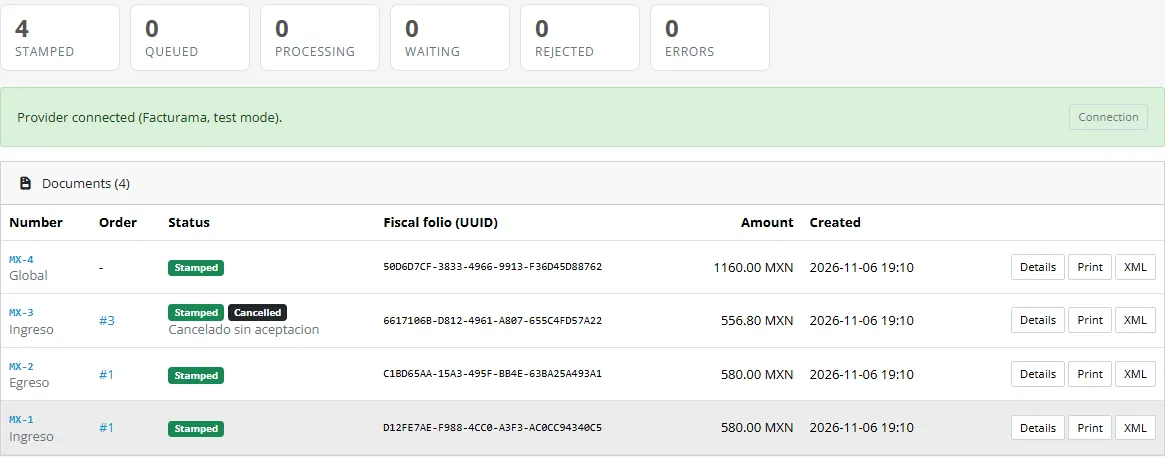
Every CFDI, one clear list1 of 6
What it does
Builds CFDI 4.0 invoices from OpenCart orders, checks them against the SAT schema and has them stamped through your own Facturama or Facturapi account: Ingreso invoices, Egreso credit notes, cancellation with the SAT motives and the global invoice for sales to the general public. Customer fiscal data at checkout, SAT keys per product and category, UUID, XML and a printable view with the verification QR code, a stamping queue run by the OpenCart cron. Not a PAC: you need your own provider account. IVA-exempt and IEPS lines, REP, Carta Porte and withholdings are not supported. OpenCart 4, no OCMOD.
What it changes for your store
CFDI 4.0 invoices from your OpenCart orders. Mexican merchants must issue a CFDI for sales to customers who ask for one, and a global invoice for the rest. This extension builds the CFDI 4.0 file from the order, checks it against the SAT schema and sends it to your own account at Facturama or Facturapi, which stamps it. You keep your provider and your certificates; the extension adds the OpenCart side.
Not a PAC. The extension does not stamp invoices and never sees your digital certificates. You need your own Facturama or Facturapi account and pay the provider for the stamps.
Know the limits. IVA-exempt and IEPS lines, payment complements (REP), Carta Porte and tax withholdings are not part of version 1.0; use the payment method PUE. Tested against local mocks of the provider APIs, not against a live provider: start in the test mode. One issuer and one store. The extension prepares and sends documents with the data and settings you provide; it is not tax or legal advice. Facturama and Facturapi are trademarks of their owners; the extension is not affiliated with or endorsed by them or by the SAT.
Features
What you get
Ingreso invoices when an order reaches the statuses you choose, or with one click on the order page
Egreso credit notes related to the invoice, automatic at a refund status or by hand, for the whole invoice or part of it
Cancellation with the SAT motives 01 to 04, including the replacement CFDI
The global invoice (factura global) for orders without an RFC, per day, week, fortnight, month or two months
Every CFDI validated against the SAT schema before it is sent
UUID, stamped XML and a printable view with the SAT verification QR code
Customers and products
Fiscal data of the customer (RFC, legal name, fiscal postal code, tax regime, CFDI use) as fields of the address form, RFC format checked
SAT keys per product and per category: ClaveProdServ, ClaveUnidad and the IVA treatment (16 %, 8 %, 0 %, not subject)
Customers see their CFDI, print view and XML on their order page; the stamped XML can be e-mailed once
MXN stores and other currencies with the exchange rate (TipoCambio)
Admin
CFDI panel on the order page, an invoices list with status tiles, a document page with QR code, lines, history and XML
A stamping queue with retries run by the OpenCart cron, a log with CSV export, encrypted credentials, test and live mode
Events only, no OCMOD, no core edits; OpenCart 4, tested on 4.1.0.4
What you get
Download & installOne installer package (.ocmod.zip) for OpenCart 4.0.2 – 4.1.x. There is no OpenCart 3 edition. Download it from My licenses right after payment.
12 months of updates & supportNew versions and help for 12 months (24 or 36 months at checkout). After that the extension keeps working; renew anytime at 50%.
License for your storeOne production domain with all its subdomains; staging and local development hosts are free. How licensing works
30-day refundFull refund within 30 days of your first purchase, no reason needed. Refund policy
Tested buildsOpenCart 4.1.0.4. Tested on OpenCart 4.1.0.4.
Documentation & supportFull guide (Installation, Configuration, Usage, Conformance) on this page. Tickets from your account, first reply within 1 business day.
Compatibility
Mexico CFDI 4.0 e-Invoicing works with OpenCart 4.1.0.4.
We list the builds we install and test on. “Tested” means the test plan ran on that build; “Supported” means the build is inside the supported range.
Compatibility
Version
Range
Runs on
Status
OpenCart 4.1.0.x
4.1.0.0 – 4.1.0.4
PHP 8.1 – 8.3
Tested on 4.1.0.4
OpenCart 4.0.2.x
4.0.2.0 – 4.0.2.3
PHP 8.0 – 8.2
Supported
1.0.0
Nov 6, 2026
Latest
First release for OpenCart 4.1.x (ported from the CS-Cart add-on 1.0.1): CFDI 4.0 Ingreso invoices from orders, Egreso credit notes (whole or partial, on a refund status or by hand), global invoice (factura global) for orders without an RFC, cancellation with the SAT motives 01 to 04, customer fiscal data as address custom fields, SAT keys per product and category, validation against the SAT schema before sending, Facturama and Facturapi drivers on the merchant's own account, UUID and stamped XML with a printable view and verification QR code, customer account card, optional e-mail of the stamped XML, stamping queue with retries run by OpenCart's cron, log with CSV export, encrypted credentials, test and live mode.
Not in 1.0: IVA-exempt and IEPS lines, payment complements (REP), Carta Porte, tax withholdings.
How do I install the extension?
Upload. Extensions > Installer: upload the .ocmod.zip. It is for OpenCart 4 (4.0.2 to 4.1.x).
Install and enable. Extensions > Extensions > Modules: install, open the settings and switch it on. Events register themselves; nothing is patched.
Enter the license key. Paste the key from My licenses. Subdomains, staging and local hosts are included; you have 14 days to do it.
OpenCart 4.1.0.4. Tested on OpenCart 4.1.0.4. The Compatibility tab lists every version range.
Do the extensions change core files?
No. They work through OpenCart events and standard extension types (modules, order totals, themes). No core file edits, no OCMOD patches, no theme template edits, so OpenCart updates and other extensions keep working.
What does the license cover?
One production store domain with every subdomain (www, shop., staging.), plus local development hosts such as localhost, *.local and *.test. A store on another domain needs its own license; a second-store license is 40% off. You have 14 days after installing to enter the key. 12 months of updates and support are included; after that the extension keeps working and renewals are 50% off. How licensing works
Can I get a refund?
Yes. Ask for a full refund within 30 days of your first purchase, no reason needed: open a ticket or write to [email protected] with your order number. The money goes back to the card or bank account you paid with within 5 business days of approval. Refund policy
How do I get help?
Open a ticket from your account, so your license details are attached. We answer Monday to Friday: bug reports within 1 business day, how-to questions within 2. Support policy. Not a customer yet? Ask a pre-sales question.
Mexico CFDI 4.0 e-Invoicing creates CFDI 4.0 invoices from your OpenCart orders and has them stamped through your own account at a stamping provider (PAC): Facturama or Facturapi. It handles Ingreso invoices, credit notes (Egreso), cancellation with the SAT motives and the global invoice (factura global) for sales to the general public.
The extension builds the CFDI 4.0 XML (Anexo 20 of the SAT), checks it against the SAT schema that ships with the extension, sends it to your PAC, stores the fiscal folio (UUID) and the stamped XML, shows the verification QR code and gives your customers a printable view and the XML on their order page.
We are not a PAC. The extension does not stamp anything and never sees your digital certificates (CSD): they stay at your provider. You need your own account at Facturama or Facturapi, you pay the provider for the stamps, and the provider stamps your CFDI.
What it does
Ingreso. A customer who enters an RFC at checkout gets an individual CFDI 4.0 when the order reaches the statuses you choose, or when you press Create CFDI now on the order page.
Global invoice. Orders without an RFC are collected per period (daily, weekly, fortnightly, monthly, every two months) into one CFDI to the generic public RFC (XAXX010101000), with the periodicity, month and year the SAT asks for.
Egreso. A credit note related to the invoice (relation 01) when the order reaches a refund status, or by hand for the whole invoice or a partial amount.
Cancellation with the SAT motives 01 to 04, including the replacement CFDI for motive 01 and cancellations that wait for the receiver to accept.
Customer fiscal data. RFC, legal name, fiscal postal code, tax regime and CFDI use are custom fields of the address form; the RFC format is checked.
SAT keys. ClaveProdServ, ClaveUnidad and the IVA treatment per product, with a default per category and a default in the settings. IVA 16 %, 8 % (border region), 0 % or not subject; MXN and other currencies with the exchange rate (TipoCambio).
Checked before sending. Every CFDI is validated against the SAT schema (cfdv40) before anything goes to the PAC.
Stored. UUID, stamped XML, printable view with the SAT verification QR code; the stamped XML can be e-mailed to the customer once.
A queue with retries run by OpenCart's cron, a log with CSV export, encrypted credentials, test and live mode.
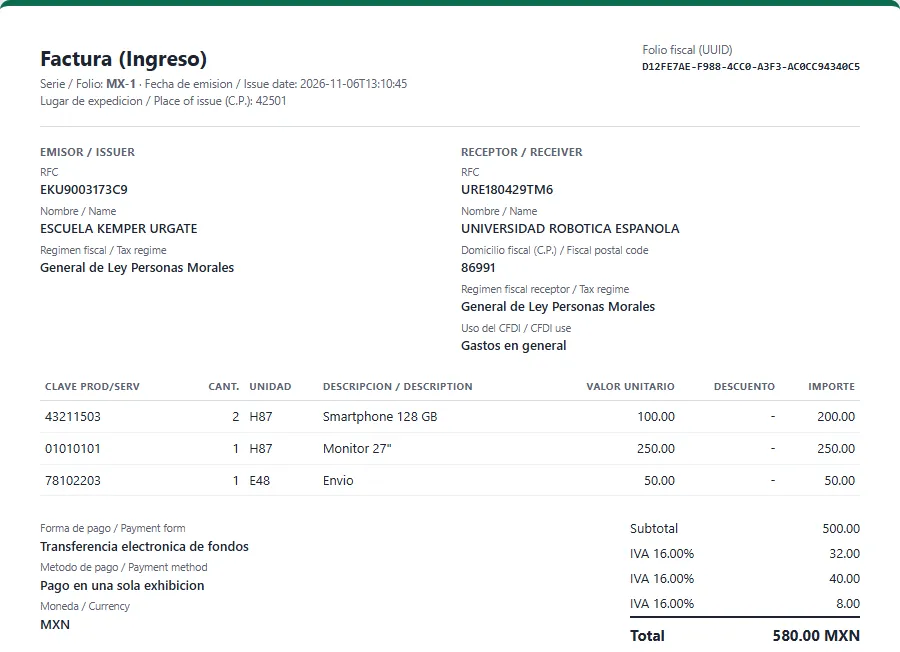
CFDI list
What it does not do
It is not a PAC and does not stamp by itself (see above).
IVA-exempt (Exento) and IEPS lines are not supported by the Facturama and Facturapi connections of this version; an order with such a line stops with a clear message instead of sending a wrong CFDI.
Payment complements (REP) for PPD sales, Carta Porte and tax withholdings are not part of version 1.0. Use the payment method PUE.
It does not give tax advice. Check SAT keys, tax rates and invoicing rules with your accountant.
Facturama and Facturapi are trademarks of their owners. SAT is the Mexican tax authority (Servicio de Administracion Tributaria). This extension is an independent product by Kavio Labs and is not affiliated with or endorsed by the SAT, Facturama or Facturapi.
Installation
Requirements
OpenCart 4.1.x (tested on 4.1.0.4).
PHP 7.4 or newer with the OpenSSL, cURL, DOM and libxml extensions (standard on OpenCart hosting). The server must reach your provider over HTTPS: api.facturama.mx / apisandbox.facturama.mx for Facturama, www.facturapi.io for Facturapi.
An account at a stamping provider (PAC) with your issuer data and CSD certificates uploaded there. Use the provider's test mode first.
OpenCart's cron running (see below) so that queued documents are stamped.
Install
Go to Extensions > Installer and upload kv_cfdi_mexico.ocmod.zip, then press the install button.
Go to Extensions > Extensions, choose Modules and install Mexico CFDI 4.0 e-Invoicing (the plus button). Installation creates the tables, the events, the cron entry, the access rights for your admin group and five custom fields in the address form (RFC, legal name, fiscal postal code, tax regime, CFDI use).
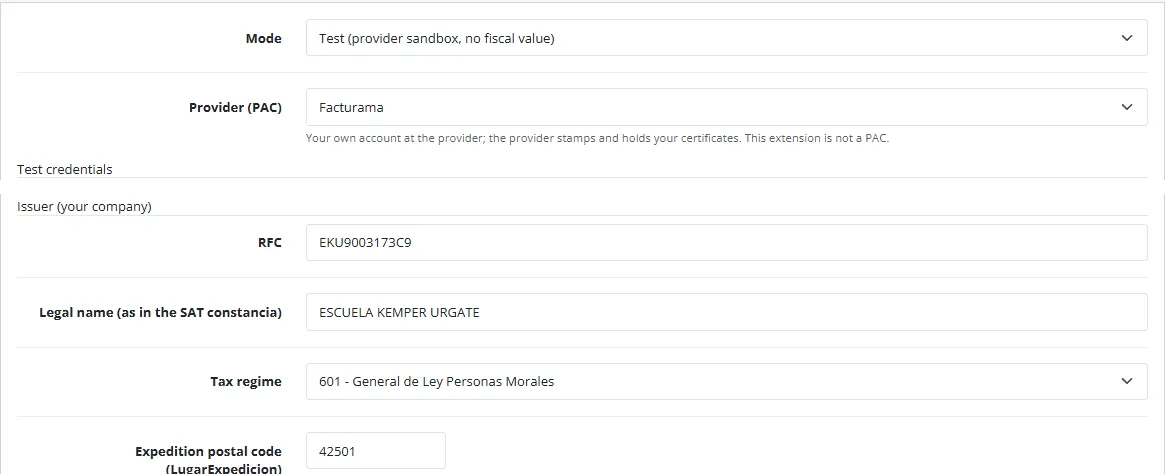
Open Sales > CFDI invoices (Mexico) > Connection, choose your provider, enter the test credentials and your issuer data (RFC, legal name, tax regime, expedition postal code) and press Save and test.
Open the module settings (the edit button) to choose the order statuses that create invoices and credit notes and to enter your license key.
Set the SAT keys of your products (tab SAT keys (CFDI) of the product form) or of their categories.
Other admin user groups need access and modify rights for extension/kv_cfdi_mexico/invoice/cfdi under System > Users > User Groups.
The shop currency can be MXN or another currency: when the default currency is not MXN, add the Mexican peso (MXN) to System > Localisation > Currencies so the exchange rate (TipoCambio) is known.
Cron
Documents created when an order reaches a status wait in the queue so that checkout is never slowed down. The queue is run by OpenCart's own cron (the extension registers an hourly job in Extensions > Cron Jobs), which needs the standard OpenCart cron line on your server, for example every 10 minutes:
*/10 * * * * php /path/to/store/cron.php
The settings page shows the exact line. As an alternative, call the cron URL shown on the settings page, with its secret key, from any scheduler. You can also press Run the queue now on the invoices page.
Updating
Upload the new package the same way. Settings, credentials and documents stay.
Disabling and uninstalling
Set the module Status to off to stop creating documents. Queued documents are not lost.
Uninstall removes the events, the cron entry, the settings, the access rights, the stored credentials and the five fiscal fields of the address form. The documents, the queue, the log and the SAT keys are kept on purpose: they are tax records. Fiscal data already stored on past orders stays on the order but is no longer shown in the address form.
Test uses the provider's sandbox (no fiscal value); Live stamps real CFDI. Test and live credentials are stored separately.
Provider (PAC)
Facturama (HTTP Basic with your user and password) or Facturapi (your secret key).
User / label, password / secret key
Your credentials at the provider. Secrets are stored encrypted (AES-256-GCM) with a key derived from your store; they are never shown again, only the last four characters.
Webhook secret
Optional. The provider can notify the store at the webhook address shown on the page; the signature is checked with this secret.
Issuer
Your RFC, legal name exactly as in your SAT constancia de situacion fiscal, tax regime and the postal code of the place of issue (LugarExpedicion).
Save and test calls the provider with the saved credentials and shows the result. Documents that were waiting for the connection go to the queue when the test succeeds.
Create the CFDI (Ingreso) when the order gets status: one or more statuses. Only orders whose customer gave an RFC are invoiced one by one.
Create a credit note (Egreso) when the order gets status: usually Refunded.
Series and folio: the document number is series plus the document id (for example WEB-17).
Time zone of the invoice date (the CFDI date must be Mexican local time).
Default IVA, Prices include IVA: on when the order total already contains the IVA (the usual Mexican shop); the CFDI divides the IVA out of the price. Off when OpenCart prices are net and the IVA is added.
Default ClaveProdServ / ClaveUnidad and the ClaveProdServ of shipping. 01010101 is "No existe en el catalogo"; set real keys per product or category.
Payment method: PUE (single payment). PPD needs payment complements (REP), which this version does not create.
Payment form (FormaPago): a default and a map from OpenCart payment codes (bank_transfer=03, cod=01, cheque=02).
Global invoice: automatic or manual, the order status of the orders to include and the period.
Customer: show the CFDI in the customer account, e-mail the stamped XML once to the customer (through the mail settings of your store).
Debug log and log retention.
License key: the license client checks the key; the admin is never blocked, only the creation of new documents pauses when the license is not valid.
SAT keys
Product form, tab SAT keys (CFDI): ClaveProdServ (8 digits), ClaveUnidad (for example H87 piece, E48 service unit, KGM kilogram) and the IVA treatment (default, 16 %, 8 %, 0 %, not subject). The category form has the same tab; a product without keys of its own takes those of its nearest category, then the defaults.
Customer fiscal fields
Installation adds five custom fields to the address form: RFC, legal name, fiscal postal code, tax regime and CFDI use. They appear in the checkout address step and in the address book. Edit labels, sort order and customer groups in Customers > Custom Fields. You can also enter or correct the fiscal data of an order in the CFDI panel of the order page.
Currency
The invoice is issued in the currency of the order. For a currency other than MXN the exchange rate is taken from the order (rate of the day of the order) against the Mexican peso in your currency table.
Usage
Ingreso (invoice)
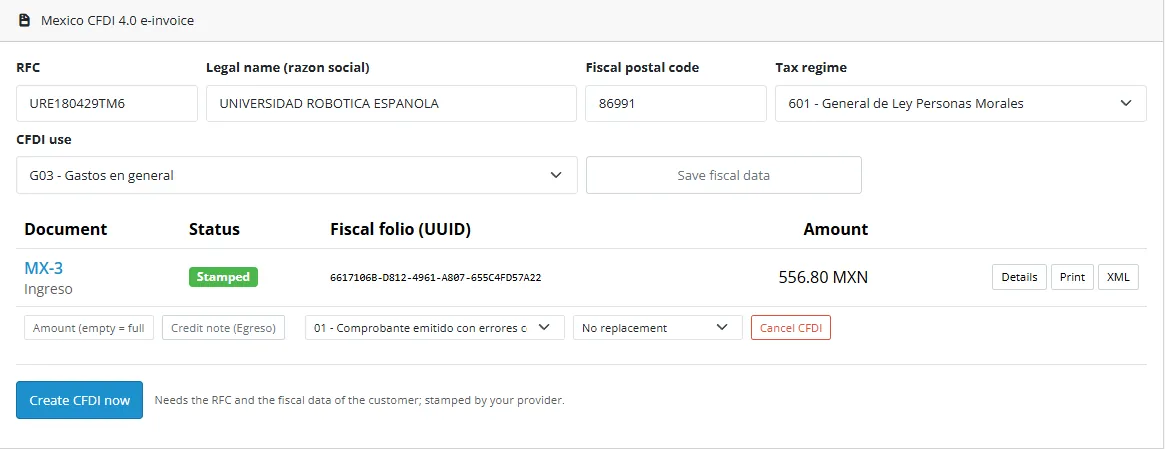
When an order reaches an issue status and the customer gave an RFC, a document is created and queued; the queue (cron, or Run the queue now) builds the CFDI, checks it against the SAT schema, sends it to the provider and stores the UUID and the stamped XML. On the order page the Mexico CFDI 4.0 e-invoice panel shows the fiscal data, the documents and their status. Create CFDI now does the same by hand.
Order panel
If the fiscal data is incomplete the document stops with a plain message ("tax regime is missing ..."). Correct the data in the panel and press Send again: the CFDI is built again with the current data.
Global invoice
Orders without an RFC (or with the generic RFC) are included in the global invoice of their period: Invoices > Global invoice (pick the period and a date inside it), or automatically at the end of each period when switched on in the settings. The CFDI goes to XAXX010101000 with the periodicity, month and year and one line per order and tax treatment. An order is in one active global invoice at a time; cancel the global invoice with motive 04 to re-issue.
Credit note (Egreso)
Set the credit statuses (for example Refunded) and the credit note is created automatically, or press Credit note (Egreso) on the invoice: empty amount for the whole invoice or an amount for a partial one. The Egreso relates to the invoice with relation type 01 and is stamped like any CFDI. Credit notes cannot exceed the invoice total.
Cancellation
Choose the SAT motive on the invoice and press Cancel CFDI: 01 (issued with errors, with a replacement CFDI), 02 (issued with errors, no relation), 03 (operation not carried out), 04 (nominative relation in a global invoice). Cancellations that need the receiver's acceptance show Cancellation pending; mark them as cancelled once accepted.
Document page
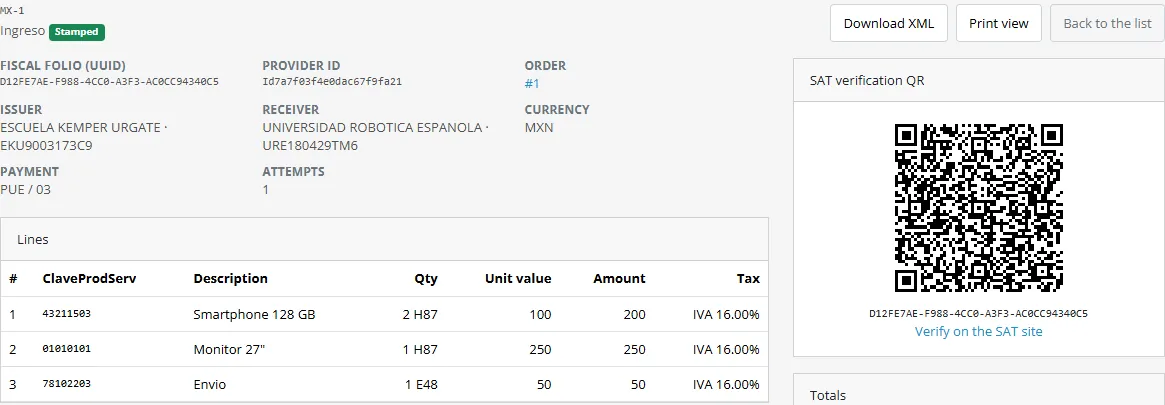
CFDI invoices (Mexico) lists all documents with status tiles and filters. The document page shows the facts, the lines with their SAT keys, the totals, the verification QR code, the history and the stamped XML; Print view opens the printable representation.
Document page
Queue and log
The Queue page lists jobs (send, cancel, status, webhook) with attempts and the last error; failed jobs retry with growing delays and can be retried or discarded by hand. The Log page records every action and provider answer (secrets masked) and exports CSV.
Customers
On the order page of their account, customers see their stamped CFDI with a printable view (with the SAT verification QR code) and an XML download. Only the logged-in owner of the order can open them.
Printable CFDI
Conformance
What the generated CFDI follows and what it was tested against. This is a description of the extension, not a certification.
Topic
What the extension does
Reference
CFDI 4.0 structure
Comprobante, Emisor, Receptor, Conceptos with Impuestos, Impuestos totals, InformacionGlobal, CfdiRelacionados
Anexo 20 of the SAT, schema cfdv40 (www.sat.gob.mx/cfd/4)
Schema check
Every CFDI and every stamped XML is validated against cfdv40, tdCFDI, catCFDI and TimbreFiscalDigital 1.1 shipped in the extension (the very large c_CodigoPostal, c_ClaveProdServ and c_Colonia lists are replaced by their format)
SAT, Portal de Comprobante Fiscal Digital por Internet
RFC
Format of t_RFC, generic public RFC XAXX010101000 with regime 616 and use S01 for the global invoice
SAT catalogues
Catalogue subsets
Regimes, CFDI uses, payment forms and methods, motives, periodicities, relation types, units
catCFDI
Global invoice
InformacionGlobal with Periodicidad, Meses (13 to 18 for bimonthly periods) and Anio
Anexo 20 guide of filling
Cancellation
Motives 01 to 04, replacement UUID for 01
SAT cancellation rules, supported by the provider APIs
Stamping
Done by your PAC: Facturama API Web (apisandbox.facturama.mx, api.facturama.mx) or Facturapi (www.facturapi.io)
The SAT verification URL with UUID, issuer and receiver RFC, total and the last eight characters of the seal, drawn as a QR code
SAT guide of the printed representation
Tested against
Unit tests of the builder, XML, schema validation, tax rounding, currency, periods and both provider drivers (112 checks, PHP 8.1 and 8.3).
End-to-end tests on OpenCart 4.1.0.4 against a local mock of the two provider APIs that follows their public documentation: order to stamped Ingreso, refund to Egreso, cancellation with a motive, global invoice, provider refusal and resend, customer view.
Not tested against the live providers or the live SAT. The sandbox run with your own test account is your step: use the test mode first. Provider API behaviour can change; the connection test and the log show what the provider answered.
Limits
IVA-exempt and IEPS lines are not supported by the provider connections in this version; payment complements (REP), Carta Porte and tax withholdings are not created. We are not a PAC and are not affiliated with the SAT, Facturama or Facturapi.
FAQ
Do I need a PAC account?
Yes. The extension builds and checks the CFDI, but only an authorised stamping provider (PAC) can stamp it. It works with Facturama and Facturapi on your own account; you pay the provider for the stamps. We are not a PAC and we do not hold your certificates.
Can I test before going live?
Yes. Use the Test mode with the sandbox credentials of your provider: nothing has fiscal value there. Switch to Live with your live credentials when the documents look right.
Which orders get a CFDI?
Orders whose customer gave an RFC (and the fiscal data) when they reach an issue status. Other orders can be collected into the global invoice. You can always create one by hand on the order page.
What about shipping and discounts?
Shipping and fees become their own lines (with the shipping ClaveProdServ of the settings and the default IVA). Coupon and reward discounts are spread over the product lines. The invoice total is compared with the order total and a warning is logged when they differ.
Why does a document stop with an error?
The message names the reason: missing or invalid fiscal data of the customer, a line with an unsupported tax (IVA exempt, IEPS), a schema problem, or the answer of the provider. Fix it and press Send again.
Are IVA-exempt, IEPS, REP, Carta Porte and withholdings supported?
No, not in this version. See the limits in Conformance. Use the payment method PUE.
Can customers see their invoice?
Yes, in their account on the order page (print view with the QR code and XML), and the stamped XML can be e-mailed once. Switch both off in the settings if you prefer.
Does it use OCMOD or change core files?
No. Events only.
Which OpenCart versions?
OpenCart 4.1.x, tested on 4.1.0.4. There is no OpenCart 3 edition.
What happens when the license is not valid?
New documents are paused and the extension shows a notice; the admin pages, existing documents and the queue of already created documents stay available. A 14-day trial runs from the first install.
Is this tax advice?
No. Check SAT keys, rates and rules with your accountant.
Server-side tracking for OpenCart 4.x and 3.0.x: purchases, refunds, add to cart, checkout, product views and leads go from your server to the free official GA4 Measurement Protocol, Meta Conversions API and TikTok Events API, deduplicated with the browser pixels through shared event ids. Consent-aware, SHA-256 hashed customer data, order status mapping, queue with retries, test mode and an event log. No paid relay, events only, no OCMOD.
The department store theme for OpenCart 4.x and 3.0.x: colour-coded departments, a department list beside the hero slider with two side promos, a big search with a department selector, tabbed product blocks, a 2 + 1 + 2 offer grid, deals of the day with real countdowns, a department showcase, a promotions band and a three-column product page with a sticky buy box. Four styles (Meridian, Harbor, Citrus, Night) and your own colours on top. Events only, no core changes.
Stop AI crawlers, scrapers, vulnerability scanners and unwanted countries before OpenCart 4.x or 3.0.x builds a page. Googlebot and Bingbot are verified by DNS and always allowed; 50+ bots get one switch each; country rules use free GeoIP databases and can close only the checkout; IP and network lists, rate limits, honeypots and the cart flood fix; a one-second challenge instead of a captcha; learning mode, dashboard, log, IP tester and Cloudflare export. No core changes, no OCMOD.