Sells your OpenCart catalogue on Mercado Libre in Mexico, Brazil, Argentina, Chile, Colombia, Uruguay and Peru with your own application: browser sign-in with automatic token renewal, category predictor and mapping, price rules and stock buffer, items with a readable reason per refused item, stock and price sync, paid orders imported as real OpenCart orders by notification and polling, Mercado Envios 2 labels (PDF or ZPL), own-carrier tracking from the order history, a job queue with retries and a full log. Credentials stored encrypted. OpenCart 4, events and cron only, no OCMOD.
Tested on 4.1.0.4Version 1.0.1Compatible with OpenCart 4.1.0.4 No core file edits
Built forOpenCart
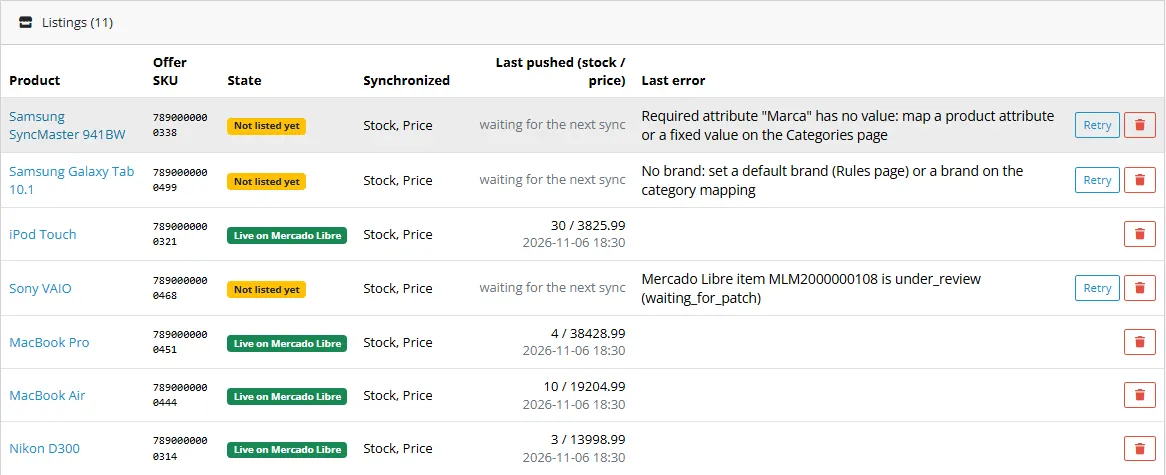
Every product with its Mercado Libre state1 of 6
What it does
Sells your OpenCart catalogue on Mercado Libre in Mexico, Brazil, Argentina, Chile, Colombia, Uruguay and Peru with your own application: browser sign-in with automatic token renewal, category predictor and mapping, price rules and stock buffer, items with a readable reason per refused item, stock and price sync, paid orders imported as real OpenCart orders by notification and polling, Mercado Envios 2 labels (PDF or ZPL), own-carrier tracking from the order history, a job queue with retries and a full log. Credentials stored encrypted. OpenCart 4, events and cron only, no OCMOD.
What it changes for your store
Your OpenCart shop on Mercado Libre. This extension connects your shop to your own Mercado Libre seller account so that items, stock, price and orders move without copy and paste. Products go out; paid orders and tracking come back into your shop.
Know the limits. You need your own Mercado Libre seller account and application; Mercado Libre has no sandbox, so you test with Mercado Libre test users. Not included: questions and messages, claims and returns, seller cancellation, Brazilian fiscal notes, item variations (every product is one simple item), catalog listing. Mercado Libre gives no buyer e-mail, so imported orders carry a placeholder address and do not send e-mails or fire the events of other extensions. Tested against a stand-in of the Mercado Libre API that follows the public documentation, not against a live seller account. Mercado Libre is a trademark of its owner; this extension is not affiliated with or endorsed by Mercado Libre.
Features
Connection
Your own Mercado Libre application; the seller authorizes it once in the browser and the extension renews the tokens itself (the refresh token is single use and replaced at every refresh)
Test and live credentials side by side, encrypted and never logged
Seven sites: Mexico, Brazil, Argentina, Chile, Colombia, Uruguay, Peru, each with its currency and category language
Catalogue
Category predictor from your product title, then the category tree; map categories with a markup and brand per category
Map the attributes a category requires to a product attribute, the manufacturer, the model, the SKU or a fixed value; closed lists are matched by value id
Items with pictures by URL, the barcode as SELLER_SKU and GTIN (or the empty-GTIN reason), plain text description, listing type, shipping mode and optional seller warranty; the exact reason when Mercado Libre refuses an item
Price and stock
Markup in percent and a fixed amount per product, per category or for the account; price endings x.99, x.90 or whole numbers
Exchange rate from your OpenCart currencies or your own; stock buffer, zero limit and maximum; stock 0 pauses the item
One call per changed item; a price that Mercado Libre ignores is shown on the product; nothing is re-sent when nothing changed
Orders, labels and tracking
Every paid order becomes an OpenCart order: buyer, delivery address with the state mapped to an OpenCart zone, lines at the price sold, the shipping cost as a shipping row, status and stock like a normal order
Notifications import orders within the next queue run, polling is the fallback; shipment status changes follow
Mercado Envios 2 labels as PDF or ZPL from the Orders page; own carrier: write the tracking number in the order history ("Tracking: ABC123 carrier: Correios")
Reliable
Job queue with retries (5 minutes up to 12 hours), a Jobs page with a run button, a filtered log with CSV export
Events and cron only, no OCMOD, no core edits; OpenCart 4, tested on 4.1.0.4
What you get
Download & installOne installer package (.ocmod.zip) for OpenCart 4.0.2 – 4.1.x. There is no OpenCart 3 edition. Download it from My licenses right after payment.
12 months of updates & supportNew versions and help for 12 months (24 or 36 months at checkout). After that the extension keeps working; renew anytime at 50%.
License for your storeOne production domain with all its subdomains; staging and local development hosts are free. How licensing works
30-day refundFull refund within 30 days of your first purchase, no reason needed. Refund policy
Tested buildsOpenCart 4.1.0.4. Tested on OpenCart 4.1.0.4.
Documentation & supportFull guide (Installation and setup, Configuration, Usage, Developer notes) on this page. Tickets from your account, first reply within 1 business day.
Compatibility
Mercado Libre Marketplace Connector works with OpenCart 4.1.0.4.
We list the builds we install and test on. “Tested” means the test plan ran on that build; “Supported” means the build is inside the supported range.
Compatibility
Version
Range
Runs on
Status
OpenCart 4.1.0.x
4.1.0.0 – 4.1.0.4
PHP 8.1 – 8.3
Tested on 4.1.0.4
OpenCart 4.0.2.x
4.0.2.0 – 4.0.2.3
PHP 8.0 – 8.2
Supported
1.0.0
Latest
First release for OpenCart 4.1: connection with the Mercado Libre authorization code flow (single-use refresh token rotation), seven sites, category predictor, category and attribute mapping, price rules and stock buffer, items with GTIN handling and a separate description, stock and price updates, order import by notification and polling into OpenCart orders, shipment status follow, Mercado Envios 2 labels, own-carrier tracking from the order history, job queue with retries, log with CSV export.
Every request is checked in the unit tests against the endpoints of the public developer documentation (tests/samples/official-operations.json).
How do I install the extension?
Upload. Extensions > Installer: upload the .ocmod.zip. It is for OpenCart 4 (4.0.2 to 4.1.x).
Install and enable. Extensions > Extensions > Modules: install, open the settings and switch it on. Events register themselves; nothing is patched.
Enter the license key. Paste the key from My licenses. Subdomains, staging and local hosts are included; you have 14 days to do it.
OpenCart 4.1.0.4. Tested on OpenCart 4.1.0.4. The Compatibility tab lists every version range.
Do the extensions change core files?
No. They work through OpenCart events and standard extension types (modules, order totals, themes). No core file edits, no OCMOD patches, no theme template edits, so OpenCart updates and other extensions keep working.
What does the license cover?
One production store domain with every subdomain (www, shop., staging.), plus local development hosts such as localhost, *.local and *.test. A store on another domain needs its own license; a second-store license is 40% off. You have 14 days after installing to enter the key. 12 months of updates and support are included; after that the extension keeps working and renewals are 50% off. How licensing works
Can I get a refund?
Yes. Ask for a full refund within 30 days of your first purchase, no reason needed: open a ticket or write to [email protected] with your order number. The money goes back to the card or bank account you paid with within 5 business days of approval. Refund policy
How do I get help?
Open a ticket from your account, so your license details are attached. We answer Monday to Friday: bug reports within 1 business day, how-to questions within 2. Support policy. Not a customer yet? Ask a pre-sales question.
Mercado Libre Marketplace Connector sells your OpenCart catalogue on Mercado Libre in Mexico, Brazil, Argentina, Chile, Colombia, Uruguay and Peru with your own Mercado Libre application. You map your categories and attributes once (the category predictor helps), set price rules and a stock buffer, and the extension creates the items, keeps stock and price in step, imports paid orders as real OpenCart orders, downloads Mercado Envios 2 labels and reports the tracking number of your own carrier.
Listings
What it does
Connection. App ID and secret key of your own application, test and live side by side, stored encrypted and shown only as a hint afterwards. The seller authorizes the application once in the browser; the extension keeps the single-use refresh token (valid for 6 months, replaced at every refresh) and renews the access token itself.
Seven sites. MLM Mexico (MXN), MLB Brazil (BRL), MLA Argentina (ARS), MLC Chile (CLP), MCO Colombia (COP), MLU Uruguay (UYU) and MPE Peru (PEN). The site sets the currency, the category tree and the language of the category names.
Categories and attributes. The category search shows the category predicted from your text first, then the names found in the tree. Map your categories (markup and brand per category) and the attributes a category requires to a product attribute, the manufacturer, the model, the SKU or a fixed value.
Items. Category, price in the currency of the site, stock, listing type, pictures by URL, attributes by value id for closed lists, the barcode as SELLER_SKU and as GTIN when it is a valid one (otherwise the empty-GTIN reason), a plain text description, shipping mode and an optional seller warranty. Every product shows its own reason when Mercado Libre refuses it.
Stock and price. One call per changed item; stock 0 pauses the item; a price that Mercado Libre ignores (price automation) is shown on the product. Nothing is re-sent when nothing changed.
Orders. Paid orders by notification and by polling become OpenCart orders: buyer, delivery address (the state is mapped to an OpenCart zone), lines at the price sold, the shipping cost the buyer paid, status and stock like a normal order. Shipment status changes follow; a cancelled order becomes a cancelled OpenCart order. Unmapped lines are listed as failed imports with the reason and retried.
Labels and tracking. Mercado Envios 2 labels (PDF or ZPL) from the Orders page. With your own carrier, set the order to Shipped and write the tracking number in the history ("Tracking: ABC123 carrier: Correios"): it is reported to Mercado Libre.
Job queue and log. Retries with growing waits (5 min, 15 min, 1 h, 3 h, 12 h), a Jobs page with "Run the queue now", a filtered log with CSV export. Secrets and tokens never reach the log.
Events and cron only, no OCMOD, no core edits. OpenCart 4, tested on 4.1.0.4.
Limits to know
You need your own Mercado Libre seller account and your own application (developers.mercadolibre.com). Mercado Libre has no sandbox: test with Mercado Libre test users on the production API.
Not included in 1.0: questions and messages, claims and returns, seller cancellation through the API (Mercado Libre documents none), Brazilian fiscal notes (NF-e), item variations (every product becomes one simple item), the catalog listing and the User Products publishing model.
Mercado Libre gives no buyer e-mail: imported orders carry a placeholder address.
Imported orders are written directly and do not fire the order e-mails or the events of other extensions.
Tested against a stand-in of the Mercado Libre API that follows the public documentation, not against a live seller account. Run a test with test users first.
Trademark
Mercado Libre is a trademark of its owner; this extension is not affiliated with or endorsed by Mercado Libre. It uses the public Mercado Libre API under your own account and application and is subject to the Mercado Libre developer terms. No Mercado Libre logo is used.
Installation and setup
Requires OpenCart 4.1 (tested on 4.1.0.4), PHP 7.4 or newer with the cURL and OpenSSL extensions, and a public https address for the shop (redirect address and notification address).
What you need from Mercado Libre
A seller account on one of the seven sites. In Argentina, Mexico, Brazil and Chile Mercado Libre creates applications only after the account holder's data is validated.
Your own application (App ID and secret key) in the developer center (developers.mercadolibre.com, "My applications"). Name it after your shop: the developer terms ask that the name does not contain "mercado", "libre", "pago", "envios" or "credito".
Products with a barcode (it becomes the SELLER_SKU; a valid GTIN/EAN is also sent as GTIN) and images reachable from the internet.
Install the extension
Extensions > Installer: upload kv_mercadolibre.ocmod.zip and click Install.
Click Edit, switch the connector on and, if you have one, enter your Kavio Labs license key. Without a key the extension works for 14 days.
The pages are under Sales > Mercado Libre: Listings, Connection, Categories, Attributes, Rules, Orders, Log, Jobs.
Cron: the install registers an hourly entry in the OpenCart cron (standard OpenCart cron line on your server, shown on the settings page). For a faster sync call the secret web address from the settings page every few minutes.
Create your application
In the developer center create a new application with the owner account of your solution.
As Redirect URI enter exactly the address shown on the Connection page (https, character for character).
As Notifications callback URL enter the notification address shown on the Connection page and tick Orders (orders_v2), Items and Shipments. Mercado Libre signs nothing: the key inside the address is the only protection, keep it private.
Copy the App ID and the secret key.
Connect
Sales > Mercado Libre > Connection: enter client ID and secret for the mode, choose the site, listing type, shipping option and an optional seller warranty. Save.
Press Connect to Mercado Libre, log in with the main seller account (a collaborator account cannot grant the application) and allow it. You land on a confirmation page of your shop and the extension tests the connection: the message names the seller and site.
Set up categories, attributes and rules (see Usage).
Test mode: no sandbox
Mercado Libre offers test users on the production API instead of a sandbox. With a token of your application create a seller and a buyer for your site (POST https://api.mercadolibre.com/users/test_user with {"site_id":"MLM"}), save the returned password (it cannot be read again), authorize in Test mode with the test seller and name test items "Item de Prueba - Por favor, NO OFERTAR". Test and live are two sets of credentials on the same API; switching mode needs a new authorization.
Update and uninstall
Upload the new package the same way; settings, credentials and data are kept. Uninstall (Extensions > Extensions > Modules) removes settings, events, the cron entry and the database tables including credentials, tokens and mappings. Items already on Mercado Libre stay there; revoke the application's access in your account if you stop using it.
Configuration
Settings page
Extensions > Extensions > Modules > Mercado Libre Marketplace Connector > Edit. The page also holds the licence card.
Setting
Default
Description
Enable the connector
On
When off, no new work is started. Work already under way is still processed.
Status of imported orders
Processing
Order status of a new Mercado Libre order (Processing takes the stock). The mapping on the Rules page can override it.
Debug log
Off
Also stores every HTTP call, masked. Secrets and tokens are never stored.
Log retention (days)
90
Older entries are removed by the cron run.
Sync interval (minutes)
15
How often stock and price are pushed, orders imported and shipments reported.
Connection (Sales > Mercado Libre > Connection)
Credentials are stored encrypted (AES-256-GCM, key derived from your store's own encryption key), never shown again; an empty secret field keeps the saved value. Saving other fields keeps the authorization; a new client ID or secret removes it.
Field
Description
Mode
Test and Live both use api.mercadolibre.com (no sandbox): Test is for a Mercado Libre test user, Live for the real seller. Each needs its own authorization.
Client ID / Client secret
App ID and secret key of your application (one pair per mode).
Site
MLM, MLB, MLA, MLC, MCO, MLU or MPE. Must be the site of the seller account; the connection test reports a mismatch.
Listing type
gold_special (Clasica), gold_pro (Premium) or free. What you may use depends on site, category and account.
Shipping
Mercado Envios 2 (the seller account must be enabled for it) or not specified.
Free shipping, Local pick-up
Sent with every new item.
Seller warranty (days)
0 = no warranty term.
The page shows the redirect address to register in the application and the notification address (with its private key).
Tokens: the access token lives 6 hours and is renewed automatically; the refresh token is valid for 6 months, works once and is replaced at every refresh, so it stays valid while the cron runs. Mercado Libre also ends the authorization when the password changes, the application secret is renewed, access is revoked, or after 4 months without an API call: the page then asks you to connect again.
Rules (Sales > Mercado Libre > Rules)
Markup in percent and a fixed amount, price endings (x.99, x.90, whole numbers; Chilean and Colombian pesos are always whole), list price, exchange rate (1 = use the OpenCart currency with the site currency code), stock buffer, zero limit, maximum, default weight, VAT, brand source (manufacturer or a product attribute), automatic listing, delivery days, the own-carrier tracking switch, tracking link template and the status mapping from Mercado Libre to OpenCart order statuses. Markup can also be set per category and per product.
Cron and notifications
https://your-shop.example/index.php?route=extension/kv_mercadolibre/channel/mercadolibre.cron&key=<secret>: a wrong key answers 403, overlapping runs are prevented.
Notification address: .../mercadolibre.webhook&c=0&k=<key>. The extension checks key, topic (orders_v2, items, shipments), resource format and seller, answers 200 at once and queues the message; the named resource is then read with your token. Mercado Libre asks for an answer within 500 ms; if notifications are lost, polling imports the orders anyway.
Log and jobs
The Log lists every call and job with filters and CSV export. Jobs lists the queue; a failed job is retried after 5 minutes, 15 minutes, 1 hour, 3 hours and 12 hours, then marked "Gave up"; use Retry or "Run the queue now".
Usage
First listing
Categories: type a product title or a category name. The predicted category comes first (Mercado Libre's predictor, written in the language of the site), then leaf categories whose name contains the text. The first search walks the tree level by level; press Reload until it is complete. Map an OpenCart category with an optional markup and brand.
Attributes: the required attributes of the category are listed (SKU, GTIN, condition are filled by the extension). Map each to a product attribute, the manufacturer, the model, the SKU or a fixed value. Closed lists are matched by name and sent by id.
Listings: map products one by one or a whole category. The barcode is sent as SELLER_SKU and, when it is a valid GTIN (8, 12, 13 or 14 digits with a correct check digit), as GTIN; otherwise the empty-GTIN reason is sent where the category accepts it. Mapped products without an item are created on the next sync.
Watch the state: Not listed yet, Waiting, Live, or the exact reason Mercado Libre gave. Fix the data and press Retry. An item under review shows its state (reported by notification).
Stock and price
One call per item with the changed stock and/or price, on the schedule and when a mapped product or its stock changes. Sync now queues an immediate push, order import and shipment report. Stock 0 pauses the item; stock above 0 reactivates it.
Orders
Paid orders are imported once; unpaid orders wait. The buyer is the receiver of the shipment; Mercado Libre gives no e-mail, so a placeholder address is used. The shipping cost paid by the buyer becomes a shipping row.
A line whose SELLER_SKU is not a mapped product is not imported: the Orders page shows the reason and the import is retried.
Shipment states (handling, ready to ship, shipped, delivered, not delivered, cancelled) follow into OpenCart through the status mapping.
Label (PDF) and Label (ZPL) download the Mercado Envios 2 label while the shipment is ready to ship / ready to print.
Own carrier: set the order to Shipped and write "Tracking: ABC123 carrier: Correios" in the history. The extension reports it once. Mercado Envios 2 shipments report themselves: nothing is written.
Cancellations and refunds are done in Mercado Libre.
Limits worth knowing
Titles are cut to 60 characters, descriptions are plain text, pictures JPG or PNG (at least 500 x 500 px).
One product is one simple item; options and variations are not sent.
Mercado Libre answers 429 when calls are too frequent; the queue retries after the usual back-off.
Developer notes
Identity
Item
Value
Extension code
kv_mercadolibre (tracker oc_mercadolibre, licence id kv_oc_mercadolibre)
Hub\* is the channel independent layer (category and attribute mapping, price rules, listing builder, product sync, order import, status map, shipments) and talks to the channel only through Hub\DriverInterface. Drivers\MercadoLibre\Driver and Mapper translate to and from Mercado Libre (the mapper is pure and unit tested with samples that follow the documented response shapes). Client\Api holds the calls, Client\BaseClient cURL with TLS verification, error mapping and masked logging. Webhook checks notifications; Queue and Jobs run the work. compat.php maps the shared core onto the OpenCart database object.
GET auth.mercadolibre.<tld>/authorization (browser), POST /oauth/token (authorization_code, refresh_token, form encoded), GET /users/me, GET /sites/{site}/categories, GET /categories/{id}, GET /categories/{id}/attributes, GET /sites/{site}/domain_discovery/search, POST /items, POST|PUT /items/{id}/description, GET|PUT /items/{id}, GET /users/{id}/items/search?seller_sku=, GET /orders/search, GET /orders/{id}, GET /shipments/{id} (header x-format-new: true), GET /shipments/{id}/orders (header X-New-Domain: true), PUT /shipments/{id} (custom shipping), GET /shipment_labels; inbound POST notifications (orders_v2, items, shipments).
Conformance
Mercado Libre publishes no OpenAPI file. tests/samples/official-operations.json lists the endpoints of the public developer documentation (es_ar and pt_br pages) and the unit tests check that every request the client sends matches one of them; the response samples follow the documented shapes with invented TEST data. The mock server (tests/mock-server/server.js) enforces documented behaviour: form encoded token requests, single-use refresh tokens, items without a description in the body, x-format-new, label states. This proves the extension against the documentation, not against the live service.
Notes on the API
No sandbox: test and live both call https://api.mercadolibre.com; setting module_kv_mercadolibre_base_url redirects calls to the mock (development only).
A notification carries no signature; the address key authenticates it and the body is never trusted beyond the resource name, which is read with the seller's token.
The refresh token is single use; the token record is replaced in the same step, under a lock, and a parallel refresh is detected.
Tables
kv_mercadolibre_accounts (secrets sealed), _log, _jobs, _product_map, _order_map, _returns (unused by this channel), _category_map, _attr_map, _options, _cache, _batches.
Tests
php81 tests/unit.php and php83 tests/unit.php; node tests/mock-server/server.js 11931; node tests/e2e.js (oc41, headless Edge); tests/shots.js for the documentation captures.
Mercado Libre is a trademark of its owner; this extension is not affiliated with or endorsed by Mercado Libre.
FAQ
Do I need my own Mercado Libre application?
Yes. The extension never uses a shared key; the seller sees your application's name when granting access.
Is there a sandbox?
No. Mercado Libre offers test users on the production API. See Installation.
Which sites are supported?
Mexico (MLM), Brazil (MLB), Argentina (MLA), Chile (MLC), Colombia (MCO), Uruguay (MLU), Peru (MPE). One site per account.
Why does a product need a barcode?
It is the item's SELLER_SKU, which matches stock, price and orders back to your products; a valid GTIN is also sent as GTIN.
What does the category predictor do?
It asks Mercado Libre which category fits a text and shows the answer first. Mercado Libre may moderate items listed elsewhere.
Does it send invoices or cancel orders?
No. Fiscal notes, seller cancellations, claims and returns stay in Mercado Libre. A cancelled order still becomes a cancelled OpenCart order.
Does it need the notification address?
Recommended: orders arrive at the next queue run instead of the next sync. Without it the order list is polled, so nothing is lost.
Can I list variations?
Not in 1.0. Every product becomes one simple item.
Is it endorsed by Mercado Libre?
No. It uses the public API under your own account and application.
Server-side tracking for OpenCart 4.x and 3.0.x: purchases, refunds, add to cart, checkout, product views and leads go from your server to the free official GA4 Measurement Protocol, Meta Conversions API and TikTok Events API, deduplicated with the browser pixels through shared event ids. Consent-aware, SHA-256 hashed customer data, order status mapping, queue with retries, test mode and an event log. No paid relay, events only, no OCMOD.
The department store theme for OpenCart 4.x and 3.0.x: colour-coded departments, a department list beside the hero slider with two side promos, a big search with a department selector, tabbed product blocks, a 2 + 1 + 2 offer grid, deals of the day with real countdowns, a department showcase, a promotions band and a three-column product page with a sticky buy box. Four styles (Meridian, Harbor, Citrus, Night) and your own colours on top. Events only, no core changes.
Stop AI crawlers, scrapers, vulnerability scanners and unwanted countries before OpenCart 4.x or 3.0.x builds a page. Googlebot and Bingbot are verified by DNS and always allowed; 50+ bots get one switch each; country rules use free GeoIP databases and can close only the checkout; IP and network lists, rate limits, honeypots and the cart flood fix; a one-second challenge instead of a captcha; learning mode, dashboard, log, IP tester and Cloudflare export. No core changes, no OCMOD.