Books your OpenCart orders in your own Xero organisation: contacts, sales invoices with your account codes and tax types, payments against the bank account mapped to the payment method, and credit notes for refunds and product returns, with a retrying job queue and a log. You connect your own Xero app (OAuth 2.0, granular scopes); credentials and tokens are stored encrypted. OpenCart 4, events and cron only, no OCMOD.
Tested on 4.1.0.4Updated Nov 6, 2026Version 1.0.1Compatible with OpenCart 4.1.0.4 No core file edits
Built forOpenCart
Every order booked in Xero1 of 6
What it does
Books your OpenCart orders in your own Xero organisation: contacts, sales invoices with your account codes and tax types, payments against the bank account mapped to the payment method, and credit notes for refunds and product returns, with a retrying job queue and a log. You connect your own Xero app (OAuth 2.0, granular scopes); credentials and tokens are stored encrypted. OpenCart 4, events and cron only, no OCMOD.
What it changes for your store
Your OpenCart orders in Xero, without re-keying. Xero is cloud accounting software used by many small businesses in the United Kingdom, Australia and New Zealand. This extension connects your shop to your own Xero organisation so that every order ends up as a contact, an invoice and a payment, and every refund as a credit note.
Know the limits. You need your own Xero organisation and a Xero app; Xero decides which plans may use its API. One store and one organisation. Invoices are in the currency of the order, which must be enabled in Xero. Changes made in Xero are not read back. Tested against a stand-in of the Xero API built from Xero's published files, not against a live organisation. Xero is a trademark of Xero Limited. This extension is not made, endorsed or certified by Xero.
Features
Connection
Connect your own Xero app with the authorization code flow and the granular accounting scopes; choose the organisation; test mode with the Xero Demo Company and live mode side by side
Credentials and tokens stored encrypted, the rotating refresh token renewed for you, a clear message when the authorization needs the owner
Invoices and payments
A contact found by e-mail or created once, a sales invoice per order with your number prefix, product lines with options, shipping, fees and discounts, in the currency of the order
The payment recorded in the bank account you map to each payment method; optional Xero items from product SKUs
Refunds and returns
A refunded order creates a credit note with the lines of the invoice; a product return creates a credit note for the returned product and quantity
Paid back from the bank account when the invoice was paid, applied to the invoice when it is still open
Reliable
Every create call carries an idempotency key, so a retried job never books a document twice; an order whose lines do not add up is refused with the reason
Rate limits wait the time Xero asks for; job queue with retries, a sync list with Xero IDs, a Jobs page and a log with CSV export; events and cron only, no OCMOD, no core edits; tested on OpenCart 4.1.0.4
What you get
Download & installOne installer package (.ocmod.zip) for OpenCart 4.0.2 – 4.1.x. There is no OpenCart 3 edition. Download it from My licenses right after payment.
12 months of updates & supportNew versions and help for 12 months (24 or 36 months at checkout). After that the extension keeps working; renew anytime at 50%.
License for your storeOne production domain with all its subdomains; staging and local development hosts are free. How licensing works
30-day refundFull refund within 30 days of your first purchase, no reason needed. Refund policy
Tested buildsOpenCart 4.1.0.4. Tested on OpenCart 4.1.0.4.
Documentation & supportFull guide (Installation, Configuration, Usage, Developer notes) on this page. Tickets from your account, first reply within 1 business day.
Compatibility
Xero Accounting Sync works with OpenCart 4.1.0.4.
We list the builds we install and test on. “Tested” means the test plan ran on that build; “Supported” means the build is inside the supported range.
Compatibility
Version
Range
Runs on
Status
OpenCart 4.1.0.x
4.1.0.0 – 4.1.0.4
PHP 8.1 – 8.3
Tested on 4.1.0.4
OpenCart 4.0.2.x
4.0.2.0 – 4.0.2.3
PHP 8.0 – 8.2
Supported
1.0.0
Nov 6, 2026
Latest
First release for OpenCart 4.1: connection to your own Xero app (OAuth 2.0 authorization code flow, granular accounting scopes, rotating refresh token under a database lock, encrypted credentials), organisation selection, contacts, sales invoices, payments, credit notes for refunded orders and product returns, mapping page, optional Xero items, idempotency keys, rate limit handling, job queue, sync list, log with CSV export.
How do I install the extension?
Upload. Extensions > Installer: upload the .ocmod.zip. It is for OpenCart 4 (4.0.2 to 4.1.x).
Install and enable. Extensions > Extensions > Modules: install, open the settings and switch it on. Events register themselves; nothing is patched.
Enter the license key. Paste the key from My licenses. Subdomains, staging and local hosts are included; you have 14 days to do it.
OpenCart 4.1.0.4. Tested on OpenCart 4.1.0.4. The Compatibility tab lists every version range.
Do the extensions change core files?
No. They work through OpenCart events and standard extension types (modules, order totals, themes). No core file edits, no OCMOD patches, no theme template edits, so OpenCart updates and other extensions keep working.
What does the license cover?
One production store domain with every subdomain (www, shop., staging.), plus local development hosts such as localhost, *.local and *.test. A store on another domain needs its own license; a second-store license is 40% off. You have 14 days after installing to enter the key. 12 months of updates and support are included; after that the extension keeps working and renewals are 50% off. How licensing works
Can I get a refund?
Yes. Ask for a full refund within 30 days of your first purchase, no reason needed: open a ticket or write to [email protected] with your order number. The money goes back to the card or bank account you paid with within 5 business days of approval. Refund policy
How do I get help?
Open a ticket from your account, so your license details are attached. We answer Monday to Friday: bug reports within 1 business day, how-to questions within 2. Support policy. Not a customer yet? Ask a pre-sales question.
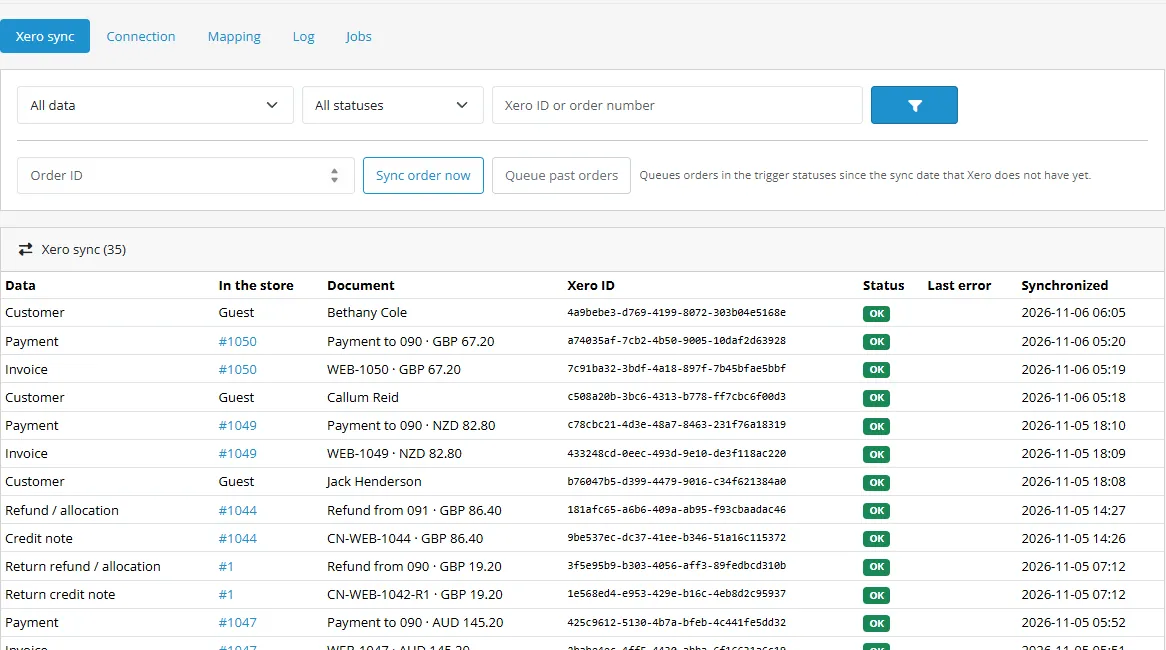
Xero Accounting Sync books the orders of your OpenCart shop in your own Xero organisation. A customer places an order, the order reaches the status you chose, and a few minutes later the contact, the sales invoice and the payment are in Xero, with your account codes and tax types. A refund or a product return becomes a credit note, paid back from the bank account or applied to the open invoice.
Sync list
What it does
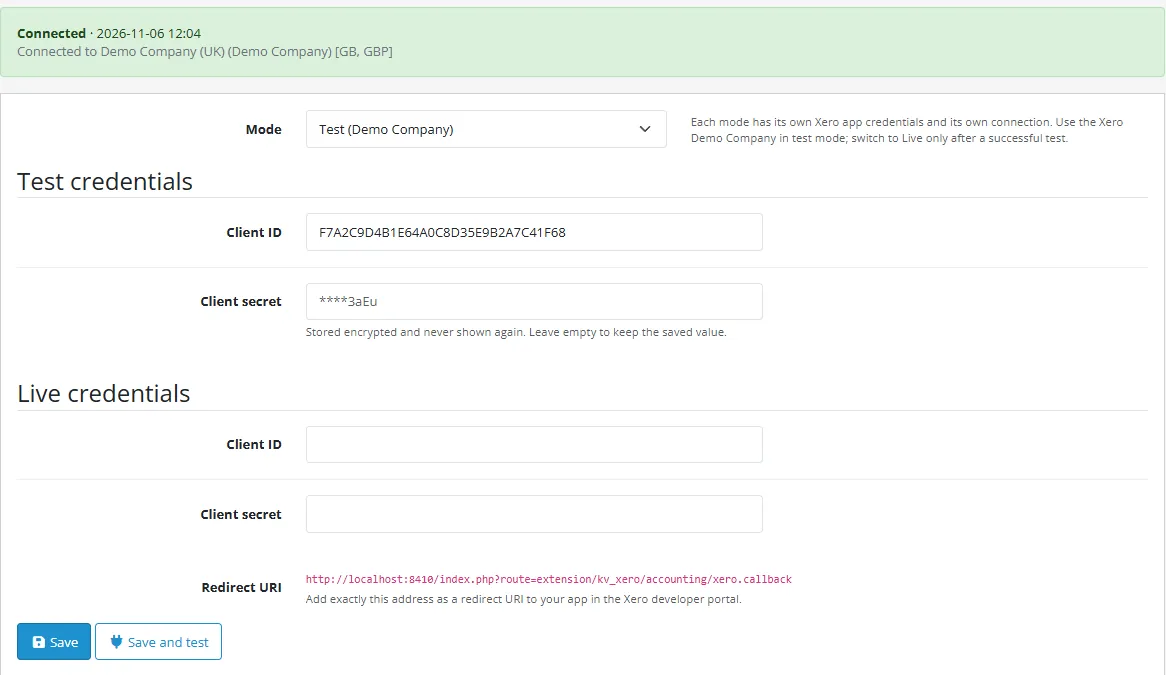
Connection. You connect your own Xero app (OAuth 2.0 authorization code flow with the granular accounting scopes) and choose the organisation. Test mode with the Xero Demo Company and live mode are kept side by side. Credentials and tokens are stored encrypted, the refresh token is renewed by the extension (it rotates on every use) and kept alive weekly.
Contacts. Found by e-mail address or created once, updated only when the customer data changed. Guests are handled.
Sales invoices. One per order with the invoice number prefix you set (for example WEB-1042), product lines (with options), shipping, fees and discounts, your account codes, the Xero tax type and the tax amount of every line, in the currency of the order. Approved or draft, due days, optional Xero items from product SKUs.
Payments. Recorded against the invoice in the bank account mapped to the payment method of the order.
Credit notes. For a refunded order (whole order) and for a product return (the returned product and quantity), paid back from the bank account when the invoice was paid, applied to the invoice when it is still open.
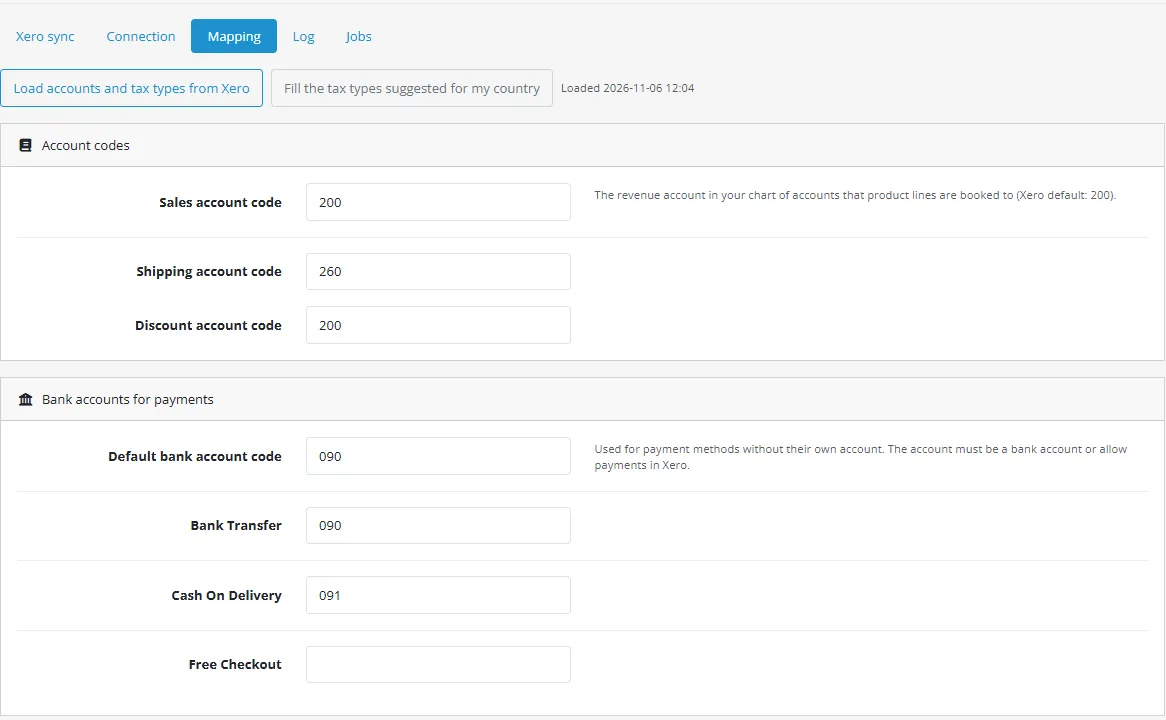
Mapping page. Sales, shipping and discount accounts, a bank account per payment method, a Xero tax type per OpenCart tax rate. Account and tax lists are loaded from your Xero; suggested tax types for organisations in the United Kingdom, Australia and New Zealand.
Reliable. Every create call carries an idempotency key, so a retried job never books a document twice. Rate limits (429) wait the time Xero asks for. A job queue with retries, a sync list with Xero IDs, a Jobs page and a filtered log with CSV export. Secrets never reach the log.
Events and cron only, no OCMOD, no core edits. OpenCart 4, tested on 4.1.0.4.
Limits to know
You need your own Xero organisation and a Xero app (client ID and secret) created in the Xero developer portal. Xero decides which plans may use the API and its limits (60 calls a minute, 5,000 a day per organisation).
One OpenCart store and one Xero organisation. Orders are booked in the currency of the order; the currency must be enabled in Xero (Xero multi-currency).
Order level discounts (coupons, reward points) are booked as one discount line; the tax of the order comes from the order's tax totals. A product return is credited at the price the product was ordered at, without a share of an order level discount. Fees (handling, low order fee) are booked without tax.
Orders whose lines do not add up to the order total (a custom extension changed the total) are refused with the reason and not sent.
Changes made in Xero are not read back. Approved invoices are left alone by the shop.
The extension was tested against a stand-in of the Xero API built from Xero's published OpenAPI files and scope table, not against a live Xero organisation. Not affiliated with Xero.
Xero is a trademark of Xero Limited. This extension is not made, endorsed or certified by Xero.
Installation
Requires OpenCart 4.1 (tested on 4.1.0.4), PHP 7.4 or newer with the cURL and OpenSSL extensions, and a store reachable over HTTPS (Xero sends the browser back to your shop).
In the admin go to Extensions > Installer, upload kv_xero.ocmod.zip and click Install.
Extensions > Extensions, choose "Modules", find "Xero Accounting Sync" and click Install (the green button).
Click Edit. Switch the extension on and, if you have one, enter your Kavio Labs license key. Without a key the extension works for 14 days.
The pages are under Sales > Xero: Xero sync, Connection, Mapping, Log, Jobs.
Cron. The install registers an hourly entry in the OpenCart cron, which needs the standard OpenCart cron line on your server (shown on the settings page). For a faster sync call the secret web address from the settings page every few minutes with your host cron.
Uninstall removes the stored credentials, the sync map, the job queue and the log. What was booked in Xero stays in Xero.
What you need from Xero
In the Xero developer portal create an app of the type "Web app" (OAuth 2.0 authorization code flow).
Add the Redirect URI shown on the Connection page, exactly as written.
Copy the client ID and create a client secret. Enter both on the Connection page (test or live credentials), save, then press "Connect to Xero" and approve the access for your organisation. Start with the Xero Demo Company in test mode.
When off, no new work is started. Jobs already queued still run.
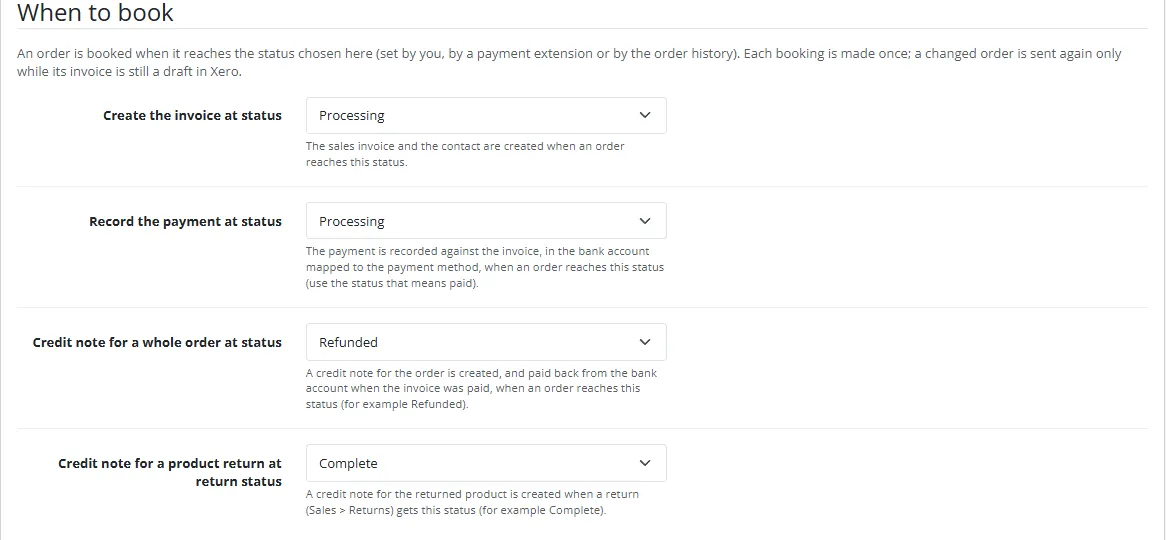
Create the invoice at status
The sales invoice and the contact are created when an order reaches this status (default Processing).
Record the payment at status
The payment is recorded when an order reaches this status (default Processing). Use the status that means paid for your payment methods.
Credit note for a whole order at status
Default Refunded.
Credit note for a product return at return status
Default Complete.
Invoice status in Xero
Approved (AUTHORISED) or Draft. A draft is approved automatically when a payment is recorded, because Xero accepts payments on approved invoices only.
Invoice number prefix
Prefix of the invoice number, for example WEB- (WEB-1042).
Due days
Days after the order date. 0 = due on the order date.
Sync from date
Orders placed before this date are never sent.
Create Xero items from product SKUs
Adds the SKU (or the model) as item code and creates missing items. Needs the write scope for Xero settings, asked for on the next Connect.
Log retention, Debug log
Retention of the log; the debug log also stores every HTTP call, masked.
Settings
Connection
Client ID and secret of your Xero app for test and for live mode; the mode switch picks one. After "Connect to Xero" the page shows the access that was asked for (offline_access accounting.invoices accounting.payments accounting.contacts accounting.settings.read) and the organisation the books are written to. With several organisations choose one and press "Use this organisation".
Connection
Mapping
Press "Load accounts and tax types from Xero" and "Fill the tax types suggested for my country", then check:
Sales, shipping and discount account codes.
A bank account code for each payment method of your store, and a default bank account for the others. The account must be a bank account or allow payments in Xero.
The Xero tax type for each OpenCart tax rate (for example VAT 20% to OUTPUT2), a standard tax type, a tax type for lines without tax and one for shipping.
Mapping
Usage
Daily work
Nothing to do. When an order reaches the chosen status the extension queues a job; the cron run books it. The Xero sync page lists every contact, invoice, payment and credit note with its number, currency, amount and Xero ID, and links to the order.
Sync list
Sync order now. Type an order ID to queue it again (for example after fixing the mapping). Nothing is booked twice: an unchanged order is skipped, a draft invoice is updated, an approved invoice is left alone.
Queue past orders. Queues the orders in the trigger statuses since the sync date that Xero does not have yet.
Refunds and returns
Set an order to the refund status: a credit note with the lines of the invoice is created and paid back from the bank account (paid order) or applied to the invoice (unpaid order). For a product return give the return the chosen return status (Sales > Returns): a credit note for the returned product and quantity is created the same way.
Jobs and log
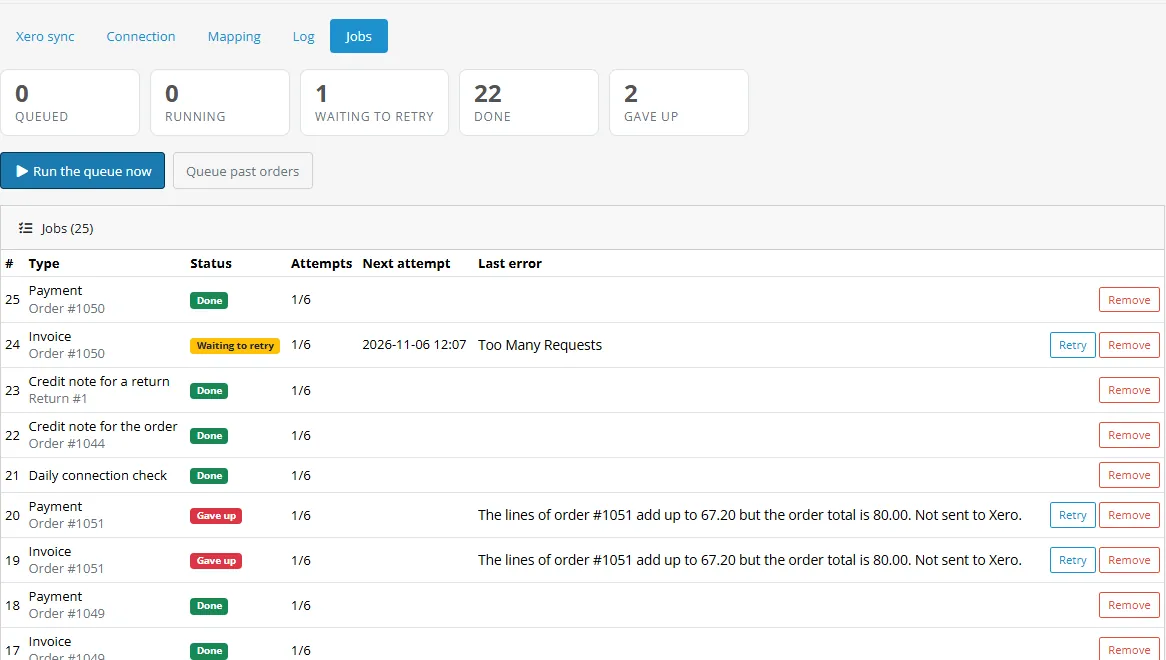
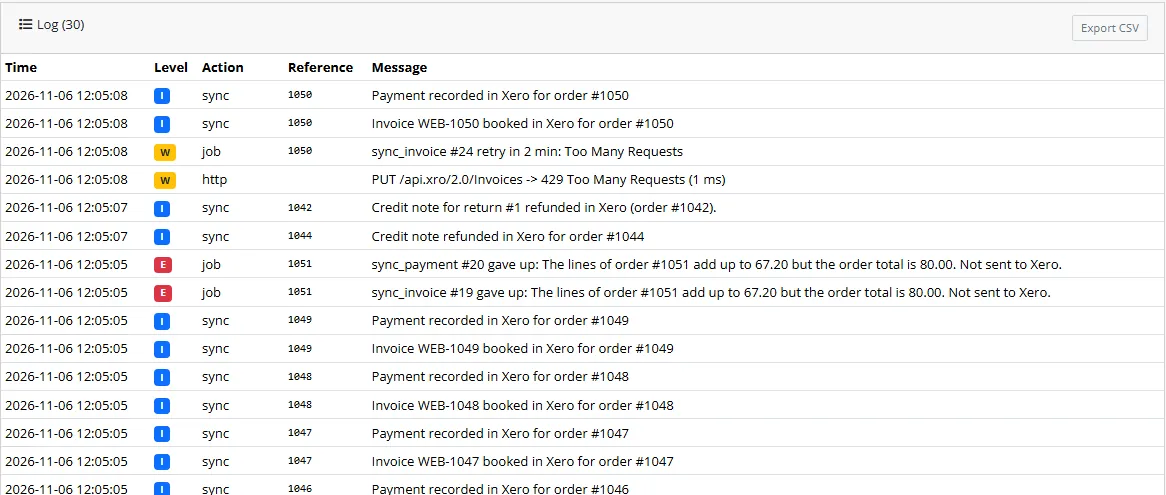
The Jobs page shows the queue: queued, waiting to retry, done, gave up. A failed job is retried after 5 minutes, then 15 minutes, 1, 3 and 12 hours; a rate limit waits the time Xero asks for; a lost authorization waits for you to connect again. "Retry" and "Remove" are on every row. The Log page has filters and a CSV export; secrets and tokens never appear in it.
JobsLog
Xero is a trademark of Xero Limited. This extension is not made, endorsed or certified by Xero.
Developer notes
Identity
Item
Value
Extension code
kv_xero
Settings
module_kv_xero_*
PHP namespace
KavioLabs\KvXero (shared core, copied to system/library/ of the extension)
queues the invoice, payment and credit note jobs at the chosen statuses
admin/model/sale/returns.addHistory/after
queues the credit note of a return at the chosen return status
admin/view/common/column_left/before
menu entry under Sales
admin/controller/common/header/before
licence check
Cron: extension/kv_xero/accounting/xero.cron (OpenCart cron, or the secret web address). The Xero redirect URI is the storefront route extension/kv_xero/accounting/xero.callback; its state is kept in the database as a SHA-256 hash, single use, 15 minutes.
Structure
Client\BaseClient (HTTP, Retry-After, error mapping), Client\Api (OAuth and Accounting API), Sync (contact, invoice, payment, credit note, return), Store (reads an OpenCart order), Accounts and Secret (credentials sealed with AES-256-GCM, token refresh under a database lock), Queue, Jobs, Log, Connect (authorization flow).
php tests/unit.php (PHP 8.1 and 8.3), node tests/mock-server/server.js 11923 (stand-in of the Xero identity service and Accounting API; the base URL is the setting module_kv_xero_base_url, development only) and node tests/e2e.js (browser test on a dev store).
API conformance (official Xero documentation)
Checked on 2026-11-06 against developer.xero.com. The stand-in carries the official scope list and the resource-to-scope table, refuses the deprecated broad scopes with invalid_scope and answers 403 when a token lacks the scope that covers a resource.
Purpose
What the extension does
Official page
Verified
Scopes
offline_access accounting.invoices accounting.payments accounting.contacts + accounting.settings.read (accounting.settings when Xero items are created). Invoices, CreditNotes and Allocations fall under accounting.invoices; Payments under accounting.payments; Contacts under accounting.contacts; Organisation, Accounts, TaxRates and Items under accounting.settings. The broad accounting.transactions is deprecated for new apps.
Xero developer documentation, OAuth 2.0 scopes
yes
Authorization code flow
GET https://login.xero.com/identity/connect/authorize (response_type=code, client_id, redirect_uri, scope, state)
Xero developer documentation, OAuth 2.0 auth flow
yes
Tokens
POST https://identity.xero.com/connect/token with Basic client id and secret; access token 30 minutes; refresh token single use, 60 days; offline_access needed for a refresh token
Xero developer documentation, OAuth 2.0 auth flow
yes
Tenants
GET https://api.xero.com/connections, header xero-tenant-id on every Accounting call
Xero developer documentation, OAuth 2.0 tenants
yes
Limits
5 concurrent calls, 60 per minute, 5,000 per day per organisation; Retry-After on 429
Trademark: Xero is a trademark of Xero Limited. This extension is not made, endorsed or certified by Xero.
FAQ
Does it use OCMOD?
No. Events and cron.
Does it work with OpenCart 3?
No, OpenCart 4 only.
Do I need a Xero app?
Yes, your own. Your order data goes from your shop straight to your Xero organisation.
Which Xero plans work?
The ones that Xero allows to use its API. Check the current rules and limits in the Xero developer documentation.
Why is a payment not recorded?
Most often no bank account is mapped for the payment method and there is no default bank account. The Jobs page shows the message. Fix the mapping and press Retry.
Why was an order refused ("lines add up to ... but the order total is ...")?
Something changed the order total without a matching line, for example a custom total extension. Nothing is sent so that Xero never gets a wrong invoice; correct the order or book it by hand in Xero.
The authorization is gone. Xero refresh tokens expire after 60 days without use or when the user revokes the app. Press "Connect again" on the Connection page; jobs wait and run afterwards.
Existing connections after an update?
If an update changes the requested access, press "Connect again" once.
Multi-currency?
Invoices are in the currency of the order; the currency must be enabled in your Xero organisation.
Is it certified by Xero?
No. Xero is a trademark of Xero Limited; this extension is not made, endorsed or certified by Xero.
Server-side tracking for OpenCart 4.x and 3.0.x: purchases, refunds, add to cart, checkout, product views and leads go from your server to the free official GA4 Measurement Protocol, Meta Conversions API and TikTok Events API, deduplicated with the browser pixels through shared event ids. Consent-aware, SHA-256 hashed customer data, order status mapping, queue with retries, test mode and an event log. No paid relay, events only, no OCMOD.
The department store theme for OpenCart 4.x and 3.0.x: colour-coded departments, a department list beside the hero slider with two side promos, a big search with a department selector, tabbed product blocks, a 2 + 1 + 2 offer grid, deals of the day with real countdowns, a department showcase, a promotions band and a three-column product page with a sticky buy box. Four styles (Meridian, Harbor, Citrus, Night) and your own colours on top. Events only, no core changes.
Stop AI crawlers, scrapers, vulnerability scanners and unwanted countries before OpenCart 4.x or 3.0.x builds a page. Googlebot and Bingbot are verified by DNS and always allowed; 50+ bots get one switch each; country rules use free GeoIP databases and can close only the checkout; IP and network lists, rate limits, honeypots and the cart flood fix; a one-second challenge instead of a captcha; learning mode, dashboard, log, IP tester and Cloudflare export. No core changes, no OCMOD.