Search as you type for OpenCart 4: products with image, price and stock, matching categories and brands, add to cart in the dropdown, typo tolerance on the words of your own catalogue, synonyms and stop words, a full-screen phone overlay, keyboard and screen reader support, and search analytics that show the searches without results with a one-click synonym. An own word index in your database (about 7 ms per search on 5,000 products), events and a daily cron task, no OCMOD.
Tested on 4.1.0.4Updated Nov 7, 2026Version 1.0.0Compatible with OpenCart 4.1.0.4 No core file edits
Built forOpenCart
Results while they type1 of 6
What it does
Search as you type for OpenCart 4: products with image, price and stock, matching categories and brands, add to cart in the dropdown, typo tolerance on the words of your own catalogue, synonyms and stop words, a full-screen phone overlay, keyboard and screen reader support, and search analytics that show the searches without results with a one-click synonym. An own word index in your database (about 7 ms per search on 5,000 products), events and a daily cron task, no OCMOD.
What it changes for your store
Live search for OpenCart 4 that finds the product, not just the word. The dropdown under your search box lists matching products while the shopper types, with image, price, special price and stock status. A shopper can add a product to the cart right from the list. Misspelled words are matched to the words of your own catalogue, your synonyms are applied, and the analytics show the searches that found nothing so you can fix them in one click.
Know the limits. Typo tolerance works on the words in your catalogue and allows one typo for words of 4 to 7 letters and two for longer words. East Asian text is matched character by character. The dropdown attaches to search fields named search; for a theme with a different field enter a CSS selector in the settings.
Features
For shoppers
Products with image, highlighted name, price and special price in the shopper's currency, stock status and an Add button (Choose options when the product needs options)
Every language has its own index; accents are folded
Fast and safe
An own word index in your database: about 7 ms per uncached search on 5,000 products, results cached, requests debounced
No external service and no monthly fee; no addresses or personal data in the analytics (different visitors are counted with a one-way hash)
Parameterised, escaped queries, every shown value escaped; rate-limited public endpoints; events and a daily cron task, no OCMOD, no core edits; tested on OpenCart 4.1.0.4 with the default theme
What you get
Download & installOne installer package (.ocmod.zip) for OpenCart 4.0.2 – 4.1.x. There is no OpenCart 3 edition. Download it from My licenses right after payment.
12 months of updates & supportNew versions and help for 12 months (24 or 36 months at checkout). After that the extension keeps working; renew anytime at 50%.
License for your storeOne production domain with all its subdomains; staging and local development hosts are free. How licensing works
30-day refundFull refund within 30 days of your first purchase, no reason needed. Refund policy
Tested buildsOpenCart 4.1.0.4. Tested on OpenCart 4.1.0.4.
Documentation & supportFull guide (Installation, Configuration, Usage, FAQ) on this page. Tickets from your account, first reply within 1 business day.
Compatibility
Live Search & Autocomplete works with OpenCart 4.1.0.4.
We list the builds we install and test on. “Tested” means the test plan ran on that build; “Supported” means the build is inside the supported range.
Compatibility
Version
Range
Runs on
Status
OpenCart 4.1.0.x
4.1.0.0 – 4.1.0.4
PHP 8.1 – 8.3
Tested on 4.1.0.4
OpenCart 4.0.2.x
4.0.2.0 – 4.0.2.3
PHP 8.0 – 8.2
Supported
1.0.0
Nov 7, 2026
Latest
First release for OpenCart 4.1: search-as-you-type dropdown with product image, price, special price and stock, matching categories and brands, add to cart from the list, recent and popular searches, typo tolerance against the store's own vocabulary, synonyms (equal words, one-way rules, phrases) and stop words, a full-screen phone overlay, keyboard and screen reader support, a corrected results page, search analytics with searches without results, a test bench in the admin, an own word index updated on product save and by a daily task, results cache.
Abuse protection: a search is counted only when the suggestion endpoint answered it (signed token), at most 40 counted searches a minute and address; the suggestion endpoint answers 120 requests a minute per address (HTTP 429, {"limited":1}), corrects at most two unknown words per query within a CPU budget of about 0.12 s, compares only words of similar length, and does not cache searches that found nothing.
Popular searches are curated and off by default: a search is listed only when it was understood completely (the list shows the catalogue words, never the typed text), shoppers clicked a result, enough different visitors made it (setting, default 5; counted with a keyed one-way hash, no address stored), and it passes a filter for web addresses, long numbers and rude or spam words plus your own blocked words. The Top searches table has Hide and Pin (allow-list).
"Showing results for" and typo corrections use only words of products that are enabled, available and in the shopper's store.
How do I install the extension?
Upload. Extensions > Installer: upload the .ocmod.zip. It is for OpenCart 4 (4.0.2 to 4.1.x).
Install and enable. Extensions > Extensions > Modules: install, open the settings and switch it on. Events register themselves; nothing is patched.
Enter the license key. Paste the key from My licenses. Subdomains, staging and local hosts are included; you have 14 days to do it.
OpenCart 4.1.0.4. Tested on OpenCart 4.1.0.4. The Compatibility tab lists every version range.
Do the extensions change core files?
No. They work through OpenCart events and standard extension types (modules, order totals, themes). No core file edits, no OCMOD patches, no theme template edits, so OpenCart updates and other extensions keep working.
What does the license cover?
One production store domain with every subdomain (www, shop., staging.), plus local development hosts such as localhost, *.local and *.test. A store on another domain needs its own license; a second-store license is 40% off. You have 14 days after installing to enter the key. 12 months of updates and support are included; after that the extension keeps working and renewals are 50% off. How licensing works
Can I get a refund?
Yes. Ask for a full refund within 30 days of your first purchase, no reason needed: open a ticket or write to [email protected] with your order number. The money goes back to the card or bank account you paid with within 5 business days of approval. Refund policy
How do I get help?
Open a ticket from your account, so your license details are attached. We answer Monday to Friday: bug reports within 1 business day, how-to questions within 2. Support policy. Not a customer yet? Ask a pre-sales question.
Search as you type for OpenCart 4. Shoppers see products with image, price and stock, matching categories and brands, and can add a product to the cart without leaving the page. Typos are understood, synonyms you define are applied, and you see which searches found nothing.
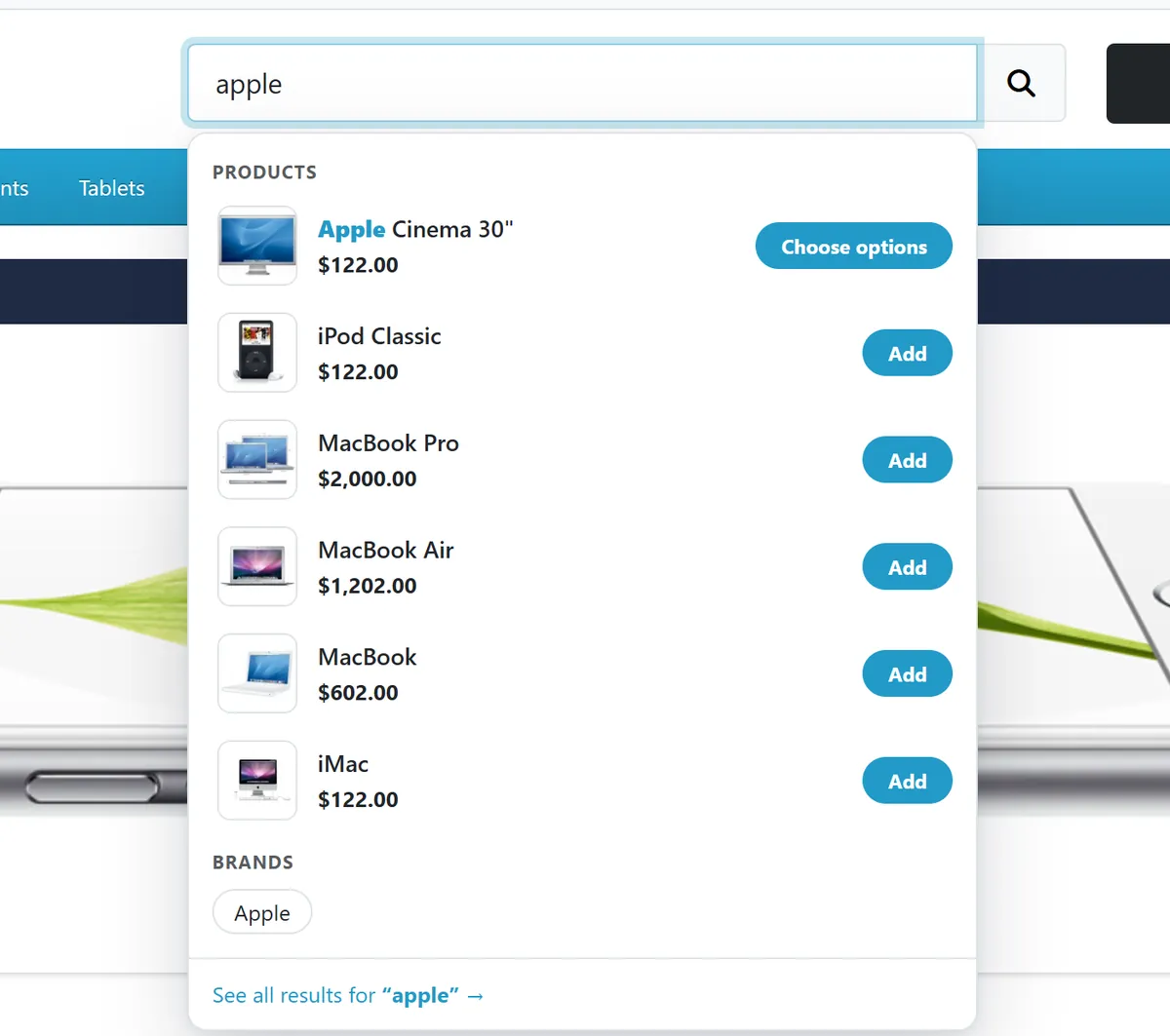
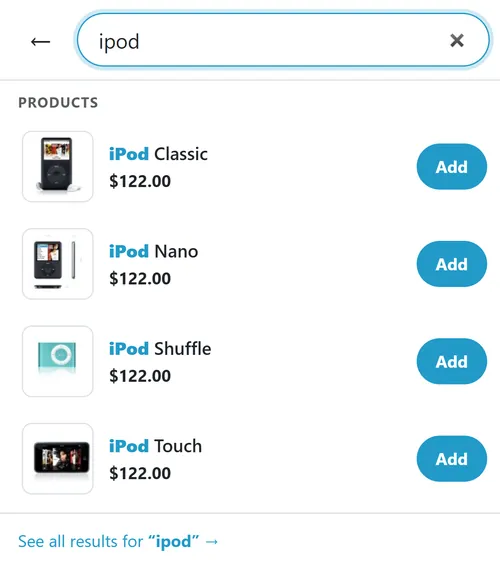
The dropdown with products, a brand and the add to cart button
Dropdown under every search box of the store: product image, name with the typed text highlighted, price and special price in the shopper's currency and tax setting, stock status, Add button (or Choose options when the product has required options)
Categories and brands that match the typed words, as links
Typo tolerance: "samsnug" finds Samsung. Unknown words are matched to the closest words of your own catalogue, so it works for your brands and model names
Synonyms and stop words you edit in the admin: equal words (tv, television), one-way rules (mobile => phone) and phrases (usb stick => flash drive)
Recent searches (kept in the shopper's browser) and popular searches (curated from your analytics, off until you switch them on) when the box is focused and empty
Phone overlay: a full-screen search with its own field, so the keyboard never covers the results
Keyboard and screen readers: arrow keys, Enter, Escape, / to jump to the search box, combobox roles
Results page: when OpenCart's normal search finds nothing, the page shows the corrected or synonym search, with a note and a link to the original
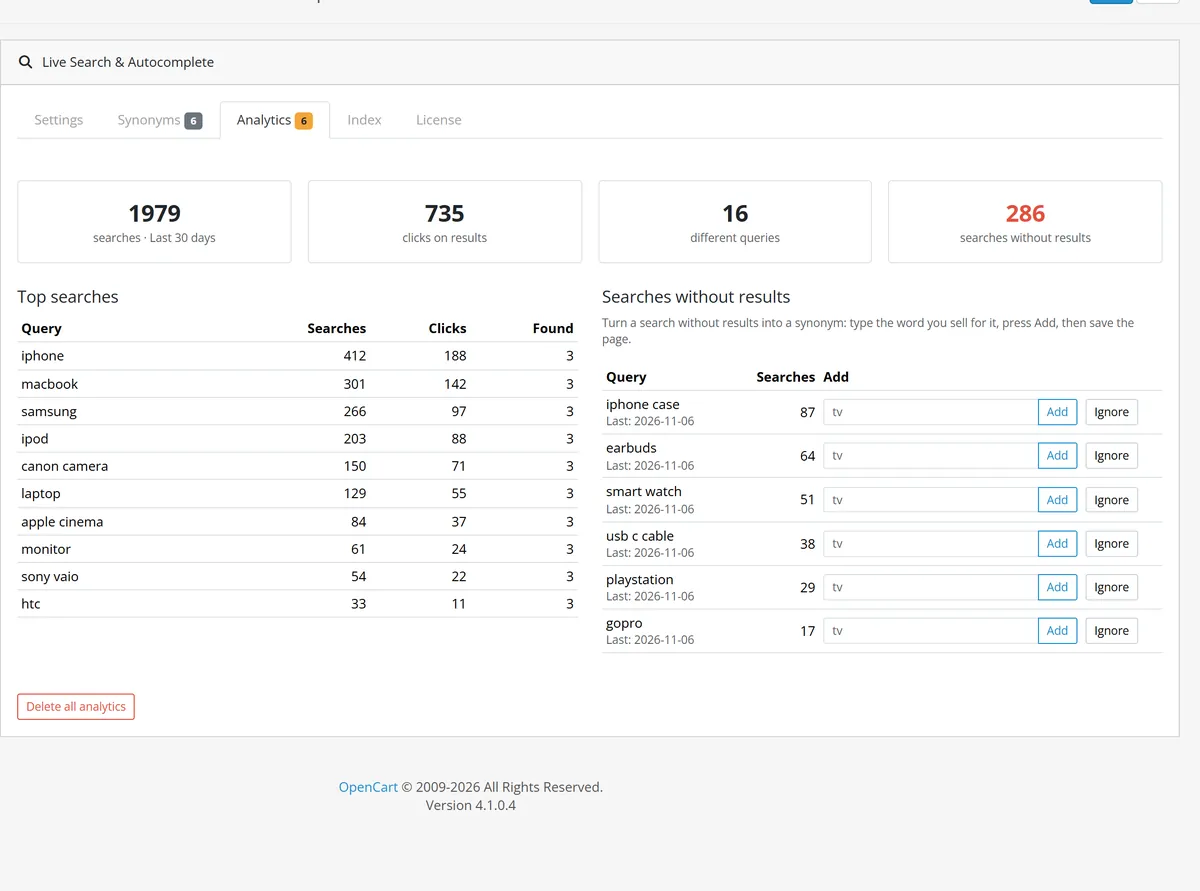
Analytics: top searches with clicks, searches without results, and a one-click way to turn them into synonyms
Fast: an own word index in your database (about 7 ms per search on 5,000 products, uncached), a result cache, debounced requests
Safe: no external service, prepared queries, every shown value escaped, no personal data in the analytics
No OCMOD and no core file changes: OpenCart events plus a daily cron task. Works with the default theme and attaches to any search field with a CSS selector
OpenCart 4.1.0.x
Installation
Requirements: OpenCart 4.1.0.x, PHP 7.4 or newer with the mbstring extension (the intl extension improves accent handling but is not required).
In the OpenCart admin open Extensions > Installer, upload kv_live_search.ocmod.zip and click Install.
Open Extensions > Extensions, choose Modules, find Live Search & Autocomplete, click the green Install button, then the blue pencil.
Installing builds the index: small and medium catalogues are done at once, a very large one is finished by the daily task or by Rebuild index on the Index tab.
The extension is switched on after installing. Open the store, click into the search box and type.
Make sure the OpenCart cron job runs (php /path/to/cron.php every few minutes). The daily task of this extension indexes products added by imports and other extensions, and rebuilds the index after category or brand changes.
Uninstall: Extensions > Modules > Uninstall removes the settings, the index, the analytics, the events and the cron entry.
Update: upload the new zip in the Installer; settings, synonyms and analytics stay. Use Rebuild index after an update only when the changelog says so.
Configuration
Extensions > Modules > Live Search & Autocomplete.
Settings tab
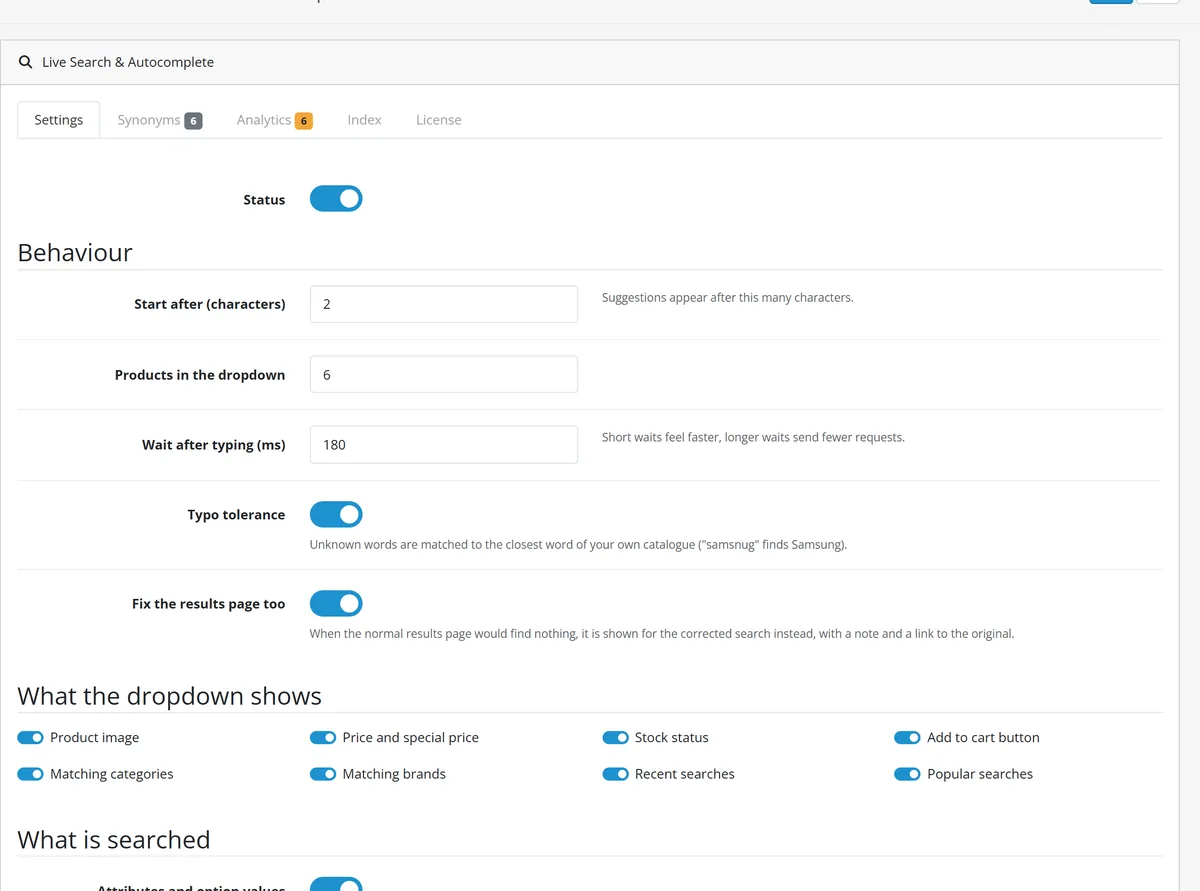
Settings tab
Start after (characters) and Wait after typing (ms): when suggestions start and how long the script waits for the next key before asking the server
Products in the dropdown: 3 to 12
Typo tolerance: matches unknown words to the closest known word (one typo for words of 4 to 7 letters, two for 8 or more; a swap of two letters counts as one)
Fix the results page too: when OpenCart's own search finds nothing and the corrected or synonym search does, the results page shows that search with a note and a link to the original
What the dropdown shows: image, price, stock status, add to cart button, matching categories, matching brands, recent searches, popular searches (off by default, see below)
Attributes and option values: words from attribute values and option values (colour, size) find the product
Product descriptions: adds the first words of the description with the lowest weight (rebuild the index after changing this)
Cache results: seconds; cleared when a product is saved; 0 switches it off
Search box selector: empty means every field named search. Enter a CSS selector (for example #header-search input) to attach the dropdown to a theme's own field. A field with data-kvls="off" is skipped
Keep analytics (days): older rows are deleted by the daily task
Synonyms tab
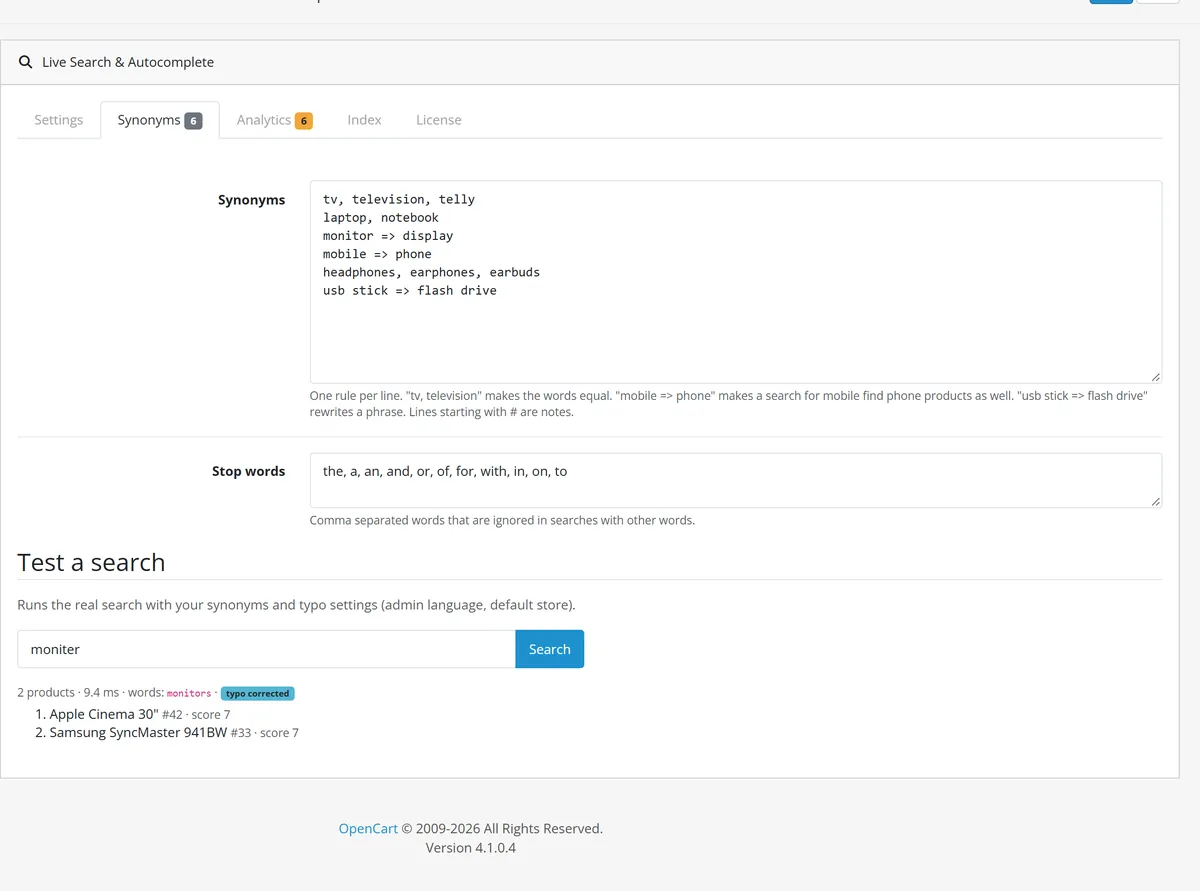
One rule per line. tv, television makes the words equal. mobile => phone makes a search for mobile find phone products as well, but not the other way round. usb stick => flash drive rewrites a phrase. Lines starting with # are notes. Stop words are ignored when a search has other words.
Synonyms and the test bench
Test a search runs the real search with your rules and shows the words it was matched with, the speed and the products with their scores.
Index tab
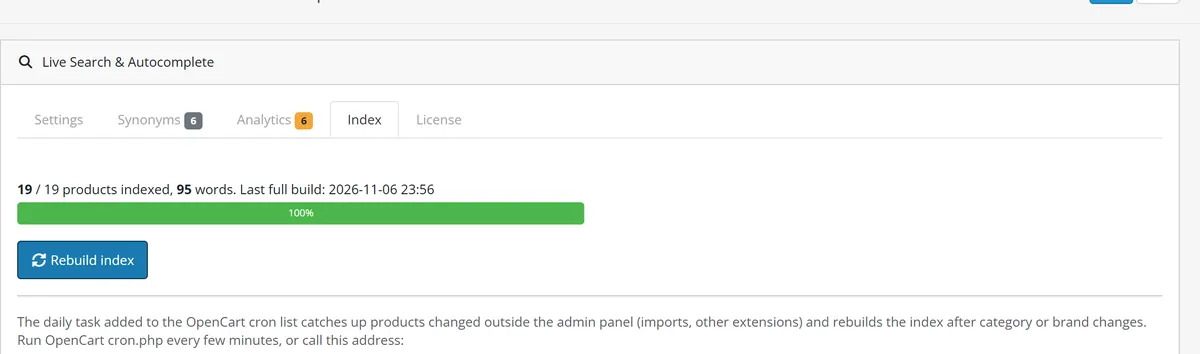
Index tab
Shows how many products are indexed and when the last full build was. Rebuild index works in steps with a progress bar and empties the index first; the daily task rebuilds in place, so searches keep working. The page also shows the address of the cron task if you prefer calling it from outside OpenCart's cron.
What is indexed, with its weight: product codes (model, SKU and the other product codes) 12, name 10, brand 5, tags 4, categories including their parents 3, attribute and option values 2, description 1. A product code such as SM-G900F is found by its parts and as SMG900F.
Popular searches (curated)
Popular searches are shown to every shopper, so they are off until you switch them on. Look at the Top searches table in the Analytics tab first: Hide removes a search for good, Pin shows it first (while it finds products) without the visitor threshold.
A search reaches the list only when all of this is true:
it was understood completely: every word matched a word of your catalogue (the list shows those catalogue words, never what the visitor typed);
shoppers clicked a result for it and it was searched at least twice;
it came from at least Popular: different visitors different visitors (default 5, 1 to 50). Visitors are counted with a keyed one-way hash of the address (only 10 characters are kept, deleted with the analytics); no address is stored;
it passes the text filter (no web addresses, no long numbers, at most five words, no rude or spam words) and contains none of your Popular: blocked words.
Visitor address from: normally the connection address. Behind a proxy or CDN choose the header it sets, otherwise every visitor looks like one address and the rate limit (120 suggestion requests and 40 tracked searches a minute per address) applies to all of them together.
Usage
What shoppers see
Click into any search box and type. After the number of characters you set, the dropdown lists matching products. Use the arrow keys and Enter, or click. Add puts one item in the cart and refreshes the cart in the header; Choose options opens the product page. At the bottom, See all results opens the normal results page. Press / anywhere on the page to jump to the search box.
Typo tolerance in the dropdown
On phones the search opens as a full-screen panel with its own field.
Phone overlay
Analytics
The Analytics tab shows the last 30 days: searches, clicks on results, different queries and searches without results; the top searches; and the searches that found nothing.
Analytics tab
For a search without results type the word you sell for it, press Add, then save the page: a rule such as iphone case => case is added to the synonyms. Ignore hides a query. Only the query text and the number of searches and clicks are stored, no customer data. A search is counted once, after the shopper stops typing or presses Enter.
Catalogue changes
Saving a product in the admin updates its index rows at once. Products added by an import or another extension are picked up by the daily task. Changing a category or a brand marks the index as outdated; the daily task rebuilds it, or press Rebuild index.
FAQ
Does it need an external service?
No. The index lives in your database and the search runs on your server.
Does it work with my theme?
It attaches to every field named search, and to any field you name with a CSS selector. It takes its colours from the theme's Bootstrap variables.
Does it change the normal search results page?
Only when OpenCart's search finds nothing and ours finds the corrected or synonym search; the page then says so and links to the original.
Which languages?
Every language installed in the store has its own index. Accents are folded ("creme" finds "crème"). East Asian text is searched character by character.
How fast is it?
About 7 ms per uncached search on 5,000 products; building the index for 5,000 products takes about a second.
Customer group prices and taxes?
The dropdown uses the store's own price functions, so special prices, customer group prices, taxes and currencies match the product list.
Why is a product missing?
Disabled products, products not in the store, and products with a future available date are not shown. Run Rebuild index if you changed products directly in the database.
Does it use OCMOD?
No. Events and a cron task only.
Can someone fill the popular searches with spam?
No. A search is counted only when the suggestion endpoint answered it (signed token), the number per address is limited, and the list shows only catalogue words of searches that several different visitors made and clicked. You can also hide any entry or block words, and the list is off until you switch it on.
Does the search slow my store down when someone sends many requests?
The suggestion endpoint answers 120 requests a minute per address and then replies with HTTP 429; typo correction is capped (two unknown words per query, a short CPU budget, similar-length words only) and searches that found nothing are not cached.
Server-side tracking for OpenCart 4.x and 3.0.x: purchases, refunds, add to cart, checkout, product views and leads go from your server to the free official GA4 Measurement Protocol, Meta Conversions API and TikTok Events API, deduplicated with the browser pixels through shared event ids. Consent-aware, SHA-256 hashed customer data, order status mapping, queue with retries, test mode and an event log. No paid relay, events only, no OCMOD.
The department store theme for OpenCart 4.x and 3.0.x: colour-coded departments, a department list beside the hero slider with two side promos, a big search with a department selector, tabbed product blocks, a 2 + 1 + 2 offer grid, deals of the day with real countdowns, a department showcase, a promotions band and a three-column product page with a sticky buy box. Four styles (Meridian, Harbor, Citrus, Night) and your own colours on top. Events only, no core changes.
Stop AI crawlers, scrapers, vulnerability scanners and unwanted countries before OpenCart 4.x or 3.0.x builds a page. Googlebot and Bingbot are verified by DNS and always allowed; 50+ bots get one switch each; country rules use free GeoIP databases and can close only the checkout; IP and network lists, rate limits, honeypots and the cart flood fix; a one-second challenge instead of a captcha; learning mode, dashboard, log, IP tester and Cloudflare export. No core changes, no OCMOD.