1.0.0
Nov 6, 2026
Latest- First release.
by Kavio Labs · for OpenCart 4.1.x
DHL Paket, Kleinpaket, Europaket, Packstation and Postfiliale for shops that ship in Germany: customers search DHL locations at checkout and pick a Packstation or Postfiliale, you create the Parcel DE shipment from the order page or at an order status, with cash on delivery in euro, return label, customs data, PDF or ZPL labels, cancel, close-out with the manifest PDF, and the tracking read back into the order history by cron. You connect with your own DHL business customer contract and developer portal app. DHL has no price list for shoppers, so checkout prices are the ones you enter. A shipping extension with events and cron, no OCMOD.
DHL Paket, Kleinpaket, Europaket, Packstation and Postfiliale for shops that ship in Germany: customers search DHL locations at checkout and pick a Packstation or Postfiliale, you create the Parcel DE shipment from the order page or at an order status, with cash on delivery in euro, return label, customs data, PDF or ZPL labels, cancel, close-out with the manifest PDF, and the tracking read back into the order history by cron. You connect with your own DHL business customer contract and developer portal app. DHL has no price list for shoppers, so checkout prices are the ones you enter. A shipping extension with events and cron, no OCMOD.
DHL Parcel Germany Shipping & Labels works with OpenCart 4.1.0.4.
We list the builds we install and test on. “Tested” means the test plan ran on that build; “Supported” means the build is inside the supported range.
| Version | Range | Runs on | Status |
|---|---|---|---|
| OpenCart 4.1.0.x | 4.1.0.0 – 4.1.0.4 | PHP 8.1 – 8.3 | Tested on 4.1.0.4 |
| OpenCart 4.0.2.x | 4.0.2.0 – 4.0.2.3 | PHP 8.0 – 8.2 | Supported |
The Documentation tab covers the settings and every screen.
OpenCart 4.1.0.4. Tested on OpenCart 4.1.0.4. The Compatibility tab lists every version range.
No. They work through OpenCart events and standard extension types (modules, order totals, themes). No core file edits, no OCMOD patches, no theme template edits, so OpenCart updates and other extensions keep working.
One production store domain with every subdomain (www, shop., staging.), plus local development hosts such as localhost, *.local and *.test. A store on another domain needs its own license; a second-store license is 40% off. You have 14 days after installing to enter the key. 12 months of updates and support are included; after that the extension keeps working and renewals are 50% off. How licensing works
Yes. Ask for a full refund within 30 days of your first purchase, no reason needed: open a ticket or write to [email protected] with your order number. The money goes back to the card or bank account you paid with within 5 business days of approval. Refund policy
Open a ticket from your account, so your license details are attached. We answer Monday to Friday: bug reports within 1 business day, how-to questions within 2. Support policy. Not a customer yet? Ask a pre-sales question.
12 more answers about setup and daily use in the Documentation tab.
DHL Parcel Germany Shipping & Labels connects your OpenCart 4 shop to the DHL APIs of Post & Parcel Germany (Parcel DE Shipping v2, Authentication, Shipment Tracking and Location Finder). Customers choose DHL Paket, Kleinpaket, Europaket, Packstation or Postfiliale at checkout; for the last two they search the locations around their address and pick one; you create the shipment and its label from the order page (or let an order status do it); the tracking number and the status come back into the order. You connect with your own DHL business customer contract and your own app on the DHL developer portal.
What it does
DHL, Paket, Packstation and Postfiliale are trademarks of DHL Group (Deutsche Post AG); this extension is independent software and is not affiliated with or endorsed by DHL. The DHL logo is not used.
Requirements: OpenCart 4.1.0.x, PHP 7.4 or newer with cURL and OpenSSL, a DHL business customer contract (Geschaeftskundenvertrag) with a business customer portal user, and an app on the DHL developer portal.
kv_dhl_parcel_de.ocmod.zip and click Install.Uninstall: Extensions > Shipping > Uninstall removes the settings, the credentials, the shipments, the stored locations and the log. Shipments already created stay at DHL and their tracking numbers stay in the order history.
Update: upload the new zip in the Installer; settings and credentials stay.
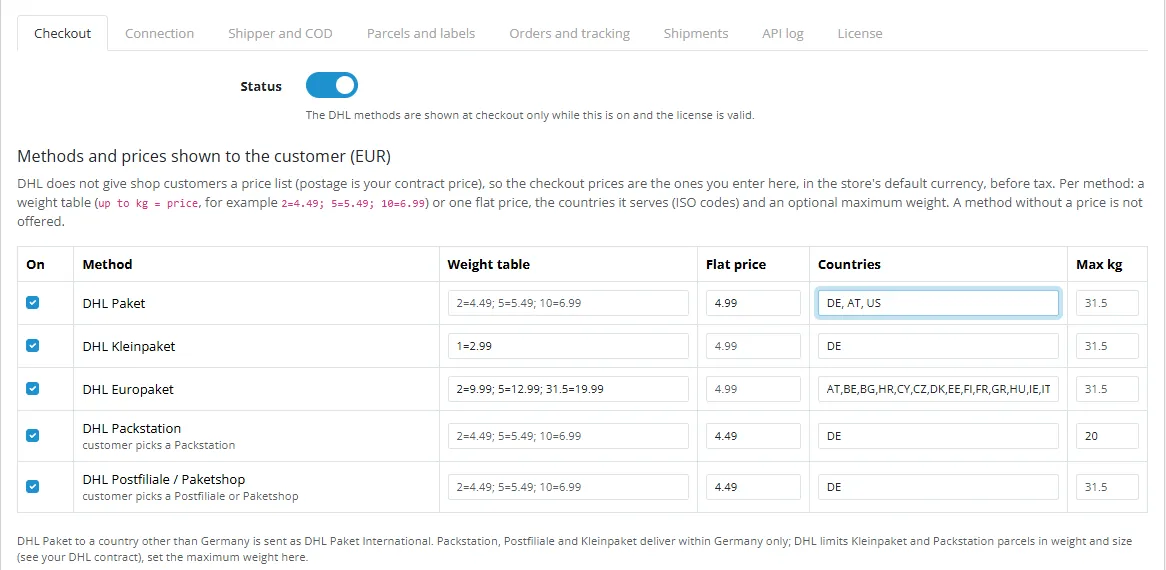
Checkout. Status, and per method (DHL Paket, Kleinpaket, Europaket, Packstation, Postfiliale / Paketshop): on/off, a weight table (up to kg = price, for example 2=4.49; 5=5.49; 10=6.99) or a flat price, the countries it serves (ISO codes; default Germany, Europaket the other EU countries), and an optional maximum weight. A method without a price is not offered. Prices are in the store's default currency, before tax. Free shipping from, tax class, geo zone, sort order.
Connection. Mode (test = DHL sandbox, live = production) and, per mode: API key and secret of the developer portal app, business customer user and password, the billing numbers (V01PAK DHL Paket, V53WPAK DHL Paket International, V54EPAK DHL Europaket, V62KP DHL Kleinpaket, retoure DHL Retoure) and the user group profile (default STANDARD_GRUPPENPROFIL). Secrets are stored encrypted; leave a secret field empty to keep it, enter - to remove it.
Shipper and COD. The sender printed on the label (name, street and number, postal code, city, country, e-mail, contact) or the shipper reference of the business customer portal. For cash on delivery the IBAN and account holder (and BIC), or the account reference stored at DHL.
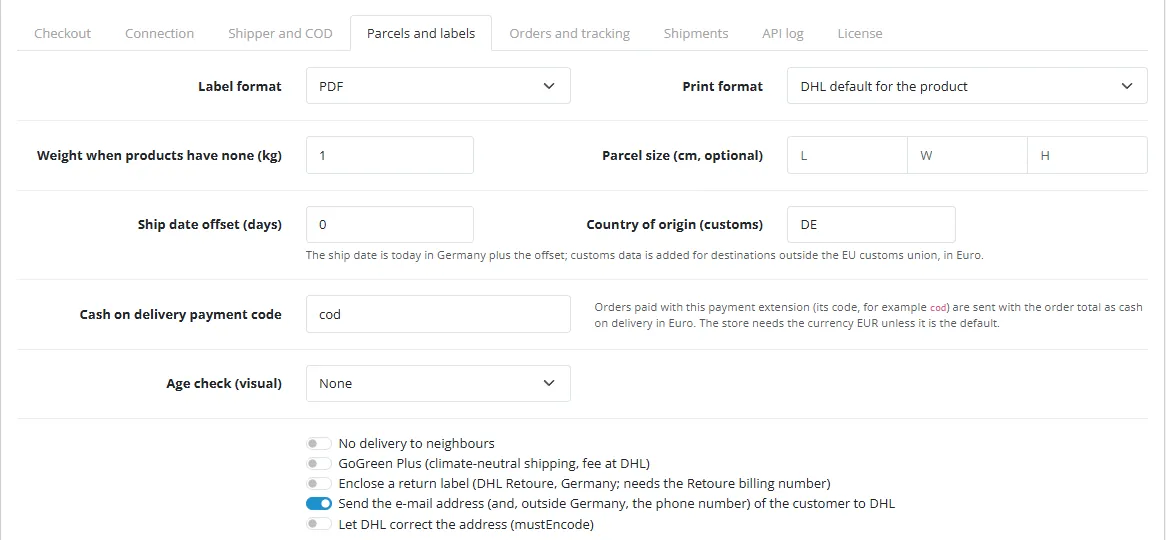
Parcels and labels. Label format (PDF, ZPL) and print format (A4, the 910-300-xxx laser and thermal formats, 100x70mm), weight used when products have none, optional parcel size, ship date offset, country of origin for customs, the payment extension code that means cash on delivery (for example cod), age check 16+ / 18+, no delivery to neighbours, GoGreen Plus, an enclosed return label (DHL Retoure, Germany), sending the customer's e-mail address (and phone outside Germany) to DHL, and mustEncode.
Orders and tracking. Order status that creates the shipment at DHL (only orders with a DHL method), order status when the label is created, e-mail the customer, debug log. Cron: */10 * * * * php /path/to/opencart/cron.php or the secret address shown on the tab. DHL scans a parcel after the hand-over, so there is no tracking status before that.
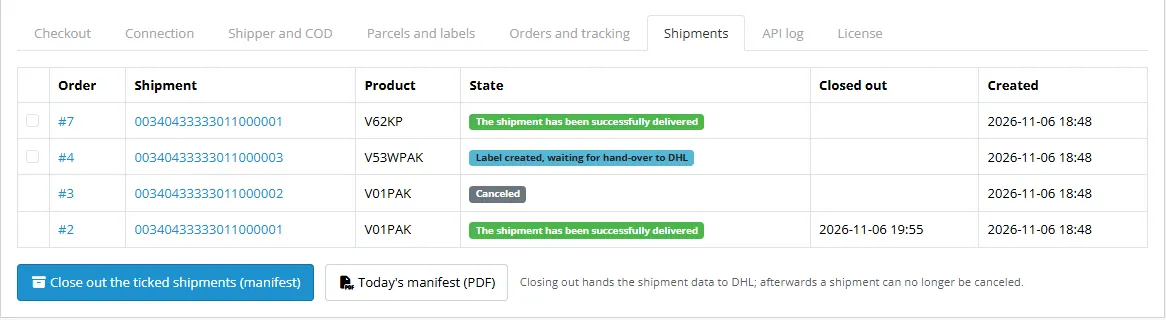
Shipments. The latest shipments with order, shipment number, product, state and close-out time; tick open shipments and press Close out (manifest), or open today's manifest PDF.
API log. Errors and warnings; with the debug log on, every request and response. Secrets, the API key and label files are masked.
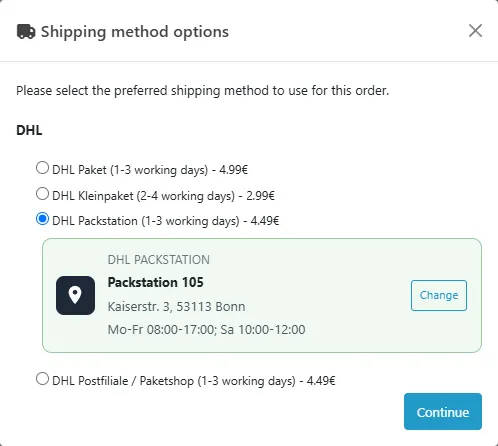
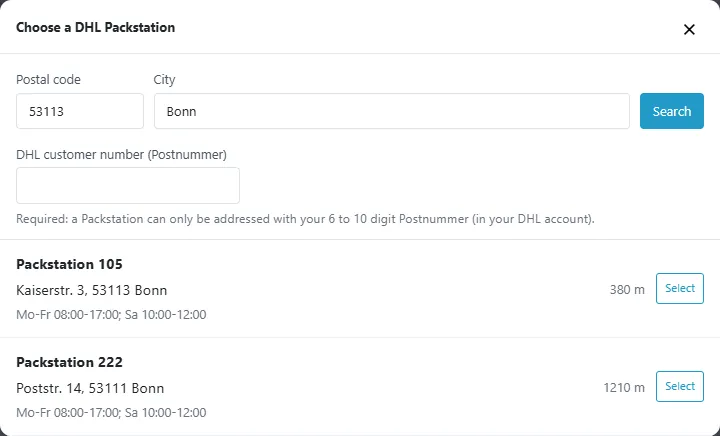
Checkout. The customer chooses a DHL method. For Packstation and Postfiliale / Paketshop a card appears below the option: Find locations opens a dialog with the locations around the shipping address (the postal code and city can be changed), shows the distance and opening hours and asks for the DHL customer number (Postnummer; required for a Packstation). Without a location the choice is refused. The chosen location is shown next to the method and stored with the order.
Create the shipment. Open the order, tab DHL, press Create shipment at DHL. DHL answers with the shipment number and the label, both stored with the shipment; the tracking number and the DHL tracking link go to the order history (and the order moves to the status you chose). The tab shows the product, the shipment number and the state, and buttons for the label, the cash on delivery label, the return label and the customs document where they exist. For orders placed without the picker (or by phone) search the location on the tab and press Use.
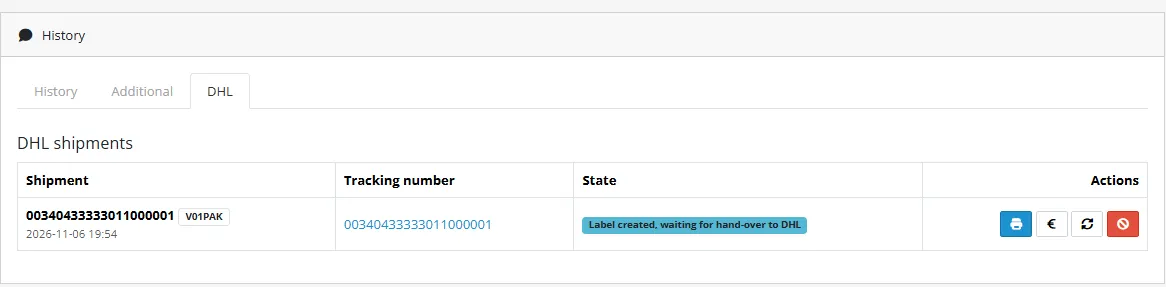
Tracking. Press the refresh button or wait for the cron: the extension reads the DHL status (created, in transit, delivered, problem) and keeps the label if it was missing. DHL only knows a parcel after the hand-over, so a new shipment stays "created" until then.
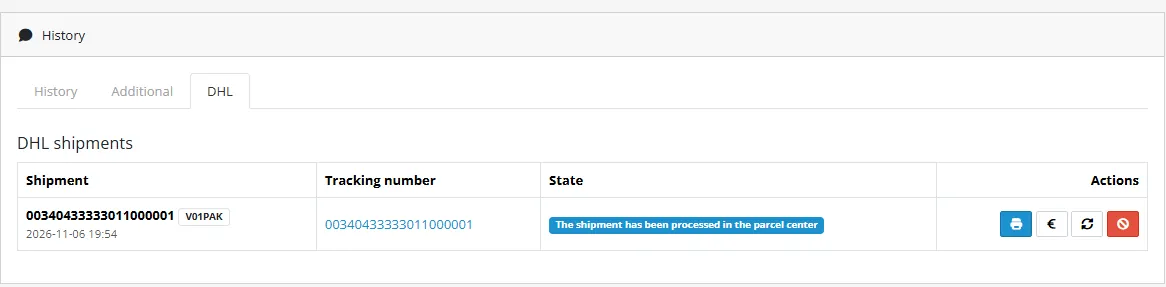
Cancel. The red button cancels the shipment before it is closed out. After the close-out DHL refuses and the extension shows why.
Close out. Settings > Shipments: tick the open shipments and press Close out. DHL then has the shipment data; the manifest PDF of the day opens from the button next to it.
| Item | Value |
|---|---|
| Extension code | kv_dhl_parcel_de (type shipping) |
| Settings | shipping_kv_dhl_parcel_de_* (token cache: code kv_dhl_parcel_de_cache) |
| PHP namespace | KavioLabs\KvDhlParcelDe (shared core in system/library/ of the extension) |
| Tables | kv_dhl_parcel_de_points (location of an order), kv_dhl_parcel_de_shipments, kv_dhl_parcel_de_log |
| Checkout route | extension/kv_dhl_parcel_de/shipping/kv_dhl_parcel_de (model getQuote, codes kv_dhl_parcel_de.paket, .kleinpaket, .europaket, .packstation, .filiale) |
| Session | kv_dhl_parcel_de_points (per method: the location chosen at checkout) |
| Trigger | Action |
|---|---|
catalog/view/checkout/shipping_method/after | adds the location picker (script and style) to the shipping method block |
catalog/controller/checkout/shipping_method.save/after | refuses a location method without a location; adds the location to the method name |
catalog/model/checkout/order.addOrder/after, editOrder/after | stores the chosen location with the order |
catalog/model/checkout/order.addHistory/after | creates the shipment at the chosen order status |
admin/view/sale/order_info/before | adds the DHL tab to the order page |
admin/controller/common/header/before | licence check |
| OpenCart cron, hourly | extension/kv_dhl_parcel_de/shipping/kv_dhl_parcel_de.cron reads shipments back |
AJAX routes of the picker (storefront): .search (Location Finder search), .point (validates and stores the choice).
Ported from the CS-Cart add-on dhl_parcel_de 1.0.0: the same request builders (shipment, services, customs, manifest), validated against the same official OpenAPI files; the job queue of the CS-Cart add-on is replaced by direct calls from the order tab, the order status event and the cron.
php81 tests/unit.php and php83 tests/unit.php (141 checks) against tests/mock-server/server.js (a stand-in built from the official OpenAPI files in tests/fixtures/openapi, validating every body and query strictly) and a scratch MariaDB database; every request is recorded and checked again by tests/check-requests.js against the specifications (38 requests). node tests/e2e.js runs the browser flow on an OpenCart 4.1.0.4 dev store (92 checks). Not tested against a live DHL account.
Hidden setting shipping_kv_dhl_parcel_de_base_url points the extension to the mock; it is honoured for loopback hosts only.
What the extension does, against the official DHL documentation and OpenAPI files (developer.dhl.com, downloaded November 2026): Parcel DE Shipping (Post & Parcel Germany) v2.2.0, Authentication API (Post & Parcel Germany) 2.0.6, Shipment Tracking - Unified 1.5.8 and Location Finder - Unified 1.14.0. The extension is proven against a local mock that validates every request against these specifications; it has not been run against your DHL account until you test the connection.
| Topic | Documented behaviour | What the extension does |
|---|---|---|
| Environments | Sandbox https://api-sandbox.dhl.com/parcel/de/shipping/v2, production https://api-eu.dhl.com/parcel/de/shipping/v2; production is approved after a successful sandbox run | Test mode uses the sandbox host, Live mode the production host; two sets of credentials and billing numbers |
| Authentication | OAuth2 password grant: POST /parcel/de/account/auth/ropc/v1/token with grant_type=password, username, password (GKP), client_id, client_secret as form data; answer access_token, token_type, expires_in; Basic Auth is deprecated | Password grant, token cached encrypted per account and mode until shortly before it expires, signed in again once on HTTP 401. No Basic Auth |
| Test connection | GET /hello of the Authentication API tests the token; validate=true on POST /orders validates without side effects | Token, /hello (EKP shown), then a validate=true shipment with the configured billing number and a sample consignee; nothing is created |
| Create shipment | POST /orders with profile and up to 30 shipments; each has product, billingNumber (14 characters, digits 11 and 12 = product), refNo (8 to 35 characters), shipDate (today or later), shipper (address or shipperRef), consignee, details (weight required), services, customs | One shipment per request. Product from the service: V01PAK, V53WPAK (destination outside Germany), V54EPAK, V62KP. refNo = "Order 000123"; shipDate = today in Europe/Berlin plus the setting; shipper from the settings (Shipper and COD) or a shipper reference; weight in grams (maximum 31 500) |
| Consignee | Address (name1.. name3, addressStreet, addressHouse, postalCode, city, country ISO alpha-3, phone, email), Locker (name, lockerID 100 to 999, postNumber, city, postalCode), PostOffice (name, retailID 401 to 999, postNumber or email, ...), PO box; Packstation and post offices only in Germany | Address with street and house number split; company becomes name1, the person name2; Locker and PostOffice with the number range checked on the server; phone only outside Germany and only with the consent setting; e-mail only with consent, or for a PostOffice without Postnummer. PO box addresses are not offered |
| Services | cashOnDelivery (Euro, bank account or accountReference, transferNote1), visualCheckOfAge (A16, A18), noNeighbourDelivery, goGreenPlus, dhlRetoure (return billing number, return address), others | Those five. Other services (preferred day, neighbour or location, ident check, bulky goods, premium, drop point routing ...) are not offered in 1.0.0 |
| Customs | customs is needed outside the EU customs union (Northern Ireland, postal code BT, is inside): exportType, postalCharges, items with description, value and weight of one single item, quantity; currencies must match | Added for destinations outside the EU: COMMERCIAL_GOODS, postal charges and item values in Euro, item weight in kg, country of origin from the setting. Paperless customs upload (/customs-documents) is not used |
| Label | includeDocs include or URL, docFormat PDF or ZPL2, printFormat (A4, 910-300-xxx, 100x70mm), combine, mustEncode; labels must not be scaled | All of these. The label is requested inline (includeDocs=include), stored, and downloaded from the stored copy; a URL answer is downloaded once. COD label, return label and customs document are stored as further documents |
| Documents later | GET /orders?shipment=... returns documents of shipments not closed out; for a specific number up to three days after the close-out | Used when the creation answer had no label (the next read by cron or the refresh button fetches it) |
| Cancel | DELETE /orders?profile=...&shipment=... only before the close-out | Cancel button; a closed-out shipment is refused locally, DHL's message is shown otherwise |
| Close-out | POST /manifests with profile and shipmentNumbers (or billingNumber); automatic at the end of day time of the portal; GET /manifests returns the manifest document | Close out selected shipments; manifest PDF of the day |
| Validation messages | Items carry validationMessages with property, validationMessage, validationState (Error or Warning); a warning still returns a valid label | Errors are shown as the refusal reason and nothing is stored; warnings are logged and the label is kept |
| Errors | RequestStatus (title, status, detail) as application/problem+json; 401, 429 and 500 documented | The message of the problem body and the validation messages are shown in the admin and the API log; 401 signs in again once; 429 is retried twice and network errors and 5xx for GET and DELETE; a POST is never repeated after a network error (the shipment may exist already) |
| Tracking | GET /track/shipments?trackingNumber=...&service=parcel-de&recipientPostalCode=... with header DHL-API-Key; statusCode is delivered, failure, pre-transit, transit or unknown; 404 when the shipment is not known | Status mapped to created, in transit, delivered, problem; the status text and serviceUrl are stored; 404 keeps "created". Read by the OpenCart cron (new shipments every few minutes until the label is stored, open ones every two hours) |
| Locations | GET /location-finder/v1/find-by-address with providerType=parcel and locationType (locker, postoffice, servicepoint), GET /locations/{id}, header DHL-API-Key; keywordId is the Packstation or retail number | Search around the shipping address; the choice is validated with GET /locations/{id} (type and number range) before it is stored; the Location Finder has no sandbox in the specification, it uses the production host |
| Rate limits | 429 documented; no figures in the specification | Retries twice with a short pause, at most 50 shipments checked per cron run |
Multi-piece shipments (the API has none), Warenpost International (V66WPI) and the old Warenpost (V62WP), DHL Retoure International (it needs the separate Parcel DE Returns API), paperless customs documents, PO box addresses, preferred day / neighbour / location, ident check, additional insurance, bulky goods, premium and drop point options, pickup orders, SOAP (retired by DHL).
Yes. The DHL Parcel DE APIs need a business customer contract, a portal user, billing numbers and a developer portal app. The extension includes none of them. DHL's sandbox works for testing; production access is approved by DHL.
No. DHL gives shops no price list for their customers; the prices at checkout are the ones you enter in the settings.
A card below the Packstation option opens a search around the shipping address (DHL Location Finder). The customer picks one and enters the Postnummer, the DHL customer number a Packstation requires. The choice is checked against the Location Finder before it is saved.
Paket, Paket International and Europaket to the countries you list per method (default: Germany; Europaket the other EU countries). Packstation, Postfiliale and Kleinpaket within Germany only. Outside the EU customs data is added in Euro.
Name the payment extension that means cash on delivery (code cod for the OpenCart one) and enter the bank account DHL pays to. Orders paid with it are sent with the order total as COD in Euro, and the COD label is stored.
Yes for Germany: switch on the enclosed return label and enter the DHL Retoure billing number. The return shipment number and label are stored.
It hands the shipment data to DHL (POST /manifests). Afterwards the shipment can no longer be changed or cancelled. DHL also closes out automatically at the day end time of your portal.
DHL scans the parcel after the hand-over; the tracking status starts then.
Yes, Test mode uses the DHL sandbox. The Location Finder has no sandbox in its specification and uses the production host with your API key.
No, OpenCart 4.1 only.
No. A shipping extension, events and cron.
No. DHL, Paket, Packstation and Postfiliale are trademarks of DHL Group (Deutsche Post AG). The DHL logo is not used.
Buy with confidence
This product was tested on this build. Builds we did not test are not listed.
Updates and support are included in the price. The product keeps working afterwards; renewing is optional.
How licensing worksIf it is not what you expected, tell us within 30 days and we refund the order.
Refund policyPay by card, Apple Pay or Google Pay on Stripe's secure page. Your card number never reaches our server.
Ask a pre-sales questionSold by Kavio Labs Software Limited, registered in England and Wales No. 17532441. About us
More for OpenCart
Server-side tracking for OpenCart 4.x and 3.0.x: purchases, refunds, add to cart, checkout, product views and leads go from your server to the free official GA4 Measurement Protocol, Meta Conversions API and TikTok Events API, deduplicated with the browser pixels through shared event ids. Consent-aware, SHA-256 hashed customer data, order status mapping, queue with retries, test mode and an event log. No paid relay, events only, no OCMOD.

The department store theme for OpenCart 4.x and 3.0.x: colour-coded departments, a department list beside the hero slider with two side promos, a big search with a department selector, tabbed product blocks, a 2 + 1 + 2 offer grid, deals of the day with real countdowns, a department showcase, a promotions band and a three-column product page with a sticky buy box. Four styles (Meridian, Harbor, Citrus, Night) and your own colours on top. Events only, no core changes.

Stop AI crawlers, scrapers, vulnerability scanners and unwanted countries before OpenCart 4.x or 3.0.x builds a page. Googlebot and Bingbot are verified by DNS and always allowed; 50+ bots get one switch each; country rules use free GeoIP databases and can close only the checkout; IP and network lists, rate limits, honeypots and the cart flood fix; a one-second challenge instead of a captcha; learning mode, dashboard, log, IP tester and Cloudflare export. No core changes, no OCMOD.


