Przelewy24 for Polish shops: the customer pays on the Przelewy24 page with BLIK, a bank transfer or a card; every notification is checked against the order (signature, merchant, POS, session, amount, currency) and confirmed with the verify call before the order counts as paid; repeated notifications change an order once, a lost notification is recovered by the return and the cron, and full or partial refunds start from the order page. You connect with your own Przelewy24 merchant account. A payment extension with events and cron, no OCMOD.
Tested on 4.1.0.4Updated Nov 6, 2026Version 1.0.1Compatible with OpenCart 4.1.0.4 No core file edits
Built forOpenCart
Przelewy24 right in the checkout1 of 6
What it does
Przelewy24 for Polish shops: the customer pays on the Przelewy24 page with BLIK, a bank transfer or a card; every notification is checked against the order (signature, merchant, POS, session, amount, currency) and confirmed with the verify call before the order counts as paid; repeated notifications change an order once, a lost notification is recovered by the return and the cron, and full or partial refunds start from the order page. You connect with your own Przelewy24 merchant account. A payment extension with events and cron, no OCMOD.
What it changes for your store
Przelewy24 for OpenCart 4, from checkout to refund. Customers choose Przelewy24, confirm the order and pay on the secure Przelewy24 page with BLIK, a bank transfer or a card. You connect with your own Przelewy24 merchant account.
Know the limits. One-time payments only: no recurring payments, card-on-file or instalments, and the method is hidden for subscriptions. You need a Przelewy24 merchant account; Przelewy24 charges its own fees. Tested against a stand-in built from the Przelewy24 REST API documentation, not against a live account; points we could not confirm are listed in the documentation. Przelewy24 and BLIK are trademarks of their owners; this extension is independent software and is not affiliated with or endorsed by Przelewy24. The Przelewy24 logo is not used.
Features
Checkout and payment
Przelewy24 as a payment method at checkout, with name, geo zone and sort order like any OpenCart payment method
Choose all methods of your account, BLIK only, cards only or pay-by-link only
Currencies PLN, EUR, GBP and CZK; a cart in another currency is charged in PLN when the store has PLN
Card and bank data never reach your server; test mode uses the Przelewy24 sandbox
Safe confirmation
Every notification is checked before anything is confirmed: signature with your CRC key, merchant id and POS id of your account, the payment you started, amount and currency of the order
Only a successful verify call marks the order paid; repeated notifications change an order once
A lost notification is recovered by the customer's return and an hourly cron; a late payment on a canceled order is still booked
Orders and refunds
Unpaid orders stay missing orders until paid, or show as waiting for payment if you prefer; paid and refunded statuses are settings
An order that is already processing or complete is never moved back; a second payment for the same order is flagged
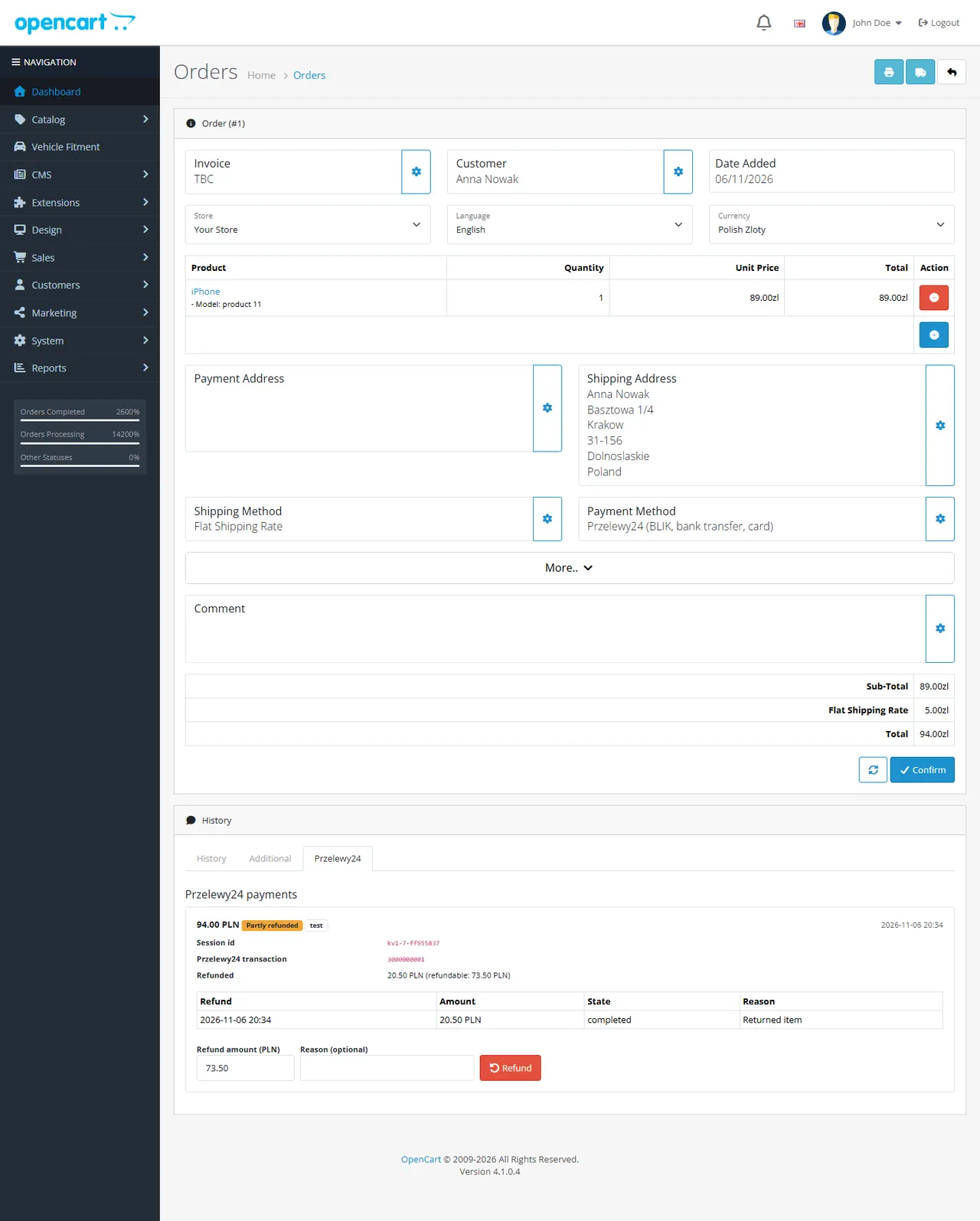
A Przelewy24 tab on the order page: state, transaction id, full or partial refund, read back; refund results come back into the order history
Safe and simple
API key and CRC key stored encrypted and masked in the log; an events and cron extension, no OCMOD, no core edits; tested on OpenCart 4.1.0.4
What you get
Download & installOne installer package (.ocmod.zip) for OpenCart 4.0.2 – 4.1.x. There is no OpenCart 3 edition. Download it from My licenses right after payment.
12 months of updates & supportNew versions and help for 12 months (24 or 36 months at checkout). After that the extension keeps working; renew anytime at 50%.
License for your storeOne production domain with all its subdomains; staging and local development hosts are free. How licensing works
30-day refundFull refund within 30 days of your first purchase, no reason needed. Refund policy
Tested buildsOpenCart 4.1.0.4. Tested on OpenCart 4.1.0.4.
Documentation & supportFull guide (Installation, Configuration, Usage, Developer notes) on this page. Tickets from your account, first reply within 1 business day.
Compatibility
Przelewy24 Payments works with OpenCart 4.1.0.4.
We list the builds we install and test on. “Tested” means the test plan ran on that build; “Supported” means the build is inside the supported range.
Compatibility
Version
Range
Runs on
Status
OpenCart 4.1.0.x
4.1.0.0 – 4.1.0.4
PHP 8.1 – 8.3
Tested on 4.1.0.4
OpenCart 4.0.2.x
4.0.2.0 – 4.0.2.3
PHP 8.0 – 8.2
Supported
1.0.0
Nov 6, 2026
Latest
First release: Przelewy24 hosted payment page (BLIK, pay-by-link, cards), signed register, notification checked against the order and confirmed with transaction verify, read-back by the customer's return and the cron, full and partial refunds from the order page.
How do I install the extension?
Upload. Extensions > Installer: upload the .ocmod.zip. It is for OpenCart 4 (4.0.2 to 4.1.x).
Install and enable. Extensions > Extensions > Modules: install, open the settings and switch it on. Events register themselves; nothing is patched.
Enter the license key. Paste the key from My licenses. Subdomains, staging and local hosts are included; you have 14 days to do it.
OpenCart 4.1.0.4. Tested on OpenCart 4.1.0.4. The Compatibility tab lists every version range.
Do the extensions change core files?
No. They work through OpenCart events and standard extension types (modules, order totals, themes). No core file edits, no OCMOD patches, no theme template edits, so OpenCart updates and other extensions keep working.
What does the license cover?
One production store domain with every subdomain (www, shop., staging.), plus local development hosts such as localhost, *.local and *.test. A store on another domain needs its own license; a second-store license is 40% off. You have 14 days after installing to enter the key. 12 months of updates and support are included; after that the extension keeps working and renewals are 50% off. How licensing works
Can I get a refund?
Yes. Ask for a full refund within 30 days of your first purchase, no reason needed: open a ticket or write to [email protected] with your order number. The money goes back to the card or bank account you paid with within 5 business days of approval. Refund policy
How do I get help?
Open a ticket from your account, so your license details are attached. We answer Monday to Friday: bug reports within 1 business day, how-to questions within 2. Support policy. Not a customer yet? Ask a pre-sales question.
Przelewy24 Payments adds Przelewy24 to the checkout of your OpenCart 4 shop. The customer confirms the order, pays on the secure Przelewy24 page with BLIK, a bank transfer (pay-by-link) or a card, and returns to your shop. You connect with your own Przelewy24 merchant account.
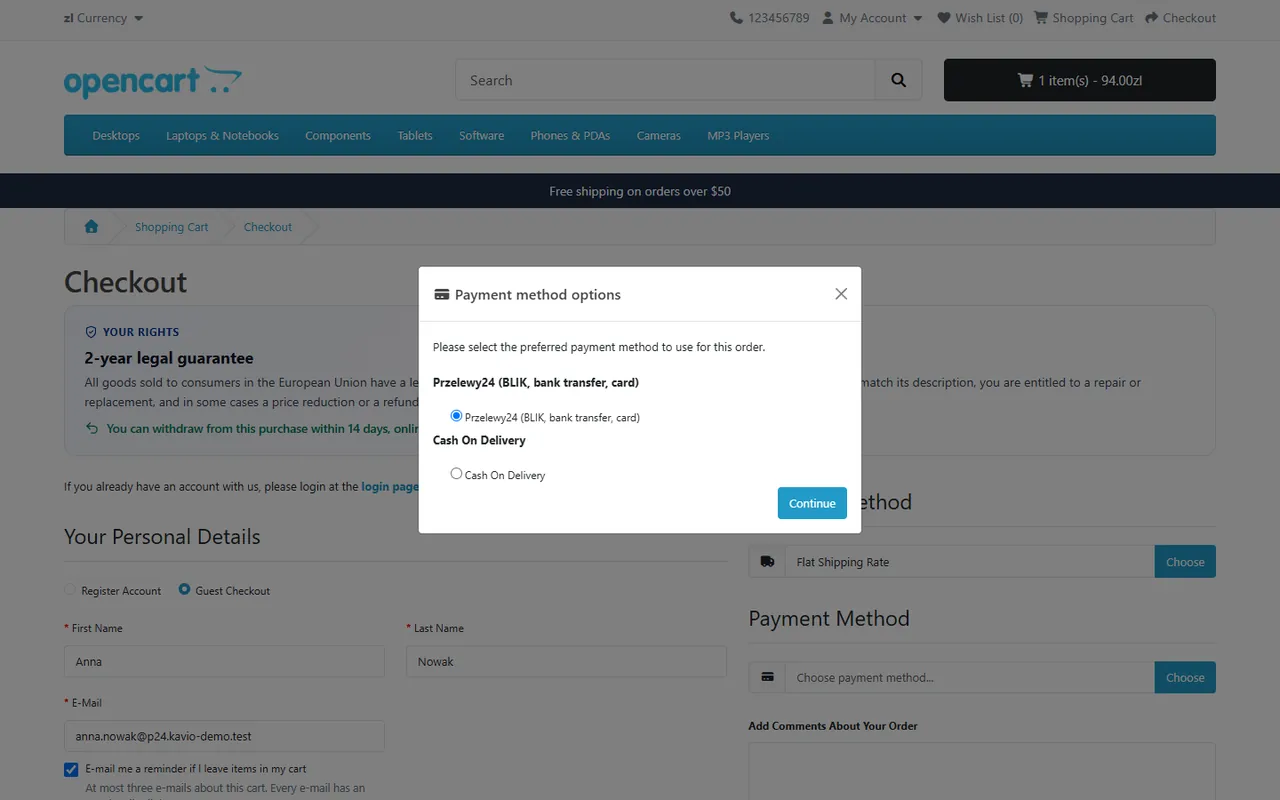
Przelewy24 in the checkout payment dialog
What it does
Hosted payment page. Card and bank data never reach your server. Choose all methods of your account, BLIK only, cards only or pay-by-link only.
Currencies. PLN, EUR, GBP and CZK. A cart in another currency is charged in PLN when the store has the currency PLN, otherwise the method is not offered.
Safe confirmation. Every notification from Przelewy24 is checked against your records before anything is confirmed: the signature (SHA-384 with your CRC key), the merchant id and POS id of your account, the session of a payment you started, and the amount and currency of the order. Only then is the mandatory transaction verify call made, and only a successful verify marks the order paid.
Repeat-safe. A repeated notification, the customer's return and the cron running together confirm a payment once. An order that is already further along is never moved back; a second payment for the same order is flagged for a refund.
Lost notifications. The customer's return and an hourly cron read the payment back from Przelewy24, so a missed notification is recovered.
Refunds. Full or partial, from the Przelewy24 tab of the order page; the refund result reported by Przelewy24 is written to the order history and can set the Refunded status.
Order flow. By default the order stays a missing order until it is paid (no e-mail, nothing in the order list); you can show it as "waiting for payment" instead. Paid and refunded statuses are settings.
Safe storage. API key and CRC key are stored encrypted and masked in the log. Events and cron only: no OCMOD, no core edits. OpenCart 4, tested on 4.1.0.4.
Limits to know
One-time payments only: the method is hidden for carts with a subscription. No card-on-file or recurring payments, no instalments.
Przelewy24 charges its own fees; you need a merchant account (and a sandbox account for testing).
Tested against a stand-in built from the Przelewy24 REST API documentation, not against a live Przelewy24 account: test the connection in sandbox mode and pay one test order before you go live. Points we could not confirm in the documentation are listed in the conformance page.
Przelewy24 and BLIK are trademarks of their owners; this extension is independent software and is not affiliated with or endorsed by Przelewy24. The Przelewy24 logo is not used.
Installation
Requirements: OpenCart 4.1.0.x, PHP 7.4 or newer with cURL and OpenSSL, a Przelewy24 merchant account (a sandbox account for testing), HTTPS on the shop (Przelewy24 sends its notification there).
In the Przelewy24 panel note your POS id (shop id), the merchant id, the API key (report key) and the CRC key. The sandbox and the production panel are separate accounts with separate keys.
In the OpenCart admin open Extensions > Installer, upload kv_przelewy24.ocmod.zip and click Install.
Open Extensions > Extensions, choose Payments, find Przelewy24 Payments, click the green Install button, then the blue pencil.
On the Connection tab choose the mode (start with Test), enter the POS id, API key and CRC key and click Save and test connection.
On the Payment tab set the status to on and save. Place a test order and pay in the sandbox.
Make sure the OpenCart cron job runs (see Log and cron).
Uninstall: Extensions > Payments > Uninstall removes the settings, the keys, the payment records, the refunds and the log. Payments already taken stay with Przelewy24 and in the order history.
Update: upload the new zip in the Installer; settings and keys stay.
Offer Przelewy24 at checkout (needs a complete connection)
Name at checkout
Shown to the customer
Payment methods on the Przelewy24 page
All methods of your account, BLIK only, cards only, pay-by-link only
Time to pay
Minutes the customer has on the Przelewy24 page (0 = Przelewy24 default, at most 99)
Geo zone, sort order
As for any OpenCart payment method
Connection
Test and live credentials are stored separately: POS id, merchant id (empty = same as POS id), API key and CRC key. Keys are stored encrypted and never shown again; leave a field empty to keep the stored value, type a single minus sign to clear it. Save and test connection calls the Przelewy24 test access of the selected mode and counts your payment methods.
The notification address shown on the tab is sent with every payment; there is nothing to enter in the Przelewy24 panel.
Order statuses
Setting
Meaning
While waiting for payment
Missing order until paid (default) or a visible status
Paid
Set after the verify call succeeded; orders already processing or complete are not moved back
Fully refunded
Set when the refund of the last part is completed
E-mail the customer
Send the status e-mail when the order becomes paid
Log and cron
The log lists calls and confirmed payments; errors are always kept, with Debug log every request is kept (keys masked). Entries older than 60 days are removed. The OpenCart cron reads open payments back every hour for 14 days; the tab shows the cron command and a secret web address for other schedulers.
Usage
Customer. Chooses Przelewy24 in the payment dialog, confirms the order, is taken to the Przelewy24 page, pays and returns to the shop. If the customer comes back without paying, the shop shows the payment failed page and the order stays unpaid; the customer can try again.
You. The order page has a Przelewy24 tab with the amount, state, Przelewy24 transaction id, refunds and, for payments that are not confirmed yet, Read back from Przelewy24. To refund, enter an amount in the payment currency (empty = the rest) and press Refund; the result arrives as a notification and appears in the order history. A rejected refund returns the amount to the refundable balance.
Order tab with a partial refund
A payment shown as Duplicate payment is a second verified payment for an order that was already paid: refund it.
The controller and model files are named kv_przelewy_24.php: the OpenCart 4 autoloader puts an underscore before every digit of a class name (KvPrzelewy24 is loaded from kv_przelewy_24.php). The core installer still checks that admin/controller/payment/kv_przelewy24.php exists, so that file is an empty marker.
Money rules: amounts are integers in grosz; merchantId, posId, orderId and amount are sent as integers because the checksum is made from the typed JSON; the Przelewy24 transaction id does not fit 32 bits and is stored as bigint. A payment is paid only after PUT /api/v1/transaction/verify succeeded.
Tests: php81 tests/unit.php and php83 tests/unit.php (needs node tests/mock-server/server.js 11958 and MariaDB), node tests/e2e.js on a dev store. The hidden setting payment_kv_przelewy24_base_url (loopback hosts only) points the extension to the mock.
Conformance with the Przelewy24 REST API documentation (OpenCart)
Against the Przelewy24 REST API v1 documentation (developers.przelewy24.pl, OpenAPI 1.0.18 as read for the sister add-on). The extension is proven against a local stand-in that follows these pages (unit and browser tests); it has not been run against a live or sandbox Przelewy24 account. The documentation site renders in the browser only, so it was not re-read word for word for this port; items under "To confirm" are taken over from the first reading and must be confirmed with your sandbox account.
Topic
Documented behaviour
What the extension does
Hosts
Production https://secure.przelewy24.pl, sandbox https://sandbox.przelewy24.pl (separate accounts)
Test mode uses the sandbox, Live mode production; credentials per mode
Authentication
HTTP Basic: user = POS id, password = API key
As documented
Test access
GET /api/v1/testAccess answers {"data": true}
Connection test; also counts GET /api/v1/payment/methods/{lang}
Register
POST /api/v1/transaction/register; sign = SHA-384 of the JSON {sessionId, merchantId, amount, currency, crc}
Typed JSON (integers for ids and amount), flags JSON_UNESCAPED_UNICODE and JSON_UNESCAPED_SLASHES; sends merchantId, posId, sessionId, amount, currency, description, email, country, language, urlReturn, urlStatus, waitForResult, encoding and optional client, address, zip, city, timeLimit, channel; answers a token, the customer goes to {host}/trnRequest/{token}
Verify
PUT /api/v1/transaction/verify; sign over {sessionId, orderId, amount, currency, crc}
Called after every checked notification or read-back; only a status: success answer marks the order paid
Notification (urlStatus)
JSON body merchantId, posId, sessionId, amount, originAmount, currency, orderId, methodId, statement, sign; sign over the fields in this order plus the CRC key; must be answered HTTP 200
Signature compared in constant time; merchantId and posId must equal the account of the transaction (the mode stored with the session); the session must be one we registered; amount, originAmount and currency must equal the registered ones; any failure answers 4xx and verifies nothing; a repeated notification answers 200 without a second verify
Same checks plus refund uuid, amount and Przelewy24 transaction id must match the refund we sent; idempotent
Read back
GET /api/v1/transaction/by/sessionId/{sessionId}; status 0 none, 1 advance, 2 paid, 3 returned; 404 when the customer has not started
Status 2 starts the same checks and verify call as a notification
Refund
POST /api/v1/transaction/refund with requestId (max 45), refunds[{orderId, sessionId, amount, description (max 35)}], refundsUuid (max 35), urlStatus; answers 201, 409 on conflict
As documented; the amount is reserved before the call and returned when the call fails or the refund is rejected
Errors
{"error": "text", "code": n} or {"error": [{"message": ...}], "code": 409}
Message shown to the administrator; network errors, 5xx and 429 are retryable
To confirm with your sandbox account
Channel values. BLIK only = 8192, cards only = 4096, pay-by-link only = 64 for the channel bit mask: taken over from the first reading, not re-read.
Currencies. PLN, EUR, GBP and CZK are offered; Przelewy24 documents more currencies for some accounts. The currency must be enabled on your account.
Status 2 of the read-back. The documentation does not say whether status 2 is reported before or after verify. A payment is only counted after a successful verify call; if verify is refused for a payment that Przelewy24 already reports as paid, the log shows the Przelewy24 message and the order stays open.
originAmount. Requiring it to equal the order amount is stricter than the documentation; a payment where Przelewy24 reports a different origin amount is refused and logged for you to decide.
Rate limits and notification source addresses are not stated in the pages we read; none are assumed.
Not covered in 1.0.0
Card-on-file and recurring payments, instalments, wallets with their own API, multiple POS ids per store, other currencies.
Trademark: Przelewy24 and BLIK are trademarks of their owners; this extension is not affiliated with or endorsed by Przelewy24. The Przelewy24 logo is not used (no terms for third-party use were found, so the name appears in text only).
FAQ
Does the customer need a Przelewy24 account?
No.
Is the order paid when the customer returns?
Only when Przelewy24 confirms it: the return reads the payment back and confirms it with the verify call.
The customer paid but the order is not paid. Przelewy24 repeats the notification; the cron also reads the payment back. Use "Read back from Przelewy24" on the order tab to do it at once, and check the log.
Why is the order missing from the order list?
By default an unpaid order is a missing order (Sales > Orders > filter Missing Orders). Choose a visible status under Order statuses to see it earlier.
Which currencies?
PLN, EUR, GBP, CZK (the currency must be enabled on your Przelewy24 account). Other cart currencies are charged in PLN when the store has PLN.
Server-side tracking for OpenCart 4.x and 3.0.x: purchases, refunds, add to cart, checkout, product views and leads go from your server to the free official GA4 Measurement Protocol, Meta Conversions API and TikTok Events API, deduplicated with the browser pixels through shared event ids. Consent-aware, SHA-256 hashed customer data, order status mapping, queue with retries, test mode and an event log. No paid relay, events only, no OCMOD.
The department store theme for OpenCart 4.x and 3.0.x: colour-coded departments, a department list beside the hero slider with two side promos, a big search with a department selector, tabbed product blocks, a 2 + 1 + 2 offer grid, deals of the day with real countdowns, a department showcase, a promotions band and a three-column product page with a sticky buy box. Four styles (Meridian, Harbor, Citrus, Night) and your own colours on top. Events only, no core changes.
Stop AI crawlers, scrapers, vulnerability scanners and unwanted countries before OpenCart 4.x or 3.0.x builds a page. Googlebot and Bingbot are verified by DNS and always allowed; 50+ bots get one switch each; country rules use free GeoIP databases and can close only the checkout; IP and network lists, rate limits, honeypots and the cart flood fix; a one-second challenge instead of a captcha; learning mode, dashboard, log, IP tester and Cloudflare export. No core changes, no OCMOD.