Packeta (Zásilkovna) shipping for OpenCart 4: customers choose a pick-up point, Z-BOX, partner carrier point or home delivery at checkout and pick the point on the Packeta widget (every choice validated on the server); you create the packet from the order page or at an order status, with cash on delivery in CZK, EUR, HUF or RON, Packeta PDF or ZPL labels with the carrier label for home delivery, bulk PDF, and the status read back by cron and signed push tracking. You connect with your own Packeta API key and password. Packeta has no price list for shoppers, so checkout prices are the ones you enter. A shipping extension with events and cron, no OCMOD.
Tested on 4.1.0.4Updated Nov 6, 2026Version 1.0.0Compatible with OpenCart 4.1.0.4 No core file edits
Built forOpenCart
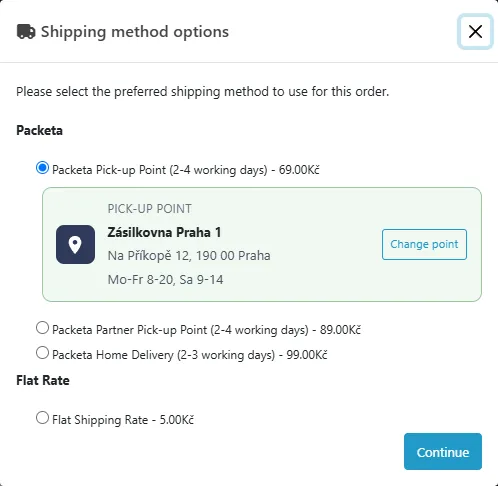
Pick the point right at checkout1 of 6
What it does
Packeta (Zásilkovna) shipping for OpenCart 4: customers choose a pick-up point, Z-BOX, partner carrier point or home delivery at checkout and pick the point on the Packeta widget (every choice validated on the server); you create the packet from the order page or at an order status, with cash on delivery in CZK, EUR, HUF or RON, Packeta PDF or ZPL labels with the carrier label for home delivery, bulk PDF, and the status read back by cron and signed push tracking. You connect with your own Packeta API key and password. Packeta has no price list for shoppers, so checkout prices are the ones you enter. A shipping extension with events and cron, no OCMOD.
What it changes for your store
Packeta shipping for OpenCart 4, from checkout to label. Customers choose a Packeta pick-up point or Z-BOX, a partner carrier's pick-up point or home delivery, and pick the point on the official Packeta widget; every choice is checked on the server before it is kept. You create the packet from the order page (or at an order status); the label and the barcode come back into the order. You connect with your own Packeta API key and API password.
Know the limits. Prices at checkout are the ones you enter, not a live quote, because Packeta has no price list for shops. Packeta has no sandbox: test mode is a second set of credentials for a testing sender. Customs declarations, returns, B2B packets, dispatch orders, carrier services, 18+ and scheduled delivery are not covered. Tested against a stand-in built from the official Packeta documentation, not against a live Packeta account. Packeta and Z-BOX are names of their owner; this extension is independent software and is not affiliated with or endorsed by Packeta. The Packeta logo is not used.
Features
Checkout
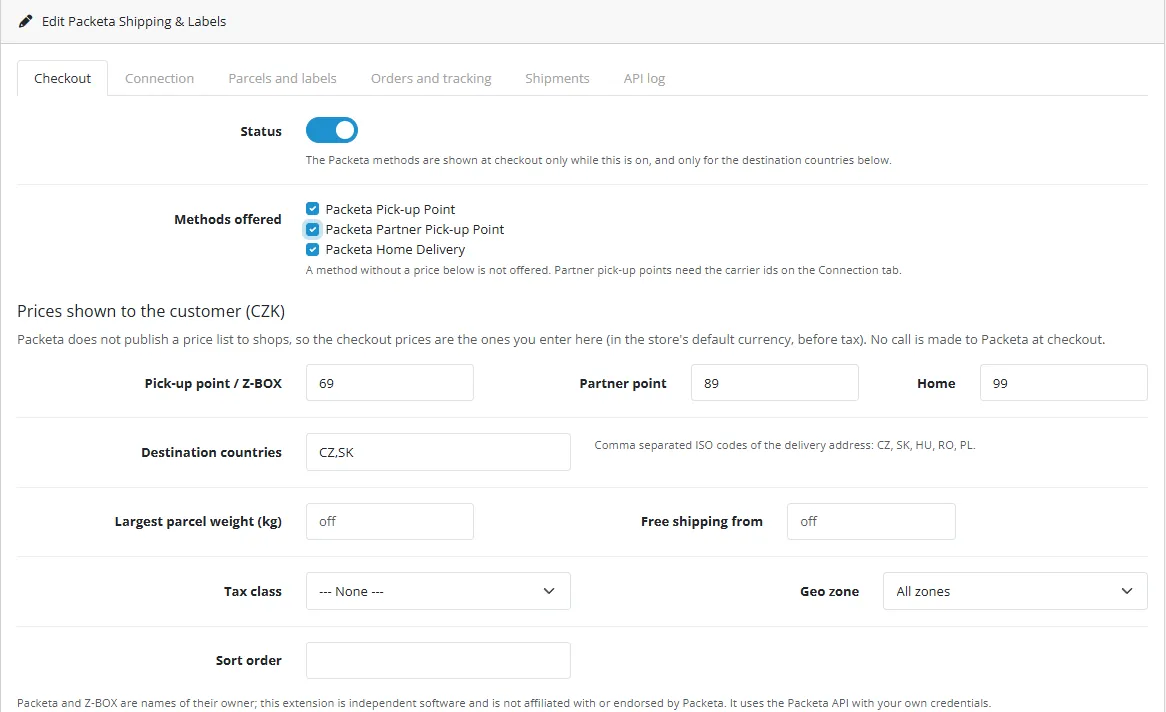
Packeta Pick-up Point, Partner Pick-up Point and Home Delivery with the prices you enter: destination countries (CZ, SK, HU, RO), largest parcel weight, free shipping threshold, tax class and geo zone
Point picker as a sub-option of the shipping method: the Packeta widget v6 with the countries of the delivery address and the Z-BOX lockers
Server-side validation of every selection with the widget validation endpoint; the validated name and address are stored with the order and shown in the shipping method name
Packets, labels and tracking
A Packeta tab on the order page: createPacket with recipient, point or address, weight, value, phone and name cleaned to the Packeta rules
Cash on delivery in the currency of the destination (CZK as a whole number, HUF in steps of 5, EUR, RON); the maximum packet value of the documentation is respected
Packeta label as PDF (A6 on A6, A7 on A7, A6 on A4, A7 on A4, 105x35mm on A4, A8 on A8) or ZPL (203 or 300 dpi); the carrier's own A6 label for home delivery and partner points, with the Packeta label as fallback; one PDF for up to 50 packets
Status read back by the OpenCart cron and by Packeta's signed push tracking events (HMAC-SHA256, replay protection); the barcode and the tracking link go to the order history, with an optional e-mail
Cancel while Packeta has not received the packet; Packeta messages are shown as they are
Safe and simple
API password and signing key stored encrypted and never logged, labels served to administrators only; a shipping extension with events and cron, no OCMOD, no core edits; tested on OpenCart 4.1.0.4
What you get
Download & installOne installer package (.ocmod.zip) for OpenCart 4.0.2 – 4.1.x. There is no OpenCart 3 edition. Download it from My licenses right after payment.
12 months of updates & supportNew versions and help for 12 months (24 or 36 months at checkout). After that the extension keeps working; renew anytime at 50%.
License for your storeOne production domain with all its subdomains; staging and local development hosts are free. How licensing works
30-day refundFull refund within 30 days of your first purchase, no reason needed. Refund policy
Tested buildsOpenCart 4.1.0.4. Tested on OpenCart 4.1.0.4.
Documentation & supportFull guide (Installation, Configuration, Usage, Developer notes) on this page. Tickets from your account, first reply within 1 business day.
Compatibility
Packeta Shipping & Labels works with OpenCart 4.1.0.4.
We list the builds we install and test on. “Tested” means the test plan ran on that build; “Supported” means the build is inside the supported range.
Compatibility
Version
Range
Runs on
Status
OpenCart 4.1.0.x
4.1.0.0 – 4.1.0.4
PHP 8.1 – 8.3
Tested on 4.1.0.4
OpenCart 4.0.2.x
4.0.2.0 – 4.0.2.3
PHP 8.0 – 8.2
Supported
1.0.0
Nov 6, 2026
Latest
First release: Packeta REST/XML integration for OpenCart 4.1. Pick-up Point, Partner Pick-up Point and Home Delivery methods with merchant prices, the Packeta widget v6 picker with server-side validation, packets (createPacket) from the order page or at an order status, PDF and ZPL labels with carrier labels and bulk PDF, cash on delivery in CZK, EUR, HUF and RON, status by cron and signed push tracking, cancel.
How do I install the extension?
Upload. Extensions > Installer: upload the .ocmod.zip. It is for OpenCart 4 (4.0.2 to 4.1.x).
Install and enable. Extensions > Extensions > Modules: install, open the settings and switch it on. Events register themselves; nothing is patched.
Enter the license key. Paste the key from My licenses. Subdomains, staging and local hosts are included; you have 14 days to do it.
OpenCart 4.1.0.4. Tested on OpenCart 4.1.0.4. The Compatibility tab lists every version range.
Do the extensions change core files?
No. They work through OpenCart events and standard extension types (modules, order totals, themes). No core file edits, no OCMOD patches, no theme template edits, so OpenCart updates and other extensions keep working.
What does the license cover?
One production store domain with every subdomain (www, shop., staging.), plus local development hosts such as localhost, *.local and *.test. A store on another domain needs its own license; a second-store license is 40% off. You have 14 days after installing to enter the key. 12 months of updates and support are included; after that the extension keeps working and renewals are 50% off. How licensing works
Can I get a refund?
Yes. Ask for a full refund within 30 days of your first purchase, no reason needed: open a ticket or write to [email protected] with your order number. The money goes back to the card or bank account you paid with within 5 business days of approval. Refund policy
How do I get help?
Open a ticket from your account, so your license details are attached. We answer Monday to Friday: bug reports within 1 business day, how-to questions within 2. Support policy. Not a customer yet? Ask a pre-sales question.
Packeta Shipping & Labels connects your OpenCart 4 shop to the Packeta (Zásilkovna) API for parcels to Czechia, Slovakia, Hungary and Romania. Customers choose a Packeta pick-up point, a Z-BOX, a partner carrier's pick-up point or home delivery at checkout and pick the point on the official Packeta widget; you create the packet from the order page (or let an order status do it); the label, the barcode and the status come back into the order. You connect with your own Packeta API key and API password.
Packeta methods and the point picker at checkout
What it does
Three Packeta methods at checkout. Pick-up Point (Packeta pick-up points and Z-BOXes), Partner Pick-up Point (pick-up points of Packeta's partner carriers) and Home Delivery. The prices are the ones you enter, with a free shipping threshold, the destination countries, a weight limit, tax class and geo zone like any OpenCart shipping method.
Point picker as a sub-option. Below a pick-up option the customer chooses the point on the Packeta widget v6. Every choice is validated on the server with the widget validation endpoint before it is kept; the validated name and address are stored with the order and shown in the shipping method name.
Packets. The Packeta tab on the order page creates the packet (createPacket): recipient, point or address, weight, value, cash on delivery in the destination currency (CZK, EUR, HUF, RON), phone and name cleaned to the Packeta rules. Optionally an order status creates it automatically.
Labels. The Packeta label as PDF (six layouts) or ZPL (203 or 300 dpi); for home delivery and partner points the carrier's own A6 label when the carrier supports it, with the Packeta label as fallback; one PDF for many packets.
Tracking. The status (packetStatus) is read back by the OpenCart cron, and Packeta's signed push tracking events update it at once. The barcode and the Packeta tracking link are written to the order history.
Cancel while Packeta has not received the packet.
Safe. The API password is stored encrypted and never logged; label files are only served to logged-in administrators. Events and cron only: no OCMOD, no core edits. OpenCart 4, tested on 4.1.0.4.
Limits to know
Packeta gives shops no price list for their customers, so the prices customers see are the ones you enter in the settings. Keep them in line with your Packeta contract.
Destinations are Czechia, Slovakia, Hungary and Romania (Poland with a carrier id you enter). Customs declarations outside the EU, returns, B2B packets, dispatch orders, carrier services, 18+ and scheduled delivery are not covered.
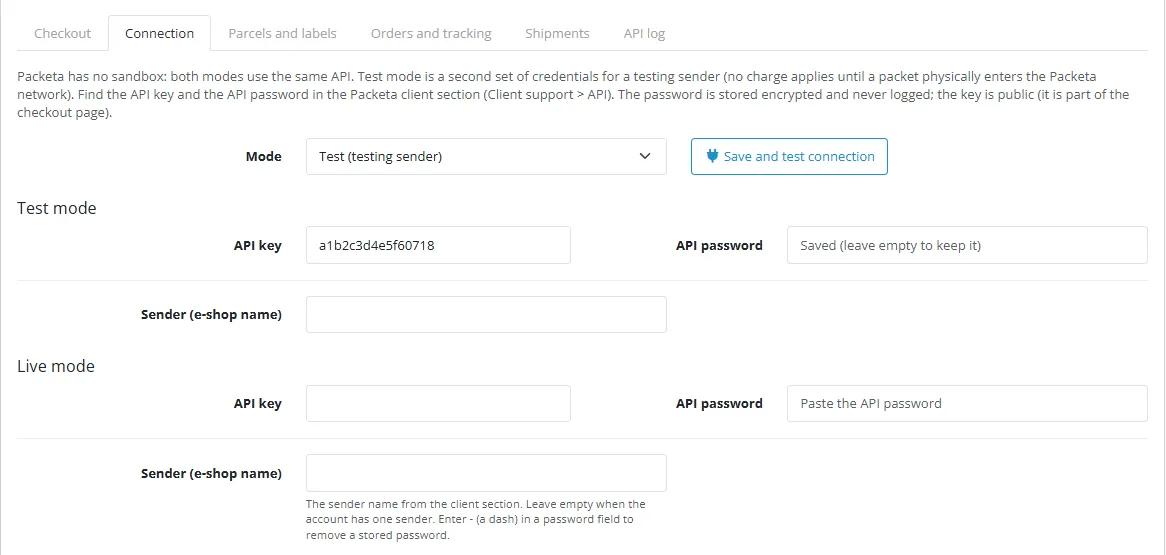
Packeta has no sandbox. Test mode is a second set of credentials for a testing sender; no charge applies until a packet physically enters the Packeta network.
Cash on delivery is sent in the currency of the destination country (CZK as a whole number, HUF in steps of 5). The store needs a rate for that currency unless the order is already in it.
The extension was tested against a stand-in of the Packeta API built from the official documentation, not against a live Packeta account. Test the connection and send one packet to your own address before you rely on it.
Packeta and Z-BOX are names of their owner; this extension is independent software and is not affiliated with or endorsed by Packeta. The Packeta logo is not used.
Installation
Requirements: OpenCart 4.1.0.x, PHP 7.4 or newer with cURL, SimpleXML and OpenSSL, a Packeta client account with API access.
In the Packeta client section (Client support > API) note the API key (public, used by the map) and the API password (secret). If your account has several senders, note the sender (e-shop) name too. Packeta has no sandbox: ask for a testing sender if you want separate test credentials.
In the OpenCart admin open Extensions > Installer, upload kv_packeta.ocmod.zip and click Install.
Open Extensions > Extensions, choose Shipping, find Packeta Shipping & Labels, click the green Install button, then the blue pencil.
On the Connection tab choose the mode (start with Test), enter the API key, the API password and the sender, and click Save and test connection.
On the Checkout tab enter your prices (pick-up point, partner point, home delivery), the destination countries, choose the methods, set the status to on and save. For partner pick-up points enter the carrier ids on the Connection tab.
On the Parcels and labels tab choose the label format and layout, the cash on delivery payment code and whether to use the carrier's own labels.
Make sure the OpenCart cron job runs (see Orders and tracking). Optionally ask Packeta to activate push tracking and enter the address and the signing key they give you on the Connection tab.
Uninstall: Extensions > Shipping > Uninstall removes the settings, the credentials, the packets, the stored points and the log. Packets already created stay at Packeta and their barcodes stay in the order history.
Update: upload the new zip in the Installer; settings and credentials stay.
Configuration
Prices
Checkout. Status, methods offered (Pick-up Point, Partner Pick-up Point, Home Delivery), the price of each (store default currency, before tax; a method without a price is not offered), destination countries (CZ, SK, HU, RO, PL), largest parcel weight, free shipping from, tax class, geo zone, sort order.
Connection. Mode (test or live: two sets of credentials on the same API) and, per mode, the API key (public), the API password (stored encrypted; leave empty to keep it, enter - to remove it) and the sender name. Pick-up point widget: countries shown on the map, Z-BOX lockers on or off, the carrier ids of partner pick-up points, the home delivery carrier id per country (empty uses the official ids 106 Czechia, 131 Slovakia, 4159 Hungary, 4161 Romania). Push tracking: the address to give to Packeta and the signing key (encrypted).
Connection
Parcels and labels. Label format (PDF or ZPL), PDF layout (A6 on A6, A7 on A7, A6 on A4, A7 on A4, 105x35mm on A4, A8 on A8), ZPL resolution (203 or 300 dpi), use of the carrier's own label for home delivery and partner points, the payment extension code that means cash on delivery (for example cod), the weight to send when products have none.
Orders and tracking. Order status that creates the packet at Packeta (only orders with a Packeta method), order status when the packet is created, e-mail the customer, debug log. Cron: */10 * * * * php /path/to/opencart/cron.php (the extension registers an hourly job) or the secret address shown on the tab.
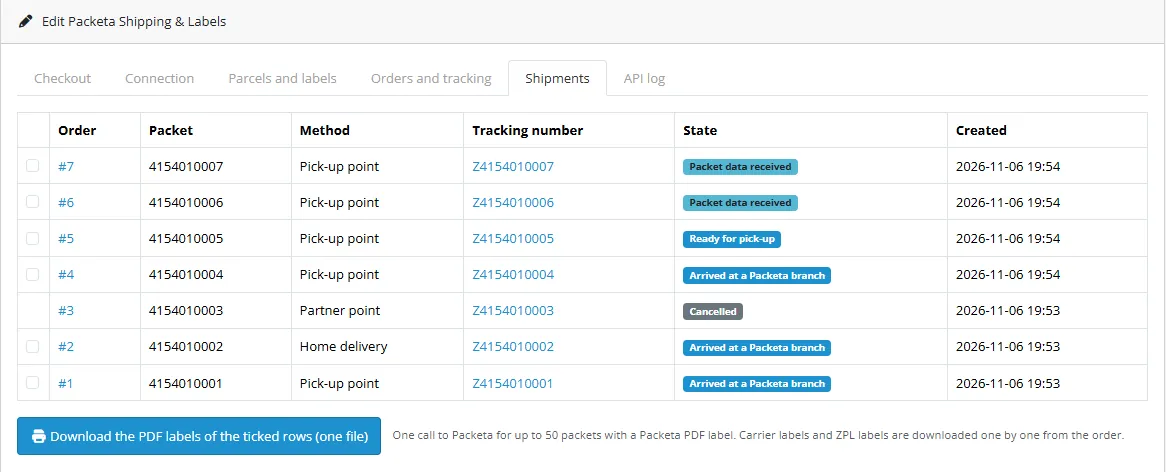
Shipments. The latest packets with order, packet, method, barcode and state; tick rows and download one PDF with the Packeta labels.
API log. Errors and warnings; with the debug log on, every request and response. The password and the keys are masked.
Usage
Checkout. The customer chooses a Packeta method. For the pick-up options a card appears below the option: Choose a pick-up point opens the Packeta widget; the point is validated by Packeta's server-side check and shown on the card. Without a point the choice is refused. The chosen point is shown next to the method and stored with the order.
Point picker
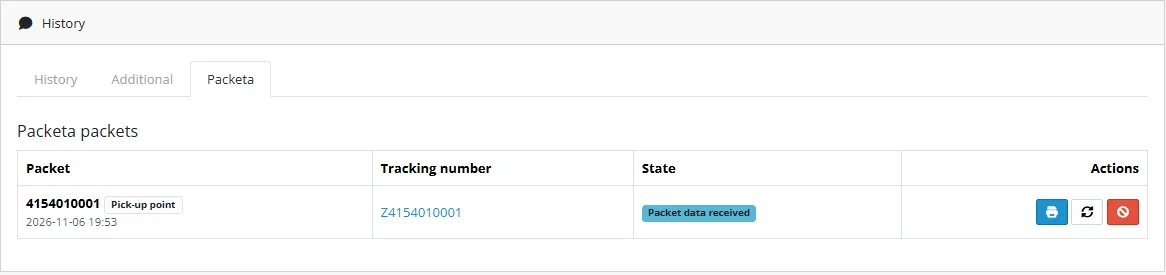
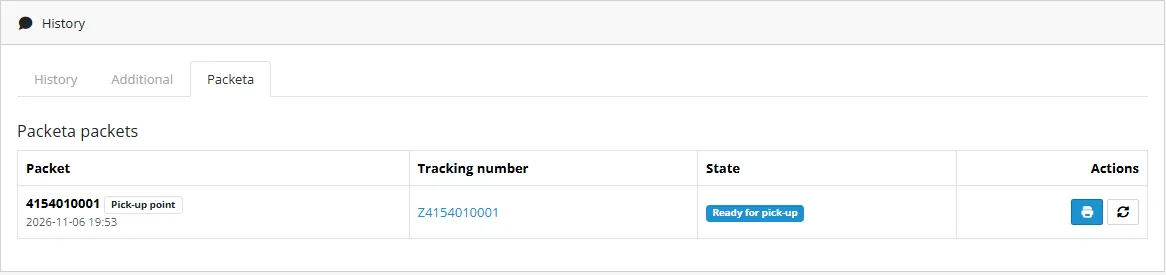
Create the packet. Open the order, tab Packeta, press Create packet at Packeta. Packeta answers at once with the packet id and the barcode; the extension fetches the label right away. For orders placed without the picker (or by phone) enter the Packeta point id on the tab and press Set point; the id is validated before it is kept.
Order tab
Label and status. The print button opens the label (PDF) or downloads it (ZPL). For home delivery the carrier's courier number may take a few minutes: until then the tab shows "Waiting for the carrier label", and after ten minutes the Packeta label is used. The refresh button, the hourly cron and Packeta's push tracking events read the status; the barcode and the Packeta tracking link are in the order history.
Tracking
Cancel. The red button cancels the packet while Packeta has not received it. After that Packeta refuses and the extension shows its message.
Many orders. Settings > Shipments: tick packets and download one PDF with their Packeta labels (carrier labels and ZPL labels are downloaded one by one).
Shipments
Developer notes
Identity
Item
Value
Extension code
kv_packeta (type shipping)
Settings
shipping_kv_packeta_*
PHP namespace
KavioLabs\KvPacketa (shared core in system/library/ of the extension)
Tables
kv_packeta_points (point of an order), kv_packeta_shipments (packets), kv_packeta_log, kv_packeta_events (push event ids)
php81 tests/unit.php and php83 tests/unit.php (229 checks) run in two parts: the official documentation examples (answers, faults, label and tracking samples, the push tracking signature, the widget validation, phone formats) with every request checked on the wire against the documented shape; and the OpenCart flows against tests/mock-server/server.js (a stand-in built from the same pages) and a scratch MariaDB database. node tests/e2e.js runs the browser flow on an OpenCart 4.1.0.4 dev store. Not tested against a live Packeta account.
Hidden setting shipping_kv_packeta_base_url points the extension to the mock (API, widget validation and carrier feed); it is honoured for loopback hosts only.
Conformance with the Packeta documentation (OpenCart 4)
What the extension does, against the official Packeta documentation (docs.packeta.com: Packeta API, API reference, Label printing, Packet tracking, PUDO delivery widget, Home delivery, Common issues, Carrier overview; read November 2026). The extension is proven against a local mock that follows these pages; it has not been run against your Packeta account until you test the connection.
Topic
Documented behaviour
What the extension does
Interfaces and endpoint
SOAP and REST/XML with identical functionality; REST: HTTP POST of an XML body to https://www.zasilkovna.cz/api/rest, the root element is the method, the first argument is apiPassword; the answer is `<response><status>ok\
fault</status>`
REST/XML only. One POST per call; ok returns the result, fault is turned into an error with the fault name and the field list
Sandbox
None. "You can use your production account for testing purposes, as no charges apply unless a packet physically enters the Packeta network"; a dedicated testing sender is suggested
Test mode is a second set of credentials on the same API (use a testing sender). Same host in both modes; the hidden setting base_url redirects the calls to a loopback mock for tests only
Credentials
API key (16 characters, public: widget and feeds) and API password (secret: API calls)
Both on the Connection page; the password sealed with AES-256-GCM, never logged; the key is public by design
Test connection
(no dedicated method)
packetAttributesValid with throw-away data: a validation fault means the password was accepted, IncorrectApiPasswordFault means it was not; sender and approval faults are shown. The method has no side effects. The reading that a validation fault means "accepted" is ours: verify with your account
Create packet
createPacket(packetAttributes) returns id, barcode (Z + id), barcodeText; required: number, name, surname, addressId, value, weight, and e-mail or phone; eshop when using more senders
Sends these plus currency, cod, company, street / houseNumber / city / zip (home delivery), carrierPickupPoint (partner points). Stores the packet with its barcode
Pick-up points
addressId is the branch id from the widget; external carrier pick-up points: carrier id in addressId plus carrierPickupPoint
Both. Partner points come from the widget with the carrier ids you configure
Home delivery
addressId is the carrier id (official carrier list: CZ 106, SK 131, HU 4159, RO 4161); address fields required
Carrier id per country from a setting (those defaults); street and house number are split from the address, house number kept with its slash part
Currency and COD
Optional currency, default is the destination country's currency; CZK COD must be a whole number, HUF a multiple of 5; max packet value 20 000 CZK, 700 EUR "or equivalent" (docs.packeta.com/guides/currency-handling): for HUF, PLN and RON the EUR limit is converted with the store's currency rates; other currencies need a conversion set up in the client section
Converts the order total into the destination currency with the store's rates; rounds COD as documented; caps the insured value at the limit and refuses a COD above it; refuses when no destination currency can be used
Phone
Mobile number in the formats of the "Phone number formats" table, with or without + / 00
Normalised to the international digits of the destination country (CZ, SK, HU, RO, PL formats of the table); otherwise the e-mail is used
Names and notes
Emoji in names are the usual validation error
Control characters, quotes and emoji are removed; first and last name limited to 32 characters
Labels
Packeta labels (pick-up points, Z-BOXes): packetLabelPdf formats A6 on A6, A7 on A7, A6 on A4, A7 on A4, 105x35mm on A4, A8 on A8; packetLabelZpl A6/A7 at 203/300 dpi; the answer is base64 (PDF) or XML-escaped (ZPL). Carrier labels: A6 only, via packetCourierLabelPdf/Zpl with the courier number; Packeta label as fallback
All of these. The courier number comes from packetInfo (courierInfo). ZPL is unescaped before it is stored. Carrier label not supported or not ready in ten minutes: Packeta label
Bulk labels
packetsLabelsPdf for several packets
Used for the merged PDF of selected packets that have Packeta labels
Tracking
packetStatus, packetTracking, packetCourierTracking; status code table 1 to 33 and 999; carriers are synchronised three times a day
packetStatus by the OpenCart cron job every hour for open packets (every 6 hours for packets with a problem, 200 packets per run at most); the status code is mapped to created, in transit, delivered, problem, cancelled. External carrier history (packetCourierTracking) is not read: the carrier tracking link from packetInfo is shown instead
Link in the order history and on the packet row; the id is the packet id returned by createPacket (not the Z barcode, which is shown as the link text); format from docs.packeta.com/docs/packet-tracking/tracking
Cancel
cancelPacket for packets not physically submitted; CancelNotAllowedFault otherwise
Cancel button; the fault text is shown
Push tracking
Activated on request by Packeta (integrations team); HTTPS endpoint; POST JSON, headers X-Webhook-Timestamp, X-Webhook-Signature = HMAC-SHA256 of timestamp.rawBody with the signing key, X-Webhook-Event-Id; HTTP 200/202 = success; retries with back-off up to 8 hours
The endpoint verifies the signature on the raw body in constant time, rejects timestamps older than 24 hours, deduplicates by event id, answers at once and applies the status in the same request (one UPDATE)
Pick-up point widget
Library https://widget.packeta.com/v6/www/js/library.js, Packeta.Widget.pick(apiKey, callback, options); the widget needs the API key, never the password; options such as vendors, country, language, appIdentity
Loaded on the checkout only, from an event on the shipping method dialog. Vendors are built from the widget country setting (pick-up points and Z-BOXes) or the partner carrier ids
Validation of the point
"Always validate the selected PUDO point on the server side": POST https://widget.packeta.com/v6/pps/api/widget/v1/validate with apiKey, point, options; answers isValid, point, errors
Every selection is validated before it is kept; the validated name and address are stored, not the browser's
Errors
Faults such as PacketAttributesFault (with AttributeFault list), IncorrectApiPasswordFault, ExternalGatewayFault, PacketIdFault, CancelNotAllowedFault
HTTP 200 for every answer: a fault is shown to the admin with its name and field list; ExternalGatewayFault and network errors / HTTP 5xx count as temporary (the cron job reads again, a packet creation is repeated by hand)
Rate limits
Not stated on the pages we read
Reads are retried three times with a pause; creating a packet is never repeated after a network error or HTTP 5xx (the packet may exist). At most 200 packets checked per cron run
Not covered in 1.0.0
Customs declarations (outside the EU), returns and claim-assistant packets, B2B packets, dispatch orders / shipments (delivery notes, createShipment), carrier services (carrierService), 18+ delivery, scheduled delivery, Packeta data feeds as a map replacement, SOAP, external carrier tracking history.
Trademarks
Packeta and Z-BOX are names of their owner. This extension is independent software and is not affiliated with or endorsed by Packeta. The Packeta logo is not used: the documentation asks for it on labels only, and no brand page granting integrations the right to use it as a partner mark could be confirmed.
FAQ
Does it show live Packeta prices?
No. Packeta has no price list for an e-shop's customers; the prices at checkout are the ones you enter in the settings.
Does the customer pick the point on a map?
Yes: the official Packeta widget v6, with your public API key. Every choice is validated on the server before it is kept.
Which countries?
Czechia, Slovakia, Hungary and Romania with the carrier ids of the official carrier list; pick-up points of partner carriers with the carrier ids you enter. Customs declarations (outside the EU) are not covered.
Is there a sandbox?
No. You test with your own account; nothing is charged until a packet physically enters the Packeta network, and Packeta suggests a dedicated testing sender. Cancel test packets before you hand them over.
What about cash on delivery?
Name the payment extension that means cash on delivery (code cod for the OpenCart one). Orders paid with it are sent with the order total as COD in the currency of the destination country (CZK whole numbers, HUF in steps of 5). The maximum packet value of the documentation (20,000 CZK, 700 EUR or equivalent) is respected in every supported currency; HUF, PLN and RON limits are the EUR limit converted with your store's currency rates.
Why is the label of a home delivery not there at once?
The carrier's courier number can take a few minutes. The extension waits ten minutes for the carrier's own label and then uses the Packeta label.
Which label formats?
PDF in A6 on A6, A7 on A7, A6 on A4, A7 on A4, 105x35mm on A4 and A8 on A8; ZPL at 203 or 300 dpi; carrier labels are A6.
Does it work with OpenCart 3?
No, OpenCart 4.1 only.
Does it use OCMOD?
No. A shipping extension, events and cron.
Where are my credentials stored?
In your own database, encrypted with a key derived from your store's encryption key; the password is never shown again after saving and never written to the log.
Is it affiliated with Packeta?
No. Packeta and Z-BOX are names of their owner. The Packeta logo is not used.
Server-side tracking for OpenCart 4.x and 3.0.x: purchases, refunds, add to cart, checkout, product views and leads go from your server to the free official GA4 Measurement Protocol, Meta Conversions API and TikTok Events API, deduplicated with the browser pixels through shared event ids. Consent-aware, SHA-256 hashed customer data, order status mapping, queue with retries, test mode and an event log. No paid relay, events only, no OCMOD.
The department store theme for OpenCart 4.x and 3.0.x: colour-coded departments, a department list beside the hero slider with two side promos, a big search with a department selector, tabbed product blocks, a 2 + 1 + 2 offer grid, deals of the day with real countdowns, a department showcase, a promotions band and a three-column product page with a sticky buy box. Four styles (Meridian, Harbor, Citrus, Night) and your own colours on top. Events only, no core changes.
Stop AI crawlers, scrapers, vulnerability scanners and unwanted countries before OpenCart 4.x or 3.0.x builds a page. Googlebot and Bingbot are verified by DNS and always allowed; 50+ bots get one switch each; country rules use free GeoIP databases and can close only the checkout; IP and network lists, rate limits, honeypots and the cart flood fix; a one-second challenge instead of a captcha; learning mode, dashboard, log, IP tester and Cloudflare export. No core changes, no OCMOD.