Sells your OpenCart catalogue on Amazon through your own private SP-API app (Login with Amazon refresh token): product type and attribute mapping, price rules and stock buffer, merchant fulfilled listings with the Listings Items API, price and quantity partial updates, orders imported as real OpenCart orders (Orders API 2026-01-01 or v0 with a Restricted Data Token), tracking sent back with confirmShipment, 22 Amazon stores, a job queue with retries and a full log. Credentials stored encrypted. Merchant fulfilled only; needs your own SP-API app. OpenCart 4, events and cron only, no OCMOD.
Tested on 4.1.0.4Version 1.0.1Compatible with OpenCart 4.1.0.4 No core file edits
Built forOpenCart
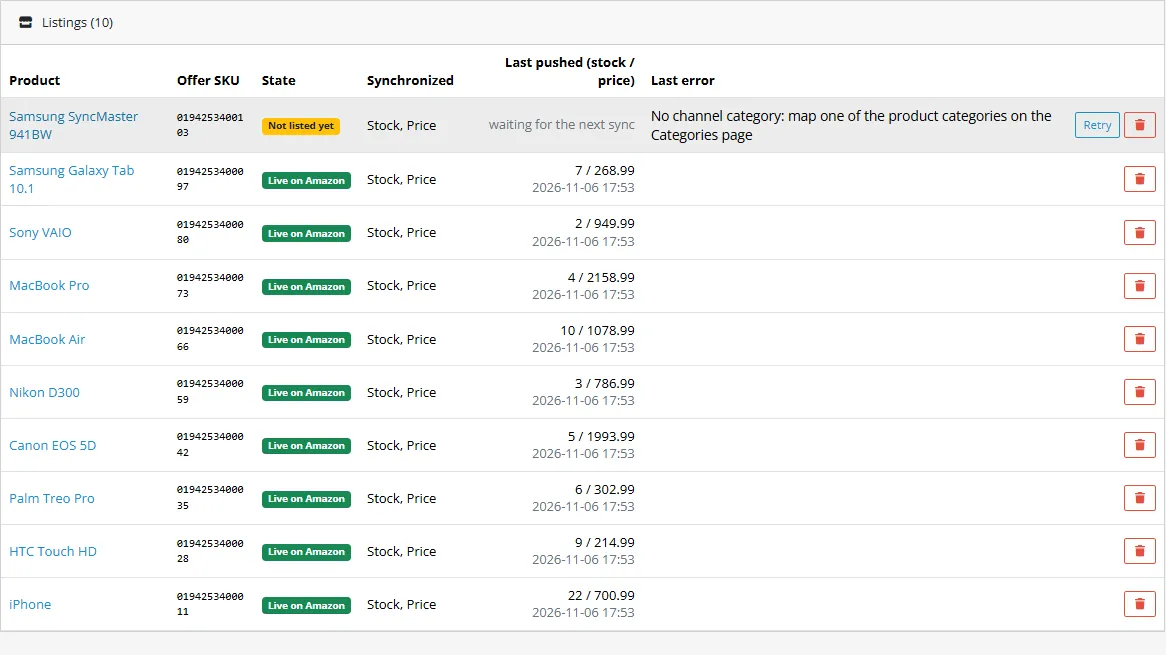
Every product, its state and its reason1 of 6
What it does
Sells your OpenCart catalogue on Amazon through your own private SP-API app (Login with Amazon refresh token): product type and attribute mapping, price rules and stock buffer, merchant fulfilled listings with the Listings Items API, price and quantity partial updates, orders imported as real OpenCart orders (Orders API 2026-01-01 or v0 with a Restricted Data Token), tracking sent back with confirmShipment, 22 Amazon stores, a job queue with retries and a full log. Credentials stored encrypted. Merchant fulfilled only; needs your own SP-API app. OpenCart 4, events and cron only, no OCMOD.
What it changes for your store
Your OpenCart shop on Amazon, merchant fulfilled. This extension connects your shop to your own Amazon seller account through the Selling Partner API so that listings, price, stock and orders move without copy and paste. It is a two-way connector: products go out, orders and tracking come back into your shop.
Know the limits. You need your own Amazon seller account on the Professional plan and your own SP-API app (a developer profile, client keys and a refresh token that you create in Seller Central; Amazon reviews developer profiles). Merchant fulfilled (FBA is not supported and FBA orders are not imported). Not included: cancelling orders and returns from the store, variations (parent and child listings), multi-package shipments, attributes that need nested values (dimensions, weights with units), and gated categories that need approval in Seller Central. Amazon is polled by cron, so new orders arrive at the next sync. Imported orders do not send e-mails or fire the events of other extensions. Tested against a stand-in of the Selling Partner API built from the official models, not against a live seller account. Amazon is a trademark of Amazon.com, Inc. or its affiliates. This extension is an independent product by Kavio Labs, not affiliated with or endorsed by Amazon.
Features
Connection
Your own private SP-API app, self-authorized: Login with Amazon client ID and secret plus the refresh token, stored encrypted and never logged. No Kavio Labs account, no app review by us, no AWS keys
Test mode on the Amazon sandbox and live mode, one-click connection test that lists your stores
22 Amazon stores (US, CA, MX, BR, UK, DE, FR, IT, ES, NL, BE, IE, SE, PL, AE, SA, EG, ZA, IN, JP, AU, SG) with the matching region, currency and language
Catalogue
Search the Amazon product types of your store and map them to your categories; map every required attribute to a product attribute, the manufacturer, the model or a fixed value; allowed values are matched by name
Listings through the Listings Items API, matched by barcode (EAN, UPC, GTIN) and SKU; Amazon's own issues are read back and shown per product, with a retry button
Per product: see whether it is not listed, waiting for Amazon or live, and the exact message Amazon gave when it refuses a product
Price and stock
Markup in percent and a fixed amount per product, per category or for the account; price endings x.99, x.90 or whole numbers; exchange rate from your OpenCart currencies or your own; stock buffer, zero limit and maximum; handling time and VAT
Price and quantity go out as partial updates; nothing is re-sent when nothing changed
Orders and tracking
Every merchant fulfilled Amazon order becomes an OpenCart order: buyer, delivery address, the price Amazon sold, the status you choose, stock taken like a normal order; pending orders wait until Amazon releases them
New Orders API 2026-01-01 by default, the deprecated v0 with a Restricted Data Token as an option
Orders whose SKU is not mapped are listed as failed imports with the reason and retried
Set the order to Shipped and write the tracking number in the order history ("Tracking: 1Z999 carrier: UPS"): the shipment is confirmed at Amazon, once
Reliable
Job queue with retries (5 minutes up to 12 hours) and rate limit (429) handling, a Jobs page with a run button, a filtered log with CSV export
Events and cron only, no OCMOD, no core edits; OpenCart 4, tested on 4.1.0.4
What you get
Download & installOne installer package (.ocmod.zip) for OpenCart 4.0.2 – 4.1.x. There is no OpenCart 3 edition. Download it from My licenses right after payment.
12 months of updates & supportNew versions and help for 12 months (24 or 36 months at checkout). After that the extension keeps working; renew anytime at 50%.
License for your storeOne production domain with all its subdomains; staging and local development hosts are free. How licensing works
30-day refundFull refund within 30 days of your first purchase, no reason needed. Refund policy
Tested buildsOpenCart 4.1.0.4. Tested on OpenCart 4.1.0.4.
Documentation & supportFull guide (Installation and setup, Configuration, Usage, Developer notes) on this page. Tickets from your account, first reply within 1 business day.
Compatibility
Amazon Seller Connector (SP-API) works with OpenCart 4.1.0.4.
We list the builds we install and test on. “Tested” means the test plan ran on that build; “Supported” means the build is inside the supported range.
Compatibility
Version
Range
Runs on
Status
OpenCart 4.1.0.x
4.1.0.0 – 4.1.0.4
PHP 8.1 – 8.3
Tested on 4.1.0.4
OpenCart 4.0.2.x
4.0.2.0 – 4.0.2.3
PHP 8.0 – 8.2
Supported
1.0.0
Latest
First release for OpenCart 4.1: Amazon Selling Partner API (SP-API) with your own private app (self-authorization, Login with Amazon refresh token), test mode on the Amazon sandbox and live mode, connection test.
22 Amazon stores across North America, Europe, the Middle East and Africa, and the Far East region, each with its currency and locale.
Product types and their required attributes from the Product Type Definitions API, category and attribute mapping, price rules, stock buffer.
Merchant fulfilled (FBM) listings with the Listings Items API (put), matched by barcode and SKU, Amazon's own issues read back; price and quantity pushed with partial updates (patch).
Order import with the Orders API v2026-01-01 (default) or v0 with a Restricted Data Token into real OpenCart orders; status follow; tracking numbers sent with confirmShipment.
Job queue with retries and back-off, rate limit (429) handling, OpenCart cron and a secret web address, log with CSV export.
Every request is checked in the unit tests against the official SP-API OpenAPI models.
How do I install the extension?
Upload. Extensions > Installer: upload the .ocmod.zip. It is for OpenCart 4 (4.0.2 to 4.1.x).
Install and enable. Extensions > Extensions > Modules: install, open the settings and switch it on. Events register themselves; nothing is patched.
Enter the license key. Paste the key from My licenses. Subdomains, staging and local hosts are included; you have 14 days to do it.
OpenCart 4.1.0.4. Tested on OpenCart 4.1.0.4. The Compatibility tab lists every version range.
Do the extensions change core files?
No. They work through OpenCart events and standard extension types (modules, order totals, themes). No core file edits, no OCMOD patches, no theme template edits, so OpenCart updates and other extensions keep working.
What does the license cover?
One production store domain with every subdomain (www, shop., staging.), plus local development hosts such as localhost, *.local and *.test. A store on another domain needs its own license; a second-store license is 40% off. You have 14 days after installing to enter the key. 12 months of updates and support are included; after that the extension keeps working and renewals are 50% off. How licensing works
Can I get a refund?
Yes. Ask for a full refund within 30 days of your first purchase, no reason needed: open a ticket or write to [email protected] with your order number. The money goes back to the card or bank account you paid with within 5 business days of approval. Refund policy
How do I get help?
Open a ticket from your account, so your license details are attached. We answer Monday to Friday: bug reports within 1 business day, how-to questions within 2. Support policy. Not a customer yet? Ask a pre-sales question.
Sells your OpenCart catalogue on Amazon with your own Amazon seller account: listings from your products, price and stock sync, order import into real OpenCart orders and tracking numbers, through the Amazon Selling Partner API (SP-API). Merchant fulfilled (FBM) offers only.
What it does
Maps OpenCart categories to Amazon product types and product attributes to the attributes the product type requires; required attributes are checked before anything is sent.
Creates listings with the Listings Items API for merchant fulfilled offers, matched by barcode (EAN, UPC, GTIN) and SKU, and reads back Amazon's own issues when a listing is refused.
Pushes price and quantity with partial updates, with price rules, a stock buffer and price endings.
Imports Amazon orders into OpenCart without duplicates (buyer, delivery address, prices as sold) and follows their status.
Sends the tracking number from the order history back with the shipment confirmation of the Orders API.
Your own private Amazon app (self-authorization): your keys stay in your store, no Kavio Labs account or approval is involved. Credentials are stored encrypted; test (Amazon sandbox) and live mode are separate.
A job queue with automatic retries and rate limit handling, a log with filters and CSV export.
What it does not do in 1.0
Fulfilled by Amazon (FBA): not included. The connector lists, prices and imports merchant fulfilled (FBM) offers only; FBA orders are not imported.
Cancelling Amazon orders and handling returns from the store: do it in Seller Central.
Variations (parent and child listings), multi-package shipments and Amazon Business quantity discounts.
Attributes that need a nested structure (dimensions, weights with units, dangerous goods): only attributes with a plain value are mapped. Products whose product type requires more are listed in Seller Central or through a later version.
It needs your own SP-API app: a Professional seller account, a developer profile and a private app that you authorize yourself (see Installation). This is not a one-click login.
Compatibility
OpenCart 4.1 (tested on 4.1.0.4); PHP 7.4 or newer with the cURL and OpenSSL extensions.
No OCMOD, no core edits. The queue runs from the OpenCart cron (see Configuration).
Trademark
Amazon is a trademark of Amazon.com, Inc. or its affiliates. This extension is an independent product of Kavio Labs, not affiliated with or endorsed by Amazon. It uses the public Selling Partner API under your own seller account and app and is subject to Amazon's terms.
Next steps
Listings
Installation and setup
Requirements
OpenCart 4.1 (tested on 4.1.0.4), PHP 7.4 or newer with the cURL and OpenSSL extensions.
Administrator access to the admin.
An Amazon seller account on the Professional selling plan (individual accounts cannot register private apps) and its primary user login. Amazon requires the primary user to register as a developer and to authorize an app.
Products with a valid EAN, UPC or GTIN as the barcode and images that are reachable from the internet (Amazon downloads them).
The OpenCart cron line on your server (see step 5 of the installation).
Install the extension
In the admin go to Extensions > Installer, upload kv_amazon_sp.ocmod.zip and click Install.
Extensions > Extensions, choose "Modules", find "Amazon Seller Connector (SP-API)" and click Install (the green button).
Click Edit. Switch the connector on and, if you have one, enter your Kavio Labs license key. Without a key the extension works for 14 days.
The Amazon pages are under Sales > Amazon: Listings, Connection, Categories, Attributes, Rules, Orders, Returns, Log, Jobs.
Cron. The install registers an hourly entry in the OpenCart cron, which needs the standard OpenCart cron line on your server (shown on the settings page). For a faster sync call the secret web address from the settings page every few minutes with your host cron. Every 5 minutes is enough: Amazon's order search allows only one request every few minutes per seller.
Create your own (private) Amazon app
The connector uses the Selling Partner API as a private developer: you register as a developer for your own seller account, create an app and authorize it yourself. Amazon documents this path for private applications ("Self-authorization": the app is not published and you authorize it for your own account while it is in draft status). It costs nothing and does not involve Kavio Labs. The form and the review of your developer profile are Amazon's and can take some time.
Sign in to Seller Central as the primary user and open Apps and Services > Develop Apps. Register as a developer for your own account (private developer): describe your use (own store integration), answer the data security questions and choose the roles. Roles to choose: Product Listing, Inventory and Order Tracking and, for the buyer name and delivery address of your orders, the role that allows personal data for merchant fulfilled orders (Direct-to-Consumer Delivery). See Amazon's "Registering as a developer" and "Selling Partner API Roles" pages.
On the Develop Apps page choose Add new app client, give it a name, choose the SP-API type and select the roles from step 1. Save it.
Open the app's LWA credentials (client identifier and client secret) and copy both. The client identifier starts with amzn1.application-oa2-client..
In the app list choose Authorize app (self-authorization). Amazon shows a refresh token (it starts with Atzr|). Each click creates a new refresh token and the earlier ones stay valid. Copy it at once and keep it private.
Your Seller ID (merchant token) is shown in Seller Central under Account Info > Your Merchant Token.
You do not need an AWS account, an IAM user or request signing: SP-API calls are authorized with the Login with Amazon access token only.
Connect Amazon
Open Sales > Amazon > Connection.
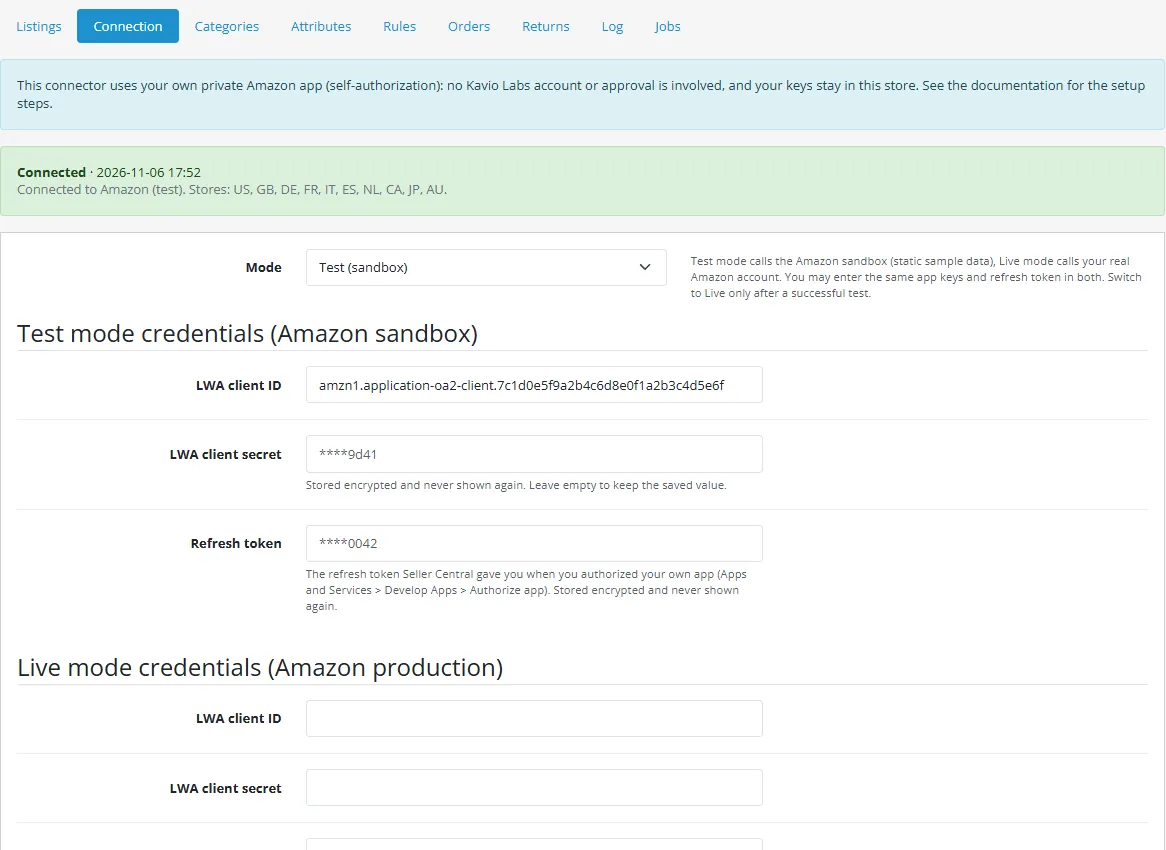
Choose Test mode, enter the Client ID, Client secret and Refresh token of your app (you may use the same values for test and live), your Seller ID and the Amazon store (country) you sell on. Test mode calls Amazon's sandbox, which answers with static sample data; Live mode calls your real account.
Press Save and test: a green message lists the stores your account sells in.
Switch to Live mode, save and test again. In live mode the test also checks that your account sells on the chosen store.
Choose the Orders API: v2026-01-01 (recommended) or the deprecated v0 (see Configuration).
Open Categories, map your OpenCart categories to Amazon product types and set the default brand; open Attributes to map the attributes the product type requires; open Rules for prices and stock (see Usage).
Connection
Update
Upload the new package in Extensions > Installer. Settings, credentials and data are kept; missing tables and settings are added on the first request after the update.
See CHANGELOG for what changed in each version.
Uninstall
Extensions > Extensions > Modules > Amazon Seller Connector (SP-API) > Uninstall removes the mappings, rules, queue, log and the stored credentials. The OpenCart orders that were imported stay. Listings already on Amazon stay there; close them in Seller Central if you do not want them offered. Revoke the app in Seller Central if you no longer use it.
Configuration
Settings page
Extensions > Extensions > Modules > Amazon Seller Connector (SP-API) > Edit. The page also holds the licence card.
Setting
Default
Description
Enable the connector
On
When off, no new work is started. Jobs of work that is already under way are still processed.
Status of imported orders
Processing
Order status given to a new Amazon order (Processing takes the stock). The status mapping on the Rules page can override it.
Debug log
Off
Also stores every HTTP call with masked request and response. Secrets are never stored.
Log retention (days)
90
Older log entries are removed by the cron run.
Sync interval (minutes)
15
How often stock and price are pushed, orders imported and shipments reported (every run of the cron address).
Connection (Sales > Amazon > Connection)
Credentials are stored encrypted (AES-256-GCM, key derived from your store's own encryption key), never shown again, and an empty secret field keeps the saved value.
Field
Description
Mode
Test calls the Amazon sandbox (static sample data); Live calls your real account. You can use the same app keys and refresh token in both.
Client ID / Client secret
The Login with Amazon credentials of your private app (Seller Central > Apps and Services > Develop Apps). Stored encrypted; the page shows only a hint afterwards.
Refresh token
The token you get with Authorize app (self-authorization). Exchanged for a one hour access token whenever needed; stored encrypted.
Seller ID
Your merchant token from Seller Central (Account Info > Your Merchant Token). Needed for the listing calls. Letters and digits only.
Amazon store
The Amazon site this connection sells on: US, CA, MX, BR, UK, DE, FR, IT, ES, NL, BE, IE, SE, PL, AE, SA, EG, ZA, IN, JP, AU or SG. Sets the endpoint region, the store id and the currency. One connection sells on one store.
Orders API
v2026-01-01 (recommended; buyer and address come with the PII role of your app) or v0 (deprecated by Amazon on 2026-01-28 and removed on 2027-03-27; buyer and address come with a Restricted Data Token that the connector requests for you).
Rules (Sales > Amazon > Rules)
Markup in percent and a fixed amount, price endings, list price, stock buffer, zero limit, maximum, handling time in days, VAT default, default weight, automatic listing, the own-carrier tracking switch, the tracking link template and the status mapping from Amazon to OpenCart order statuses. Markup can also be set per category (Categories page) and per product. Prices are sent in the currency of the Amazon store: the OpenCart price is converted with the OpenCart currency of the same code or with the fixed rate on the Rules page.
Cron
The install registers an hourly entry in the OpenCart cron (Extensions > Cron Jobs). For a faster sync call the secret web address shown on the settings page every few minutes:
Overlapping runs are prevented. A wrong key answers 403.
Log and jobs
Log lists every call and job with filters (level, action, text, dates) and a CSV export.
Jobs lists the queue. A job that fails is retried after 5 minutes, 15 minutes, 1 hour, 3 hours and 12 hours, then marked "Gave up"; use Retry to queue it again, or "Run the queue now".
Limits that come from Amazon
Access tokens last one hour; the connector renews them itself. A revoked refresh token shows as "invalid grant": authorize the app again and paste the new token.
Amazon limits every operation per seller and app (token bucket with a rate and a burst). Defaults at the time of writing: listing updates 5 per second, order search about one request every 3 minutes, order details 0.5 per second. The connector spaces its listing calls and treats a 429 answer as a temporary error: the job waits and retries. Your own limits can differ and may be higher.
Only the product types of the chosen store are offered; the attributes come from Amazon's product type definitions and are cached for a day. Refresh reference data on the Categories page clears the cache.
Buyer and address data of orders reach your app only with the PII role; Amazon removes them from old orders after some time.
The Amazon sandbox answers with static sample data for the documented sample requests; use it to check the connection, not to test a real catalogue.
Usage
First listing
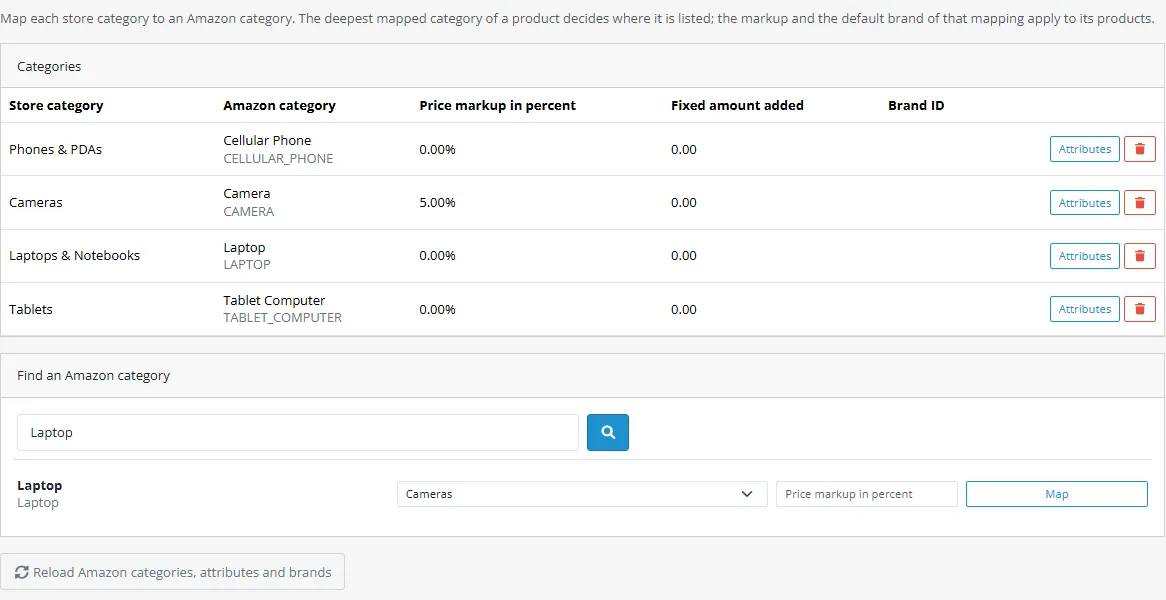
Categories: search the Amazon product types of your store and map an OpenCart category to one, with an optional markup and a default brand. Brands with spaces or punctuation: use the manufacturer of the product or a product attribute for the brand. The list is cached for a day; press Refresh reference data after Amazon changes product types.
Attributes: for the chosen product type the page lists the attributes Amazon requires. Map each to a product attribute, the manufacturer, the model or a fixed value; for lists (for example target audience) the value must be one of Amazon's values. Title, description, pictures, brand, barcode, price and quantity come from the OpenCart product and are not offered for mapping.
Rules: markup, price endings, stock buffer, handling time in days, order import statuses and the own carrier option for tracking.
Listings: add a mapping (product, barcode, whether stock and price are synchronized) one by one or for a whole OpenCart category. The barcode becomes the SKU on Amazon; use the EAN or UPC of the product.
Watch the Listings page: the first run creates the listing; Amazon accepts it, then processes it. The row shows Waiting for Amazon and later Live on Amazon or Amazon's own message (code and text). Fix the data and press Retry.
Categories
Stock and price
Price and quantity are pushed with partial updates on the schedule and whenever a mapped product is saved. Sync now queues an immediate push and order import. Nothing is sent again when nothing changed.
Orders
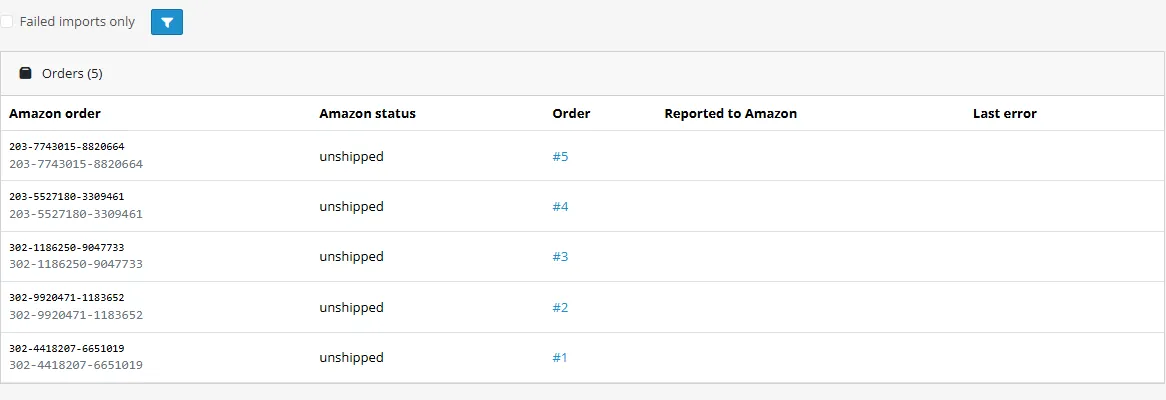
New merchant fulfilled orders appear as OpenCart orders once, with the delivery address and the prices as sold (unit price times quantity). Orders in Pending (payment not confirmed) are imported when Amazon moves them to unshipped.
A line whose SKU is not mapped is not imported: the Orders page shows the reason and the import is retried every hour.
Status changes at Amazon (shipped, cancelled) follow into OpenCart through the status mapping.
When you set an imported order to the Shipped status and write the tracking number in the order history (for example Tracking: 1Z999AA10123456784 carrier: UPS), the extension confirms the shipment at Amazon with the carrier and the tracking number, once.
The OpenCart order has the lines at the price Amazon sold. The order history notes the Amazon order number.
Orders
Jobs, log and connection
Jobs: counts per state, the list with the last error, Retry, Remove and Run the queue now.
Log: filter and export what happened and when.
Connection: test and live credentials (client ID, secret, refresh token), Seller ID, Amazon store, Orders API, Test connection.
Limits worth knowing
Amazon throttles per operation (see Configuration); the queue retries after a 429 answer.
Cancelling orders and returns are handled in Seller Central in 1.0. Fulfilled by Amazon (FBA) is not supported.
A new listing can take minutes to become buyable; the row stays on "Waiting for Amazon" until the listing exists.
Developer notes
Technical notes for developers who customize Amazon Seller Connector (SP-API) for OpenCart. The API client (src/Client/Api.php), the mapper and the driver are shared in design with the CS-Cart add-on of the same name; tests/unit.php checks every request the client sends against the official Selling Partner API models in tests/samples/official.
Amazon is a trademark of Amazon.com, Inc. or its affiliates. This extension is an independent product by Kavio Labs, not affiliated with or endorsed by Amazon.
Amazon SP-API calls: Login with Amazon refresh token exchange (cached below its one hour expiry), x-amz-access-token + User-Agent on every call, regional and sandbox hosts, Sellers, Product Type Definitions, Listings Items 2021-08-01, Catalog Items 2022-04-01 (a lookup helper the sync does not use), Tokens (Restricted Data Token), Orders v2026-01-01 and v0, confirmShipment; store table (id, region, currency, locale)
Drivers\Amazon\Driver
Implements Hub\DriverInterface: product types as categories, schema attributes, listings, price / quantity patches, order polling, shipment confirmation
Drivers\Amazon\Mapper
Pure translation (no HTTP): schema to attributes and values, hub listing to putListingsItem body, patch bodies, issues to errors, v2026 and v0 orders to the hub order shape
OpenCart access: products, categories, order creation, order status, tracking from the history
Queue, Jobs
Job queue with back-off 5 min / 15 min / 1 h / 3 h / 12 h, overlap lock
Accounts, Secret
Credentials sealed with AES-256-GCM; the refresh token is kept in the third sealed secret of the account (the column the hub calls the webhook secret; the label on the Connection page is "Refresh token")
Controllers: admin/controller/channel/amazon.php (pages and actions), catalog/controller/channel/amazon.php (cron, invoice link, stock event). No OCMOD, no core edits, no webhook endpoint.
API conformance (official Amazon models)
Checked on 2026-11-06 against the OpenAPI (Swagger 2.0) models Amazon publishes at https://github.com/amzn/selling-partner-api-models, copied unchanged to tests/samples/official. tests/conformance.php matches every request that tests/unit.php sends (the Api, Mapper and Driver tests with their real bodies) with an operation by method and path and checks the query parameters (names, required, enums, comma lists, limits), the path parameters and the JSON body (types, required properties, enums, array limits, unknown properties); sample responses are checked against the response schemas. The mock server in tests/mock-server/server.js is built from the same models and enforces the refresh token grant, the headers, the required parameters and the body shapes.
Purpose
Request
Official model
Authentication
POST https://api.amazon.com/auth/o2/token (grant_type=refresh_token); x-amz-access-token and User-Agent on every call; private (self-authorized) app, no AWS signature
GET /definitions/2020-09-01/productTypes?marketplaceIds=, GET /definitions/2020-09-01/productTypes/{productType}?marketplaceIds=&requirements=LISTING&requirementsEnforced=ENFORCED&locale=&sellerId= (the schema link of the answer is fetched)
definitionsProductTypes_2020-09-01.json
Create listing
PUT /listings/2021-08-01/items/{sellerId}/{sku}?marketplaceIds=&issueLocale= (body: productType, requirements LISTING, attributes)
listingsItems_2021-08-01.json
Read listing back
GET /listings/2021-08-01/items/{sellerId}/{sku}?marketplaceIds=&includedData=summaries,issues
GET /orders/2026-01-01/orders?marketplaceIds=&lastUpdatedAfter=&fulfilledBy=MERCHANT&fulfillmentStatuses=&includedData=&maxResultsPerPage=&paginationToken=
orders_2026-01-01.json
Orders (v0, deprecated)
GET /orders/v0/orders?MarketplaceIds=&LastUpdatedAfter=&FulfillmentChannels=MFN&OrderStatuses=&MaxResultsPerPage= (next pages: MarketplaceIds and NextToken), GET /orders/v0/orders/{orderId}/orderItems
ordersV0.json
Restricted Data Token
POST /tokens/2021-03-01/restrictedDataToken (buyerInfo, shippingAddress)
tokens_2021-03-01.json
Confirm shipment
POST /orders/v0/orders/{orderId}/shipmentConfirmation (marketplaceId, packageDetail with carrier, tracking, ship date, order items)
ordersV0.json
Notifications
Not used. SP-API notifications are delivered through SQS or EventBridge, so the connector polls
Amazon offers a sandbox that answers only static sample data, so the unit tests and the mock are built from the models. Orders API v0 is deprecated since 2026-01-28 and is removed on 2027-03-27.
Amazon specifics
SKU on Amazon = the barcode of the product map. A numeric 8, 12, 13 or 14 digit barcode is also sent as externally_assigned_product_identifier (ean, upc, gtin); any other value uses the product identifier exemption.
Listings: putListingsItem accepts a submission at once; the driver keeps the batch open and reads getListingsItem (summaries, issues) until the listing exists; ERROR issues fail the product with Amazon's text.
Price: patchListingsItem replace /attributes/purchasable_offer; quantity: merge /attributes/fulfillment_availability (channel code DEFAULT). The product type of a SKU is remembered from the listing or read with getListingsItem.
Orders: v2026-01-01 searchOrders (default) or v0 getOrders + getOrderItems with a Restricted Data Token (dataElements buyerInfo and shippingAddress). Orders without a delivery address are skipped with a log warning.
Throttling: Client\Api::$pace spaces listing calls; a 429 answer is retryable and handled by the job queue.
Test without Amazon
Set the setting module_kv_amazon_sp_base_url (development only) to the address of the mock, for example http://127.0.0.1:11974.
node tests/mock-server/server.js 11974 starts the stand-in.
php tests/unit.php runs the unit tests (PHP 8.1 and 8.3), including the conformance check.
node tests/e2e.js runs the browser test against a dev store with the extension installed.
Troubleshooting
"Test connection" fails
Check the mode: test credentials only work in test mode and live credentials only in live mode.
Check for spaces before or after the client ID and secret.
The Log page shows Amazon's answer (masked).
"invalid grant": the refresh token is wrong, revoked or belongs to another app. Authorize the app again in Seller Central and paste the new token.
"Client authentication failed" / "invalid_client": the client ID or secret is wrong, or the app was deleted.
403 "Unauthorized" on a call: the token expired (it is renewed once automatically) or your app does not have the role for that API. Check the roles of the app in Seller Central; changing roles may need a new authorization.
"The account does not sell on ..." (live test): choose the store your seller account is registered on, or register for it in Seller Central.
Sandbox: Amazon's sandbox answers only the documented sample requests; use it to test the connection, then switch to Live.
Your server must be able to reach Amazon over HTTPS (outgoing port 443) and have a current CA bundle.
Nothing happens after an order changes status
Check Enable the connector on the settings page and the order status settings.
Check the licence card on the settings page.
Open Jobs: queued jobs wait for cron. If the counts never change, the cron is not running; open the secret cron address from the settings page once.
A job is "Waiting to retry" or "Gave up"
The last error is shown in the list. Fix the cause (credentials, data, Amazon outage) and press Retry. Jobs are retried automatically after 5 minutes, 15 minutes, 1 hour, 3 hours and 12 hours before they give up.
A listing is refused or never appears
The product shows Amazon's own message (code and text) on the Listings page. The most common ones: a required attribute is missing (map it on the Attributes page), the brand needs approval in Seller Central, or the product identifier (EAN, UPC) is not accepted for that product type.
"Waiting for Amazon": the submission was accepted and Amazon is still processing it; the state changes on one of the next runs.
Listings in categories that require approval (gated categories) must be approved in Seller Central first.
Orders are missing or have no address
A new order without a delivery address is skipped and logged. Your app needs the personal data role, and with the v0 Orders API the connector asks for a Restricted Data Token; Amazon refuses it when the role is missing.
Pending orders (payment not confirmed) are imported once Amazon moves them to unshipped.
Fulfilled by Amazon (FBA) orders are not imported.
A 429 answer in the log means Amazon's rate limit: the job retries automatically. The order search is limited to roughly one request every 3 minutes per seller.
The cron address answers "Forbidden"
The key in the address is wrong. Copy the address again from the settings page.
Still stuck
Write to us from your purchase page with the extension version, the OpenCart version and the relevant log lines (secrets are masked automatically).
FAQ
Do I need to be an Amazon developer or pay for API access?
You register as a private developer for your own seller account (Professional selling plan, primary user) and authorize your own app; Amazon documents this for private applications and does not charge for it. There is no Kavio Labs account in the middle: your keys and refresh token stay in your store. Amazon reviews developer profiles and can ask questions. If you do not want to do this, this extension is not for you.
Does it need AWS keys or request signing?
No. Amazon's current SP-API documentation authorizes calls with the Login with Amazon access token only.
Does it support Fulfilled by Amazon (FBA)?
No. It lists, prices and imports merchant fulfilled (FBM) offers. FBA orders are not imported.
Which Amazon stores?
US, CA, MX, BR, UK, DE, FR, IT, ES, NL, BE, IE, SE, PL, AE, SA, EG, ZA, IN, JP, AU and SG. One connection sells on one store.
Why does the order import mention a deprecated API?
Amazon deprecated Orders API v0 on 2026-01-28 and removes it on 2027-03-27. The connector uses the new v2026-01-01 API by default and keeps v0 as an option until it is removed.
Which OpenCart versions are supported?
OpenCart 4.1 (tested on 4.1.0.4). There is no OpenCart 3 package.
Is it a bulk importer?
No. It keeps a mapped catalogue in sync with your own Amazon account (listings, price, stock, orders, tracking) and runs from your store's cron.
Where are my credentials stored?
In your own database, encrypted. The key is derived from your store's encryption key, so a database dump alone does not reveal them. They are never shown again after saving.
Does it send data to Kavio Labs?
No. The extension talks to Amazon only (Login with Amazon and the Selling Partner API). The license check sends your domain name to the Kavio Labs license server once a day (Kavio Labs licence).
Is it endorsed by Amazon?
No. Amazon is a trademark of Amazon.com, Inc. or its affiliates. The extension uses the public Selling Partner API under your own seller account and app.
What happens when Amazon is down?
Jobs fail, wait and are retried automatically (5 minutes up to 12 hours). Nothing is lost and nothing is sent twice.
What happens when the license expires?
New work stops (no stock and price push, no import of new orders). The admin pages stay open and work already under way is finished. A new installation works for 14 days without a key.
How do I get updates?
Upload the new package in Extensions > Installer. See Installation.
Server-side tracking for OpenCart 4.x and 3.0.x: purchases, refunds, add to cart, checkout, product views and leads go from your server to the free official GA4 Measurement Protocol, Meta Conversions API and TikTok Events API, deduplicated with the browser pixels through shared event ids. Consent-aware, SHA-256 hashed customer data, order status mapping, queue with retries, test mode and an event log. No paid relay, events only, no OCMOD.
The department store theme for OpenCart 4.x and 3.0.x: colour-coded departments, a department list beside the hero slider with two side promos, a big search with a department selector, tabbed product blocks, a 2 + 1 + 2 offer grid, deals of the day with real countdowns, a department showcase, a promotions band and a three-column product page with a sticky buy box. Four styles (Meridian, Harbor, Citrus, Night) and your own colours on top. Events only, no core changes.
Stop AI crawlers, scrapers, vulnerability scanners and unwanted countries before OpenCart 4.x or 3.0.x builds a page. Googlebot and Bingbot are verified by DNS and always allowed; 50+ bots get one switch each; country rules use free GeoIP databases and can close only the checkout; IP and network lists, rate limits, honeypots and the cart flood fix; a one-second challenge instead of a captcha; learning mode, dashboard, log, IP tester and Cloudflare export. No core changes, no OCMOD.