Amazon-style bundle block for OpenCart 4: the product plus companions learned from your completed orders, tick boxes with a live total and one Add all to cart button. Suggestions in the cart, pins and exclusions per product, an optional taxed bundle discount line in the order totals and analytics with attributed revenue. Own tables, daily cron, no OCMOD.
Tested on 4.1.0.4Updated Nov 7, 2026Version 1.0.0Compatible with OpenCart 4.1.0.4 No core file edits
Built forOpenCart
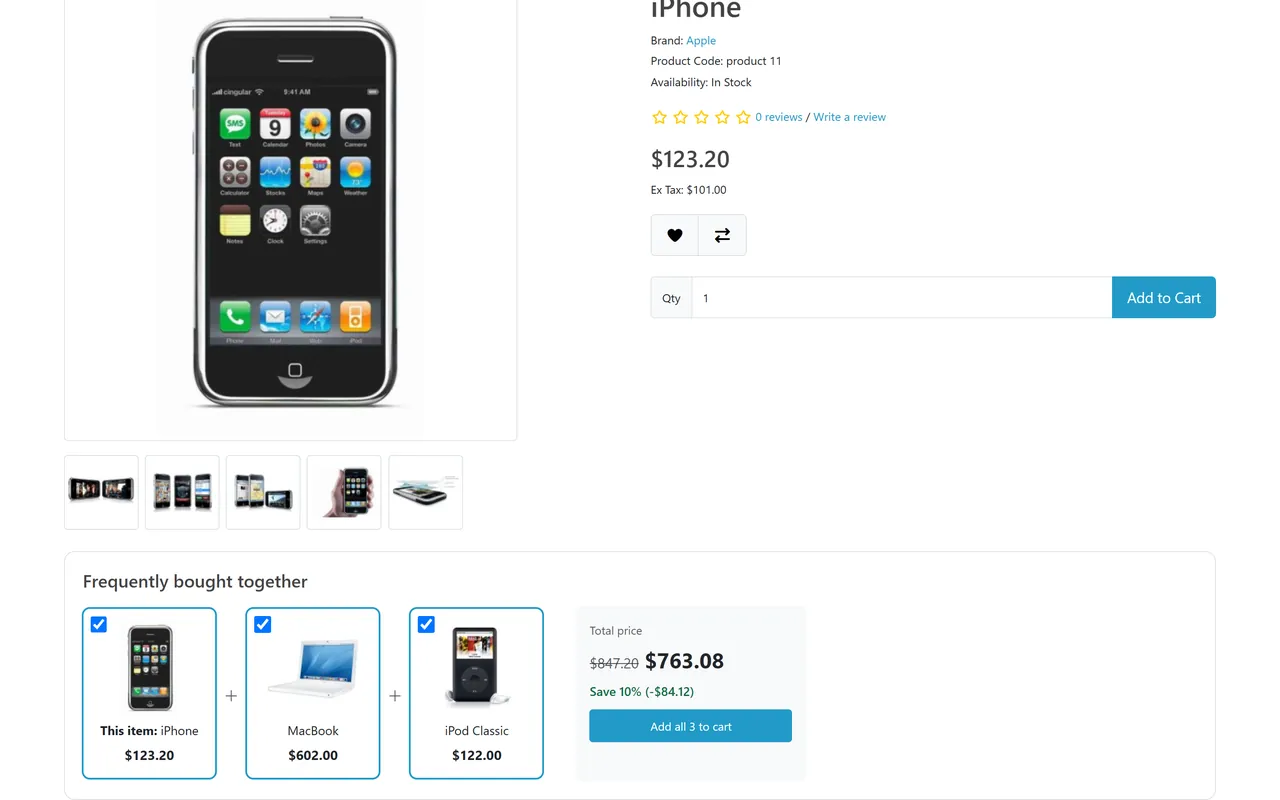
The block with a live total and one button1 of 6
What it does
Amazon-style bundle block for OpenCart 4: the product plus companions learned from your completed orders, tick boxes with a live total and one Add all to cart button. Suggestions in the cart, pins and exclusions per product, an optional taxed bundle discount line in the order totals and analytics with attributed revenue. Own tables, daily cron, no OCMOD.
What it changes for your store
Raise the order value without building a single bundle. The block under the buy box shows the product and one to three products that other customers really bought with it. Shoppers tick what they want, the combined price follows, and one button adds everything to the cart. The recommendations come from your completed orders and refresh themselves.
Know the limits. With few orders the block shows popular products of the category (or nothing, your choice) until pairs exist. The block is placed before the product tabs of the default theme; a theme that removes the tab bar and the description tab needs a small template tweak. OpenCart 4.1 only.
Features
For shoppers
Product images with "+", a tick box per product, "This item" first
A total that follows the ticks and one button: Add all 3 to cart, Add both to cart or Add selected to cart
Only products that can be bought at once: enabled, in stock, priced, minimum quantity 1, no options to choose
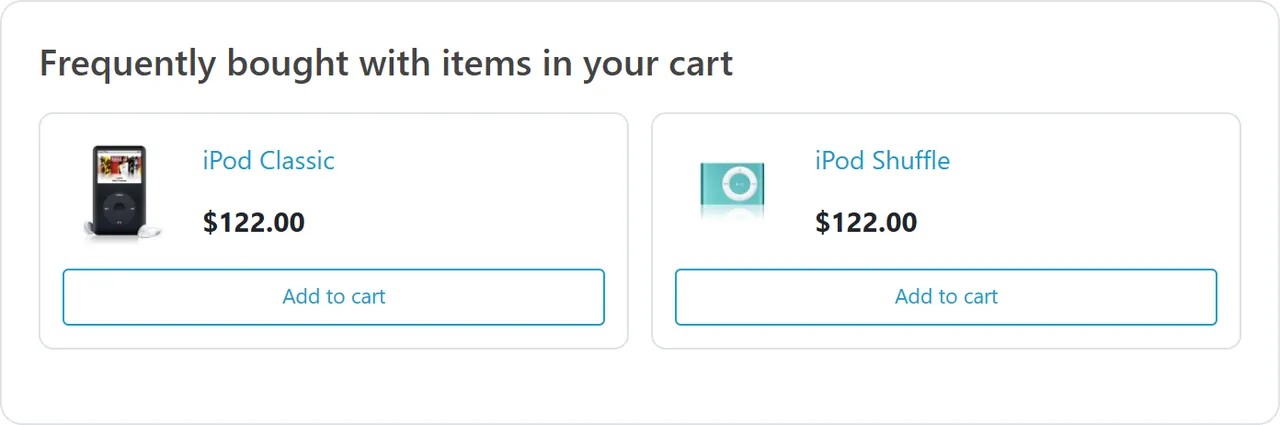
"Frequently bought with items in your cart" under the cart with one-click Add to cart
Prices in the shopper's currency, customer group and tax display; a layout that works on phones
For the store owner
Learned from orders of the statuses you choose, with a history window, recent orders weighing more, minimum orders and minimum confidence
Pin products (shown first, in your order), exclude products, hide the block for a product, exclude whole categories
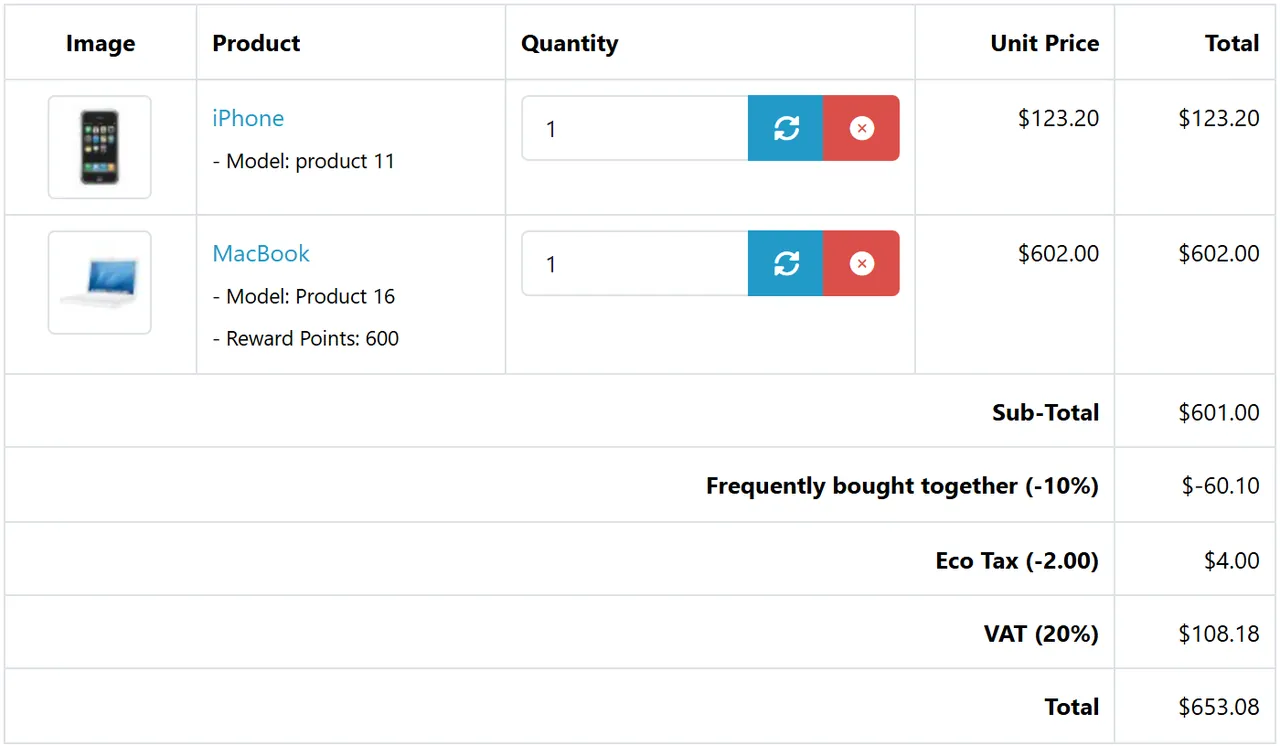
Optional bundle discount in percent: a separate "Frequently bought together" line in the order totals with tax reduced the way the core coupon does it (percentage taxes only, fixed taxes such as Eco Tax stay), never more than is left of the total or the goods after coupons and reward points; shown in the cart, checkout, e-mails and the order page, and kept when staff recalculate the order. The block shows "You save" only when the cart will give it
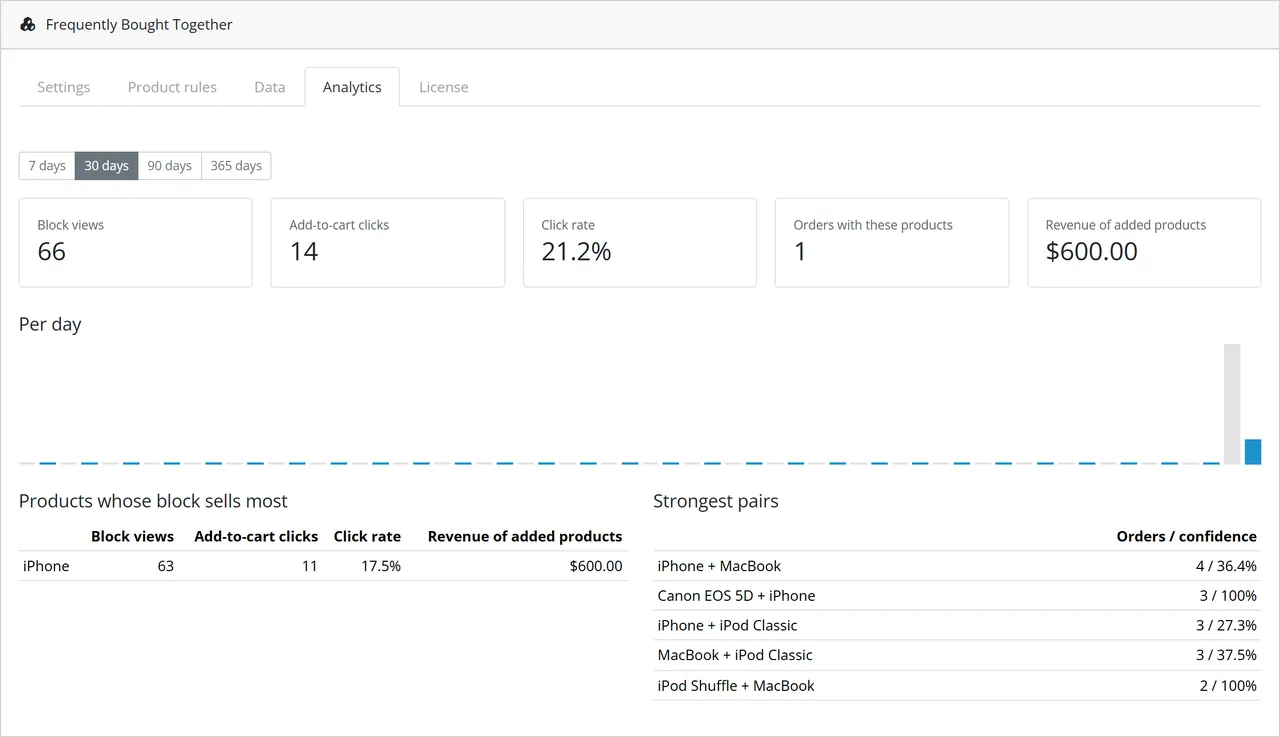
Analytics: block views, clicks, click rate, products added, orders and revenue of the added products, a daily chart, the products whose block sells most and the strongest pairs
Rebuilt in batches by cron; product pages never wait for it
Fast and safe
Own tables, no external service, no monthly fee
The add-all endpoint accepts only the products the block actually showed (the page carries a signed list), only those that can really be bought, with a rate limit and an optional client-address header for shops behind a CDN; the view beacon needs a signed token; every shown value escaped
Updates keep your data: OpenCart 4 updates an extension by uninstall + install, and this one keeps the rules, analytics, the discounts saved with orders and the settings; deleting everything is a switch you turn on yourself
Events, an order total extension and a daily cron entry: no OCMOD, no core edits; tested on OpenCart 4.1.0.4 with the default theme
What you get
Download & installOne installer package (.ocmod.zip) for OpenCart 4.0.2 – 4.1.x. There is no OpenCart 3 edition. Download it from My licenses right after payment.
12 months of updates & supportNew versions and help for 12 months (24 or 36 months at checkout). After that the extension keeps working; renew anytime at 50%.
License for your storeOne production domain with all its subdomains; staging and local development hosts are free. How licensing works
30-day refundFull refund within 30 days of your first purchase, no reason needed. Refund policy
Tested buildsOpenCart 4.1.0.4. Tested on OpenCart 4.1.0.4.
Documentation & supportFull guide (Installation, Configuration, Usage, FAQ) on this page. Tickets from your account, first reply within 1 business day.
Compatibility
Frequently Bought Together works with OpenCart 4.1.0.4.
We list the builds we install and test on. “Tested” means the test plan ran on that build; “Supported” means the build is inside the supported range.
Compatibility
Version
Range
Runs on
Status
OpenCart 4.1.0.x
4.1.0.0 – 4.1.0.4
PHP 8.1 – 8.3
Tested on 4.1.0.4
OpenCart 4.0.2.x
4.0.2.0 – 4.0.2.3
PHP 8.0 – 8.2
Supported
1.0.0
Nov 7, 2026
Latest
First release for OpenCart 4.1.0.x.
Product page block (tick boxes, live total, Add all to cart) and cart suggestions, learned from completed orders (statuses, history window, recency, minimum orders, minimum confidence).
Pins, exclusions, hide per product, excluded categories, category fallback.
Optional bundle discount as an order total line (default sort order 4, after the coupon): tax is reduced for percentage rates only, like the core coupon (fixed-amount taxes such as Eco Tax stay), the line never exceeds what is left of the total and the goods, and it is kept when staff recalculate an order in the admin.
Updates keep your data: uninstall keeps rules, analytics, order records, licence and settings (OpenCart 4 updates are uninstall + install); install is idempotent; "Delete all data on uninstall" removes everything on request; schema migration on the settings page.
A later cart suggestion adds to the set instead of replacing it; "You save" is shown only when the cart gives it; the add endpoint accepts only the products the block showed (signed list).
Editing an unpaid order at checkout refreshes the attribution; sets expire after 6 hours; build lock is a database lock, chunks are bounded by pairs (max 50 order lines), settings for the client-address header and the sort order.
Analytics: views, clicks, products added, attributed orders and revenue, top products and pairs.
Batched rebuild by cron, admin fallback and Rebuild now; per-store option.
Tested on OpenCart 4.1.0.4: unit 131 (php81, php83), browser e2e 115 (guest and signed-in customer, UK customer with Eco Tax, coupon stacking, forged requests, update with data, delete-data uninstall).
How do I install the extension?
Upload. Extensions > Installer: upload the .ocmod.zip. It is for OpenCart 4 (4.0.2 to 4.1.x).
Install and enable. Extensions > Extensions > Modules: install, open the settings and switch it on. Events register themselves; nothing is patched.
Enter the license key. Paste the key from My licenses. Subdomains, staging and local hosts are included; you have 14 days to do it.
OpenCart 4.1.0.4. Tested on OpenCart 4.1.0.4. The Compatibility tab lists every version range.
Do the extensions change core files?
No. They work through OpenCart events and standard extension types (modules, order totals, themes). No core file edits, no OCMOD patches, no theme template edits, so OpenCart updates and other extensions keep working.
What does the license cover?
One production store domain with every subdomain (www, shop., staging.), plus local development hosts such as localhost, *.local and *.test. A store on another domain needs its own license; a second-store license is 40% off. You have 14 days after installing to enter the key. 12 months of updates and support are included; after that the extension keeps working and renewals are 50% off. How licensing works
Can I get a refund?
Yes. Ask for a full refund within 30 days of your first purchase, no reason needed: open a ticket or write to [email protected] with your order number. The money goes back to the card or bank account you paid with within 5 business days of approval. Refund policy
How do I get help?
Open a ticket from your account, so your license details are attached. We answer Monday to Friday: bug reports within 1 business day, how-to questions within 2. Support policy. Not a customer yet? Ask a pre-sales question.
An Amazon-style "Frequently bought together" block for OpenCart 4. The recommendations are learned from your completed orders, so you do not build bundles by hand: the shopper sees the product plus one to three companions, ticks what they want, watches the combined price follow the ticks and adds everything with one button.
Frequently bought together on the product page
Learned from your orders: products that were in the same order, counted from the order statuses you choose (Complete and Processing by default), within a history window, recent orders weighing more. Minimum orders and minimum confidence keep chance pairs out; very large orders are skipped
Product page block: product images with "+", a tick box per product ("This item" first), a total that follows the ticks, Add all 3 to cart / Add both to cart, one request. Only products a shopper can buy at once are shown: enabled, in stock (or checkout of out-of-stock products allowed), priced, minimum quantity 1, no required options, no subscription plan
Cart suggestions: "Frequently bought with items in your cart" under the cart, one-click Add to cart; the block follows the cart when it changes
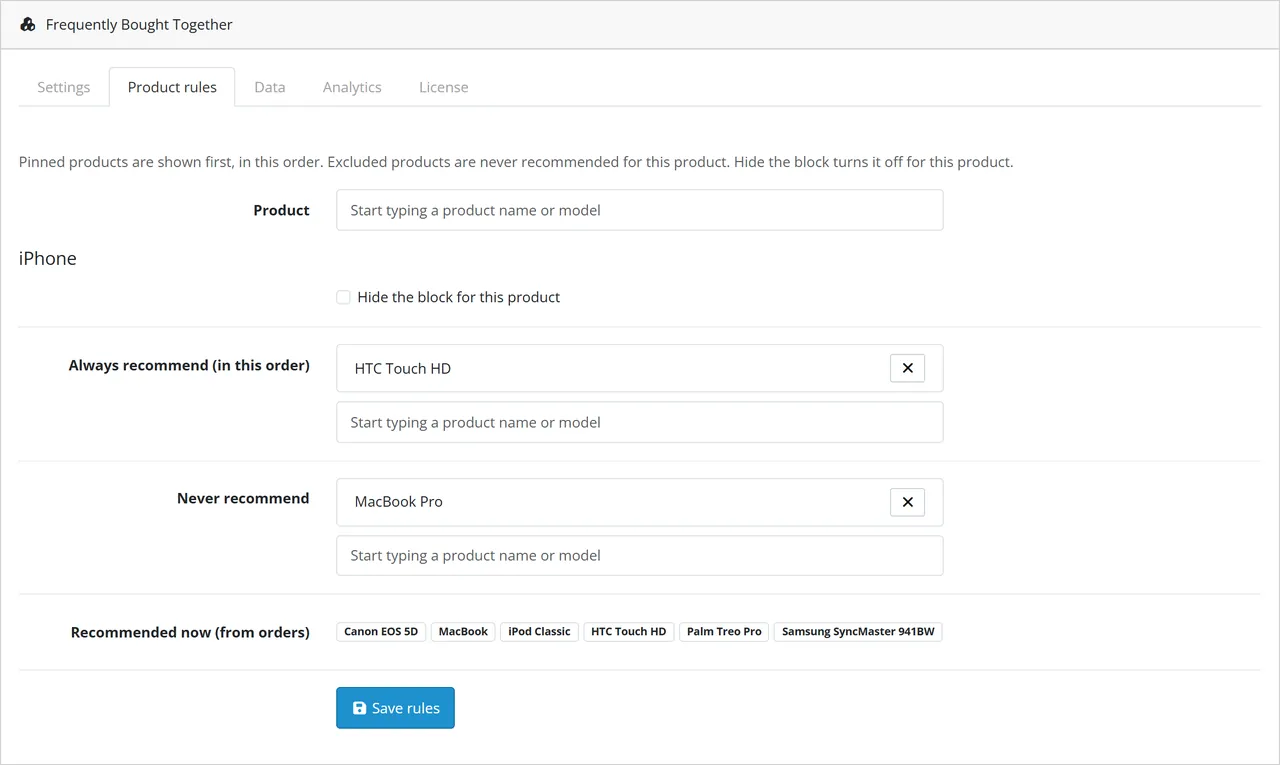
Manual control per product: pin products (shown first, in your order), exclude products or hide the block for one product
Optional bundle discount: a percentage off one unit of each product of a set added with the block, as its own taxed Frequently bought together line in the order totals; the block shows "You save"
Analytics: block views, add-to-cart clicks, click rate, products added, orders and revenue of the added products, a daily chart, the products whose block sells most and the strongest pairs
Scales: the pairs are rebuilt in batches by cron (or after admin page views, or with Rebuild now), never while shoppers browse. A product page reads a few rows from an indexed table
Safe: the add-all endpoint accepts only the product and its own recommendations that a shopper can really buy, rate-limited, the beacon needs a signed token, every shown value is escaped
No OCMOD and no core file changes: OpenCart events, an order total extension and a daily cron entry
OpenCart 4.1.0.x
The block in the shopper's cart
Installation
Requirements: OpenCart 4.1.0.x, PHP 7.4 or newer with the mbstring extension.
In the OpenCart admin open Extensions > Installer, upload kv_frequently_bought_together.ocmod.zip and click Install.
Open Extensions > Extensions, choose Modules, find Frequently Bought Together, click the green Install button, then the blue pencil.
Installing creates the tables, registers the events and the daily cron entry, adds the Frequently bought together discount order total (status on, right after the sub-total) and builds the first set of pairs from your orders. A big order history is finished by the daily task or by Rebuild now on the Data tab.
The blocks are switched on after installing. Open a product page: a product that has companions in your orders (or, with the default setting, popular products of its category) shows the block.
Make sure the OpenCart cron job runs (php /path/to/cron.php every few minutes), or call the address shown on the Data tab.
Uninstall: Extensions > Modules > Uninstall removes the events, the cron entry and the order total line. It keeps your rules, statistics, the discounts saved with placed orders, the licence and your settings, because OpenCart 4 updates an extension by uninstalling and installing it again. To remove everything, switch on Delete all data on uninstall (Data tab), save, and then uninstall.
Update (OpenCart 4.1): Extensions > Modules > Uninstall, then Extensions > Installer: Uninstall and Delete the old entry, upload the new zip, Install, and Extensions > Modules > Install. Settings, rules, statistics, order records and the licence are restored; open the settings page once so database changes of the new version run. Installing again never resets existing settings.
Switches the blocks off (the discount line of carts in progress stays)
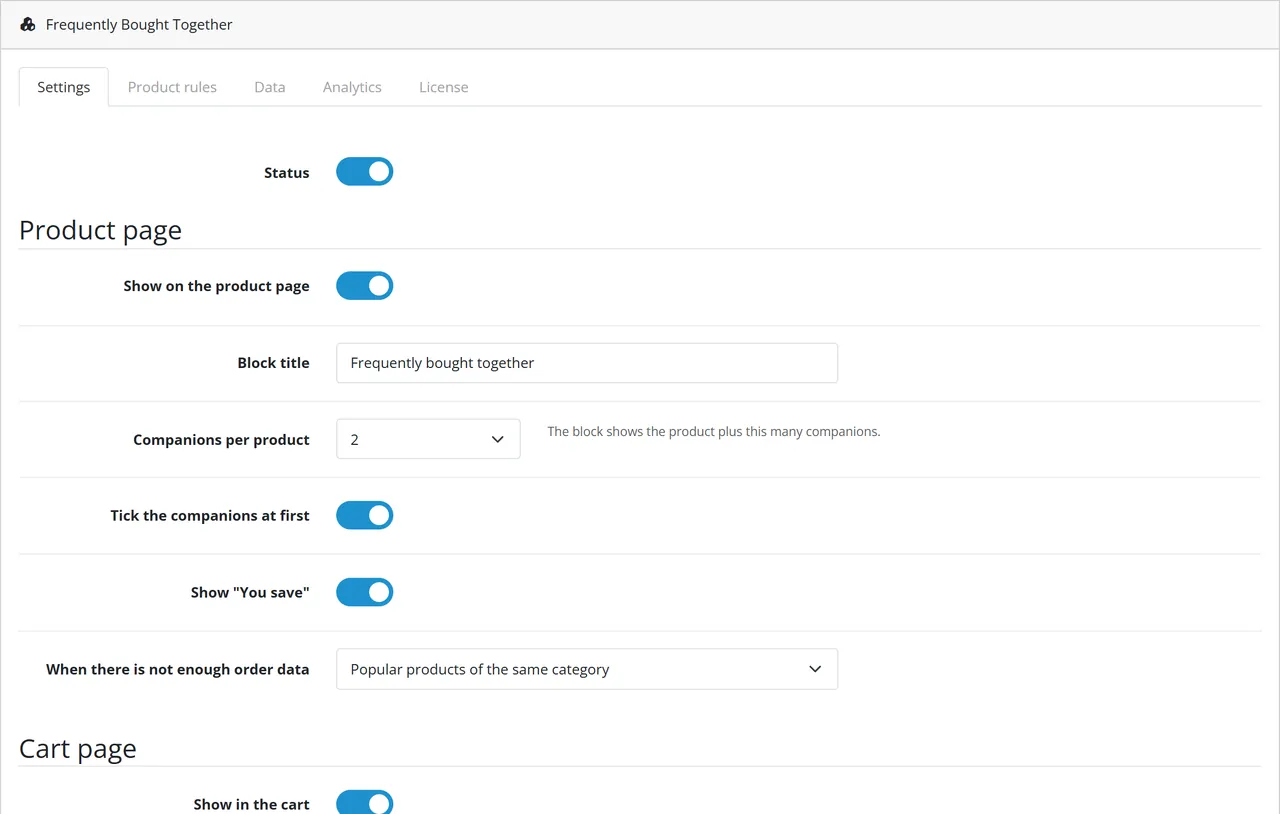
Show on the product page
on
The block above the product tabs
Block title
Frequently bought together
Plain text, tags are removed
Companions per product
2
The block shows the product plus 1 to 3 companions
Tick the companions at first
on
Off: only "This item" is ticked
Show "You save"
on
Shown only when a bundle discount percentage is set
When there is not enough order data
Popular products of the same category
Or nothing: only real order data and pins
Show in the cart
on
"Frequently bought with items in your cart"
Products in the cart block
4
1 to 8
Discount when bought together (%)
0
0 = no discount. Percent off one unit of each product of a set added with "Add all to cart"; the product of the block must be ticked and at least two products of the set must be in the cart. Adds a negative line to the order totals. Tax is reduced like the core coupon does (percentage taxes only; fixed-amount taxes such as Eco Tax stay). The line never exceeds what is left of the order total and of the goods after other discounts (coupon, reward points). A later "Add" click in the cart adds to the existing set
Sort order of the discount line
4
Position among the order totals (Sub-Total 1, Reward Points 2, Shipping 3, Coupon 4, Tax 5). Keep it before Tax
Client address header
none
Behind a CDN or load balancer choose the header that carries the shopper address so the abuse limit counts each shopper; empty uses the connection address
Delete all data on uninstall
off
On: the next uninstall deletes tables, settings, the settings snapshot and the licence state
Data (also on the Settings tab)
Setting
Default
Meaning
Orders that count as bought
Complete + Processing
Order statuses; failed, pending and cancelled orders never count when you leave the default
History (days)
365
Older orders are ignored
Recent orders weigh double after (days)
90
Half-life of the weight; 0 = all orders weigh the same
Minimum orders with both products
2
A pair needs at least this many orders
Minimum confidence (%)
5
Of the orders with the product, this share must contain the companion
Skip orders with more products than
30
Wholesale baskets say little about what goes together
Never recommend categories (ids)
empty
Comma-separated category ids
Rebuild every (hours)
24
Used by the daily task and by the admin fallback
Learn per store
off
Off: all stores share the order history
Rebuild on admin page views
on
A due rebuild gets a few seconds on an admin page view when cron is not running
Product rules
Search a product, then pin products (shown first, in your order; use the arrow to move one up), exclude products (never recommended with it) or hide the block for it. The tab also shows what is computed from orders for that product right now. Pins and exclusions apply at once.
Product rules
Data tab
Last build, number of pairs, Rebuild now (starts over, shows progress) and the cron address with its secret key.
License
Enter the license key from your Kavio Labs account and press Check now. A new installation works for 14 days without a key. Development hosts (localhost, *.test) work with every valid key. Without a valid license the storefront blocks are hidden and the pairs are not rebuilt; the admin pages always work, and your data stays.
Usage
The product block
On a product page that has recommendations the block appears between the buy box and the tabs (Description, Reviews, ...).
Frequently bought together on the product page
The viewed product comes first ("This item"), followed by up to three products bought with it.
Shoppers untick what they do not want. The total, the saving and the button follow at once: Add all 3 to cart, Add both to cart, Add selected to cart.
One click adds the ticked products (quantity 1 each) and shows "Added 3 to your shopping cart"; the mini cart updates.
Shown are only products that can be bought at once: enabled in this store, available, in stock (or checkout of out-of-stock products allowed), with a price, minimum quantity 1, no required option and no subscription plan. Prices follow the shopper's currency, customer group and the store's tax display. When prices are for signed-in customers only, the block is hidden for guests.
Where the products come from
Pinned products of this product, in your order.
Pairs from your orders, strongest first.
Popular products of the deepest category of the product, when there is not enough data (setting).
Excluded products and products of excluded categories never appear.
The cart block
Under the cart, Frequently bought with items in your cart shows up to four products bought with the cart's products (and not in the cart yet), each with Add to cart. The block reloads with the cart. Products added here belong to the set of the cart product they were recommended for, so the bundle discount applies to them too.
Recommendations on the cart page
Bundle discount
Set Discount when bought together (%) on the Settings tab, for example 10. A set is the product of a block plus the products added with the block for it. When the cart holds that product and at least one other product of its set, one unit of each product of the set is discounted. Products added in other ways are not discounted, and a product is never discounted twice.
The discount is a normal line of the order totals ("Frequently bought together (-10%)"): the tax of the discounted amount is taken off per tax rate, the line appears in the cart, checkout, order e-mails, invoices and the order page, and it is stored with the order. When staff recalculate a placed order in the admin the discount stays, because the sets are saved with the order. Its sort order is on the Data tab of the module; the line is also listed under Extensions > Extensions > Order Totals. The block shows "You save" only while the product of the page is ticked, because that is when the cart gives the discount.
Discount in the cart
Analytics
Analytics
Block views: a block counts as seen when at least a third of it is on the screen (once per page view).
Add-to-cart clicks, the click rate and the products added through the blocks.
Orders and revenue of the order lines added through the blocks, in orders with the statuses that count.
A chart per day, the products whose block sells most and the strongest pairs (orders together and confidence).
Several stores
By default all stores share the order history. Switch on Learn per store to keep the pairs per store; the block of a store then uses only that store's orders.
FAQ
How is this different from "Also bought" modules?
Most modules list the products of earlier orders. This one learns pairs with recency, minimum orders and confidence, shows them as a set with a combined price and one Add all to cart button, lets you pin and exclude products, offers an optional taxed bundle discount, suggests products in the cart and measures what the blocks sell.
My store is new. Will the block be empty?
With the default setting the block shows popular products of the same category until enough orders exist. Lower Minimum orders with both products to 1 for small stores, or pin products by hand.
How often are the recommendations updated?
Once a day by the cron entry, or after an admin page view when the data is older than Rebuild every (hours). Rebuild now on the Data tab updates them at once. Pins and exclusions apply immediately.
Does it slow down my store?
No. The heavy work runs in batches by cron or in a few seconds of an admin page view. A product page reads a few rows from an indexed table and loads up to a dozen products with the normal catalog model.
Why is a product not recommended?
It is disabled or not in this store, out of stock (and out-of-stock checkout is off), has no price, needs a minimum quantity above 1, has a required option or a subscription plan, belongs to an excluded category, is excluded for this product, or has fewer shared orders than the minimum.
Which orders count?
The order statuses chosen on the Settings tab; by default the store's Complete and Processing statuses. Orders without a status (abandoned checkouts) never count.
Can I give a discount for buying together?
Yes: set the percentage on the Settings tab (see Usage). Only products added through the block for the same product are discounted, and only while that product and another product of the set are in the cart.
Does the discount work with taxes, coupons and reward points?
The line is created by an order total extension with its own sort order (default 4, right after the coupon, before Tax), so it works next to coupons, vouchers, reward points and shipping. It never takes more than is left of the order total and of the goods, so a 100 % coupon or a points-paid order leaves it at zero. Tax is reduced per percentage tax rate by the tax of the discounted amount, exactly like the core coupon; fixed-amount taxes such as Eco Tax are not changed. Only the products the block actually showed can be added as a set (the page carries a signed list), and the saving the block shows is the saving the cart gives.
What happens if the license lapses?
The blocks are hidden and the pairs are no longer rebuilt. Carts that already hold a set keep their discount, orders keep their lines, your data and statistics stay. The admin is never blocked.
Does it work with my theme?
It targets the default OpenCart 4.1 product page and cart. The block is placed before the tab bar (or before the description tab); themes that remove both do not show the product block. The cart block is added to the cart list, which every theme that keeps OpenCart's cart controller renders.
Do the e-mails or invoices change?
No, except that the discount appears as one more total line.
Server-side tracking for OpenCart 4.x and 3.0.x: purchases, refunds, add to cart, checkout, product views and leads go from your server to the free official GA4 Measurement Protocol, Meta Conversions API and TikTok Events API, deduplicated with the browser pixels through shared event ids. Consent-aware, SHA-256 hashed customer data, order status mapping, queue with retries, test mode and an event log. No paid relay, events only, no OCMOD.
The department store theme for OpenCart 4.x and 3.0.x: colour-coded departments, a department list beside the hero slider with two side promos, a big search with a department selector, tabbed product blocks, a 2 + 1 + 2 offer grid, deals of the day with real countdowns, a department showcase, a promotions band and a three-column product page with a sticky buy box. Four styles (Meridian, Harbor, Citrus, Night) and your own colours on top. Events only, no core changes.
Stop AI crawlers, scrapers, vulnerability scanners and unwanted countries before OpenCart 4.x or 3.0.x builds a page. Googlebot and Bingbot are verified by DNS and always allowed; 50+ bots get one switch each; country rules use free GeoIP databases and can close only the checkout; IP and network lists, rate limits, honeypots and the cart flood fix; a one-second challenge instead of a captcha; learning mode, dashboard, log, IP tester and Cloudflare export. No core changes, no OCMOD.