A live bar that tells shoppers how much more to spend for free shipping, in the mini-cart, on the cart page, in the checkout summary, on the product page and in an optional sticky bar. In Automatic mode it reads the status, minimum and geo zone of the OpenCart Free Shipping method and compares the cart sub-total the way that method does, so the bar and the checkout agree; the amount left follows the shopper currency and is rounded up. Manual mode has your own threshold with round amounts per currency and different amounts per customer group. Extra reward goals (a gift at 100), a free-shipping coupon state, texts per language, colours and stores. Events only, no tables, no OCMOD.
Tested on 4.1.0.4Updated Nov 7, 2026Version 1.0.0Compatible with OpenCart 4.1.0.4 No core file edits
Built forOpenCart
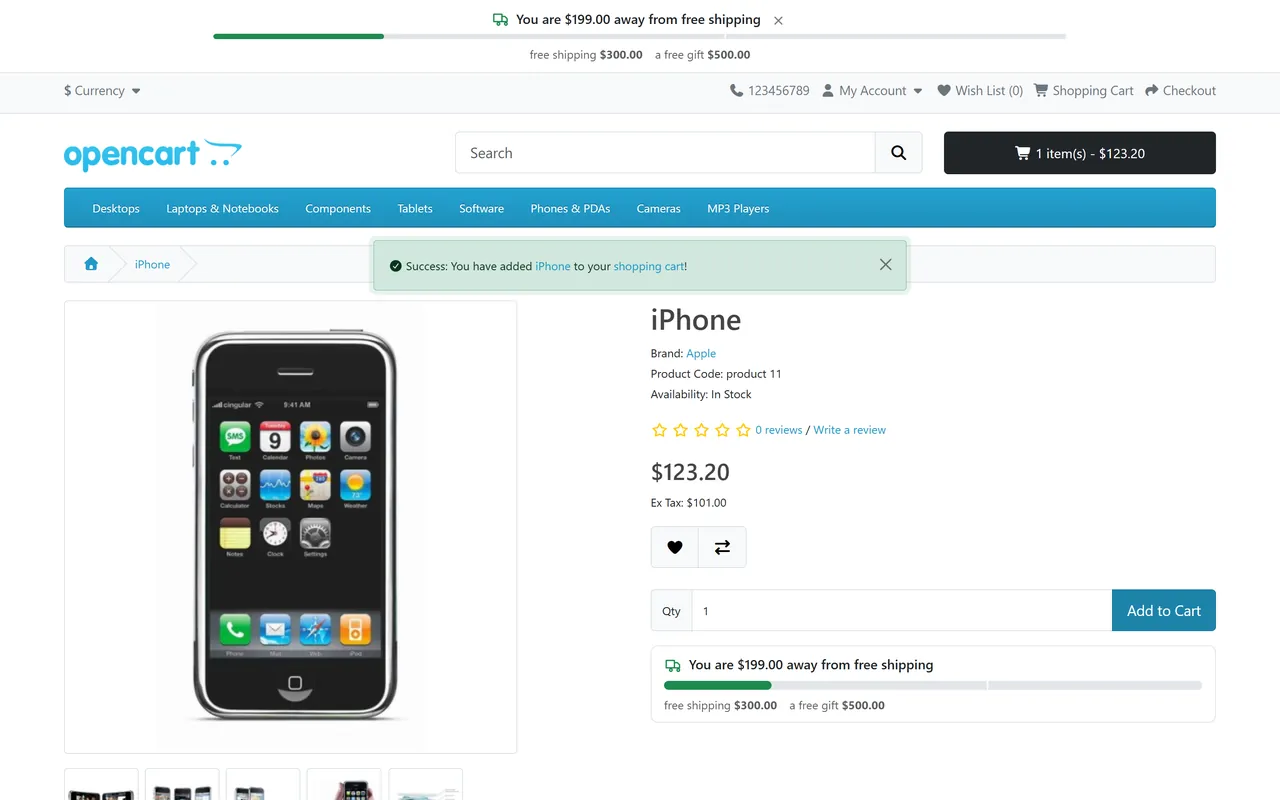
Live bar on the product page and header1 of 6
What it does
A live bar that tells shoppers how much more to spend for free shipping, in the mini-cart, on the cart page, in the checkout summary, on the product page and in an optional sticky bar. In Automatic mode it reads the status, minimum and geo zone of the OpenCart Free Shipping method and compares the cart sub-total the way that method does, so the bar and the checkout agree; the amount left follows the shopper currency and is rounded up. Manual mode has your own threshold with round amounts per currency and different amounts per customer group. Extra reward goals (a gift at 100), a free-shipping coupon state, texts per language, colours and stores. Events only, no tables, no OCMOD.
Know the limits. The bar shows progress and does not make shipping free; configure the Free Shipping method or a coupon. Extra goals are milestones only: set up the gift or discount yourself. Before a delivery address is chosen the bar assumes your store's country for the Free Shipping zone. In Automatic mode the Free Shipping method must be on, even for coupon-only shops (use Manual mode then). Coupons, reward points and tax do not change the amount left, because the Free Shipping minimum ignores them. The product page bar sits below the product form of the default theme; a theme without that form shows no bar there. OpenCart 4.1 only.
Features
For shoppers
Mini-cart, cart page, checkout summary, product page and an optional sticky bar at the top or bottom
The amount left in the shopper's own currency, rounded up so it never says 0.00 while shipping is not free yet
A check mark and a celebration message when the goal is reached; the next reward when there is one
Updates without a page reload; a layout that does not jump and works on phones
For the store owner
Automatic: reads the status, minimum and geo zone of the core Free Shipping method, so the bar and the checkout agree (equal to the minimum counts as free)
Manual: your own threshold, round amounts per currency, different amounts per customer group, compared with the sub-total or the total with tax
Extra milestones on the same bar, for example a free gift at 100 (display only: you grant the gift yourself)
A valid free-shipping coupon unlocks the bar
Texts per language with placeholders, colours, icons, reduced-motion aware animation, stores
A live preview of what Automatic mode reads from your Free Shipping method
Fast and safe
No tables and no external requests; a few light queries per page, no writes
Bar markup is escaped, colours accept hex values only
Updates keep your settings: OpenCart 4 updates an extension by uninstall and install, and this one keeps them
Events only: no OCMOD, no theme or core file edits; OpenCart 4.1.0.x, tested on 4.1.0.4 with the default theme
What you get
Download & installOne installer package (.ocmod.zip) for OpenCart 4.1.0.0 – 4.1.x. There is no OpenCart 3 edition. Download it from My licenses right after payment.
12 months of updates & supportNew versions and help for 12 months (24 or 36 months at checkout). After that the extension keeps working; renew anytime at 50%.
License for your storeOne production domain with all its subdomains; staging and local development hosts are free. How licensing works
30-day refundFull refund within 30 days of your first purchase, no reason needed. Refund policy
Tested buildsOpenCart 4.1.0.4. Tested on OpenCart 4.1.0.4.
Documentation & supportFull guide (Installation, Configuration, Usage, FAQ) on this page. Tickets from your account, first reply within 1 business day.
Compatibility
Free Shipping Progress Bar works with OpenCart 4.1.0.4.
We list the builds we install and test on. “Tested” means the test plan ran on that build; “Supported” means the build is inside the supported range.
Compatibility
Version
Range
Runs on
Status
OpenCart 4.1.0.x
4.1.0.0 – 4.1.0.4
PHP 8.1 – 8.3
Tested on 4.1.0.4
1.0.0
Nov 7, 2026
Latest
First release: live free shipping progress bar for OpenCart 4.1 (mini-cart, cart, checkout summary, product page, sticky bar), Automatic mode from the Free Shipping method or manual thresholds per currency and customer group, extra goals, free-shipping coupon state, texts per language, stores, colours.
How do I install the extension?
Upload. Extensions > Installer: upload the .ocmod.zip. It is for OpenCart 4 (4.1.0.0 to 4.1.x).
Install and enable. Extensions > Extensions > Modules: install, open the settings and switch it on. Events register themselves; nothing is patched.
Enter the license key. Paste the key from My licenses. Subdomains, staging and local hosts are included; you have 14 days to do it.
OpenCart 4.1.0.4. Tested on OpenCart 4.1.0.4. The Compatibility tab lists every version range.
Do the extensions change core files?
No. They work through OpenCart events and standard extension types (modules, order totals, themes). No core file edits, no OCMOD patches, no theme template edits, so OpenCart updates and other extensions keep working.
What does the license cover?
One production store domain with every subdomain (www, shop., staging.), plus local development hosts such as localhost, *.local and *.test. A store on another domain needs its own license; a second-store license is 40% off. You have 14 days after installing to enter the key. 12 months of updates and support are included; after that the extension keeps working and renewals are 50% off. How licensing works
Can I get a refund?
Yes. Ask for a full refund within 30 days of your first purchase, no reason needed: open a ticket or write to [email protected] with your order number. The money goes back to the card or bank account you paid with within 5 business days of approval. Refund policy
How do I get help?
Open a ticket from your account, so your license details are attached. We answer Monday to Friday: bug reports within 1 business day, how-to questions within 2. Support policy. Not a customer yet? Ask a pre-sales question.
A live progress bar that tells shoppers how much more they need to spend to get free shipping, in the mini-cart, on the cart page, in the checkout summary, on the product page and in an optional sticky bar. It reads the minimum of your own Free Shipping shipping method, so the bar follows the same minimum, zone and sub-total as the checkout once the delivery address is known (until then it assumes your store's country).
Bar on the product page and the sticky header
Same numbers as OpenCart: in Automatic mode the bar uses the Free Shipping method's status, minimum and geo zone, and compares the cart sub-total (after specials, before tax) exactly as the method does; a sub-total equal to the minimum counts as free
Any currency: amounts are converted from the default currency and rounded up to the smallest unit, so the bar never shows "0.00 away" while shipping is not yet free. Optional round amounts per currency
Manual mode: your own threshold, per currency, per customer group, compared with the sub-total or the total with tax
Extra goals: milestones on the same bar ("Free gift = 100"); display only, you grant the gift or discount yourself
Free-shipping coupons: a valid coupon with the free shipping flag unlocks the bar
Live: the cart page, mini-cart and checkout summary follow every change; the sticky bar and the product page bar refresh after add, edit and remove
No layout shift, accessible, theme-agnostic: server-rendered, an ARIA progress bar, reduced-motion aware; placed through OpenCart events, no theme file is touched
Multi-store and multi-language: limit the bar to stores, edit every text per language
Light: no tables, no external requests; a few light queries per page, no writes
No OCMOD, no core file changes; OpenCart 4.1.0.x
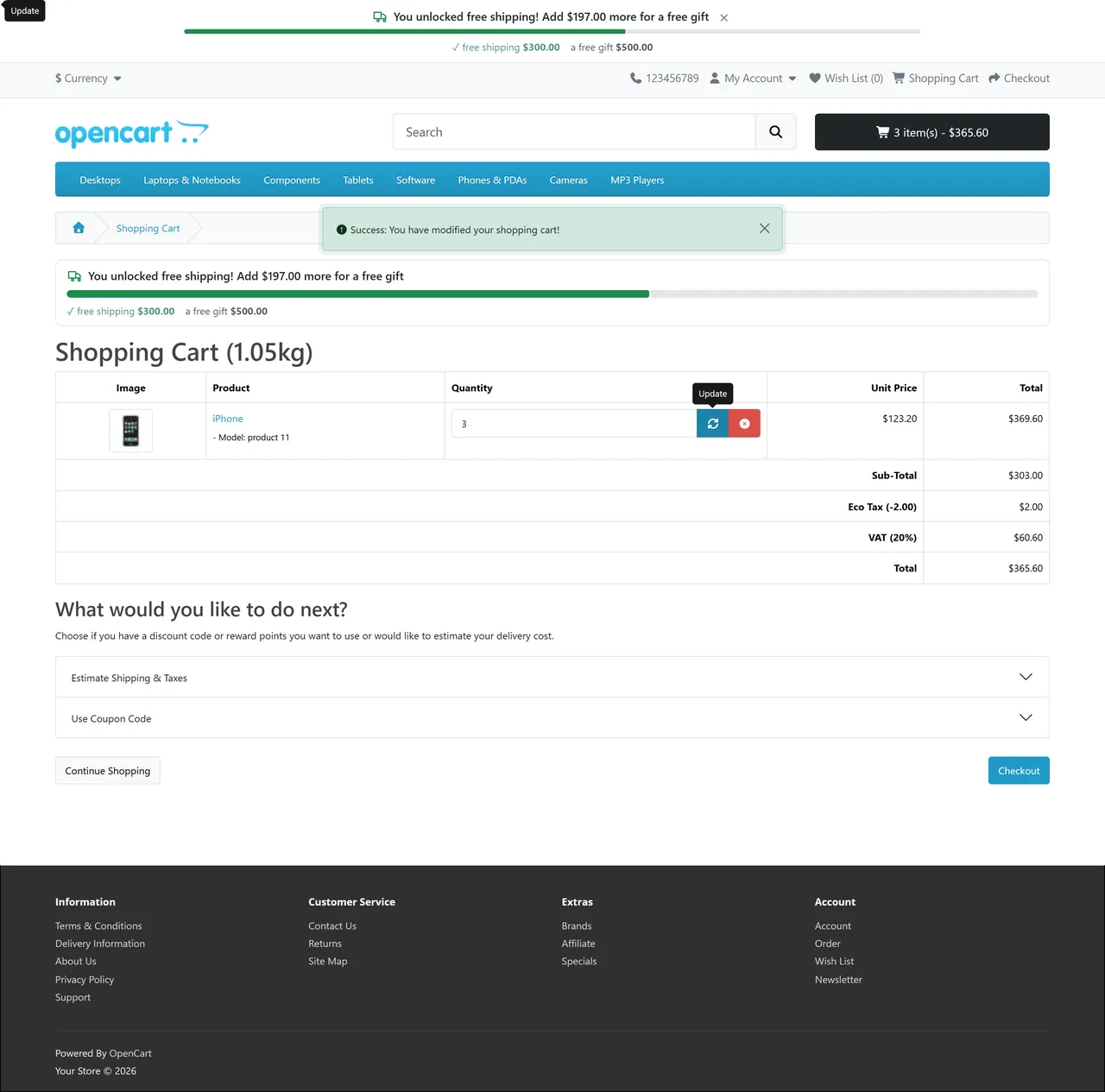
Cart page with free shipping unlocked and a gift goal next
Installation
Requirements: OpenCart 4.1.0.x, PHP 7.4 or newer with the mbstring extension.
In the OpenCart admin open Extensions > Installer, upload kv_free_shipping_bar.ocmod.zip and click Install.
Open Extensions > Extensions, choose Modules, find Free Shipping Progress Bar, click the green Install button, then the blue pencil.
Enable the core Free Shipping method under Extensions > Extensions > Shipping and set its Total (the minimum) and, if you want, a geo zone. The bar reads these values. (No Free Shipping method? Choose the manual source on the Goals tab.)
The mini-cart, cart and checkout placements are on after installing. Add a product to the cart to see the bar.
Uninstall: Extensions > Modules > Uninstall removes the events. The extension has no tables; your settings and the licence state are kept for the next install, because OpenCart 4 updates an extension by uninstalling and installing it again.
Update (OpenCart 4.1): Extensions > Modules > Uninstall, then Extensions > Installer: Uninstall and Delete the old entry, upload the new zip, Install, and Extensions > Modules > Install. Settings and the licence are restored.
Configuration
Open Extensions > Extensions > Modules > Free Shipping Progress Bar.
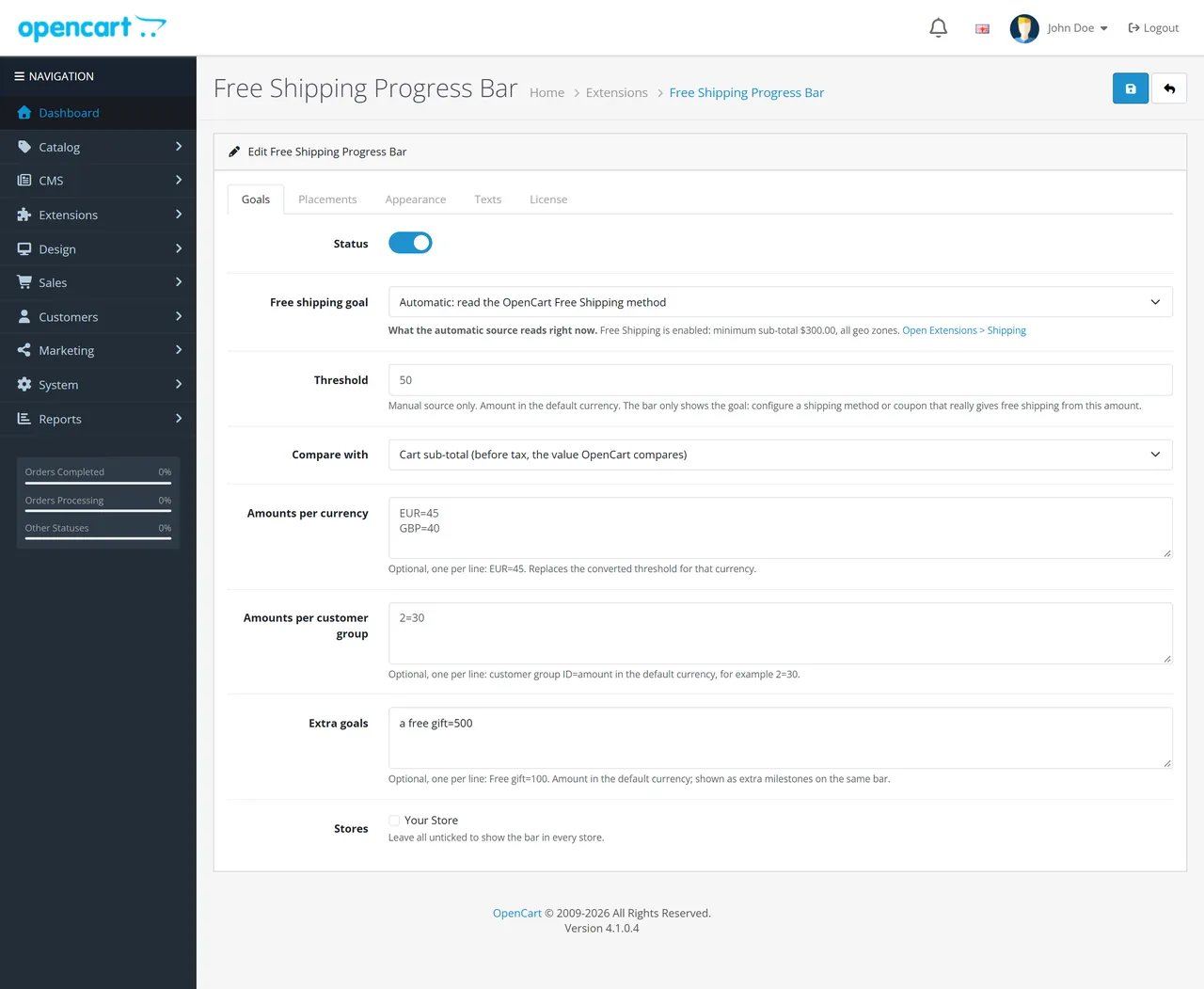
Goals
Setting
Description
Status
Switches the whole extension on or off.
Free shipping goal
Automatic reads the OpenCart Free Shipping method (status, Total, geo zone). No bar is shown when the method is off, has no minimum, or does not cover the shopper's delivery country. Manual threshold uses the amount below. A box shows what Automatic reads right now.
Threshold
Manual only. Amount in the default currency. It only drives the bar: make sure a shipping method or coupon really gives free shipping from this amount.
Compare with
Manual only. Cart sub-total (before tax, the value OpenCart compares) or Cart total with tax.
Amounts per currency
Manual only. One per line, EUR=45. Replaces the converted threshold for that currency.
Amounts per customer group
Manual only. One per line, customer group ID=amount in the default currency. The group of a signed-in customer (also with an empty cart), or the store's default group for guests. A per-currency amount (above) takes precedence over a group amount when both apply.
Extra goals
One per line, Free gift=100 (default currency), up to 5. Shown as milestones on the same bar. Display only: the extension does not give the gift or discount, you set that up yourself.
Stores
Tick the stores that show the bar; none ticked means every store.
How the delivery country is chosen for a geo-zone-limited Free Shipping method: the shipping address chosen in the checkout, otherwise the store's default country and zone.
Placements
Mini-cart, cart page, checkout summary, product page (below the product form) and a sticky bar (top of the page, sticking while scrolling, or fixed at the bottom). Visitors can close the sticky bar (it stays closed for the browser session). Show with an empty cart shows the "Free shipping on orders over ..." message; Hide when every goal is reached removes the bar after the last goal.
Appearance
Progress, goal reached and track colours (hex values only; anything else falls back to the default), icons and the progress animation (switched off for visitors who prefer reduced motion).
Texts
Per language. Leave a field empty to use the English default. Placeholders: {amount} left to the next goal in the shopper's currency, {goal} the next goal, {threshold} the free-shipping amount, {done} the goals already reached.
License
The key from your Kavio Labs account. A new installation works for 14 days without a key. Without a valid license the bar is hidden on the storefront; the cart, checkout and the admin are never affected.
Usage
What shoppers see
Empty cart: "Free shipping on orders over $50.00" (switchable).
Below the goal: "You are $12.50 away from free shipping" and a filling bar.
Goal reached: "Congratulations! You unlocked free shipping" with a check mark; with extra goals the message names the next one ("You unlocked free shipping! Add $30.00 more for a free gift").
Free-shipping coupon applied: "Your coupon gives you free shipping".
Carts without shippable products (downloads, services) show no bar.
The numbers
The Free Shipping method of OpenCart compares the cart sub-total (line totals after specials and quantity discounts, before tax) with its Total, both in the default currency, and treats "equal" as free. The bar uses the same sub-total. Coupons, reward points and taxes are not part of that comparison, so they do not move the bar, and the remaining amount is also measured before tax even when your shop displays prices with tax. In another currency the remaining amount is converted from the default currency and rounded up.
Live updates
The cart page, the mini-cart and the checkout summary are re-rendered by OpenCart after every change, and the bar is part of them. The sticky bar and the product page bar listen for the cart requests and refresh themselves.
Customizing
Colours and texts are settings. For layout tweaks the bar has the classes .kvfsb, .kvfsb-p-<placement>, .kvfsb-s-<state> (intro, progress, partial, reached, coupon), .kvfsb-track, .kvfsb-fill and the CSS variables --kvfsb-fill, --kvfsb-done, --kvfsb-track; override them in your theme's stylesheet.
Settings: goals
FAQ
Does the bar make shipping free?
No. It shows progress. Free shipping itself comes from the OpenCart Free Shipping method (or a coupon). In Automatic mode the bar reads that method (minimum, zone, sub-total). Before the shopper has chosen a delivery address it assumes your store's country, so a shopper from outside the Free Shipping zone may see the bar until the address is known. Extra goals are milestones only: you set up the gift or discount yourself.
The bar is missing.
Check: the extension status; the license (the bar is hidden without a valid license after the 14-day start); Free Shipping enabled with a Total above 0 (Automatic mode); the delivery country inside the Free Shipping geo zone; the cart has shippable products; the placement switch; the store list. A theme that removes the product form or the standard cart blocks shows no bar there instead of breaking the page.
Do coupons and taxes change the remaining amount?
No, by design: OpenCart's Free Shipping minimum ignores them. With the manual source you can compare with the cart total including tax.
Can I use it with another free shipping extension?
Yes: choose the manual source and enter the amounts your other extension uses. The bar only displays progress.
Is it multi-currency?
Yes. Amounts follow the shopper's currency; optional round amounts per currency in manual mode.
Does it slow down my store?
No. One read of the cart per page (the cart library caches it) and a few light queries (a geo-zone check, and the coupon check only when a coupon is applied); the live refresh endpoint writes nothing.
Does a free-shipping coupon show the bar when the Free Shipping method is off?
No. In Automatic mode the bar needs the Free Shipping method switched on; a store that grants free shipping only by coupon should use Manual mode.
Does uninstalling delete my settings?
No, they are kept for the next install (OpenCart 4 updates by uninstall and install).
Server-side tracking for OpenCart 4.x and 3.0.x: purchases, refunds, add to cart, checkout, product views and leads go from your server to the free official GA4 Measurement Protocol, Meta Conversions API and TikTok Events API, deduplicated with the browser pixels through shared event ids. Consent-aware, SHA-256 hashed customer data, order status mapping, queue with retries, test mode and an event log. No paid relay, events only, no OCMOD.
The department store theme for OpenCart 4.x and 3.0.x: colour-coded departments, a department list beside the hero slider with two side promos, a big search with a department selector, tabbed product blocks, a 2 + 1 + 2 offer grid, deals of the day with real countdowns, a department showcase, a promotions band and a three-column product page with a sticky buy box. Four styles (Meridian, Harbor, Citrus, Night) and your own colours on top. Events only, no core changes.
Stop AI crawlers, scrapers, vulnerability scanners and unwanted countries before OpenCart 4.x or 3.0.x builds a page. Googlebot and Bingbot are verified by DNS and always allowed; 50+ bots get one switch each; country rules use free GeoIP databases and can close only the checkout; IP and network lists, rate limits, honeypots and the cart flood fix; a one-second challenge instead of a captcha; learning mode, dashboard, log, IP tester and Cloudflare export. No core changes, no OCMOD.