1.0.0
Nov 7, 2026
Latest- First release.
by Kavio Labs · for OpenCart 4.1.x
A complete blog for OpenCart 4.1: posts, categories, tags and authors with SEO addresses per store and language, the OpenCart editor, featured images, products inside posts, related posts, a From the blog block on product pages, scheduled publishing in the shop time zone, Article and breadcrumb markup, an RSS feed, an XML sitemap and comments with moderation and spam protection. Imports the built-in OpenCart blog. No OCMOD.
A complete blog for OpenCart 4.1: posts, categories, tags and authors with SEO addresses per store and language, the OpenCart editor, featured images, products inside posts, related posts, a From the blog block on product pages, scheduled publishing in the shop time zone, Article and breadcrumb markup, an RSS feed, an XML sitemap and comments with moderation and spam protection. Imports the built-in OpenCart blog. No OCMOD.
Blog Pro works with OpenCart 4.1.0.4.
We list the builds we install and test on. “Tested” means the test plan ran on that build; “Supported” means the build is inside the supported range.
| Version | Range | Runs on | Status |
|---|---|---|---|
| OpenCart 4.1.0.x | 4.1.0.0 – 4.1.0.4 | PHP 8.1 – 8.3 | Tested on 4.1.0.4 |
The Documentation tab covers the settings and every screen.
OpenCart 4.1.0.4. Tested on OpenCart 4.1.0.4. The Compatibility tab lists every version range.
No. They work through OpenCart events and standard extension types (modules, order totals, themes). No core file edits, no OCMOD patches, no theme template edits, so OpenCart updates and other extensions keep working.
One production store domain with every subdomain (www, shop., staging.), plus local development hosts such as localhost, *.local and *.test. A store on another domain needs its own license; a second-store license is 40% off. You have 14 days after installing to enter the key. 12 months of updates and support are included; after that the extension keeps working and renewals are 50% off. How licensing works
Yes. Ask for a full refund within 30 days of your first purchase, no reason needed: open a ticket or write to [email protected] with your order number. The money goes back to the card or bank account you paid with within 5 business days of approval. Refund policy
Open a ticket from your account, so your license details are attached. We answer Monday to Friday: bug reports within 1 business day, how-to questions within 2. Support policy. Not a customer yet? Ask a pre-sales question.
11 more answers about setup and daily use in the Documentation tab.
A complete blog for OpenCart 4.1: posts, categories, tags and authors with SEO addresses, the OpenCart editor, featured images, products inside posts, related posts, comments with moderation and spam protection, scheduled publishing, an RSS feed, an XML sitemap and Article markup. It works in every store and language of your installation.
Requirements: OpenCart 4.1.0.x, PHP 8.1 or newer. Back up your store first.
kv_blog_pro.ocmod.zip and click Install on the new row.localhost and *.test work with any valid key.The blog is at index.php?route=extension/kv_blog_pro/page/blog. With SEO URLs switched on it is at /blog or, when your store already uses that address for OpenCart's built-in blog, at /journal. Change it in Design > SEO URL (search for the route extension/kv_blog_pro/page/blog).
OpenCart 4 updates an extension by uninstalling and installing it again. Blog Pro keeps its data on uninstall: posts, comments, categories, authors, tags, SEO addresses, settings and the licence state stay in the database. Update steps: Extensions > Extensions > Modules > Uninstall, Extensions > Installer > Uninstall and Delete, upload the new zip, Install, and install the module again. Open the settings page once afterwards.
If you installed a release made before data-keeping updates existed, replace the folder extension/kv_blog_pro/ with the new files over FTP instead and open the settings page once.
Uninstalling never deletes your content. To delete everything (posts, comments, authors, categories, tags, SEO addresses), use Blog > Settings > Remove all data and type DELETE. This also switches the module off and disables its events (the storefront keeps working); turn it on again in the settings to start with an empty blog.
OpenCart 4.1 includes a basic blog (CMS > Articles). Blog Pro does not change it. Use Blog > Settings > Import from the built-in blog to copy its articles, topics, tags and comments into Blog Pro, then stop linking to the built-in blog. Importing twice never creates duplicates.
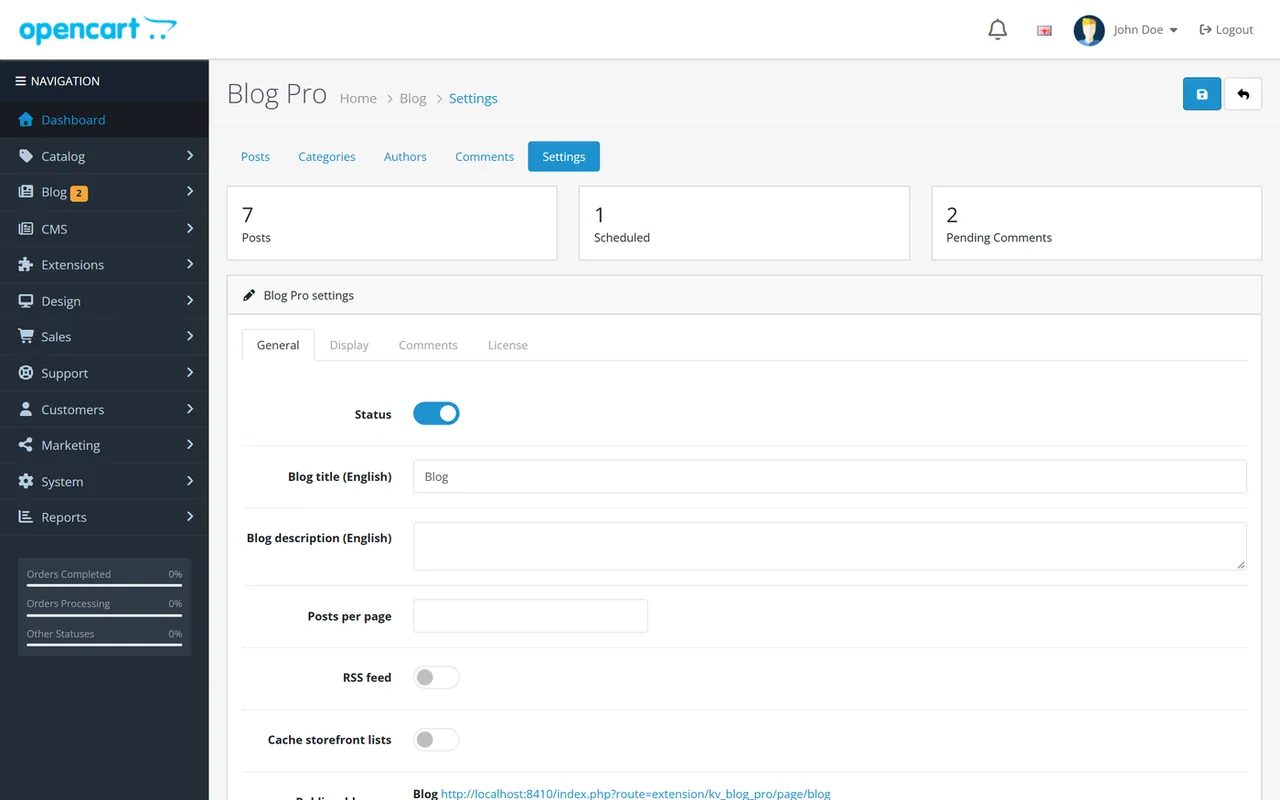
Open Blog > Settings.
| Setting | What it does |
|---|---|
| Status | Switches the blog on or off for visitors. The admin keeps working |
| Blog title and description | Per language. Used for the heading, the page title and the RSS feed |
| Posts per page | List size of the blog, category, tag, author and search pages (default 9) |
| RSS feed | Publishes the feed and the discovery link in every page head |
| Cache storefront lists | Keeps lists in the OpenCart cache. Every change in the admin clears it (a newly approved comment only refreshes the comments of its post). Search results are never cached and carry noindex. A scheduled post still appears at its minute |
The page also shows the public addresses of the blog, the RSS feed and the XML sitemap. Add the sitemap address to Google Search Console or your robots.txt.
Excerpt length, author, reading time, table of contents (shown from three headings), view counter, the number of related posts under a post and the number of posts on a product page (0 switches the product page block off).
| Setting | What it does |
|---|---|
| Comments | Switch comments on or off everywhere. Single posts can also close their comments |
| Guests may comment | Off: only signed-in customers |
| Moderation | Hold every comment, approve automatically after a first approved comment from the same signed-in customer (guests: the same e-mail, name and address), or publish immediately. The spam checks always apply |
| Comments per visitor in 10 minutes | Rate limit by a hashed address; every attempt counts, including those caught by the hidden field, and one form token can send at most two comments. Behind a proxy or CDN that does not pass the visitor address to PHP (REMOTE_ADDR), all visitors share one limit: enable real-IP forwarding on the server |
| Minimum seconds to fill the form | Faster submissions are refused |
| Links allowed | More links than this and the comment is filed as spam |
| Maximum length | Characters |
Publish times are shop times (System > Settings > Option > Timezone). A published post with a time in the future is shown as Scheduled and goes live at that minute. No cron job is needed.
Every post, category and author has an SEO keyword field per store and language. Leave it empty and Blog Pro creates one from the title. A keyword already used by something else is refused. The blog home, the feed and the sitemap have their own keywords in Design > SEO URL.
Add Blog Pro: Posts (source: latest, popular or featured; optional category; limit; images) and Blog Pro: Categories under Extensions > Modules, then place them in Design > Layouts. The layout called Blog is used by every blog page in every store (it is created for each store when you install or save the settings).
Blog > Posts > Add. One tab per language:
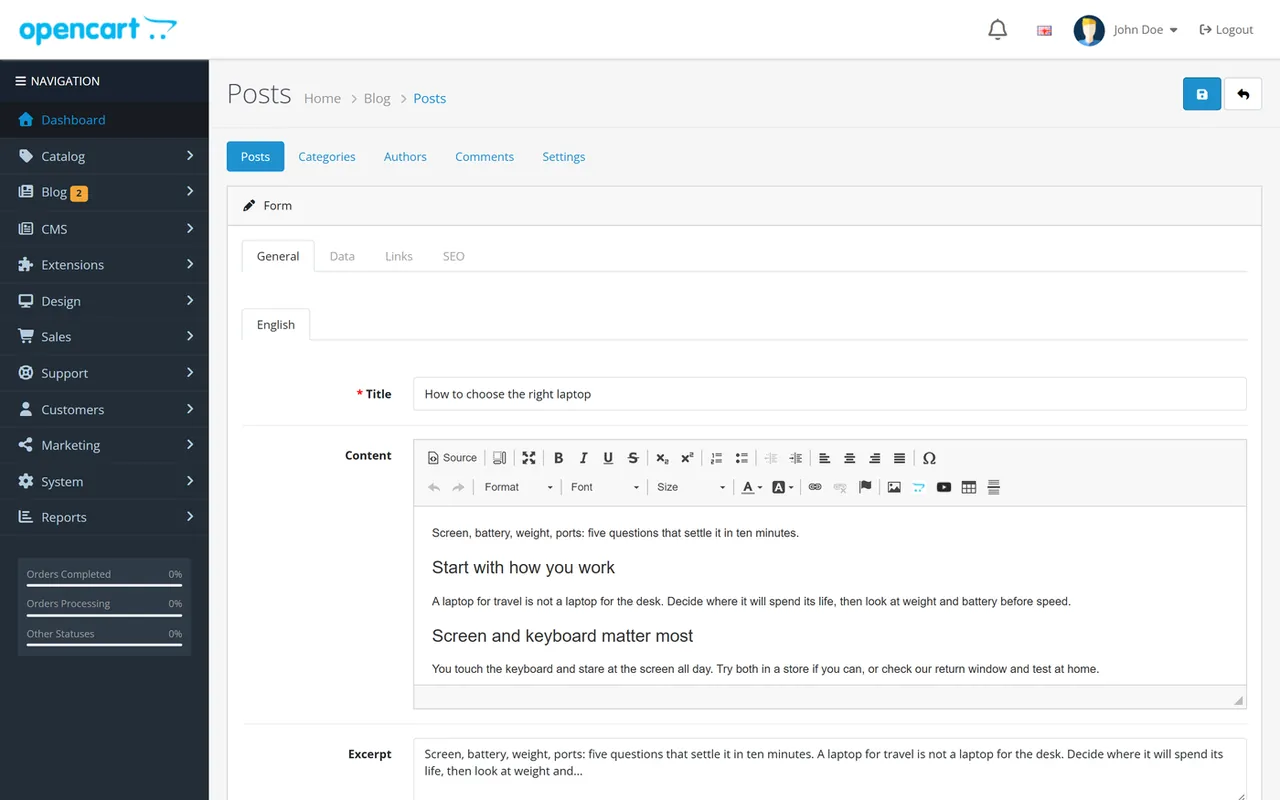
Set the Publish at time and keep the status on to schedule a post. Content is cleaned when you save: scripts, event handlers, forms, unknown tags and links that are not http, https, mailto or tel are removed. YouTube and Vimeo embeds are kept.
Blog > Categories and Blog > Authors work like posts: name, description, image, SEO keyword per store and language. Tags are created from the tags field of a post and get an SEO address automatically.
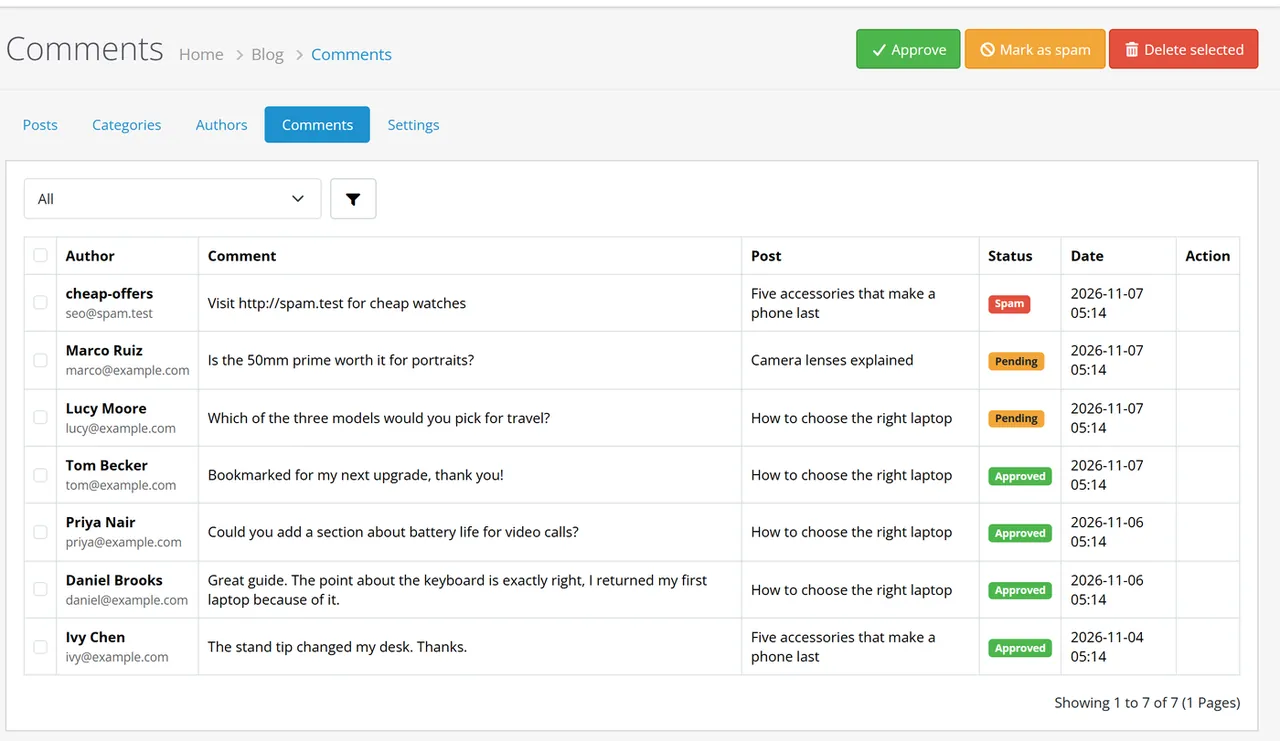
Blog > Comments lists every comment with a status filter. Select rows and click Approve, Mark as spam or Delete selected. The menu shows how many comments wait.
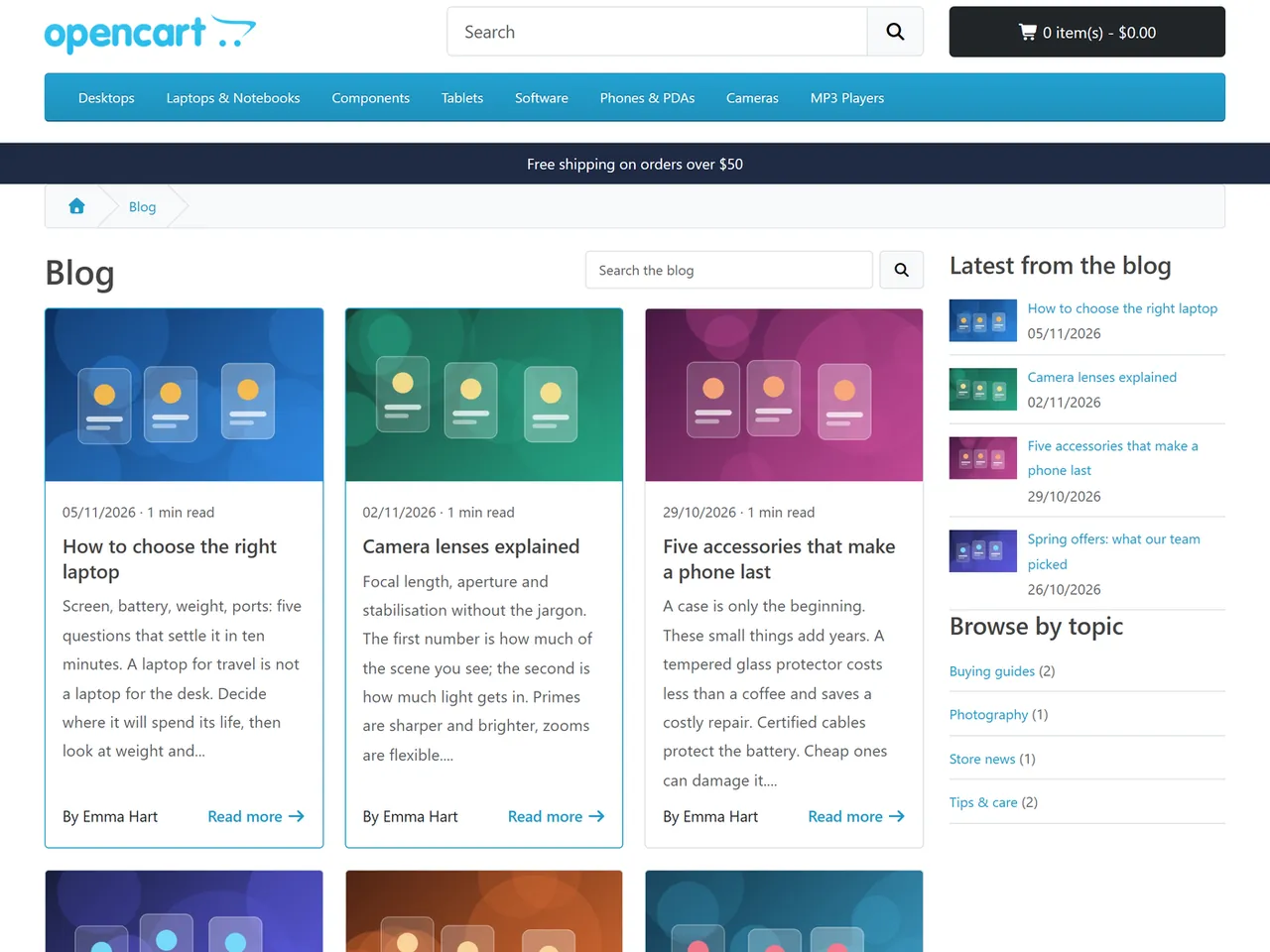
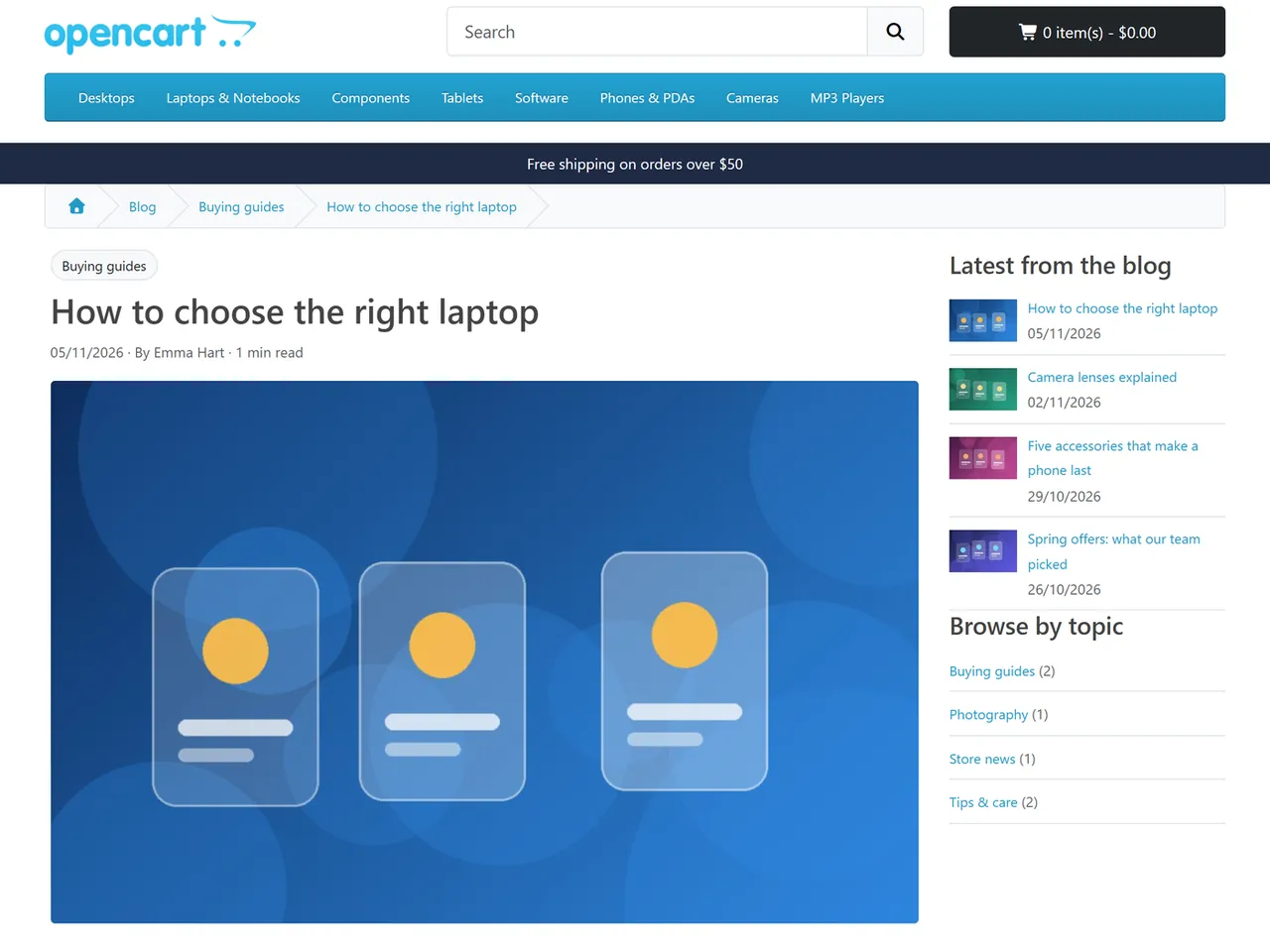
The blog page lists posts as cards with search and pagination. A post shows its categories, byline, reading time, a table of contents, the content, tags, the author box, products, related posts and comments. Product pages show "From the blog" when posts feature the product.
Blog > Settings > Import from the built-in blog copies articles (with their author names, tags and images), topics (as categories) and comments. The built-in blog is not changed. Imported items get new SEO keywords (the built-in blog keeps its own, so both serve the text until you hide the built-in one). Reply threads of the built-in comments become flat comments; use the SEO Suite redirects or your web server to forward old addresses.
The built-in blog has articles, topics and comments. Blog Pro adds authors with pages and author boxes, tags, products inside posts, related posts, posts on product pages, scheduled publishing, Article and breadcrumb markup, an RSS feed, an XML sitemap, a table of contents, reading time, layout modules, spam protection for comments and an import of your existing articles.
OpenCart 4.1.0.x (tested on 4.1.0.4), PHP 8.1 or newer. There is no OpenCart 3 edition.
OpenCart's built-in blog already owns the address blog. Blog Pro picks the first free keyword. Change it in Design > SEO URL. The keyword is chosen per language: a language whose blog address is free uses /blog, another one may use /journal.
Comments are stored as plain text (tags are stripped) and escaped when shown. Names too. The e-mail address is never shown.
A hidden field that real visitors never fill, a signed form token with a minimum fill time, a rate limit per visitor (hidden-field hits count too), duplicate detection per post and visitor, a link limit and optional moderation. Visitor addresses are stored only as a hash.
No. Lists compare the publish time with the shop time on every request, and the cache expires at the minute the next post goes live.
Yes. Posts, categories and authors choose their stores; texts and SEO keywords exist per language. Posts without text in the current language are not shown in it.
Yes. The pages use the standard OpenCart layout (breadcrumb, columns, content) and Bootstrap classes. The stylesheet catalog/view/stylesheet/kvblog.css uses Bootstrap colour variables and is easy to override.
Nothing is deleted. Use Remove all data in the settings to delete it on purpose.
No. Comment notifications are not sent in this version.
An event adds a "From the blog" block under the product details when posts feature the product. Set the number to 0 to switch it off.
Buy with confidence
This product was tested on this build. Builds we did not test are not listed.
Updates and support are included in the price. The product keeps working afterwards; renewing is optional.
How licensing worksIf it is not what you expected, tell us within 30 days and we refund the order.
Refund policyPay by card, Apple Pay or Google Pay on Stripe's secure page. Your card number never reaches our server.
Ask a pre-sales questionSold by Kavio Labs Software Limited, registered in England and Wales No. 17532441. About us
More for OpenCart
Server-side tracking for OpenCart 4.x and 3.0.x: purchases, refunds, add to cart, checkout, product views and leads go from your server to the free official GA4 Measurement Protocol, Meta Conversions API and TikTok Events API, deduplicated with the browser pixels through shared event ids. Consent-aware, SHA-256 hashed customer data, order status mapping, queue with retries, test mode and an event log. No paid relay, events only, no OCMOD.

The department store theme for OpenCart 4.x and 3.0.x: colour-coded departments, a department list beside the hero slider with two side promos, a big search with a department selector, tabbed product blocks, a 2 + 1 + 2 offer grid, deals of the day with real countdowns, a department showcase, a promotions band and a three-column product page with a sticky buy box. Four styles (Meridian, Harbor, Citrus, Night) and your own colours on top. Events only, no core changes.

Stop AI crawlers, scrapers, vulnerability scanners and unwanted countries before OpenCart 4.x or 3.0.x builds a page. Googlebot and Bingbot are verified by DNS and always allowed; 50+ bots get one switch each; country rules use free GeoIP databases and can close only the checkout; IP and network lists, rate limits, honeypots and the cart flood fix; a one-second challenge instead of a captcha; learning mode, dashboard, log, IP tester and Cloudflare export. No core changes, no OCMOD.


