FedEx for OpenCart 4 on the current FedEx REST APIs: live FedEx rates and delivery dates at checkout from one rate request per cart, labels (PDF, PNG or ZPL II) from the order page with multi-package shipments, customs lines and a commercial invoice, a choice of who pays duties and taxes, return labels, cancel, pickups, and tracking with the FedEx link written to the order history by cron; address validation tells residential from business. The label purchase is protected against double clicks and lost answers, so a label is never bought twice by accident. You connect with your own FedEx Developer Portal project and account number (test and live), secrets are encrypted at rest. A shipping extension with events and cron, no OCMOD.
Tested on 4.1.0.4Updated Nov 7, 2026Version 1.0.0Compatible with OpenCart 4.1.0.4 No core file edits
Built forOpenCart
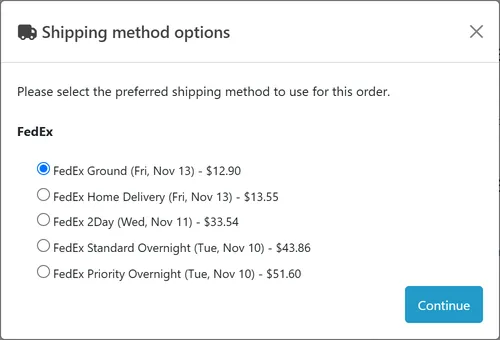
Live FedEx rates at checkout1 of 6
What it does
FedEx for OpenCart 4 on the current FedEx REST APIs: live FedEx rates and delivery dates at checkout from one rate request per cart, labels (PDF, PNG or ZPL II) from the order page with multi-package shipments, customs lines and a commercial invoice, a choice of who pays duties and taxes, return labels, cancel, pickups, and tracking with the FedEx link written to the order history by cron; address validation tells residential from business. The label purchase is protected against double clicks and lost answers, so a label is never bought twice by accident. You connect with your own FedEx Developer Portal project and account number (test and live), secrets are encrypted at rest. A shipping extension with events and cron, no OCMOD.
What it changes for your store
FedEx on the current FedEx REST APIs for your OpenCart store. Show live FedEx rates with delivery dates at checkout, then buy, print, track and cancel the label from the order page. It connects with your own FedEx Developer Portal project and account number: no aggregator in between and no per-label fee from us.
Know the limits. You need a FedEx account number and a FedEx Developer Portal project (API key and secret); FedEx decides on production access. One account per shop. Pickups are domestic requests. OpenCart keeps no package sizes per cart, so rates use the default package you set on the Connection tab; you can change size and weight per package on the order page. Tested against a stand-in built from the official FedEx documents, not against the live FedEx service. FedEx is a trademark of its owner. This extension is not affiliated with, endorsed by or sponsored by FedEx.
Features
Checkout
One FedEx shipping method with a line per service (Ground, Home Delivery, 2Day, Overnight, International Priority and more), each with its delivery date, from one rate request per cart
Only the destination city, region, postcode, country and the package weight are sent for a rate (and the value when you switch insurance on): no name, e-mail or phone
Account or list rates, markup, handling fee, rounding, free shipping threshold, fallback rate, services filter, tax class and geo zone
Labels, customs and tracking
A FedEx tab on the order: service from the customer's choice, packages from the product weights (split above the FedEx limit), the recipient address, customs lines for international orders
Labels as PDF, PNG or ZPL II, one per package, with the commercial invoice; return labels; cancel; address check that tells residential from business
Choose who pays duties and taxes: the recipient (the default), you, or a third-party FedEx account, per label if you wish
The tracking number and the FedEx tracking link go into the order history; an hourly cron refreshes the status and scan events and can move the order to your statuses
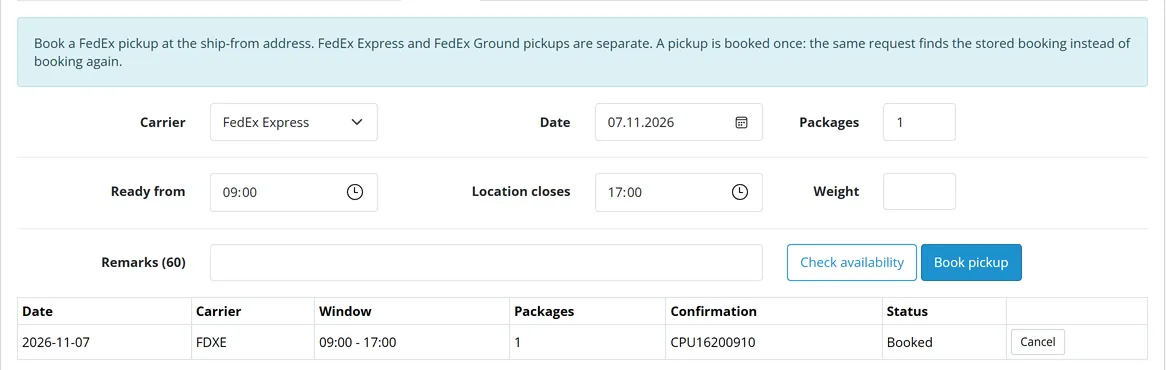
Book and cancel FedEx Express and Ground pickups with an availability check
A purchase is protected: a lock per order, a record written before FedEx is called, and a hold when the answer is lost, so double clicks and retries never buy a second label; no label is bought for a cancelled, denied, failed, refunded or incomplete order, or one whose status is outside your processing and complete lists
Safe and simple
API secrets stored encrypted, secrets and personal data masked in the log; a shipping extension with events and cron, no OCMOD, no core edits; tested on OpenCart 4.1.0.4
What you get
Download & installOne installer package (.ocmod.zip) for OpenCart 4.1.0.0 – 4.1.x. There is no OpenCart 3 edition. Download it from My licenses right after payment.
12 months of updates & supportNew versions and help for 12 months (24 or 36 months at checkout). After that the extension keeps working; renew anytime at 50%.
License for your storeOne production domain with all its subdomains; staging and local development hosts are free. How licensing works
30-day refundFull refund within 30 days of your first purchase, no reason needed. Refund policy
Tested buildsOpenCart 4.1.0.4. Tested on OpenCart 4.1.0.4.
Documentation & supportFull guide (Installation, Configuration, Usage, Developer notes) on this page. Tickets from your account, first reply within 1 business day.
Compatibility
FedEx REST Rates & Labels works with OpenCart 4.1.0.4.
We list the builds we install and test on. “Tested” means the test plan ran on that build; “Supported” means the build is inside the supported range.
Compatibility
Version
Range
Runs on
Status
OpenCart 4.1.0.x
4.1.0.0 – 4.1.0.4
PHP 8.1 – 8.3
Tested on 4.1.0.4
1.0.0
Nov 7, 2026
Latest
First release. OpenCart 4.1 port of the audited CS-Cart add-on kv_fedex_rest 1.0.0, on the FedEx REST APIs (OAuth, Rate and Transit Times, Ship, Pickup, Track, Address Validation).
Live FedEx rates and delivery dates at checkout; labels (PDF, PNG, ZPL II), multi-package, customs lines, commercial invoice; duties and taxes payer (recipient by default); return labels; cancel; pickups; tracking link and status in the order history; address validation.
FedEx currency codes (UKL, SFR, JYE and the others of the API Reference Guide) for every amount sent and read back.
Customs weight is the total weight of the line; Address Validation fields as in the official schema.
Label purchase protection: lock per order, attempt recorded before the call, unresolved hold, discard refused while a request is in flight, no label for cancelled, denied, failed, refunded or incomplete orders or statuses outside the processing and complete lists.
OpenCart stores text HTML-encoded: names, addresses, product names and the shop's own data are decoded before they go to FedEx (labels, customs invoice), and the Connection and label forms save plain text, so values with & or quotes stay intact on every save.
Amounts (rates, declared values, fees) are kept in the shop's base currency, so a store whose default currency differs from the base is not converted twice. Weight and length units with a localised name use OpenCart's class values; option weights count in the label default.
Update-safe: uninstall keeps the data, settings are restored on install.
How do I install the extension?
Upload. Extensions > Installer: upload the .ocmod.zip. It is for OpenCart 4 (4.1.0.0 to 4.1.x).
Install and enable. Extensions > Extensions > Modules: install, open the settings and switch it on. Events register themselves; nothing is patched.
Enter the license key. Paste the key from My licenses. Subdomains, staging and local hosts are included; you have 14 days to do it.
OpenCart 4.1.0.4. Tested on OpenCart 4.1.0.4. The Compatibility tab lists every version range.
Do the extensions change core files?
No. They work through OpenCart events and standard extension types (modules, order totals, themes). No core file edits, no OCMOD patches, no theme template edits, so OpenCart updates and other extensions keep working.
What does the license cover?
One production store domain with every subdomain (www, shop., staging.), plus local development hosts such as localhost, *.local and *.test. A store on another domain needs its own license; a second-store license is 40% off. You have 14 days after installing to enter the key. 12 months of updates and support are included; after that the extension keeps working and renewals are 50% off. How licensing works
Can I get a refund?
Yes. Ask for a full refund within 30 days of your first purchase, no reason needed: open a ticket or write to [email protected] with your order number. The money goes back to the card or bank account you paid with within 5 business days of approval. Refund policy
How do I get help?
Open a ticket from your account, so your license details are attached. We answer Monday to Friday: bug reports within 1 business day, how-to questions within 2. Support policy. Not a customer yet? Ask a pre-sales question.
FedEx REST Rates & Labels brings FedEx to your OpenCart 4.1 shop on the current FedEx REST APIs: live rates and delivery dates at checkout, shipping labels from the order page, return labels, cancel, pickups, tracking written to the order history, and address validation. It connects with your own FedEx Developer Portal project and FedEx account; there is no third-party service in between and no per-label fee from us.
Checkout rates
What it does
Live rates at checkout. One "FedEx" shipping method with a line per service (Ground, Home Delivery, 2Day, Overnight, International Priority, and so on), each with its delivery date. One rate request serves the whole cart. Only the destination city, region, postcode and country and the package weight (plus the value, if you switch insurance on) are sent; no name, e-mail or phone.
Price rules. Percent markup, handling fee, rounding, free shipping above a subtotal, a fallback rate when FedEx cannot be reached, a services filter, tax class and geo zone like any OpenCart shipping method. Your account rates or FedEx list rates.
Labels from the order page. A "FedEx" tab on the order: the service the customer chose, packages from the product weights (split automatically above the FedEx weight limit), the recipient address, customs lines for international orders. Labels as PDF, PNG or ZPL II, one label per package, plus the commercial invoice.
Duties and taxes. For international labels choose who pays: the recipient (DAP, the default), you (DDP) or a third-party FedEx account.
Returns, cancel, address check. A return label with one click; cancel a shipment FedEx has not picked up; let FedEx resolve the address and tell residential from business.
Pickups. Book and cancel FedEx Express and Ground pickups.
Tracking. The tracking number and the FedEx tracking link are written to the order history, and an hourly cron refreshes the status and the scan events; delivered can move the order to the status you choose.
Safe purchases. The label purchase is protected against double clicks and retries: a lock per order, a record written before FedEx is called, and a hold (Unresolved) when the answer was lost, so a label is never bought twice by accident.
Safe storage. API secrets are encrypted at rest, the log masks secrets, tokens and personal data. Events and cron only: no OCMOD, no core edits. OpenCart 4.1, tested on 4.1.0.4.
Limits to know
You need a FedEx account number and a project in the FedEx Developer Portal (API key and secret). The sandbox needs no shipping. FedEx decides on production access.
One account per shop. Pickups are domestic requests (FedEx Express and Ground). Rates and labels use the weight and value of the order lines; products without a weight use the default weight you enter on the Connection tab.
OpenCart keeps no separate dimensions per cart package: the default package size on the Connection tab is used for rates, and you can change size and weight per package on the order page before the label.
Tested against a stand-in built from the official FedEx documentation, not against the live FedEx service. The open points are listed in the Developer notes.
FedEx is a trademark of its owner. This extension is not affiliated with, endorsed by or sponsored by FedEx.
Installation
Requirements: OpenCart 4.1.0.x, PHP 7.4 or newer with cURL and OpenSSL, a FedEx account number and a FedEx Developer Portal project (API key and secret).
In the FedEx Developer Portal create a project and note the API key and secret (test keys first; production keys after FedEx approves the project). Have your FedEx account number ready.
In the OpenCart admin open Extensions > Installer, upload kv_fedex_rest.ocmod.zip and click Install.
Open Extensions > Extensions, choose Shipping, find FedEx REST Rates & Labels and click the green Install button, then the blue pencil to open the settings.
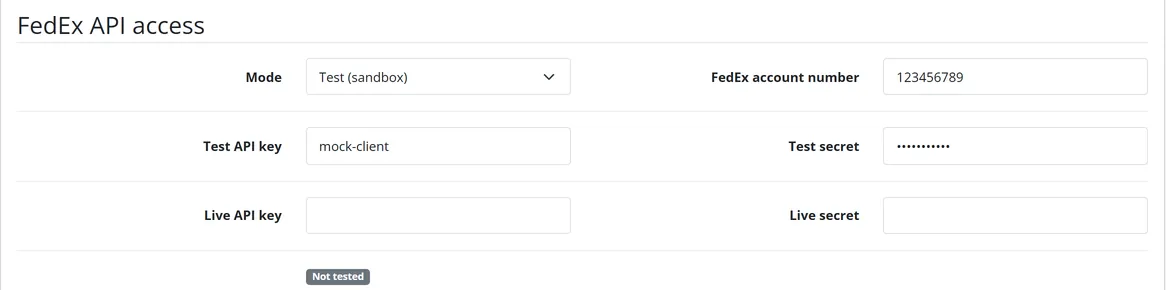
On the Connection tab choose the mode (test or live), enter the API key and secret and your FedEx account number, the ship-from address (street, city, state code, postcode, country, a phone number) and click Save connection, then Save and test connection. The test gets a token and rates a test parcel with your account number.
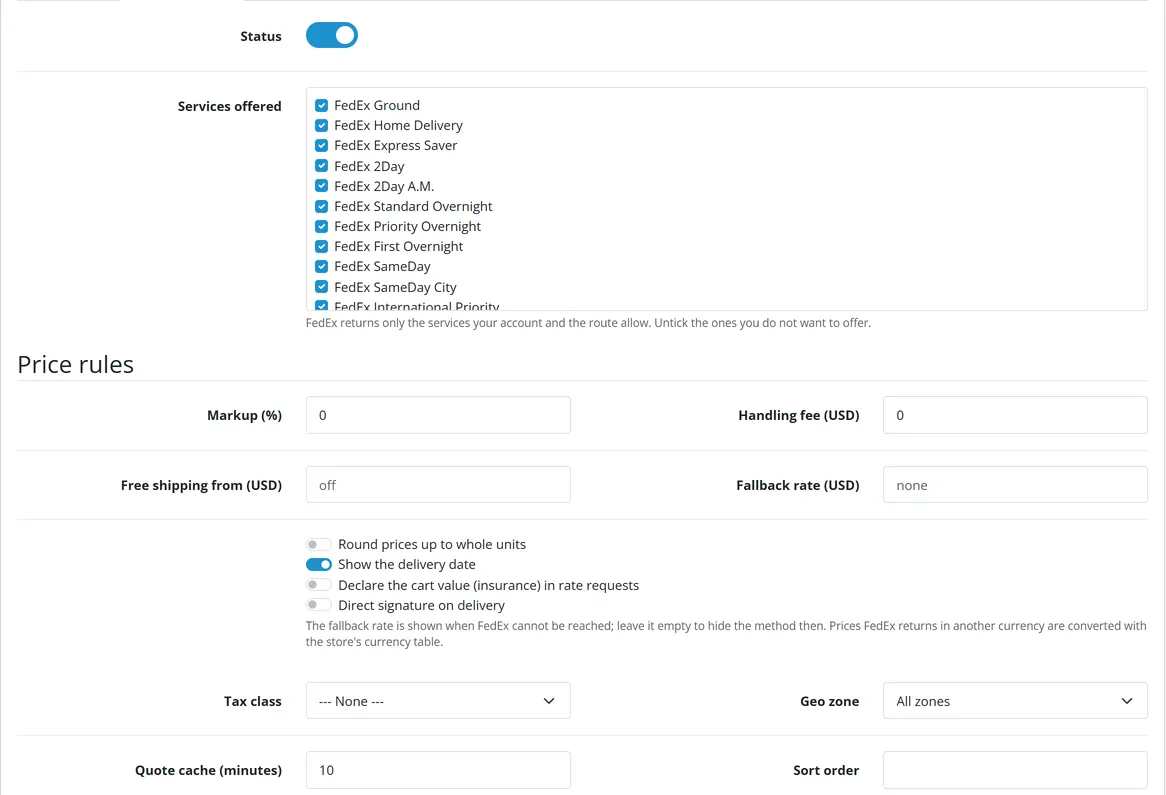
On the Checkout rates tab tick the services you offer (all are ticked by default), set the status to on and save.
Make sure the OpenCart cron job runs (php cron.php, see Checkout rates, Orders and tracking), so tracking refreshes by itself.
Open an order and look for the FedEx tab next to History.
Test in the sandbox first (mode Test), then enter the live keys and switch the mode to Live.
Updating
Your data and settings stay when you update.
OpenCart 4.x. OpenCart 4 cannot replace an installed extension, so an update is a re-install:
Extensions > Extensions > Shipping > FedEx REST Rates & Labels: Uninstall. The tables stay; the settings are kept by the extension and come back in step 4.
Extensions > Installer: Uninstallkv_fedex_rest, then Delete it.
Upload the new kv_fedex_rest.ocmod.zip and click Install.
Extensions > Extensions > Shipping > FedEx REST Rates & Labels: Install, then open Edit and check the settings once.
Uninstalling and removing all data
Uninstall removes the events and the scheduled task; your data stays in the database so that a re-install or an update finds it.
To remove everything for good, uninstall the extension (both steps above), then delete its tables in phpMyAdmin or your host's database tool: oc_kv_fedex_rest_accounts, oc_kv_fedex_rest_log, oc_kv_fedex_rest_shipments, oc_kv_fedex_rest_pieces, oc_kv_fedex_rest_pickups, oc_kv_fedex_rest_addr, oc_kv_fedex_rest_cache (with your own table prefix if it is not oc_), and the row kv_fedex_rest of oc_kv_keep (the kept settings). Labels already bought stay valid at FedEx. Back up first: this cannot be undone.
Mode: Test uses the FedEx sandbox (apis-sandbox.fedex.com) with your test keys, Live uses apis.fedex.com with your production keys. Changing the mode never mixes keys; the cached token belongs to one mode.
API key / secret: from your FedEx Developer Portal project. The secret is stored encrypted and never shown again; leave the field empty to keep the stored one.
FedEx account number: the number on your FedEx invoices. Rates, labels and pickups are billed to it.
Ship-from address: contact name, company, street, city, state code, postcode, country (ISO code) and a phone number. Empty fields are taken from Settings > Store (owner, store name, first address line, phone, e-mail, country, region); city and postcode are entered here. FedEx needs a phone number for the sender and the recipient.
Label format: PDF, PNG or ZPL II (thermal printers).
Pickup type: drop off at a FedEx location, regular scheduled pickup, or contact FedEx to schedule. It is sent with every rate and label request.
Rates: your account rates (default) or FedEx list rates.
Default destination: residential or business, used for rates and as the label default until you check the address.
Default package (length x width x height) and default weight: inches and pounds when the ship-from country is the US, the Dominican Republic or Puerto Rico; centimetres and kilograms elsewhere. The size is used for rates and fills the package row of a label. The weight is used for products that have none. Maximum package weight splits heavy carts into several packages (FedEx limit: 150 lb / 68 kg).
Default HS code and country of manufacture: pre-fill the customs lines of international labels.
Duties and taxes paid by: Recipient (DAP, default), You (DDP) or a third-party FedEx account (enter its number). Can be changed per label.
Checkout rates
Checkout settings
Services offered: tick the FedEx services you offer. FedEx returns only the services your account and the route allow.
Price rules: markup (%), handling fee, free shipping from a subtotal, fallback rate (shown when FedEx cannot be reached; empty hides the method then), rounding up to whole units. FedEx prices in another currency than your store currency are converted with the currency table of your shop; a reply in a currency the shop does not have is skipped, never converted with a wrong rate.
Show the delivery date, declare the cart value (insurance) and direct signature in rate requests.
Order status after a label: the status the order gets when a label is created (the tracking number and link are always added to the order history).
Order status when delivered: set when FedEx reports delivery.
E-mail the customer the tracking link when the label is created.
Debug log: records every request and answer (secrets, tokens and personal data masked). Off by default; errors and warnings are always recorded. Keep the log sets the retention in days.
Cron: the extension registers an hourly OpenCart cron job (Tracking refresh). Run OpenCart's cron.php from your server cron, or call the secret address shown on the page from any scheduler.
Pickups
Pickups
Book and cancel FedEx pickups (see Usage).
Log
Log
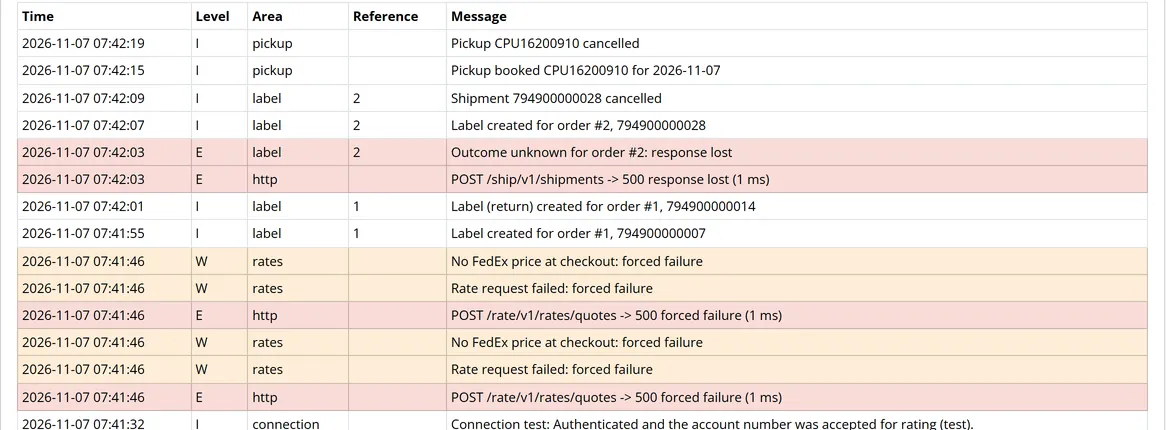
The log lists connection tests, rates problems, labels, pickups and tracking, with filters and a CSV export. Secrets, tokens, names, phone numbers, e-mail addresses and street lines are masked.
License
Enter the license key from your Kavio Labs account and click Check now. Without a key the extension works for a 14-day trial period; after that the checkout rates and new labels stop, the admin pages keep working.
Usage
Daily use
The customer chooses a FedEx service at checkout and sees the live price and the delivery date.
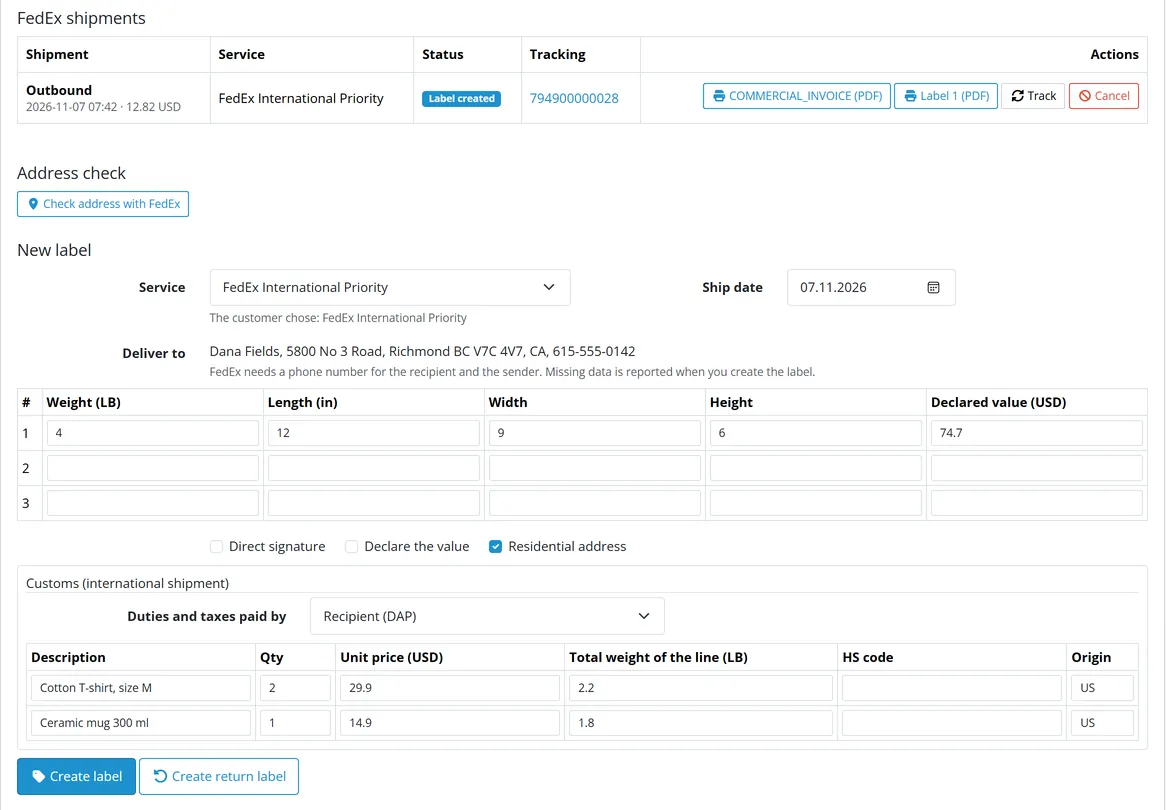
Open the order (Sales > Orders > view) and the FedEx tab next to History. The form is pre-filled from the order: the service of the chosen shipping method, one package with the weight of the products (split automatically above the FedEx limit), the customer's address, customs lines for international orders.
Click Check address with FedEx to let FedEx resolve the address and classify it as residential or business; the label then uses that classification.
Click Create label. Each package gets its own label file; international shipments also get the commercial invoice. Download them from the shipment table.
The tracking number and the FedEx tracking link are written to the order history (and the order moves to the status you chose). The cron refreshes tracking hourly; Track checks at once. Scan events are shown on the tab.
Order tab
Several packages
Fill one row per package (weight, size, declared value) and leave spare rows empty. FedEx returns one master tracking number and a label per package.
International shipments
International order
Review the customs lines (description, quantity, unit price, total weight of the line, HS code, origin). The weight column is the total for the line (quantity x unit weight), as FedEx expects it. Duties and taxes paid by is pre-selected from the Connection tab and can be changed per label: Recipient (DAP, the buyer pays on delivery; the default), Sender (DDP, FedEx invoices the destination duties and VAT to your account) or Third party (another FedEx account). The commercial invoice is requested with purpose "Sold" and the matching terms of sale. A label is refused before it is sent when a customs line is missing.
Orders that get no label
No outbound label is bought for an order that is cancelled, denied, failed, refunded or incomplete, or whose status is outside the store's processing and complete lists. The guard follows your own status lists and does not check payment itself: OpenCart's default processing list includes Pending, so remove Pending from the lists (Settings > Option) if you do not want labels for unpaid orders. A return label stays possible for a cancelled order, never for a denied, failed, expired or voided one.
Return labels
Create return label buys a FedEx print-return label: the customer is the shipper and your ship-from address is the recipient. The outbound label stays as it is.
Cancel
Cancel voids all packages of a shipment that FedEx has not yet picked up. A cancelled order can get a new label.
If FedEx does not answer while a label is bought
The extension never repeats a purchase whose outcome it cannot know. If the connection breaks or FedEx answers with a server error after receiving the request, the attempt is kept as Outcome unknown. Check your FedEx account (Ship Manager or the tracking page) for a shipment of this order: if there is none, press Discard attempt and create the label again; if there is one, take the label from FedEx Ship Manager (the extension cannot fetch it); the attempt stays on the order as the record and no second label is bought for it. A Discard while the request is still running is refused. Errors that FedEx reports before processing (validation errors, HTTP 503, rate limit) are safe: the attempt is removed and a retry works. Double clicks and two admins on the same order cannot buy two labels.
Pickups
On the Pickups tab of the settings choose FedEx Express or Ground, the date, the ready and closing time, the number of packages and optional remarks, then Book pickup. Check availability asks FedEx first. The same request is booked once. Cancel cancels a booked pickup at FedEx (FedEx cannot change a booked pickup). Times are the local wall-clock times of the ship-from address.
Developer notes
Identity
Item
Value
Extension code
kv_fedex_rest (type shipping)
Settings
shipping_kv_fedex_rest_*
PHP namespace
KavioLabs\KvFedexRest (shared core, copied to system/library/ of the extension)
.cron refreshes tracking of open shipments (60 per run), prunes the log and the rate cache
FedEx API conformance
Hosts: https://apis-sandbox.fedex.com (test) and https://apis.fedex.com (live). Every call except the token carries Authorization: Bearer <token>, Accept: application/json, X-locale: en_US. Sources: the FedEx Developer Portal API references. The OpenAPI documents are published at developer.fedex.com/wirc/json/api_groups/<Group>/<Resource>.json (Rate, Track, AddressValidation, APIAuthorization, Ship, Pickup, and API_Reference_Guide.json for currency and tracking status codes) and were compared field by field on 2026-11-07. The sample requests of Ship and Pickup and a reply built from the Address Validation examples are in tests/fixtures/ and asserted in tests/unit.php.
Currency codes. FedEx does not use plain ISO 4217 in every field: the Reference Guide lists its own codes (GBP = UKL, CHF = SFR, JPY = JYE, MXN = NMP, SGD = SID, KRW = WON, AED = DHS, TWD = NTD, ARS = ARN, CLP = CHP, DOP = RDD, XCD = ECD, JMD = JAD, KWD = KUD, KYD = CID). Money::fedexCode() maps the store currency for every amount we send (declared value, customs unit price and value, preferredCurrency); Money::isoCode() maps the currency of a reply back before conversion. A rate reply in a currency the shop does not have is skipped instead of converted with the wrong rate.
Purpose
Endpoint
Fields we send / read
OAuth token
POST /oauth/token, form encoded: grant_type=client_credentials, client_id, client_secret (child key accounts: csp_credentials, child_key, child_secret)
reads access_token, expires_in (cached encrypted; one new login on HTTP 401)
Rates
POST /rate/v1/rates/quotes
accountNumber.value, rateRequestControlParameters.returnTransitTimes, requestedShipment.{shipper.address, recipient.address(+residential), pickupType, packagingType, rateRequestType[], preferredCurrency, requestedPackageLineItems[]}, no serviceType (all services in one answer); reads output.rateReplyDetails[].{serviceType, ratedShipmentDetails[].{rateType, totalNetCharge, currency}, operationalDetail.{deliveryDate, transitTime}}
includeDetailedScans, trackingInfo[].trackingNumberInfo.trackingNumber; status codes DL delivered, DE / SE / DD exceptions, CA cancelled by sender, OC created, others in transit
Address validation
POST /address/v1/addresses/resolve
reads postalCodeToken{changed, value} (one object; parsedPostalCode as fallback), customerMessage[] (singular), classification (MIXED, UNKNOWN, BUSINESS, RESIDENTIAL); there is no postalCode in the reply
Pickups
POST /pickup/v1/pickups/availabilities, POST /pickup/v1/pickups, PUT /pickup/v1/pickups/cancel
readyDateTimestamp is local to the pickup postal code and a time zone designator is ignored, so the local wall-clock time is sent without Z
message and code shown (masked) in the log and to the admin
The Ship API has no idempotency key and no "find my shipment by reference" call, so a purchase is protected on our side (see below).
Open items to confirm in the FedEx sandbox
OAuth: child_Key (schema and examples) versus child_key (guide) for child-key accounts. We send child_key; if the sandbox rejects it only Client\Api::tokenFields() changes. Used only when a child key is entered.
Address validation: the item layout of customerMessage[] (the schema gives none); {code, message} and plain strings are both read.
Pickups: countryRelationships is always DOMESTIC; export pickups need INTERNATIONAL.
A first run against a real FedEx project: the extension has been tested against a local stand-in only.
Brand: the FedEx logo may only be used under FedEx's brand rules; the extension and its gallery use the name as text only.
Safe label purchase
A MySQL named lock per order (kv_fedex_rest_order_<id>) serialises create and return; cancel and tracking use a per-shipment lock. Discarding a pending or unresolved attempt (label or pickup) takes the same lock without waiting and is refused while a request is still in flight, so a paid label can never lose its row.
The token is fetched before the attempt row is written, so a failing login leaves nothing behind. Then a row with status Q and a request_key (hash of order, kind, service and packages, not the ship date) is written BEFORE the call; the same request finds it. A finished one is returned, a running one makes the request wait, a stale or unresolved one stops with a message. While an outbound label is active the same order returns it instead of buying again.
A timeout, a connection error or HTTP 408 / 500 / 502 / 504 turns the row into U (unresolved) and nothing retries automatically. HTTP 400 / 401 / 403 / 404 / 429 / 503 delete the row because FedEx did not process the request. A 200 without a tracking number or label also turns the row into U.
Shipments::createLabel refuses an order that is not paid or is cancelled, denied, failed, refunded or incomplete (Orders::refused: outbound labels need a status of the store's processing or complete lists and not a dead status; return labels are refused for missing, denied, failed, expired and voided orders). The check runs inside createLabel, so it covers every caller.
Tracking re-reads the row inside the shipment lock and never touches cancelled (X), pending or unresolved rows (a cancel that finished meanwhile is not overwritten).
Structure
Class
Role
Client\BaseClient, Client\Api
HTTP (cURL, TLS verification, timeouts), JSON, OAuth2 token cache (encrypted), one re-login on 401, error mapping, masked logging; the FedEx calls
Client, Accounts, Secret
Client factory and connection test; credentials sealed with AES-256-GCM (key per installation in kv_seal); non-secret fields in extra
Address / party mapping (multi-byte safe cuts), shop time zone, currency codes, order access and history, log with masking
Data kept on uninstall
Uninstall keeps the tables (OpenCart 4.1 updates are uninstall + install); Keep snapshots the settings and restores them at the end of install(). Install::drop($purge = true) is the explicit removal.
Testing
php81 tests/unit.php and php83 tests/unit.php (MariaDB 127.0.0.1:3307, scratch database kvfx_unit): mapping, currency codes, customs, duties, idempotency and the guards, against a scripted transport and the official samples. tests/mock-server/server.js <port> is a FedEx stand-in whose request shapes follow the official documents; tests/e2e.js drives OpenCart 4.1 (headless Edge): connection, checkout rates for a signed-in customer, order tab, label flows, cron, pickups, log, tests/upgrade-seed.sql seeds the update test. The hidden setting shipping_kv_fedex_rest_base_url points all calls to a loopback host.
FAQ
Do I need a FedEx account?
Yes: a FedEx account number and a project in the FedEx Developer Portal. The sandbox works without shipping anything. FedEx decides on production access.
OpenCart has FedEx modules already. Why this one?
Most FedEx modules for OpenCart only fetch checkout rates. This extension adds what a shipping desk needs: labels in PDF, PNG or ZPL II, multi-package shipments, customs lines and the commercial invoice with a duties payer choice, return labels, cancel, pickups, tracking with scan events written to the order history, address validation, and a protected label purchase.
Which customer data is sent to FedEx?
For rates only the destination city, region, postcode, country and the package weight (and the value when insurance is on). For a label the data FedEx requires: names, addresses and phone numbers of sender and recipient, and the customs lines of an international order.
Can a label be bought twice by mistake?
The extension is built to avoid it: a lock per order, a stored attempt for every purchase, and a hold ("Outcome unknown") when FedEx might have created the shipment but the answer was lost. See Usage.
Who pays duties and taxes?
The recipient by default (DAP). You can choose the sender (DDP) or a third-party account in the settings and per label.
What happens when FedEx is down?
Rates: the method is hidden, or your fallback rate is offered. Labels: the request is refused with FedEx's message; when the outcome is unknown the attempt is held for you to check.
Where are my credentials stored?
In your own database, encrypted with a key generated for your shop. They are never shown again after saving.
Does it send data to Kavio Labs?
No. The extension talks to FedEx only. The license check sends your domain name to the Kavio Labs license server.
What happens when the license is not valid?
The checkout rates and new labels stop; the admin pages, existing labels, cancel and tracking keep working.
Server-side tracking for OpenCart 4.x and 3.0.x: purchases, refunds, add to cart, checkout, product views and leads go from your server to the free official GA4 Measurement Protocol, Meta Conversions API and TikTok Events API, deduplicated with the browser pixels through shared event ids. Consent-aware, SHA-256 hashed customer data, order status mapping, queue with retries, test mode and an event log. No paid relay, events only, no OCMOD.
The department store theme for OpenCart 4.x and 3.0.x: colour-coded departments, a department list beside the hero slider with two side promos, a big search with a department selector, tabbed product blocks, a 2 + 1 + 2 offer grid, deals of the day with real countdowns, a department showcase, a promotions band and a three-column product page with a sticky buy box. Four styles (Meridian, Harbor, Citrus, Night) and your own colours on top. Events only, no core changes.
Stop AI crawlers, scrapers, vulnerability scanners and unwanted countries before OpenCart 4.x or 3.0.x builds a page. Googlebot and Bingbot are verified by DNS and always allowed; 50+ bots get one switch each; country rules use free GeoIP databases and can close only the checkout; IP and network lists, rate limits, honeypots and the cart flood fix; a one-second challenge instead of a captcha; learning mode, dashboard, log, IP tester and Cloudflare export. No core changes, no OCMOD.