A help desk inside your OpenCart 4 store: customers open tickets from their account, an order page or a private guest link; your team answers from the admin panel with departments, priorities, canned replies, assignment, SLA timers in the shop time zone and a satisfaction rating. Checked attachments outside the web root, spam protection, GDPR tools, hourly cron, no OCMOD.
Tested on 4.1.0.4Updated Nov 7, 2026Version 1.0.0Compatible with OpenCart 4.1.0.4 No core file edits
Built forOpenCart
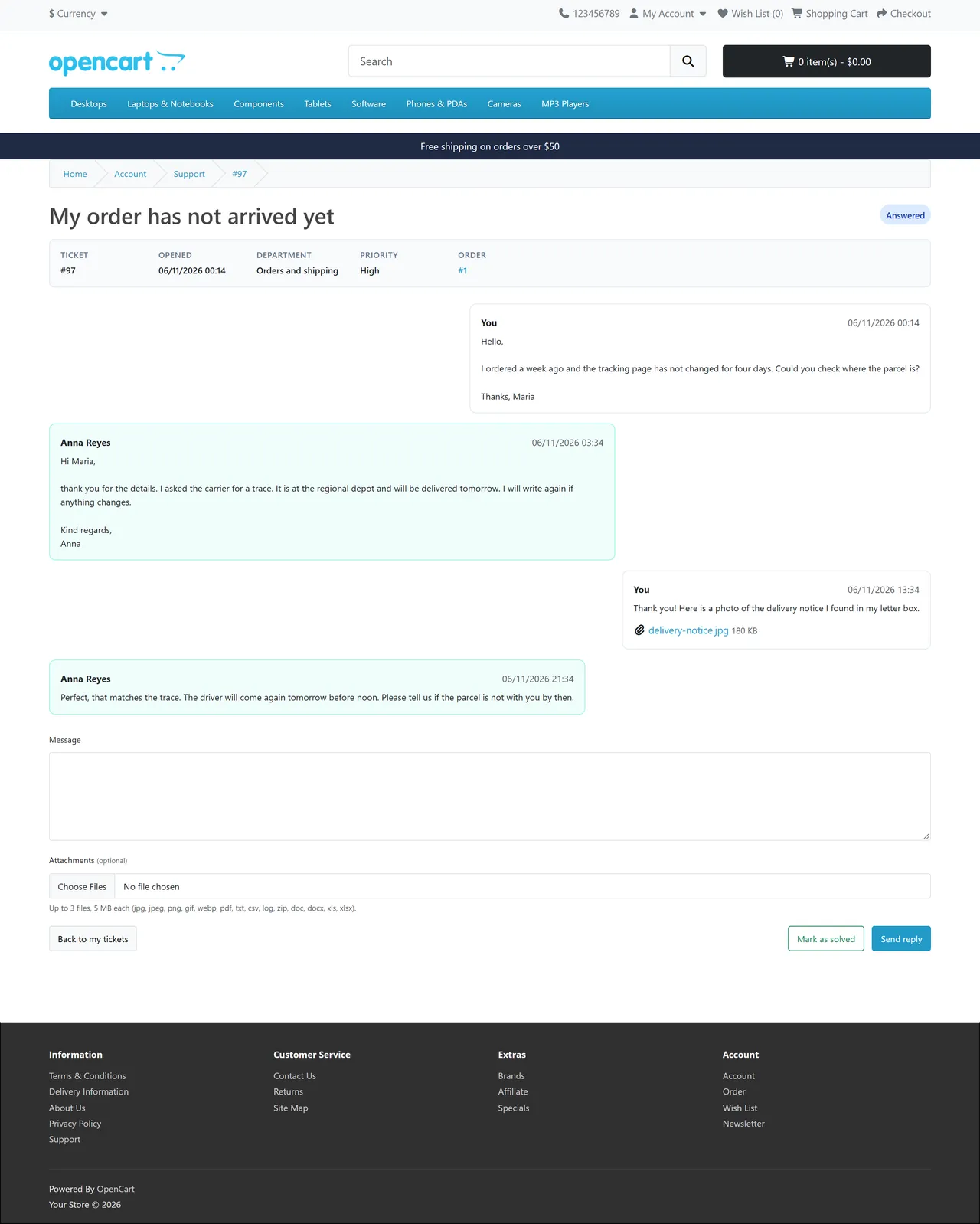
Tickets in the customer account1 of 6
What it does
A help desk inside your OpenCart 4 store: customers open tickets from their account, an order page or a private guest link; your team answers from the admin panel with departments, priorities, canned replies, assignment, SLA timers in the shop time zone and a satisfaction rating. Checked attachments outside the web root, spam protection, GDPR tools, hourly cron, no OCMOD.
What it changes for your store
Customer questions in one place. Customers open tickets from My Account, from an order page or without an account. Your team answers in the admin panel, with the order and the customer's other tickets one click away. No monthly fee, no external service: everything stays in your own database.
Know the limits. Tickets are answered in the admin panel: no inbox reading, no live chat, no knowledge base, no ticket merge, no automatic assignment rules. On hold does not pause SLA clocks. E-mails use the mail settings of the store. OpenCart 4.1 only.
Features
For customers
A "Support tickets" entry in My Account, a "Get help with this order" button on every order page and an optional footer link
Department, priority, one of their own orders, subject, message and files; the whole conversation on one page, on phones too
Guests get a private link by e-mail; a lost link is renewed by e-mail to the address on the ticket
Mark a ticket as solved and rate the help with 1 to 5 stars
For your team
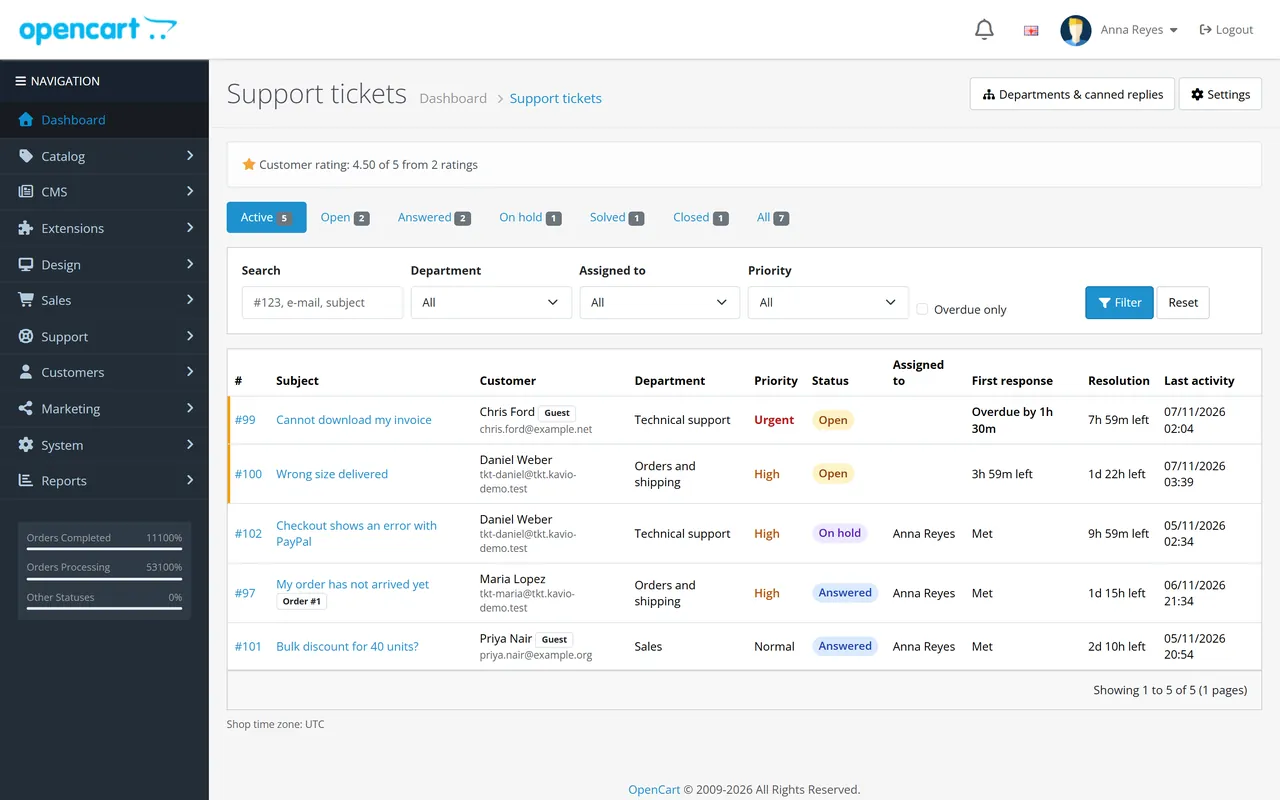
A queue with status tabs (open, answered, on hold, solved, closed) and filters for text, department, assignee, priority and overdue
Assignment, four priorities, departments with their own notice e-mail
Canned replies that fill in the customer's name, the ticket number and your name
SLA timers: hours for first response and resolution per priority, counted in the shop time zone, optionally only in business hours; overdue tickets are marked in the queue
Tickets about an order are listed on the order page in the admin panel
Average customer rating at the top of the queue
Safe by design
A signed-in customer sees only their own tickets; a guest link opens one ticket and cannot be guessed; every wrong link gives the same "not found" page
Attachments: type allow-list, size limit and a content check; stored in OpenCart's storage folder under random, unguessable names (move the storage folder outside the web root as OpenCart recommends; an .htaccess lock is added for Apache); SVG, HTML and scripts are refused; downloads only after the ticket is checked
Everything customers write is stripped of tags and escaped again in the shop and in the admin panel
Spam protection: form token, honeypot, minimum fill-in time, limits per IP address and hour, open ticket limit; no raw IP address is stored
E-mail only to the ticket's address, your department and notice addresses and the assigned staff member
GDPR: tickets are deleted with the customer account, export and erase by e-mail address, optional automatic deletion of old closed tickets
Update-safe and light
Own tables; uninstall keeps your tickets and settings, so the OpenCart 4 update path does not lose data
OpenCart events and one hourly cron entry: no OCMOD, no core edits; tested on OpenCart 4.1.0.4 with the default theme and real signed-in customers
What you get
Download & installOne installer package (.ocmod.zip) for OpenCart 4.1.0.0 – 4.1.x. There is no OpenCart 3 edition. Download it from My licenses right after payment.
12 months of updates & supportNew versions and help for 12 months (24 or 36 months at checkout). After that the extension keeps working; renew anytime at 50%.
License for your storeOne production domain with all its subdomains; staging and local development hosts are free. How licensing works
30-day refundFull refund within 30 days of your first purchase, no reason needed. Refund policy
Tested buildsOpenCart 4.1.0.4. Tested on OpenCart 4.1.0.4.
Documentation & supportFull guide (Installation, Configuration, Usage, FAQ) on this page. Tickets from your account, first reply within 1 business day.
Compatibility
Help Desk & Support Tickets works with OpenCart 4.1.0.4.
We list the builds we install and test on. “Tested” means the test plan ran on that build; “Supported” means the build is inside the supported range.
Compatibility
Version
Range
Runs on
Status
OpenCart 4.1.0.x
4.1.0.0 – 4.1.0.4
PHP 8.1 – 8.3
Tested on 4.1.0.4
1.0.0
Nov 7, 2026
Latest
First release.
SLA timers (first response, resolution) in the shop time zone, optional business hours.
Satisfaction rating (1 to 5 stars and a comment, once per ticket).
Guest links signed with a server secret; one ticket per link; lost-link renewal by e-mail; identical answers for wrong ids, wrong links and foreign tickets.
Attachments in OpenCart's storage folder: extension allow-list, size limit, content check, random names, download only after the ticket check, no SVG or HTML.
Spam protection: form token, honeypot, minimum fill-in time, per-IP limits (salted hash, no raw IP), open ticket limit.
GDPR: tickets deleted with the customer, export and erase by e-mail address, retention setting.
Data and settings survive the OpenCart 4.1 update path (uninstall + install).
How do I install the extension?
Upload. Extensions > Installer: upload the .ocmod.zip. It is for OpenCart 4 (4.1.0.0 to 4.1.x).
Install and enable. Extensions > Extensions > Modules: install, open the settings and switch it on. Events register themselves; nothing is patched.
Enter the license key. Paste the key from My licenses. Subdomains, staging and local hosts are included; you have 14 days to do it.
OpenCart 4.1.0.4. Tested on OpenCart 4.1.0.4. The Compatibility tab lists every version range.
Do the extensions change core files?
No. They work through OpenCart events and standard extension types (modules, order totals, themes). No core file edits, no OCMOD patches, no theme template edits, so OpenCart updates and other extensions keep working.
What does the license cover?
One production store domain with every subdomain (www, shop., staging.), plus local development hosts such as localhost, *.local and *.test. A store on another domain needs its own license; a second-store license is 40% off. You have 14 days after installing to enter the key. 12 months of updates and support are included; after that the extension keeps working and renewals are 50% off. How licensing works
Can I get a refund?
Yes. Ask for a full refund within 30 days of your first purchase, no reason needed: open a ticket or write to [email protected] with your order number. The money goes back to the card or bank account you paid with within 5 business days of approval. Refund policy
How do I get help?
Open a ticket from your account, so your license details are attached. We answer Monday to Friday: bug reports within 1 business day, how-to questions within 2. Support policy. Not a customer yet? Ask a pre-sales question.
A help desk inside your OpenCart 4.1 store. Customers open tickets from their account, from an order page or without an account; your team answers from the admin panel. Departments, priorities, statuses, canned replies, staff assignment, order linking, SLA timers in your shop time zone and a satisfaction rating are included. Everything stays in your own database.
A ticket in the customer account
Tickets in the account: a "Support tickets" entry in My Account, a "Get help with this order" button on every order page and an optional "Support" link in the footer
Guests too: no account needed. A private link, signed on the server, opens exactly one ticket. A lost link is renewed by e-mail to the address on the ticket; the old link stops working
Departments, priorities, statuses: five statuses (open, answered, on hold, solved, closed), four priorities, departments with their own notice e-mail
Staff tools: queue with status tabs and filters, assignment, internal notes the customer never sees, canned replies with the customer's name and the ticket number filled in, other tickets of the same customer one click away
Order linking: customers pick one of their own orders; the order page in the admin lists its tickets
SLA timers: hours for the first response and for the resolution per priority, counted in the shop time zone, optionally only in business hours. Overdue tickets stand out in the queue
Satisfaction rating: 1 to 5 stars and a comment after a ticket is solved, one rating per ticket, average in the queue
Safe attachments: file type allow-list, size limit and a content check; files are stored in OpenCart's storage folder under random names and served only to people who may see the ticket
Spam protection: form token, honeypot, minimum fill-in time, limits per IP address and hour, open ticket limit
E-mail notices through the store's mail settings: confirmation, staff notice, replies, solved
Privacy: tickets are deleted with the customer account; export or erase everything about one e-mail address; optional automatic deletion of old closed tickets
No OCMOD and no core file changes: OpenCart events and an hourly cron entry
OpenCart 4.1.0.x
The ticket queue
Installation
Requirements: OpenCart 4.1.0.x, PHP 7.4 or newer with the mbstring and fileinfo extensions, a working mail setting (System > Settings > Mail) if you want e-mail notices.
In the OpenCart admin open Extensions > Installer, upload kv_support_tickets.ocmod.zip and click Install.
Open Extensions > Extensions, choose Modules, find Help Desk & Support Tickets, click the green Install button, then the blue pencil.
Installing creates the tables, registers the events and the hourly cron entry, gives your admin group access to the ticket pages and adds a Support menu to the admin panel. Three departments (Sales, Orders and shipping, Technical support) and one canned reply are created the first time; you can change or delete them.
Open the settings and check the tabs: General (guest tickets, order link, notice address), Attachments, Spam protection, SLA timers and Life cycle. Switch Status on.
Give other admin user groups access in System > Users > User Groups: extension/kv_support_tickets/support/tickets for agents, extension/kv_support_tickets/support/setup for departments and canned replies, extension/kv_support_tickets/module/kv_support_tickets for the settings.
Check System > Settings > Local > Time zone: SLA clocks and all dates follow it.
Make sure the OpenCart cron job runs (php /path/to/cron.php), or call the address shown on the Life cycle tab every hour. It closes old solved tickets and applies the retention. Without a cron job the admin panel does this once an hour while somebody is signed in.
The storage folder of OpenCart holds the attachments in storage/kv_support_tickets/. OpenCart's web installer puts that folder inside the web root until you move it, so move it outside the web root as OpenCart recommends (see the OpenCart installation guide). The extension writes an .htaccess lock there for Apache and uses random file names; on nginx close the folder in the server configuration.
Uninstall: Extensions > Modules > Uninstall removes the events, the cron entry and the permissions. It keeps tickets, messages, files and your settings, because OpenCart 4 updates an extension by uninstalling and installing it again. To remove everything, use Data and privacy > Delete all data first.
Update (OpenCart 4.1): Extensions > Modules > Uninstall, then Extensions > Installer: Uninstall and Delete the old entry, upload the new zip, Install, and Extensions > Modules > Install. Tickets and settings are restored; open the settings page once so database changes of the new version run.
Configuration
Extensions > Extensions > Modules > Help Desk & Support Tickets
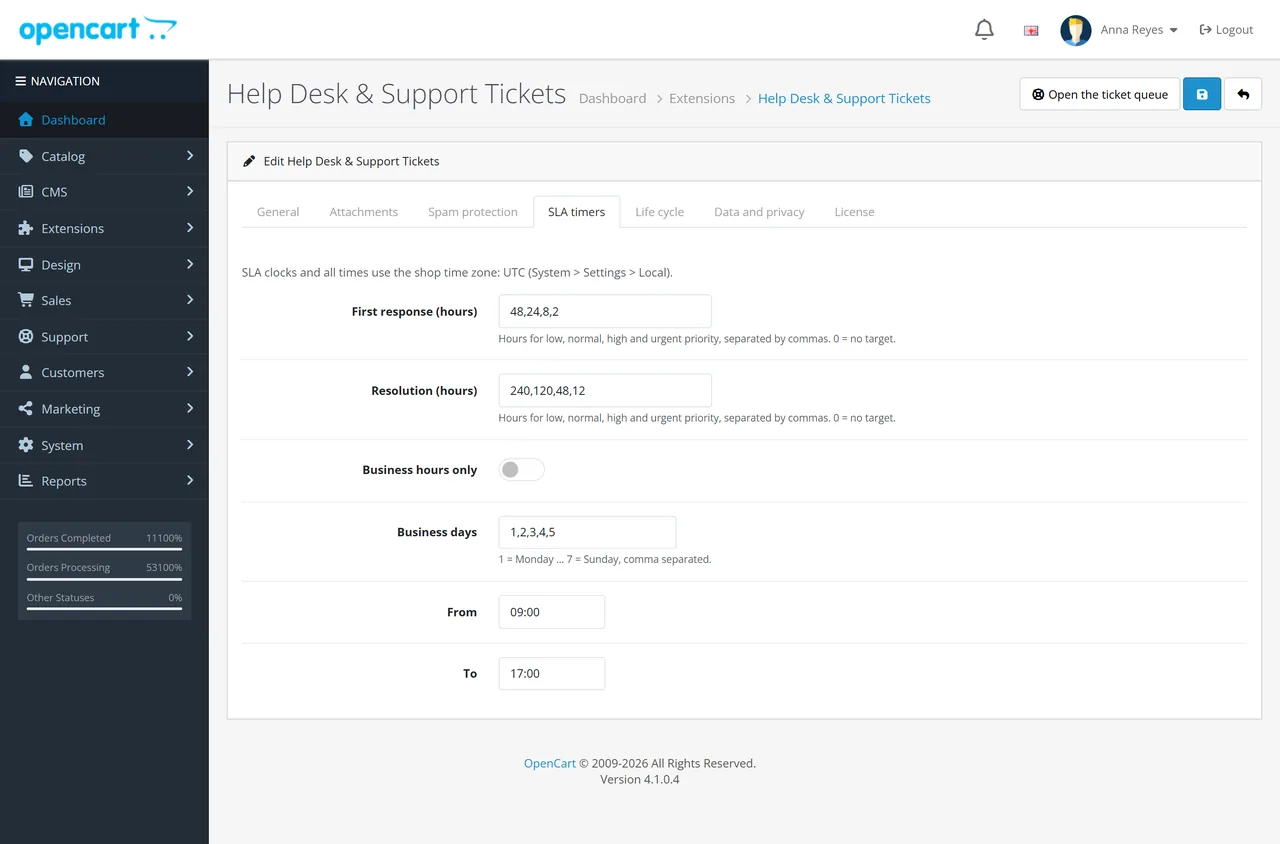
Settings, SLA timers
General
Status: switches the storefront part on or off. The admin pages stay available
Tickets without an account: guests get a private link by e-mail. Off = guests are sent to sign in
Link an order: signed-in customers may link one of their own orders
Footer link: adds "Support" to the information links in the footer
E-mail the customer / the assigned staff member: notice switches
Satisfaction rating: the stars on solved tickets
Notice address: receives new-ticket notices when a department has no address of its own. Empty = the store e-mail. The extension never sends to any other fixed address: recipients are the customer's address on the ticket, the department address, this address, the store e-mail and the e-mail of the staff member a ticket is assigned to
Attachments
Files per message (1 to 10), largest file (1 to 25 MB) and the allowed types. The list can only be narrowed: jpg, jpeg, png, gif, webp, pdf, txt, csv, log, zip, doc, docx, xls, xlsx. SVG, HTML and scripts can never be uploaded. Every file is checked for its name, size and real content type.
Spam protection
Honeypot and timing check: a hidden field and a minimum fill-in time (default 3 seconds)
New tickets per IP and hour, replies per IP and hour, open tickets per customer or e-mail address, lost-link requests per IP and hour. No raw IP address is stored: limits use a salted hash
SLA timers
Hours for low, normal, high and urgent priority, for the first response and for the resolution. 48,24,8,2 means 48 hours for low, 24 for normal, 8 for high and 2 for urgent. 0 = no target. Business hours only counts only the chosen weekdays (1 = Monday to 7 = Sunday) between the From and To time. All of it runs in the shop time zone. The first staff reply stops the first-response clock; solving the ticket stops the resolution clock. Changing the priority of a ticket recalculates its targets from the day it was opened.
Life cycle
Close solved tickets after (days): 7 by default, 0 = never
Customer may answer a solved ticket for (days): a reply reopens it; after this time the customer opens a new ticket
Delete closed tickets after (days): 0 = keep
Scheduled task URL: for a cron service when OpenCart's own cron is not used
Data and privacy
Download a JSON export of everything stored for an e-mail address, erase it, or delete all data of the extension (type DELETE). Deleting a customer account in the admin or by the customer deletes the customer's tickets, messages and files, and guest tickets of the same e-mail address.
Departments and canned replies
Support > Departments & canned replies. A department has a name, a description, an optional notice e-mail, a sort order and a status. Canned replies are ready answers for all departments or one; {customer_name}, {ticket_id} and {agent_name} are filled in when the reply is inserted.
Usage
Customers
My Account > Support tickets lists the customer's tickets. New ticket asks for a department, priority (low to high), an optional order, subject, message and optional files. The customer's own name and e-mail address are used
Get help with this order on an order page opens the form with that order selected
A ticket page shows the conversation, the files, the status and a reply box. Mark as solved closes the question from the customer's side; a reply to a solved ticket reopens it inside the reopen window
Solved tickets show a star rating with an optional comment, once
A signed-in customer sees only their own tickets. Any other ticket number gives the same "not found" page as a number that does not exist
Guests
Support (footer) > New ticket: name, e-mail, department, message. The confirmation e-mail holds a private link; the page after sending carries it too
The link opens one ticket, shows the conversation and takes replies and the rating. Whoever has the link can read the ticket: tell customers not to forward the e-mail
Lost the link? The guest enters the ticket number and the e-mail address. If they match, a new link goes to that address and the old one stops working. The answer on the page is the same either way
Staff
The ticket queue
Support > Tickets shows the active tickets, oldest waiting first. Tabs per status, filters for text (#123, e-mail, subject), department, assignee, priority and overdue. A coloured edge marks tickets that wait for staff. The SLA columns show the time left, or the overdue time in red
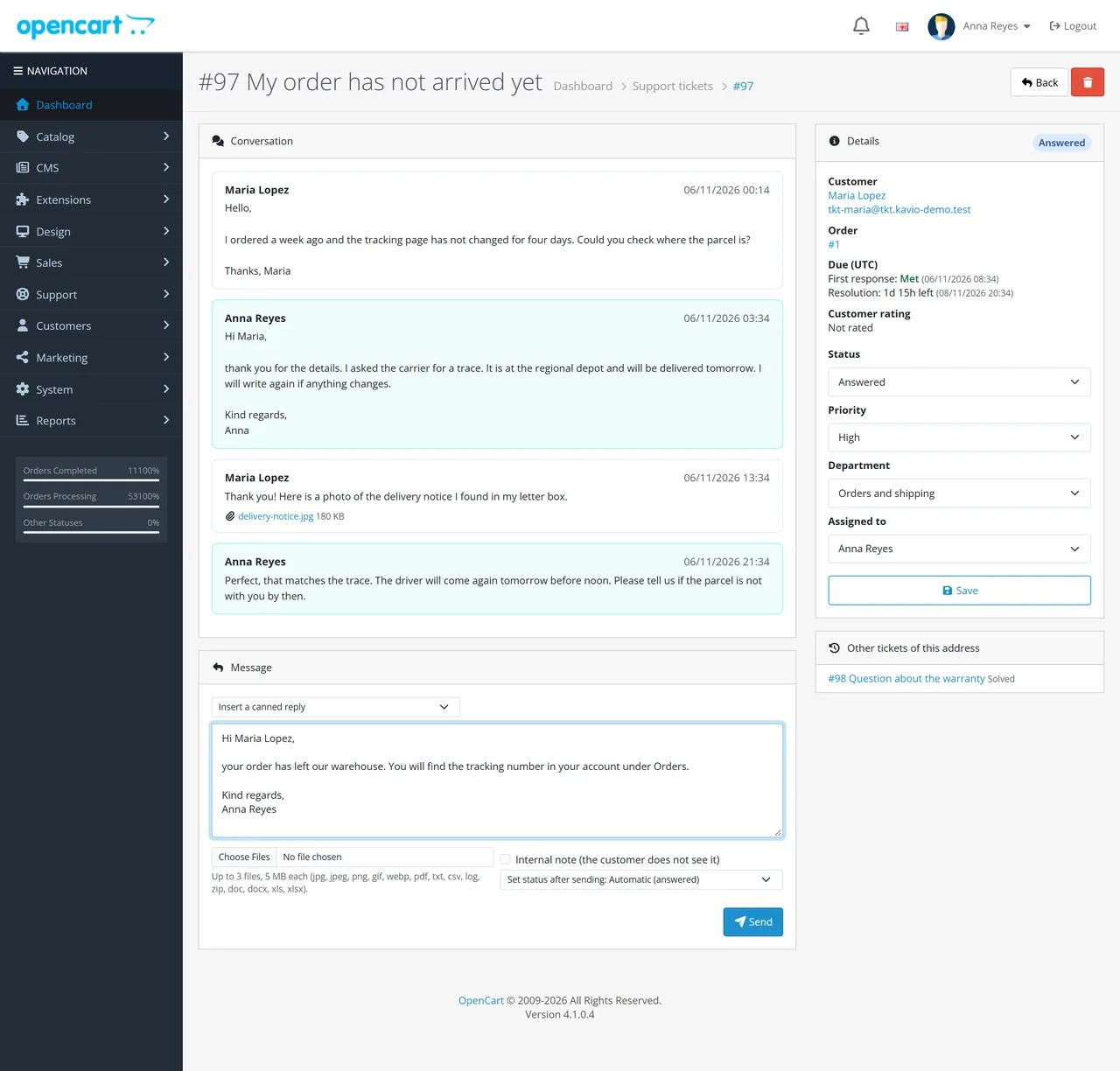
A ticket page has the conversation, a reply box, a status select and the details column: customer, linked order, due times, rating, status, priority, department and assignee. The first reply assigns an unassigned ticket to the person who answered
Internal note keeps the text and its files hidden from the customer; no e-mail goes out
Insert a canned reply adds the text to the box so you can edit it before sending
Set status after sending: answered by default; choose solved to ask the customer for a rating
Staff open a customer's other tickets, their order and their customer record from the details column
The order page in the admin lists the tickets linked to that order
Deleting a ticket removes its messages and files
E-mails
Confirmation to the customer, a notice to staff for each new ticket and each customer reply, the staff reply to the customer, "solved" with a rating link and the lost-link mail. All go through the mail settings of the store. Replies to tickets from signed-in customers link to the ticket page in the account (the customer signs in first); guests get their private link.
FAQ
Can a customer see another customer's ticket?
No. Account tickets open only for the signed-in owner. Guest tickets open only through their private link, which is computed on the server (HMAC with secrets that are not in the database) and cannot be guessed. A wrong number, a wrong link and somebody else's ticket all give the same "not found" page. Wrong guesses are limited per IP address.
What happens to files?
They are stored in OpenCart's storage folder under random, unguessable names (move the storage folder outside the web root as OpenCart recommends; an .htaccess lock is added for Apache, other web servers need the folder closed in their own configuration). An upload must have an allowed extension, be inside the size limit and really be what its extension says. SVG, HTML and scripts are refused, and a name like shell.php.jpg is refused too. Downloads go through the extension after the ticket was checked, with X-Content-Type-Options: nosniff; only images may display inside the page (with a sandbox policy), everything else is a download.
Is customer text safe in the admin panel?
Everything a customer writes is stripped of tags when it is stored and escaped again whenever it is shown, in the shop and in the admin panel.
Which e-mail addresses does the extension write to?
The address on the ticket, the department's address, the notice address from the settings, the store e-mail and the e-mail of the assigned staff member. Nothing else. E-mail uses the mail settings of your store; with no mail engine configured, tickets still work and nothing is sent.
Do SLA timers pause?
The first-response clock stops at the first staff reply, the resolution clock when the ticket is solved or closed. "On hold" does not pause the clock in this version.
Which time zone?
The one in System > Settings > Local. Business hours, due times and all dates use it.
Can customers write in any language?
Yes. Messages and replies are stored as typed (utf8mb4, emoji included) and cut by characters, never in the middle of a character.
What happens when I update the extension?
Uninstall keeps all tickets and your settings. Follow the update steps in the installation page; data and settings come back at the next install.
What happens when a customer deletes their account?
Their tickets, messages and files are deleted, and so are guest tickets with the same e-mail address.
Does it work with the order editor, other themes, other extensions?
It adds pages and events only; it changes no core file and no order data. It uses the default OpenCart 4 account and footer templates (it inserts a link into them through events); a theme that renders those pages very differently may need the link added by hand: the pages are index.php?route=extension/kv_support_tickets/support/desk.
What does it not do?
It does not read e-mails from an inbox, it has no live chat and no knowledge base, no merging of tickets and no automatic assignment rules. Tickets are answered in the admin panel.
Server-side tracking for OpenCart 4.x and 3.0.x: purchases, refunds, add to cart, checkout, product views and leads go from your server to the free official GA4 Measurement Protocol, Meta Conversions API and TikTok Events API, deduplicated with the browser pixels through shared event ids. Consent-aware, SHA-256 hashed customer data, order status mapping, queue with retries, test mode and an event log. No paid relay, events only, no OCMOD.
The department store theme for OpenCart 4.x and 3.0.x: colour-coded departments, a department list beside the hero slider with two side promos, a big search with a department selector, tabbed product blocks, a 2 + 1 + 2 offer grid, deals of the day with real countdowns, a department showcase, a promotions band and a three-column product page with a sticky buy box. Four styles (Meridian, Harbor, Citrus, Night) and your own colours on top. Events only, no core changes.
Stop AI crawlers, scrapers, vulnerability scanners and unwanted countries before OpenCart 4.x or 3.0.x builds a page. Googlebot and Bingbot are verified by DNS and always allowed; 50+ bots get one switch each; country rules use free GeoIP databases and can close only the checkout; IP and network lists, rate limits, honeypots and the cart flood fix; a one-second challenge instead of a captcha; learning mode, dashboard, log, IP tester and Cloudflare export. No core changes, no OCMOD.