The reviews-first theme for OpenCart 4: the best approved review of every product sits in a speech bubble on its card, the home page carries a proof bar, a review wall with a five-bar histogram and a Top rated row, and the product page opens its buy box with a rating card. Everything is counted from the core review module, and every proof element hides itself when a store has no reviews. Eight colour schemes (six warm light, two dark) plus your own colours, Young Serif and Lexend type, two home layouts (Showcase, Market), mega menu, live search, quick view, AJAX filters, sticky add-to-cart and a one-click Starling demo store with 205 reviews. Events only, no core changes, no OCMOD.
Tested on 4.1.0.4Version 1.0.0Compatible with OpenCart 4.1.0.0 – 4.1.0.4 No core file edits
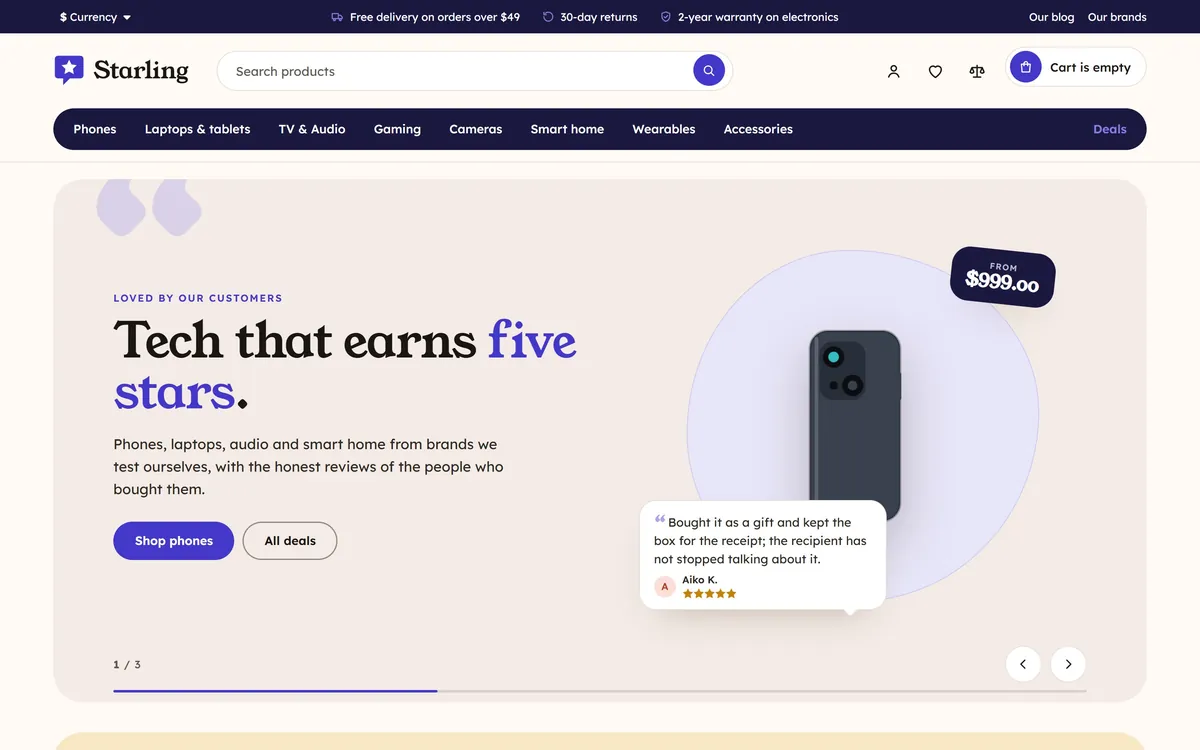
Kudos, Applause scheme: the hero with a product and its best review, a proof bar, on desktop and phone1 of 11
What it does
The reviews-first theme for OpenCart 4: the best approved review of every product sits in a speech bubble on its card, the home page carries a proof bar, a review wall with a five-bar histogram and a Top rated row, and the product page opens its buy box with a rating card. Everything is counted from the core review module, and every proof element hides itself when a store has no reviews. Eight colour schemes (six warm light, two dark) plus your own colours, Young Serif and Lexend type, two home layouts (Showcase, Market), mega menu, live search, quick view, AJAX filters, sticky add-to-cart and a one-click Starling demo store with 205 reviews. Events only, no core changes, no OCMOD.
Kudos lets your customers sell for you. Every proof element comes from the core OpenCart review module, nothing is invented, and a store without reviews simply shows none of it.
Features
Best review on every card: the best short approved review of the product in a speech bubble under the price, with an initials avatar and the author as "Maya K.".
Proof bar: the store average, the number of reviews, the five-star share and the number of reviewed products, counted from your approved reviews.
Review wall: the newest 4 and 5 star reviews as speech-bubble cards with the product, a score card and a five-bar histogram.
Top rated row: your best rated products in a scrolling row.
Rating card in the buy box: average, count, histogram, and the most positive and the most critical review side by side.
Hero with a packshot on a soft shape and, when a product is set, that product's best review. Arrows, counter and pause button; it never moves for visitors who prefer reduced motion.
2 home layouts: Showcase (hero, proof bar, review wall high on the page) and Market (no hero, dense rows for large catalogues).
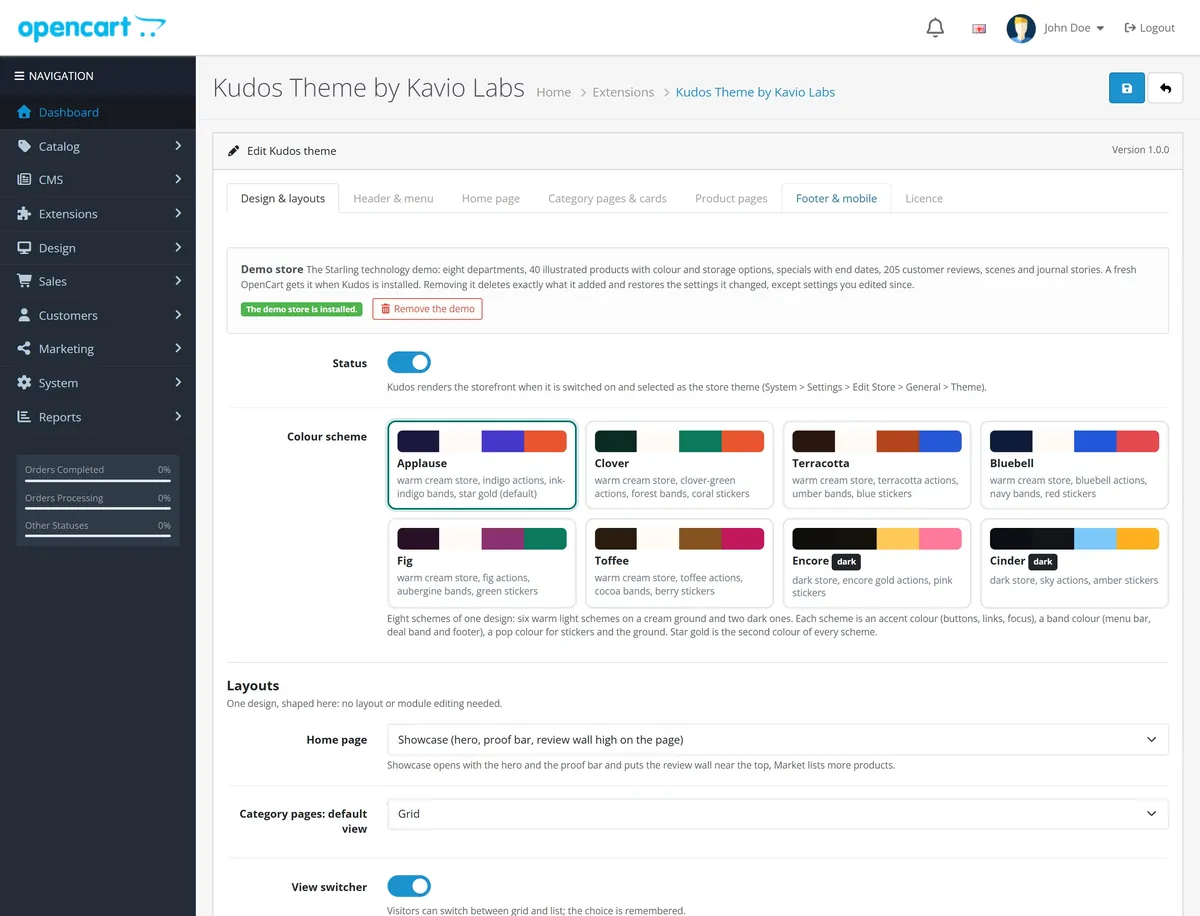
8 colour schemes: Applause, Clover, Terracotta, Bluebell, Fig and Toffee (light, on a cream ground) and Encore and Cinder (dark), plus four colours of your own; text colours follow and are corrected to 4.5:1 or better.
Shopping: mega menu with a featured product, live search, quick view, compare, wish list, AJAX filters and sorting with Show more, grid and list views, deal countdowns from real end dates, quantity prices, delivery dates, sticky add-to-cart bar, structured data.
One-click demo store: Starling, 40 illustrated technology products and 205 reviews; it arrives on a fresh store and leaves with one click (your own edits stay).
OpenCart 4.1.0.0 to 4.1.x. Events only: no core changes, no OCMOD. Self-hosted Young Serif and Lexend fonts, no CDNs.
Kudos next to our other OpenCart themes
Every Kavio Labs theme has its own character. This table shows where Kudos differs, so you can pick the one that fits your store.
Kudos compared with our other OpenCart themes
Kudos
Duo
Noir
Vertex
Volt
Atlas
Price (one-time)
$69
$69
$69
$149
$59
$129 (OpenCart 4 and 3)
Signature
Reviews are the design: best review on every card, review wall, proof bar, Top rated row
Split screen: a fixed context panel on the left half
Dark-first: products on a lit stage, cursor spotlight, glass pill header
The theme you configure: headers, homes and product pages in the settings
Electronics superstore with spec meters
Department store: a colour system per department in the menu, tiles and card labels, big search with a department selector
Hero
Packshot on a soft shape with that product's best review
Campaign slides in the split panel
Product stage: packshot in a spotlight disc
Stage with a promotion strip
Deal stage with spec callouts
Slider beside an All departments menu with two side promos
Social proof
Built from the core review module: proof bar, wall, rating card with histogram, most critical review shown
White card, rating, price, best review in a speech bubble
Hairline cards, colour dots
White plate in a graphite frame, glowing spec chips
Configurable cards
Spec meters
Department-coloured labels, tabbed product blocks
Product page
Rating card at the top of the buy box, option chips, sticky add-to-cart
Image stack in the panel
Price in a ring of light
Studio, Cascade or Compact
Lab score rings
Three columns with highlights and a sticky buy box with delivery facts
OpenCart versions
4.1.0.0 – 4.1.x
4.1.0.0 – 4.1.x
4.1.0.0 – 4.1.x
4.x + 3.0.x
4.x + 3.0.x
4.0.2.0 – 4.1.x + 3.0.3 – 3.0.5
Demo store
Starling (technology, 40 products, 205 reviews)
Twofold (technology, 40 products)
Obsidian (technology, 40 products)
Circuit Hall
Nodal Electronics
Department-store demo (live)
What you get
Download & installOne installer package (.ocmod.zip) for OpenCart 4.1.0.0 – 4.1.x. There is no OpenCart 3 edition. Download it from My licenses right after payment.
12 months of updates & supportNew versions and help for 12 months (24 or 36 months at checkout). After that the theme keeps working; renew anytime at 50%.
License for your storeOne production domain with all its subdomains; staging and local development hosts are free. How licensing works
30-day refundFull refund within 30 days of your first purchase, no reason needed. Refund policy
Tested buildsOpenCart 4.1.0.0 – 4.1.0.4. Tested on OpenCart 4.1.0.4.
Documentation & supportFull guide (Installation, Configuration, FAQ) on this page. Tickets from your account, same-day reply on weekdays (Mon-Fri 09:00-18:00 UTC+3).
Compatibility
Kudos: Reviews-First Theme works with OpenCart 4.1.0.0 – 4.1.0.4.
We list the builds we install and test on. “Tested” means the test plan ran on that build; “Supported” means the build is inside the supported range.
Compatibility
Version
Range
Runs on
Status
OpenCart 4.1.0.x
4.1.0.0 – 4.1.0.4
PHP 8.1 – 8.3
Tested on 4.1.0.4
1.0.0
Latest
First release: the OpenCart edition of the Kavio Labs Kudos theme for OpenCart 4.1.0.0 to 4.1.x.
Social proof built from the core review module: the best approved review on every product card, a proof bar, a review wall with a five-bar histogram, a Top rated row and a rating card at the top of the buy box (average, count, histogram, most positive and most critical review). Every element hides itself without reviews and every number is counted from approved reviews.
Eight colour schemes (six warm light, two dark) at 4.5:1 or better plus a colour editor, Showcase and Market home layouts, Young Serif and Lexend type.
Mega menu in a rounded band, live search, quick view, compare, wish list, AJAX filters with Show more, quantity prices, deal countdowns, sticky add-to-cart bar, structured data.
One-click Starling demo store with 40 products and 205 reviews.
Settings, licence key and the active theme survive an OpenCart 4.1 update (uninstall + install).
How do I install the theme?
Download the package from My licenses and install it in Extensions > Installer, then Extensions > Themes, like any other OpenCart theme. The Documentation tab has every step, from the first activation to the theme settings.
Which OpenCart versions does it work with?
OpenCart 4.1.0.0 – 4.1.0.4. Tested on OpenCart 4.1.0.4. The Compatibility tab lists every version range.
What does the license cover?
One production store domain with every subdomain (www, shop., staging.), plus local development hosts such as localhost, *.local and *.test. A store on another domain needs its own license; a second-store license is 40% off. You have 14 days after installing to enter the key. 12 months of updates and support are included; after that the theme keeps working and renewals are 50% off. How licensing works
Can I get a refund?
Yes. Ask for a full refund within 30 days of your first purchase, no reason needed: open a ticket or write to [email protected] with your order number. The money goes back to the card or bank account you paid with within 5 business days of approval. Refund policy
How do I get help?
Open a ticket from your account, so your license details are attached. We answer with a same-day reply on weekdays (Mon-Fri 09:00-18:00 UTC+3). Support policy. Not a customer yet? Ask a pre-sales question.
Kudos is a flagship theme of Kavio Labs for OpenCart 4.1.0.0 to 4.1.x, the OpenCart edition of the Kudos theme for CS-Cart. Its idea is your customers' words are the design: the best review of a product sits in a speech bubble on its card, the home page carries a proof bar, a review wall and a Top rated row, and the product page opens its buy box with a rating card. Everything comes from the core OpenCart review module, and nothing is invented: a number or a quote appears only when your store holds it, and a store without reviews simply shows no proof sections.
It is one universal design for every sector: technology, fashion, beauty, home, gifts or a single-brand store. The demo is a technology store, Starling, with 205 customer reviews of its own.
Kudos home page, Applause scheme
What you get
Best review on every card: the best short approved review of the product (4 or 5 stars, up to 150 characters by default, best rating first) in a speech bubble under the price, with an initials avatar, the author as "Maya K." and the stars. Products without a fitting review show no bubble.
Proof bar: one line with the store-wide average, the number of approved reviews, the share of five-star reviews and the number of reviewed products. All numbers are counted from your approved reviews (cached for an hour and cleared when you save a review, a product or the settings).
Review wall: the newest approved 4 and 5 star reviews as speech-bubble cards with the product they are about, next to a score card with the average and a five-bar histogram. It needs at least three reviews and hides itself otherwise.
Top rated row: a scrolling row of your best rated products (average first, then number of reviews, with a minimum number of reviews you set).
Rating card in the buy box: at the top of the product page the average, the number of reviews, a five-bar histogram and, when they exist, the most positive and the most critical approved review side by side. It links to the Reviews tab.
Hero: scenes with a title, text, buttons and a product packshot on a soft shape; a scene with a product also shows that product's best review. Arrows, a counter and a 44 px pause button; the rotation pauses on hover and focus, stops for good after a click, swipe or key press, and never runs for visitors who prefer reduced motion.
Two home layouts: Showcase (hero, proof bar, service strip, categories, Picked for you tabs, review wall, Top rated row, deals band, brands, journal, newsletter) and Market (no hero: proof bar, categories, deals band, Top rated, New arrivals, Top sellers, review wall, brands, journal).
Eight colour schemes: six warm light schemes on a cream ground (Applause, Clover, Terracotta, Bluebell, Fig, Toffee) and two dark ones (Encore, Cinder). Star gold is the second colour of every scheme. Four colours of your own (accent, band, pop and ground); text colours follow by themselves and are corrected to 4.5:1 or better.
Type: Young Serif for display and prices, Lexend for text.
Mega menu in a rounded band: top categories with subcategories, counts and a featured product; departments over the limit go into "More"; the phone drawer lists all of them.
Shopping: live search, quick view, compare, wish list, AJAX filters and sorting with Show more, grid and list views, quantity prices, deal countdowns from real special end dates, delivery dates, sticky add-to-cart bar, phone bottom bar.
Product page: colour swatches and option chips, perks, tabs, sticky bar and structured data (JSON-LD: product, offer, rating, breadcrumbs).
One-click demo store: Starling (eight departments, 40 illustrated products of six invented brands, specials with end dates, 205 reviews and journal articles).
Safe and fast. Events only: no core file changes, no OCMOD. Self-hosted fonts (SIL Open Font License 1.1), one stylesheet and one script, no CDNs.
Requirements
OpenCart 4.1.0.0 to 4.1.x (tested on 4.1.0.4)
PHP 8.1 or later (what OpenCart 4.1 needs; the theme code itself runs on PHP 7.4+)
System > Settings > Option > Reviews: Allow Reviews switched on to see the proof elements.
Pages
Installation
Go to Extensions > Installer and upload kv_theme_kudos.ocmod.zip. Click Install (the green + button) next to it.
Go to Extensions > Extensions, choose the type Themes, and click Install next to Kudos Theme by Kavio Labs.
Click Edit, check that Status is on, pick a Colour scheme and a Home page layout and save.
Go to System > Settings, edit your store, and on the General tab set Theme to Kudos Theme by Kavio Labs. Save.
On the Option tab of the same page make sure Allow Reviews is on. Kudos shows reviews that are approved (Catalog > Reviews, status Enabled).
OpenCart 4 has no theme folders. Kudos is a theme extension: it swaps in its own templates while it is the store theme and switched on. Switch the store back to Default to return to the stock look at any time.
Recommended image sizes (System > Settings > Image): product card 600 x 600, product page 1000 x 1000, popup 1400 x 1400, additional 160 x 160, cart 140 x 140, category 600 x 600. Square packshots on a white or transparent background look best: Kudos shows them on a white plate in every scheme.
Kudos is built for OpenCart 4 (Bootstrap 5). There is no OpenCart 3 edition.
The demo store
On a fresh store (no products, or only the OpenCart sample products and no orders) the install adds the Starling demo: eight departments, 40 illustrated products with colour and storage options, specials with end dates, 205 customer reviews and journal articles, so every section is filled at once. A store with its own catalogue stays exactly as it is. The demo switches off the OpenCart sample products and categories only; your information pages (About Us, Delivery Information, Privacy Policy, Terms & Conditions) stay on, so the registration and checkout agreements keep working.
The Design & layouts tab has the buttons:
Install the demo adds it on any store, next to your own products.
Remove the demo deletes exactly what the demo added (its products, reviews and pages) and restores the settings it changed. A setting you changed since the import (store name, logo, colour scheme, home sections ...) stays as you set it. Your own products and reviews stay. After a removal the demo never comes back by itself, also not on an update.
The demo specials run for a few days after the import, so their countdowns end. To see them again, remove and add the demo, or give the products new end dates.
Set up your store in five steps
Look. On Design & layouts pick a colour scheme and a home layout (Showcase or Market).
Menu. Categories with Show in top menu form the menu row and its mega panels. On Header & menu you can give a top category a short name and a featured product.
Home. On Home page set the hero scenes, the tabs, the deals band, the review wall and the Top rated row (title, number of reviews shown, minimum reviews per product).
Reviews. Approve reviews under Catalog > Reviews. Kudos counts only enabled reviews of enabled products. Ask your customers for reviews: the theme gets better with every one.
Product data. Kudos reads your normal catalogue data:
Options named Colour or Color show as swatches. Options listed under Chip option names show as chips with the price change.
Colour siblings: sell each colour as its own product and give them the same Range attribute value: they show as linked swatches.
A Ships in attribute (for example "Ships in 1-2 days") becomes delivery dates on the product page; a Video attribute adds a video button.
Special prices with an end date (Catalog > Products > Special) get countdowns on cards, the product page and the deals band.
Filters: add filter groups (Catalog > Filters), assign them to products and categories, and put the core Filter module in the left column of the Category layout (Design > Layouts).
Update
On OpenCart 4 an update is: Extensions > Extensions > Themes > Uninstall Kudos, in Extensions > Installer uninstall and delete the old package, upload the new one and install it, then Install Kudos again. OpenCart deletes a theme's settings when it is uninstalled; Kudos keeps a copy of its settings and licence key and puts them back when it is installed again, the demo store stays, and stores that used Kudos use it again.
Uninstall
Uninstalling removes Kudos's events and switches a store that uses Kudos back to Default. A copy of the theme settings and the demo stay (so an update keeps them). For a complete clean-up, click Remove the demo on the theme page first, then uninstall.
Configuration
Everything is on one page: Extensions > Extensions > Themes > Kudos Theme by Kavio Labs > Edit. Settings are per store (choose the store at the top of the theme list).
Category pages: default view (grid or list), view switcher, 3 or 4 products per row.
Subtle animations. Visitors who prefer reduced motion never see animations.
Your colours: accent (buttons, links, focus), band (menu bar, deals band, footer), pop (stickers, sale prices) and ground. Leave a field empty to keep the scheme's colour. A dark ground switches the store to dark mode, a light one to the light look. Text colours follow and are corrected to 4.5:1 or better.
Text logo: without a logo image the header shows the Kudos star bubble with this text (empty = store name).
Home layouts
Layout
Sections in order
Showcase
hero, proof bar, service strip, shop by category, Picked for you, review wall, Top rated, deals band, brands, journal and about, newsletter
Market
proof bar, service strip, shop by category, deals band, Top rated, New arrivals, Top sellers, review wall, brands, journal and about
Every section has Show and Show on (all devices, desktop and tablet only, phones only). Titles accept *word* to light a word in the accent colour and | for a line break. Modules you place in the Home layout (Design > Layouts) show below the Kudos sections. Proof sections (proof bar, review wall, Top rated) hide themselves when your store has too few approved reviews, or when reviews are switched off.
Home page
Hero: scenes with a label, title, text, a product id (its packshot, price and best review) or a photo, and two buttons with links. Links take a category id or path, p:<id> (product), i:<id> (information page), specials or a URL.
Proof bar: shown or hidden; the numbers are never edited by hand.
Review wall: title and number of reviews shown (3 to 9). It lists the newest approved reviews with four or five stars (at least 30 characters), one per product.
Top rated row: title and the minimum number of approved reviews per product (1 to 20).
Service strip: four promises with icons.
Shop by category: category ids in order (empty = your top categories).
Picked for you: up to four tabs (most viewed, bestsellers, newest, on special) with optional product ids.
Deals band: label, title, text and product ids (empty = products on special, soonest end first). The countdown ends with the soonest special.
Rails (Market): New arrivals and Top sellers, each with optional product ids.
Brands, journal and about, newsletter: titles, counts, own stories when the OpenCart 4.1 blog is empty, and the about text (also used in the footer and as the home meta description when you have none).
Header & menu
Three top-line messages (the third can link), service links, phone number for the drawer, sticky header, search placeholder, live search, number of departments in the menu row (the rest go into "More"), the Deals link and short names / featured products per top category.
Category pages & cards
Subcategory chips, pagination (Show more button, load while scrolling or page numbers), AJAX filters and sorting, active filter chips, and the card parts: Best review on cards (on or off, and the longest text the card may show), spec chips and their attributes (off by default), brand line, quantity prices, deal countdowns, quick view, compare, discount and New flags, the New window in days and the low-stock quantity.
Product pages
Rating card (on or off), hover zoom, sticky add-to-cart bar, structured data, perks under the buy button, related products title, and the attribute and option names Kudos reads (video, colour options, chip options, range siblings, delivery time).
Footer & mobile
Payment chips (plain text, no logos), social links (Name|URL per line), the phone bottom bar and the back-to-top button.
Licence
Enter the licence key from your Kavio Labs account. The theme never blocks your store or the admin panel: without a valid key it keeps working and this page shows a reminder.
FAQ
Does Kudos change OpenCart core files or use OCMOD?
No. Kudos is an OpenCart 4 theme extension that works with events only. Uninstall it or switch the store theme back to Default and the stock look returns.
Where do the reviews come from? Can I add my own quotes?
From the core OpenCart review module (Catalog > Reviews). Only approved reviews of enabled products count. Kudos has no field for quotes you typed yourself: every quote on the store is a review a customer wrote, and every number is counted from those reviews.
What if my store has no reviews yet?
The proof bar, the review wall, the Top rated row and the bubbles on the cards stay hidden, and the rest of the home page looks complete. They appear as reviews are approved. Switching off Allow Reviews hides them as well.
Why does the review wall need three reviews?
Fewer would look empty. The wall also lists only reviews with four or five stars and at least 30 characters, one per product; the rating card on a product page shows everything, including the most critical review.
Does Kudos pick reviews to make products look better than they are?
The cards show the best short review of each product, but the stars, the average and the histogram always count every approved review, and the product page shows the most critical one next to the most positive one.
How fresh are the proof numbers?
They are cached for an hour and cleared as soon as you add, edit or delete a review, save a product or a category, or save the settings.
Will my product photos look right?
Yes. Photos always sit on white plates, with no filters or blend modes, so product colours stay true in every scheme.
What happens on phones?
A compact header with the search, a menu drawer with every department, the hero with the product above the text, categories as a swipe row, two products per row and a bottom bar (Home, Menu, Search, Account, Cart).
Can I stop the hero from rotating?
Set Seconds per scene to 0. Visitors can also pause it with the pause button; a click on the arrows, a swipe or a key press stops it for good, and it never moves for visitors who prefer reduced motion.
Does Kudos work with other extensions?
Kudos keeps OpenCart's own markup for cart, checkout, account and the layout positions, and restyles the pages it does not template. Extensions that add to pages through events or layout modules keep working.
Is there an OpenCart 3 version?
No. Kudos needs OpenCart 4.1.0.0 or later (Bootstrap 5).
Is Kudos the same as Kudos for CS-Cart?
It is the same design and demo store, built natively for OpenCart on its review module. The two are separate products.
Do I lose my settings when I update?
No. An OpenCart 4 update is uninstall + install; Kudos keeps a copy of its settings and licence key and puts them back when it is installed again, the demo store stays, and stores that used Kudos use it again.
Server-side tracking for OpenCart 4.x and 3.0.x: purchases, refunds, add to cart, checkout, product views and leads go from your server to the free official GA4 Measurement Protocol, Meta Conversions API and TikTok Events API, deduplicated with the browser pixels through shared event ids. Consent-aware, SHA-256 hashed customer data, order status mapping, queue with retries, test mode and an event log. No paid relay, events only, no OCMOD.
The department store theme for OpenCart 4.x and 3.0.x: colour-coded departments, a department list beside the hero slider with two side promos, a big search with a department selector, tabbed product blocks, a 2 + 1 + 2 offer grid, deals of the day with real countdowns, a department showcase, a promotions band and a three-column product page with a sticky buy box. Four styles (Meridian, Harbor, Citrus, Night) and your own colours on top. Events only, no core changes.
Stop AI crawlers, scrapers, vulnerability scanners and unwanted countries before OpenCart 4.x or 3.0.x builds a page. Googlebot and Bingbot are verified by DNS and always allowed; 50+ bots get one switch each; country rules use free GeoIP databases and can close only the checkout; IP and network lists, rate limits, honeypots and the cart flood fix; a one-second challenge instead of a captcha; learning mode, dashboard, log, IP tester and Cloudflare export. No core changes, no OCMOD.