
Sell by Weight & Length
Extension · v1.0.1Sell products by weight, length, area or volume with decimal quantities, unit prices, step/min/max and a live price on the product page.
- 4.1.0.x
- 4.0.2.x
- 3.0.x
from$69Buy
by Kavio Labs · for OpenCart 4.x and 3.0.x
Home and furniture theme for OpenCart 4.x and 3.0.x: room hero slider with a floating card, studio-sweep product cards with material, swatches and a delivery line, room mega menu, shop by room tiles, tabbed best sellers and a Complete the look checklist with one Add to cart. Four presets, no core changes.
Home and furniture theme for OpenCart 4.x and 3.0.x: room hero slider with a floating card, studio-sweep product cards with material, swatches and a delivery line, room mega menu, shop by room tiles, tabbed best sellers and a Complete the look checklist with one Add to cart. Four presets, no core changes.
OpenCart 4.0.2.0 - 4.1.0.4, 3.0.x
Hearth is a home and furniture theme for OpenCart 4.x and 3.0.x by Kavio Labs. It is built for furniture, lighting, rugs, textiles and homeware stores, where shoppers browse by room, compare materials and colours, and want to know when a piece arrives.
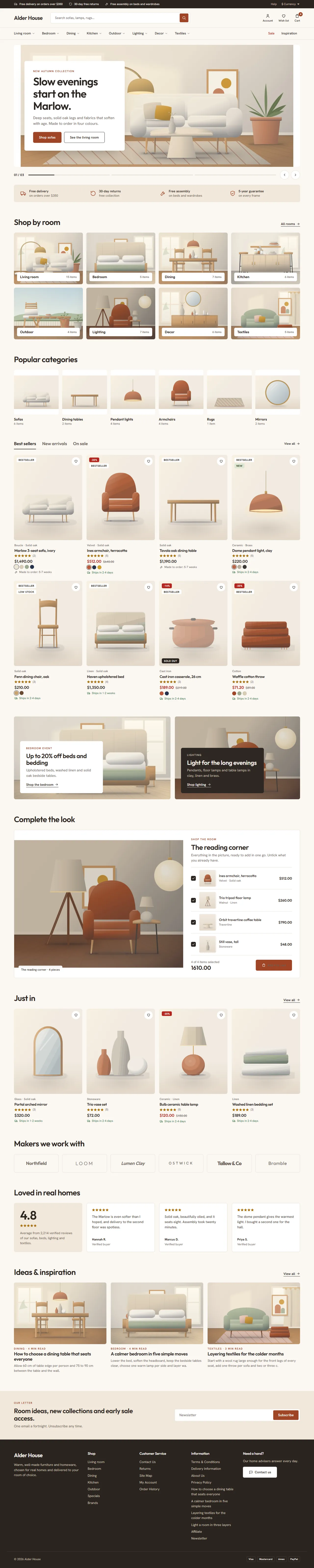
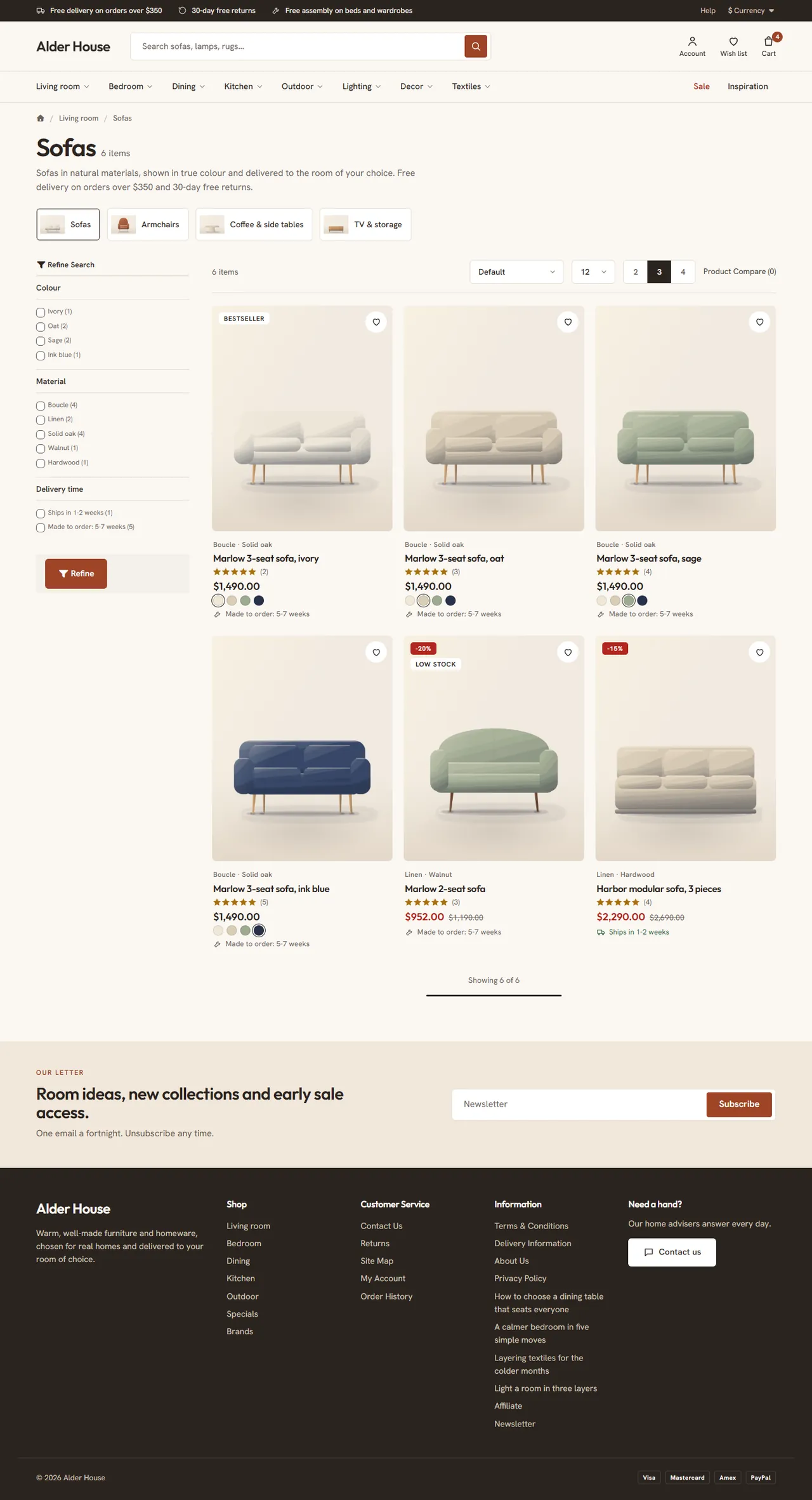
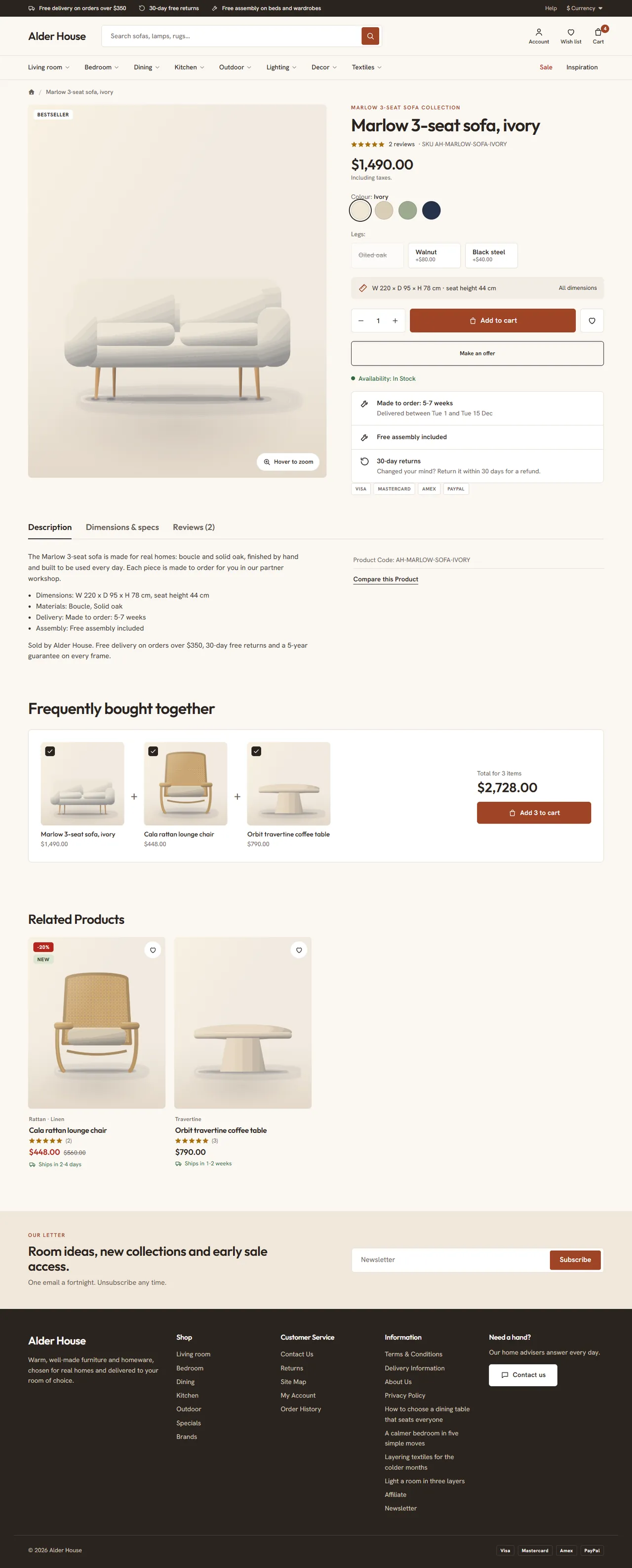
On a phone the menu opens as a slide-in drawer and the home page stacks into one column.

Other extensions keep working: Hearth keeps the core ids of the product form and the mini cart. Extensions that add buttons to the product page appear under Add to cart.
| OpenCart 4.0.2.0 to 4.1.x | OpenCart 3.0.3.x to 3.0.5.x | |
|---|---|---|
| Package | kv_theme_hearth.ocmod.zip | kv_theme_hearth-oc3.ocmod.zip |
| Framework | Bootstrap 5 | Bootstrap 3 |
| Hearth templates | header, footer, home, mini cart, product card, category, product page | header, footer, home, mini cart, product card, category, product page, search, specials, brand page |
One licence covers both packages and includes 12 months of updates and support.
kv_theme_hearth.ocmod.zip. Click Install (the green + button) next to it.OpenCart 4 has no theme folders. Hearth is a theme extension: it swaps in its own templates while it is the store's theme and switched on. Switch the store back to Default to return to the stock look at any time. The settings page tells you whether Hearth is the active theme.
kv_theme_hearth-oc3.ocmod.zip.The repository includes a demo importer used for the screenshots in these docs (the "Alder House" store: 8 rooms, 25 subcategories, 55 products with options, attributes, filters, related products, specials, reviews and the Hearth home settings). It is a developer tool and is not part of the installable package.
Click Uninstall in Extensions > Extensions > Themes. On OpenCart 4, Hearth removes its events and settings, and a store that still uses Hearth is switched back to the stock theme first, so it never renders without a theme. Then delete the upload in Extensions > Installer.
Upload the new package in Extensions > Installer (OpenCart 4: uninstall the old version there first), then refresh modifications on OpenCart 3.
All settings are on Extensions > Extensions > Themes > Hearth > Edit, per store. Tabs: General, Header & footer, Home page, Product data, Licence (and Listing & images on OpenCart 3).
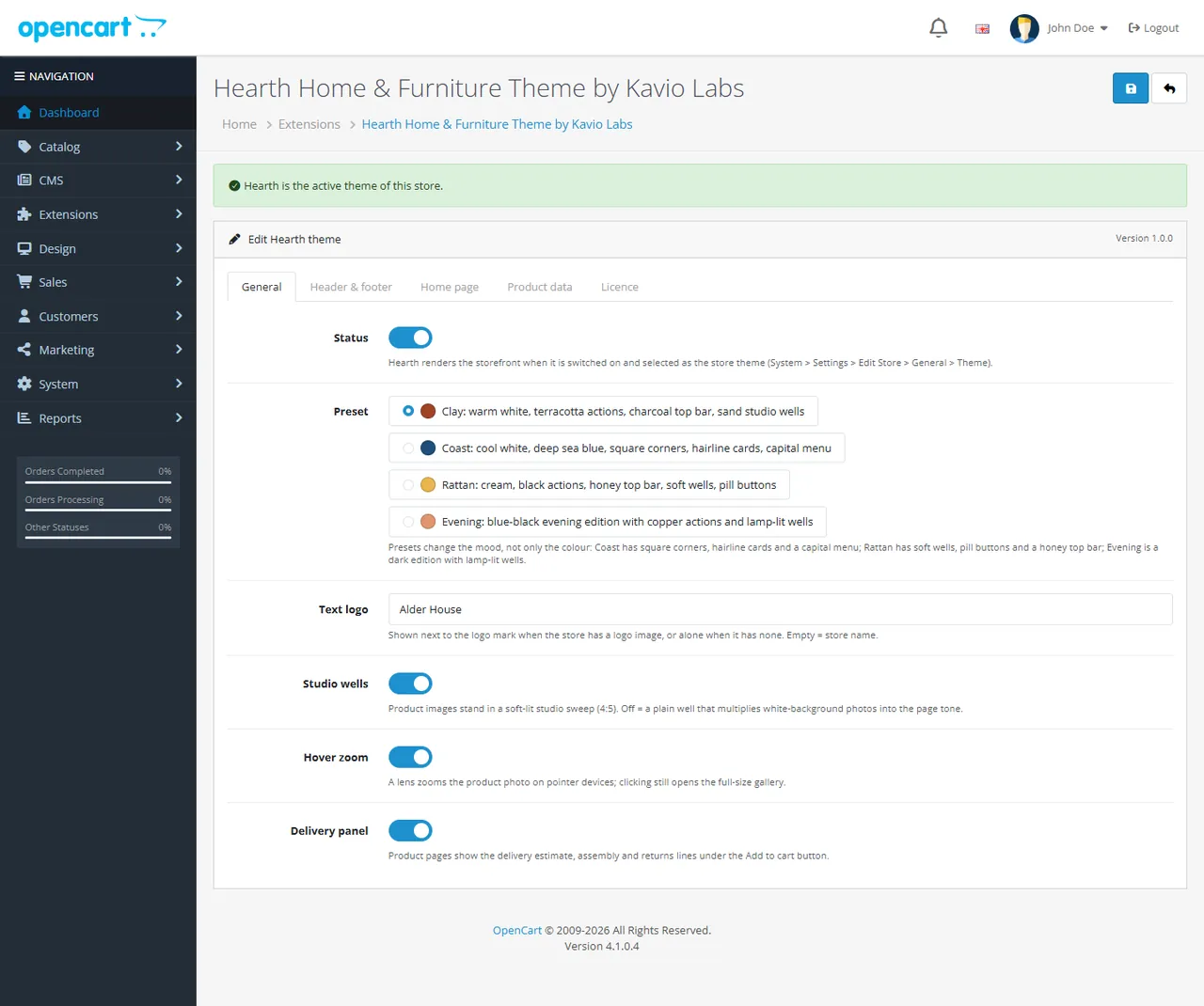
| Setting | What it does |
|---|---|
| Status | Hearth renders the storefront when it is on and selected as the store's theme. |
| Preset | Clay (warm white, terracotta actions, charcoal top bar), Coast (cool white, deep sea blue, square corners, hairline cards, capital menu), Rattan (cream, black actions, honey top bar, soft wells, pill buttons), Evening (blue-black dark edition with copper actions). |
| Text logo | Shown next to the logo image, or alone when the store has none. Empty means the store name. |
| Studio wells | Product images stand in a soft-lit studio sweep (4:5). Off gives a plain well that blends white-background photos into the page. |
| Hover zoom | A lens zooms the product photo on pointer devices. Clicking still opens the full-size gallery. |
| Delivery panel | Delivery estimate, assembly and returns lines under Add to cart. |
| Setting | What it does | ||
|---|---|---|---|
| Top bar messages 1 to 3 | Short promises with an icon on the top bar. Empty hides one. On phones only the first shows. | ||
| Menu: number of rooms | How many top-menu categories appear in the navigation. | ||
| Sale link label | Link to the Specials page. Empty hides it. | ||
| Inspiration link label and target | A second link, for example to a blog. The target is a URL, a category id, or an information page as i:<id>. | ||
| Search placeholder | Text in the search box. | ||
| Newsletter band | Kicker, title, text and button. An empty title hides the band. The button opens the newsletter page (signed in) or the registration page. | ||
| Footer about, help card | Text under the logo and a help card with a button to the contact page. | ||
| Payment chips | Text chips separated by a vertical bar, for example `Visa | Mastercard | PayPal`. Hearth shows no brand logos. |
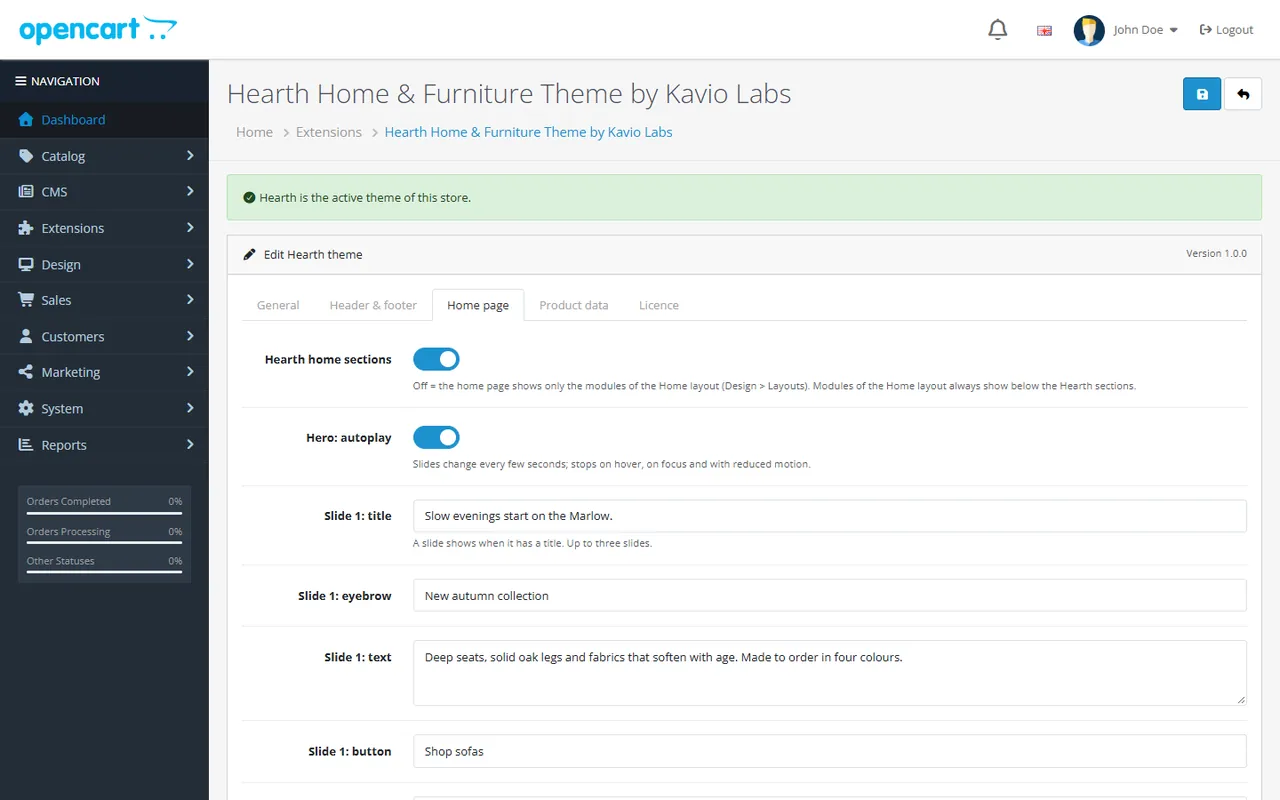
Hearth's home page shows, in order: hero slider, promise strip, shop by room, popular categories, product tabs, two promo banners (off by default), Complete the look, new arrivals row, makers strip, reviews, ideas and inspiration (these last three are off by default). Modules of the Home layout follow.
20), a category path (20_27), an information page as i:<id>, or a URL. An empty link opens the Specials page.image/, for example catalog/room-1.jpg. Hero images are about 1312 x 560, promo images about 900 x 640, the Complete the look image about 1000 x 800. Without one, Hearth uses built-in illustrations where it has them.bold part|small part pairs separated by ;.Quote|Name|Product.Hearth reads normal OpenCart attributes (Catalog > Attributes) and options. Name them as below, or change the names on this tab.
| Setting (default name) | Shown as |
|---|---|
Colour option names (Colour, Color) | Round swatches on the product page, from the option value image or a colour worked out from the value name. |
Chip option names (Size, Legs, Fabric, Finish, Length) | Chips with the price change under the name. Sold-out values stay visible, struck through. |
Collection attribute (Collection) and Colour attribute (Colour) | Colourway swatches on cards and the product page. |
Material attribute (Material) | "Boucle · Solid oak" line on cards. Without it the card shows the brand or category. |
Delivery time attribute (Delivery time) | Delivery line on cards and in the delivery panel. A day range such as "Ships in 2-4 days" becomes dates ("Delivered between Tue 18 and Fri 21 Nov"). |
Assembly attribute (Assembly) | Assembly line in the delivery panel. |
Dimension attributes (Width, Depth, Height) and Seat height attribute | "W 220 x D 95 x H 78 cm" above Add to cart. |
Label attribute (Label) | Your own tags, two at most. |
Other options: New tag days (30, 0 = off), Low stock quantity (3, 0 = off), the returns line title and text, a fallback text for products without a delivery attribute, and Frequently bought together (on, with its title), which uses the product's Related Products: up to two that can be added with one click, with a live total.
Enter your licence key on the Licence tab. Fresh installs run a 14-day trial. Without a valid licence Hearth keeps working: the storefront and the admin panel are never blocked, and the settings page shows a reminder with the licence status. The licence check runs from the admin panel only, at most once a day. It sends the licence key, the theme id and version, your store host names and the OpenCart version.
No. On OpenCart 4, Hearth is a theme extension that swaps in its templates and adds data through events. On OpenCart 3 it is a theme folder plus a theme extension that adds data through events. Neither version edits core files or adds OCMOD modifications.
Your Theme Editor version. Hearth only uses its own template when the Theme Editor has no override for that page.
It works them out from a delivery time attribute you fill in, such as "Ships in 2-4 days" or "Made to order: 5-7 weeks". Dates are an estimate for display: Hearth does not book delivery slots.
Create one product per colour and give them the same value in the Collection attribute, plus the colour name in the Colour attribute. Cards and the product page then show swatches that link between them.
The ticked products with one button. Products with a required option or without stock are shown but cannot be ticked.
Frequently bought together shows nothing. It uses the Related Products tab of the product. Add related products there, or switch the block off with Frequently bought together on the Product data tab.
Yes. Every home section has its own switch on the Home page tab, or switch off Hearth home sections to use only the modules of the Home layout.
No. White or transparent cut-outs look best in the studio wells. Turn Studio wells off if your photos are lifestyle shots.
Outfit and Hanken Grotesk, served from your own store (SIL Open Font License 1.1). Hearth loads no fonts from third-party servers.
Yes. The menu and search open in a slide-in drawer, and the home page stacks into one column (see the phone screenshot in the overview).
Nothing changes in your store. The Hearth settings page shows a reminder until you renew. Updates and support need a valid licence.
The screenshots in these docs come from the "Alder House" demo: 8 rooms, 25 subcategories and 55 products with illustrations made for the theme.
More for OpenCart
Sell products by weight, length, area or volume with decimal quantities, unit prices, step/min/max and a live price on the product page.
Shoppers propose a price; the store accepts, declines or counters, and the agreed price is enforced in the cart once.
Buy X get Y, tiered cart discounts, free gifts and scheduled rules on top of OpenCart specials and coupons.

